brake LINCOLN NAVIGATOR 2022 Owners Manual
[x] Cancel search | Manufacturer: LINCOLN, Model Year: 2022, Model line: NAVIGATOR, Model: LINCOLN NAVIGATOR 2022Pages: 646, PDF Size: 7.29 MB
Page 11 of 646
Accessing the Passive Key Backup
Position ......................................................204
Starting and Stopping the Engine – Troubleshooting ......................................
205
Auto-Start-Stop
What Is Auto-Start-Stop .............................
207
Auto-Start-Stop Precautions .....................
207
Switching Auto-Start-Stop On and Off ......................................................................
207
Stopping the Engine ...................................
207
Restarting the Engine .................................
207
Auto-Start-Stop Indicators .........................
207
Auto-Start-Stop – Troubleshooting ........
208
Fuel and Refueling
Fuel and Refueling Precautions ...............
210
Fuel Quality .....................................................
211
Locating the Fuel Filler Funnel ..................
211
Running Out of Fuel ....................................
212
Refueling ........................................................
213
Fuel Tank Capacity ......................................
216
Fuel and Refueling – Troubleshooting .......................................................................
216 Catalytic Converter
What Is the Catalytic Converter
................
217
Catalytic Converter Precautions ...............
217
Catalytic Converter – Troubleshooting .......................................................................
218
Automatic Transmission
Automatic Transmission Precautions ......
219
Automatic Transmission Positions ...........
219
Shifting Your Vehicle Into Gear ...............
220
Automatic Transmission Position Indicators ......................................................................
220
Manually Shifting Gears ............................
220
Temporary Neutral Mode ...........................
221
Automatic Return to Park (P) .....................
221
Automatic Transmission Audible Warnings ......................................................................
222
Four-Wheel Drive
How Does Four-Wheel Drive Work ........
223
Four-Wheel Drive Precautions .................
223
Four-Wheel Drive Limitations ...................
224
Selecting a Four-Wheel Drive Mode ......
225Four-Wheel Drive Modes
..........................
225
Four-Wheel Drive Indicators ....................
226
Four-Wheel Drive Driving Hints ...............
226
Four-Wheel Drive – Troubleshooting .....
229
Electronic Limited-Slip Differential
What Is the Electronic Limited-Slip Differential .................................................
231
Electronic Limited-Slip Differential – Troubleshooting ......................................
232
Brakes
Brake Precautions .......................................
233
Anti-Lock Braking System .........................
233
Brake Over Accelerator .............................
233
Locating the Brake Fluid Reservoir ........
233
Checking the Brake Fluid .........................
233
Brake Fluid Specification ..........................
234
Brakes – Troubleshooting .........................
234
Electric Parking Brake
What Is the Electric Parking Brake .........
236
7
2022 Navigator (TB9) Canada/United States of America, enUSA, Edition date: 202109, First-Printing Table of Contents
Page 12 of 646
Applying the Electric Parking Brake
......236
Applying the Electric Parking Brake in an Emergency ...............................................
236
Manually Releasing the Electric Parking Brake ..........................................................
236
Automatically Releasing the Electric Parking Brake ...........................................
237
Electric Parking Brake Audible Warning ......................................................................
237
Releasing the Electric Parking Brake if the Vehicle Battery Has Run Out of Charge
......................................................................
237
Electric Parking Brake – Troubleshooting ......................................................................
237
Reverse Braking Assist
What Is Reverse Braking Assist ...............
239
How Does Reverse Braking Assist Work ......................................................................
239
Reverse Braking Assist Precautions ......
239
Switching Reverse Braking Assist On and Off ...............................................................
240
Overriding Reverse Braking Assist ........
240
Reverse Braking Assist Indicators ..........
240Reverse Braking Assist – Troubleshooting
.......................................................................
241
Hill Start Assist
What Is Hill Start Assist ..............................
243
How Does Hill Start Assist Work .............
243
Hill Start Assist Precautions ......................
243
Hill Start Assist – Troubleshooting .........
243
Auto Hold
How Does Auto Hold Work ......................
244
Switching Auto Hold On and Off .............
244
Using Auto Hold ..........................................
244
Auto Hold Indicators ..................................
245
Traction Control
What Is Traction Control ............................
246
How Does Traction Control Work ...........
246
Switching Traction Control On and Off ......................................................................
246
Traction Control Indicator .........................
246
Traction Control – Troubleshooting ........
247Stability Control
How Does Stability Control Work
...........
248
Switching Stability Control On and Off ......................................................................
249
Stability Control Indicator .........................
250
Hill Descent Control
What Is Hill Descent Control .....................
251
How Does Hill Descent Control Work .......................................................................
251
Hill Descent Control Precautions .............
251
Switching Hill Descent Control On and Off .......................................................................
251
Setting the Hill Descent Speed ................
251
Hill Descent Control Indicator .................
252
Hill Descent Control – Troubleshooting ......................................................................
252
Steering
Electric Power Steering .............................
253
Steering – Troubleshooting ......................
254
Parking Aids
Parking Aid Precautions ............................
255
8
2022 Navigator (TB9) Canada/United States of America, enUSA, Edition date: 202109, First-Printing Table of Contents
Page 15 of 646
Pre-Collision Assist – Troubleshooting
......................................................................327
Driver Alert
What Is Driver Alert .....................................
330
How Does Driver Alert Work ....................
330
Driver Alert Precautions ............................
330
Driver Alert Limitations ...............................
331
Switching Driver Alert On and Off ...........
331
Driver Alert – Troubleshooting .................
331
Speed Sign Recognition
What Is Speed Sign Recognition .............
332
How Does Speed Sign Recognition Work ......................................................................
332
Speed Sign Recognition Precautions .....
332
Speed Sign Recognition Limitations ......
332
Speed Sign Recognition Indicators ........
333
Setting the Speed Sign Recognition Speed Warning ......................................................
333
Setting the Speed Sign Recognition Speed Tolerance ...................................................
333
Speed Sign Recognition – Troubleshooting ......................................................................
333 Load Carrying
Load Carrying Precautions
.......................
335
Locating the Safety Compliance Certification Labels .................................
336
What Is the Gross Axle Weight Rating ......................................................................
336
What Is the Gross Vehicle Weight Rating ......................................................................
336
What Is the Gross Combined Weight Rating .........................................................
336
Calculating Payload ....................................
337
Calculating the Load Limit .........................
337
Roof Rack ......................................................
339
Luggage Compartment
Installing and Removing the Luggage Compartment Cargo Net .......................
341
Adjusting the Luggage Compartment Load Floor ...........................................................
342
Adjusting the Luggage Compartment Divider ........................................................
343
Connecting a Trailer
Connecting a Trailer Precautions ............
345Hitches
...........................................................
345
Connecting a Trailer ...................................
346
Connecting a Trailer – Troubleshooting ......................................................................
348
Towing a Trailer
Towing a Trailer Precautions ....................
349
Trailer Brake Precautions ..........................
349
Towing a Trailer Limitations ......................
350
Loading Your Trailer ...................................
350
Trailer Towing Hints ....................................
350
Launching or Retrieving a Boat or Personal Watercraft ..................................................
351
Towing Weights and Dimensions ............
352
Towing a Trailer – Troubleshooting ........
354
Integrated Trailer Brake Controller
What Is the Integrated Trailer Brake Controller ..................................................
356
Integrated Trailer Brake Controller Precautions ..............................................
356
Using the Integrated Trailer Brake Controller ..................................................
356
11
2022 Navigator (TB9) Canada/United States of America, enUSA, Edition date: 202109, First-Printing Table of Contents
Page 16 of 646
Adjusting the Integrated Trailer Brake
Controller Mode ......................................358
Integrated Trailer Brake Controller – Troubleshooting ......................................
359
Trailer Sway Control
How Does Trailer Sway Control Work .......................................................................
361
Trailer Sway Control Precautions .............
361
Switching Trailer Sway Control On and Off .......................................................................
361
Trailer Backup Assistance
What is Trailer Backup Assistance ..........
362
How Does Trailer Backup Assistance Work ......................................................................
362
Trailer Backup Assistance Precautions ......................................................................
362
Setting Up the Trailer Backup Assistance for a Conventional Trailer .....................
363
Switching Trailer Backup Assistance On and Off .......................................................
366
Using the Trailer Backup Assistance Controller ..................................................
366Using the Trailer Backup Assistance Views
......................................................................
367
Trailer Backup Assistance – Troubleshooting ......................................
369
Trailer Reverse Guidance
What Is Trailer Reverse Guidance ...........
375
How Does Trailer Reverse Guidance Work ......................................................................
375
Trailer Reverse Guidance Precautions ......................................................................
375
Setting Up Trailer Reverse Guidance for a Conventional Trailer ...............................
375
Switching Trailer Reverse Guidance On and Off .......................................................
378
Using Trailer Reverse Guidance Views ......................................................................
378
Trailer Reverse Guidance – Troubleshooting ......................................
380
Driving Hints
Reduced Engine Performance .................
384
Cold Weather Precautions ........................
384
Driving on Snow and Ice ...........................
384
Breaking-In ....................................................
385Driving Economically
..................................
385
Driving in Special Conditions ...................
385
Driving Through Shallow Water ...............
387
Floor Mats .....................................................
388
Crash and Breakdown Information
Roadside Assistance ..................................
390
Switching the Hazard Flashers On and Off .......................................................................
391
Jump Starting the Vehicle ..........................
391
Post-Crash Alert System ............................
393
Automatic Crash Shutoff ...........................
394
Recovery Towing .........................................
394
Transporting the Vehicle ...........................
395
Towing Your Vehicle
Towing Your Vehicle Precautions ............
397
Recreationally Towing Your Vehicle - 4x4 ......................................................................
397
Recreationally Towing Your Vehicle - 4x2 ......................................................................
399
Emergency Towing .....................................
399
12
2022 Navigator (TB9) Canada/United States of America, enUSA, Edition date: 202109, First-Printing Table of Contents
Page 18 of 646
Wheel Nuts
...................................................468
Capacities and Specifications
Engine Specifications ................................
469
Motorcraft Parts ...........................................
470
Engine Oil Capacity and Specification .......................................................................
471
Cooling System Capacity and Specification ......................................................................
473
Fuel Tank Capacity ......................................
474
Air Conditioning System Capacity and Specification .............................................
475
Washer Fluid Specification .......................
476
Brake Fluid Specification ...........................
476
Transfer Case Fluid Capacity and Specification .............................................
478
Front Axle Fluid Capacity and Specification ......................................................................
479
Rear Axle Fluid Capacity and Specification ......................................................................
480
Vehicle Identification
Vehicle Identification Number ..................
481Connected Vehicle
What Is a Connected Vehicle
...................
482
Connected Vehicle Requirements ..........
482
Connected Vehicle Limitations ................
482
Connecting the Vehicle to a Mobile Network .....................................................
482
Connecting the Vehicle to a Wi-Fi Network ......................................................................
482
Connected Vehicle – Troubleshooting ......................................................................
483
Vehicle Wi-Fi Hotspot
Creating a Vehicle Wi-Fi Hotspot ............
486
Changing the Vehicle Wi-Fi Hotspot Name or Password .............................................
486
Audio System
Audio System Precautions ........................
488
Identifying the Audio Unit .........................
488
Switching the Audio Unit On and Off .....
488
Selecting the Audio Source .....................
488
Playing or Pausing the Audio Source .....
488
Adjusting the Volume .................................
489
Switching Shuffle Mode On and Off ......
489Switching Repeat Mode On and Off
......
489
Setting a Memory Preset ..........................
489
Muting the Audio .........................................
489
Adjusting the Sound Settings ..................
489
Setting the Clock and Date ......................
490
AM/FM Radio ................................................
490
Switching the Display On and Off ............
491
Digital Radio ..................................................
491
Satellite Radio ..............................................
493
Audio System – Troubleshooting ...........
496
Rear Passenger Audio Controls
Identifying the Rear Passenger Audio Controls .....................................................
500
Switching the Rear Passenger Audio Controls On and Off ..............................
500
Selecting the Audio Source .....................
500
Playing and Pausing the Audio Source ......................................................................
500
Adjusting the Volume ................................
500
Switching Shuffle Mode On and Off ......
500
Switching Repeat Mode On and Off ......
500
Changing the Radio Station .....................
500
14
2022 Navigator (TB9) Canada/United States of America, enUSA, Edition date: 202109, First-Printing Table of Contents
Page 25 of 646
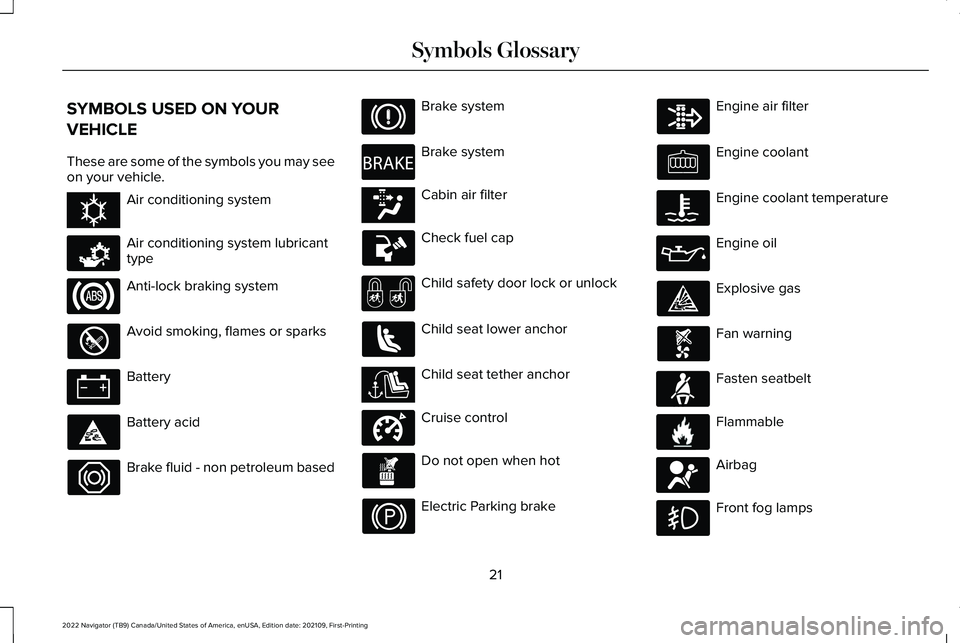
SYMBOLS USED ON YOUR
VEHICLE
These are some of the symbols you may see
on your vehicle.
Air conditioning system
Air conditioning system lubricant
type
Anti-lock braking system
Avoid smoking, flames or sparks
Battery
Battery acid
Brake fluid - non petroleum based Brake system
Brake system
Cabin air filter
Check fuel cap
Child safety door lock or unlock
Child seat lower anchor
Child seat tether anchor
Cruise control
Do not open when hot
Electric Parking brake Engine air filter
Engine coolant
Engine coolant temperature
Engine oil
Explosive gas
Fan warning
Fasten seatbelt
Flammable
Airbag
Front fog lamps
21
2022 Navigator (TB9) Canada/United States of America, enUSA, Edition date: 202109, First-Printing Symbols GlossaryE162384 E231157 E270480 E139223 E141128 E332905 E71880 E231160 E67017
Page 28 of 646
WARNING: Do not connect wireless
plug-in devices to the data link connector.
Unauthorized third parties could gain
access to vehicle data and impair the
performance of safety related systems.
Only allow repair facilities that follow our
service and repair instructions to connect
their equipment to the data link connector.
We respect your privacy and are committed
to protecting it. The information contained
in this manual was correct at the time of
publication but as technology rapidly
changes, we recommend that you visit the
local Lincoln website for the latest
information.
Your vehicle has electronic control units that
have data recording functionality and the
ability to permanently or temporarily store
data. This data could include information on
the condition and status of your vehicle,
vehicle maintenance requirements, events
and malfunctions. The types of data that can
be recorded are described in this section.
Some of the data recorded is stored in event
logs or error logs. Note:
Error logs are reset following a service
or repair.
Note: We may provide information in
response to requests from law enforcement,
other government authorities and third
parties acting with lawful authority or through
a legal process. Such information could be
used by them in legal proceedings.
Data recorded includes, for example:
• Operating states of system components,
for example fuel level, tire pressure and
battery charge level.
• Vehicle and component status, for
example wheel speed, deceleration,
lateral acceleration and seatbelt status.
• Events or errors in essential systems, for
example headlamps and brakes.
• System responses to driving situations,
for example airbag deployment and
stability control.
• Environmental conditions, for example
temperature. Some of this data, when used in combination
with other information, for example an
accident report, damage to a vehicle or
eyewitness statements, could be associated
with a specific person.
Services That We Provide
If you use our services, we collect and use
data, for example account information,
vehicle location and driving characteristics,
that could identify you. We transmit this data
through a dedicated, protected connection.
We only collect and use data to enable your
use of our services to which you have
subscribed, with your consent or where
permitted by law. For additional information,
see the terms and conditions of the services
to which you have subscribed.
For additional information about our privacy
policy, refer to the local Lincoln website.
24
2022 Navigator (TB9) Canada/United States of America, enUSA, Edition date: 202109, First-Printing Data Privacy
Page 29 of 646
Services That Third Parties Provide
We recommend that you review the terms
and conditions and data privacy information
for any services equipped with your vehicle
or to which you subscribe. We take no
responsibility for services that third parties
provide.
Where equipped, SiriusXM with 360L may
use the modem. To disable, turn off the
SiriusXM 360L or Vehicle Connectivity
setting. See Enabling and Disabling the
Modem (page 482).
SERVICE DATA
Service data recorders in your vehicle are
capable of collecting and storing diagnostic
information about your vehicle. This
potentially includes information about the
performance or status of various systems
and modules in the vehicle, such as engine,
throttle, steering or brake systems. In order
to properly diagnose and service your
vehicle, Ford Motor Company (Ford of
Canada in Canada), and service and repair
facilities may access or share among them vehicle diagnostic information received
through a direct connection to your vehicle
when diagnosing or servicing your vehicle.
Additionally, Ford Motor Company (Ford of
Canada, in Canada) may, where permitted
by law, use vehicle diagnostic information
for vehicle improvement or with other
information we may have about you, for
example, your contact information, to offer
you products or services that may interest
you. Data may be provided to our service
providers such as part suppliers that may
help diagnose malfunctions, and who are
similarly obligated to protect data. We retain
this data only as long as necessary to
perform these functions or to comply with
law. We may provide information where
required in response to official requests to
law enforcement or other government
authorities or third parties acting with lawful
authority or court order, and such information
may be used in legal proceedings. For U.S.
only (if equipped), if you choose to use
connected apps and services, you consent
that certain diagnostic information may also
be accessed electronically by Ford Motor
Company and Ford authorized service
facilities, and that the diagnostic informationmay be used to provide services to you,
personalizing your experience, troubleshoot,
and to improve products and services and
offer you products and services that may
interest you, where permitted by law. For
Canada only, for more information, please
review the Ford of Canada privacy policy at
www.ford.ca, including our U.S. data storage
and use of service providers in other
jurisdictions who may be subject to legal
requirements in Canada, the United States
and other countries applicable to them, for
example, lawful requirements to disclose
personal information to governmental
authorities in those countries.
25
2022 Navigator (TB9) Canada/United States of America, enUSA, Edition date: 202109, First-Printing Data Privacy
Page 30 of 646
EVENT DATA
This vehicle is equipped with an event data
recorder. The main purpose of an event data
recorder is to record, in certain crash or near
crash-like situations, such as an airbag
deployment or hitting a road obstacle; this
data will assist in understanding how a
vehicle
’s systems performed. The event data
recorder is designed to record data related
to vehicle dynamics and safety systems for
a short period of time, typically 30 seconds
or less.
The event data recorder in this vehicle is
designed to record such data as:
• How various systems in your vehicle
were operating.
• Whether or not the driver and passenger
seatbelts were buckled/fastened.
• How far (if at all) the driver was
depressing the accelerator and/or the
brake pedal.
• How fast the vehicle was traveling.
• Where the driver was positioning the
steering wheel. This data can help provide a better
understanding of the circumstances in which
crashes and injuries occur.
Note:
Event data recorder data is recorded
by your vehicle only if a non-trivial crash
situation occurs; no data is recorded by the
event data recorder under normal driving
conditions and no personal data or
information (for example name, gender, age,
and crash location) is recorded. However,
parties, such as law enforcement, could
combine the event data recorder data with
the type of personally identifying data
routinely acquired during a crash
investigation.
To read data recorded by an event data
recorder, special equipment is required, and
access to the vehicle or the event data
recorder is needed. In addition to the vehicle
manufacturer, other parties, such as law
enforcement, that have such special
equipment, can read the information if they
have access to the vehicle or the event data
recorder. BlueCruise Data (If Equipped)
If BlueCruise is active in certain crash or near
crash-like situations, such as an airbag
deployment or hitting a road obstacle, the
system may record driver attentiveness,
based on the direction of eyes and duration,
and photographs of the driver seat area.
Note: No data is recorded under normal
driving conditions.
SETTINGS DATA
Your vehicle has electronic control units that
have the ability to store data based on your
personalized settings. The data is stored
locally in the vehicle or on devices that you
connect to it, for example, a USB drive or
digital music player. You can delete some of
this data and also choose whether to share
it through the services to which you
subscribe.
See Center Display Precautions
(page 501).
26
2022 Navigator (TB9) Canada/United States of America, enUSA, Edition date: 202109, First-Printing Data Privacy
Page 58 of 646
The retractor for the third row center seatbelt
is in the roof.
To fasten the seatbelt:
1. Pull the belt out steadily. It may lock if
you pull it sharply or if the vehicle is on
a slope.
2. Insert the smaller tongue into the smaller
buckle to the left of the center seat.
3. Pull the larger tongue across the lap and
insert it into the buckle to the right of the
center seat.
Note: If in constant use, you can leave the
belt buckled in the smaller buckle. When it
is not in use, or when you fold or move the
rear seats, you should release the belt from
the smaller buckle. Using the tongue of the
adjacent seatbelt, press the red button on
the smaller buckle. SENSITIVE LOCKING MODE
WHAT IS SENSITIVE LOCKING MODE
Sensitive locking mode is a seatbelt retractor
feature that allows shoulder belt length
adjustment according to your movements
and locking in response to vehicle
movement.
HOW DOES SENSITIVE LOCKING
MODE WORK
If the driver suddenly brakes, turns a corner
sharply, or the vehicle receives an impact of
about 5 mph (8 km/h) or more, the seatbelts
lock to help reduce forward movement of
the driver and passengers.
In addition, the seatbelt retractor locks if you
pull the seatbelt webbing out too quickly. If
the retractor locks, slowly lower the height
adjuster to allow the seatbelt to retract.
If the retractor does not unlock, pull the
seatbelt out slowly then feed a small length
of webbing back toward the stowed position. For rear seatbelts, recline the rear seat
backrest or push the seat backrest cushion
away from the seatbelt. Feed a small length
of webbing back toward the stowed position.
AUTOMATIC LOCKING MODE
WHAT IS AUTOMATIC LOCKING
MODE
This feature keeps the seatbelts pre-locked.
The belt still retracts to remove any slack in
the shoulder belt.
WHEN TO USE AUTOMATIC LOCKING
MODE
Use this mode any time you install a child
restraint in the front passenger seating
position or any rear seating position. Properly
restrain children 12 years old and under in a
rear seat whenever possible.
Note:
Automatic locking mode is not
available on the driver seatbelt.
54
2022 Navigator (TB9) Canada/United States of America, enUSA, Edition date: 202109, First-Printing Seatbelts