change wheel LINCOLN NAVIGATOR 2022 User Guide
[x] Cancel search | Manufacturer: LINCOLN, Model Year: 2022, Model line: NAVIGATOR, Model: LINCOLN NAVIGATOR 2022Pages: 646, PDF Size: 7.29 MB
Page 285 of 646
LANE CENTERING ALERTS
You must keep your hands on the steering
wheel at all times.
When the system is active and detects no
steering activity for a period of time, the
system alerts you to put your hands on the
steering wheel. If you do not react to the
warnings the system cancels and slows your
vehicle down to idle speeds while
maintaining steering control. See Lane
Centering Automatic Cancellation (page
281).
The system also alerts you if your vehicle
crosses lane markings without detected
steering activity.
Note: The system could detect a light grip
or touch on the steering wheel as hands-off
driving. LANE CENTERING AUTOMATIC
CANCELLATION
When an external condition cancels the
system, for example, no lane markings
available, a tone sounds and a message
appears in the instrument cluster display.
If your vehicle starts to slow down, you must
provide steering input to the wheel and press
the accelerator pedal to regain full system
performance.
Automatic cancellation can also occur if:
•
The lane becomes too wide or too
narrow.
• The system cannot detect valid lane
markings.
• Lane markings cross over one another.
Note: The system disables until the next key
cycle if your vehicle slows down due to driver
inactivity twice within a key cycle. LANE CENTERING INDICATORS Illuminates when you switch lane
centering on. The color of the
indicator changes to indicate the
system status.
Gray indicates the system is on but inactive.
Green indicates the system is active and
applying steering torque assistance input to
keep your vehicle in the center of the lane.
Amber with an audible tone and then gray
indicates a system automatic cancellation.
INTELLIGENT ADAPTIVE CRUISE
CONTROL
HOW DOES INTELLIGENT ADAPTIVE
CRUISE CONTROL WORK
Intelligent adaptive cruise control combines
speed sign recognition with adaptive cruise
control to adjust the cruise set speed to the
speed limit detected by the speed sign
recognition system. As the system detects
new speed signs, the set speed updates.
281
2022 Navigator (TB9) Canada/United States of America, enUSA, Edition date: 202109, First-Printing Adaptive Cruise ControlE297977
Page 291 of 646
WARNING: Obstructions to the driver
facing camera or infrared lighting could
prevent the system from properly
operating. Keep the camera and lighting
areas free from obstruction. Failure to
follow this instruction could result in the
loss of control of your vehicle, personal
injury or death. WARNING: Do not use the system if
any changes or modifications to the
steering wheel have been made. Any
changes or modifications to the steering
wheel could affect the functionality or
performance of the system. Failure to
follow this instruction could result in the
loss of control of your vehicle, personal
injury or death. WARNING: The system may not
function if the sensor is blocked. WARNING:
Pay close attention to
changing road conditions such as entering
or leaving a highway, on roads with
intersections or roundabouts, roads
without visible lanes of travel, roads that
are winding, slippery, unpaved, or steep
slopes. WARNING:
The system is not a crash
warning or avoidance system. WARNING: Large contrasts in outside
lighting can limit sensor performance. WARNING:
The system attempts to
keep your vehicle in the center of the lane
as well as maintain speed and gap control.
The system may not be able to perform
these tasks in all situations. Do not use the
system in complex or uncertain driving
conditions. Failure to follow this instruction
could result in the loss of control of your
vehicle, personal injury or death. WARNING:
Your vehicle could drift
out of the lane of travel. Always be
prepared to manually steer your vehicle.
Failure to follow this instruction could result
in the loss of control of your vehicle,
personal injury or death. WARNING:
The system will not
operate if the sensor cannot track the road
lane markings.
ACTIVEGLIDE™ REQUIREMENTS
ActiveGlide only activates when all of the
following occur:
• ActiveGlide is enabled in your information
and entertainment screen.
See
ActiveGlide ™ Settings (page 288).
• Adaptive cruise control is on.
• The system detects both lane markings.
• Your hands are on the steering wheel.
• Your eyes are on the road.
287
2022 Navigator (TB9) Canada/United States of America, enUSA, Edition date: 202109, First-Printing ActiveGlide™
(If Equipped)
Page 292 of 646
Note:
The system must meet certain location
requirements for the hands-free mode of
ActiveGlide to work.
Note: The system requires updated software
for hands-free mode. See Vehicle System
Updates (page 521).
ACTIVEGLIDE™ LIMITATIONS
Any of the following conditions could result
in ActiveGlide not operating correctly:
• You do not have your vehicle centered
in the lane.
• The lane is too narrow or too wide.
• The system does not detect at least one
lane marking or when lanes merge or
split.
• You have limited steering input.
• Using the system in areas under
construction.
• If you make any aftermarket modifications
to the steering system.
• When using a spare tire. The driver-facing camera may not operate
correctly due to any of the following:
•
If you have a pre-existing eye condition,
such as an eye misalignment, or have
had eye surgery.
• You cover your facial features by a mask,
hat or other items.
• The lighting conditions change
significantly.
• You are not in the field of view of the
camera.
• You position or tilt yourself to one side.
• You are moving around extensively.
• You are wearing glasses or sunglasses
that are too dark or reflective.
Note: The system has limited steering
assistance and may not be sufficient for all
driving situations.
Note: In exceptional conditions, such as
inclement weather or direct sunlight, the
system could deviate from the center line.
Note: The information provided by the
navigation map data could be inaccurate or
out of date. ACTIVEGLIDE™ SETTINGS
Enabling ActiveGlide
1. Press
Driver Assistance.
2. Press
Cruise Control.
3. Press
Adaptive Cruise Control.
4. Press
Lane Centering with Hands-Free.
Enabling Activation Prompts
1. Press
Driver Assistance.
2. Press
Cruise Control.
3. Press
Adaptive Cruise Control.
4. Press
Lane Centering with Hands-Free.
5. Press
Activation Prompts.
SWITCHING ACTIVEGLIDE™ ON
AND OFF
Switching ActiveGlide On
The controls are on the steering wheel.
288
2022 Navigator (TB9) Canada/United States of America, enUSA, Edition date: 202109, First-Printing ActiveGlide™
(If Equipped)
Page 293 of 646
Using Activation Prompts
When the prompt appears, press
the button to switch ActiveGlide
on.
The indicator appears in the instrument
cluster. When the system is on, the color of
the indicator changes to indicate the system
status.
Note: You must enable activation prompts
in the touchscreen.
Using Steering Wheel Controls Using the adaptive cruise control
and lateral support buttons, ensure
both systems are active.
ActiveGlide activates.
Switching ActiveGlide Off Press either the lateral support or
adaptive cruise control button
when system is active or in
standby mode.
ActiveGlide turns off through each
ignition cycle. ACTIVEGLIDE™ ALERTS
When ActiveGlide is providing hands-on
driving or transitioning to hands-on driving
from hands-free driving and detects no
steering activity for a certain period of time,
the system alerts you with a message in the
instrument cluster to put your hands on the
steering wheel. After the first alert, the
system alerts you with a message in the
instrument cluster and an audible warning.
When ActiveGlide is providing hands-on or
hands-free driving and detects you are not
looking at the road for a certain period of
time, the system alerts you to return your
eyes to the road. Depending on where you
are looking, the alert can be a message in
the instrument cluster and an audible
warning.
If you do not react to the warnings,
ActiveGlide cancels, quickly activates and
releases the brakes, and slows your vehicle
down to low speeds while maintaining
steering control.
If your vehicle slows down and you resume
control, a message appears to prompt you
to press the accelerator pedal to allow the
system to resume.
Note:
If the system detects repeated
inactivity, it disables until the next key cycle.
ACTIVEGLIDE™ AUTOMATIC
CANCELLATION
When an external condition cancels
ActiveGlide, for example, no lane markings
available, a tone sounds and a message
appears in the instrument cluster. If your vehicle starts to slow down,
you must take control of steering
and press and release the button
to reactivate ActiveGlide.
System cancellation can also occur if:
• The lane becomes too narrow.
• The system cannot detect valid lane
markings.
289
2022 Navigator (TB9) Canada/United States of America, enUSA, Edition date: 202109, First-Printing ActiveGlide™ (If Equipped)E144529 E308131 E144529 E308131 E144529 E308130
Page 294 of 646
•
Lane markings cross.
• Your eyes are not on the road or your
hands are not the steering wheel.
If you have your hands on the steering wheel
and your eyes are on the road when the
feature is active and a cancellation occurs,
the system sounds a tone and displays a
cancelled graphic in the instrument cluster.
If you are not paying attention to the road or
your hands are not on the steering wheel
and a cancellation occurs, the system
displays a message and a tone sounds until
you resume control. If you do not resume
control in time, ActiveGlide quickly activates
and releases the brakes, and slows your
vehicle down to low speeds while
maintaining steering control. If your vehicle
slows down and you resume control, a
message appears to prompt you to press the
accelerator pedal to allow the system to
resume.
Note: The system disables until the next key
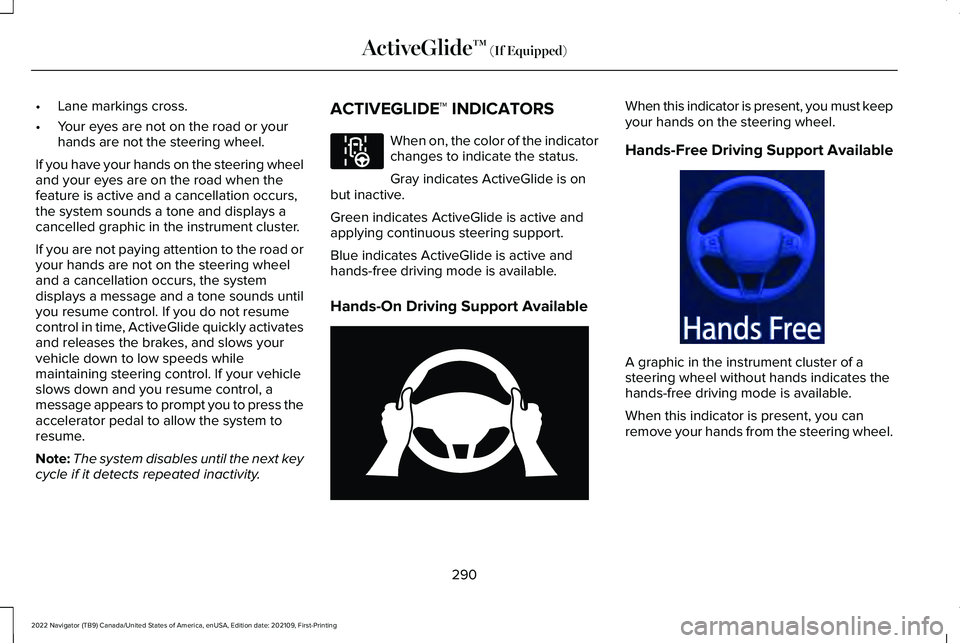
cycle if it detects repeated inactivity. ACTIVEGLIDE™ INDICATORS When on, the color of the indicator
changes to indicate the status.
Gray indicates ActiveGlide is on
but inactive.
Green indicates ActiveGlide is active and
applying continuous steering support.
Blue indicates ActiveGlide is active and
hands-free driving mode is available.
Hands-On Driving Support Available When this indicator is present, you must keep
your hands on the steering wheel.
Hands-Free Driving Support Available
A graphic in the instrument cluster of a
steering wheel without hands indicates the
hands-free driving mode is available.
When this indicator is present, you can
remove your hands from the steering wheel.
290
2022 Navigator (TB9) Canada/United States of America, enUSA, Edition date: 202109, First-Printing ActiveGlide™ (If Equipped)E297977 E333236 E333232
Page 297 of 646
WHAT IS DRIVE MODE CONTROL
Your vehicle has various drive modes that
you can select for different driving
conditions. Depending on the drive mode
that you select, the system adjusts various
vehicle settings.
HOW DOES DRIVE MODE
CONTROL WORK
Drive mode control adjusts your vehicle
configuration for each mode you select.
Changing the drive mode adjusts the
steering effort and feel of the steering
system.
The stability and traction control assist your
vehicle control in adverse conditions or
high-performance driving.
Throttle control enhances the powertrain
response, transmission controls become
optimized with shift schedules, and
four-wheel drive settings are optimized and
tuned to each mode.
Changing the drive mode can engage or
disengage the electronic locking differentials.
Changing the drive mode changes the
four-wheel drive mode to the default setting
for the selected drive mode.
Note:
The system has diagnostic checks that
continuously monitor the system for proper
operation. If a mode is unavailable due to a
system fault, the drive mode system defaults
to normal. When the system defaults to
normal, the driveline settings remain the
same as prior to the system fault. Note:
The system reverts to the normal
mode each time you start your vehicle. At
startup the system also displays a prompt
on the instrument cluster display that gives
you the option to return to the previously
selected drive mode during the last ignition
cycle. If you select yes, the system returns
to the last selected drive mode and the
default driveline settings associated with
that mode. If you select no, the system
remains in normal mode and the driveline
settings remain the same as selected in the
prior ignition cycle. If you do not select yes
or no, the system stays in normal mode and
the driveline settings remain the same as
selected in the prior ignition cycle.
293
2022 Navigator (TB9) Canada/United States of America, enUSA, Edition date: 202109, First-Printing Drive Mode Control
Page 298 of 646
SELECTING A DRIVE MODE
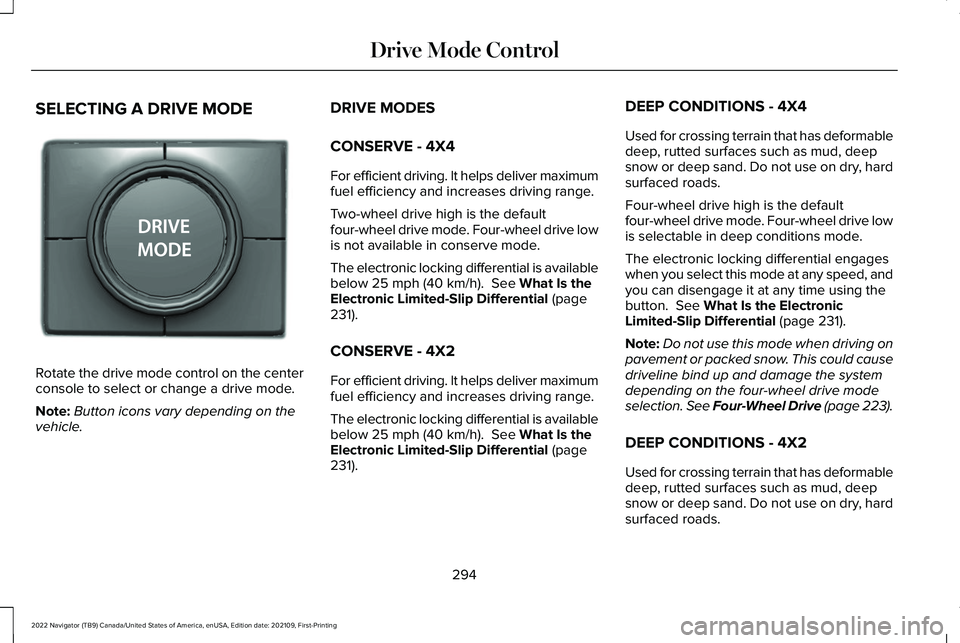
Rotate the drive mode control on the center
console to select or change a drive mode.
Note:
Button icons vary depending on the
vehicle. DRIVE MODES
CONSERVE - 4X4
For efficient driving. It helps deliver maximum
fuel efficiency and increases driving range.
Two-wheel drive high is the default
four-wheel drive mode. Four-wheel drive low
is not available in conserve mode.
The electronic locking differential is available
below 25 mph (40 km/h). See What Is the
Electronic Limited-Slip Differential (page
231).
CONSERVE - 4X2
For efficient driving. It helps deliver maximum
fuel efficiency and increases driving range.
The electronic locking differential is available
below
25 mph (40 km/h). See What Is the
Electronic Limited-Slip Differential (page
231). DEEP CONDITIONS - 4X4
Used for crossing terrain that has deformable
deep, rutted surfaces such as mud, deep
snow or deep sand. Do not use on dry, hard
surfaced roads.
Four-wheel drive high is the default
four-wheel drive mode. Four-wheel drive low
is selectable in deep conditions mode.
The electronic locking differential engages
when you select this mode at any speed, and
you can disengage it at any time using the
button.
See What Is the Electronic
Limited-Slip Differential (page 231).
Note: Do not use this mode when driving on
pavement or packed snow. This could cause
driveline bind up and damage the system
depending on the four-wheel drive mode
selection. See Four-Wheel Drive (page 223).
DEEP CONDITIONS - 4X2
Used for crossing terrain that has deformable
deep, rutted surfaces such as mud, deep
snow or deep sand. Do not use on dry, hard
surfaced roads.
294
2022 Navigator (TB9) Canada/United States of America, enUSA, Edition date: 202109, First-Printing Drive Mode ControlE246604
Page 304 of 646
LANE KEEPING SYSTEM
LIMITATIONS
The lane keeping system only operates when
the vehicle speed is greater than 40 mph
(64 km/h).
The system works when the camera can
detect at least one lane marking.
Note: When you select Aid or Alert and Aid
mode and the system detects no steering
activity for a short period of time, the system
alerts you to put your hands on the steering
wheel. The system may detect a light grip or
touch on the steering wheel as hands-off
driving.
The lane keeping system may not correctly
operate in any of the following conditions:
• The lane keeping system does not detect
at least one lane marking.
• You switch the turn signal on.
• You apply direct steering, accelerate fast
or brake hard.
• The vehicle speed is less than
40 mph
(64 km/h). •
The anti-lock brake, stability control or
traction control system activates.
• The lane is too narrow.
• Something is obscuring the camera or it
is unable to detect the lane markings due
to environment, traffic or vehicle
conditions.
• Entering or exiting a tight curve when
driving at high speeds.
The lane keeping system may not correct
lane positioning in any of the following
conditions:
• High winds.
• Uneven road surfaces.
• Heavy or uneven loads.
• Incorrect tire pressure.
SWITCHING THE LANE KEEPING
SYSTEM ON AND OFF To activate the lane keeping
system, press the button on the
steering wheel.To deactivate the lane keeping system, press
the button again.
Note:
When switching the system on or off
a message appears in the information and
entertainment display to show the status.
Note: The system stores the on or off setting
until manually changed, unless it detects a
MyKey™. If the system detects a MyKey™, it
defaults to the last setting for that MyKey™.
Note: If the system detects a MyKey™,
pressing the button does not affect the on
or off status of the system. You can only
change the mode and intensity settings.
SWITCHING THE LANE KEEPING
SYSTEM MODE
The lane keeping system has different
settings that you can view or adjust using
the information display.
The system stores the last known selection
for each of these settings. You do not need
to readjust your settings each time you
switch on the system.
300
2022 Navigator (TB9) Canada/United States of America, enUSA, Edition date: 202109, First-Printing Lane Keeping SystemE334922
Page 305 of 646
To change the lane keeping system mode,
use the touchscreen:
1. Press Features on the touchscreen.
2. Press
Driver Assistance.
3. Press
Lane-Keeping System.
4. Press
Lane-Keeping Mode.
5. Select a mode.
Note: The system remembers the last setting
when you start your vehicle. If the system
detects a MyKey™, it defaults to the last
setting for that MyKey™.
ALERT MODE
WHAT IS ALERT MODE
Alert mode vibrates the steering wheel when
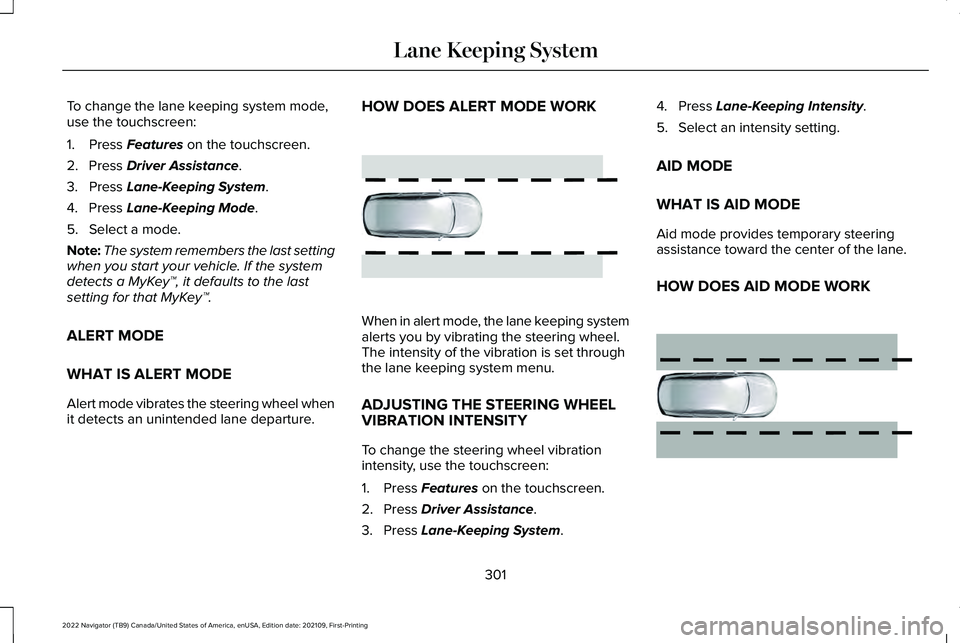
it detects an unintended lane departure. HOW DOES ALERT MODE WORK
When in alert mode, the lane keeping system
alerts you by vibrating the steering wheel.
The intensity of the vibration is set through
the lane keeping system menu.
ADJUSTING THE STEERING WHEEL
VIBRATION INTENSITY
To change the steering wheel vibration
intensity, use the touchscreen:
1. Press
Features on the touchscreen.
2. Press
Driver Assistance.
3. Press
Lane-Keeping System. 4. Press
Lane-Keeping Intensity.
5. Select an intensity setting.
AID MODE
WHAT IS AID MODE
Aid mode provides temporary steering
assistance toward the center of the lane.
HOW DOES AID MODE WORK 301
2022 Navigator (TB9) Canada/United States of America, enUSA, Edition date: 202109, First-Printing Lane Keeping SystemE165515 E165516
Page 307 of 646
While the lane keeping system is on, the
color of the lane markings change to indicate
the system status. Red
Yellow
Green
Gray
Indicates that the system is
providing or has just provided a lane keeping alert warning.
Indicates that the system is
providing or has just provided a lane keeping aid intervention.
Indicates that the system is avail-
able or ready to provide a warning or intervention on the indicated side.
Indicates that the system is
temporarily unavailable to provide a warning or intervention on the indicated side.
BLIND SPOT ASSIST
WHAT IS BLIND SPOT ASSIST
Blind spot assist is an extension of the lane
keeping system.
It may help you identify adjacent vehicles
during a lane change.
Blind spot assist provides a blind spot
warning and steering assistance to help
during lane changes. HOW DOES BLIND SPOT ASSIST
WORK Activate and deactivate the system
using the lane keeping system
button on the steering wheel.
During lane changes, the design of the blind
spot assist feature detects vehicles in, or
approaching, your blind spot and provides
a warning, plus steering assistance to direct
your vehicle back into your lane.
When active, this system functions with or
without the use of direction indicators and
hazard flashers. You must keep your hands on the steering
wheel at all times.
BLIND SPOT ASSIST LIMITATIONS
All system limitations present in the basic
lane keeping system also apply to blind spot
assist.
Blind spot assist does not function under the
following conditions:
•
The system does not detect lane
markings.
• One or both rear radar sensors become
blocked or faulty.
• You attach a trailer with a wiring
connection to your vehicle.
303
2022 Navigator (TB9) Canada/United States of America, enUSA, Edition date: 202109, First-Printing Lane Keeping SystemE334922