instrument cluster LINCOLN NAVIGATOR 2022 Owners Manual
[x] Cancel search | Manufacturer: LINCOLN, Model Year: 2022, Model line: NAVIGATOR, Model: LINCOLN NAVIGATOR 2022Pages: 646, PDF Size: 7.29 MB
Page 8 of 646
Interior Lamp Function
.................................131
Adjusting the Instrument Panel Lighting Brightness ..................................................
132
Ambient Lighting ..........................................
132
Interior Lighting – Troubleshooting .........
132
Windows
Opening and Closing the Windows ........
133
Global Opening and Closing .....................
133
Window Bounce-Back .................................
134
Locking the Rear Window Controls .........
135
Interior Mirror
Interior Mirror Precautions .........................
136
Auto-Dimming Interior Mirror ....................
136
Exterior Mirrors
Adjusting the Exterior Mirrors ...................
137
Folding the Exterior Mirrors .......................
137
Auto-Dimming Exterior Mirror ...................
138
Moonroof
Opening and Closing the Sun Shade ......
139Opening and Closing the Moonroof
.......
139
Venting the Moonroof .................................
140
Moonroof Bounce-Back .............................
140
Instrument Cluster
Instrument Cluster Overview .....................
141
Tachometer ....................................................
142
Speedometer ................................................
142
Fuel Gauge ....................................................
142
Engine Coolant Temperature Gauge ......
143
Engine Oil Pressure Gauge .......................
143
Transmission Fluid Temperature Gauge .......................................................................
143
What Are the Instrument Cluster Warning Lamps ..........................................................
143
Instrument Cluster Warning Lamps .........
143
What Are the Instrument Cluster Indicators .......................................................................
145
Instrument Cluster Indicators ....................
145
Instrument Cluster Display
Using the Instrument Cluster Display Controls ......................................................
147Instrument Cluster Display Main Menu
.......................................................................
147
Trip Computer ...............................................
148
Customizing the Instrument Cluster Display .......................................................................
149
Personalized Settings
Changing the Language ............................
150
Changing the Measurement Unit ............
150
Changing the Temperature Unit ..............
150
Changing the Tire Pressure Unit .............
150
Head Up Display
What Is the Head Up Display .....................
151
Switching the Head Up Display On and Off ........................................................................\
151
Head Up Display Settings ...........................
151
Head Up Display Indicators .......................
153
Head Up Display – Troubleshooting .......
154
Remote Start
What Is Remote Start ...................................
155
Remote Start Precautions ..........................
155
Remote Start Limitations ............................
155
4
2022 Navigator (TB9) Canada/United States of America, enUSA, Edition date: 202109, First-Printing Table of Contents
Page 34 of 646
See Adjusting the Volume (page 489).
A
See
Shifting Using the Paddle Shifters (page 220).
B
See
Using the Instrument Cluster Display Controls (page 147).
C
See
Beginning a Voice Interaction (page 504).
D
See
Selecting the Audio Source (page 488).
E
See
Accessing Navigation (page 518).
F
See
Switching Adaptive Cruise Control On and Off (page 273).
G
See
Setting the Adaptive Cruise Control Gap (page 275).
H
See
Setting the Adaptive Cruise Control Speed (page 274).
I
30
2022 Navigator (TB9) Canada/United States of America, enUSA, Edition date: 202109, First-Printing Visual Search
Page 36 of 646
See Instrument Cluster Overview (page 141).
A
See
Push Button Ignition Switch (page 200).
B
See
Status Bar (page 501).
C
See
Switching the 360 Degree Camera On and Off (page 263).
D
See
Opening the Glove Compartment (page 199).
E
See
Switching the Hazard Flashers On and Off (page 391).
F
See
Switching Climate Control On and Off (page 158).
G
See
Shifting Your Vehicle Into Gear (page 220).
H
32
2022 Navigator (TB9) Canada/United States of America, enUSA, Edition date: 202109, First-Printing Visual Search
Page 71 of 646
•
Other passengers pushing or pulling on
the seat.
• Rear passenger feet and knees resting
or pushing on the seat.
The listed conditions could cause the weight
of a properly seated occupant to be
incorrectly interpreted by the front passenger
sensing system. The person in the front
passenger seat could appear heavier or
lighter due to the conditions listed. Make sure the front passenger
sensing system is operating
properly. See Crash Sensors and
Airbag Indicator (page 68).
If the airbag readiness light is on, do the
following:
• Pull your vehicle over.
• Switch your vehicle off. •
Check for any objects lodged underneath
the front passenger seat or cargo
interfering with the seat.
• Remove the obstruction if found.
• Restart your vehicle.
• Wait at least two minutes and verify that
the airbag readiness light in the
instrument cluster is no longer
illuminated.
• If the airbag readiness light in the
instrument cluster remains illuminated,
there may be a problem due to the front
passenger sensing system.
Do not attempt to repair or service the
system. Take your vehicle in for service
immediately.
If it is necessary to modify an advanced front
airbag system to accommodate a person
with disabilities, contact your Customer
Relationship Center.
See Contacting Us
(page 17). FRONT PASSENGER SENSING
SYSTEM PRECAUTIONS WARNING: Sitting improperly, out of
position or with the seatback reclined too
far can take weight off the seat cushion
and affect the decision of the passenger
sensing system, resulting in serious injury
or death in the event of a crash. Always sit
upright against your seat back, with your
feet on the floor. WARNING:
Any alteration or
modification to the front passenger seat
may affect the performance of the front
passenger sensing system. This could
seriously increase the risk of injury or
death.
67
2022 Navigator (TB9) Canada/United States of America, enUSA, Edition date: 202109, First-Printing AirbagsE67017
Page 72 of 646
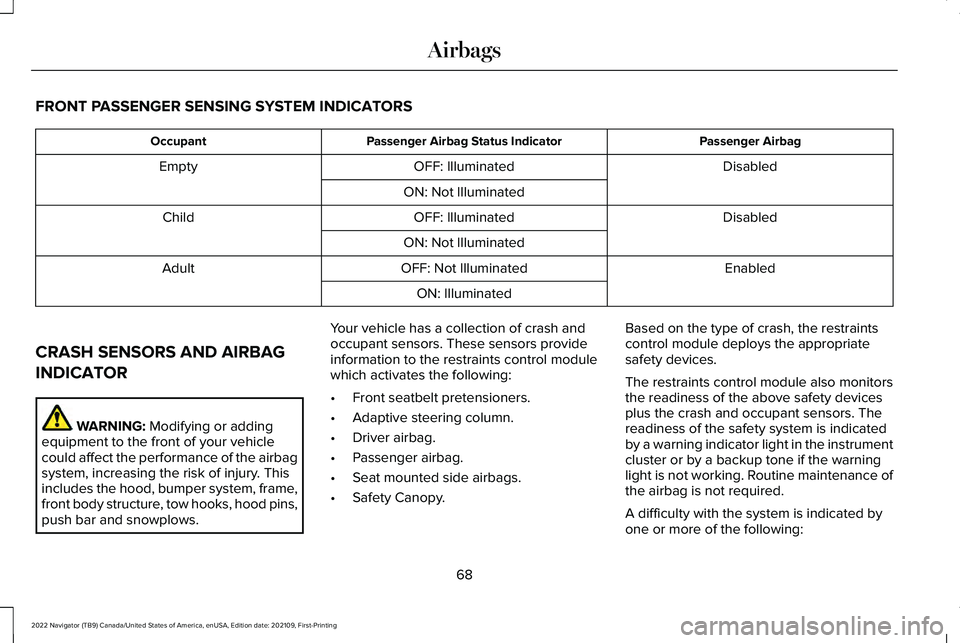
FRONT PASSENGER SENSING SYSTEM INDICATORS
Passenger Airbag
Passenger Airbag Status Indicator
Occupant
Disabled
OFF: Illuminated
Empty
ON: Not Illuminated Disabled
OFF: Illuminated
Child
ON: Not Illuminated Enabled
OFF: Not Illuminated
Adult
ON: Illuminated
CRASH SENSORS AND AIRBAG
INDICATOR WARNING: Modifying or adding
equipment to the front of your vehicle
could affect the performance of the airbag
system, increasing the risk of injury. This
includes the hood, bumper system, frame,
front body structure, tow hooks, hood pins,
push bar and snowplows. Your vehicle has a collection of crash and
occupant sensors. These sensors provide
information to the restraints control module
which activates the following:
•
Front seatbelt pretensioners.
• Adaptive steering column.
• Driver airbag.
• Passenger airbag.
• Seat mounted side airbags.
• Safety Canopy. Based on the type of crash, the restraints
control module deploys the appropriate
safety devices.
The restraints control module also monitors
the readiness of the above safety devices
plus the crash and occupant sensors. The
readiness of the safety system is indicated
by a warning indicator light in the instrument
cluster or by a backup tone if the warning
light is not working. Routine maintenance of
the airbag is not required.
A difficulty with the system is indicated by
one or more of the following:
68
2022 Navigator (TB9) Canada/United States of America, enUSA, Edition date: 202109, First-Printing Airbags
Page 84 of 646
5. Press the brake pedal and the ignition
button within 20 seconds to start the
vehicle.
6. If your vehicle does not start, repeat steps 1-5.
System Lockout
The system locks after five attempts of trying
to enter a Backup Start Passcode, resetting
a current passcode or entering an incorrect
Valet Mode passcode.
Note: The system remains locked for five
minutes. After five minutes the system allows
codes to be entered again. PHONE AS A KEY –
TROUBLESHOOTING
PHONE AS A KEY – FREQUENTLY
ASKED QUESTIONS
How can I tell if my vehicle has Phone as a
Key?
The touchscreen shows the Phone as a
Key reset option if your vehicle has
Phone as a Key. If you have registered
your vehicle through the Lincoln Way
app, a control button appears on the
home screen of the Lincoln Way app. What happens if I cannot unlock the vehicle
with Phone as a Key?
Attempt to move your phone closer to
the vehicle. Check that the Lincoln Way
app is still running and that the Phone
as a Key control screen shows
connected. If the phone is connected,
attempt to press the remote unlock
button in the Lincoln Way app. If the
phone is not connected or the remote
unlock button does not work in the
Lincoln Way app, attempt to force close
and restart the app.
Why do I get a No Key Detected message
in the instrument cluster display when I am
using Phone as a Key and my phone is in
the car? Your phone ’s Bluetooth connection has
been disrupted or is not connected. Try
reconnecting your phone's Bluetooth
connection. Move the phone closer to
the center of the vehicle near the cup
holder or center console. Verify your
Phone as a Key is still active, enabled
and has not been revoked.
80
2022 Navigator (TB9) Canada/United States of America, enUSA, Edition date: 202109, First-Printing Phone as a Key
Page 145 of 646
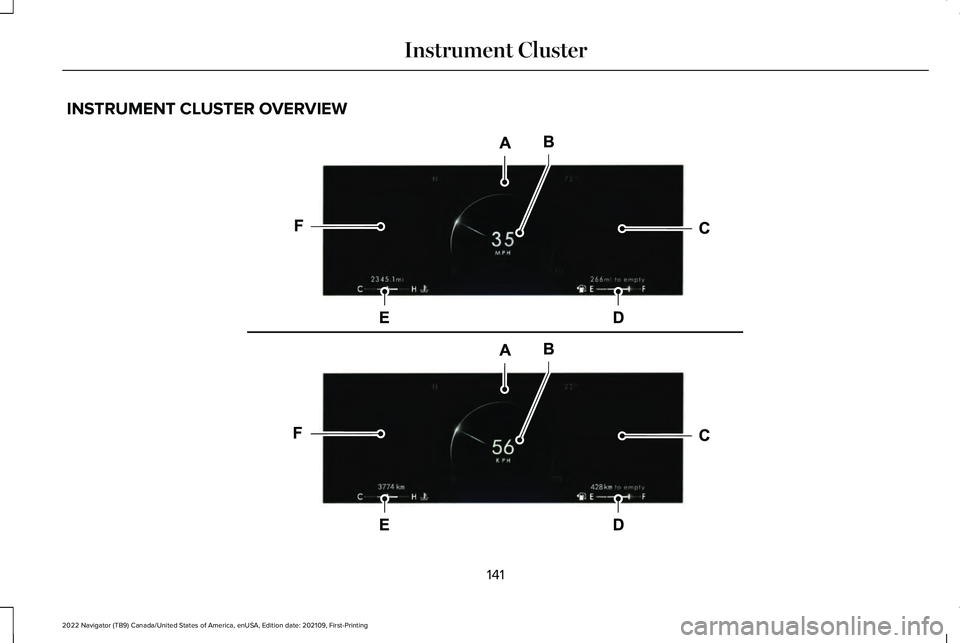
INSTRUMENT CLUSTER OVERVIEW
141
2022 Navigator (TB9) Canada/United States of America, enUSA, Edition date: 202109, First-Printing Instrument ClusterE271984
Page 146 of 646
Status bar.
A
Speedometer.
B
Right information group.
C
Fuel gauge.
D
Engine coolant temperature gauge.
E
Left information group.
F
TACHOMETER
Indicates the engine speed.
SPEEDOMETER
Indicates the vehicle speed.
FUEL GAUGE
WHAT IS THE FUEL GAUGE
Indicates approximately how much fuel is in
the fuel tank. FUEL GAUGE LIMITATIONS
The fuel gauge may not provide an accurate
reading when your vehicle is on an incline.
LOCATING THE FUEL FILLER DOOR
The arrow adjacent to the fuel pump symbol
indicates on which side of your vehicle the
fuel filler door is located.
WHAT IS THE LOW FUEL REMINDER
A low fuel level reminder displays and
sounds when the distance to empty reaches
75 mi (120 km) to empty for MyKey, and at
50 mi (80 km), 25 mi (40 km), 12 mi (20 km)
and 0 mi (0 km) for all vehicle keys.
Note: The low fuel reminder can appear at
different fuel gauge positions depending on
fuel economy conditions. This variation is
normal.
142
2022 Navigator (TB9) Canada/United States of America, enUSA, Edition date: 202109, First-Printing Instrument Cluster
Page 147 of 646
WHAT IS DISTANCE TO EMPTY
Indicates the approximate distance your
vehicle can travel on the fuel remaining in
the tank. Changes in driving pattern can
cause the value to not only decrease but also
increase or stay constant for periods of time.
ENGINE COOLANT TEMPERATURE
GAUGE
Indicates the engine coolant temperature.
ENGINE OIL PRESSURE GAUGE
Indicates the engine oil pressure.
Note:
This is a configurable gauge.
TRANSMISSION FLUID
TEMPERATURE GAUGE
Indicates the transmission fluid temperature. Special operating conditions can cause
higher than normal operating temperatures.
See Special Operating Conditions
Scheduled Maintenance (page 536).
Note: This is a configurable gauge.
WHAT ARE THE INSTRUMENT
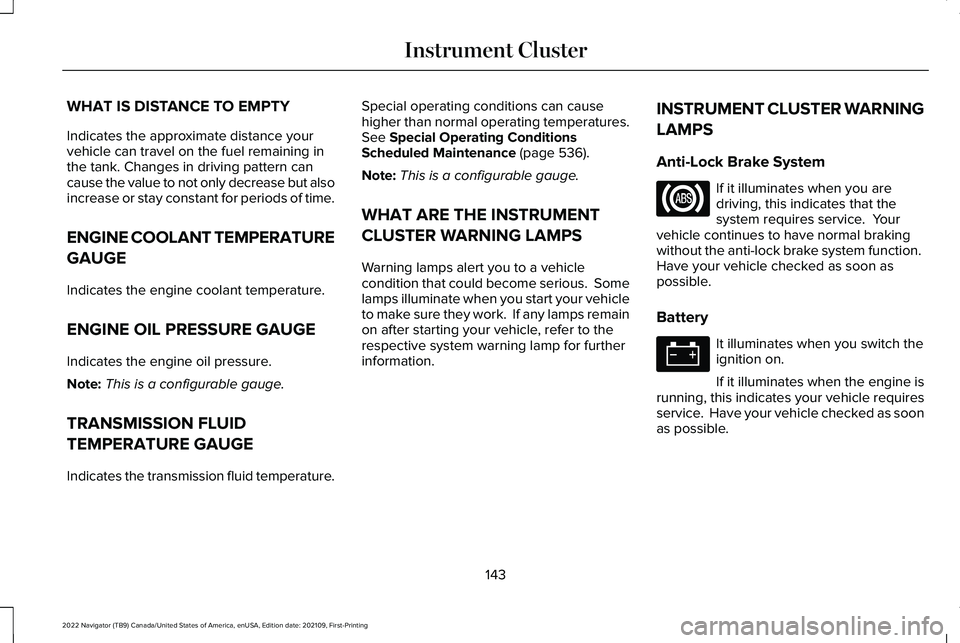
CLUSTER WARNING LAMPS
Warning lamps alert you to a vehicle
condition that could become serious. Some
lamps illuminate when you start your vehicle
to make sure they work. If any lamps remain
on after starting your vehicle, refer to the
respective system warning lamp for further
information. INSTRUMENT CLUSTER WARNING
LAMPS
Anti-Lock Brake System If it illuminates when you are
driving, this indicates that the
system requires service. Your
vehicle continues to have normal braking
without the anti-lock brake system function.
Have your vehicle checked as soon as
possible.
Battery It illuminates when you switch the
ignition on.
If it illuminates when the engine is
running, this indicates your vehicle requires
service. Have your vehicle checked as soon
as possible.
143
2022 Navigator (TB9) Canada/United States of America, enUSA, Edition date: 202109, First-Printing Instrument Cluster
Page 148 of 646
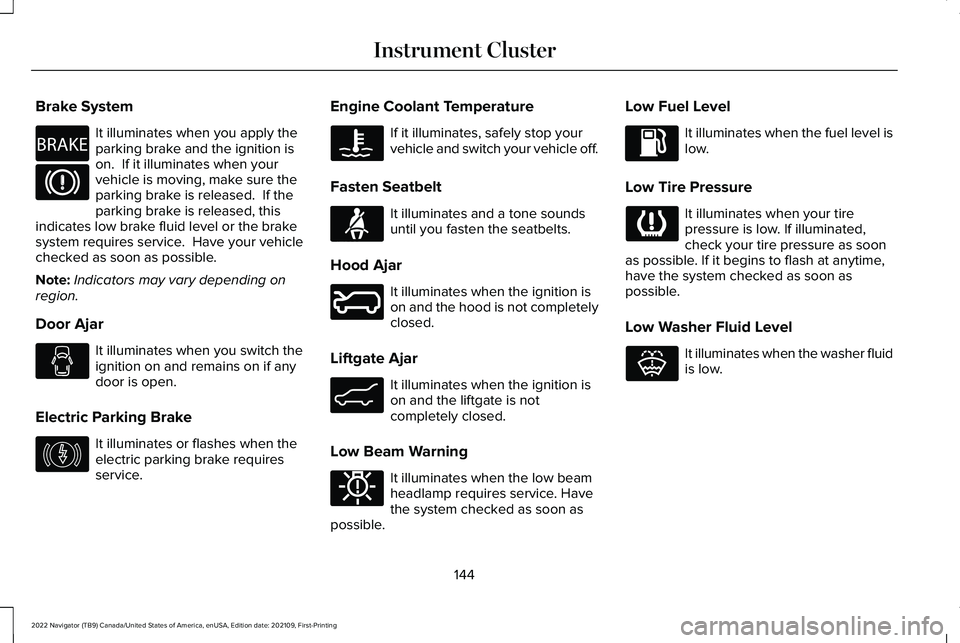
Brake System
It illuminates when you apply the
parking brake and the ignition is
on. If it illuminates when your
vehicle is moving, make sure the
parking brake is released. If the
parking brake is released, this
indicates low brake fluid level or the brake
system requires service. Have your vehicle
checked as soon as possible.
Note: Indicators may vary depending on
region.
Door Ajar It illuminates when you switch the
ignition on and remains on if any
door is open.
Electric Parking Brake It illuminates or flashes when the
electric parking brake requires
service. Engine Coolant Temperature If it illuminates, safely stop your
vehicle and switch your vehicle off.
Fasten Seatbelt It illuminates and a tone sounds
until you fasten the seatbelts.
Hood Ajar It illuminates when the ignition is
on and the hood is not completely
closed.
Liftgate Ajar It illuminates when the ignition is
on and the liftgate is not
completely closed.
Low Beam Warning It illuminates when the low beam
headlamp requires service. Have
the system checked as soon as
possible. Low Fuel Level It illuminates when the fuel level is
low.
Low Tire Pressure It illuminates when your tire
pressure is low. If illuminated,
check your tire pressure as soon
as possible. If it begins to flash at anytime,
have the system checked as soon as
possible.
Low Washer Fluid Level It illuminates when the washer fluid
is low.
144
2022 Navigator (TB9) Canada/United States of America, enUSA, Edition date: 202109, First-Printing Instrument ClusterE270480 E146190 E71880 E246598 E162453 E181350 E132353