change wheel LINCOLN NAVIGATOR 2022 Owner's Manual
[x] Cancel search | Manufacturer: LINCOLN, Model Year: 2022, Model line: NAVIGATOR, Model: LINCOLN NAVIGATOR 2022Pages: 646, PDF Size: 7.29 MB
Page 310 of 646
BLIND SPOT ASSIST WITH TRAILER
COVERAGE
WHAT IS BLIND SPOT ASSIST WITH
TRAILER COVERAGE
Blind spot assist with trailer coverage is an
extension of the lane keeping system.
It may help you identify adjacent vehicles
during a lane change.
Blind spot assist provides a blind spot
warning and steering assistance to help
during lane changes.
When attaching a trailer, ensure you have
properly set up the trailer coverage settings.
See Blind Spot Information System With
Trailer Coverage (page 313).
HOW DOES BLIND SPOT ASSIST WITH
TRAILER COVERAGE WORK Activate and deactivate the system
using the lane keeping system
button on the steering wheel. During lane changes, the design of the blind
spot assist feature detects vehicles in, or
approaching, your blind spot and provides
a warning, plus steering assistance to direct
your vehicle back into your lane.
If a supported trailer is connected, the
function is reduced to only detecting vehicles
on both sides of your vehicle and trailer,
extending rearward from the exterior mirrors
to the end of your trailer.
See Blind Spot
Information System With Trailer Coverage
(page
313).
When active, this system functions with or
without the use of direction indicators and
hazard flashers.
You must keep your hands on the steering
wheel at all times.
BLIND SPOT ASSIST WITH TRAILER
COVERAGE LIMITATIONS
All system limitations present in the basic
lane keeping system also apply to blind spot
assist.
Blind spot assist does not function under the
following conditions: •
The system does not detect lane
markings.
• One or both rear radar sensors become
blocked or faulty.
• You have not configured the attached
trailer correctly in the trailer tow menus
or an unsupported trailer has been
attached. Only certain trailer shapes and
dimensions are supported.
See Blind
Spot Information System With Trailer
Coverage Limitations
(page 313).
Note: Blind spot assist with trailer coverage
could have reduced performance if you
attach a trailer to your vehicle.
Blind spot assist may have difficulty detecting
hazards under the following conditions:
• If a vehicle is approaching in an adjacent
lane at a relative speed much higher than
your vehicle.
• Bad weather conditions are present that
obstruct the sensors.
• Attaching bike or cargo racks could
cause false alerts due to obstruction of
the sensor.
306
2022 Navigator (TB9) Canada/United States of America, enUSA, Edition date: 202109, First-Printing Lane Keeping SystemE334922
Page 317 of 646
BLIND SPOT INFORMATION SYSTEM
WITH TRAILER COVERAGE
WHAT IS BLIND SPOT INFORMATION
SYSTEM WITH TRAILER COVERAGE
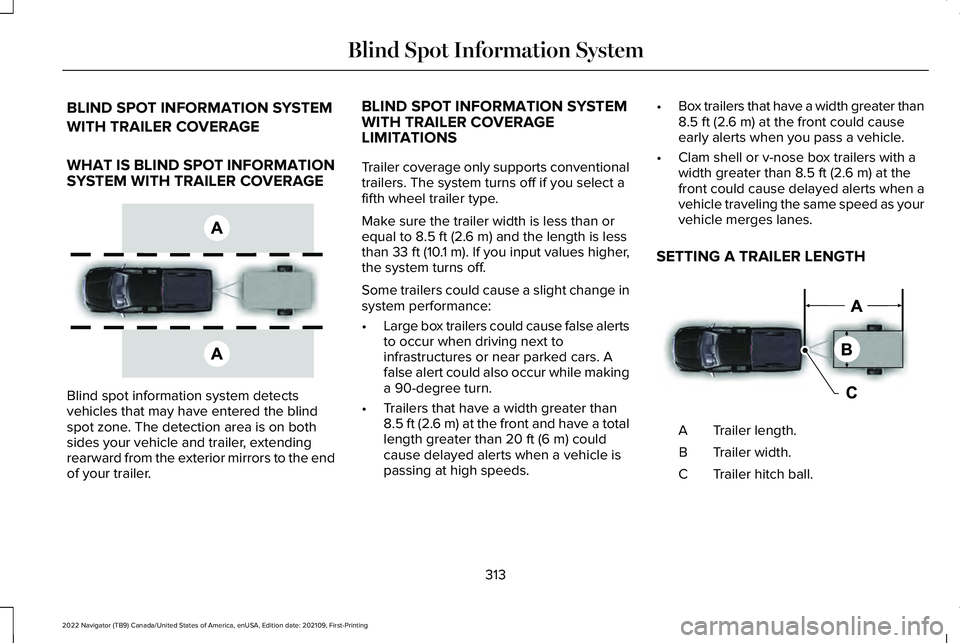
Blind spot information system detects
vehicles that may have entered the blind
spot zone. The detection area is on both
sides your vehicle and trailer, extending
rearward from the exterior mirrors to the end
of your trailer. BLIND SPOT INFORMATION SYSTEM
WITH TRAILER COVERAGE
LIMITATIONS
Trailer coverage only supports conventional
trailers. The system turns off if you select a
fifth wheel trailer type.
Make sure the trailer width is less than or
equal to 8.5 ft (2.6 m) and the length is less
than 33 ft (10.1 m). If you input values higher,
the system turns off.
Some trailers could cause a slight change in
system performance:
• Large box trailers could cause false alerts
to occur when driving next to
infrastructures or near parked cars. A
false alert could also occur while making
a 90-degree turn.
• Trailers that have a width greater than
8.5 ft (2.6 m)
at the front and have a total
length greater than 20 ft (6 m) could
cause delayed alerts when a vehicle is
passing at high speeds. •
Box trailers that have a width greater than
8.5 ft (2.6 m)
at the front could cause
early alerts when you pass a vehicle.
• Clam shell or v-nose box trailers with a
width greater than
8.5 ft (2.6 m) at the
front could cause delayed alerts when a
vehicle traveling the same speed as your
vehicle merges lanes.
SETTING A TRAILER LENGTH Trailer length.
A
Trailer width.
B
Trailer hitch ball.
C
313
2022 Navigator (TB9) Canada/United States of America, enUSA, Edition date: 202109, First-Printing Blind Spot Information SystemE225007 E225008
Page 361 of 646
3.
When you plug in a trailer with electric or
electric-over-hydraulic brakes, a message
confirming connection appears in the
information display.
4. Use the gain adjustment to find the desired starting point. A gain setting of
6.0 is a good starting point for heavier
loads.
Note: Use the following steps to adjust the
gain setting whenever road, weather and
trailer, or vehicle loading conditions, change
from when you initially set the gain.
5. In a traffic-free environment, tow the trailer on a dry, level surface and squeeze
the manual control lever completely.
6. If the trailer wheels lock up, indicated by
squealing tires, reduce the gain setting.
If the trailer wheels turn freely, increase
the gain setting. Repeat Steps 5 and 6
until the gain setting is at a point just
below trailer wheel lock-up. If towing a
heavier trailer, trailer wheel lock-up may
not be attainable even with the maximum
gain setting of 10.
Note: Only perform this procedure at speeds
of approximately 20–25 mph (30–40 km/h). Note:
The trailer brake controller reduces
output at vehicle speeds below 11 mph
(18 km/h) so that trailer and vehicle braking
is not jerky or harsh. This feature is only
available when applying the brakes using
your vehicle's brake pedal, not the controller.
Note: Your vehicle's brake system and the
trailer brake system work independently of
each other. Changing the gain setting on the
controller does not affect the operation of
your vehicle's brakes whether you attach a
trailer or not.
Note: With the proper electrical connection,
pressing your vehicle brake pedal or using
the manual control lever illuminates both
trailer and vehicle brake lamps.
Note: When you switch the engine off, the
controller output is disabled and the display
and module shut down. The controller
module and display turn on when you switch
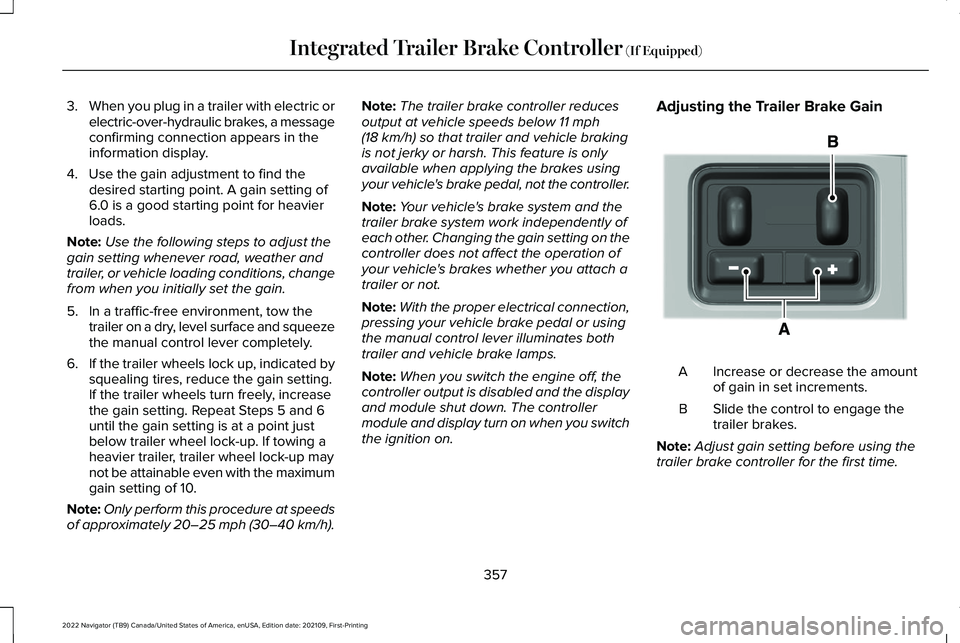
the ignition on. Adjusting the Trailer Brake Gain
Increase or decrease the amount
of gain in set increments.
A
Slide the control to engage the
trailer brakes.
B
Note: Adjust gain setting before using the
trailer brake controller for the first time.
357
2022 Navigator (TB9) Canada/United States of America, enUSA, Edition date: 202109, First-Printing Integrated Trailer Brake Controller
(If Equipped)E333154
Page 374 of 646
 and pull forward to get yo\
ur
vehicle and trailer back to an in-lin")
Description
Message
Displays when you exceed the maximum controllable trailer angle for
the system. Place your vehicle in drive (D) and pull forward to get yo\
ur
vehicle and trailer back to an in-line position, then activate the syste\
m
by selecting the connected trailer and following the instructions on
the touchscreen.
If this message consistently displays, you may need to repeat the
trailer setup and calibration. Delete the trailer from the system and
repeat the setup and calibration process.
Stop now. Deactivated by trailer angle.
Displays when the system can no longer steer the vehicle and you
must take over steering.
Pro Trailer Backup Assist™ Stop Now Take Control of Steering Wheel
These messages display when the system does not detect the trailer.
Make sure the rear camera is clean, and the sticker is clearly visible
in the camera image. You can also move the trailer forward or back-
ward to change the trailer position and lighting conditions
If these messages continue to display, visit your authorized dealer to
have your vehicle checked.
Pro Trailer Backup Assist™ Trailer Not Detected. Shift to Park Press
Knob to Exit
Pro Trailer Backup Assist™ Trailer Not Detected. Refer to Owner's
Manual. Press Knob to Exit
370
2022 Navigator (TB9) Canada/United States of America, enUSA, Edition date: 202109, First-Printing Trailer Backup Assistance (If Equipped)
Page 376 of 646
TRAILER BACKUP ASSISTANCE –
FREQUENTLY ASKED QUESTIONS
Why does the trailer not reverse straight?
Verify the sticker is correctly applied.
Other factors such as the hitch
connection, road camber, road slope
and trailer suspension could influence
how straight the system can reverse the
trailer when the control knob is not
turned. You can compensate for the
trailer drifting to the right or left by
slowly turning the knob until the trailer
is following your desired path and then
holding the knob in that position. What does it mean if the system remains
on one message for an extended time
during calibration?
The camera could need to be cleaned,
the sticker could be blocked, the
drawbar could be outside the allowed
range of 9–18 in (23–46 cm) or you
could need to move to a different area
to change the lighting and background.
Verify the sticker is in the proper
location.
See Applying the Trailer
Reversing Aid Sticker (page 364). You
can move to a different area or change
the direction you are driving or setup
the system at a different time of day.
Some trailers are not compatible with
the sticker and camera system.
What does it mean if the system pauses
during calibration? There could be steering input or trailer
movement during the straight drive
portion of the calibration process. What does it mean if the system displays
hold steering steady during turn?
Part of the calibration process for the
sticker setup requires a steady turn. If
you are continually moving the steering
wheel during the turn, this delays the
calibration process. To enable the
calibration process, hold the steering
wheel at the same position when
turning.
What does it mean if the system displays
that it is not available? There could be a sub-system that the
system uses that is not correctly
operating or there could be a battery
voltage issue. If the system continues
to display it is not available, visit your
authorized dealer to have your vehicle
checked.
372
2022 Navigator (TB9) Canada/United States of America, enUSA, Edition date: 202109, First-Printing Trailer Backup Assistance
(If Equipped)
Page 378 of 646
What does it mean if the trailer is at its
maximum angle or the system deactivated
by trailer angle?
You are at the maximum controllable
trailer angle for the system. Place your
vehicle in drive (D) and pull forward to
get the truck and trailer back to an
in-line position. If this message
consistently displays, this could indicate
the sticker is incorrectly applied, the
trailer needs to be recalibrated or the
drawbar or the trailer dimensions are
outside of the supported range. The
system is designed to work with
drawbars that have a license plate to
hitch ball center measurement of 9–18 in
(23–46 cm) when installed. The system
is designed to work with trailers that
have a hitch point to center of the axle
or axles measurement of
6–33 ft
(1.85–10.05 m). Do not attempt to use
drawbars or trailers that have a length
outside of this range as the system
performance degrades and could cause
improper system function. Check that
the correct trailer is selected in the touchscreen. Verify the sticker is
correctly applied and check that the
drawbar and the trailer dimensions are
within the allowed range. Then, delete
the trailer from the system and repeat
the setup process to calibrate the trailer.
What does it mean when the system tells
you to take control of the steering wheel? The system is no longer steering the
vehicle and you must take over steering.
There are four reasons the system could
display this message. The first reason
the system could display this message
is that you have touched the steering
wheel when the system is steering. The
second reason the system could display
this message is that you have exceeded
the maximum speed for the feature. The
third reason the system could display
this message is that the trailer is not
detected. The final reason the system
could display this message is that an
internal condition for system operation
is not met that requires your vehicle to
return to manual control of the steering. What does it mean if the system does not
detect a trailer?
The system requires a clear view of the
sticker placed on the trailer. You must
keep the camera lens and sticker clean
for the system to correctly operate. If
the system cannot initially detect the
trailer, it could be necessary for you to
change the lighting conditions by
moving your vehicle and trailer or
waiting until the conditions change. See
Applying the Trailer Reversing Aid
Sticker (page 364). Some trailers are not
compatible with the sticker and camera
system.
Note: The system is designed to be used
with the same trailer connection every time
you choose the trailer from the touchscreen.
When using a different drawbar or a different
pin hole on drawbars with more than one,
connecting the drawbar to your vehicle
affects the trailer position and you may need
to repeat the trailer setup and calibration
process.
374
2022 Navigator (TB9) Canada/United States of America, enUSA, Edition date: 202109, First-Printing Trailer Backup Assistance
(If Equipped)
Page 386 of 646
TRAILER REVERSE GUIDANCE –
FREQUENTLY ASKED QUESTIONS
What does it mean if the system remains
on one message for an extended time
during calibration?
The camera could need to be cleaned,
the sticker could be blocked, the
drawbar could be outside the allowed
range of 9–18 in (23–46 cm) or you
could need to move to a different area
to change the lighting and background.
Verify the sticker is in the proper
location.
See Applying the Trailer
Reverse Aid Sticker (page 376). You can
move to a different area or change the
direction you are driving or setup the
system at a different time of day. Some
trailers are not compatible with the
sticker and camera system.
What does it mean if the system pauses
during calibration? There could be steering input or trailer
movement during the straight drive
portion of the calibration process. What does it mean if the system displays
hold steering steady during turn?
Part of the calibration process for the
sticker setup requires a steady turn. If
you are continually moving the steering
wheel during the turn, this delays the
calibration process. To enable the
calibration process, hold the steering
wheel at the same position when
turning.
What does it mean if the system displays
that it is not available? There could be a sub-system that the
system uses that is not correctly
operating or there could be a battery
voltage issue. If the system continues
to display it is not available, visit your
authorized dealer to have your vehicle
checked. What does it mean if the system displays
that driving is required to initialize steering?
The steering system needs to learn
internal parameters to fully turn on the
feature. Drive your vehicle straight
forward above
25 mph (40 km/h) for
approximately 5 minutes. This could also
occur when your vehicle is new, there
is a battery voltage issue or if the
steering system has been serviced.
What does it mean if the system does not
detect a trailer? The system requires a clear view of the
sticker placed on the trailer. You must
keep the camera lens and sticker clean
for the system to correctly operate. If
the system cannot initially detect the
trailer, it could be necessary for you to
change the lighting conditions by
moving your vehicle and trailer or
waiting until the conditions change. See
Applying the Trailer Reverse Aid
Sticker (page 376). Some trailers are not
compatible with the sticker and camera
system.
382
2022 Navigator (TB9) Canada/United States of America, enUSA, Edition date: 202109, First-Printing Trailer Reverse Guidance
(If Equipped)
Page 389 of 646
BREAKING-IN
Your vehicle requires a break-in period. For
the first 1,000 mi (1,600 km), avoid driving at
high speeds, heavy braking, aggressive
shifting or using your vehicle to tow. During
this time, your vehicle may exhibit some
unusual driving characteristics.
DRIVING ECONOMICALLY
The following helps to improve fuel
consumption:
•
Drive smoothly, accelerate gently and
anticipate the road ahead to avoid heavy
braking.
• Regularly check your tire pressures and
make sure that they are inflated to the
correct pressure.
• Follow the recommended maintenance
schedule and carry out the
recommended checks.
• Plan your journey and check the traffic
before you set off. It is more efficient to
combine errands into a single trip
whenever possible. •
Avoid idling the engine in cold weather
or for extended periods. Start the engine
only when you are ready to set off.
• Do not carry unnecessary weight in your
vehicle as extra weight wastes fuel.
• Do not add unnecessary accessories to
the exterior of your vehicle, for example
running boards. If you use a roof rack,
remember to fold it down or remove it
when not in use.
• Do not shift into neutral when you are
braking or when your vehicle is slowing
down.
• Shut all windows when driving at high
speeds.
• Switch off all electric systems when not
in use, for example air conditioning. Make
sure that you unplug any accessories
from the auxiliary power points when not
in use. DRIVING IN SPECIAL CONDITIONS
EMERGENCY MANEUVERS
In an unavoidable emergency where you
must make a sudden sharp maneuver, turn
the steering wheel only as rapidly and as far
as required to avoid the emergency. Apply
smooth pressure to the accelerator pedal or
brake pedal as needed. Avoid abrupt
steering, acceleration and braking changes.
Abrupt changes could increase the risk of
vehicle roll over, loss of vehicle control and
personal injury. If possible, use any available
road surfaces to bring your vehicle under
control.
385
2022 Navigator (TB9) Canada/United States of America, enUSA, Edition date: 202109, First-Printing Driving Hints
Page 390 of 646
DRIVING THROUGH MUD AND WATER
Mud
Be cautious of sudden changes in vehicle
speed or direction when you are driving in
mud. Even all-wheel drive and four-wheel
drive vehicles can lose traction in mud. If
your vehicle slides, steer in the direction of
the slide until you regain control of your
vehicle. After driving through mud, clean off
residue stuck to rotating driveshafts and tires.
Excess residue can cause an imbalance that
could damage drive components.
Note:
If your vehicle gets stuck in mud, it
could be rocked out by shifting between
forward and reverse gears, stopping
between shifts in a steady pattern. Press
lightly on the accelerator in each gear.
Note: Do not rock your vehicle if the engine
is not at normal operating temperature, as
damage to the transmission could occur.
Note: Do not rock your vehicle for more than
a minute, as damage to the transmission
and tires could occur or the engine could
overheat. Water
If you must drive though deep water, drive
slowly. The water could limit traction or brake
capability. See Driving Through Shallow
Water (page 387).
When driving though water, determine the
depth and avoid water higher than the center
of the wheel.
Once through water, always try the brakes.
Wet brakes do not stop your vehicle as
quickly as dry brakes. Apply light pressure
to the brake pedal while slowly moving the
vehicle to dry the brakes.
Note: Driving through deep water could
cause damage to the transmission. If the
front or rear axle is submerged in water,
have the axle lubricant and power transfer
unit lubricant checked and changed if
necessary. DRIVING ON HILLY OR SLOPING
TERRAIN WARNING: Extreme care should be
used when steering the vehicle in reverse
down a slope so as not to cause the
vehicle to swerve out of control.
Although natural obstacles could make it
necessary to travel diagonally up or down a
hill or steep incline, you should try to drive
straight up or straight down.
Note: Avoid turning on steep slopes or hills.
A danger lies in losing traction, slipping
sideways and possible vehicle roll over.
Whenever driving on a hill, determine
beforehand the route you can use. Do not
drive over the crest of a hill without seeing
what conditions are on the other side. Do
not drive in reverse over a hill without the
aid of an observer.
386
2022 Navigator (TB9) Canada/United States of America, enUSA, Edition date: 202109, First-Printing Driving Hints
Page 422 of 646
Note:
Do not add oil further than the
maximum mark. Oil levels above the
maximum mark may cause engine damage.
Note: Immediately soak up any oil spillage
with an absorbent cloth.
RESETTING THE ENGINE OIL CHANGE
REMINDER
Depending on your cluster, there are two
paths to reset the engine oil change
reminder.
Path 1
1. Press the Menu button on the steering wheel to enter the information display
main menu.
2. Select Settings.
3. Select
Vehicle Maintenance.
4. Select
Oil Life.
5. Press and hold the
OK button until the
system reset confirmation appears. Path 2
1. Press the Menu button on the steering
wheel to enter the information display
main menu.
2. Select
Truck Info.
3. Select
Engine Information.
4. Press and hold the
OK button until the
system reset confirmation appears.
ENGINE OIL CAPACITY AND
SPECIFICATION
For filling information, please refer to the
Capacities and Specifications section of your
owner's manual.
See Engine Oil Capacity
and Specification (page 471).
CHECKING THE COOLANT
When the engine is cold, check the
concentration and level of the coolant at the
intervals listed in the scheduled maintenance
information.
See Scheduled Maintenance
(page 528). Note:
Make sure that the coolant level is
between the minimum and maximum marks
on the coolant reservoir.
Note: Coolant expands when it is hot. The
level may extend beyond the
MAX mark.
If the coolant level is at or below the
minimum mark, add prediluted coolant
immediately.
Maintain coolant concentration within 48%
to 50%, which equates to a freeze point
between
-29°F (-34°C) and -35°F (-37°C).
Coolant concentration should be checked
using a refractometer. We do not recommend
the use of hydrometers or coolant test strips
for measuring coolant concentration.
Adding Coolant WARNING:
Keep your hands and
clothing clear of the cooling fan.
418
2022 Navigator (TB9) Canada/United States of America, enUSA, Edition date: 202109, First-Printing Maintenance