climate control LINCOLN NAVIGATOR 2022 User Guide
[x] Cancel search | Manufacturer: LINCOLN, Model Year: 2022, Model line: NAVIGATOR, Model: LINCOLN NAVIGATOR 2022Pages: 646, PDF Size: 7.29 MB
Page 166 of 646
Quickly Cooling the Interior
1. Press MAX A/C.
2. Drive with the windows open for a short period of time.
Recommended Settings for Cooling
1. Press
AUTO.
2. Adjust the temperature function to the setting you prefer. Use
72°F (22°C) as a
starting point, then adjust the setting as
necessary.
Defogging the Side Windows in Cold
Weather
1. Press and release defrost or maximum defrost.
2. Adjust the temperature control to the setting you prefer. Use
72°F (22°C) as a
starting point, then adjust the setting as
necessary.
162
2022 Navigator (TB9) Canada/United States of America, enUSA, Edition date: 202109, First-Printing Climate Control
Page 167 of 646
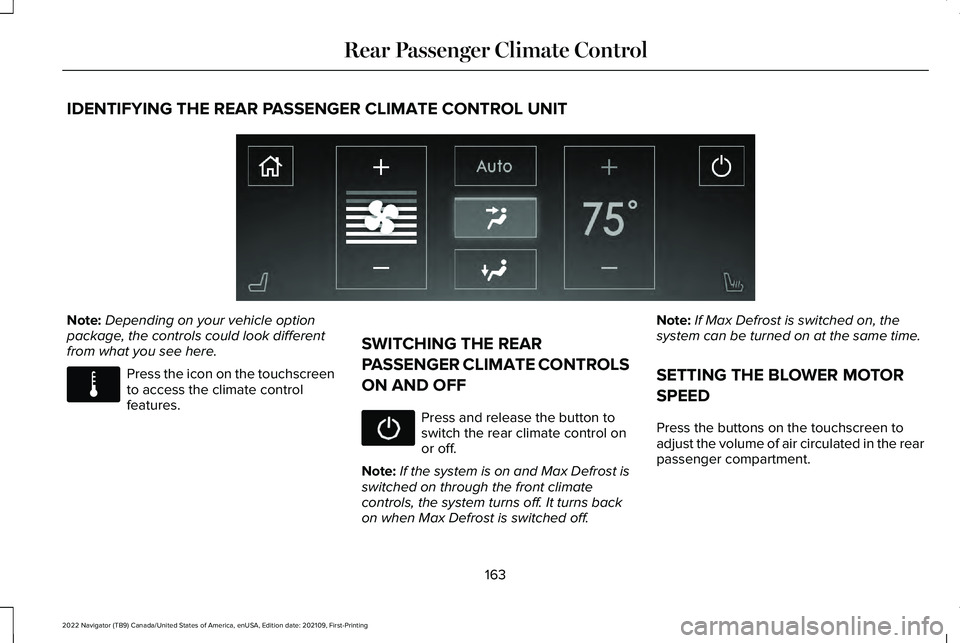
IDENTIFYING THE REAR PASSENGER CLIMATE CONTROL UNIT
Note:
Depending on your vehicle option
package, the controls could look different
from what you see here. Press the icon on the touchscreen
to access the climate control
features.
SWITCHING THE REAR
PASSENGER CLIMATE CONTROLS
ON AND OFF Press and release the button to
switch the rear climate control on
or off.
Note: If the system is on and Max Defrost is
switched on through the front climate
controls, the system turns off. It turns back
on when Max Defrost is switched off. Note:
If Max Defrost is switched on, the
system can be turned on at the same time.
SETTING THE BLOWER MOTOR
SPEED
Press the buttons on the touchscreen to
adjust the volume of air circulated in the rear
passenger compartment.
163
2022 Navigator (TB9) Canada/United States of America, enUSA, Edition date: 202109, First-Printing Rear Passenger Climate ControlE357000 E283811
Page 168 of 646
SETTING THE TEMPERATURE
Press the buttons on the touchscreen to set
the temperature in the rear passenger
compartment.
DIRECTING THE FLOW OF AIR
Directing Air to the Rear Console Air
Vents
Press the button on the
touchscreen to direct airflow to the
rear console air vents. Directing Air to the Rear Footwell Air
Vents Press the button on the
touchscreen to direct airflow to
rear footwell air vents.
Note: Air can be directed through any
combination of air vents.
REAR AUTO MODE
SWITCHING REAR AUTO MODE ON
AND OFF Press the button on the
touchscreen to switch rear
automatic operation on, then set
the temperature.
The system adjusts the blower motor speed,
air distribution, air conditioning operation to
reach and maintain the temperature you
have set. REAR PASSENGER CLIMATE
CONTROL INDICATORS Illuminates when the rear climate
controls are locked through the
front climate controls.
Note: If the rear climate controls are locked
and the rear climate system is turned off, the
indicator illuminates for a few seconds when
you try to use any of the rear climate
controls.
164
2022 Navigator (TB9) Canada/United States of America, enUSA, Edition date: 202109, First-Printing Rear Passenger Climate ControlE356421 E356422 E356421 E356422 E244097
Page 176 of 646
HEATED SEATS
HEATED SEAT PRECAUTIONS
WARNING: Use caution when using
the heated seat if you are unable to feel
pain to your skin because of advanced
age, chronic illness, diabetes, spinal cord
injury, medication, alcohol use, exhaustion
or other physical conditions. The heated
seat could cause burns even at low
temperatures, especially if used for long
periods of time. Failure to follow this
instruction could result in personal injury. WARNING:
Do not poke sharp
objects into the seat cushion or seat
backrest. This could damage the heated
seat element and cause it to overheat.
Failure to follow this instruction could result
in personal injury. WARNING:
Do not place anything on
the seat that blocks the heat, for example
a seat cover or a cushion. This could cause
the seat to overheat. Failure to follow this
instruction could result in personal injury.
Do not:
• Place heavy objects on the seat.
• Operate the heated seat if water or any
other liquid spills on the seat. Allow the
seat to dry.
SWITCHING THE HEATED SEATS ON
AND OFF
The vehicle must be running to use this
feature. Press the heated seat symbol to cycle
through the various heat settings and off.
More indicator lights indicate warmer
settings.
Note:
The heated seats may remain on after
you remote start your vehicle, based on your
remote start settings. The heated seats may
also turn on when you start your vehicle if
they were on when you switched your
vehicle off.
Automatic Climate Controlled Seats
(If
Equipped)
When you switch the auto setting on, the
climate controlled seats switch between the
heated seats and ventilated seats to match
your climate control setting.
172
2022 Navigator (TB9) Canada/United States of America, enUSA, Edition date: 202109, First-Printing Front SeatsE146322
Page 177 of 646
VENTILATED SEATS
VENTILATED SEAT PRECAUTIONS
Do not:
•
Spill liquid on the front seats. This may
cause the air vent holes to become
blocked and not work properly.
• Place cargo or objects under the seats.
They may block the air intake causing
the air vents to not work properly.
SWITCHING THE VENTILATED SEATS
ON AND OFF
The vehicle must be running to use this
feature. Press this symbol on the climate controls or
the touchscreen to cycle through the various
ventilation settings and off. More indicator
lights indicate higher fan speeds.
Note:
When you switch the climate control
fan speed and the ventilated seats to their
maximum settings, the ventilated seats
provide increased cooling.
If the engine falls below 350 RPM while the
ventilated seats are on, the feature turns
itself off unless the vehicle is in
Auto-Start-Stop mode. You may need to
reactivate the ventilated seats.
Note: The ventilated seats may remain on
after you remote start your vehicle, based
on your remote start settings. The ventilated
seats may also turn on when you start your
vehicle if they were on when you switched
your vehicle off.
173
2022 Navigator (TB9) Canada/United States of America, enUSA, Edition date: 202109, First-Printing Front SeatsE224689
Page 186 of 646
The rear seat heat controls are on the rear
of the center console.
Press the heated seat symbol to cycle
through the various heat settings and off.
More indicator lights indicate warmer
settings.
Note:
The heated seats may remain on after
you remote start your vehicle, based on your
remote start settings. The heated seats may
also turn on when you start your vehicle if
they were on when you switched your
vehicle off. Automatic Climate Controlled Seats (If
Equipped)
When you switch the auto setting on, the
climate controlled seats switch between the
heated seats and ventilated seats to match
your climate control setting.
VENTILATED SEATS
VENTILATED SEAT PRECAUTIONS
Do not:
• Spill liquid on the seats. This may cause
the air vent holes to become blocked and
not work properly.
• Place cargo or objects under the seats.
They may block the air intake causing
the air vents to not work properly.
SWITCHING THE VENTILATED SEATS
ON AND OFF
The vehicle must be running to use this
feature. Press this symbol on the climate controls or
the rear touchscreen to cycle through the
various ventilation settings and off. More
indicator lights indicate higher fan speeds.
Note:
When you switch the climate control
fan speed and the ventilated seats to their
maximum settings, the ventilated seats
provide increased cooling.
If the engine falls below 350 RPM while the
ventilated seats are on, the feature switches
itself off unless the vehicle is in
Auto-Start-Stop mode. You may need to
reactivate the ventilated seats.
Note: The ventilated seats may remain on
after you remote start your vehicle, based
on your remote start settings. The ventilated
seats may also switch on when you start
your vehicle if they were on when you
switched your vehicle off.
182
2022 Navigator (TB9) Canada/United States of America, enUSA, Edition date: 202109, First-Printing Rear SeatsE146322 E224689
Page 196 of 646
LOCATING THE USB PORTS
Data Transfer USB Ports
The USB ports could be in the following
locations:
•
On the lower instrument panel below the
climate control.
• Inside the center console.
Note: These USB ports can also charge
devices.
Note: Not all USB ports in your vehicle have
data transfer capabilities.
Note: We recommend using only USB-IF
certified cables and adapters. Non-certified
cables and adapters may not work.
Charge Only USB Ports The USB ports could be in the following
locations: •
On the lower instrument panel.
• On the upper instrument panel.
• Inside the media bin.
• Inside the center console.
• On the rear of the center console.
• In the cargo area.
PLAYING MEDIA USING THE USB
PORT WARNING: Driving while distracted
can result in loss of vehicle control, crash
and injury. We strongly recommend that
you use extreme caution when using any
device that may take your focus off the
road. Your primary responsibility is the safe
operation of your vehicle. We recommend
against the use of any hand-held device
while driving and encourage the use of
voice-operated systems when possible.
Make sure you are aware of all applicable
local laws that may affect the use of
electronic devices while driving. Connect your device to the USB port. Press the audio button on the
feature bar.
Select
Sources. Select the USB option.
Press the button to play a track.
Press the button again to pause
the track.
Press the button to skip to the next
track.
Press and hold the button to fast
forward through the track. Press the button once to return to
the beginning of a track.
Repeatedly press the button to
return to previous tracks.
Press and hold the button to fast rewind.
CHARGING A DEVICE
Connect your device to the USB port.
192
2022 Navigator (TB9) Canada/United States of America, enUSA, Edition date: 202109, First-Printing USB Ports E100027
Page 204 of 646
STARTING AND STOPPING THE
ENGINE – PRECAUTIONS
WARNING: Extended idling at high
engine speeds can produce very high
temperatures in the engine and exhaust
system, creating the risk of fire or other
damage. WARNING:
Do not park, idle or drive
your vehicle on dry grass or other dry
ground cover. The emission system heats
up the engine compartment and exhaust
system, creating the risk of fire. WARNING:
Do not start the engine
in a closed garage or in other enclosed
areas. Exhaust fumes are toxic. Always
open the garage door before you start the
engine. Failure to follow this instruction
could result in personal injury or death. WARNING:
Do not use starting fluid,
for example ether, in the air intake system.
Such fluid could cause immediate
explosive damage to the engine and
possible personal injury. WARNING: Exhaust leaks may result
in entry of harmful and potentially lethal
fumes into the passenger compartment. If
you smell exhaust fumes inside your
vehicle, have your vehicle inspected
immediately. Do not drive if you smell
exhaust fumes.
The powertrain control system meets all
Canadian interference-causing equipment
standard requirements regulating the
impulse electrical field or radio noise.
If you stop your vehicle and leave the engine
idling for long periods, we recommend that
you do one of the following:
• Open the windows at least
1 in (2.5 cm).
• Set your climate control to outside air. PUSH BUTTON IGNITION SWITCH
Switching the Ignition Off
When the ignition is on or in accessory mode,
press the push button ignition switch once
without your foot on the brake pedal.
Switching the Ignition to Accessory
Mode
When the ignition is off, press the push
button ignition switch once without your foot
on the brake pedal.
All electrical circuits and accessories are
operational and the warning lamps and
indicators illuminate.
200
2022 Navigator (TB9) Canada/United States of America, enUSA, Edition date: 202109, First-Printing Starting and Stopping the EngineE321258
Page 206 of 646
ENGINE BLOCK HEATER (IF EQUIPPED)
ENGINE BLOCK HEATER
PRECAUTIONS WARNING:
Failure to follow engine
block heater instructions could result in
property damage or serious personal
injury. WARNING:
Do not use your heater
with ungrounded electrical systems or
two-pronged adapters. There is a risk of
electrical shock. WARNING:
Do not fully close the
hood, or allow it to drop under its own
weight when using the engine block
heater. This could damage the power cable
and may cause an electrical short resulting
in fire, injury and property damage. We recommend that you do the following for
a safe and correct operation:
•
Use a 16-gauge outdoor extension cord
that is product certified by Underwriter’ s
Laboratory (UL) or Canadian Standards
Association (CSA). This extension cord
must be suitable for use outdoors, in cold
temperatures, and be clearly marked
Suitable for Use with Outdoor
Appliances. Do not use an indoor
extension cord outdoors. This could
result in an electric shock or become a
fire hazard.
• Use as short an extension cord as
possible.
• Do not use multiple extension cords.
• Make sure that when in operation, the
extension cord plug and engine block
heater cord plug connections are free
and clear of water. This could cause an
electric shock or fire.
• If the engine block heater cord is under
the hood, do not remove the wiring from
its original location. Do not close the
hood on the extension wiring. •
Park your vehicle in a clean area, clear
of combustible materials.
• Firmly connect the engine block heater
cord and the extension cord.
• Check the extension cord for heat
anywhere when the system has been
operating for approximately 30 minutes.
• Unplug and properly stow the system
before starting and driving your vehicle.
The protective cover seals the terminals
of the engine block heater cord plug
when not in use.
• Check the engine block heater system
for proper operation before winter.
HOW DOES THE ENGINE BLOCK
HEATER WORK
The engine block heater warms the engine
coolant. This allows the climate control
system to quickly respond. The equipment
includes a heater element installed in the
engine block and a wire harness. You can
connect the system to a grounded 220-240
volt AC electrical source.
202
2022 Navigator (TB9) Canada/United States of America, enUSA, Edition date: 202109, First-Printing Starting and Stopping the Engine
Page 401 of 646
TOWING YOUR VEHICLE
PRECAUTIONS
Use the following guidelines when towing
your vehicle. Failure to follow this instruction
could result in vehicle damage not covered
by the vehicle warranty.
Note:
Make sure you properly secure your
vehicle to the tow vehicle.
Note: If you are unsure of the vehicle ’s
configuration, contact an authorized dealer.
RECREATIONALLY TOWING YOUR
VEHICLE - 4X4 WARNING: Do not disconnect the
battery when recreationally towing your
vehicle. This prevents the transfer case
from shifting properly and could cause the
vehicle to roll, even if the transmission is
in park (P). WARNING:
Placing the transfer case
in its neutral position could cause your
vehicle to freely roll. Make sure you press
and hold the brake pedal and the vehicle
is in a secure, safe position when you place
the transfer case in its neutral position.
Follow these guidelines if you have a need
for recreational towing. An example of
recreational towing would be towing your
vehicle behind a motorhome. These
guidelines are to make sure that you do not
damage the transmission.
You can only tow your vehicle with all wheels
on the ground by placing the transfer case
in its neutral position and engaging the
recreational tow feature. Perform the
following steps after positioning your vehicle
behind the tow vehicle and properly securing
them together.
Note: Put your climate control system in
recirculated air mode to prevent exhaust
fumes from entering your vehicle. Note:
Failure to put the transfer case in its
neutral position can damage vehicle
components.
Note: You can check the towing status at
any time by opening the driver door or
turning the ignition to the accessory or on
position.
Neutral Tow Enabled Leave
Transmission in Neutral appears in the
instrument cluster display to confirm you can
recreationally tow your vehicle.
Note: If your vehicle has an anti-theft alarm,
make sure you switch perimeter sensing on
when towing.
See Setting the Alarm
Security Level (page 107).
Switching
Neutral Tow On
1. Start your vehicle.
2. Make sure your vehicle is in
NORMAL
mode. See Selecting a Drive Mode
(page 294).
3. Place your vehicle in temporary neutral mode.
See Entering Temporary Neutral
Mode (page 221).
397
2022 Navigator (TB9) Canada/United States of America, enUSA, Edition date: 202109, First-Printing Towing Your Vehicle