climate control LINCOLN NAVIGATOR 2022 Owner's Manual
[x] Cancel search | Manufacturer: LINCOLN, Model Year: 2022, Model line: NAVIGATOR, Model: LINCOLN NAVIGATOR 2022Pages: 646, PDF Size: 7.29 MB
Page 408 of 646
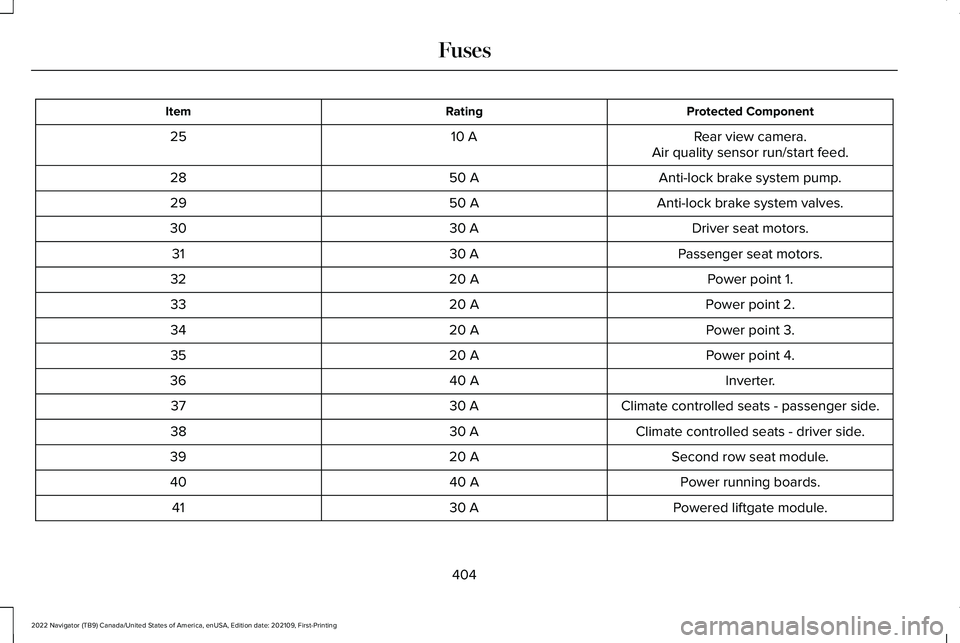
Protected Component
Rating
Item
Rear view camera.
10 A
25
Air quality sensor run/start feed.
Anti-lock brake system pump.
50 A
28
Anti-lock brake system valves.
50 A
29
Driver seat motors.
30 A
30
Passenger seat motors.
30 A
31
Power point 1.
20 A
32
Power point 2.
20 A
33
Power point 3.
20 A
34
Power point 4.
20 A
35
Inverter.
40 A
36
Climate controlled seats - passenger side.
30 A
37
Climate controlled seats - driver side.
30 A
38
Second row seat module.
20 A
39
Power running boards.
40 A
40
Powered liftgate module.
30 A
41
404
2022 Navigator (TB9) Canada/United States of America, enUSA, Edition date: 202109, First-Printing Fuses
Page 414 of 646
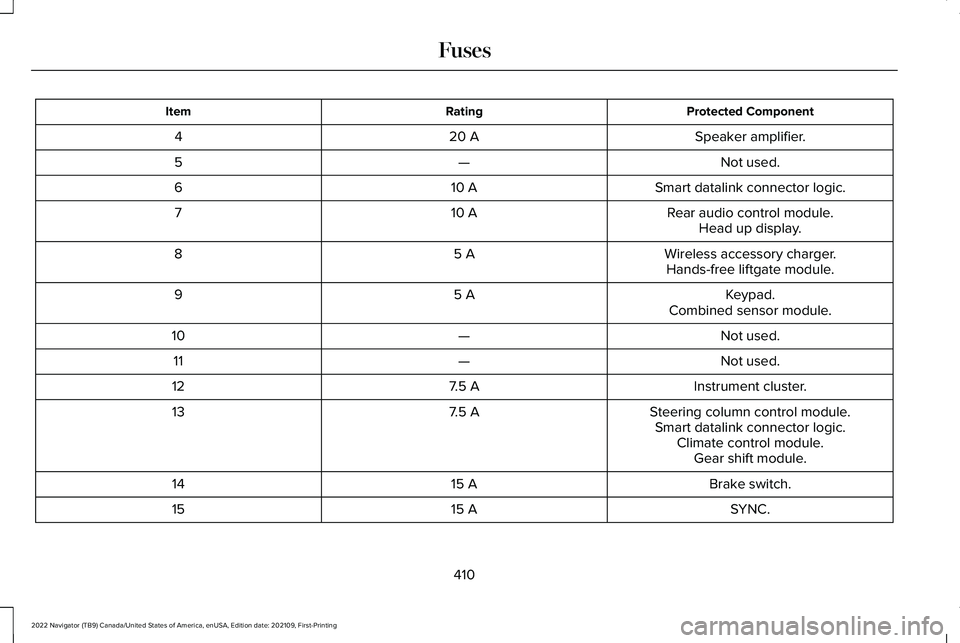
Protected Component
Rating
Item
Speaker amplifier.
20 A
4
Not used.
—
5
Smart datalink connector logic.
10 A
6
Rear audio control module.
10 A
7
Head up display.
Wireless accessory charger.
5 A
8
Hands-free liftgate module.
Keypad.
5 A
9
Combined sensor module.
Not used.
—
10
Not used.
—
11
Instrument cluster.
7.5 A
12
Steering column control module.
7.5 A
13
Smart datalink connector logic.Climate control module.Gear shift module.
Brake switch.
15 A
14
SYNC.
15 A
15
410
2022 Navigator (TB9) Canada/United States of America, enUSA, Edition date: 202109, First-Printing Fuses
Page 416 of 646
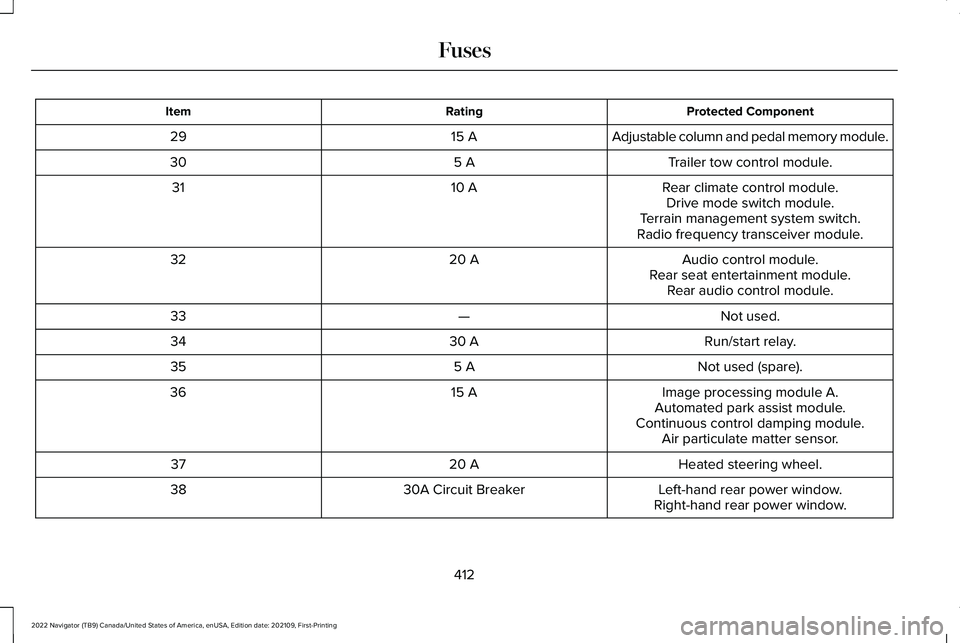
Protected Component
Rating
Item
Adjustable column and pedal memory module.
15 A
29
Trailer tow control module.
5 A
30
Rear climate control module.
10 A
31
Drive mode switch module.
Terrain management system switch.
Radio frequency transceiver module.
Audio control module.
20 A
32
Rear seat entertainment module.Rear audio control module.
Not used.
—
33
Run/start relay.
30 A
34
Not used (spare).
5 A
35
Image processing module A.
15 A
36
Automated park assist module.
Continuous control damping module. Air particulate matter sensor.
Heated steering wheel.
20 A
37
Left-hand rear power window.
30A Circuit Breaker
38
Right-hand rear power window.
412
2022 Navigator (TB9) Canada/United States of America, enUSA, Edition date: 202109, First-Printing Fuses
Page 429 of 646
If you disconnect or replace the battery and
your vehicle has an automatic transmission,
it must relearn its adaptive strategy. Because
of this, the transmission may shift firmly when
first driven. This is normal operation while
the transmission fully updates its operation
to optimum shift feel.
Battery Sensor Reset
When you install a new battery, reset the
battery sensor by doing the following:
1. Switch the ignition on, and leave the
engine off.
Note: Complete Steps 2 and 3 within 10
seconds.
2. Flash the high beam headlamps five times, ending with the high beams off.
3. Press and release the brake pedal three
times.
The battery warning lamp flashes three times
to confirm that the reset is successful. Battery Management System (If Equipped)
The system monitors battery conditions and
takes actions to extend battery life. If
excessive battery drain is detected, the
system temporarily disables some electrical
systems to protect the battery.
Systems included are:
• Heated rear window.
• Heated seats.
• Climate control.
• Heated steering wheel.
• Audio unit.
• Navigation system.
A message may appear in the information
display to alert you that battery protection
actions are active. This message is only for
notification that an action is taking place, and
not intended to indicate an electrical problem
or that the battery requires replacement. After battery replacement, or in some cases
after charging the battery with an external
charger, the battery management system
requires eight hours of vehicle sleep time to
relearn the battery state of charge. During
this time, your vehicle must remain fully
locked with the ignition switched off.
Note:
Prior to relearning the battery state of
charge, the battery management system
may temporarily disable some electrical
systems.
Electrical Accessory Installation
To make sure the battery management
system works correctly, do not connect an
electrical device ground connection directly
to the battery negative post. This can cause
inaccurate measurements of the battery
condition and potential incorrect system
operation.
Note: If you add electrical accessories or
components to the vehicle, it may adversely
affect battery performance and durability.
This may also affect the performance of
other electrical systems in the vehicle.
425
2022 Navigator (TB9) Canada/United States of America, enUSA, Edition date: 202109, First-Printing Maintenance
Page 439 of 646
PREPARING YOUR VEHICLE FOR
STORAGE
If you plan on storing your vehicle for 30
days or more, the following maintenance
recommendations ensures your vehicle stays
in good operating condition.
Under various conditions, long-term storage
may lead to degraded engine performance
or failure unless you use specific precautions
to preserve your vehicle.
General
•
Store all vehicles in a dry, ventilated
place.
• If vehicles are stored outside, they
require regular maintenance to protect
against rust and weather damage.
• Make sure all linkages, cables, levers and
pins under your vehicle are covered with
grease to prevent rust. •
Move vehicles at least 25 ft (7.5 m) every
15 days to lubricate working parts and
prevent corrosion.
• Fill the fuel tank with high-quality fuel
until the first automatic shutoff of the fuel
pump nozzle.
Engine
• Change the engine oil and filter prior to
storage because used engine oil contains
contaminants which may cause engine
damage.
• Start the engine every 15 days for a
minimum of 15 minutes. Run at fast idle
with the climate controls set to defrost
until the engine reaches normal
operating temperature.
• With your foot on the brake, shift through
all the gears while the engine is running. Body
•
Wash your vehicle thoroughly to remove
dirt, grease, oil, tar or mud from exterior
surfaces, rear-wheel housings and the
underside of front fenders.
• Periodically wash your vehicle if it is
stored in exposed locations.
• Touch-up exposed or primed metal to
prevent rust.
• Cover chrome and stainless steel parts
with a thick coat of auto wax to prevent
discoloration. Re-wax as necessary when
you wash your vehicle.
• Lubricate all hood, door and luggage
compartment hinges and latches with a
light grade oil.
• Cover interior trim to prevent fading.
• Keep all rubber parts free from oil and
solvents.
435
2022 Navigator (TB9) Canada/United States of America, enUSA, Edition date: 202109, First-Printing Storing Your Vehicle
Page 441 of 646
LOCATING THE TIRE LABEL
You will find a Tire Label containing tire
inflation pressure by tire size and other
important information located on the
B-Pillar or the edge of the driver's door.
See Locating the Safety Compliance
Certification Labels (page 336).
DEPARTMENT OF
TRANSPORTATION UNIFORM TIRE
QUALITY GRADES Tire Quality Grades apply to new
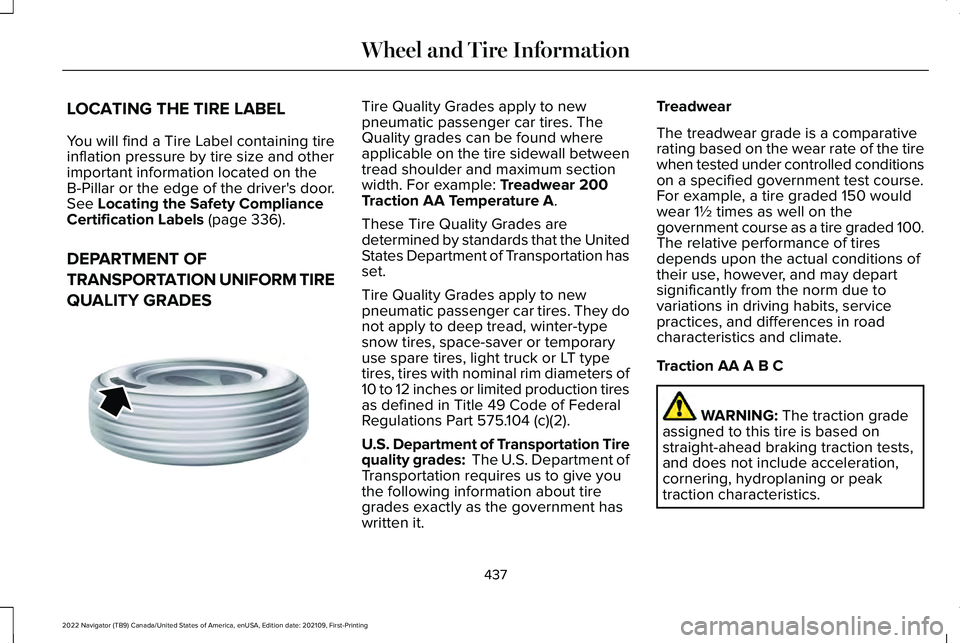
pneumatic passenger car tires. The
Quality grades can be found where
applicable on the tire sidewall between
tread shoulder and maximum section
width. For example:
Treadwear 200
Traction AA Temperature A.
These Tire Quality Grades are
determined by standards that the United
States Department of Transportation has
set.
Tire Quality Grades apply to new
pneumatic passenger car tires. They do
not apply to deep tread, winter-type
snow tires, space-saver or temporary
use spare tires, light truck or LT type
tires, tires with nominal rim diameters of
10 to 12 inches or limited production tires
as defined in Title 49 Code of Federal
Regulations Part 575.104 (c)(2).
U.S. Department of Transportation Tire
quality grades: The U.S. Department of
Transportation requires us to give you
the following information about tire
grades exactly as the government has
written it. Treadwear
The treadwear grade is a comparative
rating based on the wear rate of the tire
when tested under controlled conditions
on a specified government test course.
For example, a tire graded 150 would
wear 1½ times as well on the
government course as a tire graded 100.
The relative performance of tires
depends upon the actual conditions of
their use, however, and may depart
significantly from the norm due to
variations in driving habits, service
practices, and differences in road
characteristics and climate.
Traction AA A B C
WARNING:
The traction grade
assigned to this tire is based on
straight-ahead braking traction tests,
and does not include acceleration,
cornering, hydroplaning or peak
traction characteristics.
437
2022 Navigator (TB9) Canada/United States of America, enUSA, Edition date: 202109, First-Printing Wheel and Tire InformationE142542
Page 621 of 646
3
360 Degree Camera....................................261
360 Degree Camera Settings.........................263
360 Degree Camera Guide Lines...........262
360 Degree Camera Limitations..............262
360 Degree Camera Precautions.............261
360 Degree Camera Settings...................263 Switching the 360 Degree Camera On and
Off......................................................................263
Switching the 360 Degree Camera View..................................................................264
4
4WD See: Four-Wheel Drive......................................223
9
911 Assist...........................................................70
A
A/C See: Climate Control..........................................158
About This Publication...................................19 ABS
See: Brakes..........................................................233
Accessing Apps.............................................513
Accessing Navigation..................................518
Accessing the Passive Key Backup Position........................................................204
Accessories...................................................523
ActiveGlide ™
..................................................286
ActiveGlide ™ – Troubleshooting......................291
ActiveGlide ™ Alerts
......................................289
ActiveGlide ™ Automatic
Cancellation
................................................289
ActiveGlide ™ Indicators...............................290
ActiveGlide ™ Limitations.............................288
ActiveGlide ™ Precautions...........................286
ActiveGlide ™ Requirements.......................287
ActiveGlide ™ Settings..................................288
ActiveGlide ™ – Troubleshooting................291
ActiveGlide ™ – Information Messages...........291
Active Park Assist
.........................................265
Active Park Assist – Troubleshooting...........267
Active Park Assist Precautions.................265
Active Park Assist – Troubleshooting.........................................267
Active Park Assist – Frequently Asked Questions.........................................................267
Active Park Assist – Information Messages.........................................................267 Adaptive Cruise Control
.............................270
Adaptive Cruise Control –
Troubleshooting.............................................283
Intelligent Adaptive Cruise Control................281
Lane Centering...................................................279
Adaptive Cruise Control Automatic Cancellation................................................274
Adaptive Cruise Control Indicators.........278
Adaptive Cruise Control Limitations.........271
Adaptive Cruise Control Precautions.................................................270
Adaptive Cruise Control – Troubleshooting.........................................283
Adaptive Cruise Control – Information Messages.........................................................283
Adaptive Front Lighting...............................129 How Does Adaptive Front Lighting
Work...................................................................129
Switching Adaptive Front Lighting On and Off.......................................................................130
Adjustable Pedals
..........................................113
Adjusting the Exterior Mirrors....................137
Adjusting the Headlamps..........................426
Adjusting the Instrument Panel Lighting Brightness.....................................................132
Adjusting the Integrated Trailer Brake Controller Mode
.........................................358
617
2022 Navigator (TB9) Canada/United States of America, enUSA, Edition date: 202109, First-Printing Index
Page 622 of 646
Adjusting the Luggage Compartment
Divider..........................................................343
Adjusting the Luggage Compartment Load Floor..............................................................342
Adjusting the Map.........................................518
Changing the Format of the Map....................518
Zooming the Map In and Out...........................518
Adjusting the Pedals......................................113
Adjusting the Seatbelt Height
.....................56
Adjusting the Seatbelts During Pregnancy......................................................55
Adjusting the Sound Settings
...................489
Adjusting the Steering Wheel.....................112
Adjusting the Volume..................................489
Aid Mode.........................................................301 How Does Aid Mode Work...............................301
What Is Aid Mode................................................301
Airbag Precautions
.........................................63
Airbags...............................................................61
Front Passenger Sensing System....................65
Air Conditioning See: Climate Control..........................................158
Air Conditioning System Capacity and Specification................................................475
Alert and Aid Mode.....................................302 How Does Alert and Aid Mode Work............302
What Is Alert and Aid Mode............................302 Alert Mode
......................................................301
Adjusting the Steering Wheel Vibration
Intensity.............................................................301
How Does Alert Mode Work............................301
What Is Alert Mode.............................................301
AM/FM Radio.................................................490 AM/FM Radio Limitations.................................490
Selecting a Radio Station..................................
491
Ambient Lighting
...........................................132
Adjusting Ambient Lighting..............................132
Switching Ambient Lighting On and Off........132
Anti-Lock Braking System..........................233 Anti-Lock Braking System Limitations...........233
Anti-Theft Alarm System.............................106 Arming the Anti-Theft Alarm System..............107
Disarming the Anti-Theft Alarm System........107
How Does the Anti-Theft Alarm System
Work...................................................................106
What Are the Inclination Sensors....................107
What Are the Interior Sensors.........................106
What Is the Anti-Theft Alarm System.............106
What Is the Perimeter Alarm............................106
Anti-Theft Alarm System Settings.............107 Setting the Alarm Security Level.....................107
Switching Ask on Exit On and Off...................107
What are the Alarm Security Levels...............107
What Is Ask on Exit.............................................107
Appendices......................................................611 Applying the Electric Parking Brake........236
Applying the Electric Parking Brake in an
Emergency..................................................236
App Precautions
............................................513
App Requirements........................................513
Apps..................................................................513
Audio System................................................488
AM/FM Radio.......................................................490
Audio System – Troubleshooting..................496
Digital Radio..........................................................491
Satellite Radio.....................................................493
Audio System Precautions
.........................488
Audio System – Troubleshooting............496 Audio System – Information Messages.......
496
Auto-Dimming Exterior Mirror....................138 What Is the Auto-Dimming Exterior
Mirror..................................................................138
Auto-Dimming Interior Mirror.....................136 Auto-Dimming Interior Mirror
Limitations .........................................................136
What Is the Auto-Dimming Interior Mirror..................................................................136
Auto Hold
.......................................................244
Auto Hold Indicators...................................245
Autolamps........................................................121 Autolamp Settings................................................121
What Are Autolamps...........................................121
618
2022 Navigator (TB9) Canada/United States of America, enUSA, Edition date: 202109, First-Printing Index
Page 625 of 646
Catalytic Converter.......................................217
Catalytic Converter – Troubleshooting.........218
Catalytic Converter Precautions................217
Catalytic Converter – Troubleshooting..........................................218
Catalytic Converter – Warning Lamps...........
218
Center Console
.............................................199
Opening the Center Console...........................199
Center Display Limitations..........................501
Center Display Overview
............................501
Center Display Precautions........................501
Changing a Flat Tire.....................................461
Changing a Road Wheel.............................461
Changing the 12V Battery
..........................423
Changing the Fuel Filter.............................423
Changing the Language.............................150
Changing the Measurement Unit.............150
Changing the Radio Station......................500
Changing the Remote Control Battery......73
Changing the Temperature Unit...............150
Changing the Tire Pressure Unit..............150
Changing the Vehicle Wi-Fi Hotspot Name or Password
................................................486
Charging a Device........................................192
Charging a Wireless Device.......................197
Checking MyKey System Status.................84
Checking the Brake Fluid...........................233
Checking the Coolant..................................418 Checking the Seatbelts
.................................58
Checking the Tire Pressures.....................449
Checking the Wiper Blades.........................116
Children and Airbags.....................................65
Child Restraint Anchor Points
......................40
Locating the Child Restraint Lower Anchor
Points...................................................................40
Locating the Child Restraint Top Tether Anchor Points.....................................................41
What Are the Child Restraint Anchor Points...................................................................40
Child Restraints
................................................41
Child Restraint Position Information..................41
Child Restraints Recommendation...................43
Child Safety
......................................................39
Child Restraint Anchor Points............................40
Child Restraints.......................................................41
Installing Child Restraints....................................44
Child Safety Locks...........................................51
Child Safety Precautions
...............................39
Cleaning Products.......................................429
Cleaning the Exterior..................................430
Cleaning Camera Lenses and Sensors........432
Cleaning Chrome, Aluminium or Stainless
Steel....................................................................431
Cleaning Headlamps and Rear Lamps.........430
Cleaning Stripes or Graphics............................431
Cleaning the Engine Compartment................431 Cleaning the Exterior Precautions.................
430
Cleaning the Underbody..................................432
Cleaning Wheels..................................................431
Cleaning Windows and Wiper Blades..........
430
Cleaning the Interior....................................432 Cleaning Carpets and Floor Mats..................433
Cleaning Displays and Screens......................432
Cleaning Fabric Seats and Headliners.........433
Cleaning Leather and Vinyl..............................433
Cleaning Moonroof Tracks...............................434
Cleaning Plastic..................................................432
Cleaning Seatbelts.............................................434
Cleaning the Instrument Panel.......................
432
Clearing All MyKeys.......................................84
Clearing the Garage Door Opener
...........190
Climate Control..............................................158 Auto Mode............................................................160
Climate Control Hints
....................................161
Closing the Liftgate......................................100 Closing the Hands-Free Liftgate.....................102
Closing the Liftgate From Inside Your
Vehicle...............................................................100
Closing the Liftgate From Outside Your Vehicle................................................................101
Closing the Liftgate Using the Remote Control................................................................101
Cold Weather Precautions.........................384
621
2022 Navigator (TB9) Canada/United States of America, enUSA, Edition date: 202109, First-Printing Index
Page 630 of 646
How Does Glare Free Lighting Work.............126
Overriding Glare Free Lighting........................128
Switching Glare Free Lighting On and
Off.......................................................................128
Glare Free Lighting – Troubleshooting..........................................129
Glare Free Lighting – Information Messages..........................................................129
Global Opening and Closing......................133 Switching Global Closing On and Off............134
Switching Global Opening On and Off..........134
Using Global Closing..........................................134
Using Global Opening........................................134
What Is Global Opening and Closing.............133
Glossary of Tire Terminology
....................443
Glove Compartment.....................................199 Opening the Glove Compartment..................
199
H
Headlamp Adjusting See: Adjusting the Headlamps.......................426
Headlamps......................................................120 Adjusting the Level of the Headlamps..........120
Headlamp Indicators..........................................120
Switching Headlamp Exit Delay On and
Off.......................................................................120
Using the High Beam Headlamps..................120 Headlamps – Troubleshooting
...................121
Headlamps – Frequently Asked
Questions...........................................................121
Head Up Display
............................................151
Head Up Display – Troubleshooting..............154
Head Up Display Indicators........................153
Head Up Display Settings............................151
Head Up Display – Troubleshooting
........154
Head Up Display – Information
Messages..........................................................154
Heated Seats..................................................172 Heated Seat Precautions..................................172
Switching the Heated Seats On and Off.......172
Heating See: Climate Control..........................................158
Hill Descent Control.....................................251 Hill Descent Control – Troubleshooting.......252
Hill Descent Control Indicator..................252
Hill Descent Control Precautions..............251
Hill Descent Control – Troubleshooting.........................................252
Hill Descent Control – Information Messages.........................................................252
Hill Start Assist..............................................243 Hill Start Assist – Troubleshooting.................
243
Hill Start Assist Precautions
.......................243 Hill Start Assist – Troubleshooting
...........243
Hill Start Assist – Information
Messages.........................................................243
Hitches............................................................345 Hooking Up a Trailer Using a
Weight-Distributing Hitch.............................346
Installing a Hitch.................................................345
Hood Lock See: Opening and Closing the Hood.............414
Horn...................................................................112
How Does 911 Assist Work...........................70
How Does ActiveGlide ™ Work..................286
How Does Active Park Assist Work.........265
How Does Adaptive Cruise Control With Stop and Go Work.....................................270
How Does Auto Hold Work.......................244
How Does Blind Spot Information System Work................................................................311
How Does Cross Traffic Alert Work..........316
How Does Drive Mode Control Work..............................................................293
How Does Driver Alert Work.....................330
How Does Easy Entry and Exit Work.........97
How Does Four-Wheel Drive Work
.........223
How Does Hill Descent Control Work...............................................................251
How Does Hill Start Assist Work..............243
How Does Pre-Collision Assist Work......320
626
2022 Navigator (TB9) Canada/United States of America, enUSA, Edition date: 202109, First-Printing Index