service schedule LINCOLN NAVIGATOR 2022 User Guide
[x] Cancel search | Manufacturer: LINCOLN, Model Year: 2022, Model line: NAVIGATOR, Model: LINCOLN NAVIGATOR 2022Pages: 646, PDF Size: 7.29 MB
Page 541 of 646

Towing a Trailer or Using a Car-top Carrier
Change engine oil and filter as indicated by the information display and\
perform services listed in the Normal
Scheduled Maintenance chart.
As required
Inspect and lubricate U-joints (if equipped with grease fittings).
Inspect frequently, service
as required
See axle maintenance items under Exceptions.
Change transfer case fluid (Four-wheel drive vehicles).
Every
60,000 mi
(96,000 km) Replace spark plugs. Extensive Idling or Low-speed Driving for Long Distances, as in Heavy Commercial Use
Change engine oil and filter as indicated by the information display and\
perform services listed in the Normal
Scheduled Maintenance chart.
As required
Replace engine air filter.
Inspect frequently, service
as required
Replace cabin air filter.
Change transfer case fluid (Four-wheel drive vehicles).
Every
60,000 mi
(96,000 km) Replace spark plugs.
537
2022 Navigator (TB9) Canada/United States of America, enUSA, Edition date: 202109, First-Printing Scheduled Maintenance
Page 542 of 646
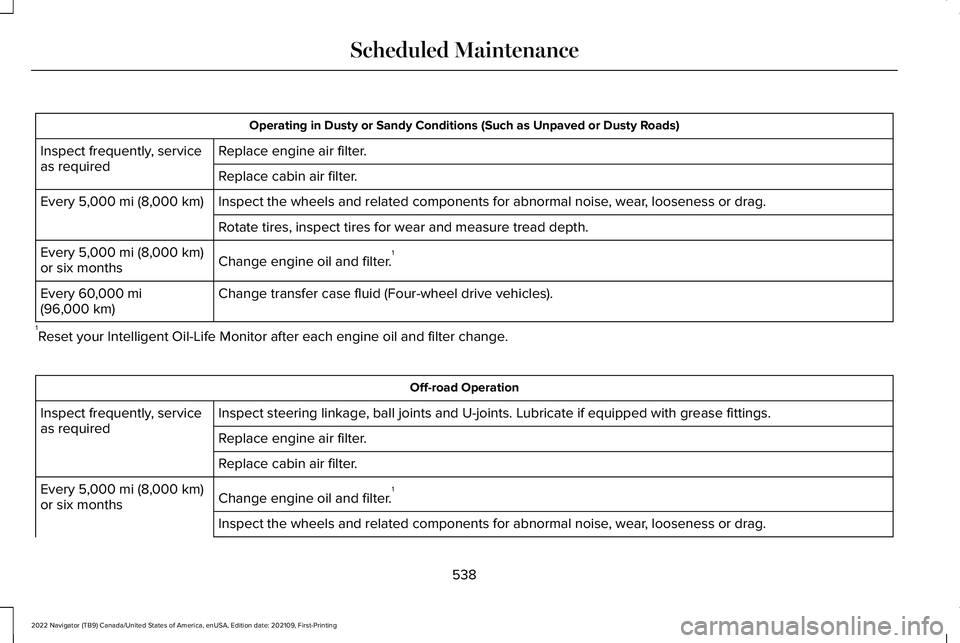
Operating in Dusty or Sandy Conditions (Such as Unpaved or Dusty Roads)
Replace engine air filter.
Inspect frequently, service
as required
Replace cabin air filter.
Inspect the wheels and related components for abnormal noise, wear, looseness or drag.
Every 5,000 mi (8,000 km)
Rotate tires, inspect tires for wear and measure tread depth.
Change engine oil and filter. 1
Every
5,000 mi (8,000 km)
or six months
Change transfer case fluid (Four-wheel drive vehicles).
Every
60,000 mi
(96,000 km)
1 Reset your Intelligent Oil-Life Monitor after each engine oil and filter \
change. Off-road Operation
Inspect steering linkage, ball joints and U-joints. Lubricate if equipped with grease fittings.
Inspect frequently, service
as required
Replace engine air filter.
Replace cabin air filter.
Change engine oil and filter.1
Every
5,000 mi (8,000 km)
or six months
Inspect the wheels and related components for abnormal noise, wear, looseness or drag.
538
2022 Navigator (TB9) Canada/United States of America, enUSA, Edition date: 202109, First-Printing Scheduled Maintenance
Page 543 of 646
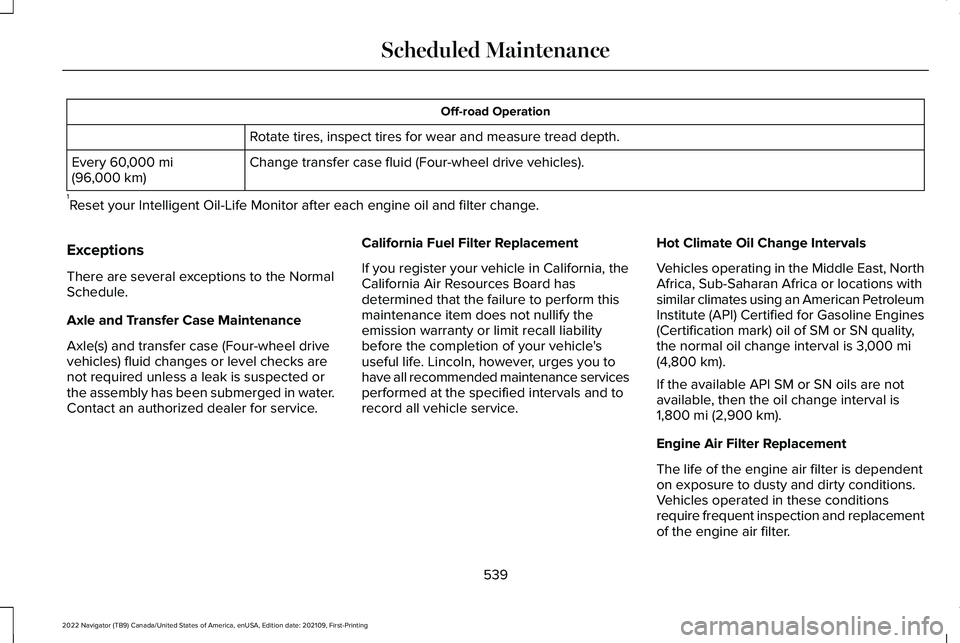
Off-road Operation
Rotate tires, inspect tires for wear and measure tread depth.
Change transfer case fluid (Four-wheel drive vehicles).
Every 60,000 mi
(96,000 km)
1 Reset your Intelligent Oil-Life Monitor after each engine oil and filter \
change.
Exceptions
There are several exceptions to the Normal
Schedule.
Axle and Transfer Case Maintenance
Axle(s) and transfer case (Four-wheel drive
vehicles) fluid changes or level checks are
not required unless a leak is suspected or
the assembly has been submerged in water.
Contact an authorized dealer for service. California Fuel Filter Replacement
If you register your vehicle in California, the
California Air Resources Board has
determined that the failure to perform this
maintenance item does not nullify the
emission warranty or limit recall liability
before the completion of your vehicle's
useful life. Lincoln, however, urges you to
have all recommended maintenance services
performed at the specified intervals and to
record all vehicle service.Hot Climate Oil Change Intervals
Vehicles operating in the Middle East, North
Africa, Sub-Saharan Africa or locations with
similar climates using an American Petroleum
Institute (API) Certified for Gasoline Engines
(Certification mark) oil of SM or SN quality,
the normal oil change interval is
3,000 mi
(4,800 km).
If the available API SM or SN oils are not
available, then the oil change interval is
1,800 mi (2,900 km)
.
Engine Air Filter Replacement
The life of the engine air filter is dependent
on exposure to dusty and dirty conditions.
Vehicles operated in these conditions
require frequent inspection and replacement
of the engine air filter.
539
2022 Navigator (TB9) Canada/United States of America, enUSA, Edition date: 202109, First-Printing Scheduled Maintenance
Page 544 of 646
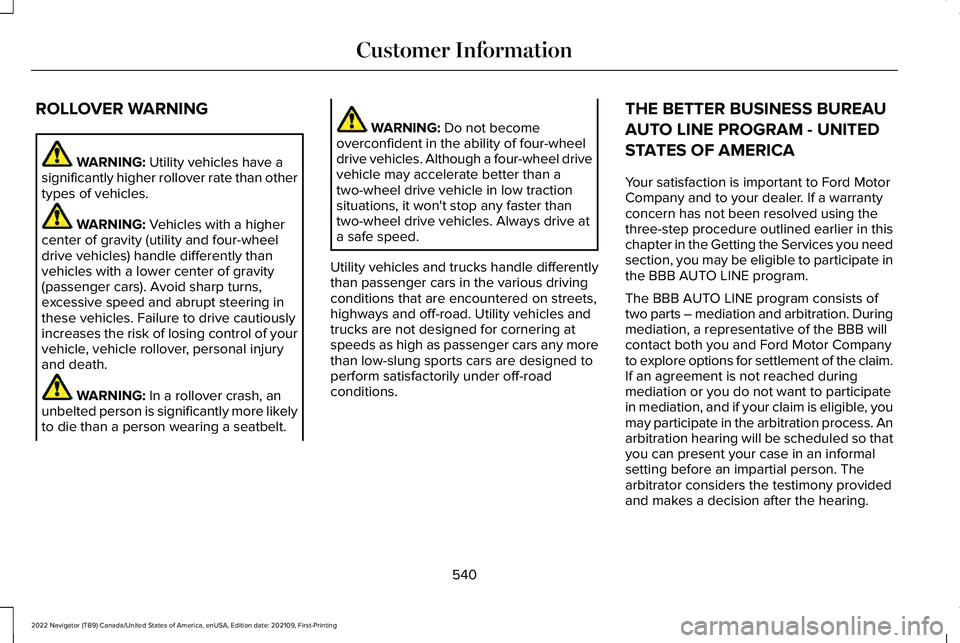
ROLLOVER WARNING
WARNING: Utility vehicles have a
significantly higher rollover rate than other
types of vehicles. WARNING:
Vehicles with a higher
center of gravity (utility and four-wheel
drive vehicles) handle differently than
vehicles with a lower center of gravity
(passenger cars). Avoid sharp turns,
excessive speed and abrupt steering in
these vehicles. Failure to drive cautiously
increases the risk of losing control of your
vehicle, vehicle rollover, personal injury
and death. WARNING:
In a rollover crash, an
unbelted person is significantly more likely
to die than a person wearing a seatbelt. WARNING:
Do not become
overconfident in the ability of four-wheel
drive vehicles. Although a four-wheel drive
vehicle may accelerate better than a
two-wheel drive vehicle in low traction
situations, it won't stop any faster than
two-wheel drive vehicles. Always drive at
a safe speed.
Utility vehicles and trucks handle differently
than passenger cars in the various driving
conditions that are encountered on streets,
highways and off-road. Utility vehicles and
trucks are not designed for cornering at
speeds as high as passenger cars any more
than low-slung sports cars are designed to
perform satisfactorily under off-road
conditions. THE BETTER BUSINESS BUREAU
AUTO LINE PROGRAM - UNITED
STATES OF AMERICA
Your satisfaction is important to Ford Motor
Company and to your dealer. If a warranty
concern has not been resolved using the
three-step procedure outlined earlier in this
chapter in the Getting the Services you need
section, you may be eligible to participate in
the BBB AUTO LINE program.
The BBB AUTO LINE program consists of
two parts – mediation and arbitration. During
mediation, a representative of the BBB will
contact both you and Ford Motor Company
to explore options for settlement of the claim.
If an agreement is not reached during
mediation or you do not want to participate
in mediation, and if your claim is eligible, you
may participate in the arbitration process. An
arbitration hearing will be scheduled so that
you can present your case in an informal
setting before an impartial person. The
arbitrator considers the testimony provided
and makes a decision after the hearing.
540
2022 Navigator (TB9) Canada/United States of America, enUSA, Edition date: 202109, First-Printing Customer Information
Page 581 of 646
REPLACEMENT PARTS
RECOMMENDATION
We have built your vehicle to the highest
standards using quality parts. We
recommend that you demand the use of
genuine Ford and Motorcraft parts whenever
your vehicle requires scheduled
maintenance or repair. You can clearly
identify genuine Ford and Motorcraft parts
by looking for the Ford, FoMoCo or
Motorcraft branding on the parts or their
packaging.
Scheduled Maintenance and
Mechanical Repairs
One of the best ways for you to make sure
that your vehicle provides years of service
is to have it maintained in line with our
recommendations using parts that conform
to the specifications detailed in this Owner’
s
Manual.
Genuine Ford and Motorcraft parts meet or
exceed these specifications. Collision Repairs
We hope that you never experience a
collision, but accidents happen sometimes.
Genuine Ford replacement collision parts
meet our stringent requirements for fit, finish,
structural integrity, corrosion protection and
dent resistance. During vehicle development
we validate that these parts deliver the
intended level of protection as a whole
system. A great way to know for sure you
are getting this level of protection is to use
genuine Ford replacement collision parts.
Warranty on Replacement Parts
Genuine Ford and Motorcraft replacement
parts are the only replacement parts that
benefit from a Ford Warranty.
The Ford Warranty may not cover damage
caused to your vehicle as a result of failed
non-Ford parts.
For additional information, refer to the terms
and conditions of the Ford Warranty.
MOBILE COMMUNICATIONS
EQUIPMENT WARNING: Driving while distracted
can result in loss of vehicle control, crash
and injury. We strongly recommend that
you use extreme caution when using any
device that may take your focus off the
road. Your primary responsibility is the safe
operation of your vehicle. We recommend
against the use of any hand-held device
while driving and encourage the use of
voice-operated systems when possible.
Make sure you are aware of all applicable
local laws that may affect the use of
electronic devices while driving.
Using mobile communications equipment is
becoming increasingly important in the
conduct of business and personal affairs.
However, you must not compromise your
own or others ’ safety when using such
equipment. Mobile communications can
enhance personal safety and security when
appropriately used, particularly in emergency
situations. Safety must be paramount when
577
2022 Navigator (TB9) Canada/United States of America, enUSA, Edition date: 202109, First-Printing Customer Information
Page 638 of 646
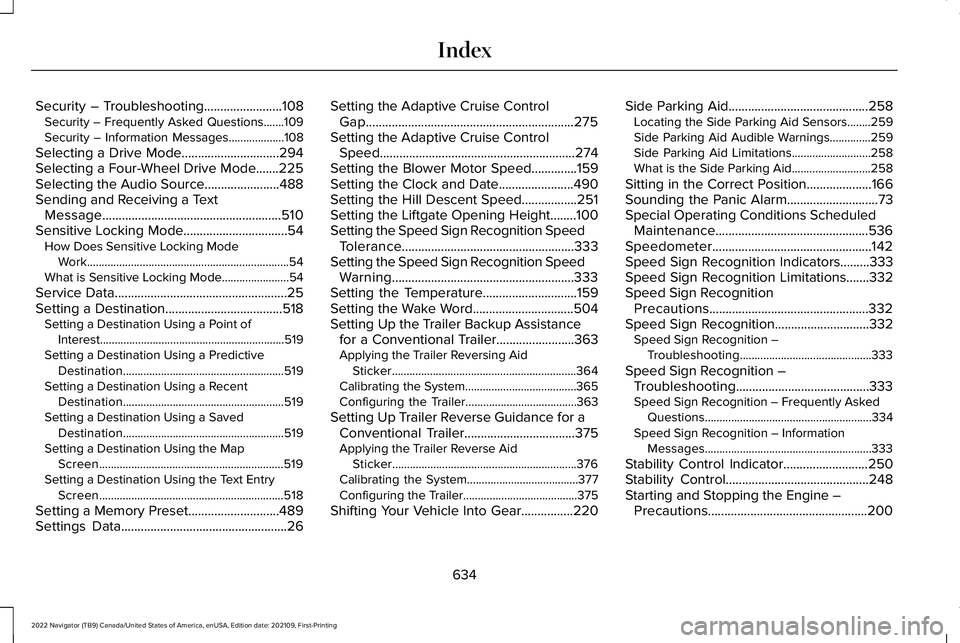
Security – Troubleshooting........................108
Security – Frequently Asked Questions.......109
Security – Information Messages...................108
Selecting a Drive Mode..............................294
Selecting a Four-Wheel Drive Mode
.......225
Selecting the Audio Source.......................488
Sending and Receiving a Text Message.......................................................510
Sensitive Locking Mode
................................54
How Does Sensitive Locking Mode
Work.....................................................................54
What is Sensitive Locking Mode.......................
54
Service Data.....................................................25
Setting a Destination....................................518 Setting a Destination Using a Point of
Interest...............................................................519
Setting a Destination Using a Predictive Destination.......................................................519
Setting a Destination Using a Recent Destination.......................................................519
Setting a Destination Using a Saved Destination.......................................................519
Setting a Destination Using the Map Screen...............................................................519
Setting a Destination Using the Text Entry Screen...............................................................518
Setting a Memory Preset............................489
Settings Data...................................................26 Setting the Adaptive Cruise Control
Gap................................................................275
Setting the Adaptive Cruise Control Speed............................................................274
Setting the Blower Motor Speed
..............159
Setting the Clock and Date.......................490
Setting the Hill Descent Speed.................251
Setting the Liftgate Opening Height........100
Setting the Speed Sign Recognition Speed Tolerance.....................................................333
Setting the Speed Sign Recognition Speed Warning........................................................333
Setting the Temperature
.............................159
Setting the Wake Word...............................504
Setting Up the Trailer Backup Assistance for a Conventional Trailer........................363
Applying the Trailer Reversing Aid Sticker...............................................................364
Calibrating the System......................................365
Configuring the Trailer......................................363
Setting Up Trailer Reverse Guidance for a Conventional Trailer
..................................375
Applying the Trailer Reverse Aid
Sticker...............................................................376
Calibrating the System......................................377
Configuring the Trailer.......................................375
Shifting Your Vehicle Into Gear
................220 Side Parking Aid
...........................................258
Locating the Side Parking Aid Sensors........259
Side Parking Aid Audible Warnings..............259
Side Parking Aid Limitations...........................258
What is the Side Parking Aid...........................258
Sitting in the Correct Position
....................166
Sounding the Panic Alarm............................73
Special Operating Conditions Scheduled Maintenance...............................................536
Speedometer.................................................142
Speed Sign Recognition Indicators.........333
Speed Sign Recognition Limitations.......332
Speed Sign Recognition Precautions.................................................332
Speed Sign Recognition.............................332 Speed Sign Recognition –
Troubleshooting.............................................333
Speed Sign Recognition – Troubleshooting.........................................333
Speed Sign Recognition – Frequently Asked Questions.........................................................334
Speed Sign Recognition – Information Messages.........................................................333
Stability Control Indicator..........................250
Stability Control............................................248
Starting and Stopping the Engine – Precautions.................................................200
634
2022 Navigator (TB9) Canada/United States of America, enUSA, Edition date: 202109, First-Printing Index