towing LINCOLN NAVIGATOR 2022 User Guide
[x] Cancel search | Manufacturer: LINCOLN, Model Year: 2022, Model line: NAVIGATOR, Model: LINCOLN NAVIGATOR 2022Pages: 646, PDF Size: 7.29 MB
Page 274 of 646
HOW DOES ADAPTIVE CRUISE
CONTROL WITH STOP AND GO
WORK
Adaptive cruise control with stop and go
uses radar and camera sensors to maintain
a set gap between your vehicle and the
vehicle in front of you while following it to a
complete stop. Stop and go can also be set
to follow a vehicle directly in front of you and
adjust the set speed, while you are at a
complete stop.
ADAPTIVE CRUISE CONTROL
PRECAUTIONS
WARNING: You are responsible for
controlling your vehicle at all times. The
system is designed to be an aid and does
not relieve you of your responsibility to
drive with due care and attention. Failure
to follow this instruction could result in the
loss of control of your vehicle, personal
injury or death. WARNING:
Do not use adaptive
cruise control on winding roads, in heavy
traffic or when the road surface is slippery.
This could result in loss of vehicle control,
serious injury or death. WARNING:
Pay close attention to
changing road conditions such as entering
or leaving a highway, on roads with
intersections or roundabouts, roads
without visible lanes of travel, roads that
are unpaved, or steep slopes. Failure to
follow this instruction could result in the
loss of control of your vehicle, personal
injury or death. WARNING:
The system is not a crash
warning or avoidance system. WARNING:
Do not use the system
when towing a trailer that has aftermarket
electronic trailer brake controls. Failure to
follow this instruction could result in the
loss of control of your vehicle, personal
injury or death. WARNING:
Do not use tire sizes
other than those recommended because
this can affect the normal operation of the
system. Failure to do so may result in a loss
of vehicle control, which could result in
serious injury. WARNING:
Do not use the system
with a snow plow blade installed. WARNING:
Do not use the system in
poor visibility, for example fog, heavy rain,
spray or snow.
When Following a Vehicle WARNING: When following a vehicle
that is braking, your vehicle does not
always decelerate quickly enough to avoid
a crash without driver intervention. Apply
the brakes when necessary. Failure to
follow this instruction could result in
personal injury or death.
270
2022 Navigator (TB9) Canada/United States of America, enUSA, Edition date: 202109, First-Printing Adaptive Cruise Control
Page 283 of 646
1. Press Features on the touchscreen.
2. Press
Driver Assistance.
3. Press
Cruise Control.
4. Press
Normal Cruise Control. The cruise control indicator
replaces the adaptive cruise
control indicator if you select
normal cruise control. The gap setting does
not display, and the system does not respond
to lead vehicles. Automatic braking remains
active to maintain set speed. The system
remembers the last setting when you start
your vehicle.
LANE CENTERING
HOW DOES LANE CENTERING WORK
Adaptive cruise control with lane centering
uses radar and camera sensors to help keep
your vehicle in the middle of the lane by
applying continuous assistance steering
torque input toward the lane center on
highways. Note:
The adaptive cruise control gap setting
operates normally.
If you drive off-center within the lane, the
system sets and maintains that preferred lane
position. The system provides continuous
assistance steering torque input toward the
preferred position.
Note: The system can only set preferred lane
positions within the lane.
Note: If the system cancels, the preferred
position erases. On the next activation, the
system provides continuous assistance
steering torque input toward the lane center.
LANE CENTERING PRECAUTIONS WARNING:
Do not use the system
when towing a trailer. Failure to follow this
instruction could result in the loss of
control of your vehicle, personal injury or
death. WARNING: Do not use the system if
any changes or modifications to the
steering wheel have been made. Any
changes or modifications to the steering
wheel could affect the functionality or
performance of the system. Failure to
follow this instruction could result in the
loss of control of your vehicle, personal
injury or death.
Adaptive cruise control precautions apply to
lane centering unless stated otherwise or
contradicted by a lane centering precaution.
See
Adaptive Cruise Control Precautions
(page 270).
LANE CENTERING REQUIREMENTS
You must keep your hands on the steering
wheel at all times.
279
2022 Navigator (TB9) Canada/United States of America, enUSA, Edition date: 202109, First-Printing Adaptive Cruise ControlE332905
Page 290 of 646
WHAT IS ACTIVEGLIDE™
ActiveGlide keeps your vehicle centered in
the lane and offers a hands-free driving
mode in certain situations when using
adaptive cruise control.
HOW DOES ACTIVEGLIDE™ WORK
ActiveGlide uses cameras to monitor your
vehicle position within a lane and applies
steering support to keep your vehicle
centered in the lane.
Using the cameras and location information,
ActiveGlide allows you to remove your hands
from the steering wheel and offers a
hands-free driving mode in certain areas.
When active, ActiveGlide uses a driver facing
camera and infrared lighting to monitor your
eyes and head position to detect if you are
distracted. If the system determines you are
distracted, it alerts you to return your eyes
to the road.
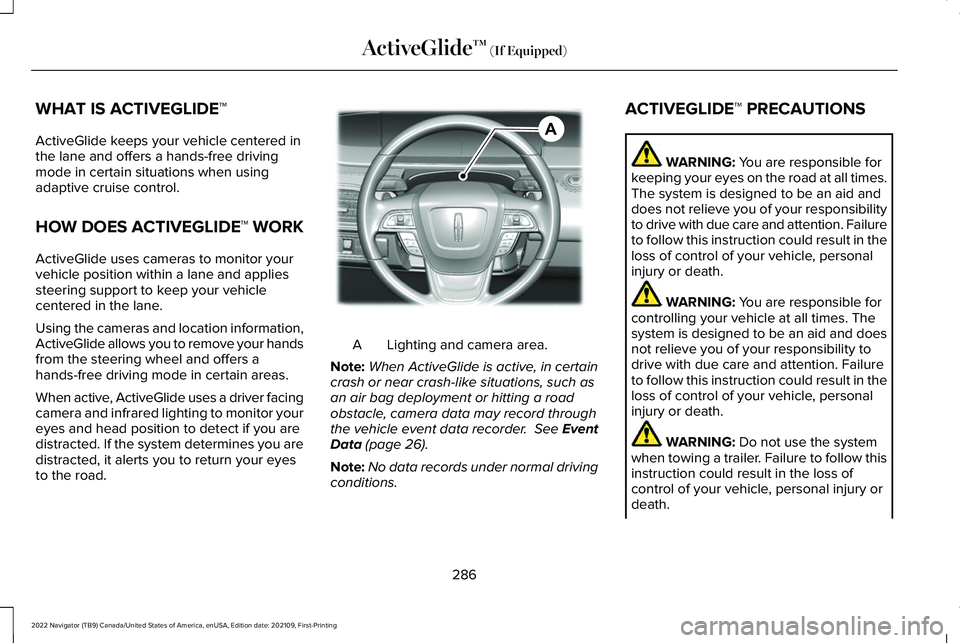
Lighting and camera area.
A
Note: When ActiveGlide is active, in certain
crash or near crash-like situations, such as
an air bag deployment or hitting a road
obstacle, camera data may record through
the vehicle event data recorder. See Event
Data (page 26).
Note: No data records under normal driving
conditions. ACTIVEGLIDE™ PRECAUTIONS WARNING:
You are responsible for
keeping your eyes on the road at all times.
The system is designed to be an aid and
does not relieve you of your responsibility
to drive with due care and attention. Failure
to follow this instruction could result in the
loss of control of your vehicle, personal
injury or death. WARNING:
You are responsible for
controlling your vehicle at all times. The
system is designed to be an aid and does
not relieve you of your responsibility to
drive with due care and attention. Failure
to follow this instruction could result in the
loss of control of your vehicle, personal
injury or death. WARNING:
Do not use the system
when towing a trailer. Failure to follow this
instruction could result in the loss of
control of your vehicle, personal injury or
death.
286
2022 Navigator (TB9) Canada/United States of America, enUSA, Edition date: 202109, First-Printing ActiveGlide™
(If Equipped)AE351152
Page 321 of 646
CROSS TRAFFIC ALERT
LIMITATIONS
The system may not correctly operate when
any of the following occur:
•
Something is blocking the sensors.
• Adjacently parked vehicles or objects are
obstructing the sensors.
• Vehicles approach at speeds less than
4 mph (6 km/h) or greater than 37 mph
(60 km/h).
• Your vehicle speed is greater than 7 mph
(12 km/h)
.
• You reverse out of an angled parking
space. Cross Traffic Alert Limitations with a
Trailer Attached
The system remains on when you attach a
trailer in vehicles with blind spot information
system with trailer tow under the following
conditions:
•
You connect a trailer.
• The trailer is a bike rack or cargo rack
with a maximum length of
3 ft (1 m).
• You set the trailer length to
3 ft (1 m) in
the instrument cluster display.
Note: The system may not correctly operate
when towing a trailer. For vehicles with an
approved trailer tow module and tow bar,
the system turns off when you attach a
trailer. For vehicles with an aftermarket
trailer tow module or tow bar, we
recommend that you switch the system off
when you attach a trailer.
SWITCHING CROSS TRAFFIC
ALERT ON AND OFF
To switch cross traffic alert on or off use the
touchscreen. 1. Press
Features on the touchscreen.
2. Press
Driver Assistance.
3. Switch
Cross Traffic Alert on or off.
Note: The system switches on every time
you switch the ignition on. To permanently
switch the system off, contact an authorized
dealer.
LOCATING THE CROSS TRAFFIC
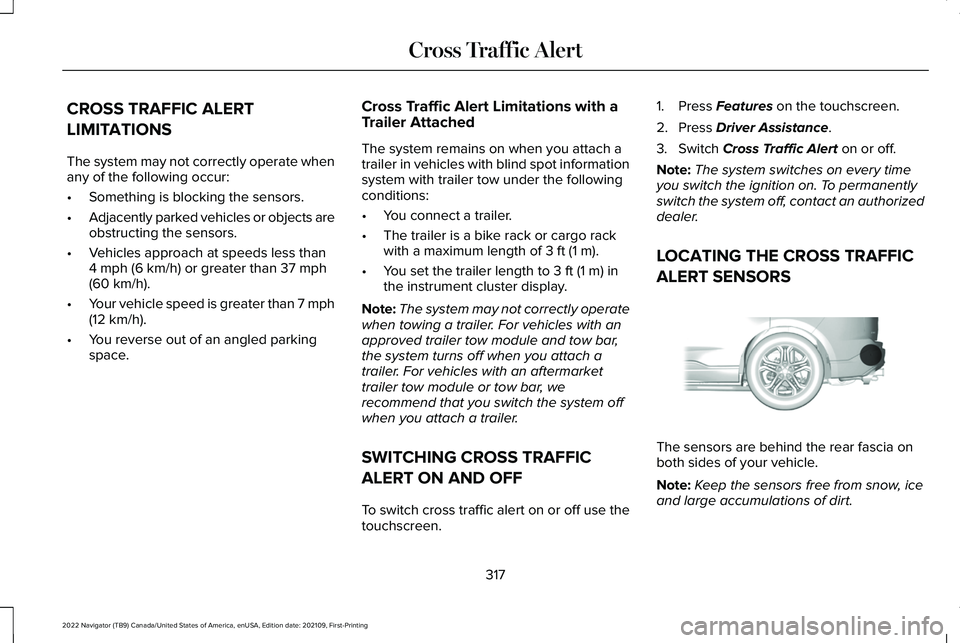
ALERT SENSORS The sensors are behind the rear fascia on
both sides of your vehicle.
Note:
Keep the sensors free from snow, ice
and large accumulations of dirt.
317
2022 Navigator (TB9) Canada/United States of America, enUSA, Edition date: 202109, First-Printing Cross Traffic AlertE205199
Page 325 of 646
WARNING: The system may fail or
operate with reduced function during cold
and severe weather conditions. Snow, ice,
rain, spray and fog can adversely affect the
system. Keep the front camera and radar
free of snow and ice. Failure to take care
may result in the loss of control of your
vehicle, serious personal injury or death. WARNING:
Take additional care if
your vehicle is heavily loaded or you are
towing a trailer. These conditions could
result in reduced performance of this
system. Failure to follow this instruction
could result in the loss of control of your
vehicle, personal injury or death. WARNING:
The system cannot help
prevent all crashes. Do not rely on this
system to replace driver judgment and the
need to maintain a safe distance and
speed. WARNING:
In situations where the
vehicle camera has limited detection
capability, this may reduce system
performance. These situations include but
are not limited to direct or low sunlight,
vehicles at night without tail lights,
unconventional vehicle types, pedestrians
with complex backgrounds, running
pedestrians, partly obscured pedestrians,
or pedestrians that the system cannot
distinguish from a group. Failure to take
care may result in the loss of control of
your vehicle, serious personal injury or
death.
PRE-COLLISION ASSIST
LIMITATIONS
Pre-collision assist depends on the detection
ability of its camera and sensors. Any
obstructions or damage to these areas can
limit detection or prevent the system from
functioning.
See Locating the Pre-Collision
Assist Sensors (page 323). The system is active at speeds above 3 mph
(5 km/h)
.
Note: The pre-collision assist system
automatically disables when you select
four-wheel drive low or manually disable
AdvanceTrac ™.
Note: Brake support and automatic
emergency braking are active at speeds up
to
80 mph (130 km/h). If your vehicle has a
radar sensor included with adaptive cruise
control, then brake support and automatic
emergency braking are active up to the
maximum speed of your vehicle.
Pedestrian Detection Limitations
Pedestrian detection is active at speeds up
to
50 mph (80 km/h).
Pedestrian detection operates optimally
when detected hazards are clearly
identifiable. System performance may reduce
in situations where pedestrians are running,
partly obscured, have a complex
background, or cannot be distinguished from
a group.
321
2022 Navigator (TB9) Canada/United States of America, enUSA, Edition date: 202109, First-Printing Pre-Collision Assist
Page 340 of 646
LOCATING THE SAFETY
COMPLIANCE CERTIFICATION
LABELS
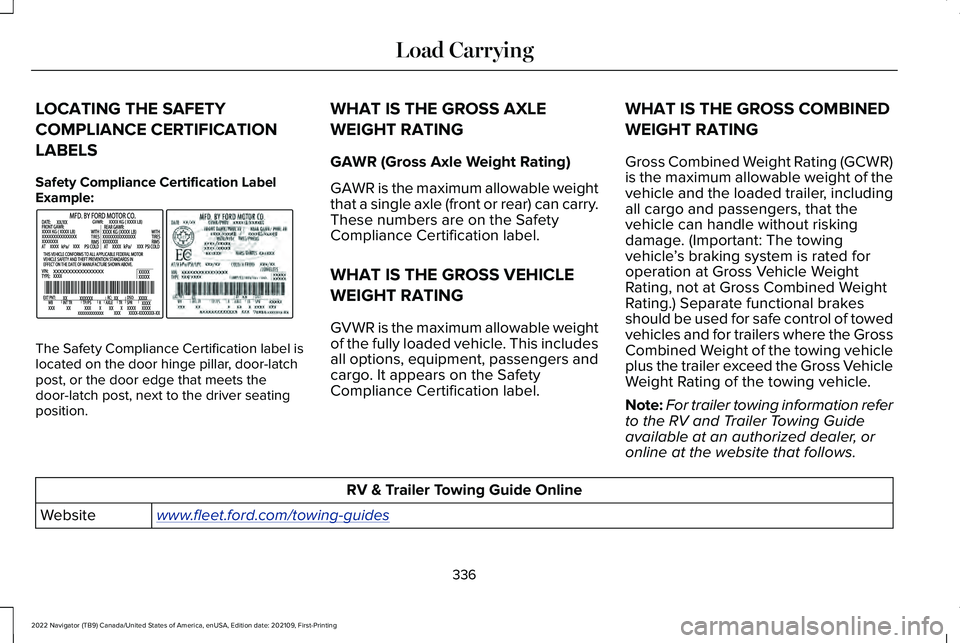
Safety Compliance Certification Label
Example:
The Safety Compliance Certification label is
located on the door hinge pillar, door-latch
post, or the door edge that meets the
door-latch post, next to the driver seating
position. WHAT IS THE GROSS AXLE
WEIGHT RATING
GAWR (Gross Axle Weight Rating)
GAWR is the maximum allowable weight
that a single axle (front or rear) can carry.
These numbers are on the Safety
Compliance Certification label.
WHAT IS THE GROSS VEHICLE
WEIGHT RATING
GVWR is the maximum allowable weight
of the fully loaded vehicle. This includes
all options, equipment, passengers and
cargo. It appears on the Safety
Compliance Certification label.
WHAT IS THE GROSS COMBINED
WEIGHT RATING
Gross Combined Weight Rating (GCWR)
is the maximum allowable weight of the
vehicle and the loaded trailer, including
all cargo and passengers, that the
vehicle can handle without risking
damage. (Important: The towing
vehicle
’s braking system is rated for
operation at Gross Vehicle Weight
Rating, not at Gross Combined Weight
Rating.) Separate functional brakes
should be used for safe control of towed
vehicles and for trailers where the Gross
Combined Weight of the towing vehicle
plus the trailer exceed the Gross Vehicle
Weight Rating of the towing vehicle.
Note: For trailer towing information refer
to the RV and Trailer Towing Guide
available at an authorized dealer, or
online at the website that follows. RV & Trailer Towing Guide Online
www . fleet. ford. com/towing-guidesWebsite
336
2022 Navigator (TB9) Canada/United States of America, enUSA, Edition date: 202109, First-Printing Load CarryingE198828
Page 341 of 646
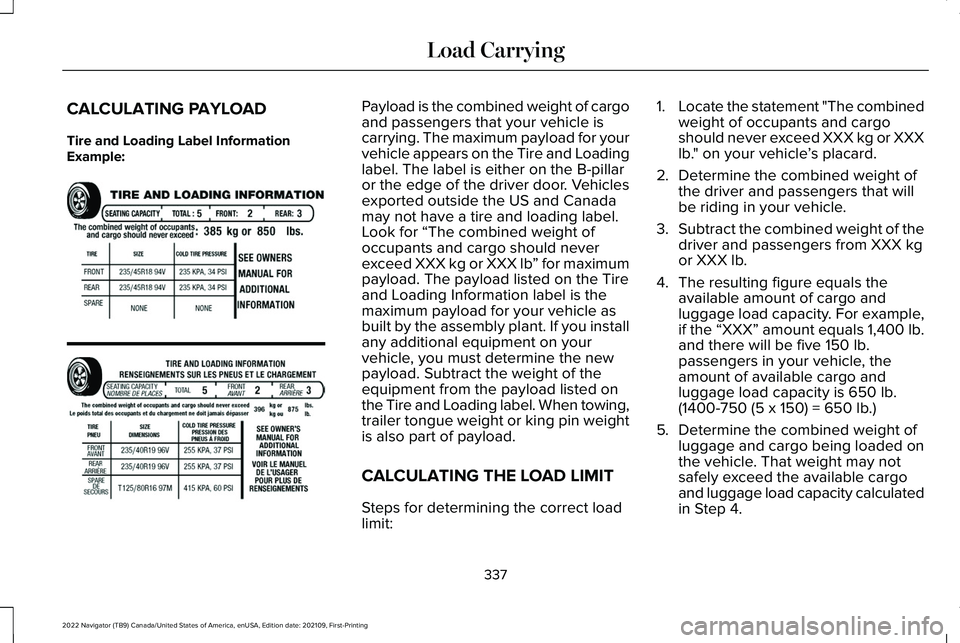
CALCULATING PAYLOAD
Tire and Loading Label Information
Example: Payload is the combined weight of cargo
and passengers that your vehicle is
carrying. The maximum payload for your
vehicle appears on the Tire and Loading
label. The label is either on the B-pillar
or the edge of the driver door. Vehicles
exported outside the US and Canada
may not have a tire and loading label.
Look for “The combined weight of
occupants and cargo should never
exceed XXX kg or XXX lb
” for maximum
payload. The payload listed on the Tire
and Loading Information label is the
maximum payload for your vehicle as
built by the assembly plant. If you install
any additional equipment on your
vehicle, you must determine the new
payload. Subtract the weight of the
equipment from the payload listed on
the Tire and Loading label. When towing,
trailer tongue weight or king pin weight
is also part of payload.
CALCULATING THE LOAD LIMIT
Steps for determining the correct load
limit: 1.
Locate the statement "The combined
weight of occupants and cargo
should never exceed XXX kg or XXX
lb." on your vehicle ’s placard.
2. Determine the combined weight of
the driver and passengers that will
be riding in your vehicle.
3. Subtract the combined weight of the
driver and passengers from XXX kg
or XXX lb.
4. The resulting figure equals the available amount of cargo and
luggage load capacity. For example,
if the “XXX” amount equals 1,400 lb.
and there will be five 150 lb.
passengers in your vehicle, the
amount of available cargo and
luggage load capacity is 650 lb.
(1400-750 (5 x 150) = 650 lb.)
5. Determine the combined weight of
luggage and cargo being loaded on
the vehicle. That weight may not
safely exceed the available cargo
and luggage load capacity calculated
in Step 4.
337
2022 Navigator (TB9) Canada/United States of America, enUSA, Edition date: 202109, First-Printing Load CarryingE198719
Page 342 of 646
6.
If your vehicle will be towing a trailer,
load from your trailer will be
transferred to your vehicle. Consult
this manual to determine how this
reduces the available cargo and
luggage load capacity of your
vehicle.
Helpful examples for calculating the
available amount of cargo and luggage
load capacity
Suppose your vehicle has a 1400-pound
(635-kilogram) cargo and luggage
capacity. You decide to go golfing. Is
there enough load capacity to carry you,
four of your friends and all the golf bags?
You and four friends average 220
pounds (99 kilograms) each and the golf
bags weigh approximately 30 pounds
(13.5 kilograms) each. The calculation
would be: 1400 - (5 x 220) - (5 x 30) =
1400 - 1100 - 150 = 150 pounds. Yes, you have enough load capacity in your
vehicle to transport four friends and your
golf bags. In metric units, the calculation
would be: 635 kilograms - (5 x 99
kilograms) - (5 x 13.5 kilograms) = 635 -
495 - 67.5 = 72.5 kilograms.
Suppose your vehicle has a 1400-pound
(635-kilogram) cargo and luggage
capacity. You and one of your friends
decide to pick up cement from the local
home improvement store to finish that
patio you have been planning for the
past two years. Measuring the inside of
the vehicle with the rear seat folded
down, you have room for twelve
100-pound (45-kilogram) bags of
cement. Do you have enough load
capacity to transport the cement to your
home? If you and your friend each weigh
220 pounds (99 kilograms), the
calculation would be: 1400 - (2 x 220) -
(12 x 100) = 1400 - 440 - 1200 = - 240
pounds. No, you do not have enough
cargo capacity to carry that much
weight. In metric units, the calculation
would be: 635 kilograms - (2 x 99
kilograms) - (12 x 45 kilograms) = 635 -198 - 540 = -103 kilograms. You will need
to reduce the load weight by at least
240 pounds (104 kilograms). If you
remove three 100-pound (45-kilogram)
cement bags, then the load calculation
would be: 1400 - (2 x 220) - (9 x 100) =
1400 - 440 - 900 = 60 pounds. Now you
have the load capacity to transport the
cement and your friend home. In metric
units, the calculation would be: 635
kilograms - (2 x 99 kilograms) - (9 x 45
kilograms) = 635 - 198 - 405 = 32
kilograms.
The above calculations also assume that
the loads are positioned in your vehicle
in a manner that does not overload the
front or the rear gross axle weight rating
specified for your vehicle on the Safety
Compliance Certification label.
338
2022 Navigator (TB9) Canada/United States of America, enUSA, Edition date: 202109, First-Printing Load Carrying
Page 349 of 646
CONNECTING A TRAILER
PRECAUTIONS
Do not tow a trailer until you drive your
vehicle at least 1,000 mi (1,600 km).
Consult your local motor vehicle laws for
towing a trailer.
See the instructions included with towing
accessories for the proper installation and
adjustment specifications.
Service your vehicle more frequently if you
tow a trailer.
See Normal Scheduled
Maintenance (page 532).
If you use a rental trailer, follow the
instructions the rental agency gives you.
When attaching the trailer wiring connector
to your vehicle, only use a proper fitting
connector that works with the vehicle and
trailer functions.
Account for the trailer coupler weight as part
of your vehicle load when calculating the
total vehicle weight.
Do not exceed the load limits.
See Normal
Scheduled Maintenance (page 532). HITCHES
INSTALLING A HITCH
WARNING:
Do not cut, drill, weld or
modify the trailer hitch. Modifying the trailer
hitch could reduce the hitch rating.
Do not use a hitch that either clamps onto
the bumper or attaches to the axle. You must
distribute the load in your trailer so that
10-15% of the total weight of the trailer is on
the tongue. Do not exceed the tongue load
rating indicated on the hitch receiver.
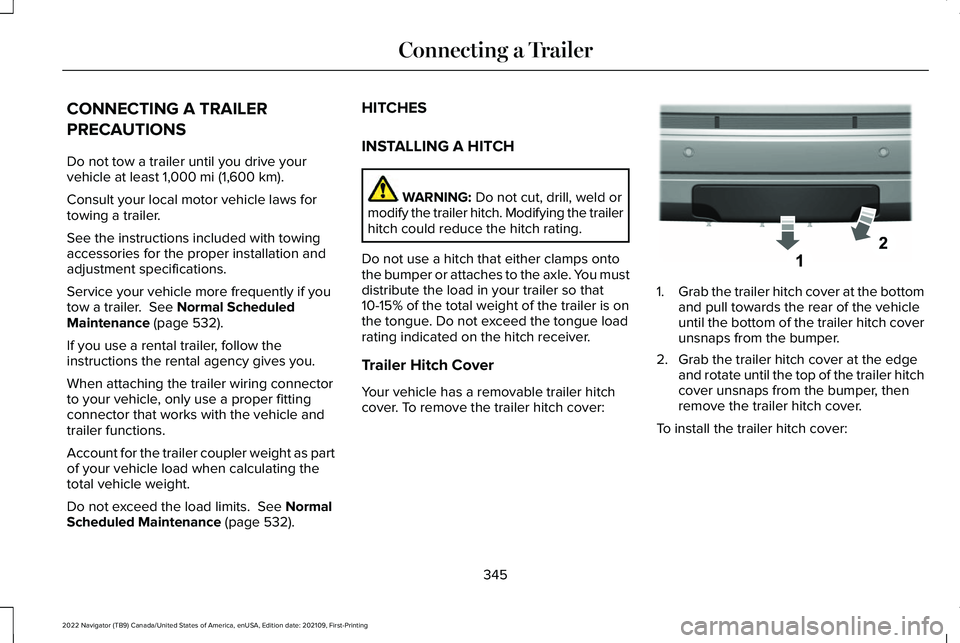
Trailer Hitch Cover
Your vehicle has a removable trailer hitch
cover. To remove the trailer hitch cover: 1.
Grab the trailer hitch cover at the bottom
and pull towards the rear of the vehicle
until the bottom of the trailer hitch cover
unsnaps from the bumper.
2. Grab the trailer hitch cover at the edge and rotate until the top of the trailer hitch
cover unsnaps from the bumper, then
remove the trailer hitch cover.
To install the trailer hitch cover:
345
2022 Navigator (TB9) Canada/United States of America, enUSA, Edition date: 202109, First-Printing Connecting a TrailerE268259
Page 350 of 646
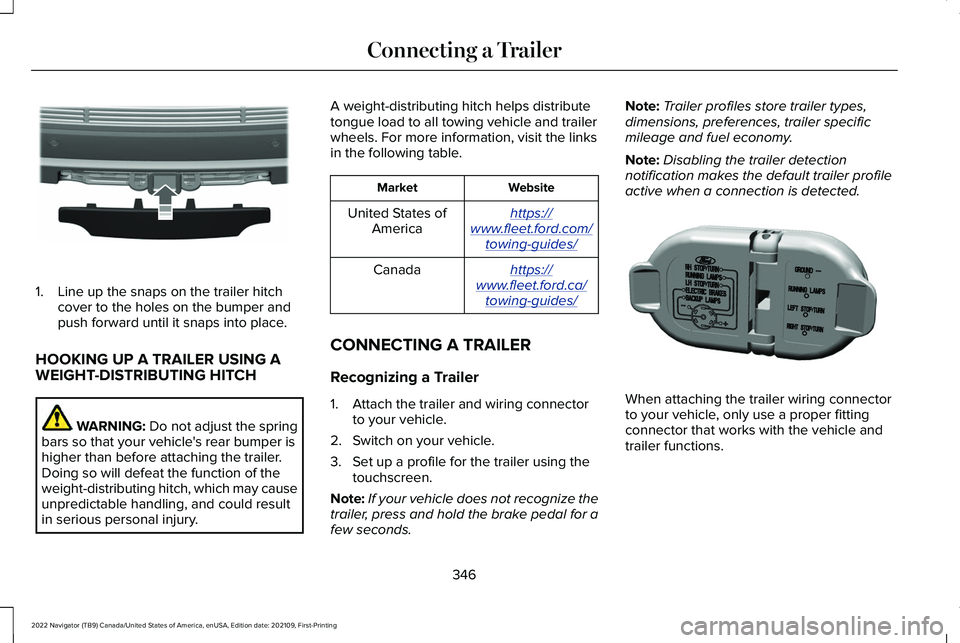
1. Line up the snaps on the trailer hitch
cover to the holes on the bumper and
push forward until it snaps into place.
HOOKING UP A TRAILER USING A
WEIGHT-DISTRIBUTING HITCH WARNING: Do not adjust the spring
bars so that your vehicle's rear bumper is
higher than before attaching the trailer.
Doing so will defeat the function of the
weight-distributing hitch, which may cause
unpredictable handling, and could result
in serious personal injury. A weight-distributing hitch helps distribute
tongue load to all towing vehicle and trailer
wheels. For more information, visit the links
in the following table. Website
Market
https:// www . fleet. ford. com/
towing-guides/United States of
America
https:// www . fleet. ford. ca/
towing-guides/Canada
CONNECTING A TRAILER
Recognizing a Trailer
1. Attach the trailer and wiring connector to your vehicle.
2. Switch on your vehicle.
3. Set up a profile for the trailer using the touchscreen.
Note: If your vehicle does not recognize the
trailer, press and hold the brake pedal for a
few seconds. Note:
Trailer profiles store trailer types,
dimensions, preferences, trailer specific
mileage and fuel economy.
Note: Disabling the trailer detection
notification makes the default trailer profile
active when a connection is detected. When attaching the trailer wiring connector
to your vehicle, only use a proper fitting
connector that works with the vehicle and
trailer functions.
346
2022 Navigator (TB9) Canada/United States of America, enUSA, Edition date: 202109, First-Printing Connecting a TrailerE268260 E163167