trailer LINCOLN NAVIGATOR 2022 Owner's Manual
[x] Cancel search | Manufacturer: LINCOLN, Model Year: 2022, Model line: NAVIGATOR, Model: LINCOLN NAVIGATOR 2022Pages: 646, PDF Size: 7.29 MB
Page 309 of 646
The lane keeping aid warning lamp or yellow
lane marking in your instrument cluster
indicate blind spot assist activation. In
addition, the blind spot information system
alert indicator flashes on the exterior mirror
on the same side as the detection. See Blind
Spot Information System (page 311).
Blind Spot Assist Information Messages Details
Message
Displays if you attach a trailer to your vehicle.
Blind Spot Assist Not Available Trailer
Attached
Displays if the blind spot information system sensors are blocked.
Blind Spot Assist Not Available Side
Sensor Blocked
The system has detected a fault that requires service. Have your vehicle checked as soon as
possible.
Blind Spot Assist System fault
Lost communication with the trailer module. Blind Spot Assist is suppressed until the failure is
fixed.
Trailer Brake Module Fault
Lost communication with the trailer module. Blind Spot Assist is suppressed until the failure is
fixed.
Trailer Lighting Module Fault See Manual
Front Camera Fault. Blind Spot Assist is suppressed until the failure is\
fixed.
Front Camera Fault Service Required
See
Blind Spot Information System (page 311).
305
2022 Navigator (TB9) Canada/United States of America, enUSA, Edition date: 202109, First-Printing Lane Keeping System
Page 310 of 646
BLIND SPOT ASSIST WITH TRAILER
COVERAGE
WHAT IS BLIND SPOT ASSIST WITH
TRAILER COVERAGE
Blind spot assist with trailer coverage is an
extension of the lane keeping system.
It may help you identify adjacent vehicles
during a lane change.
Blind spot assist provides a blind spot
warning and steering assistance to help
during lane changes.
When attaching a trailer, ensure you have
properly set up the trailer coverage settings.
See Blind Spot Information System With
Trailer Coverage (page 313).
HOW DOES BLIND SPOT ASSIST WITH
TRAILER COVERAGE WORK Activate and deactivate the system
using the lane keeping system
button on the steering wheel. During lane changes, the design of the blind
spot assist feature detects vehicles in, or
approaching, your blind spot and provides
a warning, plus steering assistance to direct
your vehicle back into your lane.
If a supported trailer is connected, the
function is reduced to only detecting vehicles
on both sides of your vehicle and trailer,
extending rearward from the exterior mirrors
to the end of your trailer.
See Blind Spot
Information System With Trailer Coverage
(page
313).
When active, this system functions with or
without the use of direction indicators and
hazard flashers.
You must keep your hands on the steering
wheel at all times.
BLIND SPOT ASSIST WITH TRAILER
COVERAGE LIMITATIONS
All system limitations present in the basic
lane keeping system also apply to blind spot
assist.
Blind spot assist does not function under the
following conditions: •
The system does not detect lane
markings.
• One or both rear radar sensors become
blocked or faulty.
• You have not configured the attached
trailer correctly in the trailer tow menus
or an unsupported trailer has been
attached. Only certain trailer shapes and
dimensions are supported.
See Blind
Spot Information System With Trailer
Coverage Limitations
(page 313).
Note: Blind spot assist with trailer coverage
could have reduced performance if you
attach a trailer to your vehicle.
Blind spot assist may have difficulty detecting
hazards under the following conditions:
• If a vehicle is approaching in an adjacent
lane at a relative speed much higher than
your vehicle.
• Bad weather conditions are present that
obstruct the sensors.
• Attaching bike or cargo racks could
cause false alerts due to obstruction of
the sensor.
306
2022 Navigator (TB9) Canada/United States of America, enUSA, Edition date: 202109, First-Printing Lane Keeping SystemE334922
Page 311 of 646
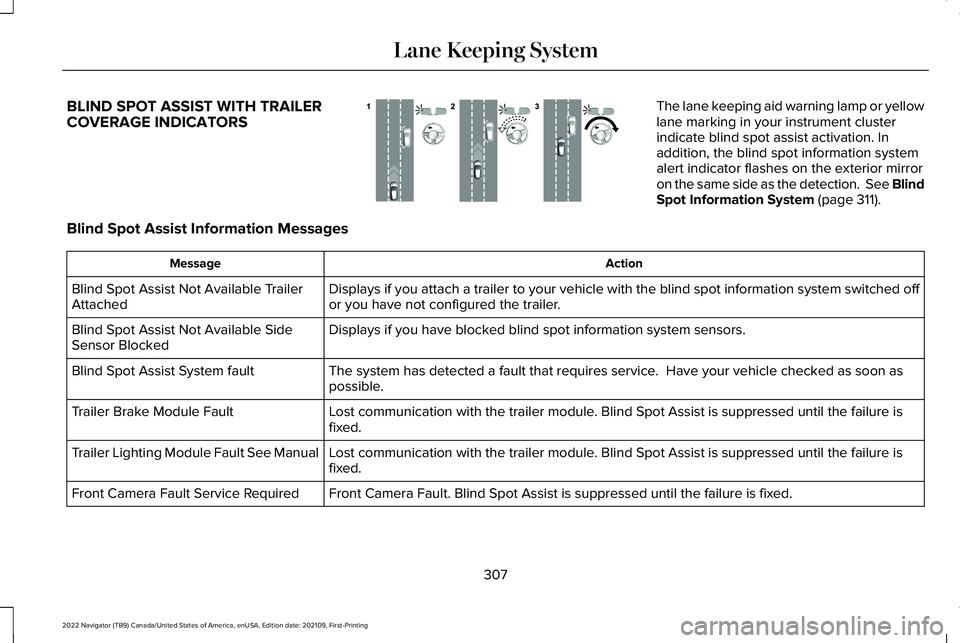
BLIND SPOT ASSIST WITH TRAILER
COVERAGE INDICATORS The lane keeping aid warning lamp or yellow
lane marking in your instrument cluster
indicate blind spot assist activation. In
addition, the blind spot information system
alert indicator flashes on the exterior mirror
on the same side as the detection. See Blind
Spot Information System (page 311).
Blind Spot Assist Information Messages Action
Message
Displays if you attach a trailer to your vehicle with the blind spot inf\
ormation system switched off
or you have not configured the trailer.
Blind Spot Assist Not Available Trailer
Attached
Displays if you have blocked blind spot information system sensors.
Blind Spot Assist Not Available Side
Sensor Blocked
The system has detected a fault that requires service. Have your vehicle checked as soon as
possible.
Blind Spot Assist System fault
Lost communication with the trailer module. Blind Spot Assist is suppressed until the failure is
fixed.
Trailer Brake Module Fault
Lost communication with the trailer module. Blind Spot Assist is suppressed until the failure is
fixed.
Trailer Lighting Module Fault See Manual
Front Camera Fault. Blind Spot Assist is suppressed until the failure is\
fixed.
Front Camera Fault Service Required
307
2022 Navigator (TB9) Canada/United States of America, enUSA, Edition date: 202109, First-Printing Lane Keeping SystemE310089
Page 317 of 646
BLIND SPOT INFORMATION SYSTEM
WITH TRAILER COVERAGE
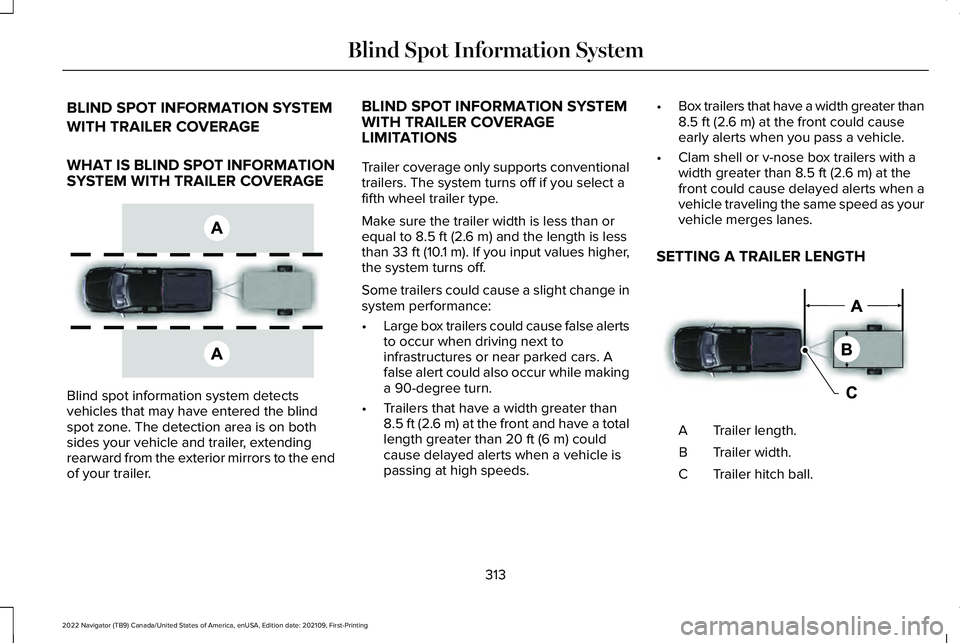
WHAT IS BLIND SPOT INFORMATION
SYSTEM WITH TRAILER COVERAGE
Blind spot information system detects
vehicles that may have entered the blind
spot zone. The detection area is on both
sides your vehicle and trailer, extending
rearward from the exterior mirrors to the end
of your trailer. BLIND SPOT INFORMATION SYSTEM
WITH TRAILER COVERAGE
LIMITATIONS
Trailer coverage only supports conventional
trailers. The system turns off if you select a
fifth wheel trailer type.
Make sure the trailer width is less than or
equal to 8.5 ft (2.6 m) and the length is less
than 33 ft (10.1 m). If you input values higher,
the system turns off.
Some trailers could cause a slight change in
system performance:
• Large box trailers could cause false alerts
to occur when driving next to
infrastructures or near parked cars. A
false alert could also occur while making
a 90-degree turn.
• Trailers that have a width greater than
8.5 ft (2.6 m)
at the front and have a total
length greater than 20 ft (6 m) could
cause delayed alerts when a vehicle is
passing at high speeds. •
Box trailers that have a width greater than
8.5 ft (2.6 m)
at the front could cause
early alerts when you pass a vehicle.
• Clam shell or v-nose box trailers with a
width greater than
8.5 ft (2.6 m) at the
front could cause delayed alerts when a
vehicle traveling the same speed as your
vehicle merges lanes.
SETTING A TRAILER LENGTH Trailer length.
A
Trailer width.
B
Trailer hitch ball.
C
313
2022 Navigator (TB9) Canada/United States of America, enUSA, Edition date: 202109, First-Printing Blind Spot Information SystemE225007 E225008
Page 318 of 646
You can set-up a trailer to work with the blind
spot information system through the
touchscreen. When setting up a trailer, a
sequence of screens appear asking for trailer
information.
1. Select type of trailer screen -
conventional, fifth wheel or gooseneck.
Note: The system only supports conventional
trailers.
2. Do you want to set up blind spot with trailer screen? If no, the system turns off.
If yes, the menu goes to the next screen.
3. Is the width less than 9 ft (2.7 m) and
length less than 33 ft (10.1 m)? If no, the
system turns off. If yes, the menu goes
to the next screen.
4. Trailer width measurement. Measure the
width at the front of the trailer. It is not
measured at the widest point of the
trailer. The maximum width at the front
of the trailer the system can support is
8.5 ft (2.6 m)
. Note:
You do not need to enter an exact
trailer width measurement. You only need
to confirm that the width of the trailer is less
than
9 ft (2.7 m).
5. Trailer length measurement. The trailer length is the distance between the trailer
hitch ball and the rear of the trailer. The
maximum length that the system can
support is
33 ft (10.1 m).
6. Enter the length of trailer. The default setting is
18 ft (5.5 m). Toggling up or
down using the menu buttons increases
or decreases the measurement by
3 ft
(1 m). Select a length that is equal to or
within 3 ft (1 m) of the actual measured
length. For example, if the actual
measure length is
25 ft (7.5 m), toggle
the length in the menu to 27 ft (8.2 m).
The system setup saves when you enter
the length of the trailer.
Note: If the trailer is a bike rack or cargo
rack with electrical lighting, enter a length
of 3 ft (1 m). Cross traffic alert remains on for
trailers with a length of
3 ft (1 m) or less. Note:
The system requires proper
measurement and measure entry to function
properly.
SELECTING A TRAILER
When you connect a trailer to your vehicle,
the trailer set up menu appears in the
touchscreen. This menu allows you to set up
a new trailer or choose from a previously set
up trailer. A warning message appears and
the system turns off if you do not choose or
add a new trailer.
Note: The warning message may not appear
until your vehicle reaches 22 mph (35 km/h).
314
2022 Navigator (TB9) Canada/United States of America, enUSA, Edition date: 202109, First-Printing Blind Spot Information System
Page 319 of 646
BLIND SPOT INFORMATION
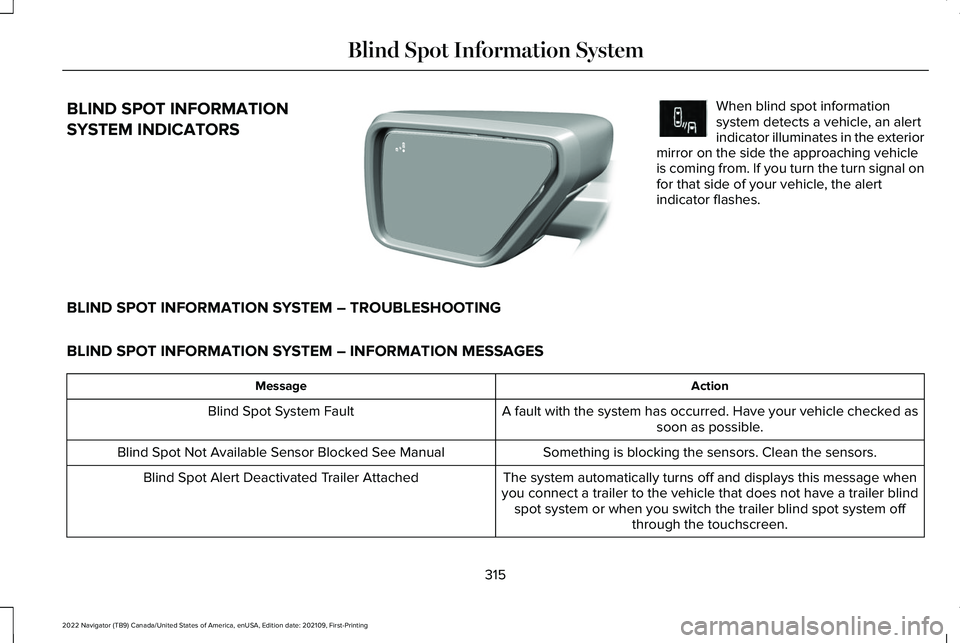
SYSTEM INDICATORS When blind spot information
system detects a vehicle, an alert
indicator illuminates in the exterior
mirror on the side the approaching vehicle
is coming from. If you turn the turn signal on
for that side of your vehicle, the alert
indicator flashes.
BLIND SPOT INFORMATION SYSTEM – TROUBLESHOOTING
BLIND SPOT INFORMATION SYSTEM – INFORMATION MESSAGES Action
Message
A fault with the system has occurred. Have your vehicle checked assoon as possible.
Blind Spot System Fault
Something is blocking the sensors. Clean the sensors.
Blind Spot Not Available Sensor Blocked See Manual
The system automatically turns off and displays this message when
you connect a trailer to the vehicle that does not have a trailer blind spot system or when you switch the trailer blind spot system off through the touchscreen.
Blind Spot Alert Deactivated Trailer Attached
315
2022 Navigator (TB9) Canada/United States of America, enUSA, Edition date: 202109, First-Printing Blind Spot Information SystemE309137 E249861E249861
Page 321 of 646
CROSS TRAFFIC ALERT
LIMITATIONS
The system may not correctly operate when
any of the following occur:
•
Something is blocking the sensors.
• Adjacently parked vehicles or objects are
obstructing the sensors.
• Vehicles approach at speeds less than
4 mph (6 km/h) or greater than 37 mph
(60 km/h).
• Your vehicle speed is greater than 7 mph
(12 km/h)
.
• You reverse out of an angled parking
space. Cross Traffic Alert Limitations with a
Trailer Attached
The system remains on when you attach a
trailer in vehicles with blind spot information
system with trailer tow under the following
conditions:
•
You connect a trailer.
• The trailer is a bike rack or cargo rack
with a maximum length of
3 ft (1 m).
• You set the trailer length to
3 ft (1 m) in
the instrument cluster display.
Note: The system may not correctly operate
when towing a trailer. For vehicles with an
approved trailer tow module and tow bar,
the system turns off when you attach a
trailer. For vehicles with an aftermarket
trailer tow module or tow bar, we
recommend that you switch the system off
when you attach a trailer.
SWITCHING CROSS TRAFFIC
ALERT ON AND OFF
To switch cross traffic alert on or off use the
touchscreen. 1. Press
Features on the touchscreen.
2. Press
Driver Assistance.
3. Switch
Cross Traffic Alert on or off.
Note: The system switches on every time
you switch the ignition on. To permanently
switch the system off, contact an authorized
dealer.
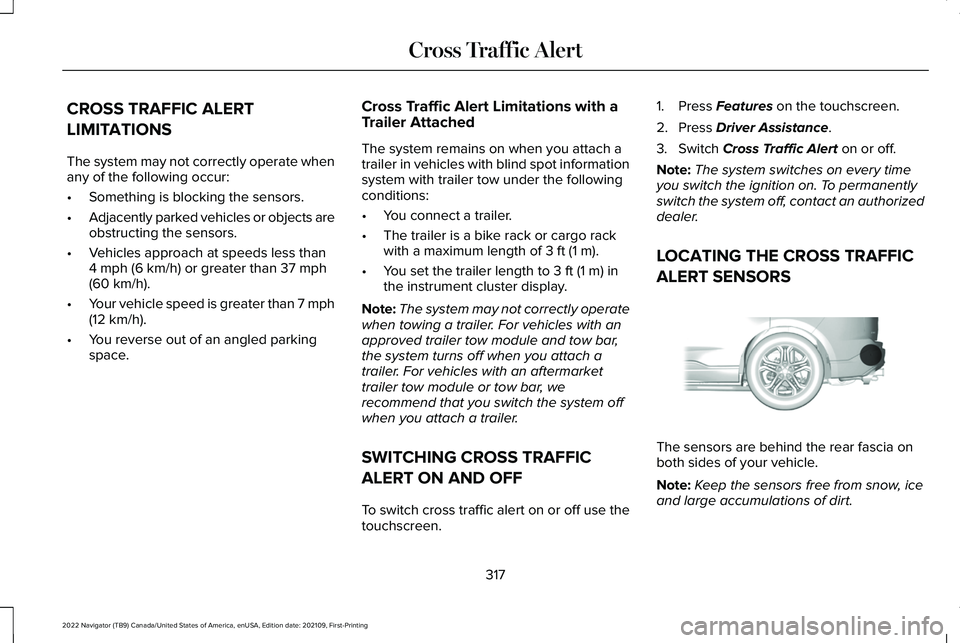
LOCATING THE CROSS TRAFFIC
ALERT SENSORS The sensors are behind the rear fascia on
both sides of your vehicle.
Note:
Keep the sensors free from snow, ice
and large accumulations of dirt.
317
2022 Navigator (TB9) Canada/United States of America, enUSA, Edition date: 202109, First-Printing Cross Traffic AlertE205199
Page 323 of 646
CROSS TRAFFIC ALERT – TROUBLESHOOTING
CROSS TRAFFIC ALERT – INFORMATION MESSAGES
Action
Message
Displays instead of indication arrows when the system detects avehicle. Check for approaching traffic.
Cross Traffic Alert
Indicates blocked cross traffic alert system sensors. Clean the sensors.If the message continues to appear, have your vehicle checked as soon as possible.
Cross Traffic Not Available Sensor Blocked See Manual
The system has malfunctioned. Have your vehicle checked as soonas possible.
Cross Traffic System Fault
Displays if you attach a trailer to your vehicle.
Cross Traffic Alert Deactivated Trailer Attached
319
2022 Navigator (TB9) Canada/United States of America, enUSA, Edition date: 202109, First-Printing Cross Traffic Alert
Page 325 of 646
WARNING: The system may fail or
operate with reduced function during cold
and severe weather conditions. Snow, ice,
rain, spray and fog can adversely affect the
system. Keep the front camera and radar
free of snow and ice. Failure to take care
may result in the loss of control of your
vehicle, serious personal injury or death. WARNING:
Take additional care if
your vehicle is heavily loaded or you are
towing a trailer. These conditions could
result in reduced performance of this
system. Failure to follow this instruction
could result in the loss of control of your
vehicle, personal injury or death. WARNING:
The system cannot help
prevent all crashes. Do not rely on this
system to replace driver judgment and the
need to maintain a safe distance and
speed. WARNING:
In situations where the
vehicle camera has limited detection
capability, this may reduce system
performance. These situations include but
are not limited to direct or low sunlight,
vehicles at night without tail lights,
unconventional vehicle types, pedestrians
with complex backgrounds, running
pedestrians, partly obscured pedestrians,
or pedestrians that the system cannot
distinguish from a group. Failure to take
care may result in the loss of control of
your vehicle, serious personal injury or
death.
PRE-COLLISION ASSIST
LIMITATIONS
Pre-collision assist depends on the detection
ability of its camera and sensors. Any
obstructions or damage to these areas can
limit detection or prevent the system from
functioning.
See Locating the Pre-Collision
Assist Sensors (page 323). The system is active at speeds above 3 mph
(5 km/h)
.
Note: The pre-collision assist system
automatically disables when you select
four-wheel drive low or manually disable
AdvanceTrac ™.
Note: Brake support and automatic
emergency braking are active at speeds up
to
80 mph (130 km/h). If your vehicle has a
radar sensor included with adaptive cruise
control, then brake support and automatic
emergency braking are active up to the
maximum speed of your vehicle.
Pedestrian Detection Limitations
Pedestrian detection is active at speeds up
to
50 mph (80 km/h).
Pedestrian detection operates optimally
when detected hazards are clearly
identifiable. System performance may reduce
in situations where pedestrians are running,
partly obscured, have a complex
background, or cannot be distinguished from
a group.
321
2022 Navigator (TB9) Canada/United States of America, enUSA, Edition date: 202109, First-Printing Pre-Collision Assist
Page 339 of 646
LOAD CARRYING PRECAUTIONS
Keep your loaded vehicle weight within
its design rating capability, with or
without a trailer. Properly loading your
vehicle provides maximum return of
vehicle design performance. Before you
load your vehicle, become familiar with
the following terms for determining your
vehicle
’s weight rating, with or without
a trailer, from the vehicle ’s Tire and
Loading Information label or Safety
Compliance Certification label. WARNING: The appropriate
loading capacity of your vehicle can
be limited either by volume capacity
(how much space is available) or by
payload capacity (how much weight
the vehicle should carry). Once you
have reached the maximum payload
of your vehicle, do not add more
cargo, even if there is space available.
Overloading or improperly loading
your vehicle can contribute to loss of
vehicle control and vehicle rollover. WARNING: Exceeding the Safety
Compliance Certification label vehicle
weight limits can adversely affect the
performance and handling of your
vehicle, cause vehicle damage and
can result in the loss of control of your
vehicle, serious personal injury or
death. WARNING:
Do not use
replacement tires with lower load
carrying capacities than the original
tires because they may lower your
vehicle's GVWR and GAWR limitations.
Replacement tires with a higher limit
than the original tires do not increase
the GVWR and GAWR limitations. WARNING:
Do not exceed the
GVWR or the GAWR specified on the
certification label. WARNING:
Exceeding any
vehicle weight rating can adversely
affect the performance and handling
of your vehicle, cause vehicle damage
and can result in the loss of control of
your vehicle, serious personal injury
or death. WARNING:
When loading the
roof racks, we recommend you evenly
distribute the load, as well as maintain
a low center of gravity. Loaded
vehicles, with higher centers of gravity,
may handle differently than unloaded
vehicles. Take extra precautions, such
as slower speeds and increased
stopping distance, when driving a
heavily loaded vehicle.
The gross combined weight must never
exceed the Gross Combined Weight
Rating.
335
2022 Navigator (TB9) Canada/United States of America, enUSA, Edition date: 202109, First-Printing Load Carrying