trailer LINCOLN NAVIGATOR 2022 User Guide
[x] Cancel search | Manufacturer: LINCOLN, Model Year: 2022, Model line: NAVIGATOR, Model: LINCOLN NAVIGATOR 2022Pages: 646, PDF Size: 7.29 MB
Page 244 of 646
The system only applies the brakes for a
short period of time when an event occurs.
Act as soon as you notice the brakes apply
in order to remain in control of the vehicle.
If you do not intervene the vehicle may start
to move again.
Note:
Certain add-on devices around the
bumper or fascia may create false alerts. For
example, large trailer hitches, bicycle or
surfboard racks, license plate brackets,
bumper covers or any other device that may
block the normal detection zone of the
system. Remove the add-on device to
prevent false alerts.
Note: The system does not react to small or
moving objects, particularly those close to
the ground.
Note: The system does not operate during
hard acceleration or steering.
Note: If your vehicle sustains damage to the
bumper or fascia leaving it misaligned or
bent, it could alter the sensing zone causing
inaccurate measurement of obstacles or
false alerts. Note:
Vehicle loading and suspension
changes can impact the angle of the sensors
and may change the normal detection zone
of the system resulting in inaccurate
measurement of obstacles or false alerts.
Note: When you connect a trailer, the system
may detect the trailer and provide an alert,
or the system turns off. If the system does
not turn off, switch the system off manually
after you connect the trailer.
Note: You may experience reduced system
performance on road surfaces that limit
deceleration. For example, roads with ice,
loose gravel, mud or sand.
SWITCHING REVERSE BRAKING
ASSIST ON AND OFF
1. Press Features on the touchscreen.
2. Press
Driver Assistance.
3. Switch
Reverse Brake Assist on or off.
Note: The system is unavailable when the
rear parking aid, cross traffic alert or traction
control is off. Note:
If your vehicle is not equipped with
cross traffic alert the reverse braking assist
relies on input from the rear parking aid and
rear camera sensors.
Note: The default setting is on in some
regions.
OVERRIDING REVERSE BRAKING
ASSIST
There could be instances when unexpected
or unwanted braking occurs. Firmly pressing
the accelerator pedal or switching the feature
off overrides the system.
REVERSE BRAKING ASSIST
INDICATORS
If the system determines that a collision with
an obstacle may occur, full braking may
apply. Bring your vehicle to a stop a safe
distance away from the obstacle. A message and warning indicator
appear when the system applies
the brakes.
240
2022 Navigator (TB9) Canada/United States of America, enUSA, Edition date: 202109, First-Printing Reverse Braking AssistE293490
Page 246 of 646
REVERSE BRAKING ASSIST –
FREQUENTLY ASKED QUESTIONS
Why is reverse braking assist unavailable?
•
Make sure the reverse braking assist is
on. See Switching Reverse Braking
Assist On and Off (page 240).
• Make sure that all doors and the liftgate
or tailgate are closed. Drive the vehicle
on a straight road for a short period. If
the message remains, contact an
authorized dealer.
• Make sure the cross traffic alert system
is on if equipped.
See Switching Cross
Traffic Alert On and Off (page 317).
• Make sure the rear parking aid system is
on.
See Rear Parking Aid (page 256).
• Make sure the traction control is on. See
Switching Traction Control On and Off
(page
246).
Note: The traction control automatically turns
off if four-wheel drive low and certain drive
modes such as mud/ruts and snow/sand is
activated. •
The vehicle may have sustained a rear
end impact. Contact an authorized dealer
to have the sensors checked for proper
coverage and operation.
• An anti-lock brake, traction control or
stability control event may have occurred.
Reverse braking assist resumes
operation when the event is complete.
• Make sure the rear view camera and 360
degree camera are not dirty or
obstructed. If dirty, clean the camera. If
the message still appears after cleaning
the camera, wait a short time for the
message to clear. If the message does
not clear, contact an authorized dealer.
• Make sure the cross traffic alert and rear
parking aid sensors are not blocked or
faulty.
See Locating the Cross Traffic
Alert Sensors (page 317). See Locating
the Rear Parking Aid Sensors (page 256).
• You recently had your vehicle serviced,
or the battery disconnected. Drive your
vehicle a short distance to resume
system operation. •
Reverse braking assist does not function
when you connect a trailer. Operation
resumes when you disconnect the trailer.
Note: If the answers to why the system is
unavailable do not assist in returning reverse
braking assist to available, have the system
checked as soon as possible.
242
2022 Navigator (TB9) Canada/United States of America, enUSA, Edition date: 202109, First-Printing Reverse Braking Assist
Page 259 of 646
PARKING AID PRECAUTIONS
WARNING: To help avoid personal
injury, always use caution when in reverse
(R) and when using the sensing system. WARNING:
The system may not
detect objects with surfaces that absorb
reflection. Always drive with due care and
attention. Failure to take care may result
in a crash. WARNING:
Traffic control systems,
fluorescent lamps, inclement weather, air
brakes, external motors and fans may
affect the correct operation of the sensing
system. This may cause reduced
performance or false alerts. WARNING:
The system may not
detect small or moving objects, particularly
those close to the ground. WARNING:
The parking aid system
can only assist you to detect objects when
your vehicle is moving at parking speeds.
To help avoid personal injury you must
take care when using the parking aid
system. WARNING:
The system may not
function if the sensor is blocked. WARNING:
In cold and severe
weather conditions the system may not
function. Rain, snow and spray can all limit
sensor performance. WARNING:
If damage occurs in the
immediate area surrounding the sensor,
have your vehicle checked as soon as
possible.
Note: If your vehicle sustains damage
leaving the sensors misaligned, this will
cause inaccurate measurements or false
alerts. When you connect a trailer to your vehicle,
the rear parking aid detects the trailer and
provides an alert. Disable the parking aid
when you connect a trailer to prevent the
alert.
Note:
Certain add-on devices installed
around the bumper or fascia may create
false alerts, for example, large trailer hitches,
bike or surfboard racks, license plate
brackets, bumper covers or any other device
that could block the normal detection zone
of the parking aid system. Aftermarket spare
tires or spare tire covers mounted to the rear
tailgate could cause false alerts from the
park aid system. Remove the add-on device
to prevent false alerts.
Note: Keep the sensors free from snow, ice
and large accumulations of dirt. If the
sensors are covered, the system's accuracy
can be affected.
Do not clean the sensors with sharp objects.
Note: When using a programmed MyKey,
you cannot switch the parking aids off. See
MyKey™
(page 82).
255
2022 Navigator (TB9) Canada/United States of America, enUSA, Edition date: 202109, First-Printing Parking Aids
Page 268 of 646
SWITCHING THE 360 DEGREE
CAMERA VIEW
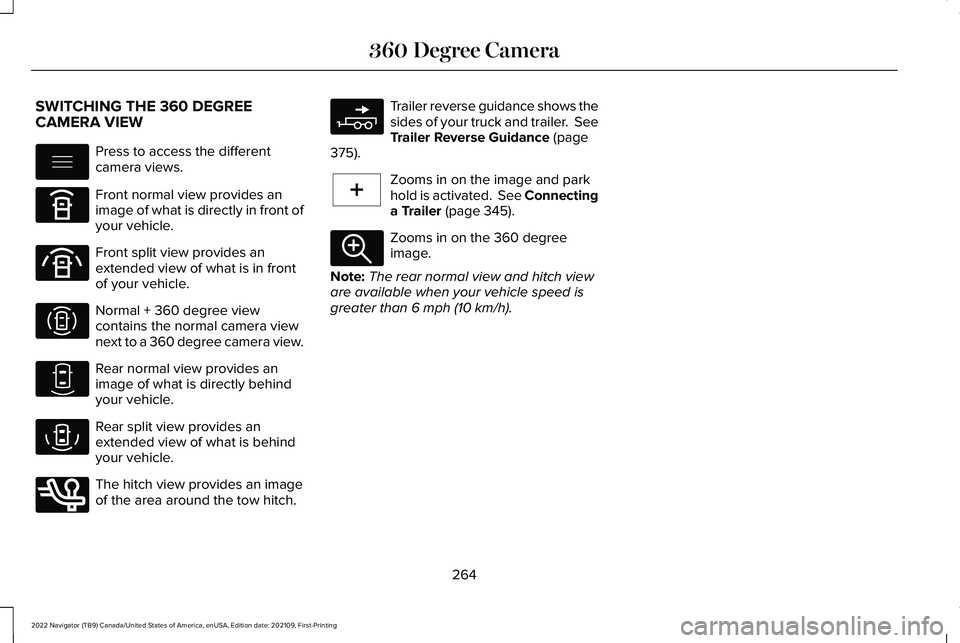
Press to access the different
camera views.
Front normal view provides an
image of what is directly in front of
your vehicle.
Front split view provides an
extended view of what is in front
of your vehicle.
Normal + 360 degree view
contains the normal camera view
next to a 360 degree camera view.
Rear normal view provides an
image of what is directly behind
your vehicle.
Rear split view provides an
extended view of what is behind
your vehicle.
The hitch view provides an image
of the area around the tow hitch. Trailer reverse guidance shows the
sides of your truck and trailer. See
Trailer Reverse Guidance (page
375). Zooms in on the image and park
hold is activated.
See Connecting
a Trailer (page 345). Zooms in on the 360 degree
image.
Note: The rear normal view and hitch view
are available when your vehicle speed is
greater than
6 mph (10 km/h).
264
2022 Navigator (TB9) Canada/United States of America, enUSA, Edition date: 202109, First-Printing 360 Degree CameraE337002 E336516 E336517 E310996 E310967 E310974 E350276 E310965 E224485 E337359
Page 269 of 646
WHAT IS ACTIVE PARK ASSIST
Assists you with parking in and out of parking
spaces.
HOW DOES ACTIVE PARK ASSIST
WORK
Active park assist uses sensors to detect
parking spaces. Active park assist controls
steering, acceleration, braking and shifting
as required to maneuver into or out of a
parking space when activate.
ACTIVE PARK ASSIST
PRECAUTIONS
WARNING: You must remain in your
vehicle when the system turns on. At all
times, you are responsible for controlling
your vehicle, supervising the system and
intervening, if required. Failure to take care
may result in the loss of control of your
vehicle, serious personal injury or death. WARNING: The sensors may not
detect objects in heavy rain or other
conditions that cause interference. WARNING:
You are responsible for
controlling your vehicle at all times. The
system is designed to be an aid and does
not relieve you of your responsibility to
drive with due care and attention. Failure
to follow this instruction could result in the
loss of control of your vehicle, personal
injury or death. WARNING:
Do not use the system
with accessories that extend beyond the
front or rear of your vehicle, for example a
trailer hitch or bike rack. The system is not
able to make corrections for the additional
length of the accessories. SWITCHING ACTIVE PARK ASSIST
ON AND OFF Press the parking aid button, then
press the active park assist icon
on the touchscreen to bring up full
screen notifications.
Press the soft keys on the touchscreen to
switch between the parallel park in,
perpendicular park in, or parallel park out
parking modes.
Cancelling Active Park Assist
To cancel parking assistance at any time,
shift out of neutral (N).
Pausing Active Park Assist
To pause parking assistance at any time,
release the parking aid button.
If you open the passenger or rear doors,
active park assist pauses.
To resume parking, press and hold the
parking aid button again.
265
2022 Navigator (TB9) Canada/United States of America, enUSA, Edition date: 202109, First-Printing Active Park AssistPE326188
Page 274 of 646
HOW DOES ADAPTIVE CRUISE
CONTROL WITH STOP AND GO
WORK
Adaptive cruise control with stop and go
uses radar and camera sensors to maintain
a set gap between your vehicle and the
vehicle in front of you while following it to a
complete stop. Stop and go can also be set
to follow a vehicle directly in front of you and
adjust the set speed, while you are at a
complete stop.
ADAPTIVE CRUISE CONTROL
PRECAUTIONS
WARNING: You are responsible for
controlling your vehicle at all times. The
system is designed to be an aid and does
not relieve you of your responsibility to
drive with due care and attention. Failure
to follow this instruction could result in the
loss of control of your vehicle, personal
injury or death. WARNING:
Do not use adaptive
cruise control on winding roads, in heavy
traffic or when the road surface is slippery.
This could result in loss of vehicle control,
serious injury or death. WARNING:
Pay close attention to
changing road conditions such as entering
or leaving a highway, on roads with
intersections or roundabouts, roads
without visible lanes of travel, roads that
are unpaved, or steep slopes. Failure to
follow this instruction could result in the
loss of control of your vehicle, personal
injury or death. WARNING:
The system is not a crash
warning or avoidance system. WARNING:
Do not use the system
when towing a trailer that has aftermarket
electronic trailer brake controls. Failure to
follow this instruction could result in the
loss of control of your vehicle, personal
injury or death. WARNING:
Do not use tire sizes
other than those recommended because
this can affect the normal operation of the
system. Failure to do so may result in a loss
of vehicle control, which could result in
serious injury. WARNING:
Do not use the system
with a snow plow blade installed. WARNING:
Do not use the system in
poor visibility, for example fog, heavy rain,
spray or snow.
When Following a Vehicle WARNING: When following a vehicle
that is braking, your vehicle does not
always decelerate quickly enough to avoid
a crash without driver intervention. Apply
the brakes when necessary. Failure to
follow this instruction could result in
personal injury or death.
270
2022 Navigator (TB9) Canada/United States of America, enUSA, Edition date: 202109, First-Printing Adaptive Cruise Control
Page 283 of 646
1. Press Features on the touchscreen.
2. Press
Driver Assistance.
3. Press
Cruise Control.
4. Press
Normal Cruise Control. The cruise control indicator
replaces the adaptive cruise
control indicator if you select
normal cruise control. The gap setting does
not display, and the system does not respond
to lead vehicles. Automatic braking remains
active to maintain set speed. The system
remembers the last setting when you start
your vehicle.
LANE CENTERING
HOW DOES LANE CENTERING WORK
Adaptive cruise control with lane centering
uses radar and camera sensors to help keep
your vehicle in the middle of the lane by
applying continuous assistance steering
torque input toward the lane center on
highways. Note:
The adaptive cruise control gap setting
operates normally.
If you drive off-center within the lane, the
system sets and maintains that preferred lane
position. The system provides continuous
assistance steering torque input toward the
preferred position.
Note: The system can only set preferred lane
positions within the lane.
Note: If the system cancels, the preferred
position erases. On the next activation, the
system provides continuous assistance
steering torque input toward the lane center.
LANE CENTERING PRECAUTIONS WARNING:
Do not use the system
when towing a trailer. Failure to follow this
instruction could result in the loss of
control of your vehicle, personal injury or
death. WARNING: Do not use the system if
any changes or modifications to the
steering wheel have been made. Any
changes or modifications to the steering
wheel could affect the functionality or
performance of the system. Failure to
follow this instruction could result in the
loss of control of your vehicle, personal
injury or death.
Adaptive cruise control precautions apply to
lane centering unless stated otherwise or
contradicted by a lane centering precaution.
See
Adaptive Cruise Control Precautions
(page 270).
LANE CENTERING REQUIREMENTS
You must keep your hands on the steering
wheel at all times.
279
2022 Navigator (TB9) Canada/United States of America, enUSA, Edition date: 202109, First-Printing Adaptive Cruise ControlE332905
Page 290 of 646
WHAT IS ACTIVEGLIDE™
ActiveGlide keeps your vehicle centered in
the lane and offers a hands-free driving
mode in certain situations when using
adaptive cruise control.
HOW DOES ACTIVEGLIDE™ WORK
ActiveGlide uses cameras to monitor your
vehicle position within a lane and applies
steering support to keep your vehicle
centered in the lane.
Using the cameras and location information,
ActiveGlide allows you to remove your hands
from the steering wheel and offers a
hands-free driving mode in certain areas.
When active, ActiveGlide uses a driver facing
camera and infrared lighting to monitor your
eyes and head position to detect if you are
distracted. If the system determines you are
distracted, it alerts you to return your eyes
to the road.
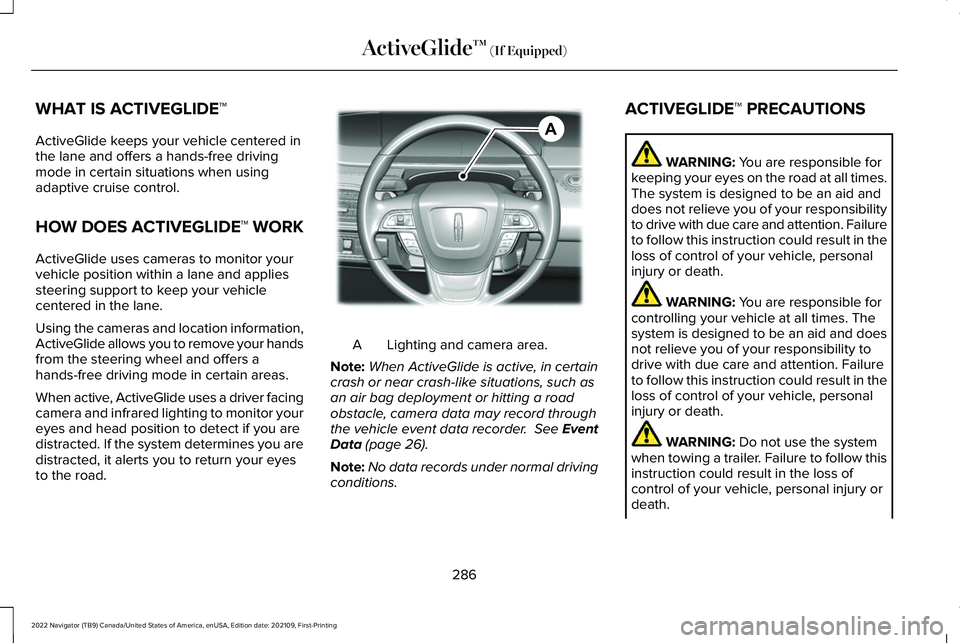
Lighting and camera area.
A
Note: When ActiveGlide is active, in certain
crash or near crash-like situations, such as
an air bag deployment or hitting a road
obstacle, camera data may record through
the vehicle event data recorder. See Event
Data (page 26).
Note: No data records under normal driving
conditions. ACTIVEGLIDE™ PRECAUTIONS WARNING:
You are responsible for
keeping your eyes on the road at all times.
The system is designed to be an aid and
does not relieve you of your responsibility
to drive with due care and attention. Failure
to follow this instruction could result in the
loss of control of your vehicle, personal
injury or death. WARNING:
You are responsible for
controlling your vehicle at all times. The
system is designed to be an aid and does
not relieve you of your responsibility to
drive with due care and attention. Failure
to follow this instruction could result in the
loss of control of your vehicle, personal
injury or death. WARNING:
Do not use the system
when towing a trailer. Failure to follow this
instruction could result in the loss of
control of your vehicle, personal injury or
death.
286
2022 Navigator (TB9) Canada/United States of America, enUSA, Edition date: 202109, First-Printing ActiveGlide™
(If Equipped)AE351152
Page 307 of 646
While the lane keeping system is on, the
color of the lane markings change to indicate
the system status. Red
Yellow
Green
Gray
Indicates that the system is
providing or has just provided a lane keeping alert warning.
Indicates that the system is
providing or has just provided a lane keeping aid intervention.
Indicates that the system is avail-
able or ready to provide a warning or intervention on the indicated side.
Indicates that the system is
temporarily unavailable to provide a warning or intervention on the indicated side.
BLIND SPOT ASSIST
WHAT IS BLIND SPOT ASSIST
Blind spot assist is an extension of the lane
keeping system.
It may help you identify adjacent vehicles
during a lane change.
Blind spot assist provides a blind spot
warning and steering assistance to help
during lane changes. HOW DOES BLIND SPOT ASSIST
WORK Activate and deactivate the system
using the lane keeping system
button on the steering wheel.
During lane changes, the design of the blind
spot assist feature detects vehicles in, or
approaching, your blind spot and provides
a warning, plus steering assistance to direct
your vehicle back into your lane.
When active, this system functions with or
without the use of direction indicators and
hazard flashers. You must keep your hands on the steering
wheel at all times.
BLIND SPOT ASSIST LIMITATIONS
All system limitations present in the basic
lane keeping system also apply to blind spot
assist.
Blind spot assist does not function under the
following conditions:
•
The system does not detect lane
markings.
• One or both rear radar sensors become
blocked or faulty.
• You attach a trailer with a wiring
connection to your vehicle.
303
2022 Navigator (TB9) Canada/United States of America, enUSA, Edition date: 202109, First-Printing Lane Keeping SystemE334922
Page 308 of 646
Note:
Bike, cargo racks and attaching a
trailer could cause false alerts due to
obstruction of the sensor. We recommend
switching the feature off when using a bike,
cargo rack or when not using our trailer
wiring. Blind spot assist may have difficulty detecting
hazards under the following conditions:
•
If a vehicle is approaching in an adjacent
lane at a relative speed much higher than
your vehicle.
• Bad weather conditions are present that
obstruct the sensors.
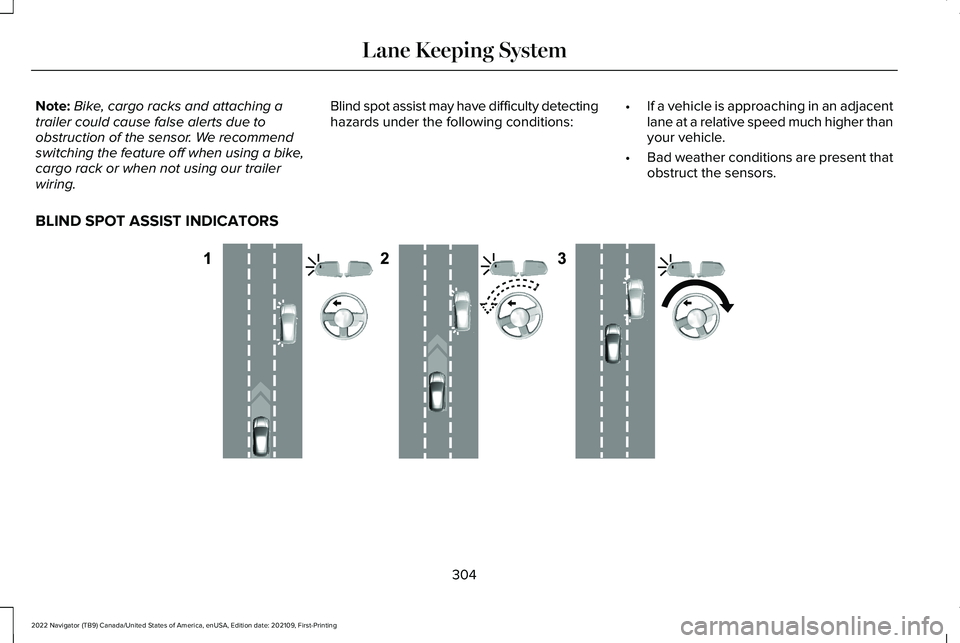
BLIND SPOT ASSIST INDICATORS 304
2022 Navigator (TB9) Canada/United States of America, enUSA, Edition date: 202109, First-Printing Lane Keeping SystemE310089