key LINCOLN NAVIGATOR 2022 Workshop Manual
[x] Cancel search | Manufacturer: LINCOLN, Model Year: 2022, Model line: NAVIGATOR, Model: LINCOLN NAVIGATOR 2022Pages: 646, PDF Size: 7.29 MB
Page 305 of 646
To change the lane keeping system mode,
use the touchscreen:
1. Press Features on the touchscreen.
2. Press
Driver Assistance.
3. Press
Lane-Keeping System.
4. Press
Lane-Keeping Mode.
5. Select a mode.
Note: The system remembers the last setting
when you start your vehicle. If the system
detects a MyKey™, it defaults to the last
setting for that MyKey™.
ALERT MODE
WHAT IS ALERT MODE
Alert mode vibrates the steering wheel when
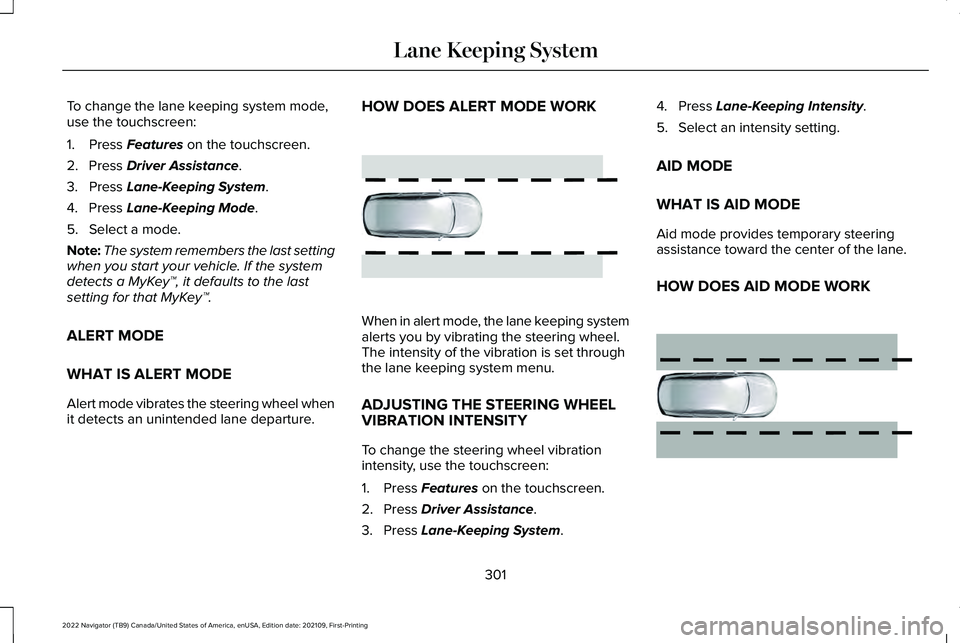
it detects an unintended lane departure. HOW DOES ALERT MODE WORK
When in alert mode, the lane keeping system
alerts you by vibrating the steering wheel.
The intensity of the vibration is set through
the lane keeping system menu.
ADJUSTING THE STEERING WHEEL
VIBRATION INTENSITY
To change the steering wheel vibration
intensity, use the touchscreen:
1. Press
Features on the touchscreen.
2. Press
Driver Assistance.
3. Press
Lane-Keeping System. 4. Press
Lane-Keeping Intensity.
5. Select an intensity setting.
AID MODE
WHAT IS AID MODE
Aid mode provides temporary steering
assistance toward the center of the lane.
HOW DOES AID MODE WORK 301
2022 Navigator (TB9) Canada/United States of America, enUSA, Edition date: 202109, First-Printing Lane Keeping SystemE165515 E165516
Page 394 of 646
ROADSIDE ASSISTANCE
Vehicles sold in the United States:
Getting Roadside Assistance
To fully assist you should you have a vehicle
concern, Lincoln offers a complimentary
roadside assistance program. This program
is separate from the New Vehicle Limited
Warranty.
The service is available:
•
Throughout the life of the vehicle for
original owners.
• For six years or 70,000 mi (110,000 km),
whichever comes first, for subsequent
owners.
Roadside Assistance covers:
• A flat tire change with a good spare. For
vehicles with an unusable tire inflation
kit, we provide towing service.
• Battery jump start.
• Lock-out assistance - key replacement
cost is the client's responsibility. •
Fuel delivery — independent service
contractors, if not prohibited by state,
local or municipal law shall deliver up to
2 gal (8 L)
of gasoline fuel to a disabled
vehicle. Roadside Assistance limits fuel
delivery service to two no-charge
occurrences within a 12-month period.
• Winch out — available within 100 ft (30 m)
of a paved or county maintained road,
no recoveries. •
Towing — independent service
contractors, if not prohibited by state,
local or municipal law shall tow Lincoln
eligible vehicles to the client's selling or
preferred dealer within 100 mi (160 km)
of the disablement location or to the
nearest Lincoln dealer. If a client requests
a tow to a selling or preferred dealer that
is more than
100 mi (160 km) from the
disablement location, the client is
responsible for any mileage costs in
excess of
100 mi (160 km).
• Roadside Assistance includes up to $200
for a towed trailer if the disabled eligible
vehicle requires service at the nearest
authorized dealer. If the towing vehicle
is operational but the trailer is not, then
the trailer does not qualify for any
roadside services.
Vehicles Sold in the United States:
Using Roadside Assistance
United States clients who require roadside
assistance, call 1-800-521-4140 or contact
Roadside Assistance using the Lincoln Way
mobile app.
390
2022 Navigator (TB9) Canada/United States of America, enUSA, Edition date: 202109, First-Printing Crash and Breakdown Information
Page 395 of 646
If you need to arrange roadside assistance
for yourself, Lincoln reimburses a reasonable
amount for towing to the nearest Lincoln
dealership within 100 mi (160 km). To obtain
reimbursement information, United States
clients, call 1-800-521-4140. Clients need to
submit their original receipts.
Vehicles Sold in Canada: Getting
Roadside Assistance
To fully assist you should you have a vehicle
concern, Lincoln offers a complimentary
roadside assistance program. This program
is eligible within Canada or the continental
United States.
The service is available 24 hours a day,
seven days a week.
This program is separate from the New
Vehicle Limited Warranty, beginning from
the original warranty start date and lasts the
life of the vehicle for the original owner.
Subsequent owners receive coverage that
is concurrent with the 6 years or
70,000 mi
(110,000 km), whichever occurs first,
powertrain warranty coverage period. Note:
Canadian roadside coverage and
benefits may differ from the U.S. coverage.
For complete program coverage details,
review your warranty guide, contact your
dealer, call us in Canada at 1-844-665-2007,
or visit our website at
www.lincolncanada.com.
If you purchased your vehicle in Canada and
require roadside assistance, please call
1-844-665-2007 or contact Roadside
Assistance using the Lincoln Way mobile
app.
Note: For quick reference, complete the
roadside assistance identification card found
in the glove compartment of your vehicle
and place it in your wallet.
SWITCHING THE HAZARD
FLASHERS ON AND OFF The hazard flasher button is on the
instrument panel. Press the button
to switch the hazard flashers on if
your vehicle is creating a safety hazard for
other road users. When you switch the hazard flashers on, all
front and rear direction indicators flash.
Note:
The hazard flashers operate when the
ignition is in any position, or if the key is not
in the ignition. The battery loses charge and
could have insufficient power to restart your
vehicle.
Press the button again to switch them off.
JUMP STARTING THE VEHICLE
JUMP STARTING PRECAUTIONS WARNING:
Batteries normally
produce explosive gases which can cause
personal injury. Therefore, do not allow
flames, sparks or lighted substances to
come near the battery. When working near
the battery, always shield your face and
protect your eyes. Always provide correct
ventilation.
391
2022 Navigator (TB9) Canada/United States of America, enUSA, Edition date: 202109, First-Printing Crash and Breakdown Information
Page 414 of 646
Protected Component
Rating
Item
Speaker amplifier.
20 A
4
Not used.
—
5
Smart datalink connector logic.
10 A
6
Rear audio control module.
10 A
7
Head up display.
Wireless accessory charger.
5 A
8
Hands-free liftgate module.
Keypad.
5 A
9
Combined sensor module.
Not used.
—
10
Not used.
—
11
Instrument cluster.
7.5 A
12
Steering column control module.
7.5 A
13
Smart datalink connector logic.Climate control module.Gear shift module.
Brake switch.
15 A
14
SYNC.
15 A
15
410
2022 Navigator (TB9) Canada/United States of America, enUSA, Edition date: 202109, First-Printing Fuses
Page 459 of 646
TIRE PRESSURE MONITORING
SYSTEM LIMITATIONS
When the outside temperature drops
significantly, the tire pressure could decrease
and activate the low tire pressure warning
lamp.
The warning lamp could also illuminate when
you use a spare wheel, or tire sealant from
the inflator kit.
Note:
Regularly checking the vehicle tire
pressures can reduce the possibility for the
warning lamp to illuminate due to outside
air temperature changes.
Note: After you inflate the tires to the
recommended pressure it could take up to
two minutes of driving over 20 mph (32 km/h)
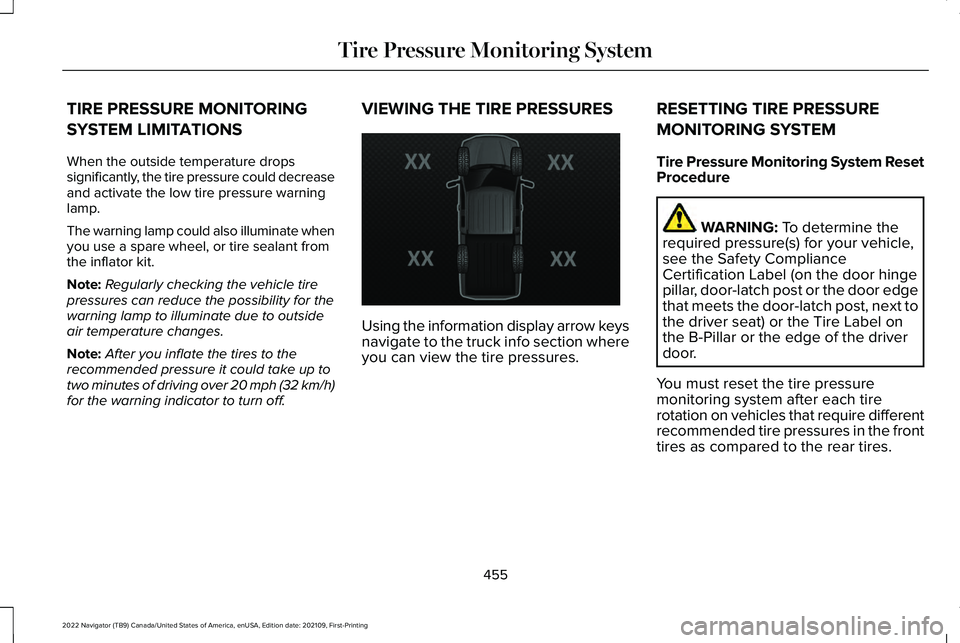
for the warning indicator to turn off. VIEWING THE TIRE PRESSURES
Using the information display arrow keys
navigate to the truck info section where
you can view the tire pressures.
RESETTING TIRE PRESSURE
MONITORING SYSTEM
Tire Pressure Monitoring System Reset
Procedure WARNING: To determine the
required pressure(s) for your vehicle,
see the Safety Compliance
Certification Label (on the door hinge
pillar, door-latch post or the door edge
that meets the door-latch post, next to
the driver seat) or the Tire Label on
the B-Pillar or the edge of the driver
door.
You must reset the tire pressure
monitoring system after each tire
rotation on vehicles that require different
recommended tire pressures in the front
tires as compared to the rear tires.
455
2022 Navigator (TB9) Canada/United States of America, enUSA, Edition date: 202109, First-Printing Tire Pressure Monitoring SystemE224333
Page 505 of 646
CENTER DISPLAY PRECAUTIONS
WARNING: Driving while distracted
can result in loss of vehicle control, crash
and injury. We strongly recommend that
you use extreme caution when using any
device that may take your focus off the
road. Your primary responsibility is the safe
operation of your vehicle. We recommend
against the use of any hand-held device
while driving and encourage the use of
voice-operated systems when possible.
Make sure you are aware of all applicable
local laws that may affect the use of
electronic devices while driving.
CENTER DISPLAY LIMITATIONS
Speed-restricted Features
For your safety, some features are not
available while the vehicle is in motion at or
above
5 mph (8 km/h). Settings that are not
critical while driving your vehicle are shown
as restricted on your display. Some of these
settings include: •
System updates.
• Personal profiles setup.
• Valet mode setup.
• Driver assistance settings.
Vehicle Settings
• MyKey setup.
• Door keypad code setup.
• Backup start passcode setup.
These restricted features become available
when your vehicle is no longer in motion.
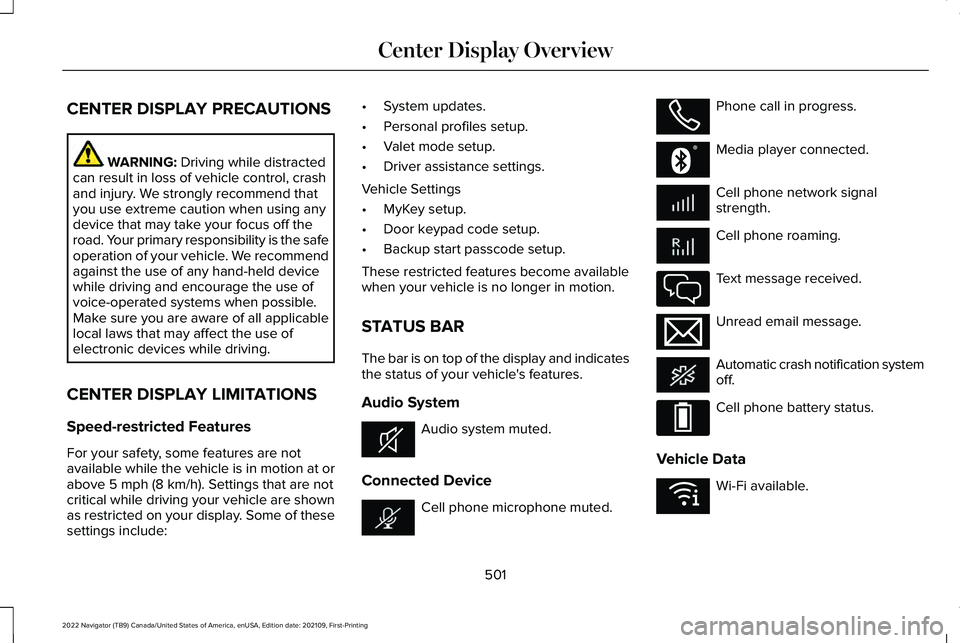
STATUS BAR
The bar is on top of the display and indicates
the status of your vehicle's features.
Audio System Audio system muted.
Connected Device Cell phone microphone muted. Phone call in progress.
Media player connected.
Cell phone network signal
strength.
Cell phone roaming.
Text message received.
Unread email message.
Automatic crash notification system
off.
Cell phone battery status.
Vehicle Data Wi-Fi available.
501
2022 Navigator (TB9) Canada/United States of America, enUSA, Edition date: 202109, First-Printing Center Display OverviewE353221 E353213 E353208 E335295 E353216 E335293 E353219
Page 511 of 646
Do Not Disturb
Reject incoming calls and switch ring tones
and alerts off.
Phone Keypad
Directly dial a number.
Voice Control
Say a command to use the Google or Siri
voice assistant available on your connected
phone to access supported features.
Note:
Some features under the phone menu
may not be available if the feature is not
supported through the phone.
507
2022 Navigator (TB9) Canada/United States of America, enUSA, Edition date: 202109, First-Printing Phone
Page 512 of 646
MAKING AND RECEIVING A
PHONE CALL
Making Calls
To call a number in your contacts, select:
Action and Description
Menu Item
You can then select the
name of the contact you
want to call. Any numbers
stored for that contact
display along with any
stored contact photos. You
can then select the number
that you want to call. The
system begins the call.
Contacts
To call a number from your recent calls,
select: Action and Description
Menu Item
You can then select an entry
that you want to call. The
system begins the call.
Recent Call
List To call a number from your favorites, select: Action and Description
Menu Item
You can then select an entry
that you want to call. The
system begins the call.
Favorites
To call a number that is not stored in your
phone, select: Action and Description
Menu Item
Select the digits of the
number you wish to call.
Phone
Keypad
The system begins the call.
Call
Pressing the backspace button deletes the
last digit you typed.
Receiving Calls
During an incoming call, an audible tone
sounds. Caller information appears in the
display if it is available. To accept the call, select: Menu Item
Accept
Note: You can also accept the call by
pressing the phone button on the steering
wheel.
To reject the call, select: Menu Item
Reject
Ignore the call by doing nothing. The system
logs it as a missed call.
During a Phone Call
During a phone call, the contacts name and
number display on the screen along with the
call duration.
The phone status items are also visible:
• Signal Strength.
• Battery.
508
2022 Navigator (TB9) Canada/United States of America, enUSA, Edition date: 202109, First-Printing Phone
Page 513 of 646
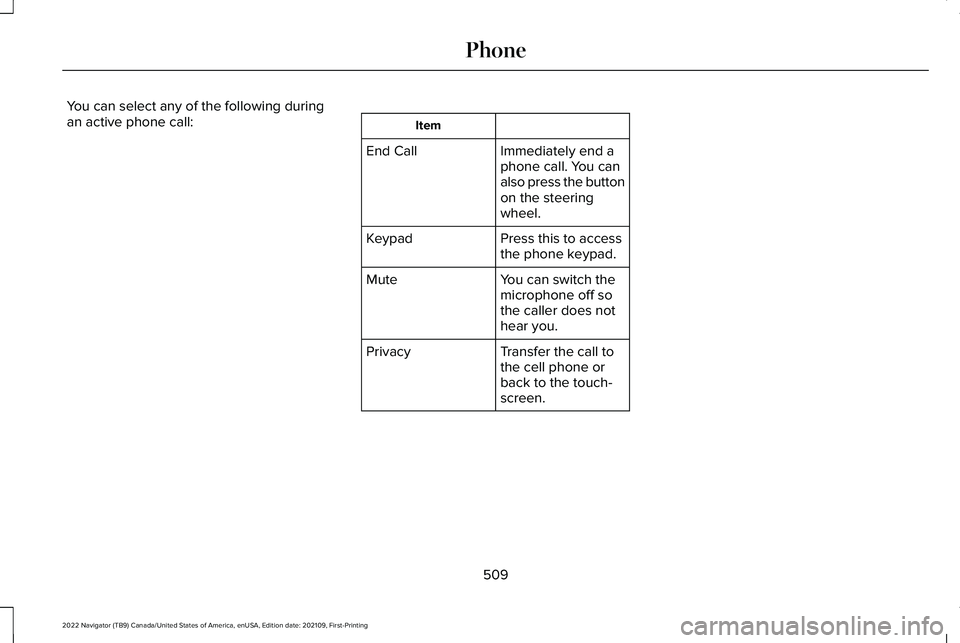
You can select any of the following during
an active phone call:
Item
Immediately end a
phone call. You can
also press the button
on the steering
wheel.
End Call
Press this to access
the phone keypad.
Keypad
You can switch the
microphone off so
the caller does not
hear you.
Mute
Transfer the call to
the cell phone or
back to the touch-
screen.
Privacy
509
2022 Navigator (TB9) Canada/United States of America, enUSA, Edition date: 202109, First-Printing Phone
Page 521 of 646
3. Follow the instructions on the display.
LINKING OR UNLINKING A
PERSONAL PROFILE TO A REMOTE
CONTROL
You can save preset memory positions for
up to three remote controls by assigning a
remote control to a personal profile using
the touchscreen.
Use the touchscreen to link a remote control
to a personal profile.
1. Switch the vehicle on and leave the
vehicle in park (P).
2. Select the Personal Profiles button under
Settings.
3. Touch the arrow for the profile you wish to link to a remote control.
4. Select remote control.
5. Follow the instructions on the display.
Note: If more than one linked remote control
is in range, the memory function moves to
the settings of the first key to initiate a
memory recall. Note:
The guest profile consists of existing
settings when there is no driver profile
created. After you create a driver profile, the
guest profile serves as an additional driver
profile.
Note: You cannot link a remote control to a
guest profile.
517
2022 Navigator (TB9) Canada/United States of America, enUSA, Edition date: 202109, First-Printing Personal Profiles