air condition LINCOLN NAVIGATOR 2023 User Guide
[x] Cancel search | Manufacturer: LINCOLN, Model Year: 2023, Model line: NAVIGATOR, Model: LINCOLN NAVIGATOR 2023Pages: 660, PDF Size: 14.04 MB
Page 125 of 660
Headlamp High Beam
Illuminates when you switch thehigh beam headlamps on.
HEADLAMPS – TROUBLESHOOTING
HEADLAMPS – FREQUENTLY ASKEDQUESTIONS
Why is there condensation in theheadlamps?
•Headlamps have vents to accommodatenormal changes in air pressure.Condensation can be a naturalby-product of this design. When moist airenters the lamp assembly through thevents, there is a possibility thatcondensation can occur when thetemperature is cold. When normalcondensation occurs, a fine mist can formon the interior of the lens. The fine misteventually clears and exits through thevents during normal operation.
How much condensation is acceptable?
•The presence of a fine mist, for exampleno streaks, drip marks or large droplets.A fine mist covers less than 50% of thelens.
How long may it take for theacceptable condensation to becleared?
•Clearing time may take as long as 48hours under dry weather conditions.
How much condensation isunacceptable?
•A water puddle inside the lamp. Streaks,drip marks or large droplets present onthe interior of the lens.
What should I do if unacceptablecondensation is present?
•Have your vehicle checked as soon aspossible.
Why do my headlamps turn off when Ihave them switched on when I switchmy vehicle off?
•The battery saver turns the headlampsoff after a short period of time after youswitch your vehicle off.
AUTOLAMPS
WHAT ARE AUTOLAMPS
WARNING: The system does notrelieve you of your responsibility to drivewith due care and attention. You may needto override the system if it does not turnthe headlamps on in low visibilityconditions, for example daytime fog.
Autolamps turn the headlamps on in low lightsituations or when the windshield wipersoperate.
AUTOLAMP SETTINGS
1.Press Settings on the touchscreen.
121
2023 Navigator (TB9) Canada/United States of America, enUSA, Edition date: 202207, DOMExterior LightingE67019
Page 158 of 660
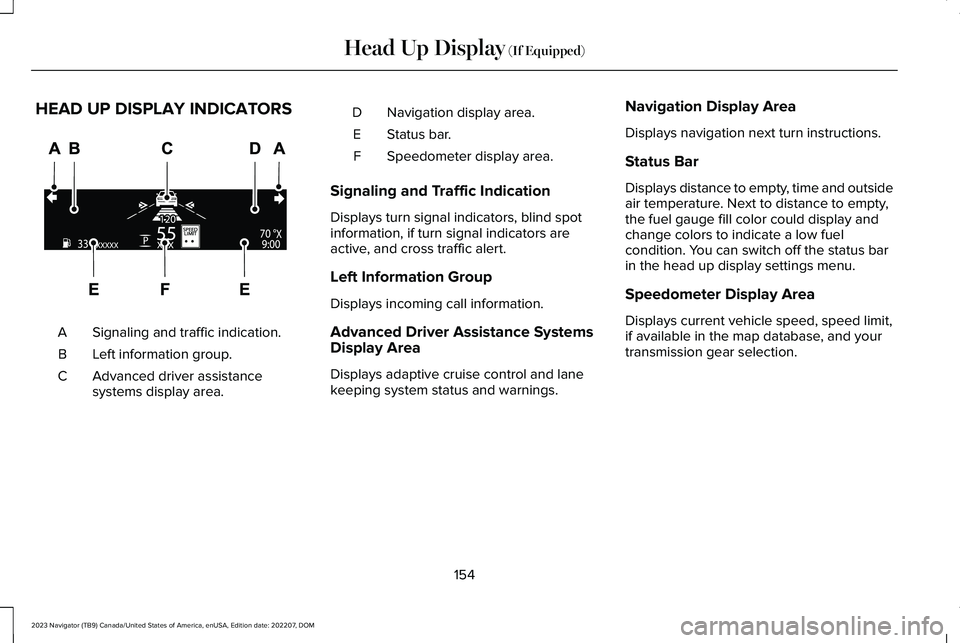
HEAD UP DISPLAY INDICATORS
Signaling and traffic indication.A
Left information group.B
Advanced driver assistancesystems display area.C
Navigation display area.D
Status bar.E
Speedometer display area.F
Signaling and Traffic Indication
Displays turn signal indicators, blind spotinformation, if turn signal indicators areactive, and cross traffic alert.
Left Information Group
Displays incoming call information.
Advanced Driver Assistance SystemsDisplay Area
Displays adaptive cruise control and lanekeeping system status and warnings.
Navigation Display Area
Displays navigation next turn instructions.
Status Bar
Displays distance to empty, time and outsideair temperature. Next to distance to empty,the fuel gauge fill color could display andchange colors to indicate a low fuelcondition. You can switch off the status barin the head up display settings menu.
Speedometer Display Area
Displays current vehicle speed, speed limit,if available in the map database, and yourtransmission gear selection.
154
2023 Navigator (TB9) Canada/United States of America, enUSA, Edition date: 202207, DOMHead Up Display (If Equipped)E355334
Page 163 of 660
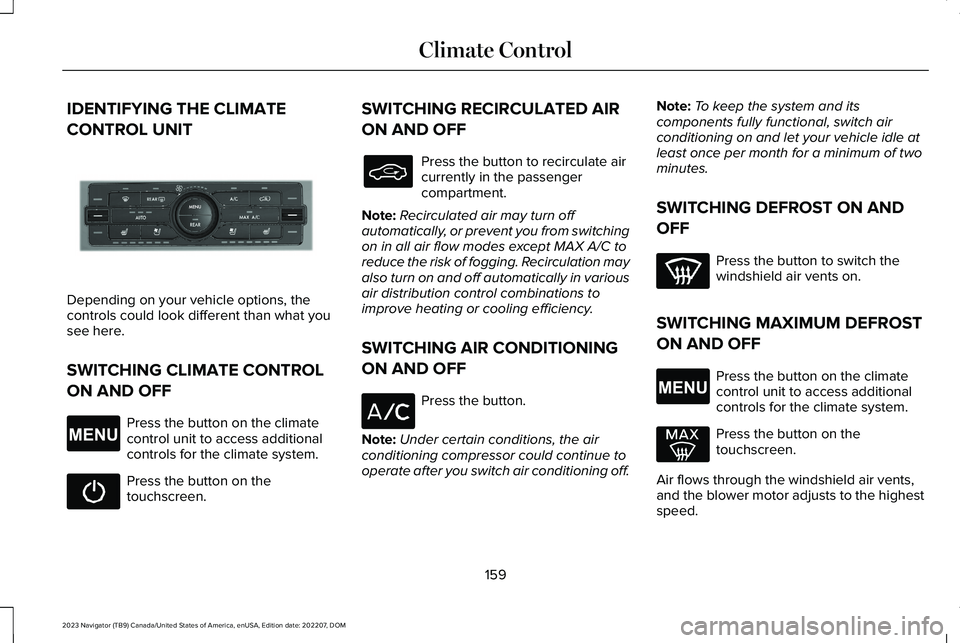
IDENTIFYING THE CLIMATE
CONTROL UNIT
Depending on your vehicle options, thecontrols could look different than what yousee here.
SWITCHING CLIMATE CONTROL
ON AND OFF
Press the button on the climatecontrol unit to access additionalcontrols for the climate system.
Press the button on thetouchscreen.
SWITCHING RECIRCULATED AIR
ON AND OFF
Press the button to recirculate aircurrently in the passengercompartment.
Note:Recirculated air may turn offautomatically, or prevent you from switchingon in all air flow modes except MAX A/C toreduce the risk of fogging. Recirculation mayalso turn on and off automatically in variousair distribution control combinations toimprove heating or cooling efficiency.
SWITCHING AIR CONDITIONING
ON AND OFF
Press the button.
Note:Under certain conditions, the airconditioning compressor could continue tooperate after you switch air conditioning off.
Note:To keep the system and itscomponents fully functional, switch airconditioning on and let your vehicle idle atleast once per month for a minimum of twominutes.
SWITCHING DEFROST ON AND
OFF
Press the button to switch thewindshield air vents on.
SWITCHING MAXIMUM DEFROST
ON AND OFF
Press the button on the climatecontrol unit to access additionalcontrols for the climate system.
Press the button on thetouchscreen.
Air flows through the windshield air vents,and the blower motor adjusts to the highestspeed.
159
2023 Navigator (TB9) Canada/United States of America, enUSA, Edition date: 202207, DOMClimate ControlE355898 E265038 E265038
Page 164 of 660
You can also use this setting to defog andclear the windshield of a thin covering of ice.
Note:To prevent window fogging, youcannot select recirculated air whenmaximum defrost is on.
Note:The heated rear window also turns onwhen you select maximum defrost.
SWITCHING MAXIMUM COOLING
ON AND OFF
Press the button.
Note:When you switch maximum coolingoff, air conditioning remains on.
SWITCHING THE HEATED REAR
WINDOW ON AND OFF
Press the button to clear the rearwindow of thin ice and fog. Theheated rear window turns off aftera short period of time.
Note:This button also activates the heatedmirrors.
Note:Do not use harsh chemicals, razorblades or other sharp objects to clean orremove decals from the inside of the heatedrear window as this could cause damage tothe heated rear window grid lines notcovered by the vehicle Warranty.
SETTING THE BLOWER MOTOR
SPEED
Turn the control to adjust thevolume of air circulated in thevehicle.
SETTING THE TEMPERATURE
Press the toggle button on the left-hand sideof the climate control upward or downwardto set the left-hand temperature.
Note:This control also adjusts the right-handside temperature when you switch off dualzone mode.
Press the toggle button on the right-handside of the climate control upward ordownward to set the right-hand temperature.
DIRECTING THE FLOW OF AIR
Press the button to accessadditional controls for the climatesystem.
160
2023 Navigator (TB9) Canada/United States of America, enUSA, Edition date: 202207, DOMClimate Control E266187 E266186 E265038
Page 169 of 660
SETTING THE TEMPERATURE
Press the buttons on the touchscreen to setthe temperature in the rear passengercompartment.
DIRECTING THE FLOW OF AIR
Directing Air to the Rear Console AirVents
Press the button on thetouchscreen to direct airflow to therear console air vents.
Directing Air to the Rear Footwell AirVents
Press the button on thetouchscreen to direct airflow torear footwell air vents.
Note:Air can be directed through anycombination of air vents.
REAR AUTO MODE
SWITCHING REAR AUTO MODE ONAND OFF
Press the button on thetouchscreen to switch rearautomatic operation on, then setthe temperature.
The system adjusts the blower motor speed,air distribution, air conditioning operation toreach and maintain the temperature youhave set.
REAR PASSENGER CLIMATE
CONTROL INDICATORS
Illuminates when the rear climatecontrols are locked through thefront climate controls.
Note:If the rear climate controls are lockedand the rear climate system is turned off, theindicator illuminates for a few seconds whenyou try to use any of the rear climatecontrols.
165
2023 Navigator (TB9) Canada/United States of America, enUSA, Edition date: 202207, DOMRear Passenger Climate ControlE356421 E356422 E356421 E356422 E244097 E244098
Page 216 of 660
FUEL QUALITY
SELECTING THE CORRECT FUEL
Your vehicle operates on regular unleadedgasoline with a minimum pump (R+M)/2octane rating of 87.
Some fuel stations, particularly those in highaltitude areas, offer fuels posted as regularunleaded gasoline with an octane ratingbelow 87. The use of these fuels could resultin engine damage that will not be coveredby the vehicle Warranty.
For best overall vehicle and engineperformance, premium fuel with an octanerating of 91 or higher is recommended. Theperformance gained by using premium fuelis most noticeable in hot weather as well asother conditions, for example when towinga trailer. See Towing a Trailer (page 349).
Do not be concerned if the enginesometimes knocks lightly. However, if theengine knocks heavily while using fuel withthe recommended octane rating, contact anauthorized dealer to prevent any enginedamage.
We recommend Top Tier detergentgasolines, where available to help minimizeengine deposits and maintain optimal vehicleand engine performance.
For additional information, visitwww.toptiergas.com.
Note:Use of any fuel for which the vehiclewas not designed can impair the emissioncontrol system, cause loss of vehicleperformance, and cause damage to theengine which may not be covered by thevehicle Warranty.
Do not use:
•Diesel fuel.
•Fuels containing kerosene or paraffin.
•Fuel containing more than 15% ethanolor E85 fuel.
•Fuels containing methanol.
•Fuels containing metallic-based additives,including manganese-based compounds.
•Fuels containing the octane boosteradditive, methylcyclopentadienylmanganese tricarbonyl (MMT).
•Leaded fuel, using leaded fuel isprohibited by law.
The use of fuels with metallic compoundssuch as methylcyclopentadienyl manganesetricarbonyl, which is a manganese-based fueladditive, will impair engine performance andaffect the emission control system.
LOCATING THE FUEL FILLER
FUNNEL
The fuel filler funnel is under the luggagecompartment floor covering.
212
2023 Navigator (TB9) Canada/United States of America, enUSA, Edition date: 202207, DOMFuel and RefuelingE161513
Page 234 of 660
WHAT IS THE ELECTRONIC
LIMITED-SLIP DIFFERENTIAL
The electronic limited-slip differential systemdirects torque across the axle, enabling thevehicle to drive over terrain and roadconditions that a conventional axle cannot.The system is active at all times and requiresno input from the driver.
Note:If your vehicle is not at optimaloperating conditions or a system fault ispresent, a warning may display in theinstrument cluster. Depending on thewarning, you may need to service yourvehicle.
Operating the Electronic Limited-SlipDifferential with a Spare or MismatchedTires
If your vehicle has an electronic limited-slipdifferential, do not use a spare tire of adifferent size than the tire provided. If youhave a spare tire installed, a message mayappear indicating the system has disabledautomatically or reduced function to preventsystem overheat and damage. Werecommend you reinstall the repaired orreplaced spare tire as soon as possible.When you replace the spare tire, the systemresumes normal operation on the next keycycle.
Trailer Towing
The electronic limited-slip differentialenhances vehicle stability during trailer towoperation. During high demand traileringevents, such as steep slopes, high speedsor with a spare tire, the system may providea warning in the instrument cluster andreduce function or enter a temporarilydisabled state. To resume normal function,stop the vehicle in a safe location and allowthe unit to adequately cool. Once the systemreaches normal operating temperatures,system function restores and the electroniclimited-slip differential restored messagedisplays.
230
2023 Navigator (TB9) Canada/United States of America, enUSA, Edition date: 202207, DOMElectronic Limited-Slip Differential (If Equipped)
Page 242 of 660
WHAT IS REVERSE BRAKING
ASSIST
Lincoln Reverse Brake Assist
The system uses sensors on the rear of yourvehicle to detect a possible collision andapplies the brakes to either reduce thedamage from impact, or to assist in avoidingthe collision.
HOW DOES REVERSE BRAKING
ASSIST WORK
Reverse braking assist functions when inreverse (R) and traveling at a speed of1–7 mph (2–12 km/h).
If the system detects an obstacle behind yourvehicle, it provides a warning through therear parking aid or cross traffic alert system.
REVERSE BRAKING ASSIST
PRECAUTIONS
WARNING: You are responsible forcontrolling your vehicle at all times. Thesystem is designed to be an aid and doesnot relieve you of your responsibility todrive with due care and attention. Failureto follow this instruction could result in theloss of control of your vehicle, personalinjury or death.
WARNING: To help avoid personalinjury, always use caution when in reverse(R) and when using the sensing system.
WARNING: The system may notoperate properly during severe weatherconditions, for example snow, ice, heavyrain and spray. Always drive with due careand attention. Failure to take care mayresult in a crash.
WARNING: Traffic control systems,fluorescent lamps, inclement weather, airbrakes, external motors and fans mayaffect the correct operation of the sensingsystem. This may cause reducedperformance or false alerts.
WARNING: Some situations andobjects prevent hazard detection. Forexample low or direct sunlight, inclementweather, unconventional vehicle types, andpedestrians. Apply the brakes whennecessary. Failure to follow this instructioncould result in the loss of control of yourvehicle, personal injury or death.
WARNING: Do not use the systemwith accessories that extend beyond thefront or rear of your vehicle, for example atrailer hitch or bike rack. The system is notable to make corrections for the additionallength of the accessories.
238
2023 Navigator (TB9) Canada/United States of America, enUSA, Edition date: 202207, DOMReverse Braking Assist (If Equipped)
Page 259 of 660
PARKING AID PRECAUTIONS
WARNING: To help avoid personalinjury, always use caution when in reverse(R) and when using the sensing system.
WARNING: The system may notdetect objects with surfaces that absorbreflection. Always drive with due care andattention. Failure to take care may resultin a crash.
WARNING: Traffic control systems,fluorescent lamps, inclement weather, airbrakes, external motors and fans mayaffect the correct operation of the sensingsystem. This may cause reducedperformance or false alerts.
WARNING: The system may notdetect small or moving objects, particularlythose close to the ground.
WARNING: The parking aid systemcan only assist you to detect objects whenyour vehicle is moving at parking speeds.To help avoid personal injury you musttake care when using the parking aidsystem.
WARNING: The system may notfunction if the sensor is blocked.
WARNING: In cold and severeweather conditions the system may notfunction. Rain, snow and spray can all limitsensor performance.
WARNING: If damage occurs in theimmediate area surrounding the sensor,have your vehicle checked as soon aspossible.
Note:If your vehicle sustains damageleaving the sensors misaligned, this willcause inaccurate measurements or falsealerts.
When you connect a trailer to your vehicle,the rear parking aid detects the trailer andprovides an alert. Disable the parking aidwhen you connect a trailer to prevent thealert.
Note:Connected trailers might be detectedby the vehicle and parking aid turns offautomatically in those instances.
Note:Certain add-on devices installedaround the bumper or fascia may createfalse alerts, for example, large trailer hitches,bike or surfboard racks, license platebrackets, bumper covers or any other devicethat could block the normal detection zoneof the parking aid system. Aftermarket sparetires or spare tire covers mounted to the reartailgate could cause false alerts from thepark aid system. Remove the add-on deviceto prevent false alerts.
Note: Keep the sensors free from snow, iceand large accumulations of dirt. If thesensors are covered, the system's accuracycan be affected.
Do not clean the sensors with sharp objects.
255
2023 Navigator (TB9) Canada/United States of America, enUSA, Edition date: 202207, DOMParking Aids
Page 291 of 660
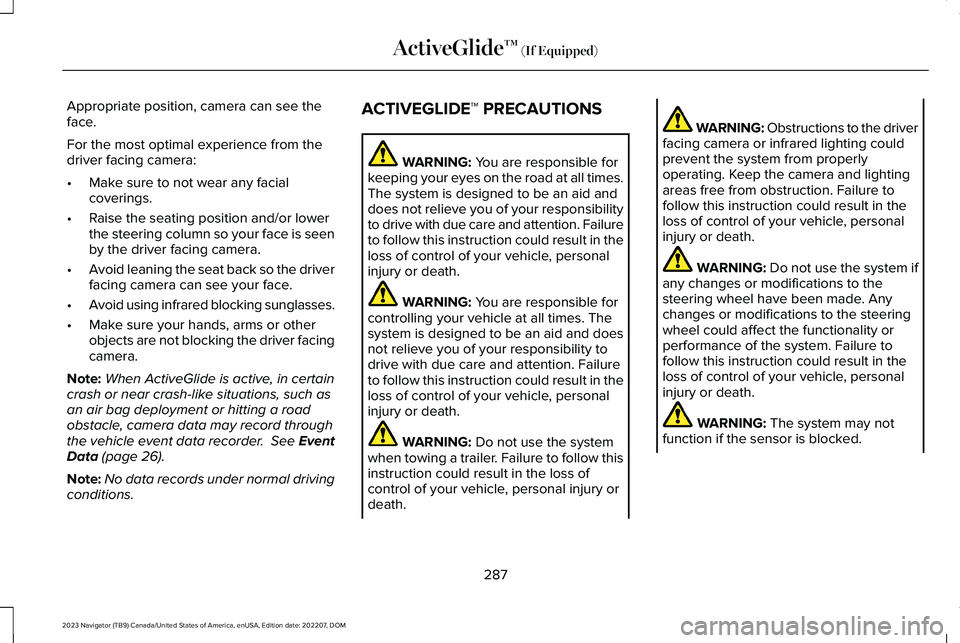
Appropriate position, camera can see theface.
For the most optimal experience from thedriver facing camera:
•Make sure to not wear any facialcoverings.
•Raise the seating position and/or lowerthe steering column so your face is seenby the driver facing camera.
•Avoid leaning the seat back so the driverfacing camera can see your face.
•Avoid using infrared blocking sunglasses.
•Make sure your hands, arms or otherobjects are not blocking the driver facingcamera.
Note:When ActiveGlide is active, in certaincrash or near crash-like situations, such asan air bag deployment or hitting a roadobstacle, camera data may record throughthe vehicle event data recorder. See EventData (page 26).
Note:No data records under normal drivingconditions.
ACTIVEGLIDE™ PRECAUTIONS
WARNING: You are responsible forkeeping your eyes on the road at all times.The system is designed to be an aid anddoes not relieve you of your responsibilityto drive with due care and attention. Failureto follow this instruction could result in theloss of control of your vehicle, personalinjury or death.
WARNING: You are responsible forcontrolling your vehicle at all times. Thesystem is designed to be an aid and doesnot relieve you of your responsibility todrive with due care and attention. Failureto follow this instruction could result in theloss of control of your vehicle, personalinjury or death.
WARNING: Do not use the systemwhen towing a trailer. Failure to follow thisinstruction could result in the loss ofcontrol of your vehicle, personal injury ordeath.
WARNING: Obstructions to the driverfacing camera or infrared lighting couldprevent the system from properlyoperating. Keep the camera and lightingareas free from obstruction. Failure tofollow this instruction could result in theloss of control of your vehicle, personalinjury or death.
WARNING: Do not use the system ifany changes or modifications to thesteering wheel have been made. Anychanges or modifications to the steeringwheel could affect the functionality orperformance of the system. Failure tofollow this instruction could result in theloss of control of your vehicle, personalinjury or death.
WARNING: The system may notfunction if the sensor is blocked.
287
2023 Navigator (TB9) Canada/United States of America, enUSA, Edition date: 202207, DOMActiveGlide™ (If Equipped)