phone LINCOLN NAVIGATOR 2023 User Guide
[x] Cancel search | Manufacturer: LINCOLN, Model Year: 2023, Model line: NAVIGATOR, Model: LINCOLN NAVIGATOR 2023Pages: 660, PDF Size: 14.04 MB
Page 83 of 660
8.Confirm you are aware you arede-authorizing all authorized users andLincoln Way Connect settings.
9.Press Continue.
USING THE VALET MODE
Classic Valet Mode
Enabling Valet Mode
Make sure the remote control is in yourvehicle.
1.Press Settings on the touchscreen.
2.Press Valet Mode.
3.Enter a four digit code to lock thetouchscreen.
4.Re-enter the same four digit code tocomplete enabling valet mode.
Disabling Valet Mode
1.Press Exit Valet Mode.
2.Enter your four digit code to disable valetmode and unlock your touchscreen.
Enhanced Valet Mode
Enabling Valet Mode
Have your backup start passcode completelyset up before using valet mode. SeeProgramming Your Phone (page 78).
Note:If your vehicle detects a remotecontrol, the system defaults to classic valetmode.
1.Press Settings on the touchscreen.
2.Press Valet Mode.
Note:If the system detects a valid phone asa key, a valet passcode displays in both thetouchscreen and mobile app.
Note:If the system does not detect a validphone as a key, it prompts you to enter yourbackup start passcode on the touchscreen.Once validated, a valet passcode displayson the touchscreen.
3.Provide the valet the first five digits of thevalet passcode to enter on the keylessentry keypad to unlock your vehicle.
4.Provide the valet the eight-digit valetpasscode to enter on the touchscreen tostart and drive your vehicle.
Disabling Valet Mode
1.Press Exit Valet Mode.
Note:If the system detects an authorizedphone as a key, valet mode disables.
Note:If the system does not detect a validphone as a key, it prompts you to enter yourbackup start passcode. Once validated, valetmode disables.
USING THE BACKUP START
PASSCODE
Make sure you have phone as a key activeon at least one phone to use the previouslycreated backup start passcode. SeeProgramming Your Phone (page 78).
79
2023 Navigator (TB9) Canada/United States of America, enUSA, Edition date: 202207, DOMPhone as a Key
Page 84 of 660
1.Press the brake pedal and the pushbutton ignition switch. If the system doesnot detect a valid phone as a key orremote control, a message appears onthe touchscreen and the system promptsyou for your backup start passcode.
Note:The touchscreen times out after 30seconds with no interaction.
Note:If the backup start passcode screendoes not appear, press the brake pedal andpush button ignition switch again.
2.Use the touchscreen to enter yourbackup start passcode.
3.After entering your backup startpasscode, press Enter within 30 seconds.
4.Once the system validates the backupstart passcode, a message alerts you tostart your vehicle.
5.Press the brake pedal and the pushbutton ignition switch within 20 secondsto start the vehicle.
6.If your vehicle does not start, repeatsteps 1-5.
System Lockout
The system locks after five combinedincorrect attempts of the following:
•Entering a backup start passcode.
•Resetting a current passcode.
•Entering a valet mode passcode.
Note:The system remains locked for fiveminutes. After five minutes the system allowscodes to be entered again.
PHONE AS A KEY –
TROUBLESHOOTING
PHONE AS A KEY – FREQUENTLYASKED QUESTIONS
How can I tell if my vehicle has phoneas a key?
•The touchscreen shows the phone as akey reset option.
•A control button appears on the homescreen of the Lincoln Way app if you haveregistered your vehicle through theLincoln Way app.
What happens if I cannot unlock thevehicle with phone as a key?
•Attempt to move your phone closer tothe vehicle.
•Check that the Lincoln Way app is stillrunning and that the phone as a keycontrol screen shows connected. If thephone is connected, attempt to press theremote unlock button in the Lincoln Wayapp. If the phone is not connected or theremote unlock button does not work inthe Lincoln Way app, attempt to forceclose and restart the app.
80
2023 Navigator (TB9) Canada/United States of America, enUSA, Edition date: 202207, DOMPhone as a Key
Page 85 of 660
Why do I get a No Key Detectedmessage in the instrument clusterdisplay when I am using phone as akey and my phone is in the car?
•Your phone’s Bluetooth connection hasbeen disrupted or is not connected. Tryreconnecting your phone's Bluetoothconnection.
•Move the phone closer to the center ofthe vehicle near the cup holder or centerconsole.
•Verify your phone as a key is still active,enabled and has not been revoked.
What do I do if my phone is lost,damaged or the battery has depleted?
•Use the backup start passcode that youcreated. See Using the Backup StartPasscode (page 79).
How many phones can I use for phoneas a key?
•You can program and activate up to fourphones with phone as a key to yourvehicle.
How does a valet drive my car if I onlyuse my phone as a key?
•Have the valet use the temporary valetpasscode that you created. See Usingthe Valet Mode (page 79).
I uninstalled my Lincoln Way app andreinstalled it. Why am I not able to geta new phone as a key?
•Remove the phone as a key that waspreviously associated with your phone.
•Reset phone as a key from your vehicle,and then request a new phone as a key.See Programming Your Phone (page78).
Why can I not remotely start thevehicle with my phone as a key?
•Using the Lincoln Way app, verify yourphone as a key setup is complete andenabled via Bluetooth connection on atleast one phone. If Bluetooth hasconnected but phone as a key setup isnot complete, complete the setup of yourphone as a key as prompted from theLincoln Way app. See ProgrammingYour Phone (page 78).
81
2023 Navigator (TB9) Canada/United States of America, enUSA, Edition date: 202207, DOMPhone as a Key
Page 87 of 660
Speed Minder
You can set a speed reminder for yourvehicle. Warning messages appear on thetouchscreen and a tone sounds if yourvehicle exceeds the set speed.
Audio System Volume Limit
The audio system maximum volume reduces.A message appears on the touchscreen ifyou attempt to exceed the volume limit.Automatic volume control turns off.
911 Assist
If you set 911 assist to always on, you cannotswitch it off with a MyKey.
Do Not Disturb
If you set do not disturb to always on, youcannot switch it off with a MyKey.
Note:If a phone is connected using AppleCarPlay or Android Auto while driving witha MyKey, the driver can receive phone callsand text messages even if the do not disturbrestriction is on. And if the vehicle comeswith satellite radio, there is no restriction onthe adult content.
Traction and Stability Control
If you set traction control or stability controlto always on, you cannot switch it off with aMyKey.
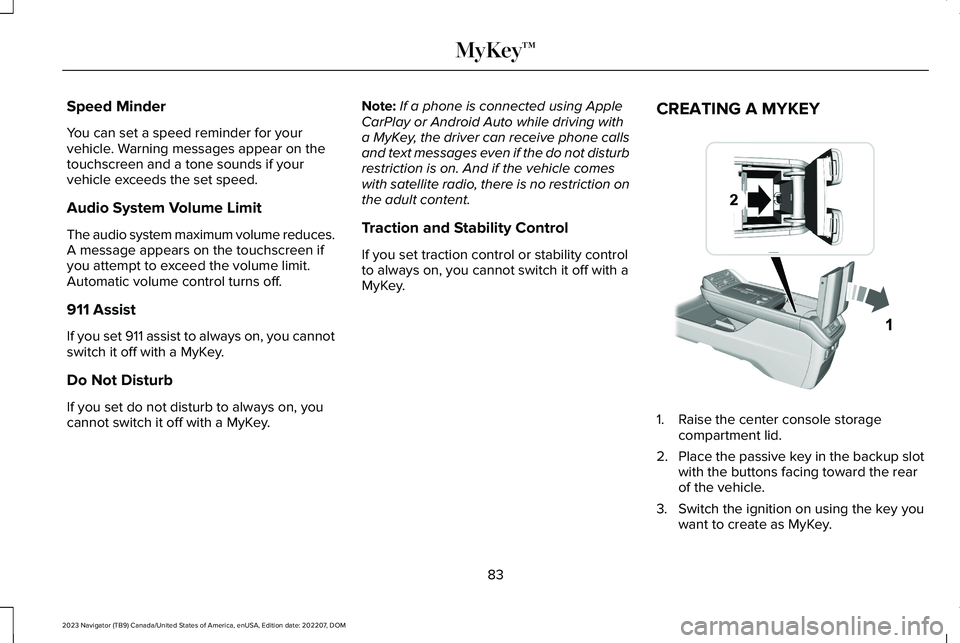
CREATING A MYKEY
1.Raise the center console storagecompartment lid.
2.Place the passive key in the backup slotwith the buttons facing toward the rearof the vehicle.
3.Switch the ignition on using the key youwant to create as MyKey.
83
2023 Navigator (TB9) Canada/United States of America, enUSA, Edition date: 202207, DOMMyKey™ E376555
Page 95 of 660
WHAT IS KEYLESS ENTRY
The system allows you to lock and unlockyour vehicle without taking the passive keyout of your pocket or purse.
KEYLESS ENTRY LIMITATIONS
Make sure your remote control is within 3 ft(1 m) from the front door handles and thetailgate.
The system could not function if:
•The remote control remains stationaryfor about a minute.
•The vehicle battery has no charge.
•The remote control battery has nocharge.
•There is interference causing issues withthe remote control frequencies.
•The remote control is too close to metalobjects or electronic devices, for examplekeys or a cell phone.
KEYLESS ENTRY SETTINGS
Switching Keyless Entry On and Off
1.Switch the ignition on using an originalkey that has not been created as aMyKey.
2.Press Settings on the touchscreen.
3.Press Vehicle Settings.
4.Press Locks.
Reprogramming the UnlockingFunction
You can enable two-stage unlocking functionallowing you to unlock only the driver doorwhen you touch the unlock sensor.
Press and hold both the lock and unlockbuttons on the remote control for fourseconds to disable or enable two-stageunlocking.
If you program the unlocking function so thatonly the driver door unlocks, you can unlockall of the other doors from inside your vehicleusing the power door lock control. You canunlock individual doors by pulling the interiordoor handles on those doors.
USING KEYLESS ENTRY
Unlocking the Doors
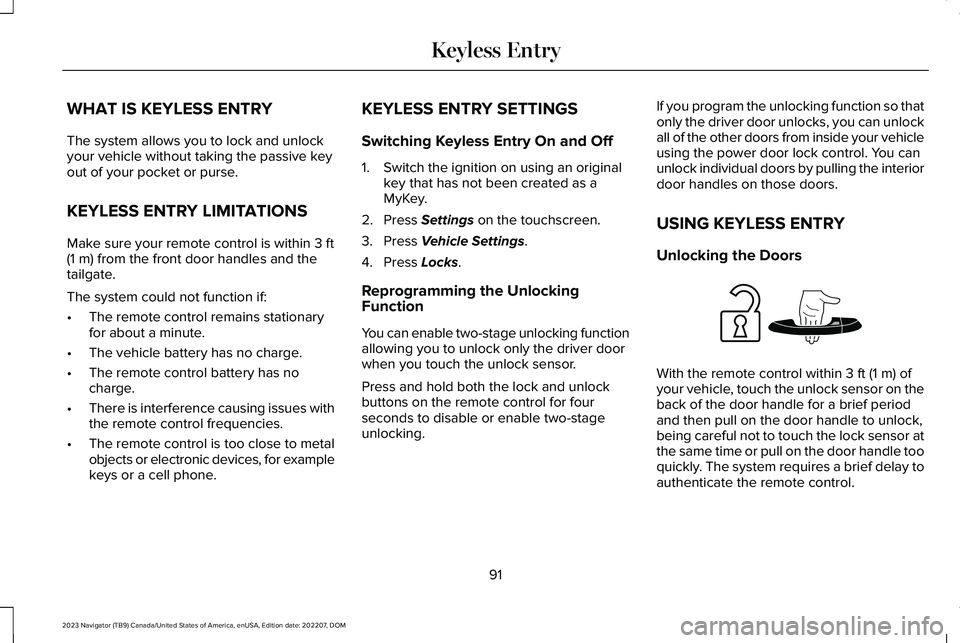
With the remote control within 3 ft (1 m) ofyour vehicle, touch the unlock sensor on theback of the door handle for a brief periodand then pull on the door handle to unlock,being careful not to touch the lock sensor atthe same time or pull on the door handle tooquickly. The system requires a brief delay toauthenticate the remote control.
91
2023 Navigator (TB9) Canada/United States of America, enUSA, Edition date: 202207, DOMKeyless EntryE248553
Page 153 of 660
HUD
SETTINGS
DISPLAY SETUP
AUDIO
PHONE
NAVIGATION
TRIP COMPUTER
ACCESSING THE TRIP COMPUTER
Using the instrument cluster controls, selectthe following to access the trip computer:
ActionMenu Item
Press and hold the OK button until the system reset confirmationappears.TRIP 1
Press and hold the OK button until the system reset confirmationappears.TRIP 2
149
2023 Navigator (TB9) Canada/United States of America, enUSA, Edition date: 202207, DOMInstrument Cluster Display
Page 160 of 660
WHAT IS REMOTE START
The system allows you to remotely start yourvehicle and to adjust the interior temperatureaccording to the settings that you chose.
REMOTE START PRECAUTIONS
WARNING: Do not start the enginein a closed garage or in other enclosedareas. Exhaust fumes are toxic. Alwaysopen the garage door before you start theengine. Failure to follow this instructioncould result in personal injury or death.
REMOTE START LIMITATIONS
Remote start does not work under thefollowing conditions:
•The alarm horn is sounding.
•The hood is open.
•The transmission is not in park (P).
•The ignition is on.
•The battery voltage is below theminimum operating voltage.
Note:Do not use remote start if your fuellevel is low.
Note:To use remote start with Lincoln Wayor Phone as a Key, enable the modem. SeeConnecting Lincoln Way to the Modem(page 481).
ENABLING REMOTE START
1.Press Settings on the touchscreen.
2.Press Vehicle Settings.
3.Press Remote Start Setup.
4.Switch Remote Start on or off.
Note:To remote start with Lincoln Way,make sure that the modem is enabled. SeeConnecting Lincoln Way to the Modem(page 481).
REMOTELY STARTING AND
STOPPING THE VEHICLE
Remotely Starting the Vehicle
Press the button on the remotecontrol.
Within three seconds, press thebutton on the remote control.
Within three seconds, press thebutton again.
Note:You can also use the Lincoln Way appto start the vehicle.
Note:The turn signals flash twice.
Note:The parking lamps turn on when thevehicle is running.
Note:The horn sounds if the system fails tostart.
Note:All other vehicle systems remain offwhen you have remotely started the vehicle.
156
2023 Navigator (TB9) Canada/United States of America, enUSA, Edition date: 202207, DOMRemote StartE138623 E138625
Page 206 of 660
All electrical circuits and accessories areoperational and the warning lamps andindicators illuminate.
Note:Your vehicle has a battery saverfeature that shuts your vehicle off when itdetects a certain amount of battery drain, orafter approximately 30 minutes of inactivityin accessory mode.
Note:The system may not function if theremote control is close to metal objects orelectronic devices, for example keys or acell phone.
Note:You need a valid key inside yourvehicle to switch the ignition on and start theengine.
STARTING THE ENGINE
STARTING A GASOLINE ENGINE
Before starting your vehicle, check thefollowing:
•Make sure that the headlamps andelectrical accessories are off.
•Make sure that the parking brake is on.
•Make sure that the transmission is in park(P).
1.Fully press the brake pedal.
Note:Do not touch the accelerator pedal.
2.Press the push button ignition switch.
Note:The engine may continue cranking forup to 15 seconds or until it starts.
Note:The engine takes longer to start atlower temperatures. It may crank for severalseconds when very cold.
RESTARTING THE ENGINE AFTERSTOPPING IT
The system allows you to start the enginewithin 10 seconds of switching it off, even ifit does not detect a valid passive key.
Within 10 seconds of switching the engineoff, fully press the brake pedal and press thepush button ignition switch. After 10 seconds,you can no longer start the engine if thesystem does not detect a valid passive key.
When you start the engine, it remains runninguntil you press the push button ignitionswitch, even if your vehicle does not detecta valid passive key. If you open and close adoor when the engine is running, the systemsearches for a valid passive key.
202
2023 Navigator (TB9) Canada/United States of America, enUSA, Edition date: 202207, DOMStarting and Stopping the EngineE357998
Page 215 of 660
FUEL AND REFUELING
PRECAUTIONS
WARNING: Do not overfill the fueltank. The pressure in an overfilled tankmay cause leakage and lead to fuel sprayand fire.
WARNING: The fuel system may beunder pressure. If you hear a hissing soundnear the fuel filler inlet, do not refuel untilthe sound stops. Otherwise, fuel may sprayout, which could cause serious personalinjury.
WARNING: Fuels can cause seriousinjury or death if misused or mishandled.
WARNING: Fuel may containbenzene, which is a cancer-causing agent.
WARNING: When refueling alwaysshut the engine off and never allow sparksor open flames near the fuel tank fillervalve. Never smoke or use a cell phonewhile refueling. Fuel vapor is extremelyhazardous under certain conditions. Avoidinhaling excess fumes.
WARNING: Read and follow all theinstructions on the pump island.
Follow these guidelines when refueling:
•Extinguish all smoking materials and anyopen flames before refueling yourvehicle.
•Switch the engine off before refueling.
•Automotive fuels can be harmful or fatalif swallowed. Fuel is highly toxic and ifswallowed can cause death or permanentinjury. If fuel is swallowed immediatelycall a physician, even if no symptoms areimmediately apparent. The toxic effectsof fuel may not be apparent for hours.
•Avoid inhaling fuel vapors. Inhaling fuelvapor can lead to eye and respiratorytract irritation. In severe cases, excessiveor prolonged breathing of fuel vapor cancause serious illness and permanentinjury.
•Avoid getting fuel in your eyes. If yousplash fuel in your eyes, immediatelyremove contact lenses, if worn, flush withwater for 15 minutes and seek medicalattention. Failure to seek proper medicalattention could lead to permanent injury.
•Fuels can be harmful if absorbed throughthe skin. If you splash fuel on your skin,clothing or both, promptly removecontaminated clothing and thoroughlywash your skin with soap and water.Repeated or prolonged skin contactcauses skin irritation.
•Be particularly careful if you are takingAntabuse or other forms of Disulfiram forthe treatment of alcoholism. Breathingfuel vapors could cause an adversereaction, serious personal injury orsickness. Immediately call a physician ifyou experience any adverse reactions.
211
2023 Navigator (TB9) Canada/United States of America, enUSA, Edition date: 202207, DOMFuel and Refueling
Page 218 of 660
6.Clean the fuel filler funnel and place itback in your vehicle or correctly disposeof it.
Note:If your vehicle runs out of fuel add aminimum of 1.3 gal (5 L) of fuel to restart theengine.
Note:You may need to switch the ignitionfrom off to on several times after refuelingto allow the fuel system to pump the fuelfrom the tank to the engine. When restarting,cranking time takes a few seconds longerthan normal.
Note:Extra funnels can be purchased froman authorized dealer if you choose todispose of the funnel.
REFUELING
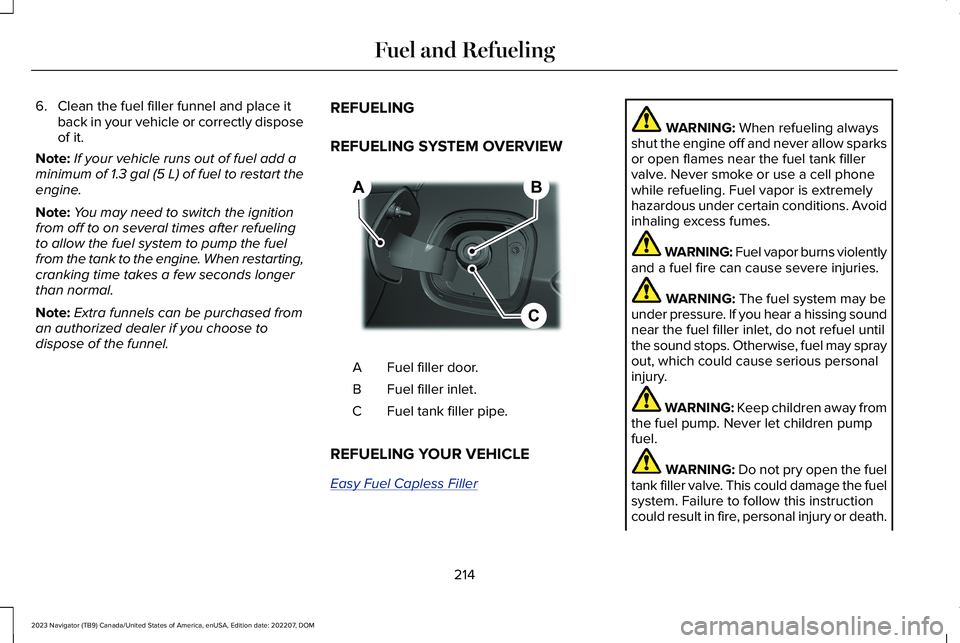
REFUELING SYSTEM OVERVIEW
Fuel filler door.A
Fuel filler inlet.B
Fuel tank filler pipe.C
REFUELING YOUR VEHICLE
Easy Fuel Capless Filler
WARNING: When refueling alwaysshut the engine off and never allow sparksor open flames near the fuel tank fillervalve. Never smoke or use a cell phonewhile refueling. Fuel vapor is extremelyhazardous under certain conditions. Avoidinhaling excess fumes.
WARNING: Fuel vapor burns violentlyand a fuel fire can cause severe injuries.
WARNING: The fuel system may beunder pressure. If you hear a hissing soundnear the fuel filler inlet, do not refuel untilthe sound stops. Otherwise, fuel may sprayout, which could cause serious personalinjury.
WARNING: Keep children away fromthe fuel pump. Never let children pumpfuel.
WARNING: Do not pry open the fueltank filler valve. This could damage the fuelsystem. Failure to follow this instructioncould result in fire, personal injury or death.
214
2023 Navigator (TB9) Canada/United States of America, enUSA, Edition date: 202207, DOMFuel and RefuelingBCA E267248