suspension LINCOLN NAVIGATOR 2023 User Guide
[x] Cancel search | Manufacturer: LINCOLN, Model Year: 2023, Model line: NAVIGATOR, Model: LINCOLN NAVIGATOR 2023Pages: 660, PDF Size: 14.04 MB
Page 436 of 660
•Do not use water pressure higher than2,000 psi (14,000 kPa).
•Do not use water hotter than 179°F (82°C).
Note:Holding the pressure washer nozzleat an angle to the vehicle's surface maydamage graphics and cause the edges topeel away from the vehicle's surface.
CLEANING CAMERA LENSES ANDSENSORS
We recommend that you only use lukewarmor cold water and a soft cloth to clean thecamera lens and sensors.
Note:Do not pressure wash camera lensand sensors.
CLEANING THE UNDERBODY
Flush the complete underside of your vehiclefrequently. Keep body and door drain holesfree from packed dirt.
Rear suspension components may requireregular cleaning with a power washer or athorough rinse with a strong stream of waterif the vehicle is operated in dusty or muddyenvironments. Rear leaf springs or othersuspension components may emit squeakingor popping noises while operating thevehicle if particles, such as dirt, rocks, orother debris, are present in the components.
CLEANING THE INTERIOR
CLEANING THE INSTRUMENT PANEL
WARNING: Do not use chemicalsolvents or strong detergents whencleaning the steering wheel or instrumentpanel to avoid contamination of the airbagsystem.
We recommend that you only clean theinstrument panel and cluster lens with adamp soft cloth. Dry the area with a clean,soft cloth.
For additional information and assistance,we recommend that you contact anauthorized dealer.
Note:Avoid cleaners or polishes thatincrease the gloss of the upper portion ofthe instrument panel. The dull finish in thisarea helps protect you from undesirablewindshield reflection.
CLEANING PLASTIC
We recommend that you only use a mildsoap and water solution on a soft cloth. Drythe area with a clean, soft cloth.
CLEANING DISPLAYS AND SCREENS
We recommend that you only use amicrofiber cloth in a circular motion to cleanoff the fingerprint or dust.
If dirt or fingerprints are still on the screen,apply a small amount of alcohol to the clothand try to clean it again.
Note:Do not pour or spray alcohol onto thetouchscreen.
432
2023 Navigator (TB9) Canada/United States of America, enUSA, Edition date: 202207, DOMVehicle Care
Page 450 of 660
USING SNOW CHAINS
WARNING: Do not exceed 30 mph(50 km/h). Failure to follow this instructioncould result in the loss of control of yourvehicle, personal injury or death.
WARNING: Do not use snow chainson snow-free roads.
WARNING: Only fit snow chains tospecified tires.
WARNING: If your vehicle is fittedwith wheel trims, remove them beforefitting snow chains.
WARNING: If you choose to installsnow tires on your vehicle, they must bethe same size, construction, and load rangeas the original tires listed on the tireplacard, and they must be installed on allfour wheels. Mixing tires of different sizeor construction on your vehicle canadversely affect your vehicle's handlingand braking, and may lead to loss ofvehicle control.
WARNING: Wheels and tires mustbe the same size, load index and speedrating as those originally fitted on thevehicle. Use of any other tire or wheel canaffect the safety and performance of yourvehicle. Additionally, the use ofnon-recommended tires and wheels cancause steering, suspension, axle, transfercase or power transfer unit failure. Followthe recommended tire inflation pressures
found on the Safety ComplianceCertification label, or the Tire Label on theB-Pillar or the edge of the driver door.Failure to follow this instruction could resultin loss of vehicle control, vehicle rollover,or personal injury or death.
Only use snow chains on rear wheels. Installsnow chains in pairs. Do not useself-tensioning snow chains.
Only use snow chains on the followingspecified tire sizes. Only install chains thatare 15mm or less (SAE Class S chains).
•265/70R17
•275/65R18
We recommend you use steel wheels of thesame size and specification if snow chainsare required because chains may chipaluminum wheels.
Follow these guidelines when using snowtires and traction devices:
446
2023 Navigator (TB9) Canada/United States of America, enUSA, Edition date: 202207, DOMWheel and Tire Information
Page 452 of 660
Use snow chains that fit against the sidewallof the tire to prevent the chains fromtouching the wheel rims or suspension. Referto the previous illustration.
If you have any questions regarding snowchains, please contact your authorizeddealer.
448
2023 Navigator (TB9) Canada/United States of America, enUSA, Edition date: 202207, DOMWheel and Tire Information
Page 495 of 660
Gray indicates the system is acquiring adigital station.
Orange indicates digital audio is playing.
Multicast Indicator
The multicast indicator appears if the currentstation is broadcasting multiple digitalbroadcasts. The highlighted numbersindicate additional digital channels available.
Note:For stations that have more than oneHD multicast, the HD indicator and radio textappears as a button. Press the button tocycle through all of the HD stations on thatspecific frequency.
SATELLITE RADIO (IF EQUIPPED)
WHAT IS SATELLITE RADIO
Your factory-installed SiriusXM radio systemincludes a limited subscription term, whichbegins on the date of sale or lease of yourvehicle. See an authorized dealer foravailability.
For additional information about extendedsubscription terms, visit www.SiriusXM.comin the United States, www.SiriusXM.ca inCanada, or call SiriusXM at 1-888-539-7474.
Note:SiriusXM reserves the unrestrictedright to change, rearrange, add or deleteprogramming including canceling, movingor adding particular channels, and its prices,at any time, with or without notice to you.Neither SiriusXM and its affiliates nor FordMotor Company and its affiliates will beliable to you or any third party for any suchmodification, suspension or termination.
SATELLITE RADIO LIMITATIONS
For optimal reception performance, keep theantenna clear of snow and ice build-up andkeep luggage and other material as far awayfrom the antenna as possible. Placingluggage over the antenna may reduceperformance. Factory-installed andaftermarket vehicle structures including, butnot limited to, roof racks and soft top roofsin a partially open position could reducereception performance.
Hills, mountains, tall buildings, bridges,tunnels, freeway overpasses, parkinggarages, dense tree foliage andthunderstorms can interfere with yourreception.
When you pass a ground-basedbroadcast-repeating tower, a stronger signalmay overtake a weaker one and could resultin the audio system muting. Your displaycould show an error message to indicate theinterference.
LOCATING THE SATELLITE RADIOIDENTIFICATION NUMBER
1.Select SiriusXM as the audio source.
2.Tune to channel 0.
SELECTING A CHANNEL
Manually Selecting a Channel
Press the button to find theprevious or next available radiochannel.
491
2023 Navigator (TB9) Canada/United States of America, enUSA, Edition date: 202207, DOMAudio SystemE328569 E328570
Page 537 of 660
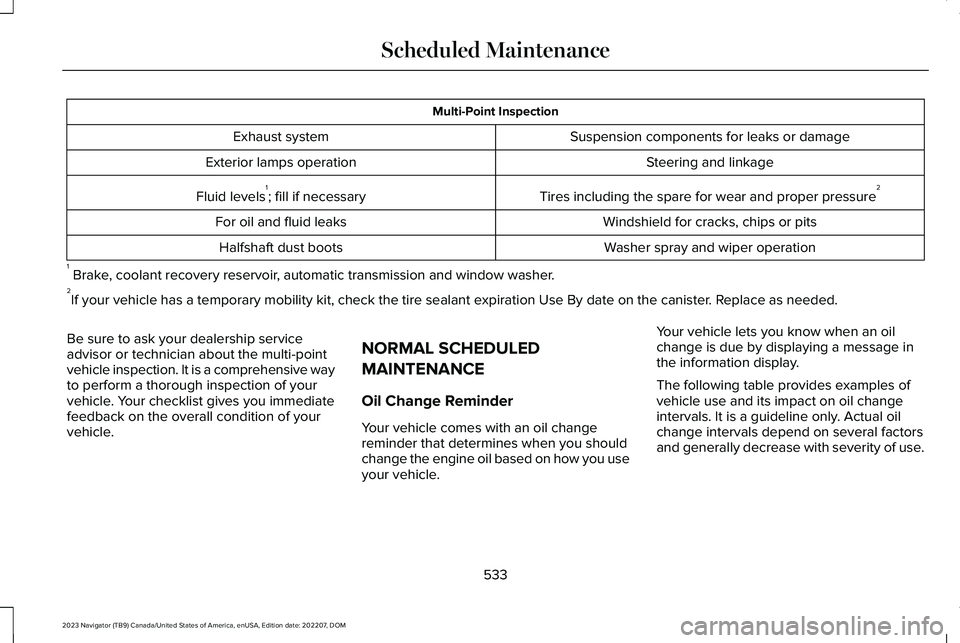
Multi-Point Inspection
Suspension components for leaks or damageExhaust system
Steering and linkageExterior lamps operation
Tires including the spare for wear and proper pressure2Fluid levels1; fill if necessary
Windshield for cracks, chips or pitsFor oil and fluid leaks
Washer spray and wiper operationHalfshaft dust boots
1 Brake, coolant recovery reservoir, automatic transmission and window washer.2If your vehicle has a temporary mobility kit, check the tire sealant expiration Use By date on the canister. Replace as needed.
Be sure to ask your dealership serviceadvisor or technician about the multi-pointvehicle inspection. It is a comprehensive wayto perform a thorough inspection of yourvehicle. Your checklist gives you immediatefeedback on the overall condition of yourvehicle.
NORMAL SCHEDULED
MAINTENANCE
Oil Change Reminder
Your vehicle comes with an oil changereminder that determines when you shouldchange the engine oil based on how you useyour vehicle.
Your vehicle lets you know when an oilchange is due by displaying a message inthe information display.
The following table provides examples ofvehicle use and its impact on oil changeintervals. It is a guideline only. Actual oilchange intervals depend on several factorsand generally decrease with severity of use.
533
2023 Navigator (TB9) Canada/United States of America, enUSA, Edition date: 202207, DOMScheduled Maintenance
Page 539 of 660
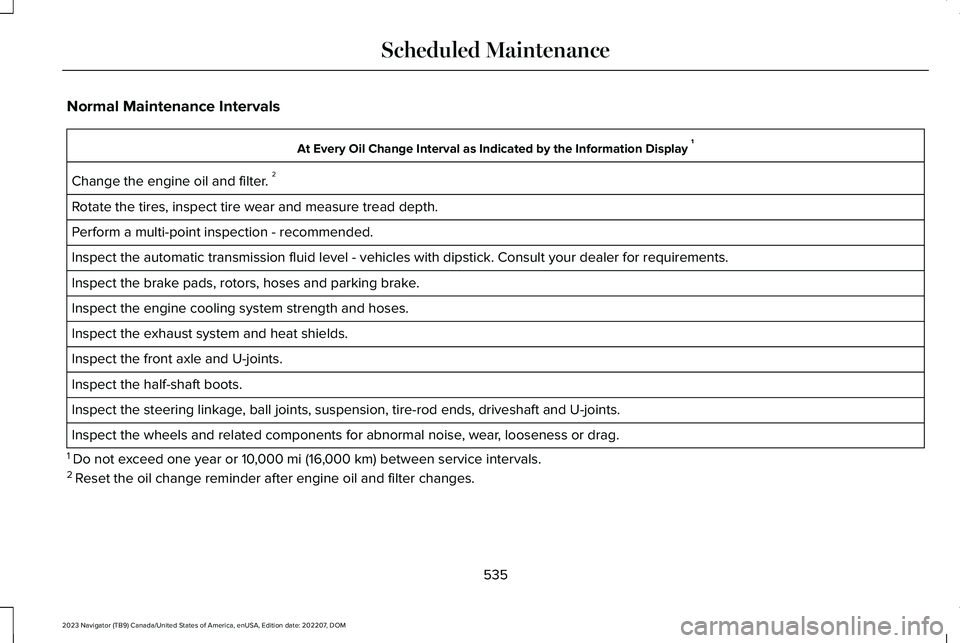
Normal Maintenance Intervals
At Every Oil Change Interval as Indicated by the Information Display 1
Change the engine oil and filter. 2
Rotate the tires, inspect tire wear and measure tread depth.
Perform a multi-point inspection - recommended.
Inspect the automatic transmission fluid level - vehicles with dipstick. Consult your dealer for requirements.
Inspect the brake pads, rotors, hoses and parking brake.
Inspect the engine cooling system strength and hoses.
Inspect the exhaust system and heat shields.
Inspect the front axle and U-joints.
Inspect the half-shaft boots.
Inspect the steering linkage, ball joints, suspension, tire-rod ends, driveshaft and U-joints.
Inspect the wheels and related components for abnormal noise, wear, looseness or drag.
1 Do not exceed one year or 10,000 mi (16,000 km) between service intervals.2 Reset the oil change reminder after engine oil and filter changes.
535
2023 Navigator (TB9) Canada/United States of America, enUSA, Edition date: 202207, DOMScheduled Maintenance
Page 619 of 660
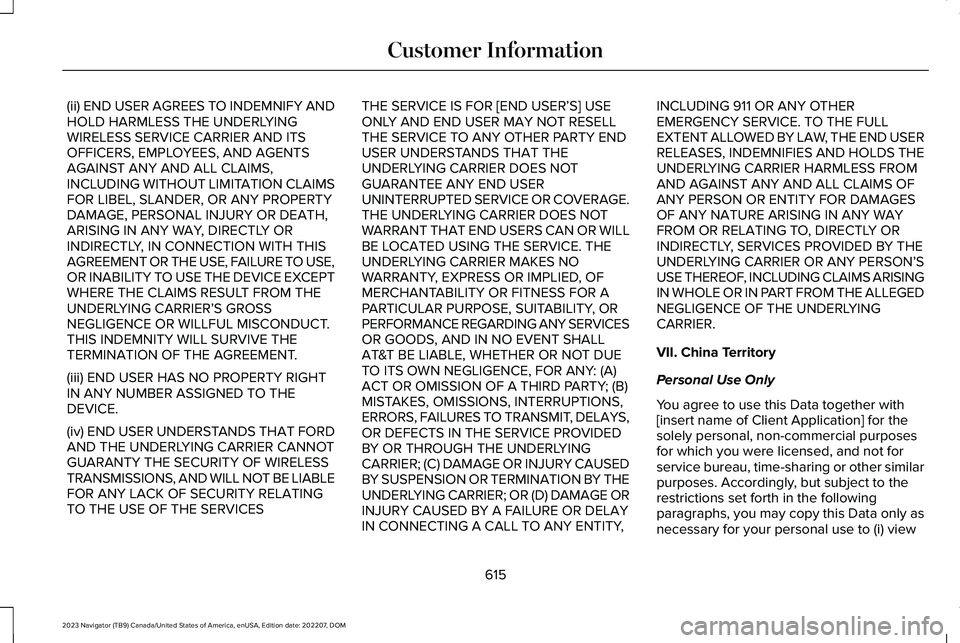
(ii) END USER AGREES TO INDEMNIFY ANDHOLD HARMLESS THE UNDERLYINGWIRELESS SERVICE CARRIER AND ITSOFFICERS, EMPLOYEES, AND AGENTSAGAINST ANY AND ALL CLAIMS,INCLUDING WITHOUT LIMITATION CLAIMSFOR LIBEL, SLANDER, OR ANY PROPERTYDAMAGE, PERSONAL INJURY OR DEATH,ARISING IN ANY WAY, DIRECTLY ORINDIRECTLY, IN CONNECTION WITH THISAGREEMENT OR THE USE, FAILURE TO USE,OR INABILITY TO USE THE DEVICE EXCEPTWHERE THE CLAIMS RESULT FROM THEUNDERLYING CARRIER’S GROSSNEGLIGENCE OR WILLFUL MISCONDUCT.THIS INDEMNITY WILL SURVIVE THETERMINATION OF THE AGREEMENT.
(iii) END USER HAS NO PROPERTY RIGHTIN ANY NUMBER ASSIGNED TO THEDEVICE.
(iv) END USER UNDERSTANDS THAT FORDAND THE UNDERLYING CARRIER CANNOTGUARANTY THE SECURITY OF WIRELESSTRANSMISSIONS, AND WILL NOT BE LIABLEFOR ANY LACK OF SECURITY RELATINGTO THE USE OF THE SERVICES
THE SERVICE IS FOR [END USER’S] USEONLY AND END USER MAY NOT RESELLTHE SERVICE TO ANY OTHER PARTY ENDUSER UNDERSTANDS THAT THEUNDERLYING CARRIER DOES NOTGUARANTEE ANY END USERUNINTERRUPTED SERVICE OR COVERAGE.THE UNDERLYING CARRIER DOES NOTWARRANT THAT END USERS CAN OR WILLBE LOCATED USING THE SERVICE. THEUNDERLYING CARRIER MAKES NOWARRANTY, EXPRESS OR IMPLIED, OFMERCHANTABILITY OR FITNESS FOR APARTICULAR PURPOSE, SUITABILITY, ORPERFORMANCE REGARDING ANY SERVICESOR GOODS, AND IN NO EVENT SHALLAT&T BE LIABLE, WHETHER OR NOT DUETO ITS OWN NEGLIGENCE, FOR ANY: (A)ACT OR OMISSION OF A THIRD PARTY; (B)MISTAKES, OMISSIONS, INTERRUPTIONS,ERRORS, FAILURES TO TRANSMIT, DELAYS,OR DEFECTS IN THE SERVICE PROVIDEDBY OR THROUGH THE UNDERLYINGCARRIER; (C) DAMAGE OR INJURY CAUSEDBY SUSPENSION OR TERMINATION BY THEUNDERLYING CARRIER; OR (D) DAMAGE ORINJURY CAUSED BY A FAILURE OR DELAYIN CONNECTING A CALL TO ANY ENTITY,
INCLUDING 911 OR ANY OTHEREMERGENCY SERVICE. TO THE FULLEXTENT ALLOWED BY LAW, THE END USERRELEASES, INDEMNIFIES AND HOLDS THEUNDERLYING CARRIER HARMLESS FROMAND AGAINST ANY AND ALL CLAIMS OFANY PERSON OR ENTITY FOR DAMAGESOF ANY NATURE ARISING IN ANY WAYFROM OR RELATING TO, DIRECTLY ORINDIRECTLY, SERVICES PROVIDED BY THEUNDERLYING CARRIER OR ANY PERSON’SUSE THEREOF, INCLUDING CLAIMS ARISINGIN WHOLE OR IN PART FROM THE ALLEGEDNEGLIGENCE OF THE UNDERLYINGCARRIER.
VII. China Territory
Personal Use Only
You agree to use this Data together with[insert name of Client Application] for thesolely personal, non-commercial purposesfor which you were licensed, and not forservice bureau, time-sharing or other similarpurposes. Accordingly, but subject to therestrictions set forth in the followingparagraphs, you may copy this Data only asnecessary for your personal use to (i) view
615
2023 Navigator (TB9) Canada/United States of America, enUSA, Edition date: 202207, DOMCustomer Information