transmission LINCOLN NAVIGATOR 2023 Workshop Manual
[x] Cancel search | Manufacturer: LINCOLN, Model Year: 2023, Model line: NAVIGATOR, Model: LINCOLN NAVIGATOR 2023Pages: 660, PDF Size: 14.04 MB
Page 429 of 660
For longer, trouble-free operation, keep thetop of the battery clean and dry and thebattery cables tightly fastened to the batteryterminals. If any corrosion is present on thebattery or terminals, remove the cables fromthe terminals and clean with a wire brush. You can neutralize the acid with a solutionof baking soda and water.
We recommend that you disconnect thenegative battery cable terminal from thebattery if you plan to store your vehicle foran extended period.
Note:If you only disconnect the negativebattery cable terminal, make sure it isisolated or placed away from the batteryterminal to avoid unintended connection orarcing.
If you replace the battery make sure itmatches the electrical requirements of yourvehicle.
If you disconnect or replace the battery andyour vehicle has an automatic transmission,it must relearn its adaptive strategy. Becauseof this, the transmission may shift firmly whenfirst driven. This is normal operation whilethe transmission fully updates its operationto optimum shift feel.
Battery Sensor Reset
When you install a new battery, reset thebattery sensor by doing the following:
1.Switch the ignition on, and leave theengine off.
Note:Complete Steps 2 and 3 within 10seconds.
2.Flash the high beam headlamps fivetimes, ending with the high beams off.
3.Press and release the brake pedal threetimes.
The battery warning lamp flashes three timesto confirm that the reset is successful.
Battery Management System (If Equipped)
The system monitors battery conditions andtakes actions to extend battery life. Ifexcessive battery drain is detected, thesystem temporarily disables some electricalsystems to protect the battery.
Systems included are:
•Heated rear window.
•Heated seats.
•Climate control.
•Heated steering wheel.
•Audio unit.
•Navigation system.
A message may appear in the informationdisplay to alert you that battery protectionactions are active. This message is only fornotification that an action is taking place, andnot intended to indicate an electrical problemor that the battery requires replacement.
425
2023 Navigator (TB9) Canada/United States of America, enUSA, Edition date: 202207, DOMMaintenance
Page 465 of 660
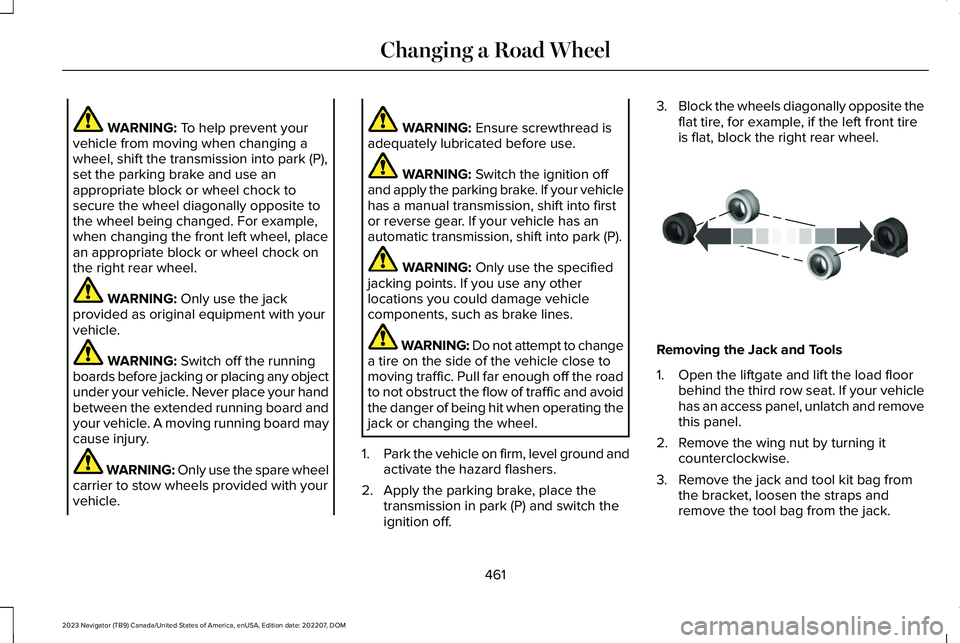
WARNING: To help prevent yourvehicle from moving when changing awheel, shift the transmission into park (P),set the parking brake and use anappropriate block or wheel chock tosecure the wheel diagonally opposite tothe wheel being changed. For example,when changing the front left wheel, placean appropriate block or wheel chock onthe right rear wheel.
WARNING: Only use the jackprovided as original equipment with yourvehicle.
WARNING: Switch off the runningboards before jacking or placing any objectunder your vehicle. Never place your handbetween the extended running board andyour vehicle. A moving running board maycause injury.
WARNING: Only use the spare wheelcarrier to stow wheels provided with yourvehicle.
WARNING: Ensure screwthread isadequately lubricated before use.
WARNING: Switch the ignition offand apply the parking brake. If your vehiclehas a manual transmission, shift into firstor reverse gear. If your vehicle has anautomatic transmission, shift into park (P).
WARNING: Only use the specifiedjacking points. If you use any otherlocations you could damage vehiclecomponents, such as brake lines.
WARNING: Do not attempt to changea tire on the side of the vehicle close tomoving traffic. Pull far enough off the roadto not obstruct the flow of traffic and avoidthe danger of being hit when operating thejack or changing the wheel.
1.Park the vehicle on firm, level ground andactivate the hazard flashers.
2.Apply the parking brake, place thetransmission in park (P) and switch theignition off.
3.Block the wheels diagonally opposite theflat tire, for example, if the left front tireis flat, block the right rear wheel.
Removing the Jack and Tools
1.Open the liftgate and lift the load floorbehind the third row seat. If your vehiclehas an access panel, unlatch and removethis panel.
2.Remove the wing nut by turning itcounterclockwise.
3.Remove the jack and tool kit bag fromthe bracket, loosen the straps andremove the tool bag from the jack.
461
2023 Navigator (TB9) Canada/United States of America, enUSA, Edition date: 202207, DOMChanging a Road WheelE175447
Page 481 of 660
TRANSFER CASE FLUID CAPACITY
AND SPECIFICATION
Use fluid that meets the defined specificationand viscosity grade.
If you do not use fluid that meets the definedspecification and viscosity grade, it couldresult in:
•Component damage that your vehiclewarranty does not cover.
•Reduced vehicle performance.
Capacities
QuantityVariant
1.4–1.6 qt (1.3–1.5 L)Four-wheel drive.
Materials
SpecificationName
WSS-M2C938-AMERCON® LV,Motorcraft® MERCON® LV Automatic Transmission Fluid(U.S.)Motorcraft® MERCON® LV Automatic Transmission Fluid / Huile pour boîte auto-matique MERCON® LV Motorcraft®(Canada)XT-10-QLVC(U.S.)CXT-10-LV6(Canada)
477
2023 Navigator (TB9) Canada/United States of America, enUSA, Edition date: 202207, DOMCapacities and Specifications
Page 537 of 660
Multi-Point Inspection
Suspension components for leaks or damageExhaust system
Steering and linkageExterior lamps operation
Tires including the spare for wear and proper pressure2Fluid levels1; fill if necessary
Windshield for cracks, chips or pitsFor oil and fluid leaks
Washer spray and wiper operationHalfshaft dust boots
1 Brake, coolant recovery reservoir, automatic transmission and window washer.2If your vehicle has a temporary mobility kit, check the tire sealant expiration Use By date on the canister. Replace as needed.
Be sure to ask your dealership serviceadvisor or technician about the multi-pointvehicle inspection. It is a comprehensive wayto perform a thorough inspection of yourvehicle. Your checklist gives you immediatefeedback on the overall condition of yourvehicle.
NORMAL SCHEDULED
MAINTENANCE
Oil Change Reminder
Your vehicle comes with an oil changereminder that determines when you shouldchange the engine oil based on how you useyour vehicle.
Your vehicle lets you know when an oilchange is due by displaying a message inthe information display.
The following table provides examples ofvehicle use and its impact on oil changeintervals. It is a guideline only. Actual oilchange intervals depend on several factorsand generally decrease with severity of use.
533
2023 Navigator (TB9) Canada/United States of America, enUSA, Edition date: 202207, DOMScheduled Maintenance
Page 539 of 660
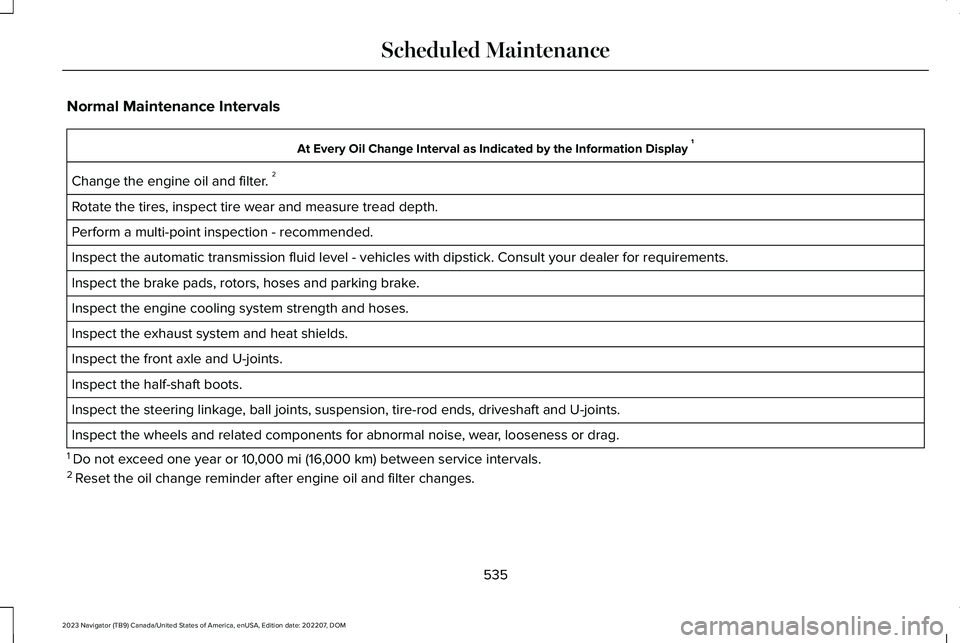
Normal Maintenance Intervals
At Every Oil Change Interval as Indicated by the Information Display 1
Change the engine oil and filter. 2
Rotate the tires, inspect tire wear and measure tread depth.
Perform a multi-point inspection - recommended.
Inspect the automatic transmission fluid level - vehicles with dipstick. Consult your dealer for requirements.
Inspect the brake pads, rotors, hoses and parking brake.
Inspect the engine cooling system strength and hoses.
Inspect the exhaust system and heat shields.
Inspect the front axle and U-joints.
Inspect the half-shaft boots.
Inspect the steering linkage, ball joints, suspension, tire-rod ends, driveshaft and U-joints.
Inspect the wheels and related components for abnormal noise, wear, looseness or drag.
1 Do not exceed one year or 10,000 mi (16,000 km) between service intervals.2 Reset the oil change reminder after engine oil and filter changes.
535
2023 Navigator (TB9) Canada/United States of America, enUSA, Edition date: 202207, DOMScheduled Maintenance
Page 540 of 660
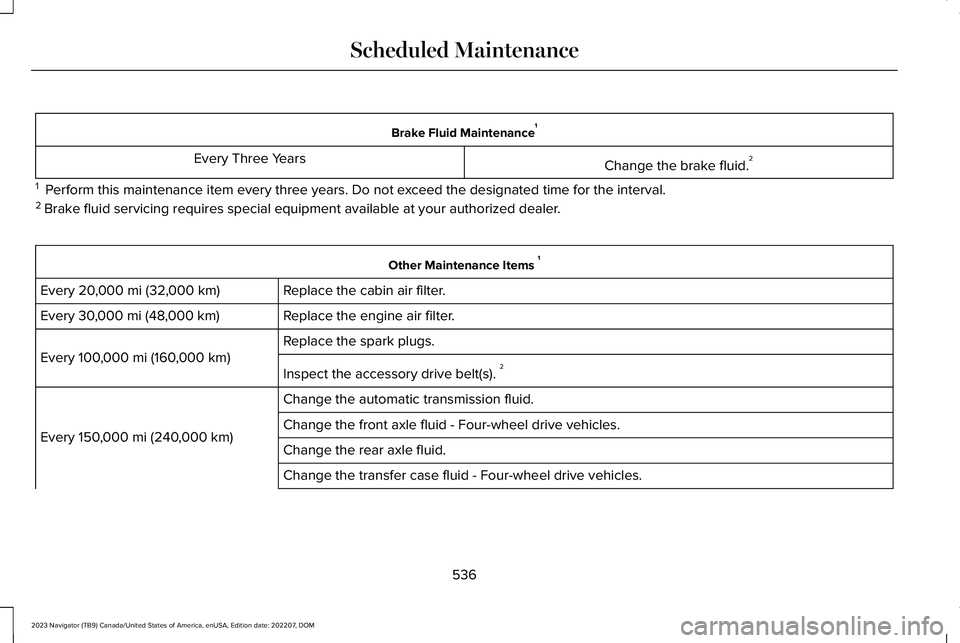
Brake Fluid Maintenance1
Change the brake fluid.2Every Three Years
1 Perform this maintenance item every three years. Do not exceed the designated time for the interval.2 Brake fluid servicing requires special equipment available at your authorized dealer.
Other Maintenance Items 1
Replace the cabin air filter.Every 20,000 mi (32,000 km)
Replace the engine air filter.Every 30,000 mi (48,000 km)
Replace the spark plugs.
Every 100,000 mi (160,000 km)
Inspect the accessory drive belt(s). 2
Change the automatic transmission fluid.
Every 150,000 mi (240,000 km)Change the front axle fluid - Four-wheel drive vehicles.
Change the rear axle fluid.
Change the transfer case fluid - Four-wheel drive vehicles.
536
2023 Navigator (TB9) Canada/United States of America, enUSA, Edition date: 202207, DOMScheduled Maintenance
Page 541 of 660
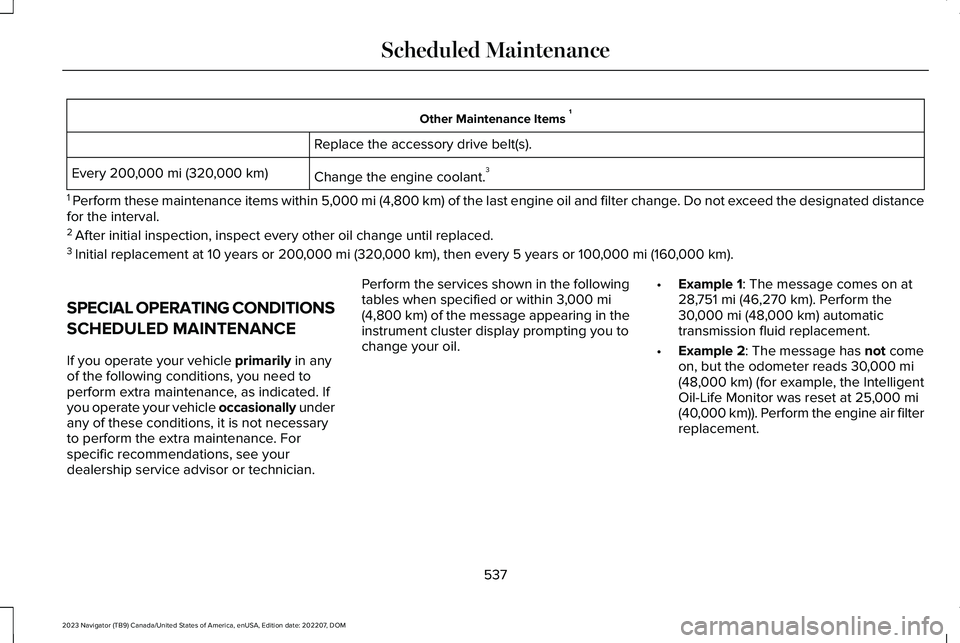
Other Maintenance Items 1
Replace the accessory drive belt(s).
Change the engine coolant.3Every 200,000 mi (320,000 km)
1 Perform these maintenance items within 5,000 mi (4,800 km) of the last engine oil and filter change. Do not exceed the designated distancefor the interval.2 After initial inspection, inspect every other oil change until replaced.3 Initial replacement at 10 years or 200,000 mi (320,000 km), then every 5 years or 100,000 mi (160,000 km).
SPECIAL OPERATING CONDITIONS
SCHEDULED MAINTENANCE
If you operate your vehicle primarily in anyof the following conditions, you need toperform extra maintenance, as indicated. Ifyou operate your vehicle occasionally underany of these conditions, it is not necessaryto perform the extra maintenance. Forspecific recommendations, see yourdealership service advisor or technician.
Perform the services shown in the followingtables when specified or within 3,000 mi(4,800 km) of the message appearing in theinstrument cluster display prompting you tochange your oil.
•Example 1: The message comes on at28,751 mi (46,270 km). Perform the30,000 mi (48,000 km) automatictransmission fluid replacement.
•Example 2: The message has not comeon, but the odometer reads 30,000 mi(48,000 km) (for example, the IntelligentOil-Life Monitor was reset at 25,000 mi(40,000 km)). Perform the engine air filterreplacement.
537
2023 Navigator (TB9) Canada/United States of America, enUSA, Edition date: 202207, DOMScheduled Maintenance
Page 598 of 660
•Links to Third Party Sites: TheSOFTWARE may provide you with theability to link to third party sites. The thirdparty sites are not under the control ofFORD MOTOR COMPANY, its affiliatesand/or its designated agent. NeitherFORD MOTOR COMPANY nor itsaffiliates nor its designated agent areresponsible for (I) the contents of anythird party sites, any links contained inthird party sites, or any changes orupdates to third party sites, or (ii)webcasting or any other form oftransmission received from any thirdparty sites. If the SOFTWARE provideslinks to third party sites, those links areprovided to you only as a convenience,and the inclusion of any link does notimply an endorsement of the third partysite by FORD MOTOR COMPANY, itsaffiliates and/or its designated agent.
•Obligation to Drive Responsibly: Yourecognize your obligation to driveresponsibly and keep attention on theroad. You will read and abide with theDEVICES operating instructionsparticularly as they pertain to safety andyou agree to assume any risk associated
with the use of the DEVICES.
UPGRADES AND RECOVERY MEDIA: If theSOFTWARE is provided by FORD MOTORCOMPANY separate from the DEVICES onmedia such as a ROM chip, CD ROM disk(s)or via web download or other means, and islabeled "For Upgrade Purposes Only" or "ForRecovery Purposes Only" you may install one(1) copy of such SOFTWARE onto theDEVICES as a replacement copy for theexisting SOFTWARE, and use it inaccordance with this EULA, including anyadditional EULA terms accompanying theupgrade SOFTWARE.
INTELLECTUAL PROPERTY RIGHTS: Alltitle and intellectual property rights in and tothe SOFTWARE (including but not limited toany images, photographs, animations, video,audio, music, text and "applets" incorporatedinto the SOFTWARE), the accompanyingprinted materials, and any copies of theSOFTWARE, are owned by FORD MOTORCOMPANY, or its affiliates or suppliers. TheSOFTWARE is licensed, not sold. You maynot copy the printed materials accompanyingthe SOFTWARE. All title and intellectualproperty rights in and to the content which
may be accessed through use of theSOFTWARE is the property of the respectivecontent owner and may be protected byapplicable copyright or other intellectualproperty laws and treaties. This EULA grantsyou no rights to use such content outside itsintended use. All rights not specificallygranted under this EULA are reserved byFORD MOTOR COMPANY, its affiliates, andthird party software and service providersand suppliers. Use of any on-line serviceswhich may be accessed through theSOFTWARE may be governed by therespective terms of use relating to suchservices. If this SOFTWARE containsdocumentation that is provided only inelectronic form, you may print one copy ofsuch electronic documentation.
594
2023 Navigator (TB9) Canada/United States of America, enUSA, Edition date: 202207, DOMCustomer Information
Page 619 of 660
(ii) END USER AGREES TO INDEMNIFY ANDHOLD HARMLESS THE UNDERLYINGWIRELESS SERVICE CARRIER AND ITSOFFICERS, EMPLOYEES, AND AGENTSAGAINST ANY AND ALL CLAIMS,INCLUDING WITHOUT LIMITATION CLAIMSFOR LIBEL, SLANDER, OR ANY PROPERTYDAMAGE, PERSONAL INJURY OR DEATH,ARISING IN ANY WAY, DIRECTLY ORINDIRECTLY, IN CONNECTION WITH THISAGREEMENT OR THE USE, FAILURE TO USE,OR INABILITY TO USE THE DEVICE EXCEPTWHERE THE CLAIMS RESULT FROM THEUNDERLYING CARRIER’S GROSSNEGLIGENCE OR WILLFUL MISCONDUCT.THIS INDEMNITY WILL SURVIVE THETERMINATION OF THE AGREEMENT.
(iii) END USER HAS NO PROPERTY RIGHTIN ANY NUMBER ASSIGNED TO THEDEVICE.
(iv) END USER UNDERSTANDS THAT FORDAND THE UNDERLYING CARRIER CANNOTGUARANTY THE SECURITY OF WIRELESSTRANSMISSIONS, AND WILL NOT BE LIABLEFOR ANY LACK OF SECURITY RELATINGTO THE USE OF THE SERVICES
THE SERVICE IS FOR [END USER’S] USEONLY AND END USER MAY NOT RESELLTHE SERVICE TO ANY OTHER PARTY ENDUSER UNDERSTANDS THAT THEUNDERLYING CARRIER DOES NOTGUARANTEE ANY END USERUNINTERRUPTED SERVICE OR COVERAGE.THE UNDERLYING CARRIER DOES NOTWARRANT THAT END USERS CAN OR WILLBE LOCATED USING THE SERVICE. THEUNDERLYING CARRIER MAKES NOWARRANTY, EXPRESS OR IMPLIED, OFMERCHANTABILITY OR FITNESS FOR APARTICULAR PURPOSE, SUITABILITY, ORPERFORMANCE REGARDING ANY SERVICESOR GOODS, AND IN NO EVENT SHALLAT&T BE LIABLE, WHETHER OR NOT DUETO ITS OWN NEGLIGENCE, FOR ANY: (A)ACT OR OMISSION OF A THIRD PARTY; (B)MISTAKES, OMISSIONS, INTERRUPTIONS,ERRORS, FAILURES TO TRANSMIT, DELAYS,OR DEFECTS IN THE SERVICE PROVIDEDBY OR THROUGH THE UNDERLYINGCARRIER; (C) DAMAGE OR INJURY CAUSEDBY SUSPENSION OR TERMINATION BY THEUNDERLYING CARRIER; OR (D) DAMAGE ORINJURY CAUSED BY A FAILURE OR DELAYIN CONNECTING A CALL TO ANY ENTITY,
INCLUDING 911 OR ANY OTHEREMERGENCY SERVICE. TO THE FULLEXTENT ALLOWED BY LAW, THE END USERRELEASES, INDEMNIFIES AND HOLDS THEUNDERLYING CARRIER HARMLESS FROMAND AGAINST ANY AND ALL CLAIMS OFANY PERSON OR ENTITY FOR DAMAGESOF ANY NATURE ARISING IN ANY WAYFROM OR RELATING TO, DIRECTLY ORINDIRECTLY, SERVICES PROVIDED BY THEUNDERLYING CARRIER OR ANY PERSON’SUSE THEREOF, INCLUDING CLAIMS ARISINGIN WHOLE OR IN PART FROM THE ALLEGEDNEGLIGENCE OF THE UNDERLYINGCARRIER.
VII. China Territory
Personal Use Only
You agree to use this Data together with[insert name of Client Application] for thesolely personal, non-commercial purposesfor which you were licensed, and not forservice bureau, time-sharing or other similarpurposes. Accordingly, but subject to therestrictions set forth in the followingparagraphs, you may copy this Data only asnecessary for your personal use to (i) view
615
2023 Navigator (TB9) Canada/United States of America, enUSA, Edition date: 202207, DOMCustomer Information
Page 637 of 660
Autolamps........................................................121Autolamp Settings................................................121What Are Autolamps...........................................121
Autolock............................................................88Autolock Requirements.......................................88What Is Autolock...................................................88
Automatically Releasing the ElectricParking Brake.............................................236Automatic Crash Shutoff............................393Automatic Crash Shutoff Precautions...........393Re-Enabling Your Vehicle.................................393What Is Automatic Crash Shutoff...................393
Automatic Emergency Braking.................327Switching Automatic Emergency Braking Onand Off..............................................................327What Is Automatic Emergency Braking........327
Automatic Engine Stop...............................204How Does Automatic Engine StopWork..................................................................205Overriding Automatic Engine Stop................205Switching Automatic Engine Stop On andOff......................................................................205What Is Automatic Engine Stop......................204
Automatic High Beam Control...................124Automatic High Beam ControlIndicators..........................................................126Automatic High Beam ControlLimitations........................................................126
Automatic High Beam ControlPrecautions......................................................125Automatic High Beam ControlRequirements...................................................125How Does Automatic High Beam ControlWork...................................................................124Overriding Automatic High BeamControl...............................................................126Switching Automatic High Beam Control Onand Off...............................................................126
Automatic High Beam Control –Troubleshooting..........................................127Automatic High Beam Control – InformationMessages..........................................................127
Automatic Locking Mode..............................54Disengaging Automatic Locking Mode..........55Engaging Automatic Locking Mode................55What Is Automatic Locking Mode.....................54When to Use Automatic Locking Mode..........54
Automatic Return to Park (P).....................223Automatic Return to Park (P)Limitations........................................................223How Does Automatic Return to Park (P)Work..................................................................223What Is Automatic Return to Park (P)............223
Automatic Transmission AudibleWarnings......................................................223
Automatic Transmission.............................220Automatic Return to Park (P)...........................223Automatic Transmission Positions.................220Manually Shifting Gears.....................................221Temporary Neutral Mode.................................222
Automatic Transmission PositionIndicators......................................................221Automatic Transmission Positions...........220Drive (D).................................................................221Neutral (N)............................................................220Park (P)..................................................................220Reverse (R)...........................................................220
Automatic TransmissionPrecautions.................................................220Auto Mode.......................................................161Auto Mode Indicators..........................................161Switching Auto Mode On and Off....................161Switching Dual Mode On and Off...................162
Auto-Start-Stop.............................................208Auto-Start-Stop – Troubleshooting...............209
Auto-Start-Stop Indicators.........................208Auto-Start-Stop Precautions......................208Auto-Start-Stop – Troubleshooting.........209Auto-Start-Stop – Frequently AskedQuestions.........................................................210Auto-Start-Stop – InformationMessages........................................................209
633
2023 Navigator (TB9) Canada/United States of America, enUSA, Edition date: 202207, DOMIndex