ignition LINCOLN NAVIGATOR 2023 Repair Manual
[x] Cancel search | Manufacturer: LINCOLN, Model Year: 2023, Model line: NAVIGATOR, Model: LINCOLN NAVIGATOR 2023Pages: 660, PDF Size: 14.04 MB
Page 429 of 660
For longer, trouble-free operation, keep thetop of the battery clean and dry and thebattery cables tightly fastened to the batteryterminals. If any corrosion is present on thebattery or terminals, remove the cables fromthe terminals and clean with a wire brush. You can neutralize the acid with a solutionof baking soda and water.
We recommend that you disconnect thenegative battery cable terminal from thebattery if you plan to store your vehicle foran extended period.
Note:If you only disconnect the negativebattery cable terminal, make sure it isisolated or placed away from the batteryterminal to avoid unintended connection orarcing.
If you replace the battery make sure itmatches the electrical requirements of yourvehicle.
If you disconnect or replace the battery andyour vehicle has an automatic transmission,it must relearn its adaptive strategy. Becauseof this, the transmission may shift firmly whenfirst driven. This is normal operation whilethe transmission fully updates its operationto optimum shift feel.
Battery Sensor Reset
When you install a new battery, reset thebattery sensor by doing the following:
1.Switch the ignition on, and leave theengine off.
Note:Complete Steps 2 and 3 within 10seconds.
2.Flash the high beam headlamps fivetimes, ending with the high beams off.
3.Press and release the brake pedal threetimes.
The battery warning lamp flashes three timesto confirm that the reset is successful.
Battery Management System (If Equipped)
The system monitors battery conditions andtakes actions to extend battery life. Ifexcessive battery drain is detected, thesystem temporarily disables some electricalsystems to protect the battery.
Systems included are:
•Heated rear window.
•Heated seats.
•Climate control.
•Heated steering wheel.
•Audio unit.
•Navigation system.
A message may appear in the informationdisplay to alert you that battery protectionactions are active. This message is only fornotification that an action is taking place, andnot intended to indicate an electrical problemor that the battery requires replacement.
425
2023 Navigator (TB9) Canada/United States of America, enUSA, Edition date: 202207, DOMMaintenance
Page 430 of 660
After battery replacement, or in some casesafter charging the battery with an externalcharger, the battery management systemrequires eight hours of vehicle sleep time torelearn the battery state of charge. Duringthis time, your vehicle must remain fullylocked with the ignition switched off.
Note:Prior to relearning the battery state ofcharge, the battery management systemmay temporarily disable some electricalsystems.
Electrical Accessory Installation
To make sure the battery managementsystem works correctly, do not connect anelectrical device ground connection directlyto the battery negative post. This can causeinaccurate measurements of the batterycondition and potential incorrect systemoperation.
Note:If you add electrical accessories orcomponents to the vehicle, it may adverselyaffect battery performance and durability.This may also affect the performance ofother electrical systems in the vehicle.
Remove and Reinstall the Battery
Install a battery approved for use by ourspecifications. See Capacities andSpecifications (page 467).
To disconnect or remove the battery, do thefollowing:
1.Apply the parking brake and switch theignition off.
2.Switch all electrical equipment off, forexample lights and radio.
3.Wait a minimum of two minutes beforedisconnecting the battery.
Note:The engine management system hasa power hold function and remains poweredfor a period of time after you switch theignition off. This is to allow the system tostore diagnostic and adaptive tables.Disconnecting the battery without waitingcan cause damage not covered by thevehicle warranty.
4.Disconnect the negative battery cableterminal.
5.Disconnect the positive battery cableterminal.
6.Remove the battery securing clamp.
7.Remove the battery.
8.To install, reverse the removal procedure.
Note:Before reconnecting the battery, makesure the ignition remains switched off.
Note:Make sure to fully tighten the batterycables.
If you disconnect or replace the vehiclebattery, you must reset the followingfeatures:
•Window bounce-back. See Opening andClosing the Windows (page 134).
•Clock Settings.
•Pre-set radio stations.
Battery Disposal
Make sure that you dispose of oldbatteries in an environmentallyfriendly way. Seek advice fromyour local authority about recycling oldbatteries.
426
2023 Navigator (TB9) Canada/United States of America, enUSA, Edition date: 202207, DOMMaintenanceE107998
Page 435 of 660
We recommend that you only use a carshampoo, a soft cloth and water on bumpersand other chrome, aluminium or stainlesssteel parts.
Note:For additional information andassistance, we recommend that you contactan authorized dealer.
Note:Rinse the area well after cleaning.
Note:Do not use abrasive materials, forexample steel wool or plastic pads, as theycan scratch these surfaces.
Note:Do not use chrome cleaner, metalcleaner or polish on wheels or wheel covers.
CLEANING WHEELS
Only use a recommended wheel and tirecleaner to clean the wheels weekly. Foradditional information and assistance, werecommend that you contact an authorizeddealer.
1.Use a sponge to remove heavy depositsof dirt and brake dust.
2.Rinse well after cleaning.
Note:Do not apply a cleaning chemical towarm or hot wheel rims and covers.
If you intend on parking your vehicle for anextended period after cleaning the wheelswith a wheel cleaner, drive your vehicle fora few minutes before parking your vehicle.This reduces the risk of corrosion of thebrake discs, brake pads and linings.
Do not clean the wheels when they are hot.
Note: Some car washes could damagewheel rims and covers.
Note: Using non-recommended cleaners,harsh cleaning products, chrome wheelcleaners or abrasive materials coulddamage wheel rims and covers.
CLEANING THE ENGINE
COMPARTMENT
Use a vacuum cleaner to remove debris fromthe screen area below windshield.
Note:If you are not familiar with the partsaround the engine do not wash the enginecompartment. Avoid frequent enginewashes.
When washing the engine compartment:
•Never wash or rinse the engine while itis hot or running.
•Never wash or rinse any ignition coil,spark plug wire or spark plug well.
•Cover the battery, power distribution box,and air filter assembly to prevent waterdamage.
Note:If your vehicle has an engine coverremove the cover before application ofshampoo and degreaser.
•Spray an approved engine shampoo anddegreaser on all parts that requirecleaning and rinse with water.
CLEANING STRIPES OR GRAPHICS
It is recommended to wash your vehicle byhand however, pressure washing may beused under the following conditions:
•Use a spray with a 40° wide spray anglepattern.
•Keep the nozzle at a 12 in (305 mm)distance and 90° angle to your vehicle'ssurface.
431
2023 Navigator (TB9) Canada/United States of America, enUSA, Edition date: 202207, DOMVehicle Care
Page 465 of 660
WARNING: To help prevent yourvehicle from moving when changing awheel, shift the transmission into park (P),set the parking brake and use anappropriate block or wheel chock tosecure the wheel diagonally opposite tothe wheel being changed. For example,when changing the front left wheel, placean appropriate block or wheel chock onthe right rear wheel.
WARNING: Only use the jackprovided as original equipment with yourvehicle.
WARNING: Switch off the runningboards before jacking or placing any objectunder your vehicle. Never place your handbetween the extended running board andyour vehicle. A moving running board maycause injury.
WARNING: Only use the spare wheelcarrier to stow wheels provided with yourvehicle.
WARNING: Ensure screwthread isadequately lubricated before use.
WARNING: Switch the ignition offand apply the parking brake. If your vehiclehas a manual transmission, shift into firstor reverse gear. If your vehicle has anautomatic transmission, shift into park (P).
WARNING: Only use the specifiedjacking points. If you use any otherlocations you could damage vehiclecomponents, such as brake lines.
WARNING: Do not attempt to changea tire on the side of the vehicle close tomoving traffic. Pull far enough off the roadto not obstruct the flow of traffic and avoidthe danger of being hit when operating thejack or changing the wheel.
1.Park the vehicle on firm, level ground andactivate the hazard flashers.
2.Apply the parking brake, place thetransmission in park (P) and switch theignition off.
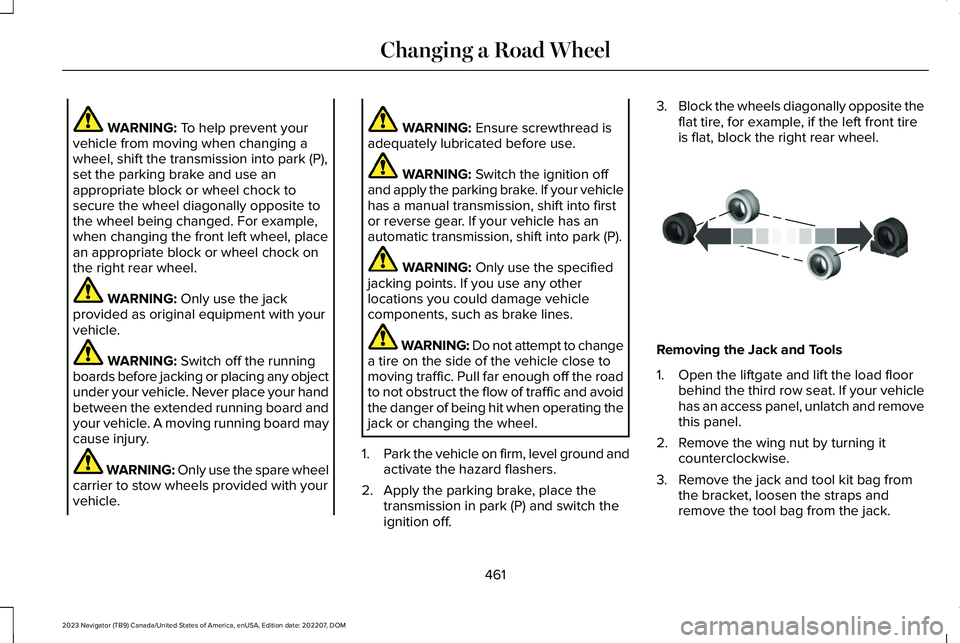
3.Block the wheels diagonally opposite theflat tire, for example, if the left front tireis flat, block the right rear wheel.
Removing the Jack and Tools
1.Open the liftgate and lift the load floorbehind the third row seat. If your vehiclehas an access panel, unlatch and removethis panel.
2.Remove the wing nut by turning itcounterclockwise.
3.Remove the jack and tool kit bag fromthe bracket, loosen the straps andremove the tool bag from the jack.
461
2023 Navigator (TB9) Canada/United States of America, enUSA, Edition date: 202207, DOMChanging a Road WheelE175447
Page 471 of 660
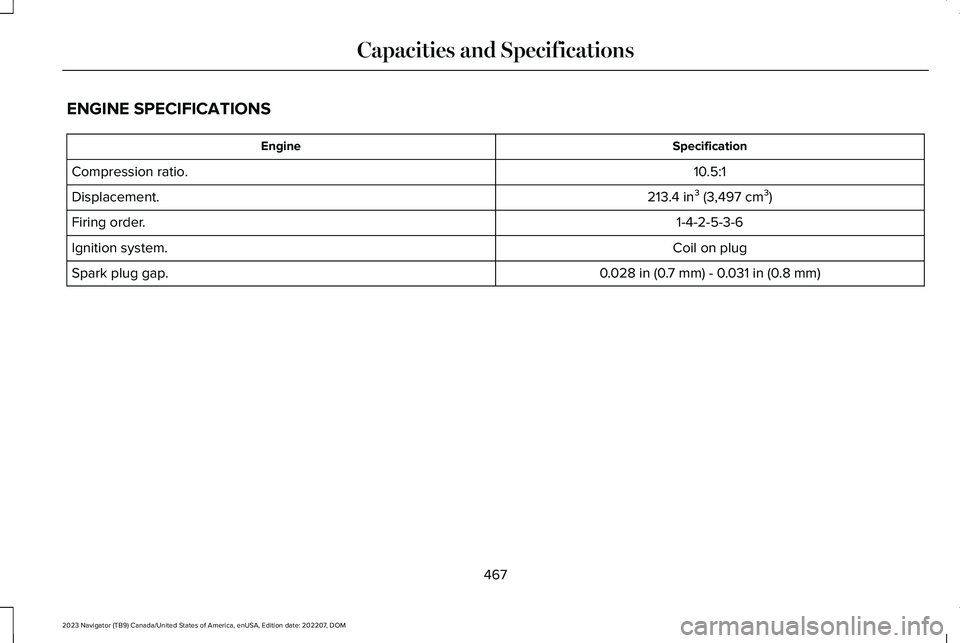
ENGINE SPECIFICATIONS
SpecificationEngine
10.5:1Compression ratio.
213.4 in³ (3,497 cm³)Displacement.
1-4-2-5-3-6Firing order.
Coil on plugIgnition system.
0.028 in (0.7 mm) - 0.031 in (0.8 mm)Spark plug gap.
467
2023 Navigator (TB9) Canada/United States of America, enUSA, Edition date: 202207, DOMCapacities and Specifications
Page 627 of 660
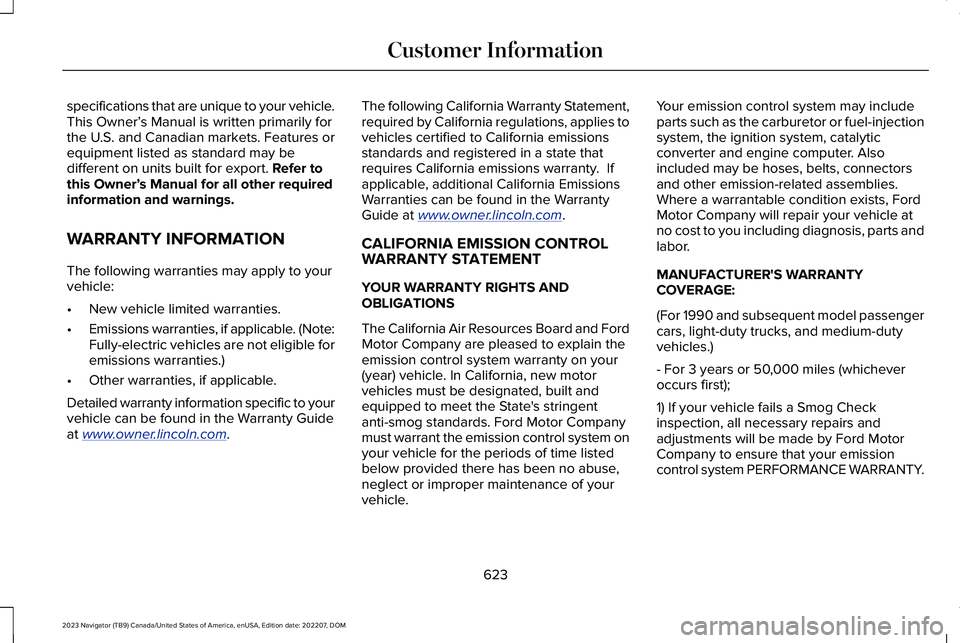
specifications that are unique to your vehicle.This Owner’s Manual is written primarily forthe U.S. and Canadian markets. Features orequipment listed as standard may bedifferent on units built for export. Refer tothis Owner’s Manual for all other requiredinformation and warnings.
WARRANTY INFORMATION
The following warranties may apply to yourvehicle:
•New vehicle limited warranties.
•Emissions warranties, if applicable. (Note:Fully-electric vehicles are not eligible foremissions warranties.)
•Other warranties, if applicable.
Detailed warranty information specific to yourvehicle can be found in the Warranty Guideat www.owner.lincoln.com.
The following California Warranty Statement,required by California regulations, applies tovehicles certified to California emissionsstandards and registered in a state thatrequires California emissions warranty. Ifapplicable, additional California EmissionsWarranties can be found in the WarrantyGuide at www.owner.lincoln.com.
CALIFORNIA EMISSION CONTROLWARRANTY STATEMENT
YOUR WARRANTY RIGHTS ANDOBLIGATIONS
The California Air Resources Board and FordMotor Company are pleased to explain theemission control system warranty on your(year) vehicle. In California, new motorvehicles must be designated, built andequipped to meet the State's stringentanti-smog standards. Ford Motor Companymust warrant the emission control system onyour vehicle for the periods of time listedbelow provided there has been no abuse,neglect or improper maintenance of yourvehicle.
Your emission control system may includeparts such as the carburetor or fuel-injectionsystem, the ignition system, catalyticconverter and engine computer. Alsoincluded may be hoses, belts, connectorsand other emission-related assemblies.Where a warrantable condition exists, FordMotor Company will repair your vehicle atno cost to you including diagnosis, parts andlabor.
MANUFACTURER'S WARRANTYCOVERAGE:
(For 1990 and subsequent model passengercars, light-duty trucks, and medium-dutyvehicles.)
- For 3 years or 50,000 miles (whicheveroccurs first);
1) If your vehicle fails a Smog Checkinspection, all necessary repairs andadjustments will be made by Ford MotorCompany to ensure that your emissioncontrol system PERFORMANCE WARRANTY.
623
2023 Navigator (TB9) Canada/United States of America, enUSA, Edition date: 202207, DOMCustomer Information
Page 650 of 660
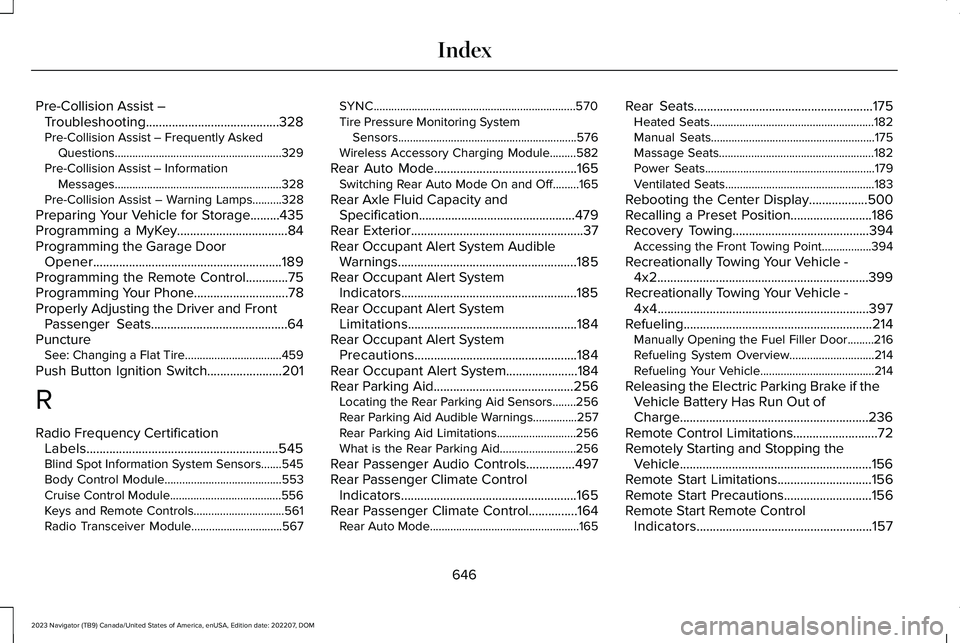
Pre-Collision Assist –Troubleshooting.........................................328Pre-Collision Assist – Frequently AskedQuestions.........................................................329Pre-Collision Assist – InformationMessages.........................................................328Pre-Collision Assist – Warning Lamps..........328
Preparing Your Vehicle for Storage.........435Programming a MyKey..................................84Programming the Garage DoorOpener..........................................................189Programming the Remote Control.............75Programming Your Phone.............................78Properly Adjusting the Driver and FrontPassenger Seats..........................................64PunctureSee: Changing a Flat Tire.................................459
Push Button Ignition Switch.......................201
R
Radio Frequency CertificationLabels...........................................................545Blind Spot Information System Sensors.......545Body Control Module........................................553Cruise Control Module......................................556Keys and Remote Controls...............................561Radio Transceiver Module...............................567
SYNC.....................................................................570Tire Pressure Monitoring SystemSensors.............................................................576Wireless Accessory Charging Module.........582
Rear Auto Mode............................................165Switching Rear Auto Mode On and Off.........165
Rear Axle Fluid Capacity andSpecification................................................479Rear Exterior.....................................................37Rear Occupant Alert System AudibleWarnings.......................................................185Rear Occupant Alert SystemIndicators......................................................185Rear Occupant Alert SystemLimitations....................................................184Rear Occupant Alert SystemPrecautions..................................................184Rear Occupant Alert System......................184Rear Parking Aid...........................................256Locating the Rear Parking Aid Sensors........256Rear Parking Aid Audible Warnings...............257Rear Parking Aid Limitations...........................256What is the Rear Parking Aid..........................256
Rear Passenger Audio Controls...............497Rear Passenger Climate ControlIndicators......................................................165Rear Passenger Climate Control...............164Rear Auto Mode...................................................165
Rear Seats.......................................................175Heated Seats........................................................182Manual Seats........................................................175Massage Seats.....................................................182Power Seats..........................................................179Ventilated Seats...................................................183
Rebooting the Center Display..................500Recalling a Preset Position.........................186Recovery Towing..........................................394Accessing the Front Towing Point.................394
Recreationally Towing Your Vehicle -4x2.................................................................399Recreationally Towing Your Vehicle -4x4.................................................................397Refueling..........................................................214Manually Opening the Fuel Filler Door.........216Refueling System Overview.............................214Refueling Your Vehicle.......................................214
Releasing the Electric Parking Brake if theVehicle Battery Has Run Out ofCharge..........................................................236Remote Control Limitations..........................72Remotely Starting and Stopping theVehicle...........................................................156Remote Start Limitations.............................156Remote Start Precautions...........................156Remote Start Remote ControlIndicators......................................................157
646
2023 Navigator (TB9) Canada/United States of America, enUSA, Edition date: 202207, DOMIndex