ignition LINCOLN NAVIGATOR 2023 Owner's Manual
[x] Cancel search | Manufacturer: LINCOLN, Model Year: 2023, Model line: NAVIGATOR, Model: LINCOLN NAVIGATOR 2023Pages: 660, PDF Size: 14.04 MB
Page 111 of 660
WHAT ARE THE INCLINATIONSENSORS
The inclination sensor is designed to detectan attempt to raise your vehicle, for exampleto remove a wheel or to tow it away.
ARMING THE ANTI-THEFT ALARMSYSTEM
The alarm is ready to arm when your vehicleis switched off.
Lock your vehicle with your remote controlto arm the alarm.
DISARMING THE ANTI-THEFT ALARMSYSTEM
Disarm the alarm by performing any of thefollowing actions:
•Unlock the doors or luggagecompartment with the remote control.
•Switch your vehicle on or start yourvehicle.
ANTI-THEFT ALARM SYSTEM
SETTINGS
WHAT ARE THE ALARM SECURITYLEVELS
You can select two levels of alarm security,all sensors and perimeter sensing.
All Sensors
All sensors is the standard setting.
In all sensors, all equipped sensors are onwhen you arm the alarm.
Note:Do not arm the alarm with all sensorsif passengers, animals or other movingobjects are inside your vehicle.
Perimeter Sensing
In perimeter sensing, the interior sensors areoff when you arm the alarm.
All the other equipped sensors activate whenyou arm the alarm in this mode.
SETTING THE ALARM SECURITYLEVEL
1.Press Settings on the touchscreen.
2.Press Vehicle.
3.Press Alarm System.
4.Press Motion Sensors.
5.Press a setting.
WHAT IS ASK ON EXIT
You can choose which level of security yourequire after you switch the ignition off.
Note:If you do not choose a setting, thesystem defaults to all sensors.
SWITCHING ASK ON EXIT ON ANDOFF
1.Press Settings on the touchscreen.
2.Press Vehicle.
3.Press Alarm System.
4.Switch Ask on Exit on or off.
107
2023 Navigator (TB9) Canada/United States of America, enUSA, Edition date: 202207, DOMSecurity
Page 138 of 660
OPENING AND CLOSING THE
WINDOWS
WARNING: Do not leave childrenunattended in your vehicle and do not letthem play with the power windows. Failureto follow this instruction could result inpersonal injury.
WARNING: When closing the powerwindows, verify they are free of obstructionand make sure that children and pets arenot in the proximity of the windowopenings.
Press the window control switchto open the window. Lift thewindow control switch to close thewindow.
Note:The power windows operate with theignition on, and for several minutes after youswitch the ignition off or until you open afront door.
To reduce wind noise or pulsing noise whenone window is open, slightly open theopposite window.
One-Touch Open
Fully press the window control switch andrelease it. Press again or lift it to stop thewindow.
One-Touch Close
Fully lift the window control switch andrelease it. Press again or lift it to stop thewindow.
Resetting One-Touch Close
Carry out all steps within 30 seconds ofstarting the sequence.
1.Close the window.
2.Press and hold the window control switchuntil the window is fully open. Keep thewindow control switch pressed for a fewseconds.
3.Lift and hold the window control switchuntil the window is fully closed. Keep thewindow control switch held for a fewseconds.
4.Press and hold the window control switchuntil the window is fully open. Keep thewindow control switch pressed for a fewseconds.
5.Lift and hold the window control switchuntil the window is fully closed. Keep thewindow control switch held for a fewseconds.
Note:Repeat the procedure if the windowdoes not close when you use one-touch.
GLOBAL OPENING (IF EQUIPPED)
WHAT IS GLOBAL OPENING (If Equipped)
You can use the remote control to open thewindows with the ignition off.
134
2023 Navigator (TB9) Canada/United States of America, enUSA, Edition date: 202207, DOMWindows
Page 142 of 660
ADJUSTING THE EXTERIOR
MIRRORS
WARNING: Do not adjust the mirrorswhen your vehicle is moving. This couldresult in the loss of control of your vehicle,serious personal injury or death.
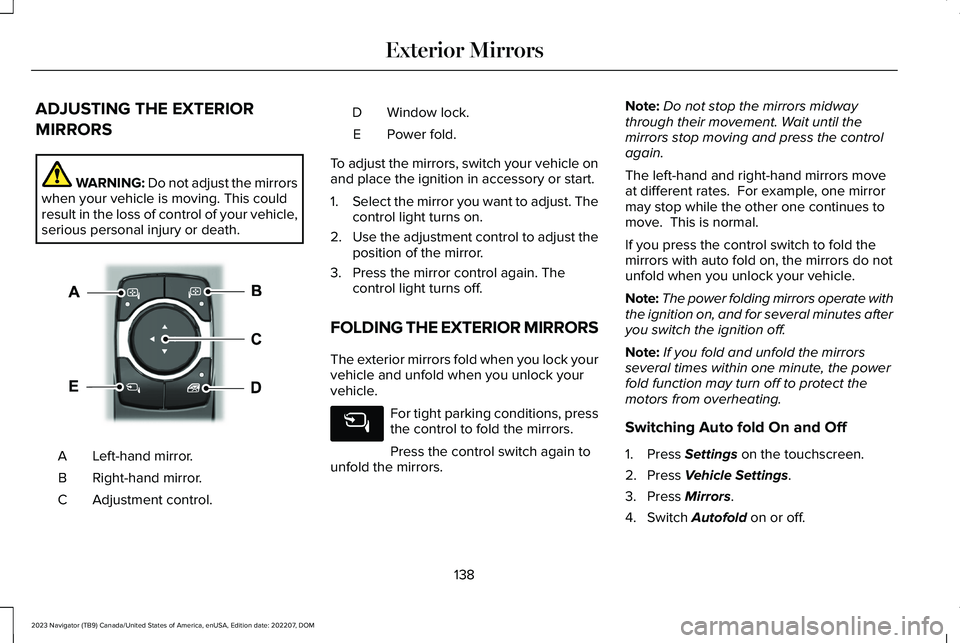
Left-hand mirror.A
Right-hand mirror.B
Adjustment control.C
Window lock.D
Power fold.E
To adjust the mirrors, switch your vehicle onand place the ignition in accessory or start.
1.Select the mirror you want to adjust. Thecontrol light turns on.
2.Use the adjustment control to adjust theposition of the mirror.
3.Press the mirror control again. Thecontrol light turns off.
FOLDING THE EXTERIOR MIRRORS
The exterior mirrors fold when you lock yourvehicle and unfold when you unlock yourvehicle.
For tight parking conditions, pressthe control to fold the mirrors.
Press the control switch again tounfold the mirrors.
Note:Do not stop the mirrors midwaythrough their movement. Wait until themirrors stop moving and press the controlagain.
The left-hand and right-hand mirrors moveat different rates. For example, one mirrormay stop while the other one continues tomove. This is normal.
If you press the control switch to fold themirrors with auto fold on, the mirrors do notunfold when you unlock your vehicle.
Note:The power folding mirrors operate withthe ignition on, and for several minutes afteryou switch the ignition off.
Note:If you fold and unfold the mirrorsseveral times within one minute, the powerfold function may turn off to protect themotors from overheating.
Switching Auto fold On and Off
1.Press Settings on the touchscreen.
2.Press Vehicle Settings.
3.Press Mirrors.
4.Switch Autofold on or off.
138
2023 Navigator (TB9) Canada/United States of America, enUSA, Edition date: 202207, DOMExterior MirrorsE369399
Page 148 of 660
WHAT IS DISTANCE TO EMPTY
Indicates the approximate distance yourvehicle can travel on the fuel remaining inthe tank. Changes in driving pattern cancause the value to not only decrease but alsoincrease or stay constant for periods of time.
ENGINE COOLANT TEMPERATURE
GAUGE
Indicates the engine coolant temperature.
ENGINE OIL PRESSURE GAUGE
Indicates the engine oil pressure.
Note:This is a configurable gauge.
TRANSMISSION FLUID
TEMPERATURE GAUGE
Indicates the transmission fluid temperature.
Special operating conditions can causehigher than normal operating temperatures.See Special Operating ConditionsScheduled Maintenance (page 537).
Note:This is a configurable gauge.
WHAT ARE THE INSTRUMENT
CLUSTER WARNING LAMPS
Warning lamps alert you to a vehiclecondition that could become serious. Somelamps illuminate when you start your vehicleto make sure they work. If any lamps remainon after starting your vehicle, refer to therespective system warning lamp for furtherinformation.
INSTRUMENT CLUSTER WARNING
LAMPS
Anti-Lock Brake System
If it illuminates when you aredriving, this indicates that thesystem requires service. Yourvehicle continues to have normal brakingwithout the anti-lock brake system function. Have your vehicle checked as soon aspossible.
Battery
It illuminates when you switch theignition on.
If it illuminates when the engine isrunning, this indicates your vehicle requiresservice. Have your vehicle checked as soonas possible.
144
2023 Navigator (TB9) Canada/United States of America, enUSA, Edition date: 202207, DOMInstrument ClusterE67020 E67021
Page 149 of 660
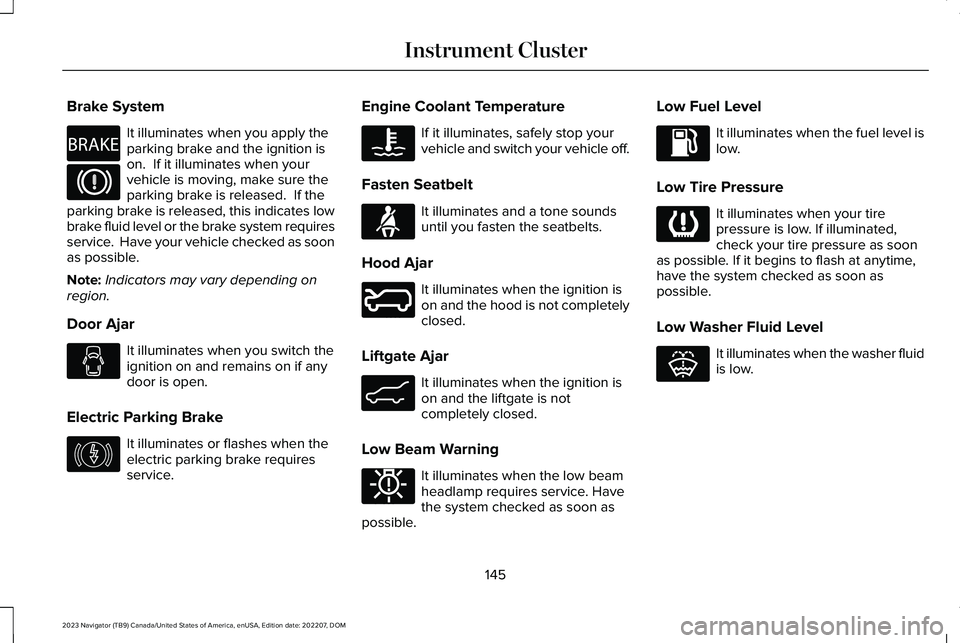
Brake System
It illuminates when you apply theparking brake and the ignition ison. If it illuminates when yourvehicle is moving, make sure theparking brake is released. If theparking brake is released, this indicates lowbrake fluid level or the brake system requiresservice. Have your vehicle checked as soonas possible.
Note:Indicators may vary depending onregion.
Door Ajar
It illuminates when you switch theignition on and remains on if anydoor is open.
Electric Parking Brake
It illuminates or flashes when theelectric parking brake requiresservice.
Engine Coolant Temperature
If it illuminates, safely stop yourvehicle and switch your vehicle off.
Fasten Seatbelt
It illuminates and a tone soundsuntil you fasten the seatbelts.
Hood Ajar
It illuminates when the ignition ison and the hood is not completelyclosed.
Liftgate Ajar
It illuminates when the ignition ison and the liftgate is notcompletely closed.
Low Beam Warning
It illuminates when the low beamheadlamp requires service. Havethe system checked as soon aspossible.
Low Fuel Level
It illuminates when the fuel level islow.
Low Tire Pressure
It illuminates when your tirepressure is low. If illuminated,check your tire pressure as soonas possible. If it begins to flash at anytime,have the system checked as soon aspossible.
Low Washer Fluid Level
It illuminates when the washer fluidis low.
145
2023 Navigator (TB9) Canada/United States of America, enUSA, Edition date: 202207, DOMInstrument ClusterE270480 E67024 E146190 E103308 E71880 E246598 E162453 E181350 E139232 E132353
Page 150 of 660
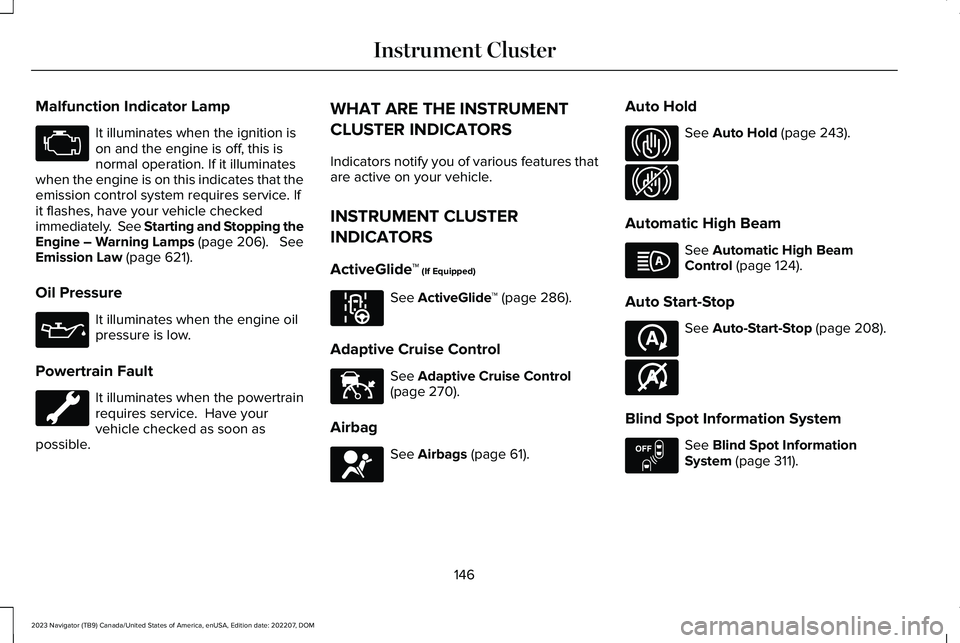
Malfunction Indicator Lamp
It illuminates when the ignition ison and the engine is off, this isnormal operation. If it illuminateswhen the engine is on this indicates that theemission control system requires service. Ifit flashes, have your vehicle checkedimmediately. See Starting and Stopping theEngine – Warning Lamps (page 206). SeeEmission Law (page 621).
Oil Pressure
It illuminates when the engine oilpressure is low.
Powertrain Fault
It illuminates when the powertrainrequires service. Have yourvehicle checked as soon aspossible.
WHAT ARE THE INSTRUMENT
CLUSTER INDICATORS
Indicators notify you of various features thatare active on your vehicle.
INSTRUMENT CLUSTER
INDICATORS
ActiveGlide™ (If Equipped)
See ActiveGlide™ (page 286).
Adaptive Cruise Control
See Adaptive Cruise Control(page 270).
Airbag
See Airbags (page 61).
Auto Hold
See Auto Hold (page 243).
Automatic High Beam
See Automatic High BeamControl (page 124).
Auto Start-Stop
See Auto-Start-Stop (page 208).
Blind Spot Information System
See Blind Spot InformationSystem (page 311).
146
2023 Navigator (TB9) Canada/United States of America, enUSA, Edition date: 202207, DOMInstrument ClusterE67028 E67022 E297977 E144524 E67017 E323448 E323449 E146105 E121377 E146361 E151262
Page 160 of 660
WHAT IS REMOTE START
The system allows you to remotely start yourvehicle and to adjust the interior temperatureaccording to the settings that you chose.
REMOTE START PRECAUTIONS
WARNING: Do not start the enginein a closed garage or in other enclosedareas. Exhaust fumes are toxic. Alwaysopen the garage door before you start theengine. Failure to follow this instructioncould result in personal injury or death.
REMOTE START LIMITATIONS
Remote start does not work under thefollowing conditions:
•The alarm horn is sounding.
•The hood is open.
•The transmission is not in park (P).
•The ignition is on.
•The battery voltage is below theminimum operating voltage.
Note:Do not use remote start if your fuellevel is low.
Note:To use remote start with Lincoln Wayor Phone as a Key, enable the modem. SeeConnecting Lincoln Way to the Modem(page 481).
ENABLING REMOTE START
1.Press Settings on the touchscreen.
2.Press Vehicle Settings.
3.Press Remote Start Setup.
4.Switch Remote Start on or off.
Note:To remote start with Lincoln Way,make sure that the modem is enabled. SeeConnecting Lincoln Way to the Modem(page 481).
REMOTELY STARTING AND
STOPPING THE VEHICLE
Remotely Starting the Vehicle
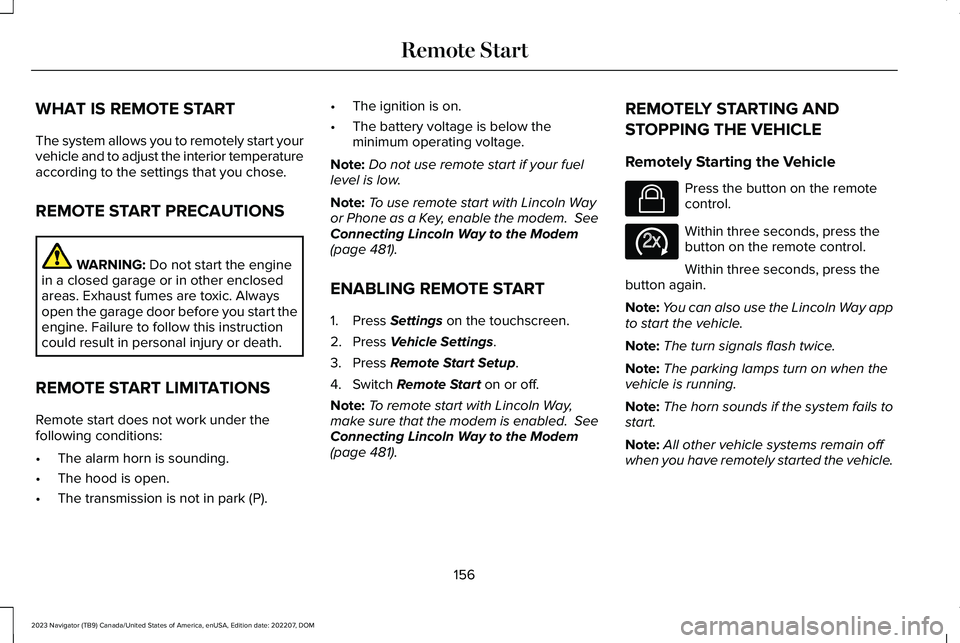
Press the button on the remotecontrol.
Within three seconds, press thebutton on the remote control.
Within three seconds, press thebutton again.
Note:You can also use the Lincoln Way appto start the vehicle.
Note:The turn signals flash twice.
Note:The parking lamps turn on when thevehicle is running.
Note:The horn sounds if the system fails tostart.
Note:All other vehicle systems remain offwhen you have remotely started the vehicle.
156
2023 Navigator (TB9) Canada/United States of America, enUSA, Edition date: 202207, DOMRemote StartE138623 E138625
Page 185 of 660
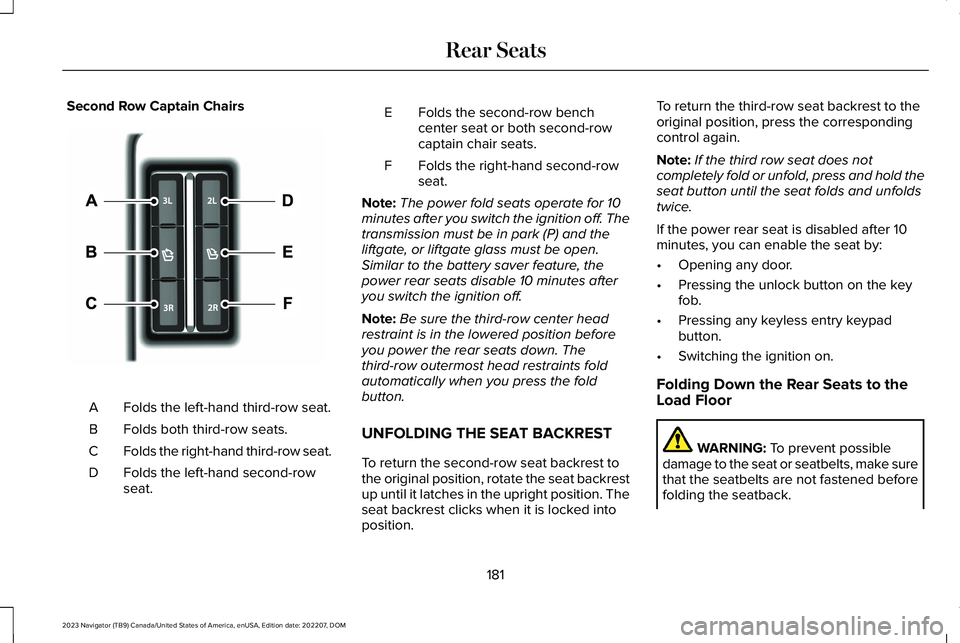
Second Row Captain Chairs
Folds the left-hand third-row seat.A
Folds both third-row seats.B
Folds the right-hand third-row seat.C
Folds the left-hand second-rowseat.D
Folds the second-row benchcenter seat or both second-rowcaptain chair seats.
E
Folds the right-hand second-rowseat.F
Note:The power fold seats operate for 10minutes after you switch the ignition off. Thetransmission must be in park (P) and theliftgate, or liftgate glass must be open.Similar to the battery saver feature, thepower rear seats disable 10 minutes afteryou switch the ignition off.
Note:Be sure the third-row center headrestraint is in the lowered position beforeyou power the rear seats down. Thethird-row outermost head restraints foldautomatically when you press the foldbutton.
UNFOLDING THE SEAT BACKREST
To return the second-row seat backrest tothe original position, rotate the seat backrestup until it latches in the upright position. Theseat backrest clicks when it is locked intoposition.
To return the third-row seat backrest to theoriginal position, press the correspondingcontrol again.
Note:If the third row seat does notcompletely fold or unfold, press and hold theseat button until the seat folds and unfoldstwice.
If the power rear seat is disabled after 10minutes, you can enable the seat by:
•Opening any door.
•Pressing the unlock button on the keyfob.
•Pressing any keyless entry keypadbutton.
•Switching the ignition on.
Folding Down the Rear Seats to theLoad Floor
WARNING: To prevent possibledamage to the seat or seatbelts, make surethat the seatbelts are not fastened beforefolding the seatback.
181
2023 Navigator (TB9) Canada/United States of America, enUSA, Edition date: 202207, DOMRear Seats E246705
Page 188 of 660
WHAT IS THE REAR OCCUPANT
ALERT SYSTEM
The rear occupant alert system monitorsvehicle conditions and notifies you to checkfor rear seat occupants when you switch theignition off.
HOW DOES THE REAR OCCUPANT
ALERT SYSTEM WORK
The system monitors when rear doors havebeen opened and closed to indicate thepotential presence of an occupant in the rearseat.
A message displays in the information andentertainment display screen and an audiblewarning sounds when you switch the ignitionoff after any of the following conditions havebeen met:
•A rear door is opened or closed whilethe ignition is on.
•You switch the ignition on within 15minutes of a rear door opening andclosing.
•You switch the ignition on within 15minutes of the alert having displayed orsounded.
REAR OCCUPANT ALERT SYSTEM
PRECAUTIONS
WARNING: On hot days, thetemperature inside the vehicle can risevery quickly. Exposure of people or animalsto these high temperatures for even a shorttime can cause death or serious heatrelated injuries, including brain damage.Small children are particularly at risk.
WARNING: Do not leave children orpets unattended in your vehicle. Failure tofollow this instruction could result inpersonal injury or death.
REAR OCCUPANT ALERT SYSTEM
LIMITATIONS
The system does not detect the presence ofobjects or passengers in the rear seat. Itmonitors when rear doors are opened andclosed.
Note:It is possible to receive an alert whenthere is no rear seat occupant, but alertconditions are met.
Note:It is possible to receive no alert whenthere is an occupant in the rear seat, if alertconditions are not met. For example, if a rearseat occupant does not enter the vehiclethrough a rear door.
Note:The audible warning does not soundwhen the front door is opened before youswitch the ignition off.
184
2023 Navigator (TB9) Canada/United States of America, enUSA, Edition date: 202207, DOMRear Occupant Alert System
Page 191 of 660
Note:You can recall a preset memoryposition when the ignition is off, or when youplace the transmission in park (P) or neutral(N) if the ignition is on and the vehicle is notmoving.
Note:Pressing any of the preset buttons orany memory feature control during a memoryrecall cancels the operation.
You can also recall a preset memory positionby:
•Pressing the unlock button on yourremote control if you linked it to a presetposition.
•Unlocking the intelligent driver doorhandle if a linked remote control ispresent.
•Recalling a personal profile in your SYNCmenu.
Using a linked remote control to recall yourmemory position when the ignition is offmoves the seat and steering column to theeasy entry position.
To recall a preset position on the passengerdoor, press and release the preset button.The passenger seat features move to theposition stored for that preset. You can recalla passenger seat preset memory at any time.
Linking a Preset Position to Your
Remote Control or Passive Key
See Linking or Unlinking a Personal Profileto a Remote Control (page 516).
187
2023 Navigator (TB9) Canada/United States of America, enUSA, Edition date: 202207, DOMMemory Function (If Equipped)