ignition LINCOLN NAVIGATOR 2023 Workshop Manual
[x] Cancel search | Manufacturer: LINCOLN, Model Year: 2023, Model line: NAVIGATOR, Model: LINCOLN NAVIGATOR 2023Pages: 660, PDF Size: 14.04 MB
Page 335 of 660
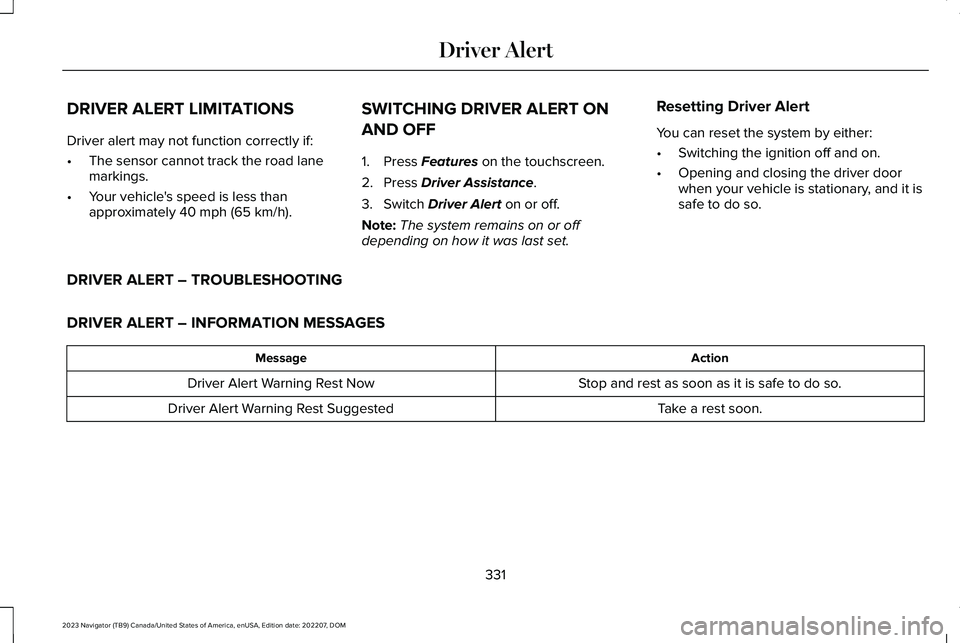
DRIVER ALERT LIMITATIONS
Driver alert may not function correctly if:
•The sensor cannot track the road lanemarkings.
•Your vehicle's speed is less thanapproximately 40 mph (65 km/h).
SWITCHING DRIVER ALERT ON
AND OFF
1.Press Features on the touchscreen.
2.Press Driver Assistance.
3.Switch Driver Alert on or off.
Note:The system remains on or offdepending on how it was last set.
Resetting Driver Alert
You can reset the system by either:
•Switching the ignition off and on.
•Opening and closing the driver doorwhen your vehicle is stationary, and it issafe to do so.
DRIVER ALERT – TROUBLESHOOTING
DRIVER ALERT – INFORMATION MESSAGES
ActionMessage
Stop and rest as soon as it is safe to do so.Driver Alert Warning Rest Now
Take a rest soon.Driver Alert Warning Rest Suggested
331
2023 Navigator (TB9) Canada/United States of America, enUSA, Edition date: 202207, DOMDriver Alert
Page 352 of 660
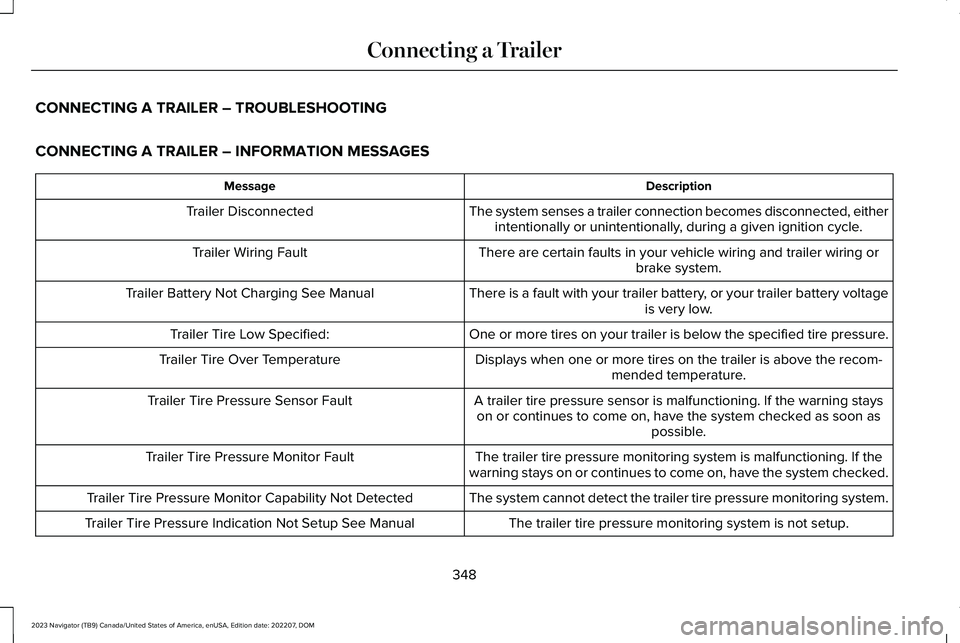
CONNECTING A TRAILER – TROUBLESHOOTING
CONNECTING A TRAILER – INFORMATION MESSAGES
DescriptionMessage
The system senses a trailer connection becomes disconnected, eitherintentionally or unintentionally, during a given ignition cycle.Trailer Disconnected
There are certain faults in your vehicle wiring and trailer wiring orbrake system.Trailer Wiring Fault
There is a fault with your trailer battery, or your trailer battery voltageis very low.Trailer Battery Not Charging See Manual
One or more tires on your trailer is below the specified tire pressure.Trailer Tire Low Specified:
Displays when one or more tires on the trailer is above the recom-mended temperature.Trailer Tire Over Temperature
A trailer tire pressure sensor is malfunctioning. If the warning stayson or continues to come on, have the system checked as soon aspossible.
Trailer Tire Pressure Sensor Fault
The trailer tire pressure monitoring system is malfunctioning. If thewarning stays on or continues to come on, have the system checked.Trailer Tire Pressure Monitor Fault
The system cannot detect the trailer tire pressure monitoring system.Trailer Tire Pressure Monitor Capability Not Detected
The trailer tire pressure monitoring system is not setup.Trailer Tire Pressure Indication Not Setup See Manual
348
2023 Navigator (TB9) Canada/United States of America, enUSA, Edition date: 202207, DOMConnecting a Trailer
Page 361 of 660
3.When you plug in a trailer with electric orelectric-over-hydraulic brakes, a messageconfirming connection appears in theinformation display.
4.Use the gain adjustment to find thedesired starting point. A gain setting of6.0 is a good starting point for heavierloads.
Note:Use the following steps to adjust thegain setting whenever road, weather andtrailer, or vehicle loading conditions, changefrom when you initially set the gain.
5.In a traffic-free environment, tow thetrailer on a dry, level surface and squeezethe manual control lever completely.
6.If the trailer wheels lock up, indicated bysquealing tires, reduce the gain setting.If the trailer wheels turn freely, increasethe gain setting. Repeat Steps 5 and 6until the gain setting is at a point justbelow trailer wheel lock-up. If towing aheavier trailer, trailer wheel lock-up maynot be attainable even with the maximumgain setting of 10.
Note:Only perform this procedure at speedsof approximately 20–25 mph (30–40 km/h).
Note:The trailer brake controller reducesoutput at vehicle speeds below 11 mph(18 km/h) so that trailer and vehicle brakingis not jerky or harsh. This feature is onlyavailable when applying the brakes usingyour vehicle's brake pedal, not the controller.
Note:Your vehicle's brake system and thetrailer brake system work independently ofeach other. Changing the gain setting on thecontroller does not affect the operation ofyour vehicle's brakes whether you attach atrailer or not.
Note:With the proper electrical connection,pressing your vehicle brake pedal or usingthe manual control lever illuminates bothtrailer and vehicle brake lamps.
Note:When you switch the engine off, thecontroller output is disabled and the displayand module shut down. The controllermodule and display turn on when you switchthe ignition on.
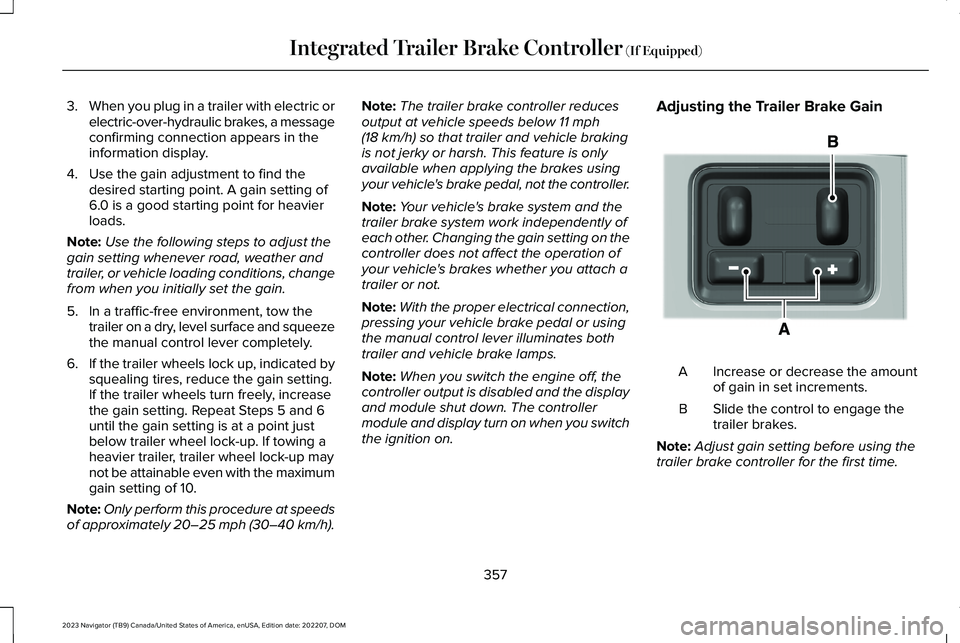
Adjusting the Trailer Brake Gain
Increase or decrease the amountof gain in set increments.A
Slide the control to engage thetrailer brakes.B
Note:Adjust gain setting before using thetrailer brake controller for the first time.
357
2023 Navigator (TB9) Canada/United States of America, enUSA, Edition date: 202207, DOMIntegrated Trailer Brake Controller (If Equipped)E333154
Page 363 of 660
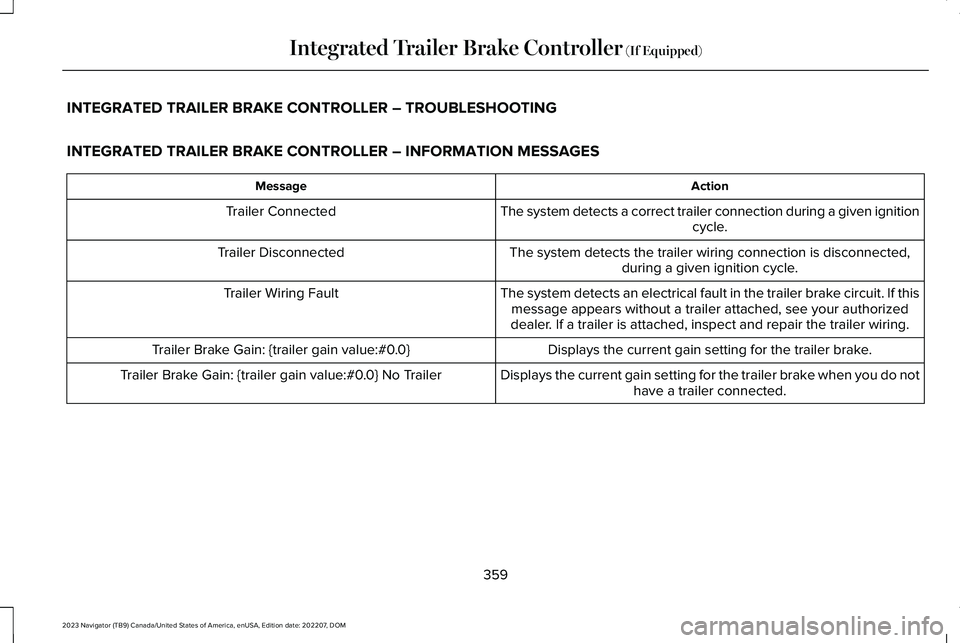
INTEGRATED TRAILER BRAKE CONTROLLER – TROUBLESHOOTING
INTEGRATED TRAILER BRAKE CONTROLLER – INFORMATION MESSAGES
ActionMessage
The system detects a correct trailer connection during a given ignitioncycle.Trailer Connected
The system detects the trailer wiring connection is disconnected,during a given ignition cycle.Trailer Disconnected
The system detects an electrical fault in the trailer brake circuit. If thismessage appears without a trailer attached, see your authorizeddealer. If a trailer is attached, inspect and repair the trailer wiring.
Trailer Wiring Fault
Displays the current gain setting for the trailer brake.Trailer Brake Gain: {trailer gain value:#0.0}
Displays the current gain setting for the trailer brake when you do nothave a trailer connected.Trailer Brake Gain: {trailer gain value:#0.0} No Trailer
359
2023 Navigator (TB9) Canada/United States of America, enUSA, Edition date: 202207, DOMIntegrated Trailer Brake Controller (If Equipped)
Page 394 of 660
If you need to arrange roadside assistanceon your own, Lincoln reimburses areasonable amount for towing to the nearestLincoln dealership within 100 mi (160 km). Toobtain reimbursement information, UnitedStates clients, call 1-800-521-4140. Clientsneed to submit their original receipts.
Vehicles Sold in Canada: GettingRoadside Assistance
If you have a vehicle concern, Lincoln offersa complimentary roadside assistanceprogram. This program is eligible withinCanada or the continental United States.
The service is available 24 hours a day,seven days a week.
This program is separate from the NewVehicle Limited Warranty, beginning fromthe original warranty start date and lasts thelife of the vehicle for the original owner.Subsequent owners receive coverage thatis concurrent with the 6 years or 70,000 mi(110,000 km), whichever occurs first,powertrain warranty coverage period.
Note:Canadian roadside coverage andbenefits may differ from the U.S. coverage.
For complete program coverage details,review your warranty guide, contact yourdealer, call us in Canada at 1-844-665-2007,or visit our website atwww.lincolncanada.com.
If you purchased your vehicle in Canada andrequire roadside assistance, please call1-844-665-2007 or contact RoadsideAssistance using the Lincoln Way mobileapp.
Note:For quick reference, complete theroadside assistance identification card foundin the glove compartment of your vehicleand place it in your wallet.
SWITCHING THE HAZARD
FLASHERS ON AND OFF
The hazard flasher button is on theinstrument panel. Press the buttonto switch the hazard flashers on ifyour vehicle is creating a safety hazard forother road users.
When you switch the hazard flashers on, allfront and rear direction indicators flash.
Note:The hazard flashers operate when theignition is in any position, or if the key is notin the ignition. The battery loses charge andcould have insufficient power to restart yourvehicle.
Press the button again to switch them off.
JUMP STARTING THE VEHICLE
JUMP STARTING PRECAUTIONS
WARNING: Batteries normallyproduce explosive gases which can causepersonal injury. Therefore, do not allowflames, sparks or lighted substances tocome near the battery. When working nearthe battery, always shield your face andprotect your eyes. Always provide correctventilation.
390
2023 Navigator (TB9) Canada/United States of America, enUSA, Edition date: 202207, DOMCrash and Breakdown InformationE75790
Page 397 of 660
SWITCHING THE POST-CRASH ALERTSYSTEM OFF
Press the hazard flasher switch, the unlockbutton on the remote control, the panicbutton on the remote control or cycle theignition to switch the system off.
Note:The alert turns off when the vehiclebattery runs out of charge.
POST IMPACT BRAKING
HOW DOES POST IMPACT BRAKINGWORK
In the event of a moderate to severe crash,the braking system reduces the vehicle’sspeed to prevent or reduce the impact of apotential secondary crash.
POST IMPACT BRAKING LIMITATIONS
Post impact braking does not activate if anyof the following occur:
•The anti-lock braking system is damagedduring the collision.
•Electronic stability control is disabled.
•Vehicle speed is below 5 mph (10 km/h).
OVERRIDING POST IMPACT BRAKING
You can override post impact braking bypressing the brake or accelerator pedal.
POST IMPACT BRAKING INDICATORS
It flashes when a post impactbraking event is occurring.
AUTOMATIC CRASH SHUTOFF
WHAT IS AUTOMATIC CRASHSHUTOFF
The automatic crash shutoff is designed tostop the fuel going to the engine in the eventof a moderate or severe crash.
Note:Not every impact causes a shutoff.
AUTOMATIC CRASH SHUTOFFPRECAUTIONS
WARNING: If your vehicle has beeninvolved in a crash, have the fuel systemchecked. Failure to follow this instructioncould result in fire, personal injury or death.
RE-ENABLING YOUR VEHICLE
1.Switch the ignition off.
2.Attempt to start your vehicle.
3.Switch the ignition off.
4.Attempt to start your vehicle.
Note:If your vehicle does not start after thethird attempt, have your vehicle checked assoon as possible.
393
2023 Navigator (TB9) Canada/United States of America, enUSA, Edition date: 202207, DOMCrash and Breakdown InformationE138639
Page 398 of 660
RECOVERY TOWING (IF EQUIPPED)
ACCESSING THE FRONT TOWINGPOINT
WARNING: Using recovery hooks isdangerous and should only be done by aperson familiar with proper vehiclerecovery safety practices. Improper use ofrecovery hooks may cause hook failure orseparation from the vehicle and couldresult in serious injury or death.
WARNING: Slowly remove the slackfrom the recovery strap prior to pulling.Failure to do so can introduce significantlyhigher loads which can cause the recoveryhooks to break off, or the recovery strapto fail which can cause serious injury ordeath.
WARNING: Never link two strapstogether with a clevis pin. These heavymetal objects could become projectiles ifthe strap breaks and can cause seriousinjury or death.
WARNING: Switch the ignition offbefore removing the recovery hook. Failureto do so could result in personal injury.
WARNING: The recovery hook canbecome hot. Let the recovery hook cooldown before removing it. Failure to do socould result in personal injury.
Your vehicle has frame-mounted frontrecovery hooks.
Note:Do not apply a load to the recoveryhooks that is greater than the gross vehicleweight rating of your vehicle.
Before using recovery hooks:
•Make sure all attaching points are secureand capable of withstanding the appliedload.
•Do not use chains, cables or tow strapswith metal hook ends.
•Only use recovery straps that have aminimum breaking strength two to threetimes the gross vehicle weight of thestuck vehicle.
•Make sure the recovery strap is in goodcondition and free of visible cuts, tearsor damage.
•Use a damper device such as a tarp,heavy blanket or piece of carpet, andplace it over the recovery strap to helpabsorb the energy in the event the strapbreaks.
•Make sure the stuck vehicle is not loadedheavier than its gross vehicle weightrating specified on the certification label.
394
2023 Navigator (TB9) Canada/United States of America, enUSA, Edition date: 202207, DOMCrash and Breakdown Information
Page 399 of 660
•Align the tow vehicle and stuck vehiclein a straight line, within 10 degrees.
•Keep bystanders to the sides of thevehicle, at a distance of at least twice thelength of the recovery strap. This helpsavoid injury from the hazard of a recoveryhook or strap breaking, or a vehiclelurching into their path.
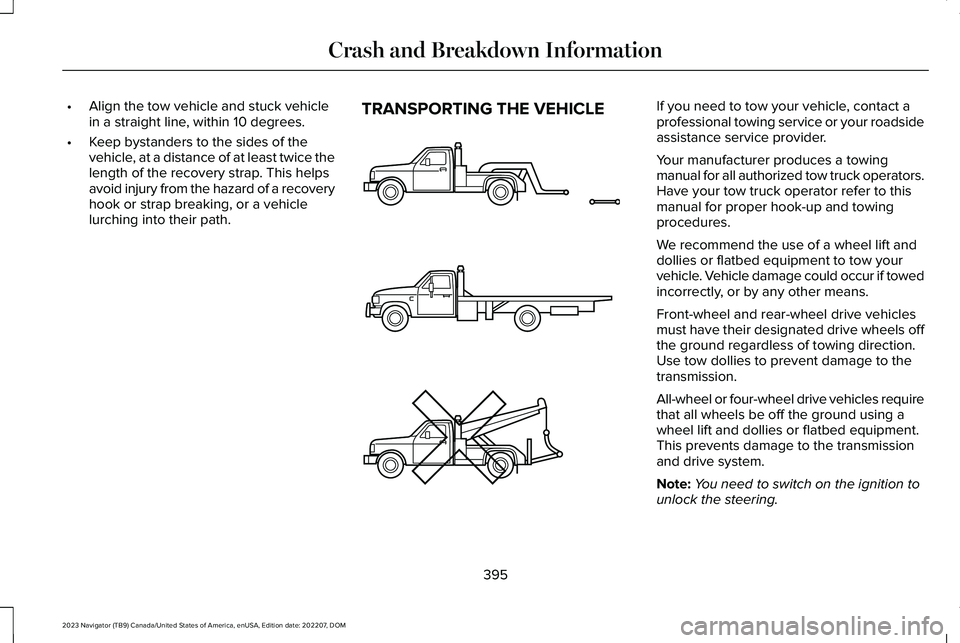
TRANSPORTING THE VEHICLEIf you need to tow your vehicle, contact aprofessional towing service or your roadsideassistance service provider.
Your manufacturer produces a towingmanual for all authorized tow truck operators.Have your tow truck operator refer to thismanual for proper hook-up and towingprocedures.
We recommend the use of a wheel lift anddollies or flatbed equipment to tow yourvehicle. Vehicle damage could occur if towedincorrectly, or by any other means.
Front-wheel and rear-wheel drive vehiclesmust have their designated drive wheels offthe ground regardless of towing direction.Use tow dollies to prevent damage to thetransmission.
All-wheel or four-wheel drive vehicles requirethat all wheels be off the ground using awheel lift and dollies or flatbed equipment.This prevents damage to the transmissionand drive system.
Note:You need to switch on the ignition tounlock the steering.
395
2023 Navigator (TB9) Canada/United States of America, enUSA, Edition date: 202207, DOMCrash and Breakdown InformationE143886
Page 401 of 660
TOWING YOUR VEHICLE
PRECAUTIONS
Use the following guidelines when towingyour vehicle. Failure to follow this instructioncould result in vehicle damage not coveredby the vehicle warranty.
Note:Make sure you properly secure yourvehicle to the tow vehicle.
Note:If you are unsure of the vehicle’sconfiguration, contact an authorized dealer.
RECREATIONALLY TOWING YOUR
VEHICLE - 4X4
WARNING: Do not disconnect thebattery when recreationally towing yourvehicle. This prevents the transfer casefrom shifting properly and could cause thevehicle to roll, even if the transmission isin park (P).
WARNING: Placing the transfer casein its neutral position could cause yourvehicle to freely roll. Make sure you pressand hold the brake pedal and the vehicleis in a secure, safe position when you placethe transfer case in its neutral position.
Follow these guidelines if you have a needfor recreational towing. An example ofrecreational towing would be towing yourvehicle behind a motorhome. Theseguidelines are to make sure that you do notdamage the transmission.
You can only tow your vehicle with all wheelson the ground by placing the transfer casein its neutral position and engaging therecreational tow feature. Perform thefollowing steps after positioning your vehiclebehind the tow vehicle and properly securingthem together.
Note:Put your climate control system inrecirculated air mode to prevent exhaustfumes from entering your vehicle.
Note:Failure to put the transfer case in itsneutral position can damage vehiclecomponents.
Note: You can check the towing status atany time by opening the driver door orturning the ignition to the accessory or onposition. Neutral Tow Enabled LeaveTransmission in Neutral appears in theinstrument cluster display to confirm you canrecreationally tow your vehicle.
Note:If your vehicle has an anti-theft alarm,make sure you switch perimeter sensing onwhen towing. See Setting the AlarmSecurity Level (page 107).
Switching Neutral Tow On
1.Start your vehicle.
2.Make sure your vehicle is in NORMALmode. See Selecting a Drive Mode(page 295).
3.Place your vehicle in temporary neutralmode. See Entering Temporary NeutralMode (page 222).
397
2023 Navigator (TB9) Canada/United States of America, enUSA, Edition date: 202207, DOMTowing Your Vehicle
Page 402 of 660
4.Switch your vehicle off by pressing thepush button ignition switch once. Amessage appears in the instrumentcluster display.
5.Switch your vehicle to accessory modeby pressing the push button ignitionswitch once without pressing the brakepedal.
6.Press and hold the brake pedal.
7.Using the instrument cluster controls onthe steering wheel, select Settings.
8.Select Neutral Tow.
9.Press and hold the OK button until aconfirmation message appears in theinformation display.
Note: If completed successfully, theinformation display shows Neutral TowEnabled Leave Transmission in Neutral. This indicates that your vehicle is safe to towwith all wheels on the ground.
Note:If you do not see a confirmationmessage in the instrument cluster display,you must perform the procedure again fromthe beginning.
Note:You may hear noise as the transfercase shifts into its neutral position. This isnormal.
10.Release the brake pedal.
11.Leave the transmission in neutral (N)and switch your vehicle off by pressingthe push button ignition switch oncewithout pressing the brake pedal.
Switching Neutral Tow Off
1.With your vehicle properly secured to thetow vehicle, press and hold the brakepedal and start the engine.
2.Switch your vehicle off by pressing thepush button ignition switch once andrelease the brake pedal.
3.Place your vehicle in accessory mode bypressing the push button ignition switchonce without pressing the brake pedal.
4.Press and hold the brake pedal.
5.Shift into park (P).
6.Release the brake pedal.
Note:If completed successfully, theinstrument cluster displays 2H and NeutralTow Disabled.
Note:You must perform the switchingneutral tow on and switching neutral tow offprocedures again from the beginning if theindicator light and message do not display.
Note:You may hear a noise as the transfercase shifts out of its neutral position. This isnormal.
7.Apply the parking brake, then disconnectyour vehicle from the tow vehicle.
8.Release the parking brake, start theengine, and shift into drive (D) to makesure the transfer case is out of the neutraltow position.
9.If the transfer case does not successfullyshift out of its neutral position, set theparking brake. Have your vehiclechecked as soon as possible.
Resolving the Shift Delayed Drive ForwardMessage
1.Press and hold the brake pedal.
2.Start your vehicle.
398
2023 Navigator (TB9) Canada/United States of America, enUSA, Edition date: 202207, DOMTowing Your Vehicle