steering LOTUS ELISE 2005 User Guide
[x] Cancel search | Manufacturer: LOTUS, Model Year: 2005, Model line: ELISE, Model: LOTUS ELISE 2005Pages: 205, PDF Size: 4.51 MB
Page 55 of 205
When only a single segment remains, representing approxi-
mately 1.3 U.S. gall. (5 litres), the amber low fuel tell tale will
flash. Refuel at the next opportunity.
NOTICE: Do not allow the tank to run completely dry, as this may damage the catalytic converter and fuel pump. This may
affect the terms of your warranty.
Coolant Temperature Display The engine coolant temperature will be displayed at the bot
-
tom right hand corner of the panel as soon as the temperature reaches 162°F. The running temperature will fluctuate a cer
-
tain amount as the operating conditions change, and during periods of idling or in heavy traffic, the temperature may rise to
over 212°F, with the cooling fans switching on at half speed at
approximately 208°F and at full speed at approximately 217°F.
The temperature display will flash at temperatures over 226°F to prompt closer monitoring by the driver of high temperatures.
The pressurised cooling system has a boiling point of over 248°F.
If the temperature approaches this level then the driver should be concerned. If this should occur, allow the engine to idle for a
few minutes whilst monitoring the temperature, and if it continues to rise, switch off and seek qualified assistance.
NOTICE: After a heavy snowfall, ensure that the radiator cooling
outlet grilles in the front body are cleared of snow before driving
the car, or overheating may occur.
Odometer An odometer (total distance recorder) reading is displayed at
the bottom left hand corner of the panel.
Trip Recorder A trip distance recorder is provided at the top left hand corner
of the panel. In order to zero the trip display, switch on the ignition, and
press for a moment (less than 1 second), the small button
on the steering column shroud ahead of the ignition switch.
This dual function button also controls the panel illumination
- see ‘Instrument & Switch Illumination’.
Instruments & Switches
53
oh_croft_InD.indd 5320/05/2004 07:58:53ProCarManuals.com
Page 56 of 205
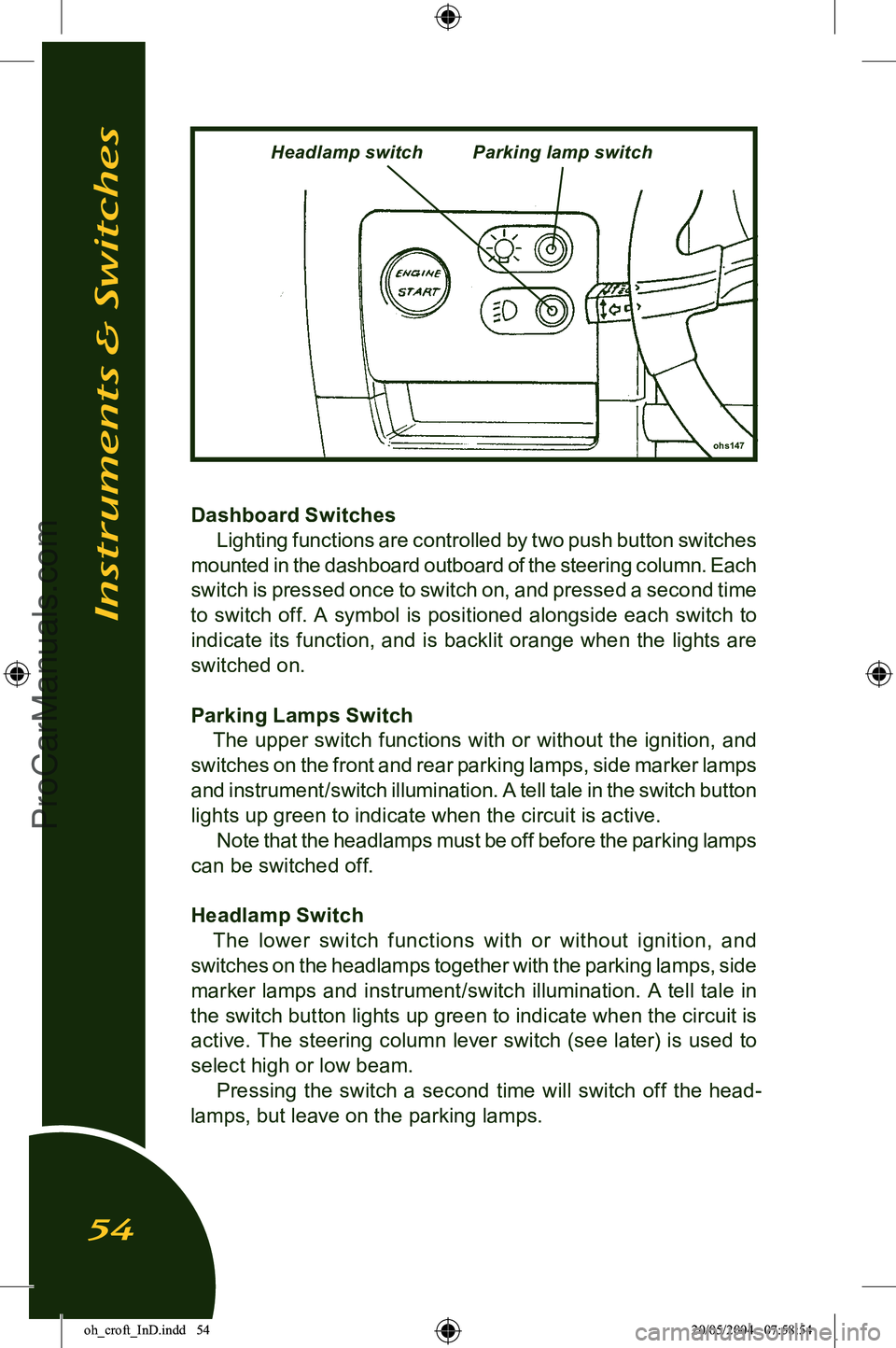
Dashboard SwitchesLighting functions are controlled by two push button switches
mounted in the dashboard outboard of the steering column. Each
switch is pressed once to switch on, and pressed a second time
to switch off. A symbol is positioned alongside each switch to indicate its function, and is backlit orange when the lights are
switched on.
Parking Lamps Switch The upper switch functions with or without the ignition, and
switches on the front and rear parking lamps, side marker lamps and instrument/switch illumination. A tell tale in the switch button
lights up green to indicate when the circuit is active. Note that the headlamps must be off before the parking lamps
can be switched off.
Headlamp Switch The lower switch functions with or without ignition, and
switches on the headlamps together with the parking lamps, side marker lamps and instrument/switch illumination. A tell tale in
the switch button lights up green to indicate when the circuit is
active. The steering column lever switch (see later) is used to
select high or low beam. Pressing the switch a second time will switch off the head
-
lamps, but leave on the parking lamps.
Instruments & Switches
54
ohs147
Headlamp switchParking lamp switch
oh_croft_InD.indd 5420/05/2004 07:58:54ProCarManuals.com
Page 58 of 205
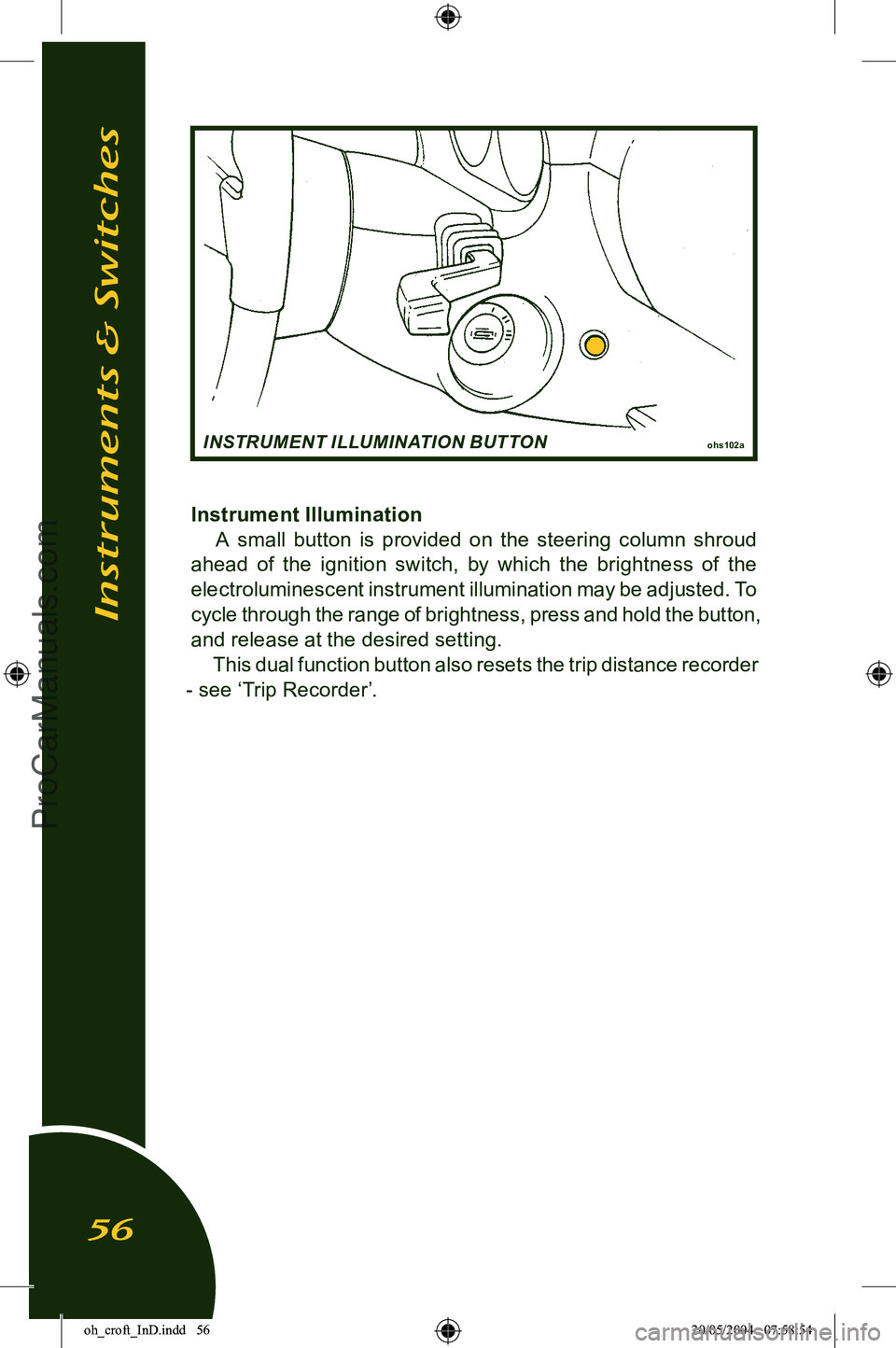
Instrument IlluminationA small button is provided on the steering column shroud
ahead of the ignition switch, by which the brightness of the
electroluminescent instrument illumination may be adjusted. To
cycle through the range of brightness, press and hold the button, and release at the desired setting. This dual function button also resets the trip distance recorder
- see ‘Trip Recorder’.
Instruments & Switches
56
ohs102aINSTRUMENT ILLUMINATION BUTTON
oh_croft_InD.indd 5620/05/2004 07:58:54ProCarManuals.com
Page 60 of 205
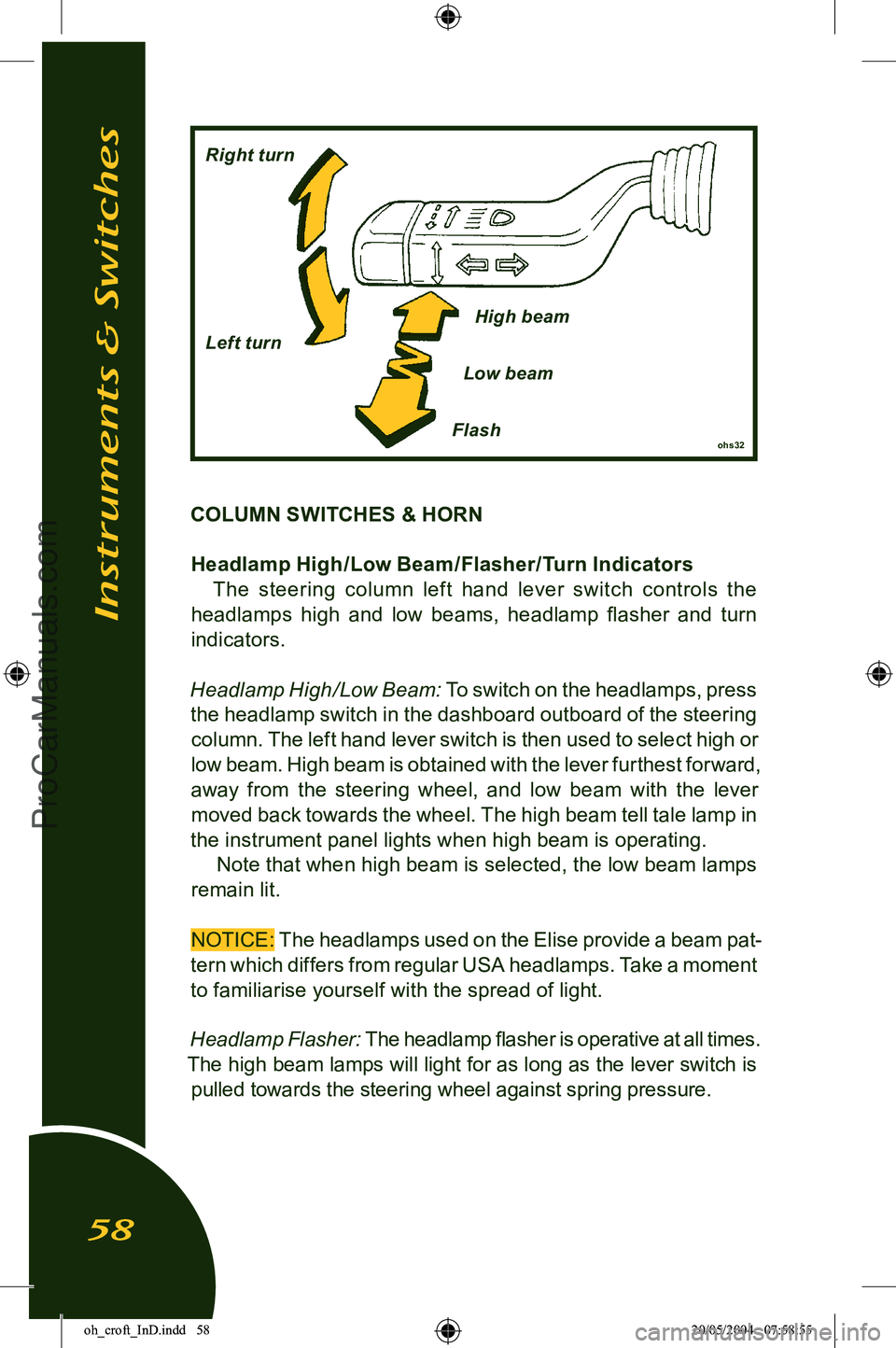
COLUMN SWITCHES & HORNHeadlamp High /Low Beam /Flasher/Turn Indicators The steering column lef t hand lever switch controls the
headlamps high and low beams, headlamp flasher and turn
indicators.
Headlamp High/Low Beam:
To switch on the headlamps, press
the headlamp switch in the dashboard outboard of the steering column. The left hand lever switch is then used to select high or
low beam. High beam is obtained with the lever furthest forward,
away from the steering wheel, and low beam with the lever moved back towards the wheel. The high beam tell tale lamp in
the instrument panel lights when high beam is operating.
Note that when high beam is selected, the low beam lamps
remain lit.
NOTICE:
The headlamps used on the Elise provide a beam pat-
tern which differs from regular USA headlamps. Take a moment
to familiarise yourself with the spread of light.
Headlamp Flasher:
The headlamp flasher is operative at all times.
The high beam lamps will light for as long as the lever switch is pulled towards the steering wheel against spring pressure.
Instruments & Switches
58
ohs32Flash
Right turn
Left turn
High beam
Low beam
oh_croft_InD.indd 5820/05/2004 07:58:55ProCarManuals.com
Page 61 of 205
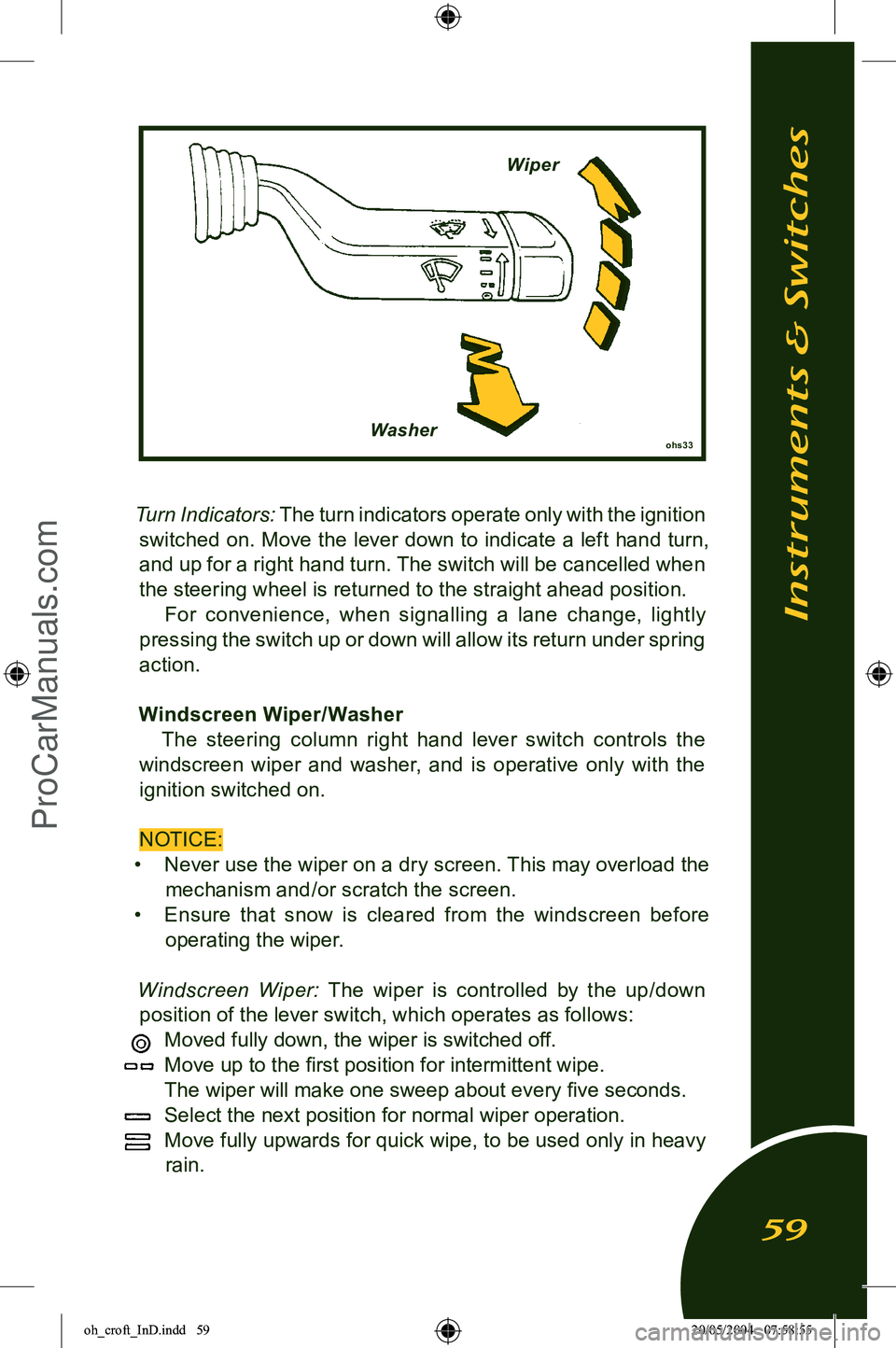
Turn Indicators: The turn indicators operate only with the ignition
switched on. Move the lever down to indicate a left hand turn, and up for a right hand turn. The switch will be cancelled when
the steering wheel is returned to the straight ahead position. For convenience, when signalling a lane change, lightly
pressing the switch up or down will allow its return under spring
action.
Windscreen Wiper/ Washer The steering column right hand lever switch controls the
windscreen wiper and washer, and is operative only with the ignition switched on.
NOTICE:
• Never use the wiper on a dry screen. This may overload the
mechanism and/or scratch the screen.
• Ensure th at snow is cleared from the windscreen before
operating the wiper.
Windscreen Wiper:
The wiper is controlled by the up/down
position of the lever switch, which operates as follows:
Moved fully down, the wiper is switched off.
Move up to the first position for intermittent wipe.
The wiper will make one sweep about every five seconds.
Select the next position for normal wiper operation.
Move fully upwards for quick wipe, to be used only in heavy
rain.
Instruments & Switches
59
ohs33Washer Wiper
oh_croft_InD.indd 5920/05/2004 07:58:55ProCarManuals.com
Page 62 of 205
Windscreen Washer: Two windscreen washer jets are provided,
one each side of the wiper spindle. Pulling the control lever to
-
wards the steering wheel will operate both the washer pump and the wiper. When the switch is released, the wiper will continue
for a further four sweeps.
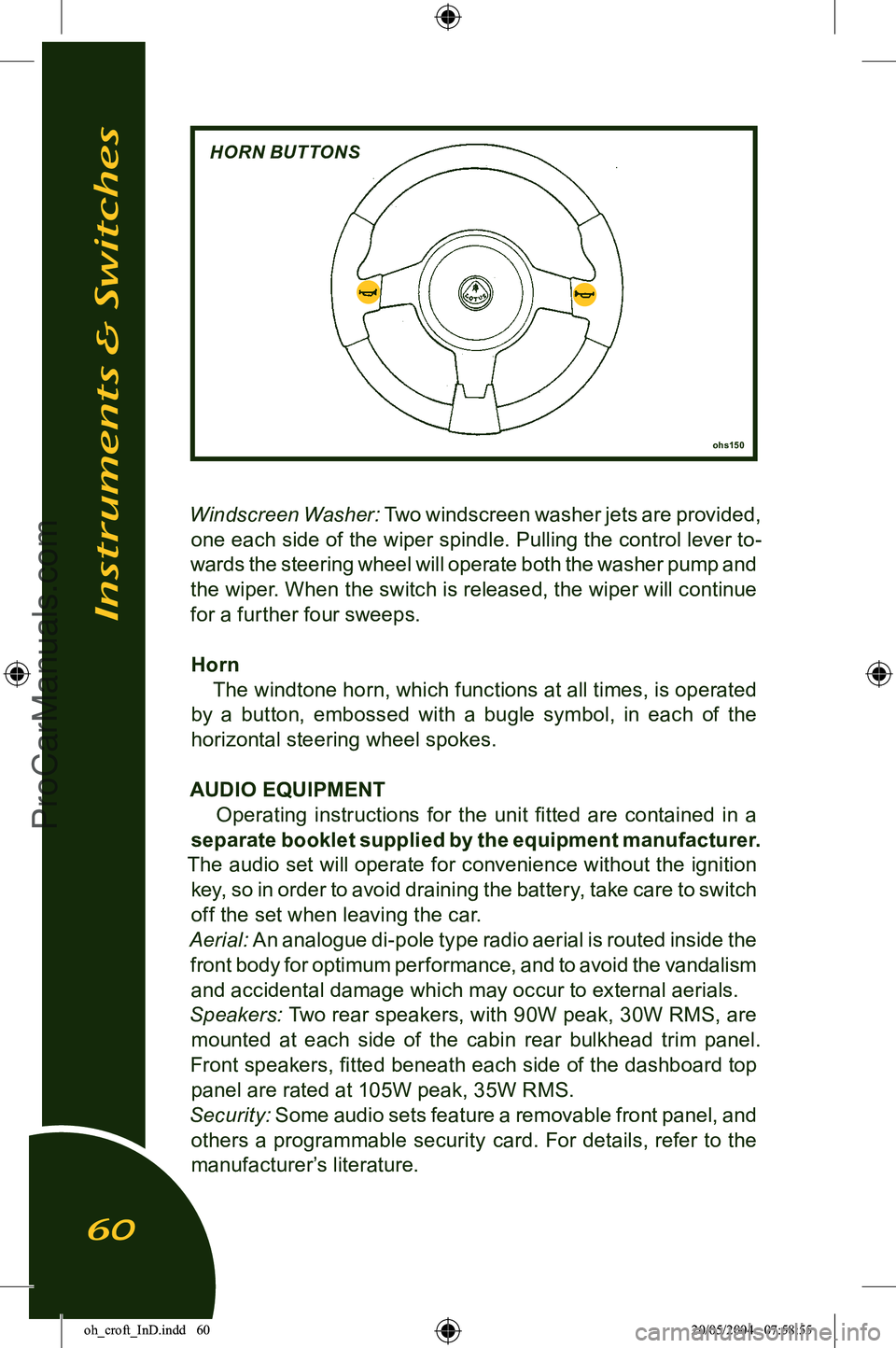
Horn The windtone horn, which functions at all times, is operated
by a button, embossed with a bugle symbol, in each of the
horizontal steering wheel spokes.
AUDIO EQUIPMENT Operating instructions for the unit fitted are contained in a
separate booklet supplied by the equipment manufacturer.
The audio set will operate for convenience without the ignition key, so in order to avoid draining the battery, take care to switch
off the set when leaving the car.
Aerial:
An analogue di-pole type radio aerial is routed inside the
front body for optimum performance, and to avoid the vandalism and accidental damage which may occur to external aerials.
Speakers:
Two rear speakers, with 90W peak, 30W RMS, are
mounted at each side of the cabin rear bulkhead trim panel.
Front speakers, fitted beneath each side of the dashboard top
panel are rated at 105W peak, 35W RMS.
Security:
Some audio sets feature a removable front panel, and
others a programmable security card. For details, refer to the
manufacturer’s literature.
Instruments & Switches
60
ohs150
HORN BUTTONS
oh_croft_InD.indd 6020/05/2004 07:58:55ProCarManuals.com
Page 70 of 205
stopping distance, a locked wheel provides little or no steering
force, such that with both front wheels locked, movement of the steering wheel has no effect on car direction. With the anti-lock
system, even panic braking results in controlled deceleration and the retention of steering response. ABS is especially ad
-
vantageous when braking on slippery road surfaces and in bad driving conditions, but it is important to realise that the ABS
cannot increase the friction level at the road surface, but can only make optimum use of the grip available.
WARNING: When driving in adverse weather, or on poor road sur
-
faces, always be alert to the possibility of slippery condi
-
tions and make the necessary allowance for increased stop
-
ping distances. Failure to do so may result in an accident in which you or others may be killed or seriously injured.
Normal braking, controlled by the pressure applied to the
brake pedal, occurs when the road conditions allow for decel
-
eration to be achieved without danger of wheel lock. The relative
speeds of the four wheels are continuously monitored by the
ABS when the brakes are applied, and if one or more wheels begin to lock, the brake pressure to that wheel(s) is modulated
by the ABS to help keep the wheel rotating and provide the
maximum controlled braking force. The wheels may appear
to lock momentarily as the wheel speed rapidly changes, and some tire noise (intermittent screeching) may be heard which is normal and will vary with road and tire conditions. Note that the
ABS does not function at speeds below 5 mph (7 km/h). When the ABS is activated, the driver is will feel a ‘pulsing’
sensation at the brake pedal as the fluid pressure is modulated, and also by audible clicking sounds. These signals indicate to
the driver that maximum braking is occuring, and that driving style should be modified to suit the conditions.
The minimum stopping distance is achieved by applying the
brakes firmly and steadily, and allowing the ABS to modulate
hydraulic pressure. The driver should not attempt to emulate
this process by ‘pumping’ the brake pedal, as modulation at the pedal will treat all four wheels similarly, rather than the individual
wheel control allowed by the electronics. An ABS tell tale lamp in the instrument panel is provided
to warn of any problems in the system and to indicate that the
Driving Controls
68
oh_croft_InD.indd 6820/05/2004 07:58:57ProCarManuals.com
Page 71 of 205
integral self diagnostics have switched out the anti-lock function.
See ‘ABS tell tale lamp’.
WARNING:
• The increased control that ABS provides should not induce you to take more risks with your safety. ABS will
not prevent a skid caused by abrupt steering movements,
or attempting to corner too quickly.
• Always maintain a safe following distance from other cars relative to the road surface and weather conditions.
Obey all traffic laws.
• Risk of accidents due to inappropriate speed cannot be reduced even by ABS. The driver is responsible for the
judgement of safe speed.
• The control unit of the ABS is set for standard tire size. If non-standard Tires are fitted, the control unit may mis-
interpret the speed of the car, because of the variant data
it receives from the wheel speed sensors. Fitting non standard tires would seriously affect the performance of
your ABS.
• The amber ABS tell tale in the instrument panel should light for about 4 seconds following ignition switch on, and
then go out. If the lamp remains lit, or comes on whilst driving, a fault in the anti-lock brake system is indicated.
The base brake system will continue to operate normally,
but without ABS. The car can be driven but should be
checked and repaired at the earliest opportunity.
• Activation of the ABS will vary according to the level of grip available at the Tires. On dry surfaces, activation
will occur only with a high pedal pressure. On slippery
surfaces, only a low pressure will be needed.
• On loose or uneven surfaces, such as gravel or snow, a car with ABS may need a longer stopping distance. Allow
a greater distance between cars in these conditions.
Driving Controls
69
oh_croft_InD.indd 6920/05/2004 07:58:57ProCarManuals.com
Page 72 of 205
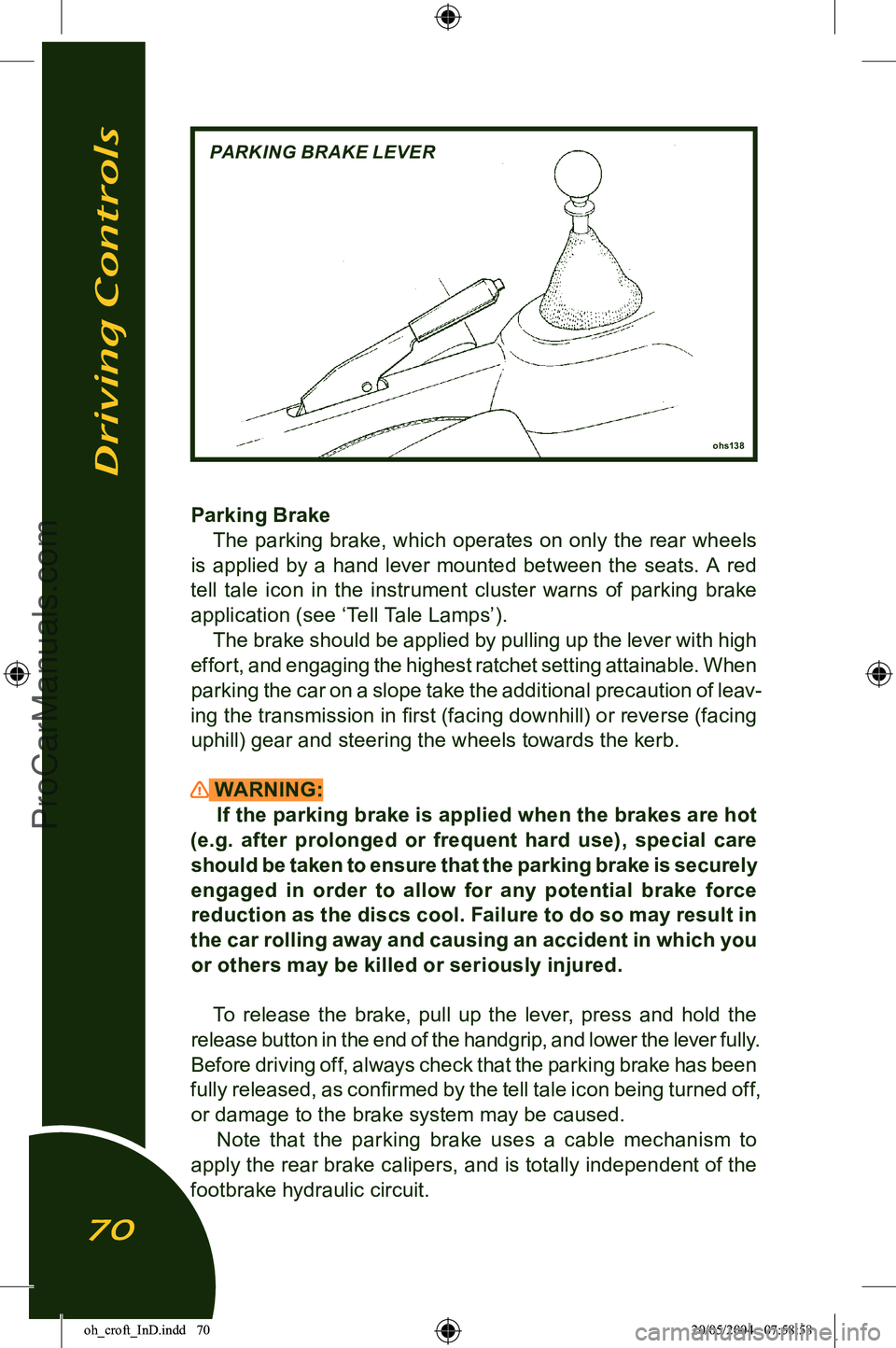
Parking BrakeThe parking brake, which operates on only the rear wheels
is applied by a hand lever mounted between the seats. A red
tell tale icon in the instrument cluster warns of parking brake application (see ‘Tell Tale Lamps’). The brake should be applied by pulling up the lever with high
effort, and engaging the highest ratchet setting attainable. When
parking the car on a slope take the additional precaution of leav
-
ing the transmission in first (facing downhill) or reverse (facing uphill) gear and steering the wheels towards the kerb.
WARNING: If the parking brake is applied when the brakes are hot
(e.g. after prolonged or frequent hard use), special care
should be taken to ensure that the parking brake is securely engaged in order to allow for any potential brake force
reduction as the discs cool. Failure to do so may result in
the car rolling away and causing an accident in which you
or others may be killed or seriously injured.
To release the brake, pull up the lever, press and hold the
release button in the end of the handgrip, and lower the lever fully.
Before driving off, always check that the parking brake has been
fully released, as confirmed by the tell tale icon being turned off,
or damage to the brake system may be caused. Note that the parking brake uses a cable mechanism to
apply the rear brake calipers, and is totally independent of the
footbrake hydraulic circuit.
Driving Controls
70
ohs138
PARKING BRAKE LEVER
oh_croft_InD.indd 7020/05/2004 07:58:58ProCarManuals.com
Page 74 of 205
STARTING PROCEDURE & ENGINE BREAK-IN
WARNING:CARBON MONOXIDE - Be aware of the danger of carbon
monoxide! Never run the engine in an enclosed space. The
exhaust gases contain carbon monoxide, a deadly gas
which is particularly dangerous, as being colourless odour
-
less and tasteless, its presence is very difficult to detect.
Before starting the engine, always check that the parking
brake is firmly applied, the transmission is in neutral, and as
an extra precaution, depress the clutch pedal. Switch off any
unnecessary electrical loads.
Starting a Cold or Warm Engine
The fuel injection and engine management system controls fuel delivery and engine settings under all normal operating conditions.
i) Insert the key into the steering lock/ignition switch and turn to
position ‘l’ to unlock the column. Before turning on the igni
-
tion; if the security tell tale in the tachometer face is flashing, mobilise the engine by pressing once, and for a full second,
the larger of the two buttons on the transmitter fob.
ii) Turn the key to position ‘II’ to switch on the ignition, and pause
for a moment to allow the fuel system to prime.
iii) Depress the clutch pedal as a precaution, and without moving
the accelerator, press the ‘Start’ button at the left hand end of
the dashboard to engage the starter motor. Release the button
as soon as the engine starts. Allow a cold engine to idle for
10 seconds before driving off, but if ambient temperatures are below freezing, allow the engine and screen heating systems
to warm up for a few minutes before driving.
iv) If the engine fails to start within 15 seconds, stop cranking
and pause for 10 seconds before a second attempt.
v) If further efforts are unsuccessful, contact your dealer or seek
other expert help.
WARNING:
An unattended car with a running engine is potentially
hazardous. Turn off the engine before leaving the car.
Starting & Engine Break-In
72
oh_croft_InD.indd 7220/05/2004 07:58:58ProCarManuals.com