instrument cluster MASERATI GHIBLI 2019 User Guide
[x] Cancel search | Manufacturer: MASERATI, Model Year: 2019, Model line: GHIBLI, Model: MASERATI GHIBLI 2019Pages: 384, PDF Size: 13.33 MB
Page 68 of 384

Supplemental Restraint
System (SRS) — Air Bags This vehicle has front air bags and
lap/shoulder belts for both the driver
and front passenger. The front air bags
are a supplement to the seat belt
restraints systems.
The driver's advanced front air bag is
mounted in the center of the steering
wheel in the area shown in the
picture. On this area is embossed the
word “SRS AIRBAG” for easier
recognition.
The passenger's advanced front air bag
is mounted in the dashboard, above
the glove compartment in the area
shown in the picture. On this area is
embossed the word “AIRBAG” for
easier recognition.
In addition, the vehicle is equipped
with a supplemental driver side knee
air bag mounted in the dashboard
below the steering column.
NOTE:
These air bags are designed to the
advanced air bag regulatory
requirements. The advanced front air bags have a
multistage inflator design. This allows
the air bag to have different rates of
inflation based on the severity and
type of collision.
This vehicle is equipped with driver
and front passenger seat track position
sensors that may adjust the inflation
level of the advanced front air bags
based upon seat position.
This vehicle is also equipped with a
front passenger seat belt buckle sensor
that detects whether the front
passenger seat belt is fastened. The
seat belt buckle sensor may adjust the
inflation rate of the advanced front air
bag.
This vehicle is equipped with
Supplemental Side Air Bag Inflatable
Curtains (SABIC) to protect the heads
of front and rear outer occupants. The
SABIC air bags are located above the side windows and their covers are also
labeled “AIR bag”.
This vehicle is also equipped with
Supplemental Seat-Mounted Side Air
Bags (SAB) for driver and passenger
pelvis-chest-shoulder protection during
a side impact. The Supplemental
Seat-Mounted Side Air Bags are
mounted on front seats and are
located in the outboard side of the
front seats.
NOTE:
After any accident, the vehicle should
be taken to the Authorized Maserati
Dealer immediately.
Air Bag System Components Your vehicle may be equipped with the
following air bag system components:
• Occupant Restraint Controller (ORC);
• Air bag warning light on the
instrument cluster;
• Steering wheel and column;
• Instrument cluster;
• Driver advanced front air bag;
• Passenger advanced front air bag;
• Supplemental driver side knee air
bag.
• Supplemental Seat-Mounted Side Air
Bags (SAB);Before Starting
2
64
Page 69 of 384
• Supplemental Side Air Bag Inflatable
Curtains (SABIC);
• Front and side impact sensors;
• Front seat belt pretensioners;
• Seat belt buckle switch;
• Seat track position sensors;
• Pyrotechnical charge to cut power
from the battery; it is located on the
positive battery terminal.
WARNING!
The air bag is not a substitute for the
seat belts. Correct use of the seat
belts, in combination with the air bag,
will offer protection for the driver and
passenger in the front seat in the
event of a head-on collision.
Advanced Front Air Bags
Properties The advanced front air bag system has
multistage driver and front passenger
air bags. This system provides air bag
inflation rates which are appropriate
to the severity and type of collision as
determined by the Occupant Restraint
Controller (ORC), which may receive
information from the front impact
sensors. The first stage inflator is triggered
immediately during an impact that
requires air bag deployment. This
inflation rate is used in less severe
collisions. A higher energy output,
inflation rate, is used for more severe
collisions.
CAUTION!
• The airbag system must be ready to
protect you in a collision. The
Occupant Restraint Controller (ORC)
monitors the internal circuits and
interconnecting wiring associated with
electrical Air Bag System Components
listed below:
– Occupant Restraint Controller
(ORC)
– Airbag Warning light on the
instrument cluster
– Steering Wheel and Column
– Instrument Cluster
– Driver advanced front air bag
– Passenger advanced front air bag
– Supplemental Seat-Mounted Side
Air Bags (SAB) Air Bags
– Supplemental Side Air Bag
Inflatable Curtains (SABIC)
– Front and side Impact Sensors
– Front seat belt pretensioners
– Seat Belt Buckle Switch – Seat Track Position Sensors
– Pyrotechnical charge to cut the
power from the battery: it is
located on the positive battery
terminal
• The electronic control unit provides
for the activation of the
pretensioners, front air bags or side
air bags (front and rear) based on
different criteria, according to the
type of impact. Failure of one or
more systems to activate is not
indicative of a system malfunction.
• The front and/or lateral air bags may
inflate if the vehicle suffers a violent
impact involving the underbody
area, for example in case of violent
impacts against steps, sidewalks,
speed bumps, or when the vehicle
falls into potholes, or similar.
WARNING!
• No objects should be placed over or
near the air bag on the instrument
panel or steering wheel because any
such objects could cause harm if the
vehicle is in a collision severe
enough to cause the air bag to
inflate.
(Continued)Before Starting
2
65
Page 72 of 384
front air bags may deploy in crashes
with little vehicle front-end damage
but that produce a severe initial
deceleration.
The side air bags will not deploy in all
side collisions. Side air bag deployment
will depend on the severity and type
of collision. Because air bag sensors
measure vehicle deceleration over
time, vehicle speed and damage
merely are not good indicators of
whether or not an air bag should have
deployed.
Seat belts are necessary for your
protection in all accidents, and also are
needed to help keep you in position,
away from an inflating air bag. The
ORC monitors the readiness of the
electronic parts of the air bag system
whenever the ignition switch is in the
RUN position. If the ignition switch is
in the OFF position, in the ACC
position, or not active, the air bag
system is not activated and the air
bags will not inflate.
The ORC contains a backup power
supply system that may deploy the air
bags even if the battery has low power
or it becomes disconnected prior to
deployment. When starting the
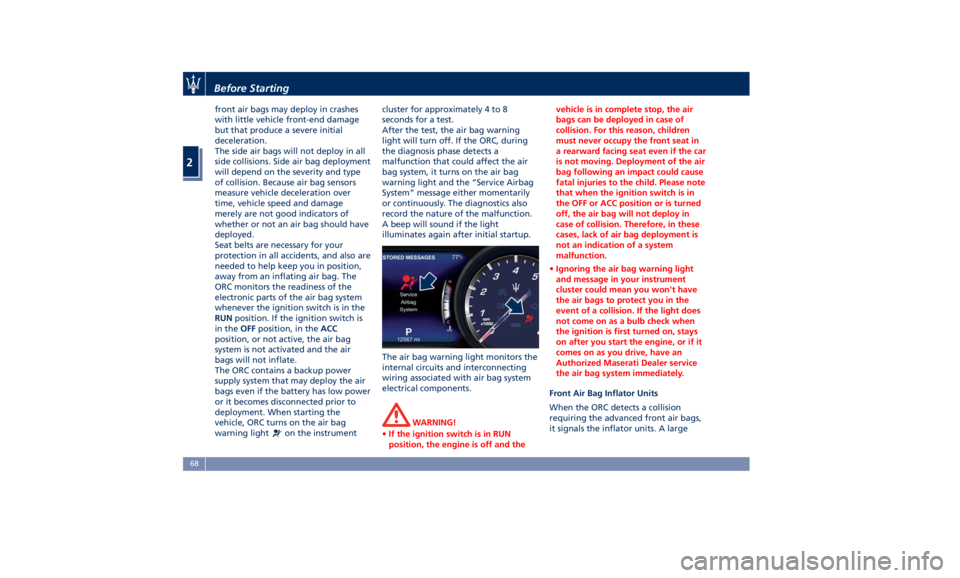
vehicle, ORC turns on the air bag
warning light
on the instrument cluster for approximately 4 to 8
seconds for a test.
After the test, the air bag warning
light will turn off. If the ORC, during
the diagnosis phase detects a
malfunction that could affect the air
bag system, it turns on the air bag
warning light and the “Service Airbag
System” message either momentarily
or continuously. The diagnostics also
record the nature of the malfunction.
A beep will sound if the light
illuminates again after initial startup.
The air bag warning light monitors the
internal circuits and interconnecting
wiring associated with air bag system
electrical components.
WARNING!
• If the ignition switch is in RUN
position, the engine is off and the vehicle is in complete stop, the air
bags can be deployed in case of
collision. For this reason, children
must never occupy the front seat in
a rearward facing seat even if the car
is not moving. Deployment of the air
bag following an impact could cause
fatal injuries to the child. Please note
that when the ignition switch is in
the OFF or ACC position or is turned
off, the air bag will not deploy in
case of collision. Therefore, in these
cases, lack of air bag deployment is
not an indication of a system
malfunction.
• Ignoring the air bag warning light
and message in your instrument
cluster could mean you won't have
the air bags to protect you in the
event of a collision. If the light does
not come on as a bulb check when
the ignition is first turned on, stays
on after you start the engine, or if it
comes on as you drive, have an
Authorized Maserati Dealer service
the air bag system immediately.
Front Air Bag Inflator Units
When
the ORC detects a collision
requiring the advanced front air bags,
it signals the inflator units. A largeBefore Starting
2
68
Page 89 of 384
• Check the tires (see “Tire Inflation
Pressure” chapter in section
“Features and Specifications”) for
proper cold inflation pressure.
Lights and Indicator Lights
• Have someone observe the
operation of exterior lights while
you operate the controls (see
“Lights” chapter in section
“Understanding the Vehicle”).
• Check turn signal and high beam
indicator lights on the instrument
cluster (see “Instrument Cluster”
chapter in section “Dashboard
Instruments and Controls”).
Door Latches
• Check for positive closing, latching,
and locking of doors and trunk lid
(see “Unlock the Vehicle with Key
fob” chapter in this section).
Fluid Leaks
• Check area under vehicle after
overnight parking for recent fluid
leaks (oil, fuel, etc.).
• If gasoline fumes are detected or
fluid leaks are suspected, contact the
Authorized Maserati Dealer . WARNING!
California Proposition 65
Operating, servicing and maintaining
a passenger vehicle or off-road vehicle
can expose you to chemicals including
such as, engine exhaust, carbon
monoxide, phthalates and lead, that
which are known to the State of
California to cause cancer and birth
defects or other reproductive harm. To
minimize exposure, avoid breathing
exhaust, do not idle the engine except
as necessary, service your vehicle in a
well-ventilated area and wear gloves
or wash your hands frequently when
servicing your vehicle. For more
information go to:
www.P65Warnings.ca.gov/passenger-
vehiclePark Assist (if equipped) The Park Assist (also called
“ParkSense”) system provides visual
and audible indications of the distance
between the rear and/or front bumper
and a detected obstacle when backing
up or moving forward, e.g. during a
parking maneuver.
Besides the use of the sensors
available on the bumpers and of the
rear parking camera, the vehicle may
be equipped with surround view
cameras (optional) to assist the driver
during maneuvers on dead-ends/roads
and on intersections. For more details
on this option, see chapter "Surround
View Camera System (optional)" in
this section.
Refer to “Park Assist System Usage
Precautions” for limitations of this
system and recommendations.
Park Assist system will retain the last
system state (enabled or disabled)
from the last ignition cycle when the
ignition is changed to the RUN
position.
Park Assist system can be active only
when the shift lever is in R (Reverse) or
D (Drive).
If Park Assist is enabled at one of
these shift lever positions, the system
will remain active until the vehicleBefore Starting
2
85
Page 90 of 384
speed is increased to approximately
7.5 mph (12 km/h) or above. The
system will become active again if the
vehicle speed is decreased to speeds
less than approximately 6.2 mph
(10 km/h).
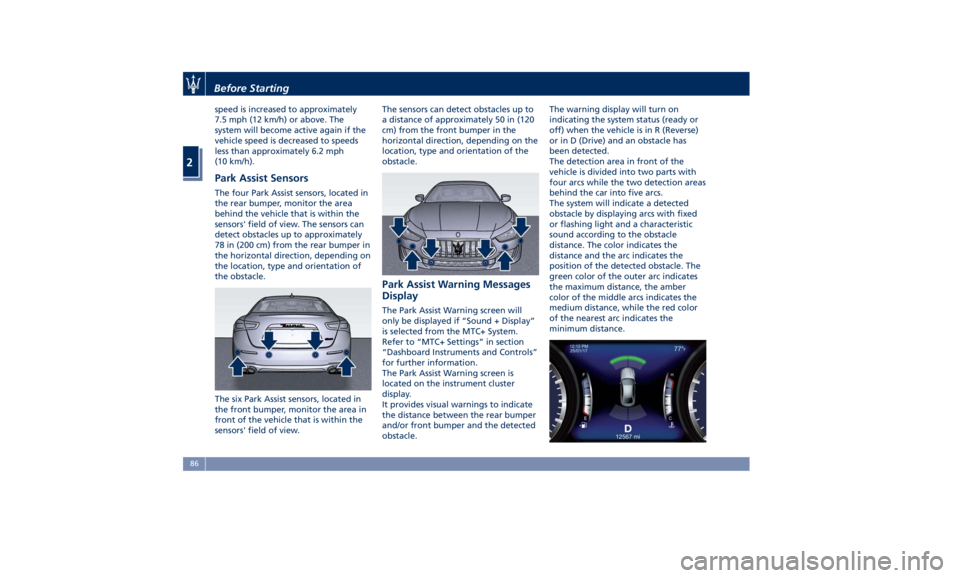
Park Assist Sensors The four Park Assist sensors, located in
the rear bumper, monitor the area
behind the vehicle that is within the
sensors' field of view. The sensors can
detect obstacles up to approximately
78 in (200 cm) from the rear bumper in
the horizontal direction, depending on
the location, type and orientation of
the obstacle.
The six Park Assist sensors, located in
the front bumper, monitor the area in
front of the vehicle that is within the
sensors' field of view. The sensors can detect obstacles up to
a distance of approximately 50 in (120
cm) from the front bumper in the
horizontal direction, depending on the
location, type and orientation of the
obstacle.
Park Assist Warning Messages
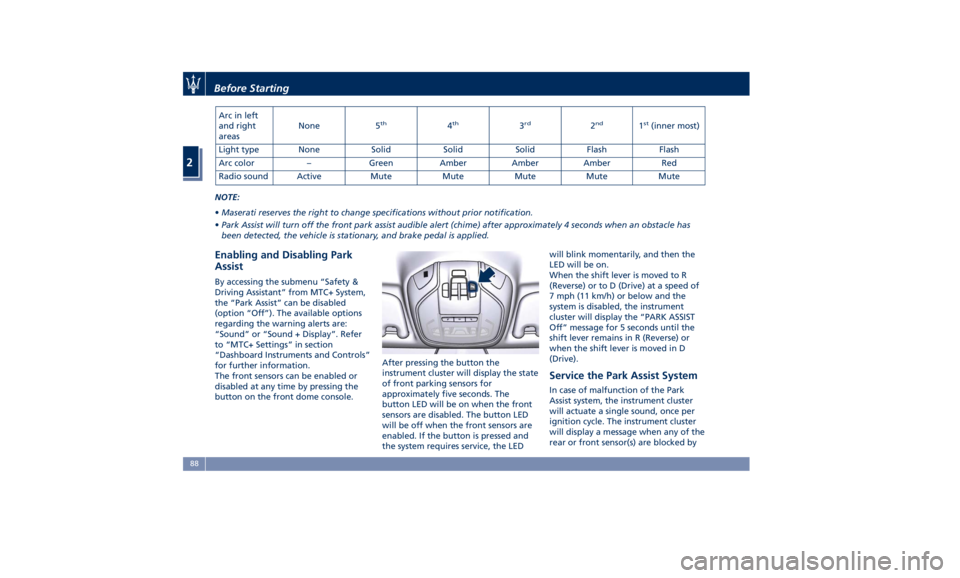
Display The Park Assist Warning screen will
only be displayed if “Sound + Display”
is selected from the MTC+ System.
Refer to “MTC+ Settings” in section
“Dashboard Instruments and Controls”
for further information.
The Park Assist Warning screen is
located on the instrument cluster
display.
It provides visual warnings to indicate
the distance between the rear bumper
and/or front bumper and the detected
obstacle. The warning display will turn on
indicating the system status (ready or
off) when the vehicle is in R (Reverse)
or in D (Drive) and an obstacle has
been detected.
The detection area in front of the
vehicle is divided into two parts with
four arcs while the two detection areas
behind the car into five arcs.
The system will indicate a detected
obstacle by displaying arcs with fixed
or flashing light and a characteristic
sound according to the obstacle
distance. The color indicates the
distance and the arc indicates the
position of the detected obstacle. The
green color of the outer arc indicates
the maximum distance, the amber
color of the middle arcs indicates the
medium distance, while the red color
of the nearest arc indicates the
minimum distance.Before Starting
2
86
Page 91 of 384
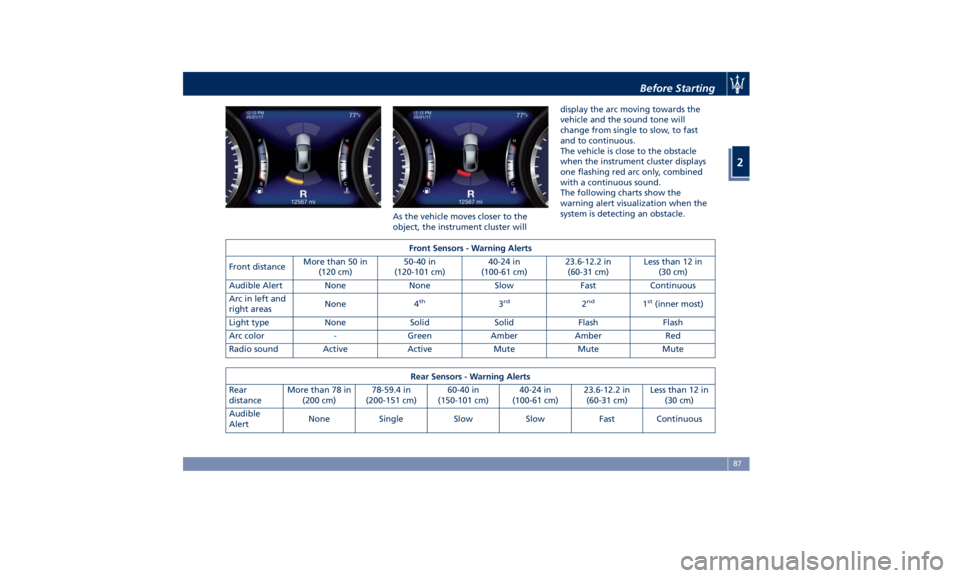
As the vehicle moves closer to the
object, the instrument cluster will display the arc moving towards the
vehicle and the sound tone will
change from single to slow, to fast
and to continuous.
The vehicle is close to the obstacle
when the instrument cluster displays
one flashing red arc only, combined
with a continuous sound.
The following charts show the
warning alert visualization when the
system is detecting an obstacle.
Front Sensors - Warning Alerts
Front distance More than 50 in
(120 cm) 50-40 in
(120-101 cm) 40-24 in
(100-61 cm) 23.6-12.2 in
(60-31 cm) Less than 12 in
(30 cm)
Audible Alert None None Slow Fast Continuous
Arc in left and
right areas None 4 th
3 rd
2 nd
1 st
(inner most)
Light type None Solid Solid Flash Flash
Arc color - Green Amber Amber Red
Radio sound Active Active Mute Mute Mute
Rear Sensors - Warning Alerts
Rear
distance More than 78 in
(200 cm) 78-59.4 in
(200-151 cm) 60-40 in
(150-101 cm) 40-24 in
(100-61 cm) 23.6-12.2 in
(60-31 cm) Less than 12 in
(30 cm)
Audible
Alert None Single Slow Slow Fast Continuous Before Starting
2
87
Page 92 of 384
Arc in left
and right
areas None 5 th
4 th
3 rd
2 nd
1 st
(inner most)
Light type None Solid Solid Solid Flash Flash
Arc color – Green Amber Amber Amber Red
Radio sound Active Mute Mute Mute Mute Mute
NOTE:
• Maserati reserves the right to change specifications without prior notification.
• Park Assist will turn off the front park assist audible alert (chime) after approximately 4 seconds when an obstacle has
been detected, the vehicle is stationary, and brake pedal is applied.
Enabling and Disabling Park
Assist By accessing the submenu “Safety &
Driving Assistant” from MTC+ System,
the “Park Assist” can be disabled
(option “Off”). The available options
regarding the warning alerts are:
“Sound” or “Sound + Display”. Refer
to “MTC+ Settings” in section
“Dashboard Instruments and Controls”
for further information.
The front sensors can be enabled or
disabled at any time by pressing the
button on the front dome console. After pressing the button the
instrument cluster will display the state
of front parking sensors for
approximately five seconds. The
button LED will be on when the front
sensors are disabled. The button LED
will be off when the front sensors are
enabled. If the button is pressed and
the system requires service, the LED will blink momentarily, and then the
LED will be on.
When the shift lever is moved to R
(Reverse) or to D (Drive) at a speed of
7 mph (11 km/h) or below and the
system is disabled, the instrument
cluster will display the “PARK ASSIST
Off” message for 5 seconds until the
shift lever remains in R (Reverse) or
when the shift lever is moved in D
(Drive).
Service the Park Assist System In case of malfunction of the Park
Assist system, the instrument cluster
will actuate a single sound, once per
ignition cycle. The instrument cluster
will display a message when any of the
rear or front sensor(s) are blocked byBefore Starting
2
88
Page 93 of 384
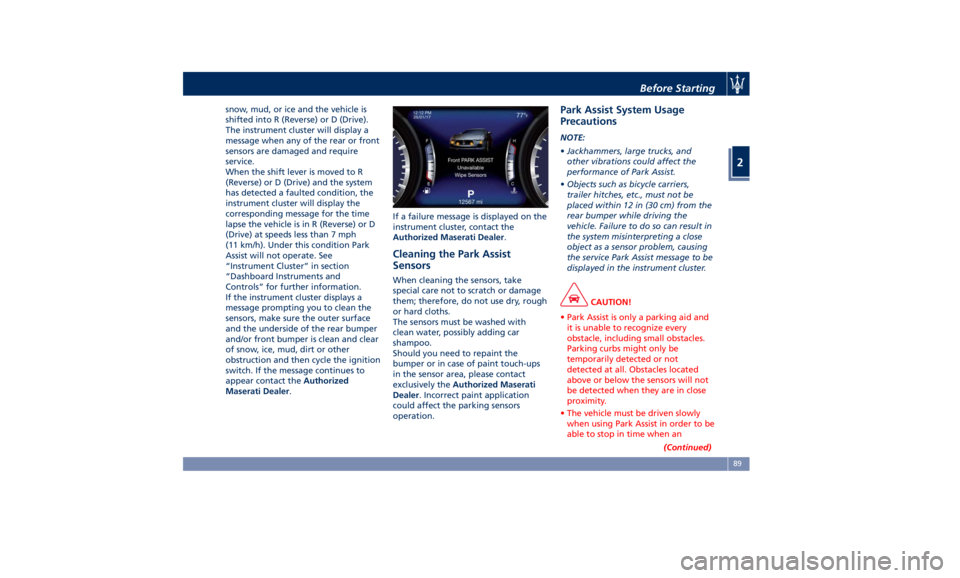
snow, mud, or ice and the vehicle is
shifted into R (Reverse) or D (Drive).
The instrument cluster will display a
message when any of the rear or front
sensors are damaged and require
service.
When the shift lever is moved to R
(Reverse) or D (Drive) and the system
has detected a faulted condition, the
instrument cluster will display the
corresponding message for the time
lapse the vehicle is in R (Reverse) or D
(Drive) at speeds less than 7 mph
(11 km/h). Under this condition Park
Assist will not operate. See
“Instrument Cluster” in section
“Dashboard Instruments and
Controls” for further information.
If the instrument cluster displays a
message prompting you to clean the
sensors, make sure the outer surface
and the underside of the rear bumper
and/or front bumper is clean and clear
of snow, ice, mud, dirt or other
obstruction and then cycle the ignition
switch. If the message continues to
appear contact the Authorized
Maserati Dealer . If a failure message is displayed on the
instrument cluster, contact the
Authorized Maserati Dealer .
Cleaning the Park Assist
Sensors When cleaning the sensors, take
special care not to scratch or damage
them; therefore, do not use dry, rough
or hard cloths.
The sensors must be washed with
clean water, possibly adding car
shampoo.
Should you need to repaint the
bumper or in case of paint touch-ups
in the sensor area, please contact
exclusively the Authorized Maserati
Dealer . Incorrect paint application
could affect the parking sensors
operation. Park Assist System Usage
Precautions NOTE:
• Jackhammers, large trucks, and
other vibrations could affect the
performance of Park Assist.
• Objects such as bicycle carriers,
trailer hitches, etc., must not be
placed within 12 in (30 cm) from the
rear bumper while driving the
vehicle. Failure to do so can result in
the system misinterpreting a close
object as a sensor problem, causing
the service Park Assist message to be
displayed in the instrument cluster.
CAUTION!
• Park Assist is only a parking aid and
it is unable to recognize every
obstacle, including small obstacles.
Parking curbs might only be
temporarily detected or not
detected at all. Obstacles located
above or below the sensors will not
be detected when they are in close
proximity.
• The vehicle must be driven slowly
when using Park Assist in order to be
able to stop in time when an
(Continued)Before Starting
2
89
Page 97 of 384
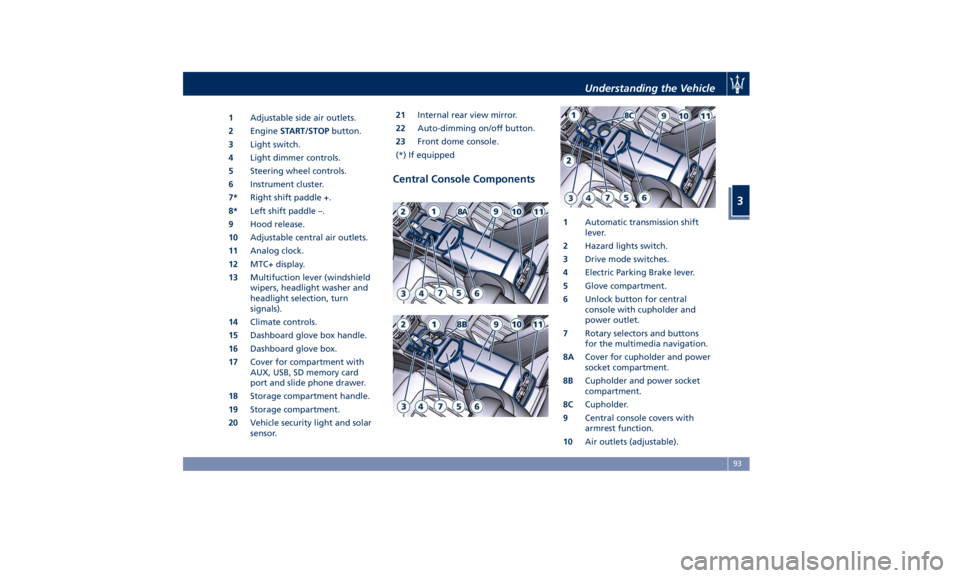
1 Adjustable side air outlets.
2 Engine START/STOP button.
3 Light switch.
4 Light dimmer controls.
5 Steering wheel controls.
6 Instrument cluster.
7* Right shift paddle +.
8* Left shift paddle –.
9 Hood release.
10 Adjustable central air outlets.
11 Analog clock.
12 MTC+ display.
13 Multifuction lever (windshield
wipers, headlight washer and
headlight selection, turn
signals).
14 Climate controls.
15 Dashboard glove box handle.
16 Dashboard glove box.
17 Cover for compartment with
AUX, USB, SD memory card
port and slide phone drawer.
18 Storage compartment handle.
19 Storage compartment.
20 Vehicle security light and solar
sensor. 21 Internal rear view mirror.
22 Auto-dimming on/off button.
23 Front dome console.
(*) If equipped
Central Console Components 1 Automatic transmission shift
lever.
2 Hazard lights switch.
3 Drive mode switches.
4 Electric Parking Brake lever.
5 Glove compartment.
6 Unlock button for central
console with cupholder and
power outlet.
7 Rotary selectors and buttons
for the multimedia navigation.
8A Cover for cupholder and power
socket compartment.
8B Cupholder and power socket
compartment.
8C Cupholder.
9 Central console covers with
armrest function.
10 Air outlets (adjustable).Understanding the Vehicle
3
93
Page 103 of 384
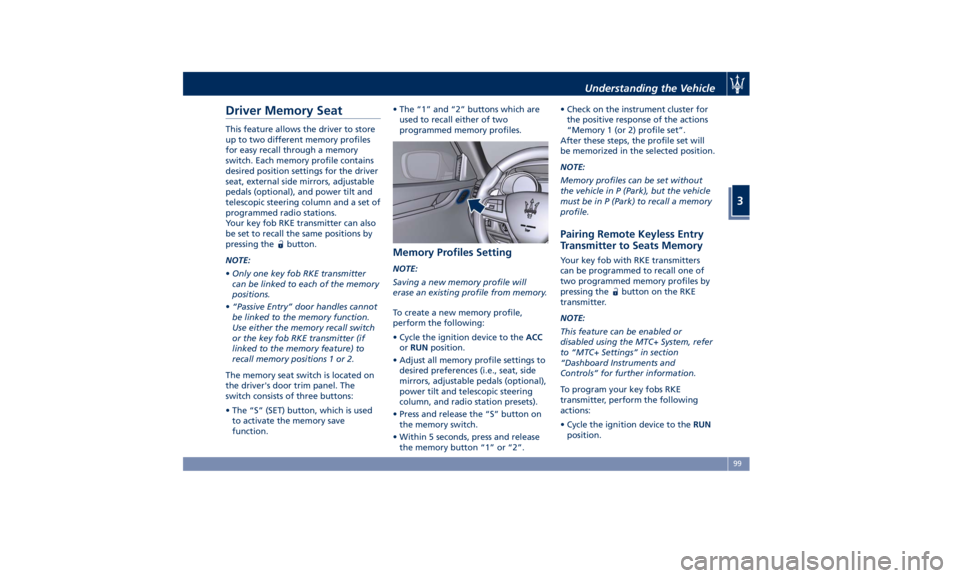
Driver Memory Seat This feature allows the driver to store
up to two different memory profiles
for easy recall through a memory
switch. Each memory profile contains
desired position settings for the driver
seat, external side mirrors, adjustable
pedals (optional), and power tilt and
telescopic steering column and a set of
programmed radio stations.
Your key fob RKE transmitter can also
be set to recall the same positions by
pressing the
button.
NOTE:
• Only one key fob RKE transmitter
can be linked to each of the memory
positions.
• “Passive Entry” door handles cannot
be linked to the memory function.
Use either the memory recall switch
or the key fob RKE transmitter (if
linked to the memory feature) to
recall memory positions 1 or 2.
The memory seat switch is located on
the driver's door trim panel. The
switch consists of three buttons:
• The “S” (SET) button, which is used
to activate the memory save
function. • The “1” and “2” buttons which are
used to recall either of two
programmed memory profiles.
Memory Profiles Setting NOTE:
Saving a new memory profile will
erase an existing profile from memory.
To create a new memory profile,
perform the following:
• Cycle the ignition device to the ACC
or RUN position.
• Adjust all memory profile settings to
desired preferences (i.e., seat, side
mirrors, adjustable pedals (optional),
power tilt and telescopic steering
column, and radio station presets).
• Press and release the “S” button on
the memory switch.
• Within 5 seconds, press and release
the memory button “1” or “2”. • Check on the instrument cluster for
the positive response of the actions
“Memory 1 (or 2) profile set”.
After these steps, the profile set will
be memorized in the selected position.
NOTE:
Memory profiles can be set without
the vehicle in P (Park), but the vehicle
must be in P (Park) to recall a memory
profile.
Pairing Remote Keyless Entry
Transmitter to Seats Memory Your key fob with RKE transmitters
can be programmed to recall one of
two programmed memory profiles by
pressing the
button on the RKE
transmitter.
NOTE:
This feature can be enabled or
disabled using the MTC+ System, refer
to “MTC+ Settings” in section
“Dashboard Instruments and
Controls” for further information.
To program your key fobs RKE
transmitter, perform the following
actions:
• Cycle the ignition device to the RUN
position.Understanding the Vehicle
3
99