light MASERATI GHIBLI 2019 Owner's Guide
[x] Cancel search | Manufacturer: MASERATI, Model Year: 2019, Model line: GHIBLI, Model: MASERATI GHIBLI 2019Pages: 384, PDF Size: 13.33 MB
Page 87 of 384
Exhaust Gas WARNING!
Exhaust gases can injure. They contain
carbon monoxide (CO), which is
colorless and odorless. Breathing it
can make you unconscious and can
eventually poison you. To avoid
breathing (CO), follow these safety
tips:
• Do not run the engine in a closed
garage or in confined areas any
longer than needed to move your
vehicle in or out of the area.
• If it is necessary to sit in a parked
vehicle with the engine running,
adjust your heating or cooling
controls to force outside air into the
vehicle. Set the blower at high
speed.
• If you are required to drive with the
trunk open, make sure that all
windows are closed and the climate
control blowers switch is set at high
speed. DO NOT use the recirculation
mode.
The best protection against carbon
monoxide
entry into
the passenger
compartment is a properly maintained
engine exhaust system. Whenever detecting a change in the
sound of the exhaust system or
eventual exhaust fumes inside the
vehicle have the Authorized Maserati
Dealer inspect the complete exhaust
system and adjacent body areas for
broken, damaged, deteriorated, or
mispositioned parts.
Open seams or loose connections
could permit exhaust fumes to seep
into the passenger compartment.
WARNING!
California Proposition 65
Operating, servicing and maintaining
a passenger vehicle or off-road vehicle
can expose you to chemicals including
such as, engine exhaust, carbon
monoxide, phthalates and lead, that
which are known to the State of
California to cause cancer and birth
defects or other reproductive harm. To
minimize exposure, avoid breathing
exhaust, do not idle the engine except
as necessary, service your vehicle in a
well-ventilated area and wear gloves
or wash your hands frequently when
servicing your vehicle. For more
information go to:
www.P65Warnings.ca.gov/passenger-
vehicle Vehicle Safety Checks Seat Belts
• Inspect the belt system periodically,
checking for cuts, frays, and loose
parts. Damaged parts must be
replaced immediately.
• Do not disassemble or modify the
system.
• If the belt has been sharply pulled,
for example as the result of an
accident, the safety belt, together
with the anchoring devices, the
anchoring device mounting screws
and the pretensioner must be
completely replaced. Even if the belt
does not present any exterior signs
of wear or damage, it may have lost
its restraining properties.
Air Bag Warning Light
The
light should illuminate and
remain lit for a few seconds bulb
checking when the ignition switch is
pushed in RUN position (see
“Supplemental Restraint System (SRS)
— Air Bags” chapter in this section).
• If the light
does not illuminate
while starting, contact the
Authorized Maserati Dealer .
• If the light stays on, flickers, or
comes on while driving, have theBefore Starting
2
83
Page 89 of 384
• Check the tires (see “Tire Inflation
Pressure” chapter in section
“Features and Specifications”) for
proper cold inflation pressure.
Lights and Indicator Lights
• Have someone observe the
operation of exterior lights while
you operate the controls (see
“Lights” chapter in section
“Understanding the Vehicle”).
• Check turn signal and high beam
indicator lights on the instrument
cluster (see “Instrument Cluster”
chapter in section “Dashboard
Instruments and Controls”).
Door Latches
• Check for positive closing, latching,
and locking of doors and trunk lid
(see “Unlock the Vehicle with Key
fob” chapter in this section).
Fluid Leaks
• Check area under vehicle after
overnight parking for recent fluid
leaks (oil, fuel, etc.).
• If gasoline fumes are detected or
fluid leaks are suspected, contact the
Authorized Maserati Dealer . WARNING!
California Proposition 65
Operating, servicing and maintaining
a passenger vehicle or off-road vehicle
can expose you to chemicals including
such as, engine exhaust, carbon
monoxide, phthalates and lead, that
which are known to the State of
California to cause cancer and birth
defects or other reproductive harm. To
minimize exposure, avoid breathing
exhaust, do not idle the engine except
as necessary, service your vehicle in a
well-ventilated area and wear gloves
or wash your hands frequently when
servicing your vehicle. For more
information go to:
www.P65Warnings.ca.gov/passenger-
vehiclePark Assist (if equipped) The Park Assist (also called
“ParkSense”) system provides visual
and audible indications of the distance
between the rear and/or front bumper
and a detected obstacle when backing
up or moving forward, e.g. during a
parking maneuver.
Besides the use of the sensors
available on the bumpers and of the
rear parking camera, the vehicle may
be equipped with surround view
cameras (optional) to assist the driver
during maneuvers on dead-ends/roads
and on intersections. For more details
on this option, see chapter "Surround
View Camera System (optional)" in
this section.
Refer to “Park Assist System Usage
Precautions” for limitations of this
system and recommendations.
Park Assist system will retain the last
system state (enabled or disabled)
from the last ignition cycle when the
ignition is changed to the RUN
position.
Park Assist system can be active only
when the shift lever is in R (Reverse) or
D (Drive).
If Park Assist is enabled at one of
these shift lever positions, the system
will remain active until the vehicleBefore Starting
2
85
Page 90 of 384
speed is increased to approximately
7.5 mph (12 km/h) or above. The
system will become active again if the
vehicle speed is decreased to speeds
less than approximately 6.2 mph
(10 km/h).
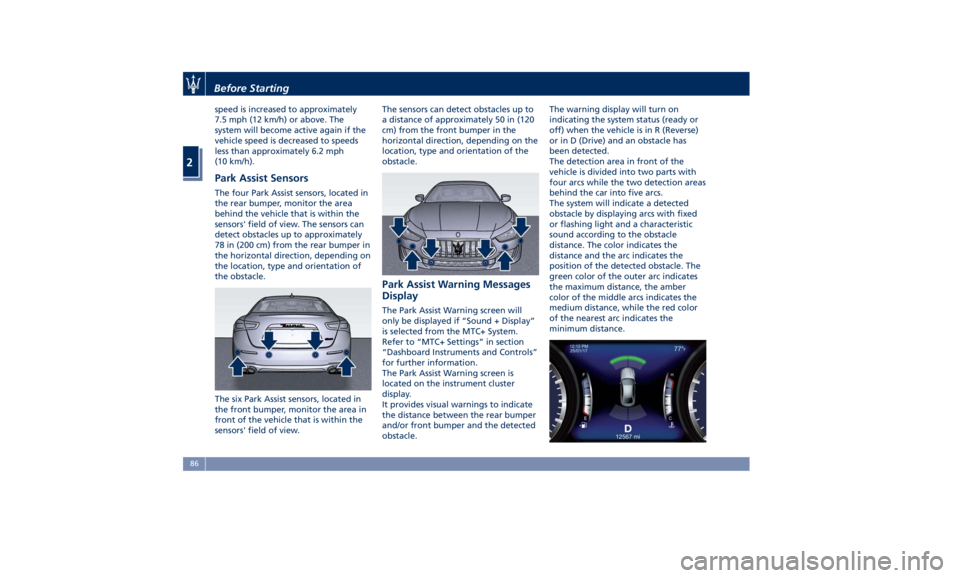
Park Assist Sensors The four Park Assist sensors, located in
the rear bumper, monitor the area
behind the vehicle that is within the
sensors' field of view. The sensors can
detect obstacles up to approximately
78 in (200 cm) from the rear bumper in
the horizontal direction, depending on
the location, type and orientation of
the obstacle.
The six Park Assist sensors, located in
the front bumper, monitor the area in
front of the vehicle that is within the
sensors' field of view. The sensors can detect obstacles up to
a distance of approximately 50 in (120
cm) from the front bumper in the
horizontal direction, depending on the
location, type and orientation of the
obstacle.
Park Assist Warning Messages
Display The Park Assist Warning screen will
only be displayed if “Sound + Display”
is selected from the MTC+ System.
Refer to “MTC+ Settings” in section
“Dashboard Instruments and Controls”
for further information.
The Park Assist Warning screen is
located on the instrument cluster
display.
It provides visual warnings to indicate
the distance between the rear bumper
and/or front bumper and the detected
obstacle. The warning display will turn on
indicating the system status (ready or
off) when the vehicle is in R (Reverse)
or in D (Drive) and an obstacle has
been detected.
The detection area in front of the
vehicle is divided into two parts with
four arcs while the two detection areas
behind the car into five arcs.
The system will indicate a detected
obstacle by displaying arcs with fixed
or flashing light and a characteristic
sound according to the obstacle
distance. The color indicates the
distance and the arc indicates the
position of the detected obstacle. The
green color of the outer arc indicates
the maximum distance, the amber
color of the middle arcs indicates the
medium distance, while the red color
of the nearest arc indicates the
minimum distance.Before Starting
2
86
Page 91 of 384
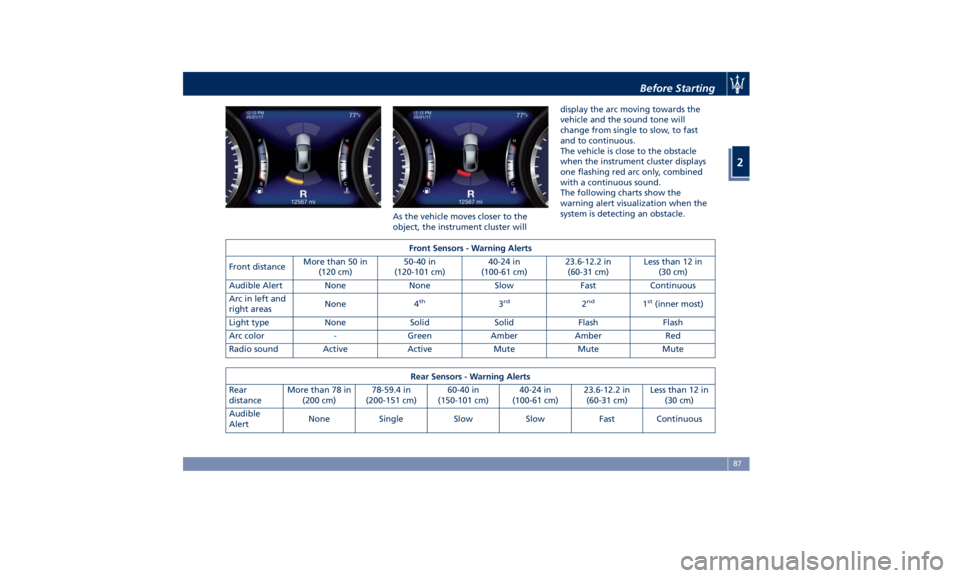
As the vehicle moves closer to the
object, the instrument cluster will display the arc moving towards the
vehicle and the sound tone will
change from single to slow, to fast
and to continuous.
The vehicle is close to the obstacle
when the instrument cluster displays
one flashing red arc only, combined
with a continuous sound.
The following charts show the
warning alert visualization when the
system is detecting an obstacle.
Front Sensors - Warning Alerts
Front distance More than 50 in
(120 cm) 50-40 in
(120-101 cm) 40-24 in
(100-61 cm) 23.6-12.2 in
(60-31 cm) Less than 12 in
(30 cm)
Audible Alert None None Slow Fast Continuous
Arc in left and
right areas None 4 th
3 rd
2 nd
1 st
(inner most)
Light type None Solid Solid Flash Flash
Arc color - Green Amber Amber Red
Radio sound Active Active Mute Mute Mute
Rear Sensors - Warning Alerts
Rear
distance More than 78 in
(200 cm) 78-59.4 in
(200-151 cm) 60-40 in
(150-101 cm) 40-24 in
(100-61 cm) 23.6-12.2 in
(60-31 cm) Less than 12 in
(30 cm)
Audible
Alert None Single Slow Slow Fast Continuous Before Starting
2
87
Page 92 of 384
Arc in left
and right
areas None 5 th
4 th
3 rd
2 nd
1 st
(inner most)
Light type None Solid Solid Solid Flash Flash
Arc color – Green Amber Amber Amber Red
Radio sound Active Mute Mute Mute Mute Mute
NOTE:
• Maserati reserves the right to change specifications without prior notification.
• Park Assist will turn off the front park assist audible alert (chime) after approximately 4 seconds when an obstacle has
been detected, the vehicle is stationary, and brake pedal is applied.
Enabling and Disabling Park
Assist By accessing the submenu “Safety &
Driving Assistant” from MTC+ System,
the “Park Assist” can be disabled
(option “Off”). The available options
regarding the warning alerts are:
“Sound” or “Sound + Display”. Refer
to “MTC+ Settings” in section
“Dashboard Instruments and Controls”
for further information.
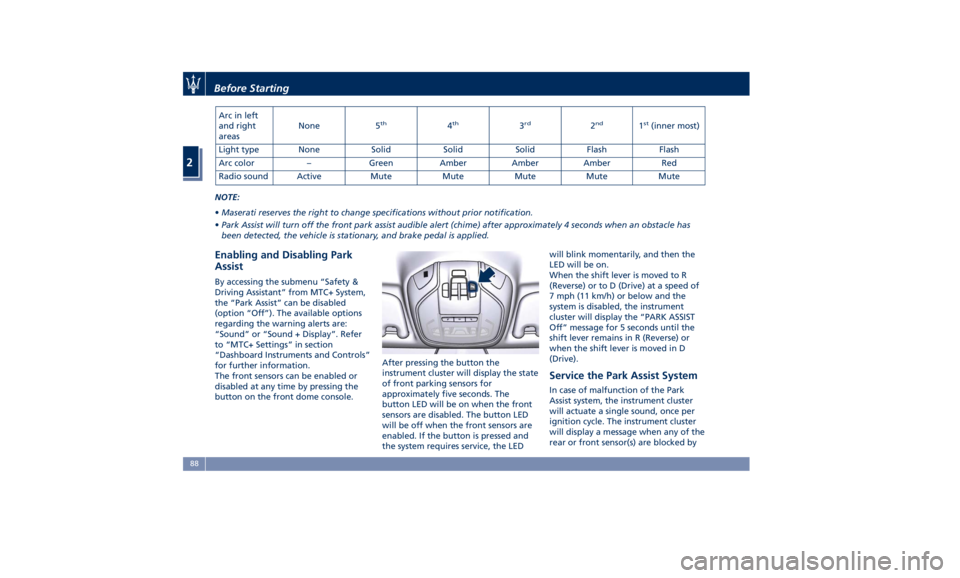
The front sensors can be enabled or
disabled at any time by pressing the
button on the front dome console. After pressing the button the
instrument cluster will display the state
of front parking sensors for
approximately five seconds. The
button LED will be on when the front
sensors are disabled. The button LED
will be off when the front sensors are
enabled. If the button is pressed and
the system requires service, the LED will blink momentarily, and then the
LED will be on.
When the shift lever is moved to R
(Reverse) or to D (Drive) at a speed of
7 mph (11 km/h) or below and the
system is disabled, the instrument
cluster will display the “PARK ASSIST
Off” message for 5 seconds until the
shift lever remains in R (Reverse) or
when the shift lever is moved in D
(Drive).
Service the Park Assist System In case of malfunction of the Park
Assist system, the instrument cluster
will actuate a single sound, once per
ignition cycle. The instrument cluster
will display a message when any of the
rear or front sensor(s) are blocked byBefore Starting
2
88
Page 95 of 384
3 – Understanding the Vehicle Interior Components ..................................... 92
Front Power Seats ....................................... 96
Driver Memory Seat ...................................... 99
Rear Seats ............................................ 101
Head Restraints ........................................ 103
Power Steering Wheel Adjustment .......................... 105
Adjustable Pedals (if equipped) ............................ 107
Rearview Mirrors ....................................... 107
Lights ................................................ 110
Windshield Wipers and Washers ........................... 122
Interior Features ....................................... 126
Cargo Area ........................................... 133
Power Sunroof with Sunshade ............................. 136
HomeLink (optional) .................................... 138
Air Conditioning Distribution ............................. 142
91
Page 97 of 384
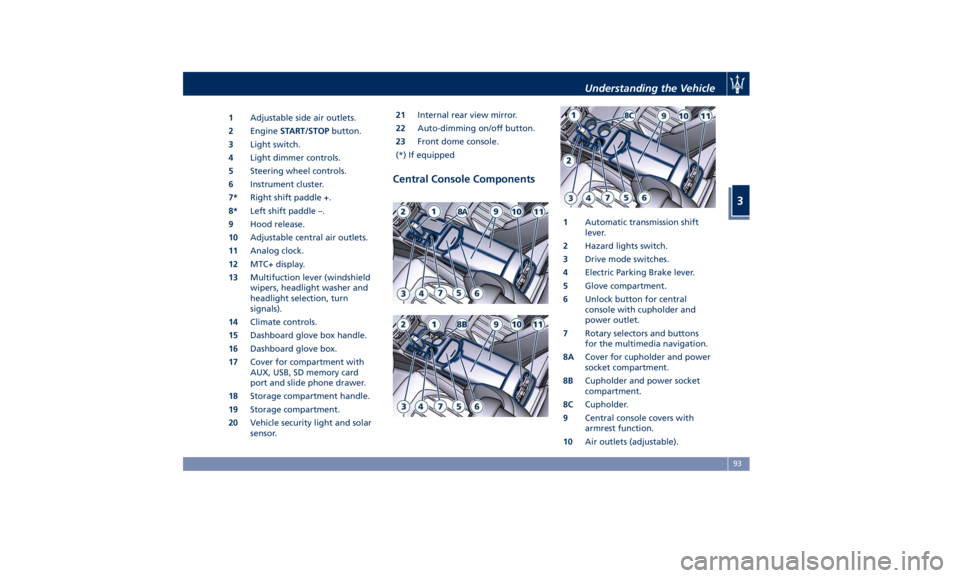
1 Adjustable side air outlets.
2 Engine START/STOP button.
3 Light switch.
4 Light dimmer controls.
5 Steering wheel controls.
6 Instrument cluster.
7* Right shift paddle +.
8* Left shift paddle –.
9 Hood release.
10 Adjustable central air outlets.
11 Analog clock.
12 MTC+ display.
13 Multifuction lever (windshield
wipers, headlight washer and
headlight selection, turn
signals).
14 Climate controls.
15 Dashboard glove box handle.
16 Dashboard glove box.
17 Cover for compartment with
AUX, USB, SD memory card
port and slide phone drawer.
18 Storage compartment handle.
19 Storage compartment.
20 Vehicle security light and solar
sensor. 21 Internal rear view mirror.
22 Auto-dimming on/off button.
23 Front dome console.
(*) If equipped
Central Console Components 1 Automatic transmission shift
lever.
2 Hazard lights switch.
3 Drive mode switches.
4 Electric Parking Brake lever.
5 Glove compartment.
6 Unlock button for central
console with cupholder and
power outlet.
7 Rotary selectors and buttons
for the multimedia navigation.
8A Cover for cupholder and power
socket compartment.
8B Cupholder and power socket
compartment.
8C Cupholder.
9 Central console covers with
armrest function.
10 Air outlets (adjustable).Understanding the Vehicle
3
93
Page 98 of 384
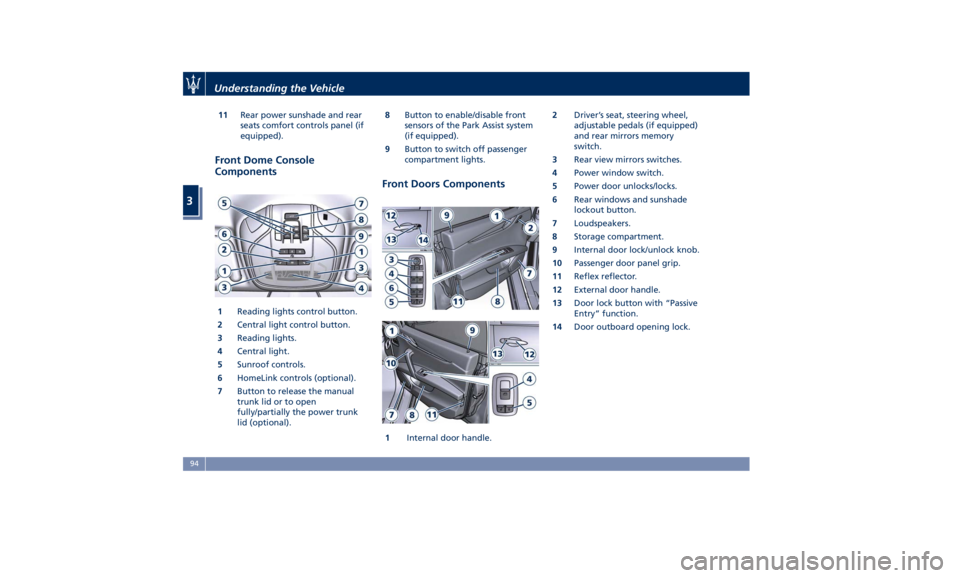
11 Rear power sunshade and rear
seats comfort controls panel (if
equipped).
Front Dome Console
Components
1 Reading lights control button.
2 Central light control button.
3 Reading lights.
4 Central light.
5 Sunroof controls.
6 HomeLink controls (optional).
7 Button to release the manual
trunk lid or to open
fully/partially the power trunk
lid (optional). 8 Button to enable/disable front
sensors of the Park Assist system
(if equipped).
9 Button to switch off passenger
compartment lights.
Front Doors Components
1 Internal door handle. 2 Driver’s seat, steering wheel,
adjustable pedals (if equipped)
and rear mirrors memory
switch.
3 Rear view mirrors switches.
4 Power window switch.
5 Power door unlocks/locks.
6 Rear windows and sunshade
lockout button.
7 Loudspeakers.
8 Storage compartment.
9 Internal door lock/unlock knob.
10 Passenger door panel grip.
11 Reflex reflector.
12 External door handle.
13 Door lock button with “Passive
Entry” function.
14 Door outboard opening lock.Understanding the Vehicle
3
94
Page 99 of 384
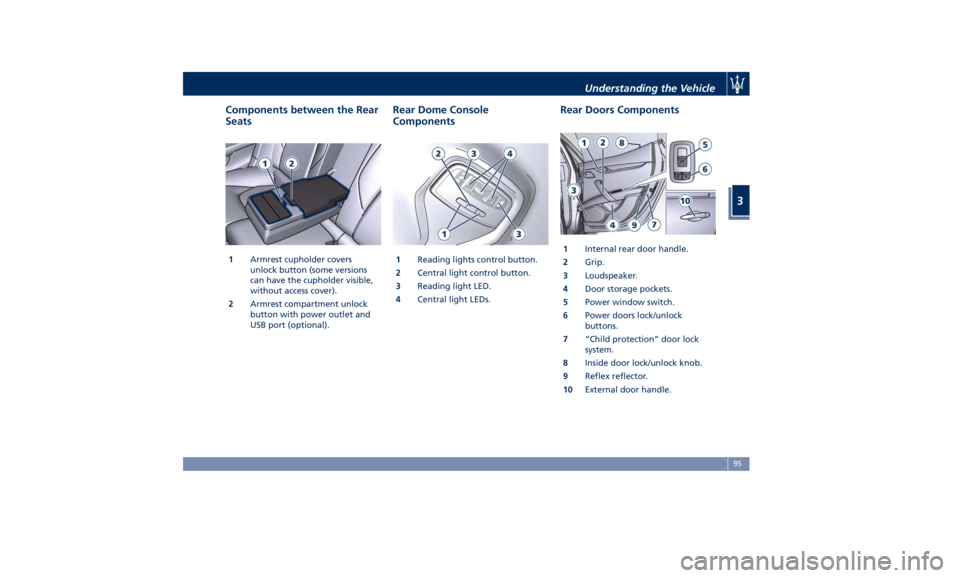
Components between the Rear
Seats
1 Armrest cupholder covers
unlock button (some versions
can have the cupholder visible,
without access cover).
2 Armrest compartment unlock
button with power outlet and
USB port (optional). Rear Dome Console
Components
1 Reading lights control button.
2 Central light control button.
3 Reading light LED.
4 Central light LEDs. Rear Doors Components
1 Internal rear door handle.
2 Grip.
3 Loudspeaker.
4 Door storage pockets.
5 Power window switch.
6 Power doors lock/unlock
buttons.
7 “Child protection” door lock
system.
8 Inside door lock/unlock knob.
9 Reflex reflector.
10 External door handle.Understanding the Vehicle
3
95
Page 110 of 384
NOTE:
You can use your key fob with RKE
transmitter or the memory buttons on
the driver's door trim panel to return
the tilt/telescopic steering
column/wheel to programmed
positions. See “Driver Memory Seat” in
this section.
WARNING!
Do not adjust the steering
column/wheel while driving.
Adjusting the steering column/wheel
while driving could cause the driver to
lose control of the vehicle. Be sure the
steering column/wheel is adjusted
before driving your vehicle. Failure to
follow this warning may result in
serious injury or death.
Heated Steering Wheel
(optional) The steering wheel contains a heating
element inside the rim that helps
warm driver’s hands by cold weather.
The heated steering wheel has only
one temperature setting. Once turned
on, this function will operate for
approximately 58 to 70 minutes before
automatically shutting off. The heated steering wheel can shut off
early or may not turn on when the
steering wheel is already warm.
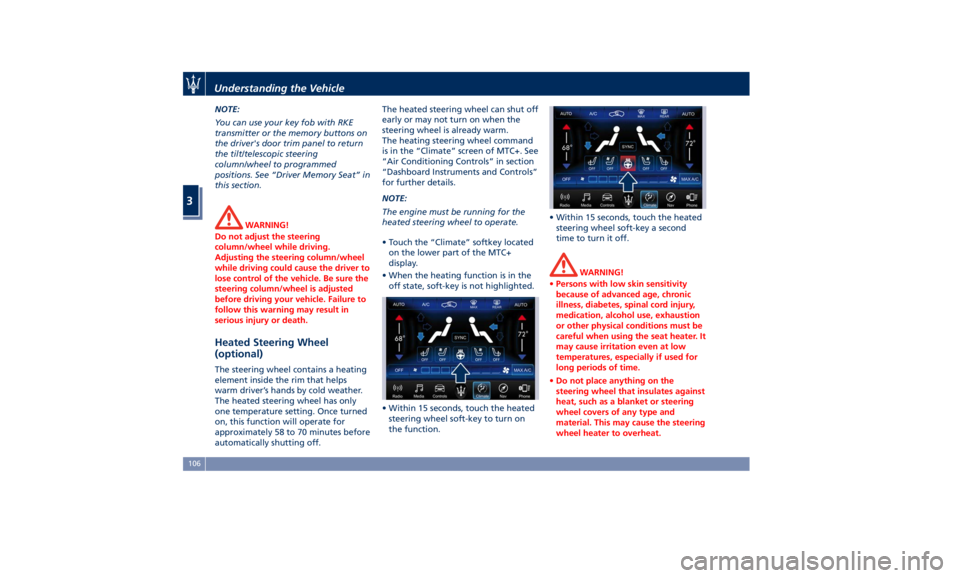
The heating steering wheel command
is in the “Climate” screen of MTC+. See
“Air Conditioning Controls” in section
“Dashboard Instruments and Controls”
for further details.
NOTE:
The engine must be running for the
heated steering wheel to operate.
• Touch the “Climate” softkey located
on the lower part of the MTC+
display.
• When the heating function is in the
off state, soft-key is not highlighted.
• Within 15 seconds, touch the heated
steering wheel soft-key to turn on
the function. • Within 15 seconds, touch the heated
steering wheel soft-key a second
time to turn it off.
WARNING!
• Persons with low skin sensitivity
because of advanced age, chronic
illness, diabetes, spinal cord injury,
medication, alcohol use, exhaustion
or other physical conditions must be
careful when using the seat heater. It
may cause irritation even at low
temperatures, especially if used for
long periods of time.
• Do not place anything on the
steering wheel that insulates against
heat, such as a blanket or steering
wheel covers of any type and
material. This may cause the steering
wheel heater to overheat.Understanding the Vehicle
3
106