seats MASERATI GHIBLI 2019 Service Manual
[x] Cancel search | Manufacturer: MASERATI, Model Year: 2019, Model line: GHIBLI, Model: MASERATI GHIBLI 2019Pages: 384, PDF Size: 13.33 MB
Page 176 of 384
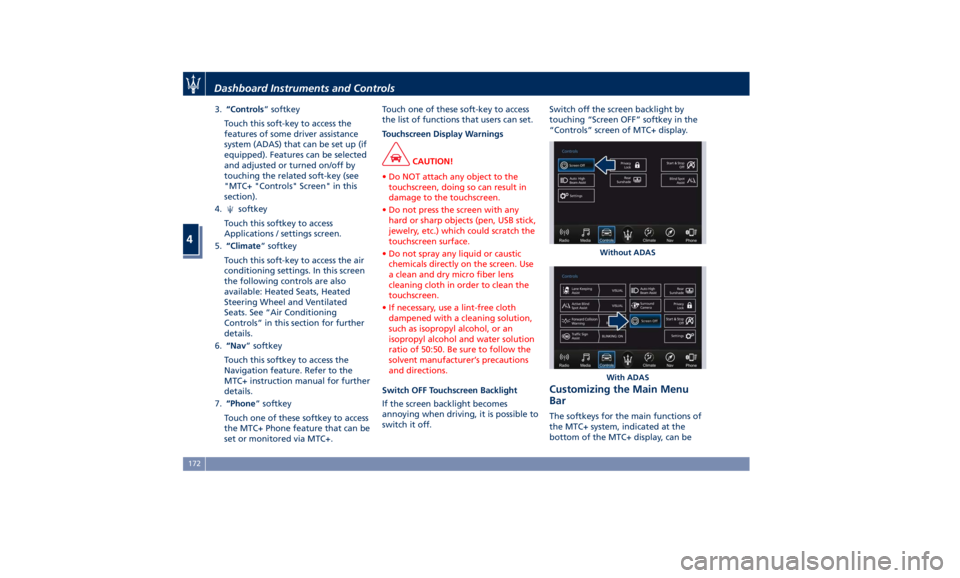
3. “Controls ” softkey
Touch this soft-key to access the
features of some driver assistance
system (ADAS) that can be set up (if
equipped). Features can be selected
and adjusted or turned on/off by
touching the related soft-key (see
"MTC+ "Controls" Screen" in this
section).
4.
softkey
Touch this softkey to access
Applications / settings screen.
5. “Climate ” softkey
Touch this soft-key to access the air
conditioning settings. In this screen
the following controls are also
available: Heated Seats, Heated
Steering Wheel and Ventilated
Seats. See “Air Conditioning
Controls” in this section for further
details.
6. “Nav ” softkey
Touch this softkey to access the
Navigation feature. Refer to the
MTC+ instruction manual for further
details.
7. “Phone ” softkey
Touch one of these softkey to access
the MTC+ Phone feature that can be
set or monitored via MTC+. Touch one of these soft-key to access
the list of functions that users can set.
Touchscreen Display Warnings
CAUTION!
• Do NOT attach any object to the
touchscreen, doing so can result in
damage to the touchscreen.
• Do not press the screen with any
hard or sharp objects (pen, USB stick,
jewelry, etc.) which could scratch the
touchscreen surface.
• Do not spray any liquid or caustic
chemicals directly on the screen. Use
a clean and dry micro fiber lens
cleaning cloth in order to clean the
touchscreen.
• If necessary, use a lint-free cloth
dampened with a cleaning solution,
such as isopropyl alcohol, or an
isopropyl alcohol and water solution
ratio of 50:50. Be sure to follow the
solvent manufacturer’s precautions
and directions.
Switch OFF Touchscreen Backlight
If
the screen backlight becomes
annoying when driving, it is possible to
switch it off. Switch off the screen backlight by
touching “Screen OFF” softkey in the
“Controls” screen of MTC+ display.
Customizing the Main Menu
Bar The softkeys for the main functions of
the MTC+ system, indicated at the
bottom of the MTC+ display, can be Without ADAS
With ADASDashboard Instruments and Controls
4
172
Page 184 of 384
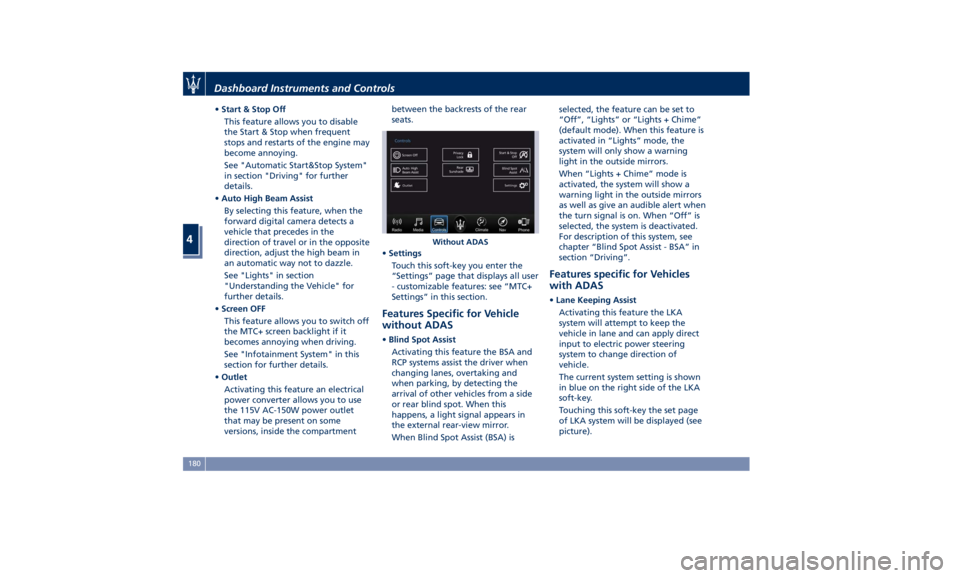
• Start & Stop Off
This feature allows you to disable
the Start & Stop when frequent
stops and restarts of the engine may
become annoying.
See "Automatic Start&Stop System"
in section "Driving" for further
details.
• Auto High Beam Assist
By selecting this feature, when the
forward digital camera detects a
vehicle that precedes in the
direction of travel or in the opposite
direction, adjust the high beam in
an automatic way not to dazzle.
See "Lights" in section
"Understanding the Vehicle" for
further details.
• Screen OFF
This feature allows you to switch off
the MTC+ screen backlight if it
becomes annoying when driving.
See "Infotainment System" in this
section for further details.
• Outlet
Activating this feature an electrical
power converter allows you to use
the 115V AC-150W power outlet
that may be present on some
versions, inside the compartment between the backrests of the rear
seats.
• Settings
Touch this soft-key you enter the
“Settings” page that displays all user
- customizable features: see “MTC+
Settings” in this section.
Features Specific for Vehicle
without ADAS • Blind Spot Assist
Activating this feature the BSA and
RCP systems assist the driver when
changing lanes, overtaking and
when parking, by detecting the
arrival of other vehicles from a side
or rear blind spot. When this
happens, a light signal appears in
the external rear-view mirror.
When Blind Spot Assist (BSA) is selected, the feature can be set to
“Off”, “Lights” or “Lights + Chime”
(default mode). When this feature is
activated in “Lights” mode, the
system will only show a warning
light in the outside mirrors.
When “Lights + Chime” mode is
activated, the system will show a
warning light in the outside mirrors
as well as give an audible alert when
the turn signal is on. When “Off” is
selected, the system is deactivated.
For description of this system, see
chapter “Blind Spot Assist - BSA” in
section “Driving”.
Features specific for Vehicles
with ADAS • Lane Keeping Assist
Activating this feature the LKA
system will attempt to keep the
vehicle in lane and can apply direct
input to electric power steering
system to change direction of
vehicle.
The current system setting is shown
in blue on the right side of the LKA
soft-key.
Touching this soft-key the set page
of LKA system will be displayed (see
picture).Without ADASDashboard Instruments and Controls
4
180
Page 201 of 384
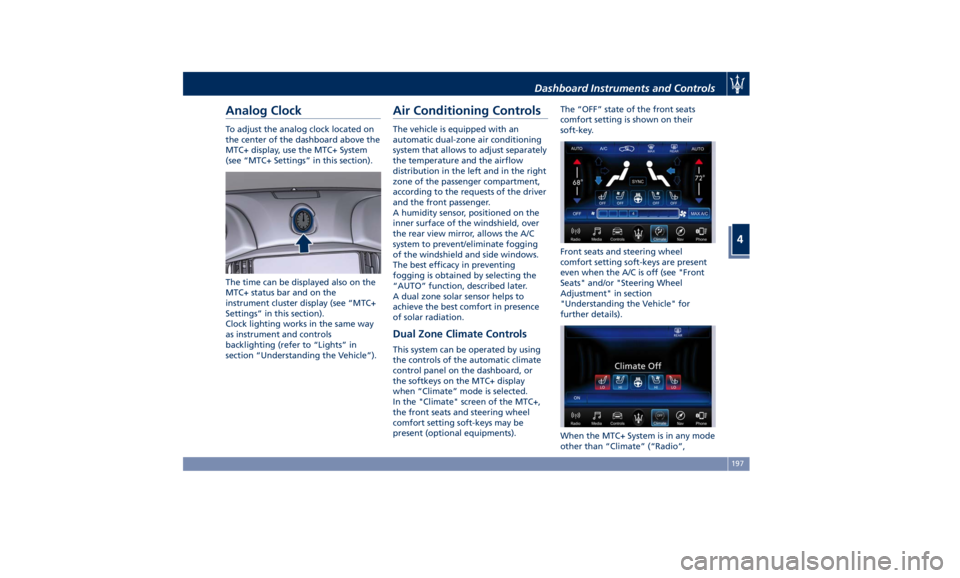
Analog Clock To adjust the analog clock located on
the center of the dashboard above the
MTC+ display, use the MTC+ System
(see “MTC+ Settings” in this section).
The time can be displayed also on the
MTC+ status bar and on the
instrument cluster display (see “MTC+
Settings” in this section).
Clock lighting works in the same way
as instrument and controls
backlighting (refer to “Lights” in
section “Understanding the Vehicle”). Air Conditioning Controls The vehicle is equipped with an
automatic dual-zone air conditioning
system that allows to adjust separately
the temperature and the airflow
distribution in the left and in the right
zone of the passenger compartment,
according to the requests of the driver
and the front passenger.
A humidity sensor, positioned on the
inner surface of the windshield, over
the rear view mirror, allows the A/C
system to prevent/eliminate fogging
of the windshield and side windows.
The best efficacy in preventing
fogging is obtained by selecting the
“AUTO” function, described later.
A dual zone solar sensor helps to
achieve the best comfort in presence
of solar radiation.
Dual Zone Climate Controls This system can be operated by using
the controls of the automatic climate
control panel on the dashboard, or
the softkeys on the MTC+ display
when “Climate” mode is selected.
In the "Climate" screen of the MTC+,
the front seats and steering wheel
comfort setting soft-keys may be
present (optional equipments). The “OFF” state of the front seats
comfort setting is shown on their
soft-key.
Front seats and steering wheel
comfort setting soft-keys are present
even when the A/C is off (see "Front
Seats" and/or "Steering Wheel
Adjustment" in section
"Understanding the Vehicle" for
further details).
When the MTC+ System is in any mode
other than “Climate” (“Radio”,Dashboard Instruments and Controls
4
197
Page 204 of 384
switch into manual mode: so the
“AUTO” LED on the button and the
MTC+ soft-key will turn off. With
engine off, the blower will run at
minimum speed (1) and can be
increased manually: with engine on,
the blower speed will gradually
increase to the higher speed (8). MAX
defrosting/demisting shall also involve
REAR defrosting/demisting function. If
this function is turned off the climate
system will return to the previous
setting, switching on the A/C (“A/C”
LED on the button and the MTC+
soft-key illuminated).
10. REAR defrosting/demisting
Press the
button or the MTC+
soft-key to turn on the rear window
defroster and the heated outside
mirrors. The LED on the button and
the MTC+ soft-key will illuminate
when the rear window defroster and
the heated external mirrors are on.
The rear window defroster and the
heated external mirrors automatically
turn off after 10 minutes.
CAUTION!
Failure to observe the following
cautions may cause damage to the rear windows defroster:
• Use care when washing the inside of
the rear window. Do not use abrasive
window cleaners on the interior
surface of the window. Use a soft
cloth and a mild washing solution,
wiping parallel to the heating
elements. Labels can be peeled off
after soaking with warm water.
• Do not use scrapers, sharp
instruments, or abrasive window
cleaners on the interior surface of
the window.
• Keep all objects inside the vehicle at
a safe distance from the window.
11. MAX A/C
By
pressing the
“MAX A/C” button or
the MTC+ soft-key, the system
automatically switches to get the
maximum cold air flow in both zones.
12 - 13. Air flow distribution modes
The airflow distribution mode,
respectively on the driver and on the
passenger zone, can be adjusted so air
comes from the dashboard vents, vents
under the dashboard in direction of
the floor, vents under the front seats
and demist/defrost vents.
The MTC+ display contains the
relevant soft-keys used to set these
modes for each zone. The climate control panel features a single button
for each zone: press it several times to
select and set the required airflow
distribution mode.
Available settings are as follows:
• “Floor” mode
Air for each zone comes from the
front vents, located under the
dashboard and under the front
seats. A small portion of the airflow
is directed through the
defrost/demist vents to prevent
windows fogging.
• “Dashboard” mode
Air flows for each zone from four
adjustable vents of the dashboard,
two vents on the upper part of the
dashboard and two positioned at
the rear end of the central console.
Each of these vents can be singly
adjusted. The air grids or vanes of
the vents can be moved to adjust air
flow direction. A setting wheel,
placed near each vent, allows to
regulate or close the airflow.
• “Bi-Level” mode
Air for each zone comes from the
dashboard and central console
adjustable vents and the fixed floor
vents. A small portion of the airflow
is directed through theDashboard Instruments and Controls
4
200
Page 302 of 384
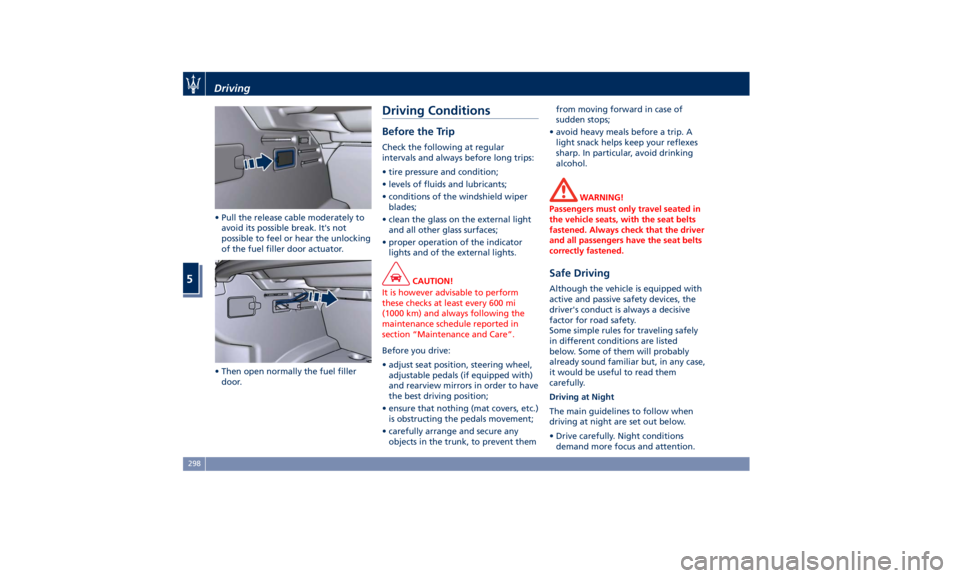
• Pull the release cable moderately to
avoid its possible break. It's not
possible to feel or hear the unlocking
of the fuel filler door actuator.
• Then open normally the fuel filler
door. Driving Conditions Before the Trip Check the following at regular
intervals and always before long trips:
• tire pressure and condition;
• levels of fluids and lubricants;
• conditions of the windshield wiper
blades;
• clean the glass on the external light
and all other glass surfaces;
• proper operation of the indicator
lights and of the external lights.
CAUTION!
It is however advisable to perform
these checks at least every 600 mi
(1000 km) and always following the
maintenance schedule reported in
section “Maintenance and Care”.
Before you drive:
•
adjust seat position, steering wheel,
adjustable pedals (if equipped with)
and rearview mirrors in order to have
the best driving position;
• ensure that nothing (mat covers, etc.)
is obstructing the pedals movement;
• carefully arrange and secure any
objects in the trunk, to prevent them from moving forward in case of
sudden stops;
• avoid heavy meals before a trip. A
light snack helps keep your reflexes
sharp. In particular, avoid drinking
alcohol.
WARNING!
Passengers must only travel seated in
the vehicle seats, with the seat belts
fastened. Always check that the driver
and all passengers have the seat belts
correctly fastened.
Safe Driving Although the vehicle is equipped with
active and passive safety devices, the
driver's conduct is always a decisive
factor for road safety.
Some simple rules for traveling safely
in different conditions are listed
below. Some of them will probably
already sound familiar but, in any case,
it would be useful to read them
carefully.
Driving at Night
The main guidelines to follow when
driving at night are set out below.
• Drive carefully. Night conditions
demand more focus and attention.Driving
5
298
Page 325 of 384
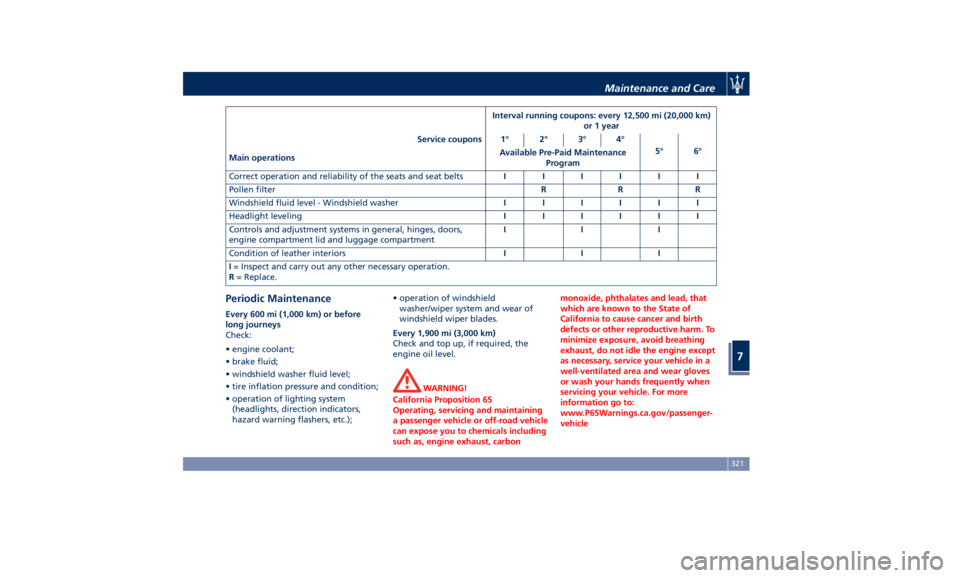
Interval running coupons: every 12,500 mi (20,000 km)
or 1 year
Service coupons 1° 2° 3° 4°
5° 6°
Main operations Available Pre-Paid Maintenance
Program
Correct operation and reliability of the seats and seat belts IIIIII
Pollen filter RRR
Windshield fluid level - Windshield washer IIIIII
Headlight leveling IIIIII
Controls and adjustment systems in general, hinges, doors,
engine compartment lid and luggage compartment III
Condition of leather interiors III
I = Inspect and carry out any other necessary operation.
R = Replace.
Periodic Maintenance Every 600 mi (1,000 km) or before
long journeys
Check:
• engine coolant;
• brake fluid;
• windshield washer fluid level;
• tire inflation pressure and condition;
• operation of lighting system
(headlights, direction indicators,
hazard warning flashers, etc.); • operation of windshield
washer/wiper system and wear of
windshield wiper blades.
Every 1,900 mi (3,000 km)
Check and top up, if required, the
engine oil level.
WARNING!
California Proposition 65
Operating, servicing and maintaining
a passenger vehicle or off-road vehicle
can expose you to chemicals including
such as, engine exhaust, carbon monoxide, phthalates and lead, that
which are known to the State of
California to cause cancer and birth
defects or other reproductive harm. To
minimize exposure, avoid breathing
exhaust, do not idle the engine except
as necessary, service your vehicle in a
well-ventilated area and wear gloves
or wash your hands frequently when
servicing your vehicle. For more
information go to:
www.P65Warnings.ca.gov/passenger-
vehicleMaintenance and Care
7
321
Page 350 of 384
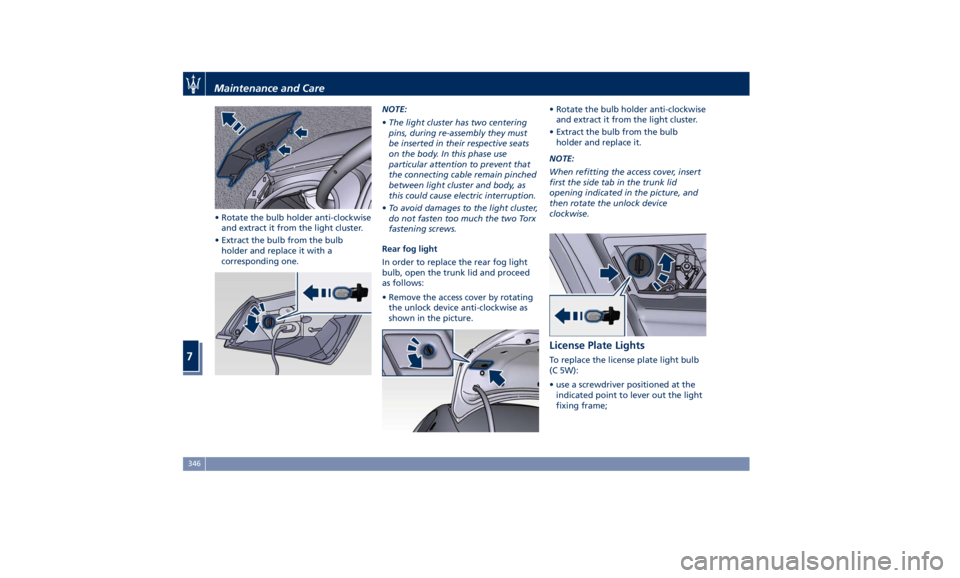
• Rotate the bulb holder anti-clockwise
and extract it from the light cluster.
• Extract the bulb from the bulb
holder and replace it with a
corresponding one. NOTE:
• The light cluster has two centering
pins, during re-assembly they must
be inserted in their respective seats
on the body. In this phase use
particular attention to prevent that
the connecting cable remain pinched
between light cluster and body, as
this could cause electric interruption.
• To avoid damages to the light cluster,
do not fasten too much the two Torx
fastening screws.
Rear fog light
In order to replace the rear fog light
bulb, open the trunk lid and proceed
as follows:
• Remove the access cover by rotating
the unlock device anti-clockwise as
shown in the picture. • Rotate the bulb holder anti-clockwise
and extract it from the light cluster.
• Extract the bulb from the bulb
holder and replace it.
NOTE:
When refitting the access cover, insert
first the side tab in the trunk lid
opening indicated in the picture, and
then rotate the unlock device
clockwise.
License Plate Lights To replace the license plate light bulb
(C 5W):
• use a screwdriver positioned at the
indicated point to lever out the light
fixing frame;Maintenance and Care
7
346
Page 376 of 384
Abbreviations .................8
Accessories
Aftermarket Parts and Accessories
Statement .................13
Active Blind Spot Assist - ABSA . . . .271
Adaptive Cruise Control (ACC) . . . .247
Activation/Deactivation ...... .250
Display Warnings and
Maintenance ............. .255
Precautions while Driving with
ACC ................... .256
Setting the Following Distance . .252
Setting the Speed .......... .251
Airbag.....................64
Advanced Front Air Bag
Properties .................65
Air Bag Deployment Result .....70
Air Bag Deployment Sensors and
Controls ..................15
Air Bag System Components .....64
Front Air Bag Inflator Units .....68
Passenger Air bag Labels .......20
Supplemental Driver Side Knee Air
bag......................67
Supplemental Restraint System
(SRS) .....................64
Supplemental Seat-mounted Side
Air Bags (SAB) ..............66
Supplemental Side Air Bag Inflatable
Curtain (SABIC) ..............67
Transport of persons with
disability ..................71
Air Conditioning (A/C) System . . . .197 A/C Distribution ........... .142
Alarm, Vehicle Security ..........27
ALR (Automatic Locking Retractor) . .61
Anti-Lock Braking System (ABS) and
Electronic Brake-force Distribution
(EBD) ................... .239
Assistance ...................11
Assistance, if you need ..........11
ATC (Automatic Temperature
Control) ................. .202
Audio Controls .............. .176
Audio Controls on Central
Console ................. .176
Steering Wheel Audio Controls . .176
Audio, setting .............. .191
Audio System ............... .177
Automatic Transmission
Manual Release of Transmission .315
AWD
All-Wheel Drive, drive mode . . . .223
BAS (Brake Assist System) ...... .240
Battery ................... .332
Battery Recharge .......... .335
Battery Remote Posts Position. . .313
Maintaining Battery Charge . . . .356
To Disconnect the Battery .... .332
To Reconnect the Battery ..... .334
Blind Spot Alert ............. .266
RCP - Rear Cross Path ........ .268
Bluetooth, Customer settings .... .192
Bodywork
Maintenance and
Care . .350
Pre-Short Drop Function ..... .353 Protection from Atmospheric
Agents ................. .350
Useful Advice to Keep the Bodywork
in Good Condition ......... .351
Brakes
Brake and Stability Control System
(ESC) ................... .238
Brake Overheating ......... .242
Brake System ............. .238
Manual Release of Parking
Brake .................. .311
Parking Brake ............. .233
Using the Brakes ........... .241
Capacity/Refillings ........... .360
Cargo Area ................ .133
Loading with Rear Seatbacks Folded
Down .................. .134
Vehicle Load Carrying Capacity . .133
Child Restraint Systems ..........72
Children too large for Booster
Seats .....................73
Infants and Child Restraints .....72
Installing Child Restraint Systems
using the Vehicle Seat Belt equipped
with ALR ..................74
Lower Anchors and Tether for
Children (LATCH) ............75
Older Children and Child
Restraints .................73
Tips on getting the most out of your
child restraint ...............74
Climate Control ............. .197Index
9 372
Page 379 of 384
Mirrors Positioning ......... .108
Rearview Mirrors .......... .107
Tilt Mirrors in Reverse ....... .108
MTC+ “Controls” Screen ....... .179
MTC+ Settings - Customer
Programmable Features ...... .183
Auto-On Comfort & Remote
Start ................... .190
Clear Personal Data ........ .193
Clock & Date ............. .186
Display ................. .184
Doors & Locks ............ .188
Engine Off Options ......... .190
Lights .................. .188
Restore Settings ........... .193
Safety and Driving Assistance . . .187
Voice Commands .......... .185
Occupant Restraint System .......55
On Board Diagnostics ......... .243
ORC (Occupant Restraint
Controller) .................67
Park Assist ..................85
Enabling and Disabling Park
Assist ....................88
Parking .................. .236
Parking Brake .............. .233
Passive Entry System ...........41
Pedals, adjustable ........... .107
Pedestrian Emergency Braking
(PEB) ................... .258
Pets, transporting .............78 Phone and Voice Controls on Steering
Wheel .................. .204
Phone Mode ............. .205
Phone/Bluetooth, Customer
settings ................. .192
Power Outlets .............. .126
Power Outlet Inside the Central
Console ................. .127
Power Outlet Inside the
Cupholder ............... .126
Power Outlet Inside the Trunk . .127
Rear Power Outlets ......... .127
Rear Parking Camera ...........78
Refueling ................. .296
Fuel Filler Neck Access
....... .296
Remote
Start System ...........
36
Restarting the Vehicle ........ .355
Restraint System ..............64
Child Restraint Systems ........72
RKE (Remote Keyless Entry)
Transmitter .................24
Roadside Assistance Program .....16
Roll-Over Warning .............15
Safety
Child Restraint Systems ........72
Reporting Safety Defects .......12
Safety Tips ..................55
Scheduled Maintenance Service . . .318
Scheduled Service Plan
Scheduled Maintenance
Indicator ................ .318 Seat Belt ...................55
Automatic Locking Retractor (ALR)
Mode ....................61
Enhanced Seat Belt Use Reminder
System (SBR) ...............62
Passenger Seat Belts ..........60
Seat Belt Reminder Light ..... .150
Seat Belts and Pregnant Women .63
Seat Belts Pretensioners .......62
Three-Point Seat Belts .........57
Three-Point Seat Belts Height
Adjustment ................59
Three-Point Seat Belts Untwisting
Procedure .................60
Three-Point Seat Belts Use
Instructions ................58
Using the Seat Belt in Automatic
Locking Retractor Mode (ALR) . . .61
Seats ......................96
Driver Memory Seat ..........99
Easy Entry/Exit Seats ........ .100
Front Heated Seats ...........97
Front Power Seats ...........96
Front Ventilated Seats .........98
Power Lumbar Seats ..........97
Rear Armrest ............. .101
Rear Seats ............... .101
Rear Side Heated Seats ...... .102
Seat Adjustment ............96
Service .....................10
Siri Smart Personal Assistant .... .205
Smoking Kit ............... .131
Snow Chains ............... .288Index
9 375