key MASERATI LEVANTE 2019 Owners Manual
[x] Cancel search | Manufacturer: MASERATI, Model Year: 2019, Model line: LEVANTE, Model: MASERATI LEVANTE 2019Pages: 436, PDF Size: 15.24 MB
Page 302 of 436
(Continued)
The driver has the responsibility to
avoid a collision by controlling the
vehicle via braking and steering.
Failure to follow this warning could
lead to serious injury or death.
FCW Operation The FCW provides audible and visual
warnings when a potential collision is
detected. Brake jerk and limited
braking may also be applied
depending on the specific scenario.
NOTE:
FCW system is not intended for
towing: this could lead the system to
malfunctions and/or to late reaction.
FCW monitors the information from
the forward looking radar sensor as
well as the Electronic Brake Controller
(EBC), to calculate the probability of a
forward collision. When the system
determines that a forward collision is
probable, the driver will be provided
with audible and visual warnings and
may provide a warning brake jerk. If
the driver does not take action based
upon these progressive warnings, then
the system will provide a limited level
of active braking to help slow down
the vehicle and mitigate the potential forward collision. If the driver reacts to
the warnings by braking and the
system determines that the driver
intends to avoid the collision by
braking but has not applied sufficient
brake force, the system will
compensate and provide additional
brake force as required.
When the system determines a
collision with the vehicle in front of
you is no longer probable, the warning
messages will be deactivated.
NOTE:
• Bad weather conditions, like strong
rain, snow, etc., can lead to reduced
system performance. Under these
conditions relevant objects will not
be detected or detected late by the
system.
• FCW is designed to react in specific
situations in typical traffic scenarios
with objects in the same lane driving
in the same direction, but under
certain conditions it can also react on
stationary objects in the same lane. It
is not designed to react to oncoming
traffic or crossing traffic.
• The FCW alerts may be triggered on
objects other than vehicles such as
guard rails or sign posts based on the
course prediction. This is expected
and is a part of normal FCW activation and functionality.
• It is unsafe to test the FCW system.
To prevent such misuse of the system,
after four Active Braking events
within a key cycle, the Active Braking
portion of FCW will be deactivated
until the next key cycle. The limit of
four events applies to the brake jerk
too.
• The FCW system is intended for
on-road use only. If the vehicle is
taken off-road, the FCW system
should be deactivated to prevent
unnecessary warnings. If the vehicle
ride height is set to “Off Road 1” or
“Off Road 2”, the FCW system will be
automatically deactivated.
• FCW will automatically deactivated
when
(ESC OFF) button is pressed
(LED light up) and when HDC is
active.
WARNING!
• Forward Collision Warning (FCW) is
not intended to avoid a collision on
its own, nor can FCW detect every
type of potential collision. The driver
has the responsibility to avoid a
collision by controlling the vehicle
via braking and steering. Failure toDriving
5
298
Page 303 of 436
follow this warning could lead to
serious injury or death. The driver is
always in charge to safely drive and
to avoid critical situations not
relying on the support of the
system. Driver has to keep in mind
that the system and therefore its
intervention is always subject to the
prevailing physical limits.
• Forward Collision Warning (FCW) is
not intended either to warn or to
apply any brake aid/brake
intervention in case of collisions
with pedestrians (if not equipped
with PEB sub-system), bicycles and
not licensable vehicles in general.
Speed Range of Use Speed mph (km/h)
Minimum 0 (0)
Engaged/activated 1.12 (1.8)
Maximum 155 (250)
When the speed is outside the
specified limits, the system
automatically disables without turning
on the corresponding warning light
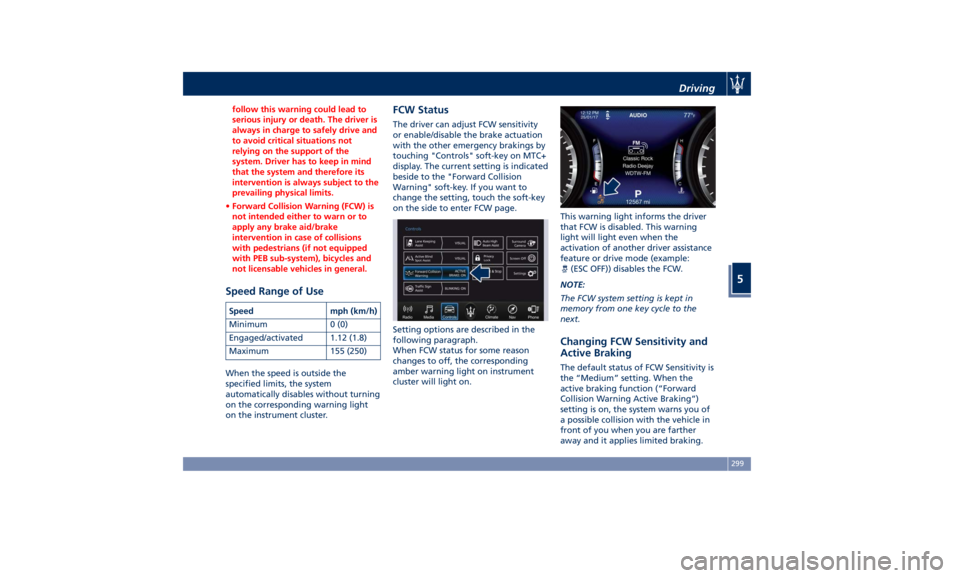
on the instrument cluster. FCW Status The driver can adjust FCW sensitivity
or enable/disable the brake actuation
with the other emergency brakings by
touching "Controls" soft-key on MTC+
display. The current setting is indicated
beside to the "Forward Collision
Warning" soft-key. If you want to
change the setting, touch the soft-key
on the side to enter FCW page.
Setting options are described in the
following paragraph.
When FCW status for some reason
changes to off, the corresponding
amber warning light on instrument
cluster will light on. This warning light informs the driver
that FCW is disabled. This warning
light will light even when the
activation of another driver assistance
feature or drive mode (example:
(ESC OFF)) disables the FCW.
NOTE:
The FCW system setting is kept in
memory from one key cycle to the
next.
Changing FCW Sensitivity and
Active Braking The default status of FCW Sensitivity is
the “Medium” setting. When the
active braking function (“Forward
Collision Warning Active Braking”)
setting is on, the system warns you of
a possible collision with the vehicle in
front of you when you are farther
away and it applies limited braking.Driving
5
299
Page 305 of 436
Lane Keeping Assist - LKA
(optional, with ACC only) This system was designed especially
for highway or freeway driving, to
reduce the risk that the vehicle, under
particular circumstances, accidentally
departs from the lane in use. When
this happens, graphic instructions on
instrument cluster display together
with steering torque application and
steering wheel vibration (depending
on the distance to the line) warn the
driver that the vehicle is going out of
the lane and initiate a steering
maneuver to try to prevent the lane
exit.
To detect lane lines, the system uses
the forward-facing camera behind of
the rear-view mirror, which is the same
one used also by the lighting system
to manage the automatic high beams.
The logic core is in the front radar.
LKA system remembers the condition
it was in before turning off the
vehicle.
Refer to “MTC+ "Controls" Screen” in
section “Dashboard Instruments and
Controls” for further information. NOTE:
In case of wet road or raining
conditions the function could be
disabled by the system in order to
minimize the risks.
Speed Range of Use Speed mph (km/h)
Minimum 37 (60)
Engaged/activated 37 (60)
Maximum 112 (180)
Customized Settings LKA is configurable by the driver in
order to maximize its efficiency based
on the driver driving style and the
expectation of the system, reducing at
the same time the possible
invasiveness.
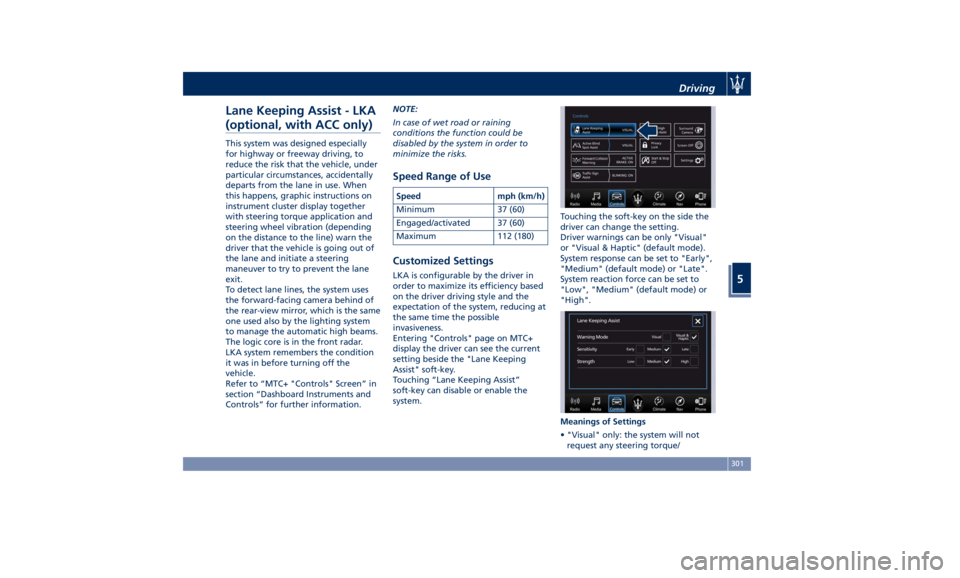
Entering "Controls" page on MTC+
display the driver can see the current
setting beside the "Lane Keeping
Assist" soft-key.
Touching “Lane Keeping Assist”
soft-key can disable or enable the
system. Touching the soft-key on the side the
driver can change the setting.
Driver warnings can be only "Visual"
or "Visual & Haptic" (default mode).
System response can be set to "Early",
"Medium" (default mode) or "Late".
System reaction force can be set to
"Low", "Medium" (default mode) or
"High".
Meanings of Settings
• "Visual" only: the system will not
request any steering torque/Driving
5
301
Page 312 of 436
(Continued)
• The BSA system is not designed to
detect pedestrians, cyclists, or
animals.
• Even if your vehicle is equipped with
the BSA system, always check your
vehicle’s outside and rearview
mirrors for any vehicles approaching
from behind or overtaking.
• Use your turn signal before changing
lanes.
RCP - Rear Cross Path The Rear Cross Path (RCP) feature is
intended to aid the drivers when gear
in reverse of parking spaces where
their vision of oncoming vehicles may
be blocked.
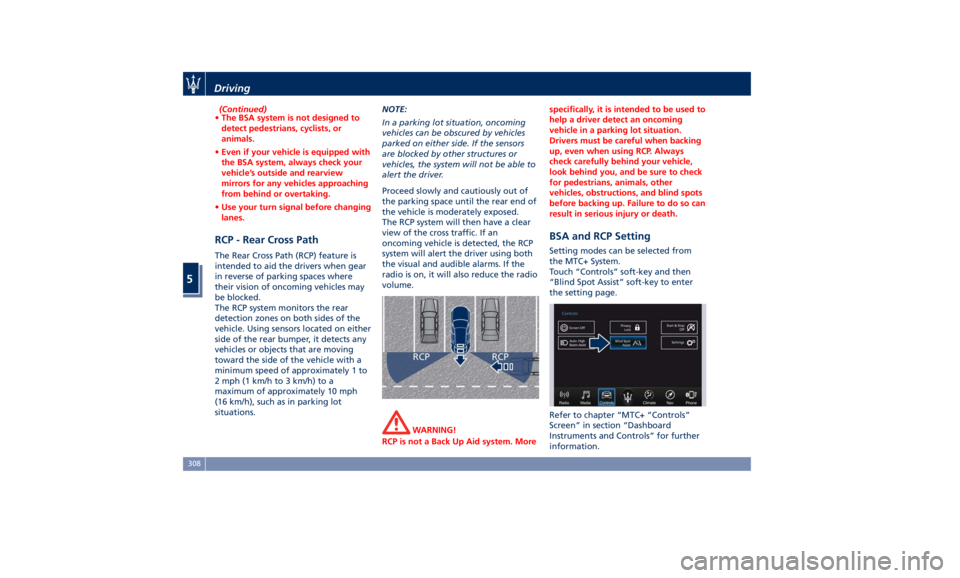
The RCP system monitors the rear
detection zones on both sides of the
vehicle. Using sensors located on either
side of the rear bumper, it detects any
vehicles or objects that are moving
toward the side of the vehicle with a
minimum speed of approximately 1 to
2 mph (1 km/h to 3 km/h) to a
maximum of approximately 10 mph
(16 km/h), such as in parking lot
situations. NOTE:
In a parking lot situation, oncoming
vehicles can be obscured by vehicles
parked on either side. If the sensors
are blocked by other structures or
vehicles, the system will not be able to
alert the driver.
Proceed slowly and cautiously out of
the parking space until the rear end of
the vehicle is moderately exposed.
The RCP system will then have a clear
view of the cross traffic. If an
oncoming vehicle is detected, the RCP
system will alert the driver using both
the visual and audible alarms. If the
radio is on, it will also reduce the radio
volume.
WARNING!
RCP is not a Back Up Aid system. More specifically, it is intended to be used to
help a driver detect an oncoming
vehicle in a parking lot situation.
Drivers must be careful when backing
up, even when using RCP. Always
check carefully behind your vehicle,
look behind you, and be sure to check
for pedestrians, animals, other
vehicles, obstructions, and blind spots
before backing up. Failure to do so can
result in serious injury or death.
BSA and RCP Setting Setting modes can be selected from
the MTC+ System.
Touch “Controls” soft-key and then
“Blind Spot Assist” soft-key to enter
the setting page.
Refer to chapter “MTC+ “Controls”
Screen” in section “Dashboard
Instruments and Controls” for further
information.Driving
5
308
Page 315 of 436
prevent the function from working.
FCW braking and stability system
interventions (ESC, ABS) will also
prevent the system from operating.
Changing lane results in system
inhibition for a certain time.
In addition the road must respect
some characteristics such as minimum-
maximum width, lane clearly defined
by two lane boundaries and only in
limited case for a limited time at least
one.
NOTE:
• In case of wet road or raining
conditions the function could be
disabled by the system in order to
minimize the risks.
• With lane boundaries it is mainly
referred to painted lines,
nevertheless the system in good
conditions might properly recognise
as valid lane boundaries also other
types (for example road edges,
curbs, etc..). Speed Range of Use Speed mph (km/h)
Minimum 37 (60)
Engaged/activated 37 (60)
Maximum 112 (180)
System Limitation Because of physical limits the system
to properly operate needs good
visibility (it might not work or not
properly operate in case of heavy rain,
snow, wet roads, fog, direct sun on
the camera, dirty windshield, low
illumination etc.)
Sharp turns, slopes and change in
slopes, poor lane boundaries, as well
as construction areas and all the
scenarios described in this paragraph
may challenge the system, therefore
be always ready to prevent any
unexpected behaviour of the car.
Damaged front bumper, windshield
replaced without proper technical
intervention may also lead to system
malfunction or system unavailability.
Other conditions such as faults, but
not explicitly indicated here may also
prevent/interrupt the system
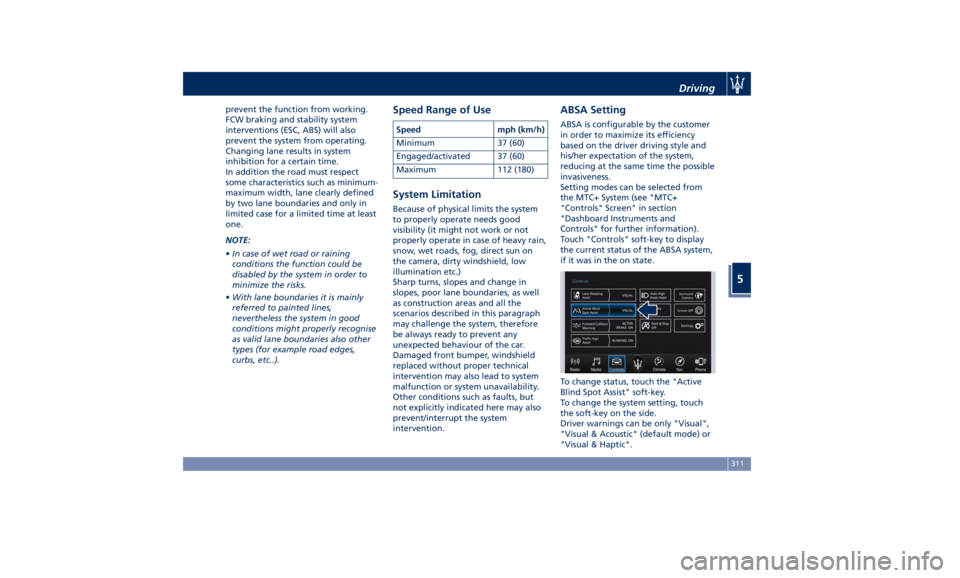
intervention. ABSA Setting ABSA is configurable by the customer
in order to maximize its efficiency
based on the driver driving style and
his/her expectation of the system,
reducing at the same time the possible
invasiveness.
Setting modes can be selected from
the MTC+ System (see "MTC+
"Controls" Screen" in section
"Dashboard Instruments and
Controls" for further information).
Touch "Controls" soft-key to display
the current status of the ABSA system,
if it was in the on state.
To change status, touch the "Active
Blind Spot Assist" soft-key.
To change the system setting, touch
the soft-key on the side.
Driver warnings can be only "Visual",
"Visual & Acoustic" (default mode) or
"Visual & Haptic".Driving
5
311
Page 323 of 436
Traffic Sign Assist – TSA
(optional) TSA detects traffic signs through the
use of a forward-facing digital camera
mounted on windshield, behind the
rear-view mirror. TSA assists the driver
by displaying on the instrument
cluster detected speed limits and
traffic signs with a restriction
indicated by an additional sign (e.g. in
snow conditions). TSA also uses the
data of the navigation system, in
order to provide information to the
driver in all cases in which the camera
is not able to detect the traffic signs
that are present on the road where
the car is travelling.
Some examples of these are: due to
low visibility, light reflection, damaged
traffic signs, traffic signs in wrong
position like rotated or fallen poles.
NOTE:
• Overtaking restriction signs are not
displayed by the TSA system.
• TSA provides a visual warning to the
driver when he/she unintentionally
reaches the maximum speed limit
allowed or when it exceeds the set
“Sensitivity” value. • The performance of TSA depends on
the update degree of navigation
system’s maps.
Customised Settings TSA is configurable by the customer
regarding the display mode on the
instrument cluster and the warning
sensitivity.
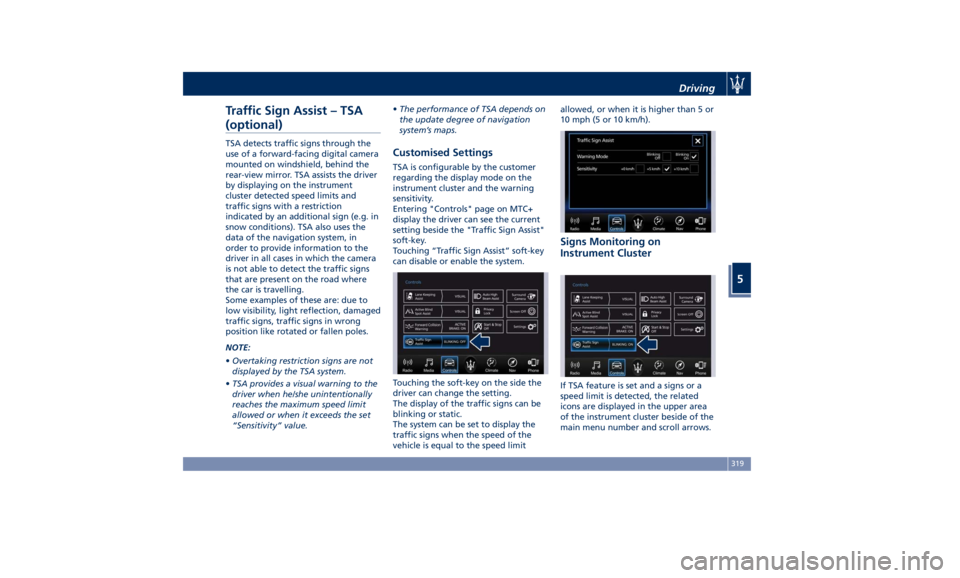
Entering "Controls" page on MTC+
display the driver can see the current
setting beside the "Traffic Sign Assist"
soft-key.
Touching “Traffic Sign Assist” soft-key
can disable or enable the system.
Touching the soft-key on the side the
driver can change the setting.
The display of the traffic signs can be
blinking or static.
The system can be set to display the
traffic signs when the speed of the
vehicle is equal to the speed limit allowed, or when it is higher than 5 or
10 mph (5 or 10 km/h).
Signs Monitoring on
Instrument Cluster
If TSA feature is set and a signs or a
speed limit is detected, the related
icons are displayed in the upper area
of the instrument cluster beside of the
main menu number and scroll arrows.Driving
5
319
Page 340 of 436
(Continued)
with proper maintenance. Have the
exhaust system inspected every time
the vehicle is raised. Have any
abnormal conditions repaired
promptly. Until repaired, drive with
all side windows fully open.
WARNING!
California Proposition 65
Operating, servicing and maintaining
a passenger vehicle or off-road vehicle
can expose you to chemicals including
such as, engine exhaust, carbon
monoxide, phthalates and lead, that
which are known to the State of
California to cause cancer and birth
defects or other reproductive harm. To
minimize exposure, avoid breathing
exhaust, do not idle the engine except
as necessary, service your vehicle in a
well-ventilated area and wear gloves
or wash your hands frequently when
servicing your vehicle. For more
information go to:
www.P65Warnings.ca.gov/passenger-
vehicle Refueling Fuel Filler Neck Access To access the fuel filler neck, the filler
door must be unlocked. From outside
the vehicle, this can only be done by
pressing the unlock
or the lock
button on the key fob RKE
transmitter, in the same way as if
opening or closing the doors. If any of
the door lock controls is pressed from
inside the vehicle, the filler door will
still remain open to allow refueling.
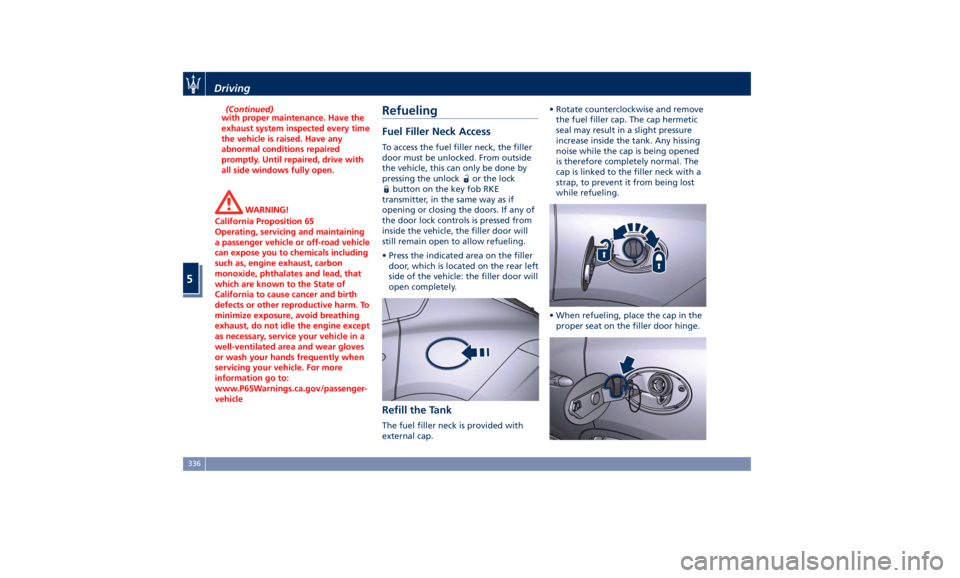
• Press the indicated area on the filler
door, which is located on the rear left
side of the vehicle: the filler door will
open completely.
Refill the Tank The fuel filler neck is provided with
external cap. • Rotate counterclockwise and remove
the fuel filler cap. The cap hermetic
seal may result in a slight pressure
increase inside the tank. Any hissing
noise while the cap is being opened
is therefore completely normal. The
cap is linked to the filler neck with a
strap, to prevent it from being lost
while refueling.
• When refueling, place the cap in the
proper seat on the filler door hinge.Driving
5
336
Page 342 of 436
Fuel Filler Cap Open Warning
Light After refueling the car
performs a check of the fuel
filler cap and the amber
warning light on the TFT
display comes on if it is not correctly
closed, after approximately 10 minutes
also depending on driving conditions.
If the problem is in the fuel system, the
Malfunction Indicator Light
also
comes on.
If the fuel filler cap is locked and the
issue remains in the system, at the next
engine start only the Malfunction
Indicator Light
comes on. In this
case, contact an Authorized Maserati
Dealer .
Emergency Fuel Filler Door
Release If you are unable to unlock the fuel
filler door using the key fob RKE
transmitter, use the fuel filler door
emergency release located in the
trunk.
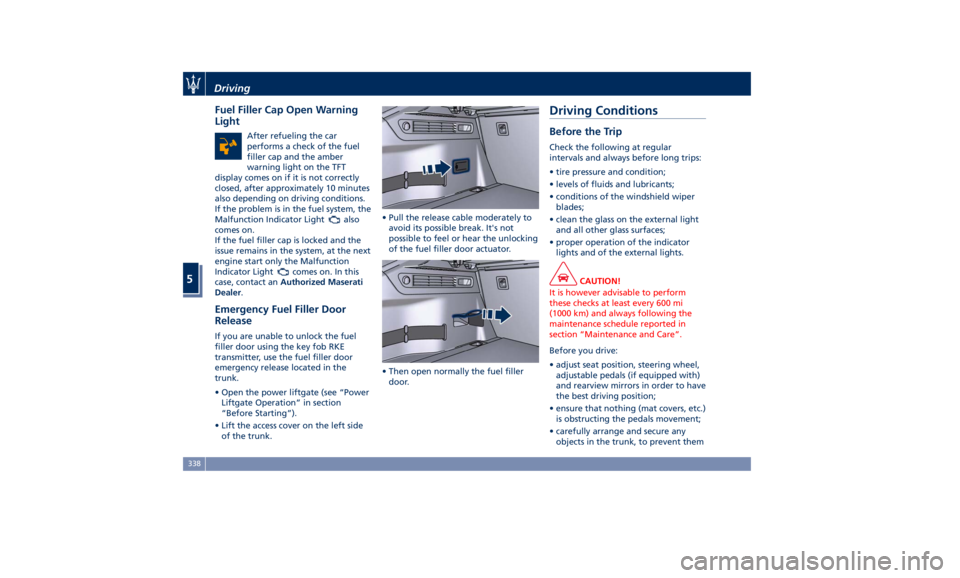
• Open the power liftgate (see “Power
Liftgate Operation” in section
“Before Starting”).
• Lift the access cover on the left side
of the trunk. • Pull the release cable moderately to
avoid its possible break. It's not
possible to feel or hear the unlocking
of the fuel filler door actuator.
• Then open normally the fuel filler
door.Driving Conditions Before the Trip Check the following at regular
intervals and always before long trips:
• tire pressure and condition;
• levels of fluids and lubricants;
• conditions of the windshield wiper
blades;
• clean the glass on the external light
and all other glass surfaces;
• proper operation of the indicator
lights and of the external lights.
CAUTION!
It is however advisable to perform
these checks at least every 600 mi
(1000 km) and always following the
maintenance schedule reported in
section “Maintenance and Care”.
Before you drive:
•
adjust seat position, steering wheel,
adjustable pedals (if equipped with)
and rearview mirrors in order to have
the best driving position;
• ensure that nothing (mat covers, etc.)
is obstructing the pedals movement;
• carefully arrange and secure any
objects in the trunk, to prevent themDriving
5
338
Page 354 of 436
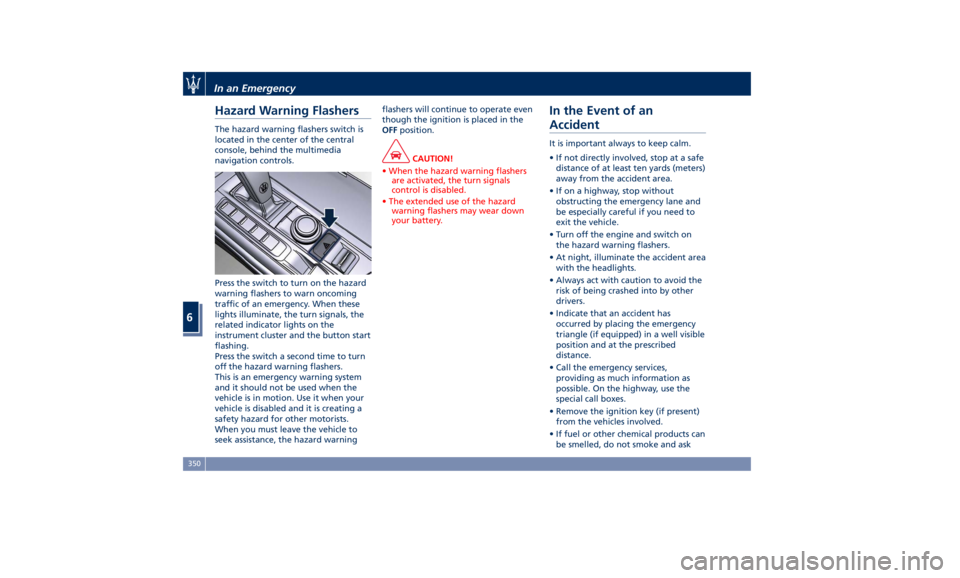
Hazard Warning Flashers The hazard warning flashers switch is
located in the center of the central
console, behind the multimedia
navigation controls.
Press the switch to turn on the hazard
warning flashers to warn oncoming
traffic of an emergency. When these
lights illuminate, the turn signals, the
related indicator lights on the
instrument cluster and the button start
flashing.
Press the switch a second time to turn
off the hazard warning flashers.
This is an emergency warning system
and it should not be used when the
vehicle is in motion. Use it when your
vehicle is disabled and it is creating a
safety hazard for other motorists.
When you must leave the vehicle to
seek assistance, the hazard warning flashers will continue to operate even
though the ignition is placed in the
OFF position.
CAUTION!
• When the hazard warning flashers
are activated, the turn signals
control is disabled.
• The extended use of the hazard
warning flashers may wear down
your battery.
In the Event of an
Accident It is important always to keep calm.
• If not directly involved, stop at a safe
distance of at least ten yards (meters)
away from the accident area.
• If on a highway, stop without
obstructing the emergency lane and
be especially careful if you need to
exit the vehicle.
• Turn off the engine and switch on
the hazard warning flashers.
• At night, illuminate the accident area
with the headlights.
• Always act with caution to avoid the
risk of being crashed into by other
drivers.
• Indicate that an accident has
occurred by placing the emergency
triangle (if equipped) in a well visible
position and at the prescribed
distance.
• Call the emergency services,
providing as much information as
possible. On the highway, use the
special call boxes.
• Remove the ignition key (if present)
from the vehicles involved.
• If fuel or other chemical products can
be smelled, do not smoke and askIn an Emergency
6
350
Page 387 of 436
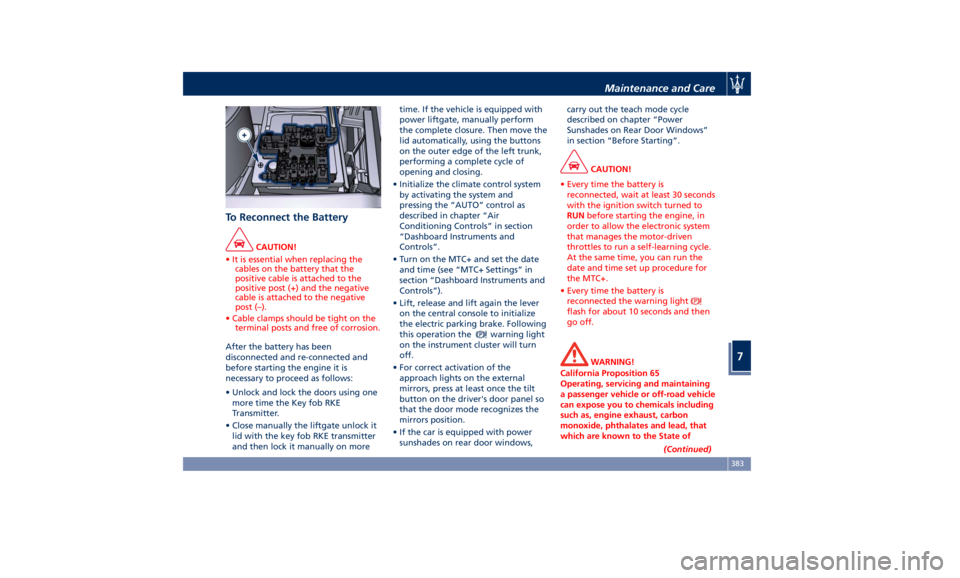
To Reconnect the Battery CAUTION!
• It is essential when replacing the
cables on the battery that the
positive cable is attached to the
positive post (+) and the negative
cable is attached to the negative
post (–).
• Cable clamps should be tight on the
terminal posts and free of corrosion.
After the battery has been
disconnected
and re-connected and
before starting the engine it is
necessary to proceed as follows:
• Unlock and lock the doors using one
more time the Key fob RKE
Transmitter.
• Close manually the liftgate unlock it
lid with the key fob RKE transmitter
and then lock it manually on more time. If the vehicle is equipped with
power liftgate, manually perform
the complete closure. Then move the
lid automatically, using the buttons
on the outer edge of the left trunk,
performing a complete cycle of
opening and closing.
• Initialize the climate control system
by activating the system and
pressing the “AUTO” control as
described in chapter “Air
Conditioning Controls” in section
“Dashboard Instruments and
Controls”.
• Turn on the MTC+ and set the date
and time (see “MTC+ Settings” in
section “Dashboard Instruments and
Controls”).
• Lift, release and lift again the lever
on the central console to initialize
the electric parking brake. Following
this operation the
warning light
on the instrument cluster will turn
off.
• For correct activation of the
approach lights on the external
mirrors, press at least once the tilt
button on the driver's door panel so
that the door mode recognizes the
mirrors position.
• If the car is equipped with power
sunshades on rear door windows, carry out the teach mode cycle
described on chapter “Power
Sunshades on Rear Door Windows”
in section “Before Starting”.
CAUTION!
• Every time the battery is
reconnected, wait at least 30 seconds
with the ignition switch turned to
RUN before starting the engine, in
order to allow the electronic system
that manages the motor-driven
throttles to run a self-learning cycle.
At the same time, you can run the
date and time set up procedure for
the MTC+.
• Every time the battery is
reconnected the warning light
flash for about 10 seconds and then
go off.
WARNING!
California Proposition 65
Operating, servicing and maintaining
a passenger vehicle or off-road vehicle
can expose you to chemicals including
such as, engine exhaust, carbon
monoxide, phthalates and lead, that
which are known to the State of
(Continued)Maintenance and Care
7
383