light MASERATI LEVANTE 2019 Owners Manual
[x] Cancel search | Manufacturer: MASERATI, Model Year: 2019, Model line: LEVANTE, Model: MASERATI LEVANTE 2019Pages: 436, PDF Size: 15.24 MB
Page 291 of 436
ahead, the ACC system automatically
kicks in by slightly accelerating or
braking (to avoid exceeding the
initially set speed) so that the vehicle
keeps present distance, trying to
adapt to the speed of the detected
vehicle ahead.
WARNING!
• The Adaptive Cruise Control (ACC) is
designed to increase vehicle driving
comfort. It must not be considered
as a means of replacing the required
attention of the driver. The driver is
always required to drive carefully.
The driver is always required to pay
utmost attention to driving
conditions (road, traffic, weather)
and style (speed, distance from
sensed vehicle ahead, brake use).
Driver has the full responsibility of
the vehicle therefore his attention is
crucial to keeping vehicle control, in
particular when approaching curves
and situations with heavy traffic.
Failure to follow these warnings can
result in a collision and death or
serious personal injury
• In some driving scenarios, the ACC
could have detection problems. In
such cases, the ACC could kick in late or unexpectedly. The driver must be
careful since his/her intervention
could be necessary.
• It is always the driver’s responsibility
to obey speed limits and to keep
minimum legal distance to the
preceding vehicle.
• ACC system can decelerate only with
limited braking, it cannot execute
emergency braking.
The ACC system:
•
Does not activate/react in the
presence of pedestrians, bicycles,
incoming traffic from opposite
direction and steady objects such as
a vehicle stuck in a traffic jam.
• Is meant for the use on highways
and well-built roads, not for city
traffic or mountain roads.
• May not have enough time to react
and/or decelerate sufficiently on
vehicles when lane is changed too
quickly or the relative speed is too
high. In such cases the driver has to
react appropriately and without any
acoustic/visual warning.
• Cannot consider road, traffic and
weather conditions and might prove
limited when visibility is poor.
• Does not always fully recognize
complex driving conditions and this could cause an incorrect assessment
of the required safety distance.
It is recommended to disable the ACC
system in the following instances:
• When driving in the fog, heavy rain,
heavy snow, slush, heavy traffic and
similar complex situations such as
highway construction zones.
• When entering a junction lane or a
slip road to leave the highway; when
driving on narrow, icy, snowy,
slippery roads, or on uphill and
downhill roads.
• The system is designed and calibrate
for car with no trailer.
• When circumstances do not allow to
drive safely at constant speed.
Displayed information Adaptive Cruise Control (ACC)
condition, as well as the LKA and HAS
status, is displayed on instrument
cluster after selecting “Driver Assist”
menu (see paragraph “TFT Display:
Menus and Settings” under
“Instrument Cluster” in section
“Dashboard Instruments and
Controls”).
Displayed information depends on
system status: ready, set, temporarily
cancelled or override.Driving
5
287
Page 294 of 436
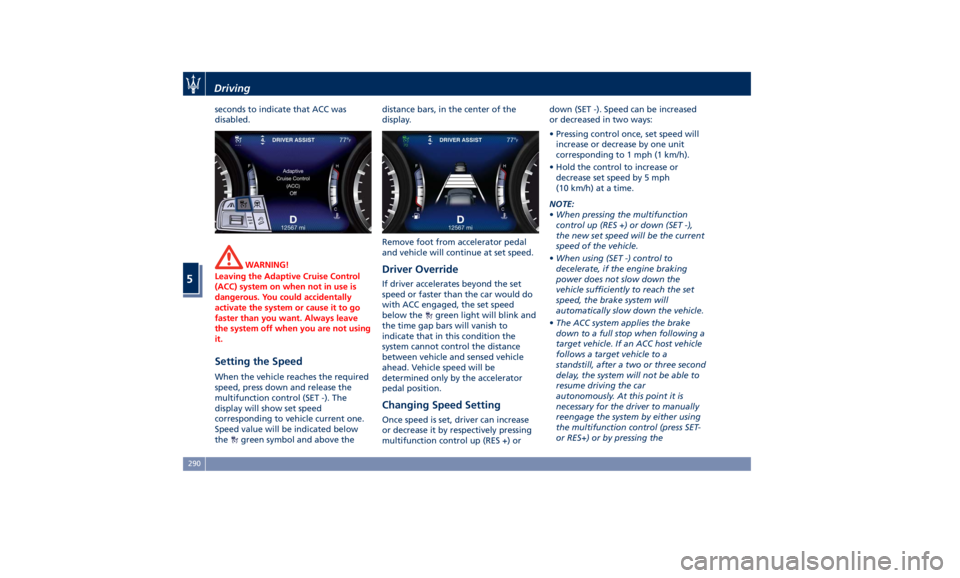
seconds to indicate that ACC was
disabled.
WARNING!
Leaving the Adaptive Cruise Control
(ACC) system on when not in use is
dangerous. You could accidentally
activate the system or cause it to go
faster than you want. Always leave
the system off when you are not using
it.
Setting the Speed When the vehicle reaches the required
speed, press down and release the
multifunction control (SET -). The
display will show set speed
corresponding to vehicle current one.
Speed value will be indicated below
the
green symbol and above the distance bars, in the center of the
display.
Remove foot from accelerator pedal
and vehicle will continue at set speed.
Driver Override If driver accelerates beyond the set
speed or faster than the car would do
with ACC engaged, the set speed
below the
green light will blink and
the time gap bars will vanish to
indicate that in this condition the
system cannot control the distance
between vehicle and sensed vehicle
ahead. Vehicle speed will be
determined only by the accelerator
pedal position.
Changing Speed Setting Once speed is set, driver can increase
or decrease it by respectively pressing
multifunction control up (RES +) or down (SET -). Speed can be increased
or decreased in two ways:
• Pressing control once, set speed will
increase or decrease by one unit
corresponding to 1 mph (1 km/h).
• Hold the control to increase or
decrease set speed by 5 mph
(10 km/h) at a time.
NOTE:
• When pressing the multifunction
control up (RES +) or down (SET -),
the new set speed will be the current
speed of the vehicle.
• When using (SET -) control to
decelerate, if the engine braking
power does not slow down the
vehicle sufficiently to reach the set
speed, the brake system will
automatically slow down the vehicle.
• The ACC system applies the brake
down to a full stop when following a
target vehicle. If an ACC host vehicle
follows a target vehicle to a
standstill, after a two or three second
delay, the system will not be able to
resume driving the car
autonomously. At this point it is
necessary for the driver to manually
reengage the system by either using
the multifunction control (press SET-
or RES+) or by pressing theDriving
5
290
Page 295 of 436
accelerator pedal (see “ACC
Operation Before and During Stop”
in this chapter).
• The ACC system maintains set speed
when driving up hill and down hill.
However, a slight speed change on
moderate hills is normal. In addition,
downshifting may occur while
climbing uphill or descending
downhill. This is normal operation
and necessary to maintain set speed.
When driving uphill and downhill,
the ACC system will cancel if the
braking temperature exceeds normal
range.
Temporary Deactivation A soft tap on the brake pedal, pushing
the multifunction control (CANC), or
normal brake pressure while slowing
the vehicle will temporarily deactivate
the ACC without erasing the set speed
memory. The
white light will appear
on the display with below the set
speed.
Conditions for Disabling and
Deactivation Besides the cases specified in the
previous paragraph, the following
conditions will disable the system:
• Anti-Lock Brake (ABS) kicks in. • Transmission lever is not in D (Drive).
• “CORSA” drive mode (TROFEO
version only) is set.
• Ride height is set to “Off Road 1” or
“Off Road 2”.
• The Electronic Stability Control and
the Traction Control System
(ESC/TCS) activate.
• Vehicle parking brake is operated.
• The driver safety belt is unbuckled at
low speed.
• The driver door is ajar at low speed.
• The driver disabled the ESC using the
(ESC OFF) button on central
console.
• The road is too steep both uphill and
downhill at low speed.
The system is deactivated and set
speed is deleted from system memory,
if the ACC ON/OFF button is pressed or
if ignition device is turned to OFF .
Resuming Speed If a speed setting is stored in system
memory, press the multifunction
control (RES +) up and take foot off
the accelerator pedal. The last set
speed will be displayed. WARNING!
The resume function should be used
only when road and traffic conditions
allow it. Resuming a too high or too
low speed for current traffic and road
conditions could cause a harsh vehicle
acceleration or deceleration which
could increase the risk of collisions
and death or serious injury.
Setting the ACC Gap The specified ACC gap can be set by
varying the distance setting among
the four possible options identified by
the number of horizontal bars:
• Maximum (longest) distance: 4 bars.
• Long distance: 3 bars (default
distance).
• Medium distance: 2 bars.
• Short distance: 1 bar.
Using this distance setting and the
vehicle speed, ACC calculates and sets
the gap to the vehicle ahead.
If system does not detect the presence
of any vehicles ahead, only the bars
referred to set distance will be
displayed.
When system detects the presence of a
vehicle ahead, it is displayed in front
of the bars (see example in the figure).Driving
5
291
Page 296 of 436
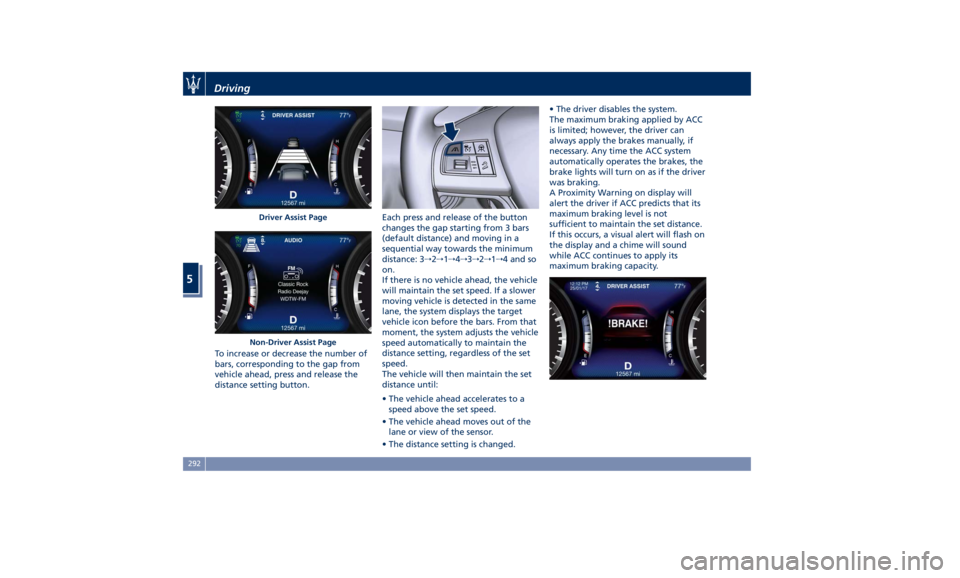
To increase or decrease the number of
bars, corresponding to the gap from
vehicle ahead, press and release the
distance setting button. Each press and release of the button
changes the gap starting from 3 bars
(default distance) and moving in a
sequential way towards the minimum
distance: 3 → 2 → 1 → 4 → 3 → 2 → 1 → 4 and so
on.
If there is no vehicle ahead, the vehicle
will maintain the set speed. If a slower
moving vehicle is detected in the same
lane, the system displays the target
vehicle icon before the bars. From that
moment, the system adjusts the vehicle
speed automatically to maintain the
distance setting, regardless of the set
speed.
The vehicle will then maintain the set
distance until:
• The vehicle ahead accelerates to a
speed above the set speed.
• The vehicle ahead moves out of the
lane or view of the sensor.
• The distance setting is changed. • The driver disables the system.
The maximum braking applied by ACC
is limited; however, the driver can
always apply the brakes manually, if
necessary. Any time the ACC system
automatically operates the brakes, the
brake lights will turn on as if the driver
was braking.
A Proximity Warning on display will
alert the driver if ACC predicts that its
maximum braking level is not
sufficient to maintain the set distance.
If this occurs, a visual alert will flash on
the display and a chime will sound
while ACC continues to apply its
maximum braking capacity.Driver Assist Page
Non-Driver Assist PageDriving
5
292
Page 302 of 436
(Continued)
The driver has the responsibility to
avoid a collision by controlling the
vehicle via braking and steering.
Failure to follow this warning could
lead to serious injury or death.
FCW Operation The FCW provides audible and visual
warnings when a potential collision is
detected. Brake jerk and limited
braking may also be applied
depending on the specific scenario.
NOTE:
FCW system is not intended for
towing: this could lead the system to
malfunctions and/or to late reaction.
FCW monitors the information from
the forward looking radar sensor as
well as the Electronic Brake Controller
(EBC), to calculate the probability of a
forward collision. When the system
determines that a forward collision is
probable, the driver will be provided
with audible and visual warnings and
may provide a warning brake jerk. If
the driver does not take action based
upon these progressive warnings, then
the system will provide a limited level
of active braking to help slow down
the vehicle and mitigate the potential forward collision. If the driver reacts to
the warnings by braking and the
system determines that the driver
intends to avoid the collision by
braking but has not applied sufficient
brake force, the system will
compensate and provide additional
brake force as required.
When the system determines a
collision with the vehicle in front of
you is no longer probable, the warning
messages will be deactivated.
NOTE:
• Bad weather conditions, like strong
rain, snow, etc., can lead to reduced
system performance. Under these
conditions relevant objects will not
be detected or detected late by the
system.
• FCW is designed to react in specific
situations in typical traffic scenarios
with objects in the same lane driving
in the same direction, but under
certain conditions it can also react on
stationary objects in the same lane. It
is not designed to react to oncoming
traffic or crossing traffic.
• The FCW alerts may be triggered on
objects other than vehicles such as
guard rails or sign posts based on the
course prediction. This is expected
and is a part of normal FCW activation and functionality.
• It is unsafe to test the FCW system.
To prevent such misuse of the system,
after four Active Braking events
within a key cycle, the Active Braking
portion of FCW will be deactivated
until the next key cycle. The limit of
four events applies to the brake jerk
too.
• The FCW system is intended for
on-road use only. If the vehicle is
taken off-road, the FCW system
should be deactivated to prevent
unnecessary warnings. If the vehicle
ride height is set to “Off Road 1” or
“Off Road 2”, the FCW system will be
automatically deactivated.
• FCW will automatically deactivated
when
(ESC OFF) button is pressed
(LED light up) and when HDC is
active.
WARNING!
• Forward Collision Warning (FCW) is
not intended to avoid a collision on
its own, nor can FCW detect every
type of potential collision. The driver
has the responsibility to avoid a
collision by controlling the vehicle
via braking and steering. Failure toDriving
5
298
Page 303 of 436
follow this warning could lead to
serious injury or death. The driver is
always in charge to safely drive and
to avoid critical situations not
relying on the support of the
system. Driver has to keep in mind
that the system and therefore its
intervention is always subject to the
prevailing physical limits.
• Forward Collision Warning (FCW) is
not intended either to warn or to
apply any brake aid/brake
intervention in case of collisions
with pedestrians (if not equipped
with PEB sub-system), bicycles and
not licensable vehicles in general.
Speed Range of Use Speed mph (km/h)
Minimum 0 (0)
Engaged/activated 1.12 (1.8)
Maximum 155 (250)
When the speed is outside the
specified limits, the system
automatically disables without turning
on the corresponding warning light
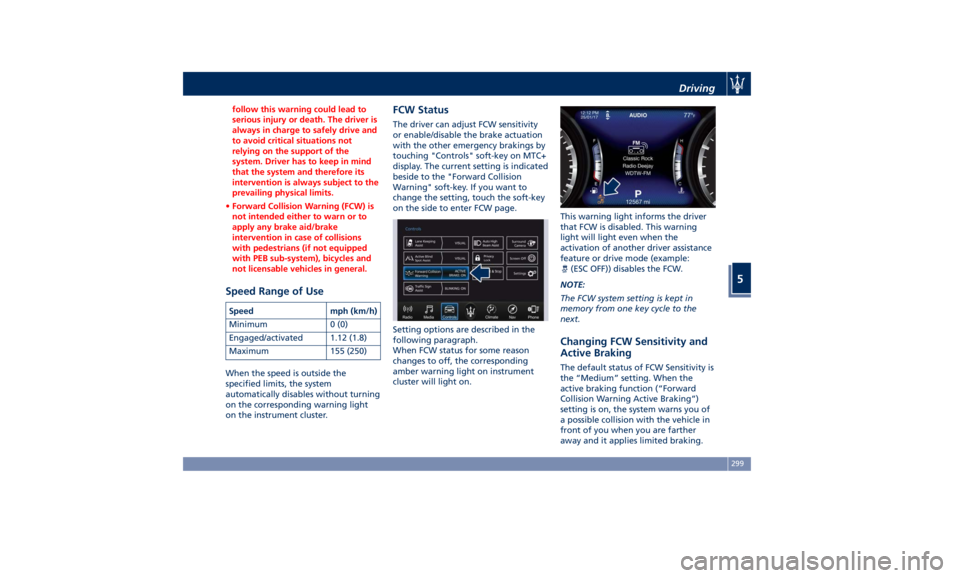
on the instrument cluster. FCW Status The driver can adjust FCW sensitivity
or enable/disable the brake actuation
with the other emergency brakings by
touching "Controls" soft-key on MTC+
display. The current setting is indicated
beside to the "Forward Collision
Warning" soft-key. If you want to
change the setting, touch the soft-key
on the side to enter FCW page.
Setting options are described in the
following paragraph.
When FCW status for some reason
changes to off, the corresponding
amber warning light on instrument
cluster will light on. This warning light informs the driver
that FCW is disabled. This warning
light will light even when the
activation of another driver assistance
feature or drive mode (example:
(ESC OFF)) disables the FCW.
NOTE:
The FCW system setting is kept in
memory from one key cycle to the
next.
Changing FCW Sensitivity and
Active Braking The default status of FCW Sensitivity is
the “Medium” setting. When the
active braking function (“Forward
Collision Warning Active Braking”)
setting is on, the system warns you of
a possible collision with the vehicle in
front of you when you are farther
away and it applies limited braking.Driving
5
299
Page 304 of 436
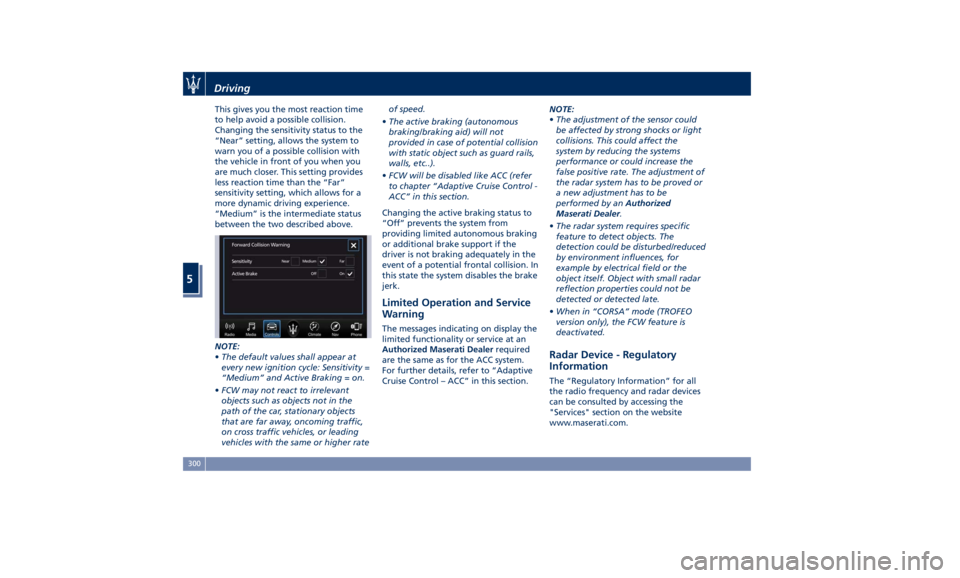
This gives you the most reaction time
to help avoid a possible collision.
Changing the sensitivity status to the
“Near” setting, allows the system to
warn you of a possible collision with
the vehicle in front of you when you
are much closer. This setting provides
less reaction time than the “Far”
sensitivity setting, which allows for a
more dynamic driving experience.
“Medium” is the intermediate status
between the two described above.
NOTE:
• The default values shall appear at
every new ignition cycle: Sensitivity =
“Medium” and Active Braking = on.
• FCW may not react to irrelevant
objects such as objects not in the
path of the car, stationary objects
that are far away, oncoming traffic,
on cross traffic vehicles, or leading
vehicles with the same or higher rate of speed.
• The active braking (autonomous
braking/braking aid) will not
provided in case of potential collision
with static object such as guard rails,
walls, etc..).
• FCW will be disabled like ACC (refer
to chapter “Adaptive Cruise Control -
ACC” in this section.
Changing the active braking status to
“Off” prevents the system from
providing limited autonomous braking
or additional brake support if the
driver is not braking adequately in the
event of a potential frontal collision. In
this state the system disables the brake
jerk.
Limited Operation and Service
Warning The messages indicating on display the
limited functionality or service at an
Authorized Maserati Dealer required
are the same as for the ACC system.
For further details, refer to “Adaptive
Cruise Control – ACC” in this section. NOTE:
• The adjustment of the sensor could
be affected by strong shocks or light
collisions. This could affect the
system by reducing the systems
performance or could increase the
false positive rate. The adjustment of
the radar system has to be proved or
a new adjustment has to be
performed by an Authorized
Maserati Dealer .
• The radar system requires specific
feature to detect objects. The
detection could be disturbed/reduced
by environment influences, for
example by electrical field or the
object itself. Object with small radar
reflection properties could not be
detected or detected late.
• When in “CORSA” mode (TROFEO
version only), the FCW feature is
deactivated.
Radar Device - Regulatory
Information The “Regulatory Information” for all
the radio frequency and radar devices
can be consulted by accessing the
"Services" section on the website
www.maserati.com.Driving
5
300
Page 305 of 436
Lane Keeping Assist - LKA
(optional, with ACC only) This system was designed especially
for highway or freeway driving, to
reduce the risk that the vehicle, under
particular circumstances, accidentally
departs from the lane in use. When
this happens, graphic instructions on
instrument cluster display together
with steering torque application and
steering wheel vibration (depending
on the distance to the line) warn the
driver that the vehicle is going out of
the lane and initiate a steering
maneuver to try to prevent the lane
exit.
To detect lane lines, the system uses
the forward-facing camera behind of
the rear-view mirror, which is the same
one used also by the lighting system
to manage the automatic high beams.
The logic core is in the front radar.
LKA system remembers the condition
it was in before turning off the
vehicle.
Refer to “MTC+ "Controls" Screen” in
section “Dashboard Instruments and
Controls” for further information. NOTE:
In case of wet road or raining
conditions the function could be
disabled by the system in order to
minimize the risks.
Speed Range of Use Speed mph (km/h)
Minimum 37 (60)
Engaged/activated 37 (60)
Maximum 112 (180)
Customized Settings LKA is configurable by the driver in
order to maximize its efficiency based
on the driver driving style and the
expectation of the system, reducing at
the same time the possible
invasiveness.
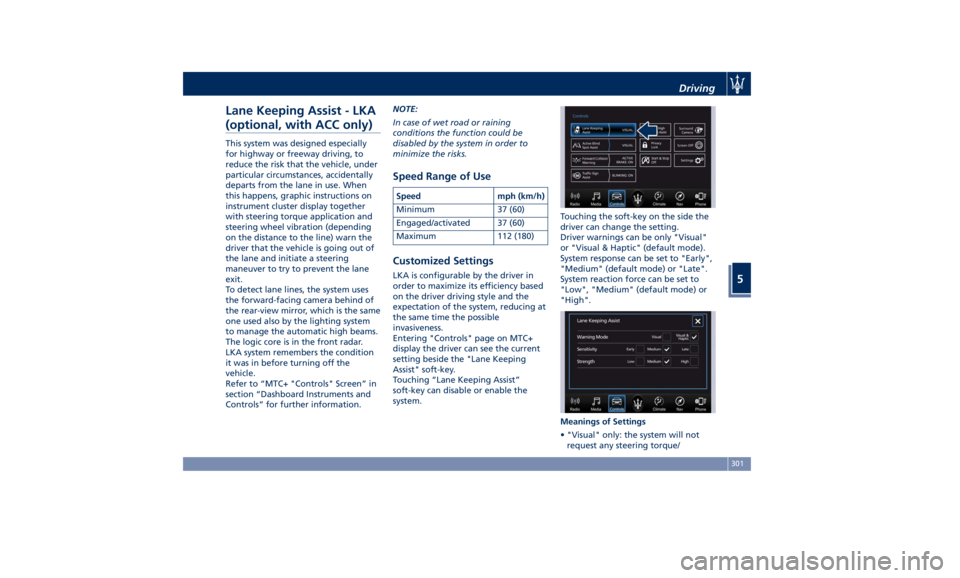
Entering "Controls" page on MTC+
display the driver can see the current
setting beside the "Lane Keeping
Assist" soft-key.
Touching “Lane Keeping Assist”
soft-key can disable or enable the
system. Touching the soft-key on the side the
driver can change the setting.
Driver warnings can be only "Visual"
or "Visual & Haptic" (default mode).
System response can be set to "Early",
"Medium" (default mode) or "Late".
System reaction force can be set to
"Low", "Medium" (default mode) or
"High".
Meanings of Settings
• "Visual" only: the system will not
request any steering torque/Driving
5
301
Page 308 of 436
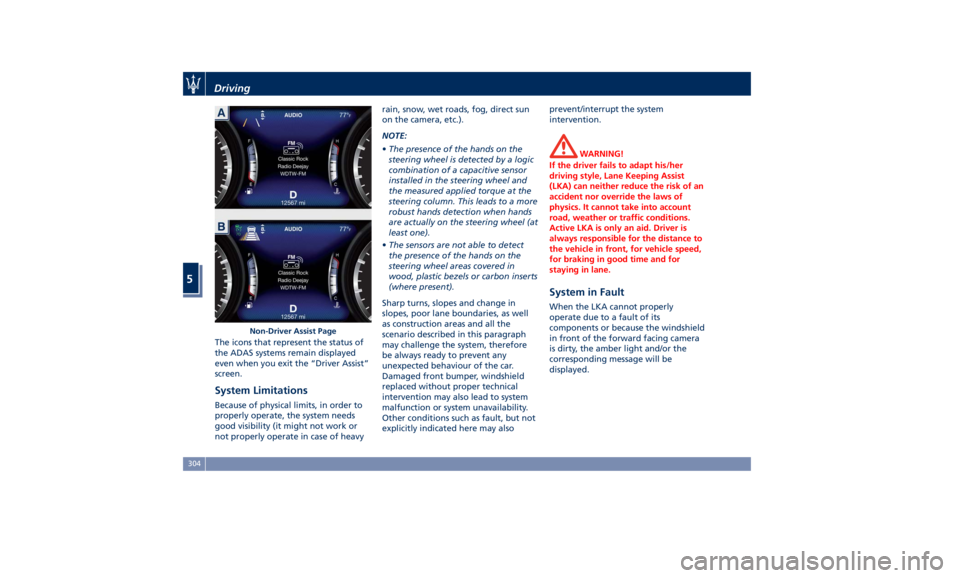
The icons that represent the status of
the ADAS systems remain displayed
even when you exit the “Driver Assist”
screen.
System Limitations Because of physical limits, in order to
properly operate, the system needs
good visibility (it might not work or
not properly operate in case of heavy rain, snow, wet roads, fog, direct sun
on the camera, etc.).
NOTE:
• The presence of the hands on the
steering wheel is detected by a logic
combination of a capacitive sensor
installed in the steering wheel and
the measured applied torque at the
steering column. This leads to a more
robust hands detection when hands
are actually on the steering wheel (at
least one).
• The sensors are not able to detect
the presence of the hands on the
steering wheel areas covered in
wood, plastic bezels or carbon inserts
(where present).
Sharp turns, slopes and change in
slopes, poor lane boundaries, as well
as construction areas and all the
scenario described in this paragraph
may challenge the system, therefore
be always ready to prevent any
unexpected behaviour of the car.
Damaged front bumper, windshield
replaced without proper technical
intervention may also lead to system
malfunction or system unavailability.
Other conditions such as fault, but not
explicitly indicated here may also prevent/interrupt the system
intervention.
WARNING!
If the driver fails to adapt his/her
driving style, Lane Keeping Assist
(LKA) can neither reduce the risk of an
accident nor override the laws of
physics. It cannot take into account
road, weather or traffic conditions.
Active LKA is only an aid. Driver is
always responsible for the distance to
the vehicle in front, for vehicle speed,
for braking in good time and for
staying in lane.
System in Fault When the LKA cannot properly
operate due to a fault of its
components or because the windshield
in front of the forward facing camera
is dirty, the amber light and/or the
corresponding message will be
displayed.Non-Driver Assist PageDriving
5
304
Page 309 of 436
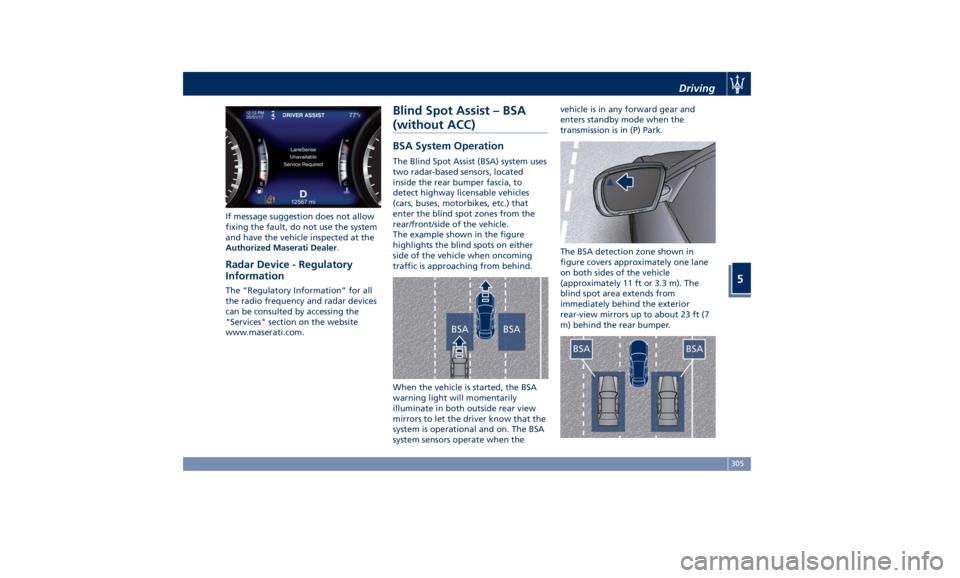
If message suggestion does not allow
fixing the fault, do not use the system
and have the vehicle inspected at the
Authorized Maserati Dealer .
Radar Device - Regulatory
Information The “Regulatory Information” for all
the radio frequency and radar devices
can be consulted by accessing the
"Services" section on the website
www.maserati.com. Blind Spot Assist – BSA
(without ACC) BSA System Operation The Blind Spot Assist (BSA) system uses
two radar-based sensors, located
inside the rear bumper fascia, to
detect highway licensable vehicles
(cars, buses, motorbikes, etc.) that
enter the blind spot zones from the
rear/front/side of the vehicle.
The example shown in the figure
highlights the blind spots on either
side of the vehicle when oncoming
traffic is approaching from behind.
When the vehicle is started, the BSA
warning light will momentarily
illuminate in both outside rear view
mirrors to let the driver know that the
system is operational and on. The BSA
system sensors operate when the vehicle is in any forward gear and
enters standby mode when the
transmission is in (P) Park.
The BSA detection zone shown in
figure covers approximately one lane
on both sides of the vehicle
(approximately 11 ft or 3.3 m). The
blind spot area extends from
immediately behind the exterior
rear-view mirrors up to about 23 ft (7
m) behind the rear bumper.Driving
5
305