steering MASERATI LEVANTE 2019 Workshop Manual
[x] Cancel search | Manufacturer: MASERATI, Model Year: 2019, Model line: LEVANTE, Model: MASERATI LEVANTE 2019Pages: 436, PDF Size: 15.24 MB
Page 237 of 436
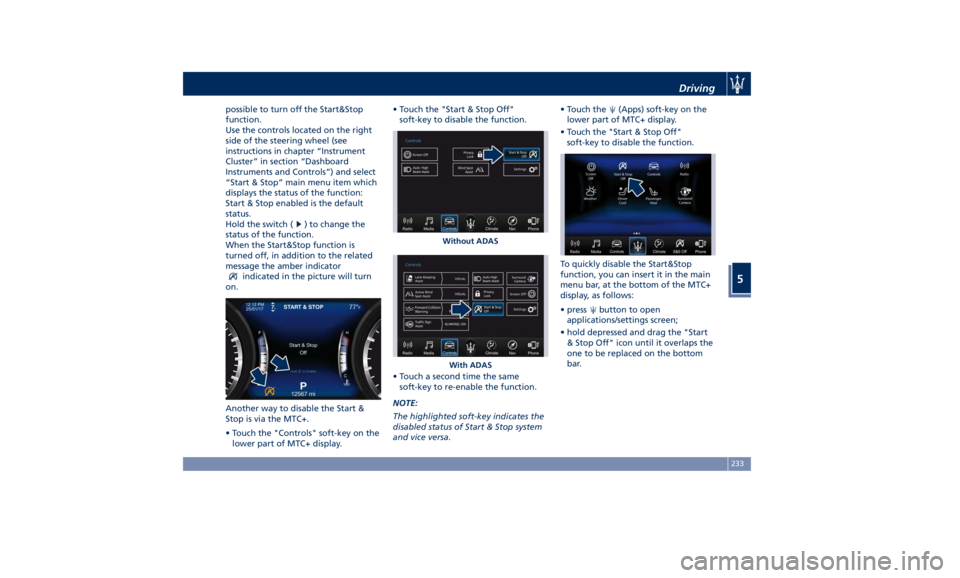
possible to turn off the Start&Stop
function.
Use the controls located on the right
side of the steering wheel (see
instructions in chapter “Instrument
Cluster” in section “Dashboard
Instruments and Controls”) and select
“Start & Stop” main menu item which
displays the status of the function:
Start & Stop enabled is the default
status.
Hold the switch (
) to change the
status of the function.
When the Start&Stop function is
turned off, in addition to the related
message the amber indicator
indicated in the picture will turn
on.
Another way to disable the Start &
Stop is via the MTC+.
• Touch the "Controls" soft-key on the
lower part of MTC+ display. • Touch the "Start & Stop Off"
soft-key to disable the function.
• Touch a second time the same
soft-key to re-enable the function.
NOTE:
The highlighted soft-key indicates the
disabled status of Start & Stop system
and vice versa. • Touch the
(Apps) soft-key on the
lower part of MTC+ display.
• Touch the "Start & Stop Off"
soft-key to disable the function.
To quickly disable the Start&Stop
function, you can insert it in the main
menu bar, at the bottom of the MTC+
display, as follows:
• press
button to open
applications/settings screen;
• hold depressed and drag the "Start
& Stop Off" icon until it overlaps the
one to be replaced on the bottom
bar.Without ADAS
With ADAS Driving
5
233
Page 244 of 436
the smoothest upshifts and downshifts
and the best fuel economy. The
transmission automatically shifts up
and down through all gears. The D
(Drive) mode provides optimum
driving characteristics under all normal
operating conditions of the vehicle.
• Vehicle stationary: to switch from D
(Drive) to R (Reverse) requires brake
pedal and unlock button pressed and
the action on the shift lever: to reach
N (Neutral) starting from D (Drive) is
possible by only acting on the shift
lever.
• To enable special operations while
the car is moving at a low speed,
such as getting out of marsh or snow,
it is possible to run quickly from D
(Drive) to R (Reverse), and vice versa,
by pressing the unlock button and
acting on the shift lever passing from
N (Neutral).
• Vehicle moving: switching to N
(Neutral) from D (Drive) it is not
necessary to press brake pedal.
• From D (Drive) selected mode it is
always possible to switch to M +/-
(Manual) mode, by move the shift
lever to the left (see following
paragraph); to return to “D”
position, move the shift lever to the
right. It is possible to shift from D (Drive) mode to M +/- (Manual) mode
regardless of car speed.
• When in D (Drive) mode, using the
paddles behind the steering wheel (if
equipped), will cause the system to
enter a temporary function and
enable the manual shift mode. This
range is indicated with the symbols
“+/-” above and below “D” letter on
the gear range field of the display.
The system will then switch back to
automatic mode according to time
elapsed in “temporary” mode and
driving conditions.
At extremely cold temperatures (-23°F /
-30°C or below), transmission may be
affected by the low temperature of
the engine and transmission. Normal
operation will resume once the
transmission temperature has risen to
a normal level.
M +/- (Manual)
This mode is obtained by moving the
shift lever to the left in “M +/-“
position.
In this mode, the transmission interacts
with the driver in order to allow
manual shift and ensure increased
control of the vehicle. The current
mode allows the transmission system
to optimise the engine brake action,
remove undesired shifting into higher and lower gears and improve the
overall performance of the vehicle.
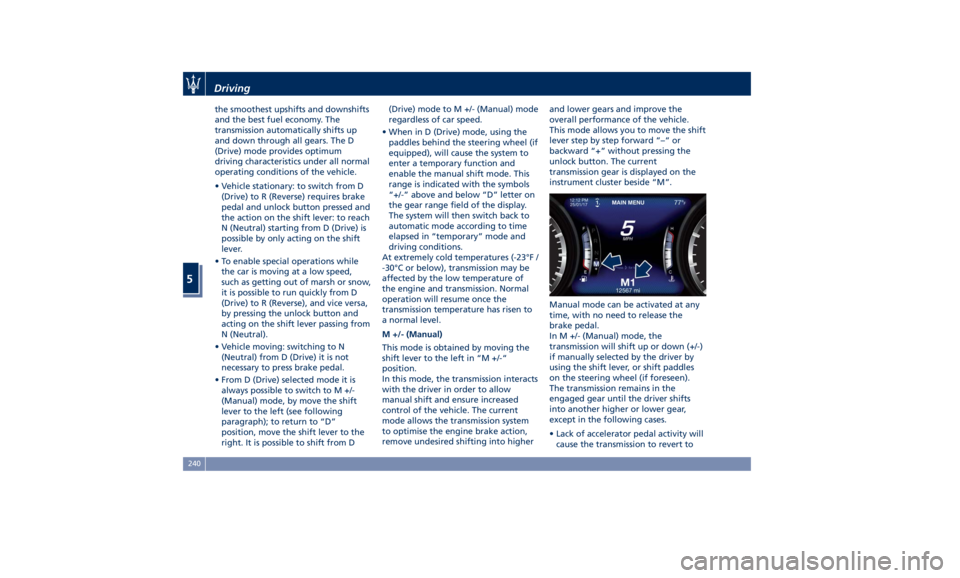
This mode allows you to move the shift
lever step by step forward “–“ or
backward “+” without pressing the
unlock button. The current
transmission gear is displayed on the
instrument cluster beside “M”.
Manual mode can be activated at any
time, with no need to release the
brake pedal.
In M +/- (Manual) mode, the
transmission will shift up or down (+/-)
if manually selected by the driver by
using the shift lever, or shift paddles
on the steering wheel (if foreseen).
The transmission remains in the
engaged gear until the driver shifts
into another higher or lower gear,
except in the following cases.
• Lack of accelerator pedal activity will
cause the transmission to revert toDriving
5
240
Page 245 of 436
automatic operation. The
transmission will also upshift
automatically once maximum engine
speed is reached.
• If in SPORT mode, the transmission
will remain in the selected gear even
when maximum engine speed is
reached. The transmission will
upshift only if enabled by the driver.
Manual upshift or downshift will be
maintained as long as SPORT mode is
selected, even by full stroke pedal
press.
• If in “M +/-“ or in SPORT mode, the
transmission will automatically
downshift as the vehicle slows to
halt (to prevent engine lugging) and
the current gear will display on the
instrument cluster. Shifting the shift
lever backward “+” or moving the
right shift paddle “+” towards the
steering wheel when stationary, will
cause the vehicle to start in second
gear. If the vehicle speed is too low,
the system will ignore further
upshifts. Avoid using speed control
when the M +/- (Manual) mode is
engaged.
When the car stops in M +/- (Manual)
mode, the transmission automatically
moves the shift lever and inserts P
(Park). If you enter the I.C.E. drive mode
when the gearshift is in “M +/-”
position, the system activates the
automatic return of the shift lever in D
(Drive) mode.
Shift Paddles (if equipped)
The driver can change gears with the
shift paddles behind the steering
wheel when in D (Drive) and M +/-
(Manual) mode.
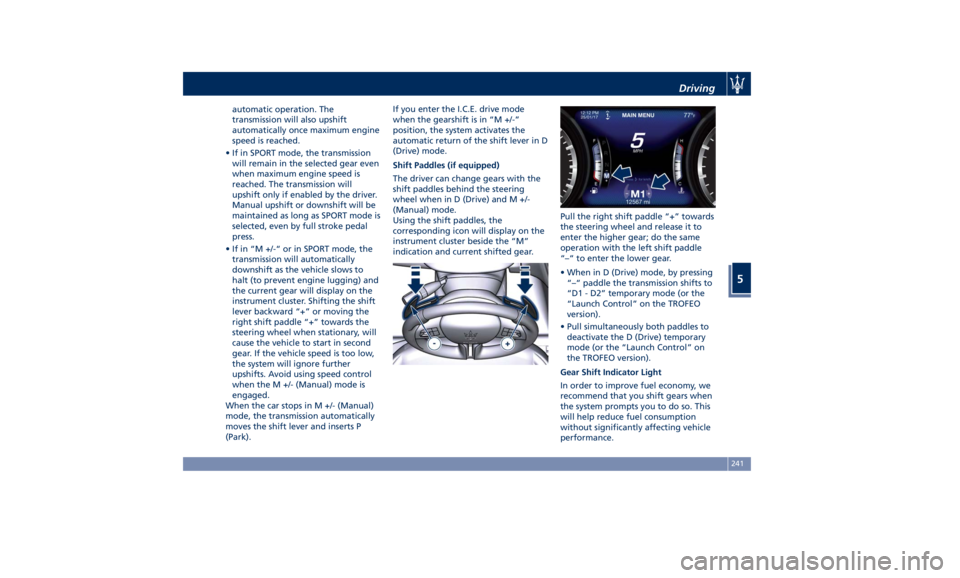
Using the shift paddles, the
corresponding icon will display on the
instrument cluster beside the “M”
indication and current shifted gear. Pull the right shift paddle “+” towards
the steering wheel and release it to
enter the higher gear; do the same
operation with the left shift paddle
“–“ to enter the lower gear.
• When in D (Drive) mode, by pressing
“–“ paddle the transmission shifts to
“D1 - D2” temporary mode (or the
“Launch Control” on the TROFEO
version).
• Pull simultaneously both paddles to
deactivate the D (Drive) temporary
mode (or the “Launch Control” on
the TROFEO version).
Gear Shift Indicator Light
In order to improve fuel economy, we
recommend that you shift gears when
the system prompts you to do so. This
will help reduce fuel consumption
without significantly affecting vehicle
performance.Driving
5
241
Page 249 of 436
• SPORT (NOT for TROFEO version): to
activate/deactivate a sportier drive
mode. In this mode, the vehicle has a
faster throttle response and ESC
sport calibration (not recommended
on wet/slippery surfaces). Activating
this drive mode, will also change the
EPS setting.
• SPORT and CORSA (TROFEO version
only): to activate/deactivate the
sportier and the race drive mode.
When in "SPORT" drive mode, the
vehicle has a faster throttle response
and ESC sport calibration (not
recommended on wet/slippery
surfaces). Activating this drive mode,
will also change the EPS setting.
When in "CORSA" drive mode, in
addition to what indicated for the
sposts mode, the transmission use a
specific gear shift pattern and the
traction is shifted more on the rear
wheels with increased oversteering
behavior. Traction control with
dedicated calibration to maximize
traction vs stability and "Launch
Control" start mode.
•
(Suspension): to switch between
the two suspension setting modes:
soft (LED light off) and hard ("S" on
the cluster and LED light on).
By selecting one of these drive modes,
the yellow or white LED on the button illuminates and, for some of these, the
vehicle configuration obtained is
graphically displayed on instrument
cluster. The same screen is also
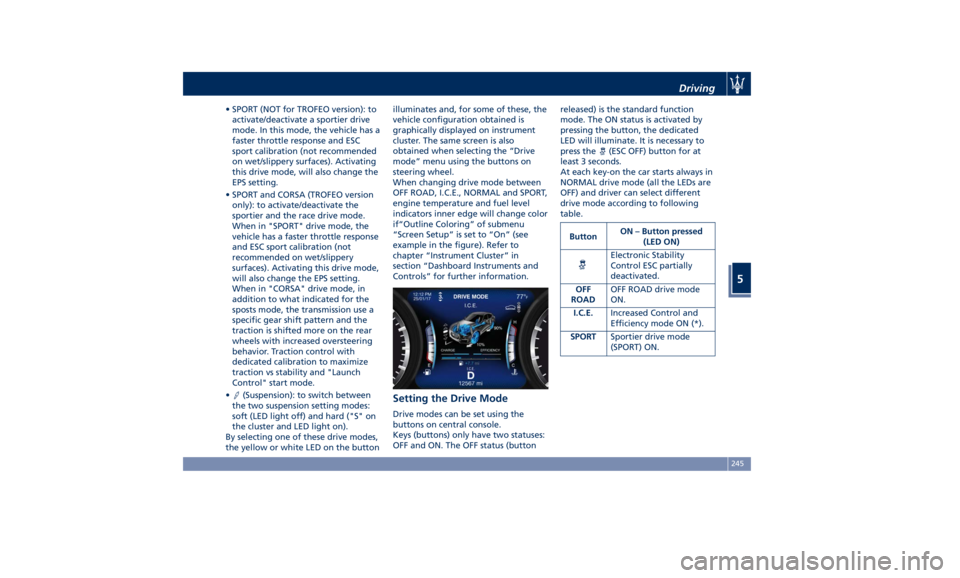
obtained when selecting the “Drive
mode” menu using the buttons on
steering wheel.
When changing drive mode between
OFF ROAD, I.C.E., NORMAL and SPORT,
engine temperature and fuel level
indicators inner edge will change color
if“Outline Coloring” of submenu
“Screen Setup” is set to “On” (see
example in the figure). Refer to
chapter “Instrument Cluster” in
section “Dashboard Instruments and
Controls” for further information.
Setting the Drive Mode Drive modes can be set using the
buttons on central console.
Keys (buttons) only have two statuses:
OFF and ON. The OFF status (button released) is the standard function
mode. The ON status is activated by
pressing the button, the dedicated
LED will illuminate. It is necessary to
press the
(ESC OFF) button for at
least 3 seconds.
At each key-on the car starts always in
NORMAL drive mode (all the LEDs are
OFF) and driver can select different
drive mode according to following
table.
Button ON – Button pressed
(LED ON)
Electronic Stability
Control ESC partially
deactivated.
OFF
ROAD OFF ROAD drive mode
ON.
I.C.E. Increased Control and
Efficiency mode ON (*).
SPORT Sportier drive mode
(SPORT) ON.Driving
5
245
Page 251 of 436
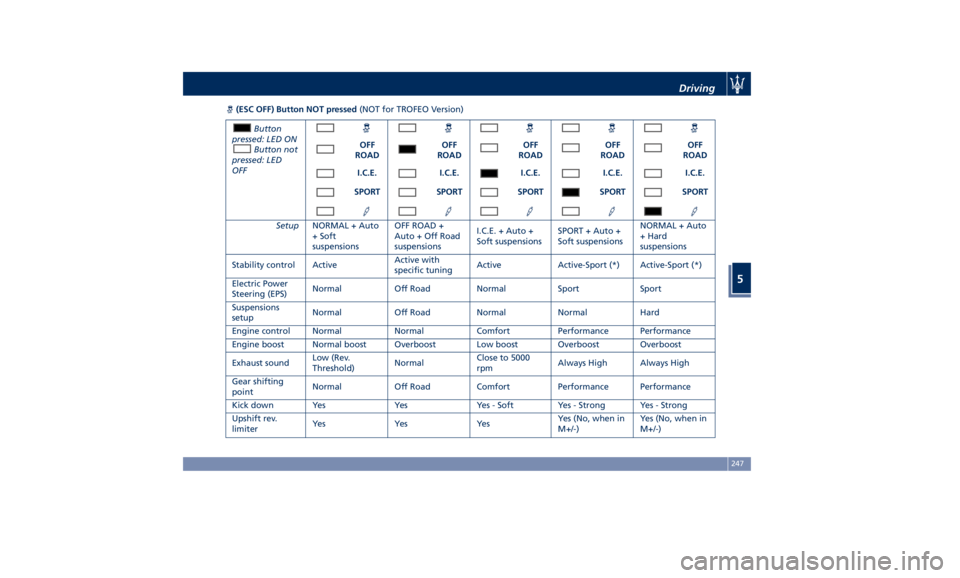
(ESC OFF) Button NOT pressed (NOT for TROFEO Version)
Button
pressed: LED ON
Button not
pressed: LED
OFF OFF
ROAD OFF
ROAD OFF
ROAD OFF
ROAD OFF
ROAD
I.C.E. I.C.E. I.C.E. I.C.E. I.C.E.
SPORT SPORT SPORT SPORT SPORT
Setup NORMAL + Auto
+ Soft
suspensions OFF ROAD +
Auto + Off Road
suspensions I.C.E. + Auto +
Soft suspensions SPORT + Auto +
Soft suspensions NORMAL + Auto
+ Hard
suspensions
Stability control Active Active with
specific tuning Active Active-Sport (*) Active-Sport (*)
Electric Power
Steering (EPS) Normal Off Road Normal Sport Sport
Suspensions
setup Normal Off Road Normal Normal Hard
Engine control Normal Normal Comfort Performance Performance
Engine boost Normal boost Overboost Low boost Overboost Overboost
Exhaust sound Low (Rev.
Threshold) Normal Close to 5000
rpm Always High Always High
Gear shifting
point Normal Off Road Comfort Performance Performance
Kick down Yes Yes Yes - Soft Yes - Strong Yes - Strong
Upshift rev.
limiter Ye s Ye s Ye s Yes (No, when in
M+/-) Yes (No, when in
M+/-)Driving
5
247
Page 253 of 436
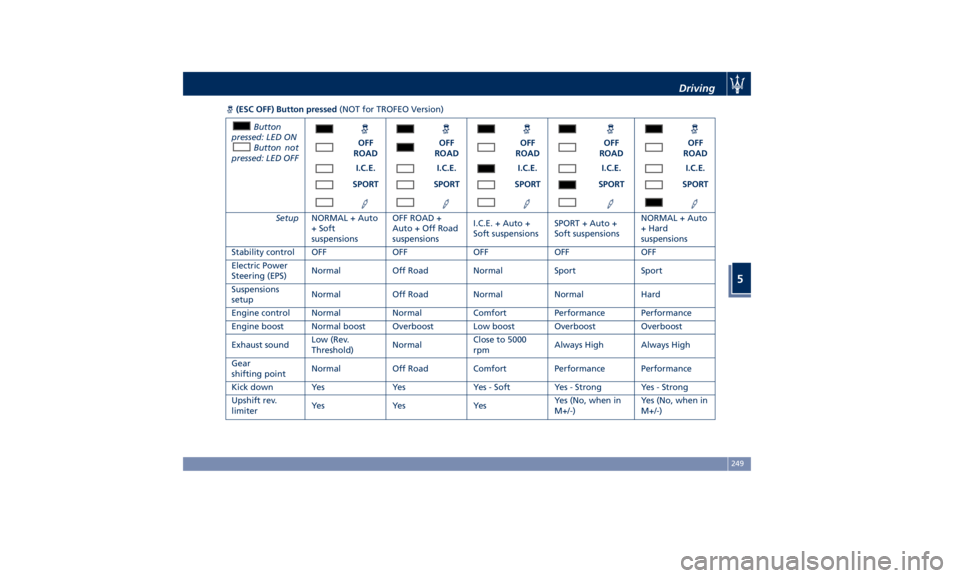
(ESC OFF) Button pressed (NOT for TROFEO Version)
Button
pressed: LED ON
Button not
pressed: LED OFF OFF
ROAD OFF
ROAD OFF
ROAD OFF
ROAD OFF
ROAD
I.C.E. I.C.E. I.C.E. I.C.E. I.C.E.
SPORT SPORT SPORT SPORT SPORT
Setup NORMAL + Auto
+ Soft
suspensions OFF ROAD +
Auto + Off Road
suspensions I.C.E. + Auto +
Soft suspensions SPORT + Auto +
Soft suspensions NORMAL + Auto
+ Hard
suspensions
Stability control OFF OFF OFF OFF OFF
Electric Power
Steering (EPS) Normal Off Road Normal Sport Sport
Suspensions
setup Normal Off Road Normal Normal Hard
Engine control Normal Normal Comfort Performance Performance
Engine boost Normal boost Overboost Low boost Overboost Overboost
Exhaust sound Low (Rev.
Threshold) Normal Close to 5000
rpm Always High Always High
Gear
shifting point Normal Off Road Comfort Performance Performance
Kick down Yes Yes Yes - Soft Yes - Strong Yes - Strong
Upshift rev.
limiter Ye s Ye s Ye s Yes (No, when in
M+/-) Yes (No, when in
M+/-)Driving
5
249
Page 255 of 436
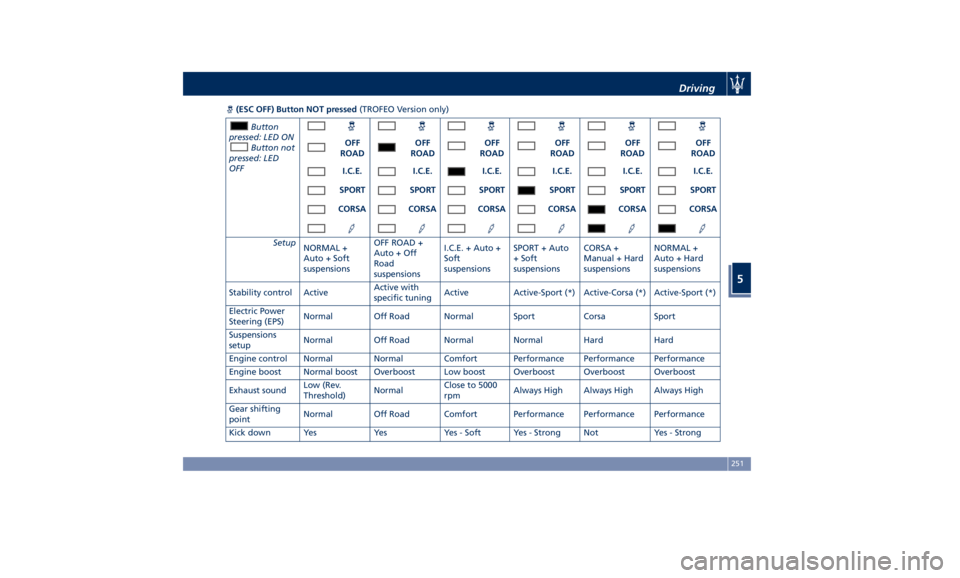
(ESC OFF) Button NOT pressed (TROFEO Version only)
Button
pressed: LED ON
Button not
pressed: LED
OFF OFF
ROAD OFF
ROAD OFF
ROAD OFF
ROAD OFF
ROAD OFF
ROAD
I.C.E. I.C.E. I.C.E. I.C.E. I.C.E. I.C.E.
SPORT SPORT SPORT SPORT SPORT SPORT
CORSA CORSA CORSA CORSA CORSA CORSA
Setup
NORMAL +
Auto + Soft
suspensions OFF ROAD +
Auto + Off
Road
suspensions I.C.E. + Auto +
Soft
suspensions SPORT + Auto
+ Soft
suspensions CORSA +
Manual + Hard
suspensions NORMAL +
Auto + Hard
suspensions
Stability control Active Active with
specific tuning Active Active-Sport (*) Active-Corsa (*) Active-Sport (*)
Electric Power
Steering (EPS) Normal Off Road Normal Sport Corsa Sport
Suspensions
setup Normal Off Road Normal Normal Hard Hard
Engine control Normal Normal Comfort Performance Performance Performance
Engine boost Normal boost Overboost Low boost Overboost Overboost Overboost
Exhaust sound Low (Rev.
Threshold) Normal Close to 5000
rpm Always High Always High Always High
Gear shifting
point Normal Off Road Comfort Performance Performance Performance
Kick down Yes Yes Yes - Soft Yes - Strong Not Yes - Strong Driving
5
251
Page 257 of 436
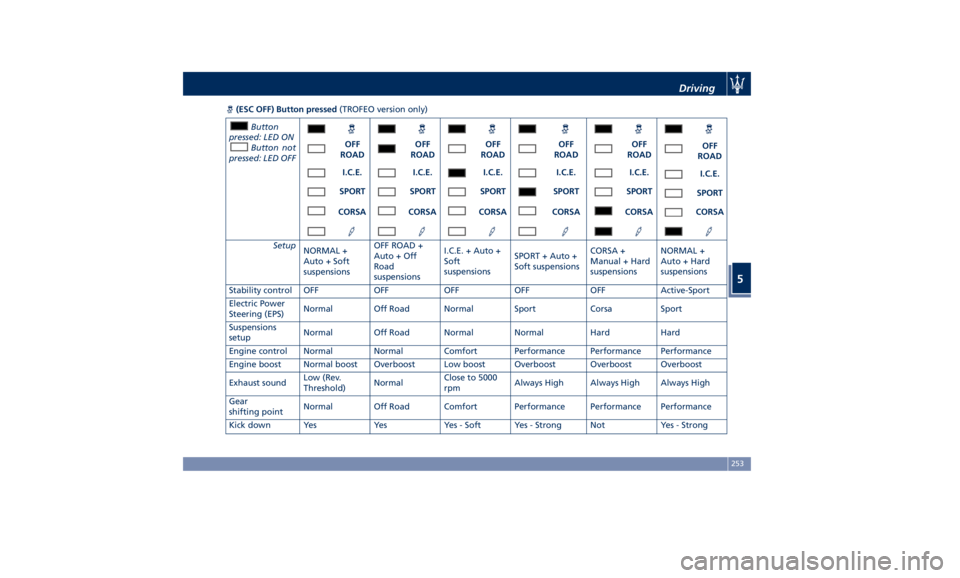
(ESC OFF) Button pressed (TROFEO version only)
Button
pressed: LED ON
Button not
pressed: LED OFF OFF
ROAD OFF
ROAD OFF
ROAD OFF
ROAD OFF
ROAD OFF
ROAD
I.C.E. I.C.E. I.C.E. I.C.E. I.C.E.
I.C.E.
SPORT SPORT SPORT SPORT SPORT
SPORT
CORSA CORSA CORSA CORSA CORSA CORSA
Setup
NORMAL +
Auto + Soft
suspensions OFF ROAD +
Auto + Off
Road
suspensions I.C.E. + Auto +
Soft
suspensions SPORT + Auto +
Soft suspensions CORSA +
Manual + Hard
suspensions NORMAL +
Auto + Hard
suspensions
Stability control OFF OFF OFF OFF OFF Active-Sport
Electric Power
Steering (EPS) Normal Off Road Normal Sport Corsa Sport
Suspensions
setup Normal Off Road Normal Normal Hard Hard
Engine control Normal Normal Comfort Performance Performance Performance
Engine boost Normal boost Overboost Low boost Overboost Overboost Overboost
Exhaust sound Low (Rev.
Threshold) Normal Close to 5000
rpm Always High Always High Always High
Gear
shifting point Normal Off Road Comfort Performance Performance Performance
Kick down Yes Yes Yes - Soft Yes - Strong Not Yes - Strong Driving
5
253
Page 259 of 436
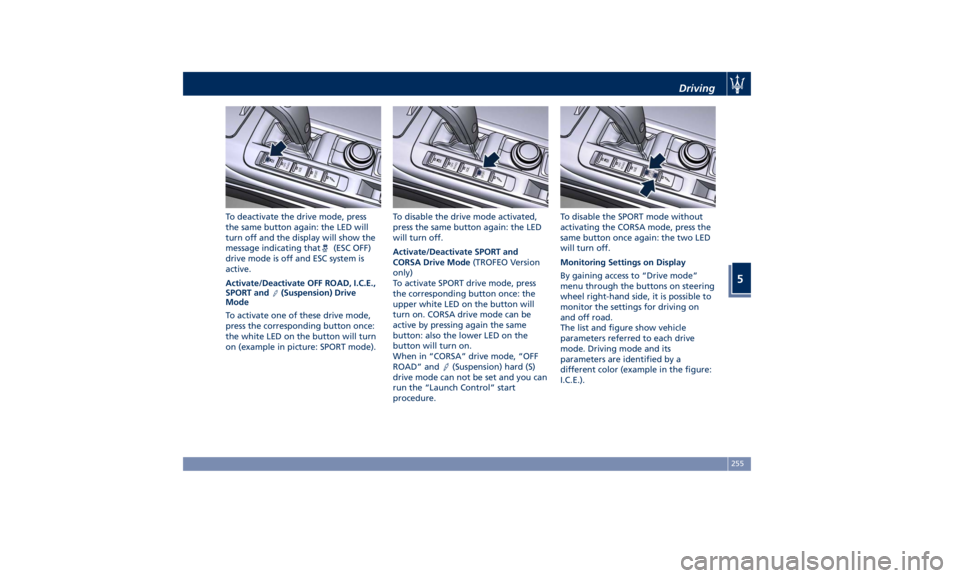
To deactivate the drive mode, press
the same button again: the LED will
turn off and the display will show the
message indicating that
(ESC OFF)
drive mode is off and ESC system is
active.
Activate/Deactivate OFF ROAD, I.C.E.,
SPORT and
(Suspension) Drive
Mode
To activate one of these drive mode,
press the corresponding button once:
the white LED on the button will turn
on (example in picture: SPORT mode). To disable the drive mode activated,
press the same button again: the LED
will turn off.
Activate/Deactivate SPORT and
CORSA Drive Mode (TROFEO Version
only)
To activate SPORT drive mode, press
the corresponding button once: the
upper white LED on the button will
turn on. CORSA drive mode can be
active by pressing again the same
button: also the lower LED on the
button will turn on.
When in “CORSA” drive mode, “OFF
ROAD” and
(Suspension) hard (S)
drive mode can not be set and you can
run the “Launch Control” start
procedure. To disable the SPORT mode without
activating the CORSA mode, press the
same button once again: the two LED
will turn off.
Monitoring Settings on Display
By gaining access to “Drive mode”
menu through the buttons on steering
wheel right-hand side, it is possible to
monitor the settings for driving on
and off road.
The list and figure show vehicle
parameters referred to each drive
mode. Driving mode and its
parameters are identified by a
different color (example in the figure:
I.C.E.).Driving
5
255
Page 264 of 436
the position of the vehicle with little
suspension movements to ensure a
proper appearance.
Display Messages
After shifting selector to change
position, a pop-up message will
indicate for 5 seconds when set
position has been reached (after
pneumatic suspension system
intervention that might last up to 30
seconds).
This type of message will be displayed
only if the option to view all
pneumatic suspension system messages
was set (For further details, refer to
“MTC+ Settings” in section
“Dashboard Instruments and
Controls”).
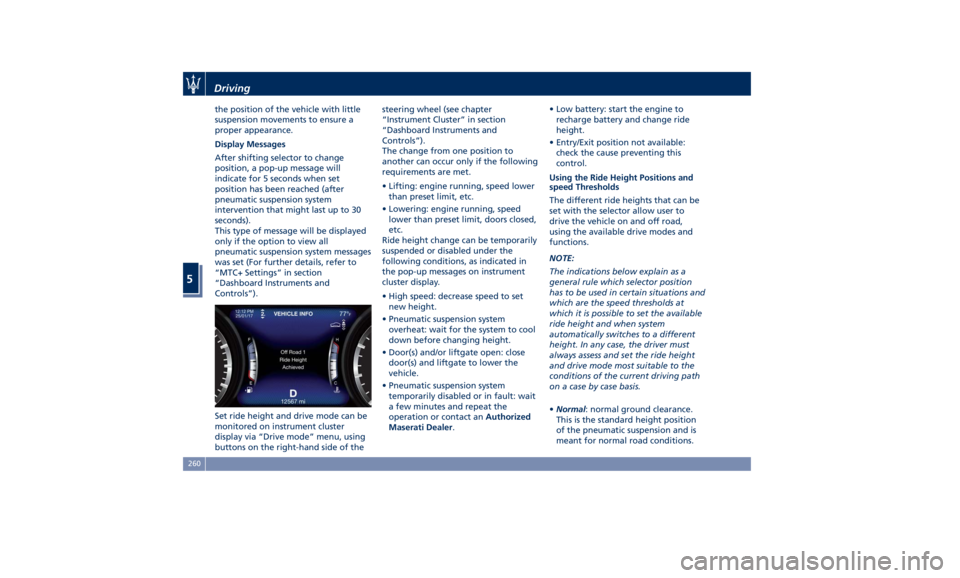
Set ride height and drive mode can be
monitored on instrument cluster
display via “Drive mode” menu, using
buttons on the right-hand side of the steering wheel (see chapter
“Instrument Cluster” in section
“Dashboard Instruments and
Controls”).
The change from one position to
another can occur only if the following
requirements are met.
• Lifting: engine running, speed lower
than preset limit, etc.
• Lowering: engine running, speed
lower than preset limit, doors closed,
etc.
Ride height change can be temporarily
suspended or disabled under the
following conditions, as indicated in
the pop-up messages on instrument
cluster display.
• High speed: decrease speed to set
new height.
• Pneumatic suspension system
overheat: wait for the system to cool
down before changing height.
• Door(s) and/or liftgate open: close
door(s) and liftgate to lower the
vehicle.
• Pneumatic suspension system
temporarily disabled or in fault: wait
a few minutes and repeat the
operation or contact an Authorized
Maserati Dealer . • Low battery: start the engine to
recharge battery and change ride
height.
• Entry/Exit position not available:
check the cause preventing this
control.
Using the Ride Height Positions and
speed Thresholds
The different ride heights that can be
set with the selector allow user to
drive the vehicle on and off road,
using the available drive modes and
functions.
NOTE:
The indications below explain as a
general rule which selector position
has to be used in certain situations and
which are the speed thresholds at
which it is possible to set the available
ride height and when system
automatically switches to a different
height. In any case, the driver must
always assess and set the ride height
and drive mode most suitable to the
conditions of the current driving path
on a case by case basis.
• Normal : normal ground clearance.
This is the standard height position
of the pneumatic suspension and is
meant for normal road conditions.Driving
5
260