steering MASERATI LEVANTE 2019 Repair Manual
[x] Cancel search | Manufacturer: MASERATI, Model Year: 2019, Model line: LEVANTE, Model: MASERATI LEVANTE 2019Pages: 436, PDF Size: 15.24 MB
Page 267 of 436
Launch Control Sequence
NOTE:
• All the above mentioned conditions
must be verified in order to activate
"Launch Control" performance start
procedure.
• During “Launch Control” ACC, FCW
and HAS (if equipped) are
temporarily disabled.
• Each step displayed on the
instrument cluster has a time out
approximately of 5 seconds.
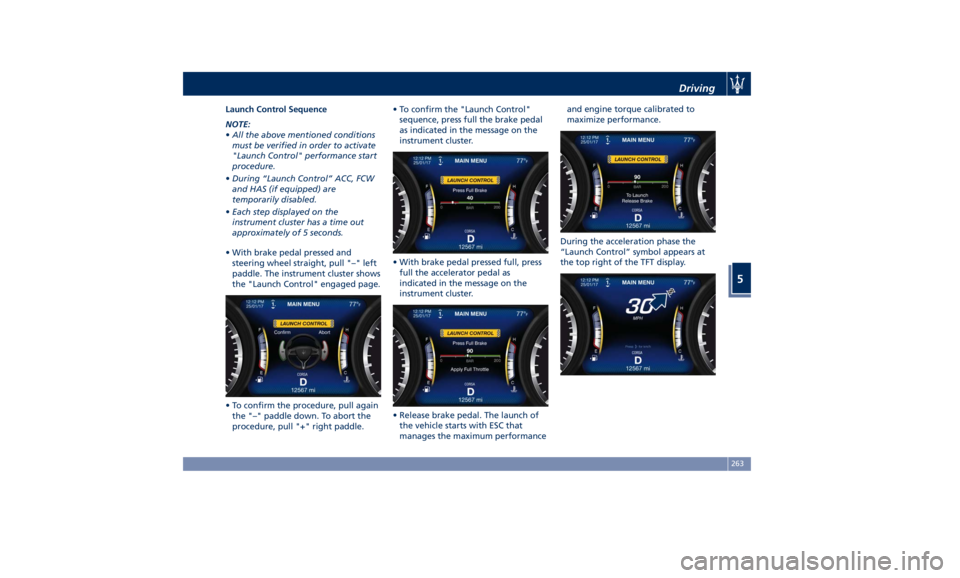
• With brake pedal pressed and
steering wheel straight, pull "–" left
paddle. The instrument cluster shows
the "Launch Control" engaged page.
• To confirm the procedure, pull again
the "–" paddle down. To abort the
procedure, pull "+" right paddle. • To confirm the "Launch Control"
sequence, press full the brake pedal
as indicated in the message on the
instrument cluster.
• With brake pedal pressed full, press
full the accelerator pedal as
indicated in the message on the
instrument cluster.
• Release brake pedal. The launch of
the vehicle starts with ESC that
manages the maximum performance and engine torque calibrated to
maximize performance.
During the acceleration phase the
“Launch Control” symbol appears at
the top right of the TFT display.Driving
5
263
Page 271 of 436
Traction Downhill When descending mountains or hills,
use Hill Descent Control (HDC) to
avoid repeated heavy braking (for
further details, refer to “Brake and
Stability Control System” in this
section).
When descending mountains or hills,
repeated braking can cause brake
fade with loss of braking power. Avoid
repeated heavy braking and
downshift the transmission whenever
possible in order to cool down the
brakes.
Warnings and Tips for Off-road
Driving When driving off-road, using the “OFF
ROAD” drive mode which is specific
for this use.
Before driving, always make sure that
the vehicle reached the ride height set
through the selector.
When driving, always:
• limit driving speed as much as
possible to tackle bends, bumpy
sections and slopes;
• increase visual control in front and
on the sides of the vehicle to quickly
spot any obstacles in your path
(potholes, branches, etc.); Always consider these tips further to
your experience gained in off-road
driving.
After Driving Off-road Off-road operation puts more stress
on your vehicle than does most
on-road driving. After going off-road,
it is always a good idea to check for
damage. That way you can get any
problems taken care of right away and
have your vehicle ready when you
need it.
• Completely inspect the underbody of
your vehicle. Check tires, body
structure, steering, suspension, and
exhaust system for damage.
• Inspect the radiator for mud and
debris that might decrease sinking
effect and clean as required.
• Check for accumulations of plants or
brush in underbody. These things
could be a fire hazard if they get in
contact with the exhaust system.
• After extended operation in mud,
sand, water, or similar dirty
conditions, have all parts that got in
contact with mud, sand and water
inspected and cleaned as soon as
possible. WARNING!
Abrasive material in any part of the
brakes may cause excessive wear or
unpredictable braking operation. Do
not drive if braking system is not
efficient: get your brakes checked and
cleaned as necessary by an
Authorized Maserati Dealer.
• If you experience unusual vibration
after
driving in mud, slush or similar
conditions, check the wheels and
suspension linkages for impacted
material. Impacted material can
cause wheel imbalance and affect
suspension response. Removing it
will correct the situation.Driving
5
267
Page 273 of 436
CAUTION!
The main function of the EPB is to
allow safe parking of the vehicle,
therefore it must only be applied
when the vehicle is already stationary.
If the EPB is used while the vehicle is
moving and decelerating until a speed
lower of 3 mph (5 km/h) and, in
particular, until complete stop
(typically in a sudden brake), it is
necessary to have the EPB system
checked by an Authorized Maserati
Dealer .
WARNING!
• Always hold the brake pedal pressed
during engagement or
disengagement of the parking
brake.
• The EPB command activation while
running generates a deceleration of
the vehicle with strong deceleration
(Dynamic Braking). It is therefore
recommended to use this feature
only in case of emergency. The
stability of the car is guaranteed by
the action of the activated ESC
system. • It is advisable to keep the "Auto
Apply" function always active (On)
so that the vehicle is properly
secured with electric parking brake.
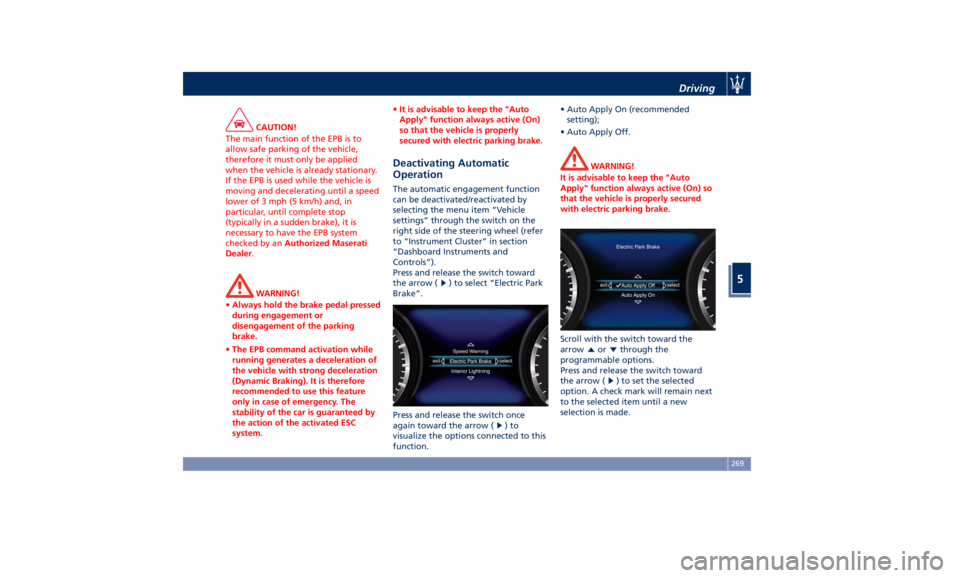
Deactivating Automatic
Operation The automatic engagement function
can be deactivated/reactivated by
selecting the menu item “Vehicle
settings” through the switch on the
right side of the steering wheel (refer
to “Instrument Cluster” in section
“Dashboard Instruments and
Controls”).
Press and release the switch toward
the arrow (
) to select “Electric Park
Brake”.
Press and release the switch once
again toward the arrow (
)to
visualize the options connected to this
function. • Auto Apply On (recommended
setting);
• Auto Apply Off.
WARNING!
It is advisable to keep the "Auto
Apply" function always active (On) so
that the vehicle is properly secured
with electric parking brake.
Scroll with the switch toward the
arrow
or through the
programmable options.
Press and release the switch toward
the arrow (
) to set the selected
option. A check mark will remain next
to the selected item until a new
selection is made.Driving
5
269
Page 277 of 436
Brake and Stability
Control System The vehicle is equipped with an
Electronic Stability Control System
(ESC), which helps to maintain
directional control in the event of loss
of grip of the tires. The system is able
to detect potentially dangerous
situations for the stability of the
vehicle and automatically sets the
brakes on all four wheels in a
differentiated manner, in order to
provide a torque settlement of the
vehicle.
ESC includes the following subsystems:
• ABS (Anti-lock Braking System);
• EBD (Electronic Brake-force
Distribution);
• TCS (Traction Control System);
• BAS (Brake Assist System);
• BTO (Brake Throttle Override);
• HSA (Hill Start Assist);
• ROM (Roll-Over Mitigation);
• TSM (Trailer Sway Mitigation);
• HDC (Hill Descent Control).
WARNING!
• These systems cannot prevent the natural laws of physics from
affecting the vehicle, nor can they
increase traction, braking or steering
efficiency beyond that afforded by
the condition of the vehicle brakes
and tires.
• These systems cannot prevent
collisions, including those resulting
from excessive speed in turns,
following another vehicle too
closely, or hydroplaning.
• The capabilities of a vehicle
equipped with these systems must
never be exploited in a reckless or
dangerous manner that could
jeopardize the driver’s and the
passenger’s safety or the safety of
others.
Electronic Stability Control
(ESC) This system enhances directional
control and stability of the vehicle
under various driving conditions. The
ESC corrects over steering and under
steering of the vehicle by applying the
brake to the appropriate wheel.
Engine power may also be reduced to
assist in counteracting the conditions
of instability and maintain the right
direction. The system is also able to
reduce the engine power. Through sensors fitted on the vehicle,
the ESC system detects the driver’s
chosen direction comparing it to the
one maintained while running. In case
of discrepancy between the required
trajectory and the current one, the
ESC system brakes the appropriate
wheel to counteract over or under
steering.
• Oversteer - when the vehicle is
turning more than appropriate for
the steering wheel position.
• Understeer - when the vehicle is
turning less than appropriate for the
steering wheel position.
The ESC system has two available
operating modes:
ESC on
This is the normal ESC operating
mode. At each start-up of the vehicle,
the ESC system is set in this mode and
should be used for most driving
conditions. The ESC should only be
turned off for specific reasons as
pointed out in the following
paragraphs.
ESC off
The “ESC off” mode is aimed for a
more spirited driving experience but
also purposeful for driving in sand, or
gravel. The current mode disables the
TCS portion of the ESC and raises theDriving
5
273
Page 280 of 436
exits from this strategy when the
accelerator pedal is completely
unstuck.
Hill Start Assist (HSA) The HSA system is designed to assist
the driver when starting a vehicle
uphill. HSA will maintain the level of
brake pressure applied for a short
period of time also after releasing the
brake pedal.
If the driver does not apply the
throttle during this short period of
time, the system will release brake
pressure and the vehicle will start
sloping down. The system will release
brake pressure proportionally to the
amount of throttle/torque applied as
the vehicle starts to move in the
chosen direction.
HSA Activation Criteria
The following criteria must be met in
order for HSA to activate:
• vehicle is stationary;
• gear selection matches vehicle uphill
direction (i.e., vehicle facing uphill is
in forward gear; vehicle backing
uphill is in reverse gear).
HSA will work in R (Reverse) and all
forward gears when the activation
criteria have been met. The system will not activate if the
transmission is placed in N (Neutral) or
P (Park).
Roll-Over Mitigation (ROM) This system anticipates the potential
for wheel lift by monitoring the
driver's steering wheel input and the
speed of the vehicle. When ROM
determines that the rate of change of
the steering wheel angle and vehicle's
speed are sufficient to potentially
cause wheel lift, it then applies the
appropriate brake and may also
reduce engine power to lessen the
chance that wheel lift will occur.
ROM will only intervene during very
severe or evasive driving maneuvers.
ROM can only reduce the chance of
wheel lift occurring during severe or
evasive driving maneuvers. It cannot
prevent wheel lift due to other factors,
such as road and off-road conditions,
leaving the roadway, or striking
objects or other vehicles.
WARNING!
Many factors, such as vehicle loading,
road and off-road conditions, and
driving conditions, influence the
chance that wheel lift or rollover may occur. ROM cannot prevent all wheel
lift or roll-overs, especially those that
involve leaving the roadway or
striking objects or other vehicles. The
capabilities of a ROM-equipped
vehicle must never be exploited in a
reckless or dangerous manner, which
could jeopardize the user’s safety or
the safety of others.
Trailer Sway Mitigation (TSM) TSM uses sensors in the vehicle to
recognize an excessively swaying
trailer and will take the appropriate
actions to attempt to stop the sway.
The system may reduce engine power
and apply the brake of the
appropriate wheel(s) to counteract the
sway of the trailer. TSM will become
active automatically once an
excessively swaying trailer is
recognized.
TSM cannot stop all trailers from
swaying. Always use caution when
towing a trailer and follow the trailer
tongue weight recommendations.
Refer to “Trailer Towing” in this
section for further information. When
TSM is functioning, the “ESC
Activation/Malfunction Indicator
Light” will flash (see “Instrument
Cluster” in section “DashboardDriving
5
276
Page 281 of 436
Instruments and Controls”), the
engine power may be reduced and
you may feel the brakes being applied
to individual wheels to attempt to
stop the trailer from swaying.
TSM is disabled when the ESC system is
partially deactivated (button
pressed, LED on).
WARNING!
If TSM activates while driving, slow
the vehicle down, stop at the nearest
safe location, and adjust the trailer
load to eliminate trailer sway.
Hill Descent Control (HDC) HDC maintains vehicle speed while
descending hills during various driving
situations, by actively controlling the
brakes.
HDC is part of the ESC system and has
three possible states:
• Off: feature is not enabled and will
not activate.
• Enabled: feature is enabled and
ready but activation conditions are
not met, or driver is actively
overriding with brake or throttle
application. • Active: feature is enabled and
actively controlling vehicle speed.
Enabling and Activating the HDC
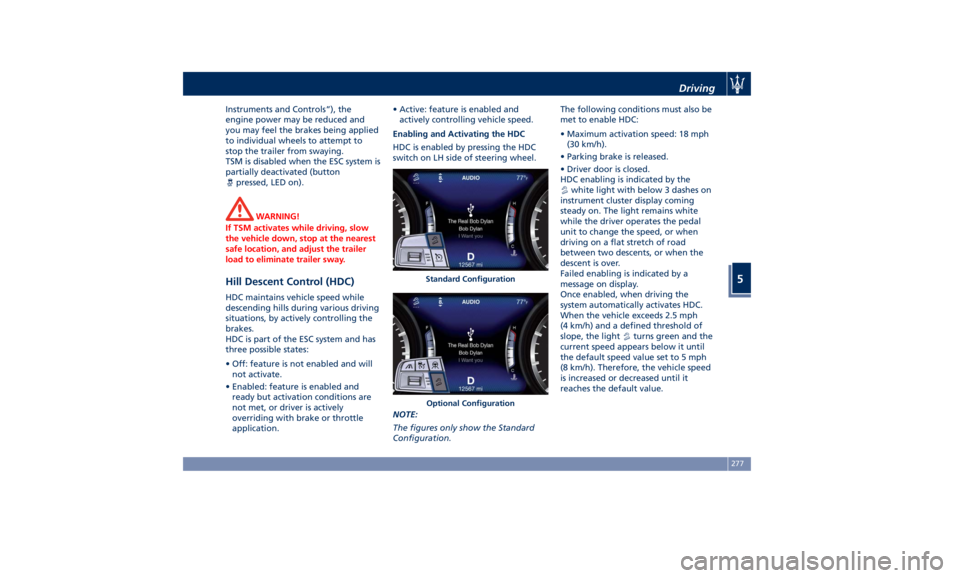
HDC is enabled by pressing the HDC
switch on LH side of steering wheel.
NOTE:
The figures only show the Standard
Configuration. The following conditions must also be
met to enable HDC:
• Maximum activation speed: 18 mph
(30 km/h).
• Parking brake is released.
• Driver door is closed.
HDC enabling is indicated by the
white light with below 3 dashes on
instrument cluster display coming
steady on. The light remains white
while the driver operates the pedal
unit to change the speed, or when
driving on a flat stretch of road
between two descents, or when the
descent is over.
Failed enabling is indicated by a
message on display.
Once enabled, when driving the
system automatically activates HDC.
When the vehicle exceeds 2.5 mph
(4 km/h) and a defined threshold of
slope, the light
turns green and the
current speed appears below it until
the default speed value set to 5 mph
(8 km/h). Therefore, the vehicle speed
is increased or decreased until it
reaches the default value.Standard Configuration
Optional Configuration Driving
5
277
Page 282 of 436
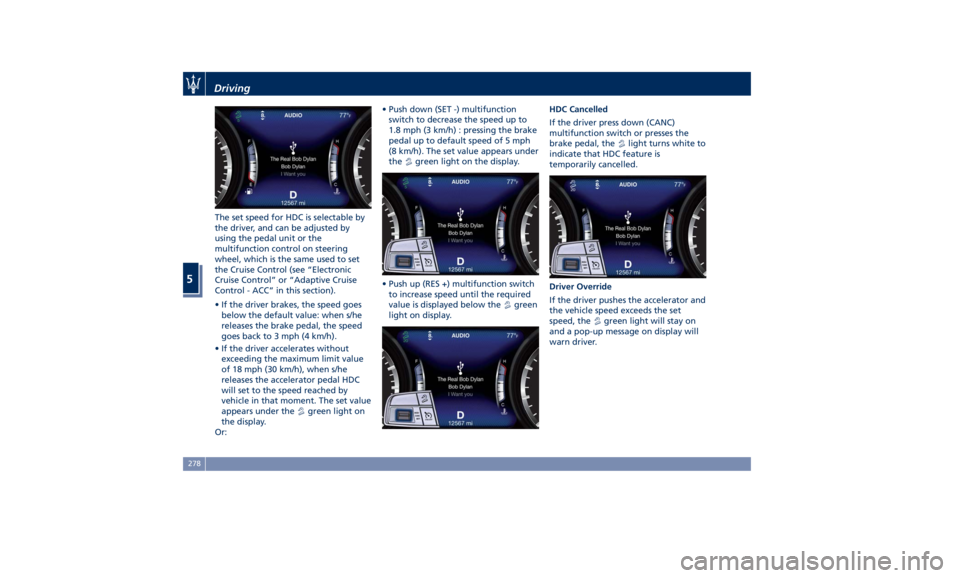
The set speed for HDC is selectable by
the driver, and can be adjusted by
using the pedal unit or the
multifunction control on steering
wheel, which is the same used to set
the Cruise Control (see “Electronic
Cruise Control” or “Adaptive Cruise
Control - ACC” in this section).
• If the driver brakes, the speed goes
below the default value: when s/he
releases the brake pedal, the speed
goes back to 3 mph (4 km/h).
• If the driver accelerates without
exceeding the maximum limit value
of 18 mph (30 km/h), when s/he
releases the accelerator pedal HDC
will set to the speed reached by
vehicle in that moment. The set value
appears under the
green light on
the display.
Or: • Push down (SET -) multifunction
switch to decrease the speed up to
1.8 mph (3 km/h) : pressing the brake
pedal up to default speed of 5 mph
(8 km/h). The set value appears under
the
green light on the display.
• Push up (RES +) multifunction switch
to increase speed until the required
value is displayed below the
green
light on display. HDC Cancelled
If the driver press down (CANC)
multifunction switch or presses the
brake pedal, the
light turns white to
indicate that HDC feature is
temporarily cancelled.
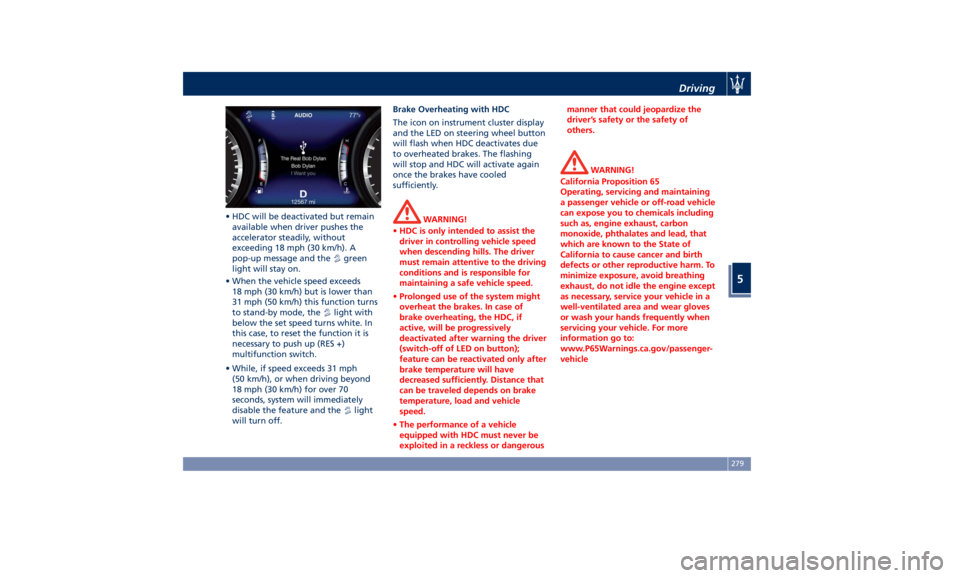
Driver Override
If the driver pushes the accelerator and
the vehicle speed exceeds the set
speed, the
green light will stay on
and a pop-up message on display will
warn driver.Driving
5
278
Page 283 of 436
• HDC will be deactivated but remain
available when driver pushes the
accelerator steadily, without
exceeding 18 mph (30 km/h). A
pop-up message and the
green
light will stay on.
• When the vehicle speed exceeds
18 mph (30 km/h) but is lower than
31 mph (50 km/h) this function turns
to stand-by mode, the
light with
below the set speed turns white. In
this case, to reset the function it is
necessary to push up (RES +)
multifunction switch.
• While, if speed exceeds 31 mph
(50 km/h), or when driving beyond
18 mph (30 km/h) for over 70
seconds, system will immediately
disable the feature and the
light
will turn off. Brake Overheating with HDC
The icon on instrument cluster display
and the LED on steering wheel button
will flash when HDC deactivates due
to overheated brakes. The flashing
will stop and HDC will activate again
once the brakes have cooled
sufficiently.
WARNING!
• HDC is only intended to assist the
driver in controlling vehicle speed
when descending hills. The driver
must remain attentive to the driving
conditions and is responsible for
maintaining a safe vehicle speed.
• Prolonged use of the system might
overheat the brakes. In case of
brake overheating, the HDC, if
active, will be progressively
deactivated after warning the driver
(switch-off of LED on button);
feature can be reactivated only after
brake temperature will have
decreased sufficiently. Distance that
can be traveled depends on brake
temperature, load and vehicle
speed.
• The performance of a vehicle
equipped with HDC must never be
exploited in a reckless or dangerous manner that could jeopardize the
driver’s safety or the safety of
others.
WARNING!
California Proposition 65
Operating, servicing and maintaining
a passenger vehicle or off-road vehicle
can expose you to chemicals including
such as, engine exhaust, carbon
monoxide, phthalates and lead, that
which are known to the State of
California to cause cancer and birth
defects or other reproductive harm. To
minimize exposure, avoid breathing
exhaust, do not idle the engine except
as necessary, service your vehicle in a
well-ventilated area and wear gloves
or wash your hands frequently when
servicing your vehicle. For more
information go to:
www.P65Warnings.ca.gov/passenger-
vehicleDriving
5
279
Page 287 of 436
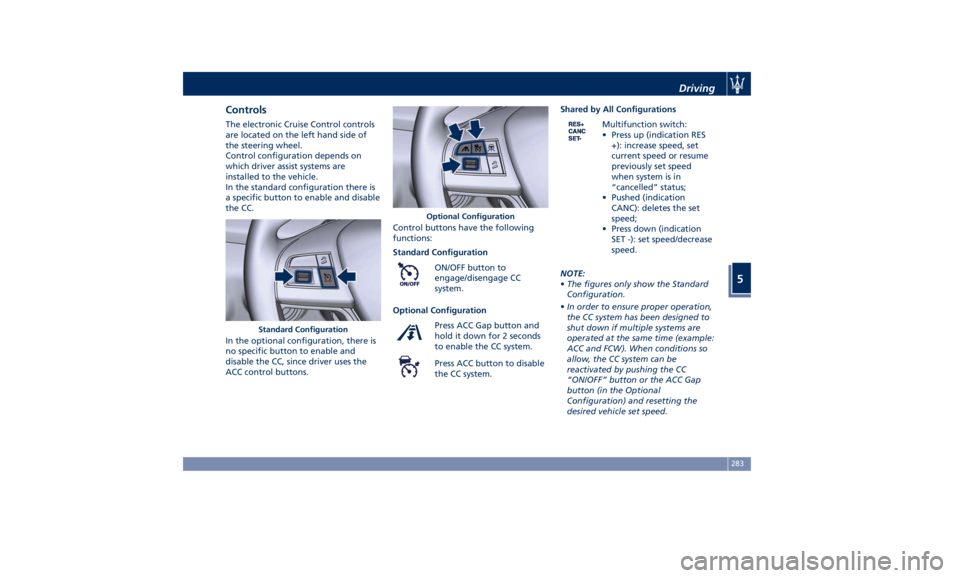
Controls The electronic Cruise Control controls
are located on the left hand side of
the steering wheel.
Control configuration depends on
which driver assist systems are
installed to the vehicle.
In the standard configuration there is
a specific button to enable and disable
the CC.
In the optional configuration, there is
no specific button to enable and
disable the CC, since driver uses the
ACC control buttons. Control buttons have the following
functions:
Standard Configuration
ON/OFF button to
engage/disengage CC
system.
Optional Configuration
Press ACC Gap button and
hold it down for 2 seconds
to enable the CC system.
Press ACC button to disable
the CC system. Shared by All Configurations
Multifunction switch:
• Press up (indication RES
+): increase speed, set
current speed or resume
previously set speed
when system is in
“cancelled” status;
• Pushed (indication
CANC): deletes the set
speed;
• Press down (indication
SET -): set speed/decrease
speed.
NOTE:
• The figures only show the Standard
Configuration.
• In order to ensure proper operation,
the CC system has been designed to
shut down if multiple systems are
operated at the same time (example:
ACC and FCW). When conditions so
allow, the CC system can be
reactivated by pushing the CC
“ON/OFF” button or the ACC Gap
button (in the Optional
Configuration) and resetting the
desired vehicle set speed.Standard Configuration Optional Configuration Driving
5
283
Page 292 of 436
Apart from the image at the center of
the display, CC, ACC, HDC, LKA and
HAS systems status is represented by
icons at the top left and right. These
icons remain displayed even when
exiting the “Driver Assist” screen.
The vehicle(s) and horizontal bars
represent the ACC status as ready
(white) or with sensed vehicle ahead
(green); the white, grey or yellow lines
represent the LKA and HAS systems.
The ACC screen can be displayed any
time driver changes system status or
settings. After 5 seconds of ACC
inactivity, the display goes back to last
screen.
ACC Controls and Activation
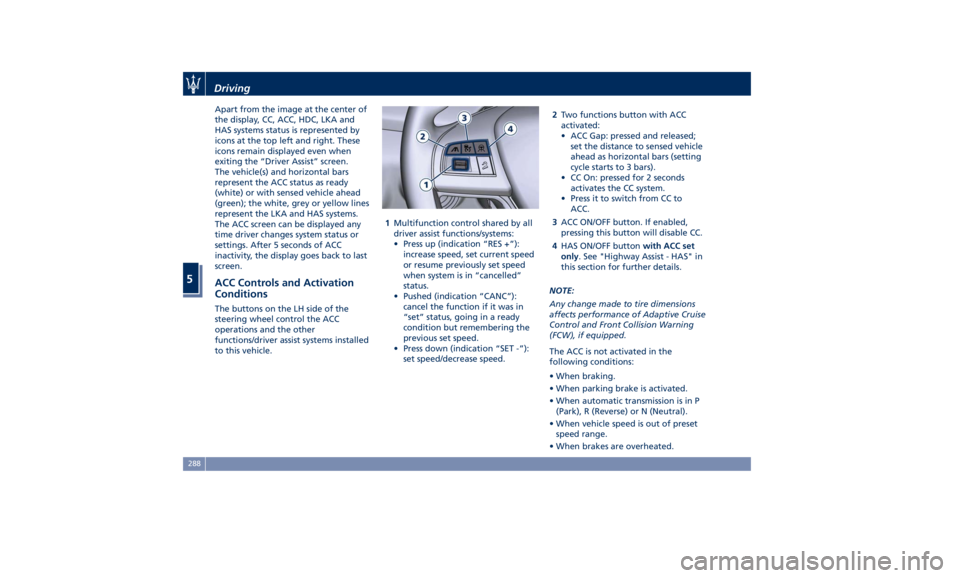
Conditions The buttons on the LH side of the
steering wheel control the ACC
operations and the other
functions/driver assist systems installed
to this vehicle. 1 Multifunction control shared by all
driver assist functions/systems:
• Press up (indication “RES +”):
increase speed, set current speed
or resume previously set speed
when system is in “cancelled”
status.
• Pushed (indication “CANC”):
cancel the function if it was in
“set” status, going in a ready
condition but remembering the
previous set speed.
• Press down (indication “SET -”):
set speed/decrease speed. 2 Two functions button with ACC
activated:
• ACC Gap: pressed and released;
set the distance to sensed vehicle
ahead as horizontal bars (setting
cycle starts to 3 bars).
• CC On: pressed for 2 seconds
activates the CC system.
• Press it to switch from CC to
ACC.
3 ACC ON/OFF button. If enabled,
pressing this button will disable CC.
4 HAS ON/OFF button with ACC set
only . See "Highway Assist - HAS" in
this section for further details.
NOTE:
Any change made to tire dimensions
affects performance of Adaptive Cruise
Control and Front Collision Warning
(FCW), if equipped.
The ACC is not activated in the
following conditions:
• When braking.
• When parking brake is activated.
• When automatic transmission is in P
(Park), R (Reverse) or N (Neutral).
• When vehicle speed is out of preset
speed range.
• When brakes are overheated.Driving
5
288