windshield MAZDA CX3 2023 User Guide
[x] Cancel search | Manufacturer: MAZDA, Model Year: 2023, Model line: CX3, Model: MAZDA CX3 2023Pages: 595, PDF Size: 32.7 MB
Page 211 of 595

Rear Window Defogger
▼Rear Window Defogger
The rear window defogger clears fog
from the rear window.
The ignition must be switched ON to
use the defogger.
Press the switch to turn on the rear
window defogger. The rear window
defogger operates for about 15
minutes and then turns
off
automatically.
The indicator light illuminates when
the defogger is operating.
To t u r n off the rear window defogger
before the 15 minutes has elapsed,
press the switch again.
1. Indicator light
CAUTION
Do not use sharp instruments or
window cleaners with abrasives to
clean the inside of the rear window
surface. They may damage the
defogger grid inside the window.
NOTE
This defogger is not designed for
melting snow. If there is an
accumulation of snow on the rear
window, remove it before using the
defogger.
The rear window defogger operation
time can be changed from 15
minutes to continuous operation.
When the operation time has been
switched to continuous operation,
by pressing the switch, the rear
window defogger will continue to
operate until the ignition is switched
OFF.
Refer to the Settings section in the
Mazda Connect Owner's Manual.
▼ Windshield Wiper De-icer*
The thermal filaments at the following
positions heat up and facilitate the
removal of snow accumulated on the
windshield.
When Driving
Switches and Controls
4-64*Some models.
CX-30_8KN2-EA-21L_Edition1_new
2021-9-15 19:39:56
Page 212 of 595

The windshield wiper de-icer operates
in conjunction with the rear window
defogger.
To turn on the windshield wiper
de-icer, switch the ignition ON and
press the rear window defogger switch
(page 4-64).
1. Indicator light
▼Mirror Defogger*
The mirror defoggers defrost the
outside mirrors.
The mirror defoggers operate in
conjunction with the rear window
defogger.
To turn on the mirror defoggers, switch
the ignition ON and press the rear
window defogger switch (page 4-64).
1. Indicator light
Horn
▼Horn
To sound the horn, press the
mark on the steering wheel.
When Driving
Switches and Controls
*Some models.4-65
CX-30_8KN2-EA-21L_Edition1_new
2021-9-15 19:39:56
Page 243 of 595

▼Camera and Sensors
Forward Sensing Camera (FSC)
The Forward Sensing Camera (FSC)
detects lane indications and recognizes
headlights, taillights and city lights
during nighttime driving. In addition, it
also detects the vehicle ahead,
pedestrians, or obstructions. The
following systems use the Forward
Sensing Camera (FSC).
High Beam Control system (HBC)Lane Departure Warning System
(LDWS)
Traffic Sign Recognition System (TSR)Distance & Speed Alert (DSA)Driver Attention Alert (DAA)Mazda Radar Cruise Control with
Stop & Go function (MRCC with
Stop & Go function)
Lane-keep Assist System (LAS)Tra ffi c Ja m A s s i s t ( TJ A )Smart Brake Support (SBS) forward
drive detection
The Forward Sensing Camera (FSC) is
installed at the top of the windshield
near the rearview mirror.
Refer to Forward Sensing Camera
(FSC) on page 4-197.
Front radar sensor
The front radar sensor detects radio
waves reflected off a vehicle ahead
sent from the radar sensor. The
following systems use the front radar
sensor.
Distance & Speed Alert (DSA)Mazda Radar Cruise Control with
Stop & Go function (MRCC with
Stop & Go function)
Traffic Jam Assist (TJA)Smart Brake Support (SBS) forward
drive detection
The front radar sensor is mounted
behind the radiator grille.
Refer to Front Radar Sensor on page
4-201.
Front side radar sensor
The front side radar sensors detects
radio waves reflected
off a vehicle
ahead sent from the radar sensor. The
following systems use the front side
radar sensor.
Front Cross Traffic Alert (FCTA)
The front side radar sensors are
installed inside the front bumper, one
on the left side and one on the right
side.
Refer to Front Side Radar Sensor on
page 4-203.
When Driving
i-ACTIVSENSE
4-96
CX-30_8KN2-EA-21L_Edition1_new 2021-9-15 19:39:56
Page 248 of 595

When there is insufficient darkness
such as at dawn or dusk.
When the luggage compartment is
loaded with heavy objects or the rear
passenger seats are occupied.
When visibility is reduced due to a
vehicle in front of you spraying water
from its tires onto your windshield.
▼To Operate the System
The HBC operates to switch the
headlights automatically between high
and low beams after the ignition is
switched ON and the headlight switch
is in the AUTO and low beam position.
The HBC determines that it is dark
based on the brightness of the
surrounding area. At the same time,
the HBC indicator light (green) in the
instrument cluster illuminates.
NOTE
Operation of the HBC function can be
disabled.
Refer to the Settings section in the
Mazda Connect Owner's Manual.
▼Manual Switching
Switching to low beams
Switch the headlight switch to the
position, or press the high beam
control switch.
The HBC indicator light (green) turns
off.
1. High beam control switch
If the HBC is turned off using the high
beam control switch, press the high
beam control switch again to turn the
HBC back on.
Switching to high beams
Shift the lever to the high beam
position.
The HBC indicator light (green) turns
off and the headlight high-beam
indicator light is illuminated.
When Driving
i-ACTIVSENSE
4-101
CX-30_8KN2-EA-21L_Edition1_new
2021-9-15 19:39:56
Page 250 of 595

The surrounding brightness suddenly
changes such as when entering or
exiting a tunnel.
Back-light is reflected off the road
surface.
The road surface is wet and shiny
after rain, or there are puddles on
the road.
The width of a lane is excessively
narrow.
The vehicle is driven on roads with
tight curves.
Heavy luggage is loaded in the
luggage compartment or on the rear
seat causing the vehicle to tilt.
The vehicle is driven through a fork in
the road or a junction.
The shade of a guardrail parallel to a
white (yellow) lane line is cast on the
road.
The illumination of the headlights is
weakened because of dirt or the
optical axis is deviated at night.
The road is excessively uneven.The vehicle is shaken after hitting a
road bump.
A vehicle in front of your vehicle is
running near a white (yellow) lane
line making it less visible.
The windshield is dirty or foggy.Strong light is directed from the front
of the vehicle (such as sunlight, or
headlights (high-beam) of
on-coming vehicles).
The vehicle is driven through an
intersection or a roundabout.
▼When the System Operates
When the ignition is switched ON, the
i-ACTIVSENSE status symbol (warning/
risk avoidance support system) (white)
turns on and the system goes on
standby.
NOTE
If the i-ACTIVSENSE status symbol
(warning/risk avoidance support
system) (white) does not turn on, the
system is canceled using the
i-ACTIVSENSE OFF switch or the
personalization feature.
Operation conditions
When all of the following conditions
are met, the i-ACTIVSENSE status
symbol (warning/risk avoidance
support system) on the
multi-information display changes
from white to green and the system
becomes operational.
The ignition is switched ON.The vehicle speed is about 64 km/h
(40 mph) or faster.
The system detects white (yellow)
lane lines.
NOTE
When the system does not detect a
white (yellow) lane line on one side
only, the system does not operate on
the side that is not being detected.
When Driving
i-ACTIVSENSE
4-103
CX-30_8KN2-EA-21L_Edition1_new
2021-9-15 19:39:56
Page 251 of 595

When temporarily canceling the
system
The LDWS goes on standby in the
following cases: The LDWS operation
is automatically restored when the
system's operation conditions are met.
The system cannot detect white
(yellow) lane lines.
The vehicle speed is less than about
56 km/h (35 mph).
The turn signal lever is operated.The accelerator pedal is depressed.The steering wheel is operated.The brake pedal is operated.
The function is temporarily stopped.
The LDWS stops functioning in the
following cases:
The temperature in the forward
sensing camera (FSC) is too high or
too low.
The windshield around the forward
sensing camera (FSC) is foggy.
The windshield around the forward
sensing camera (FSC) is blocked by
an obstruction, causing poor forward
visibility.
Strong light (such as sunlight, or
headlights (high-beam) of
on-coming vehicles) is directed at
the forward sensing camera (FSC).
System malfunction
If there is a problem with the system,
the i-ACTIVSENSE status symbol
(warning/risk avoidance support
system) (white) and the i-ACTIVSENSE
warning indication/warning light on
the multi-information display turns on
and a message is indicated.
Refer to i-ACTIVSENSE Status Symbol
(Warning/Risk Avoidance Support
System) on page 4-97.
▼ LDWS Warning
If the system determines that the
vehicle may deviate from its lane, a
warning (beep sound, steering wheel
vibration) is activated and the direction
in which the system determines that
the vehicle may deviate is indicated on
the multi-information display and the
active driving display.
Multi-information display
Active driving display
NOTE
The LDWS settings can be changed.
Refer to the Settings section in the
Mazda Connect Owner's Manual.
You may not be able to hear the
LDWS warning sound depending on
the surrounding conditions such as
outside noise.
If you set the LDWS to vibrate the
steering wheel, you may not feel the
vibrations depending on the road
surface conditions.
When Driving
i-ACTIVSENSE
4-104
CX-30_8KN2-EA-21L_Edition1_new
2021-9-15 19:39:56
Page 259 of 595
An object placed on the dashboard is reflected in the windshield and picked up
by the camera.
Heavy luggage is loaded in the luggage compartment or on the rear seat and the
vehicle is tilted.
The tire pressures are not adjusted to the specified pressure.Tires other than standard tires are equipped.The vehicle is driven on the ramp and surrounding area to or from a rest area or
a tollgate on a highway.
When surrounding brightness suddenly changes such as when entering or exiting
a tunnel.
The illumination of the headlights is weakened because of dirt or the optical axis
is deviated.
The windshield is dirty or foggy.The windshield and camera are fogged (water droplets).Strong light is directed at the front of the vehicle (such as backlight or high-beam
headlights of on-coming vehicles).
The vehicle is making a sharp turn.Strong light reflects off the road.A traffic sign is in a position which makes it difficult to reflect the light from the
vehicle's headlights, such as when the ve hicle is driven at night or in a tunnel.
The vehicle is driven under weather conditions such as rain, fog, or snow.The stored map data for the navigation system is not current.A traffic sign is obscured by mud or snow.A traffic sign is concealed by trees or a vehicle.A traffic sign is partially shaded.A traffic sign is bent or warped.A traffic sign is too low or too high.A traffic sign is too bright or too dark (including electronic traffic signs).A traffic sign is too big or too small.There is an object similar to the traffic sign being read (such as another traffic
sign or other signs resembling it).
The TSR can be set to invisible on the active driving display.
Refer to the Settings section in the Mazda Connect Owner's Manual.
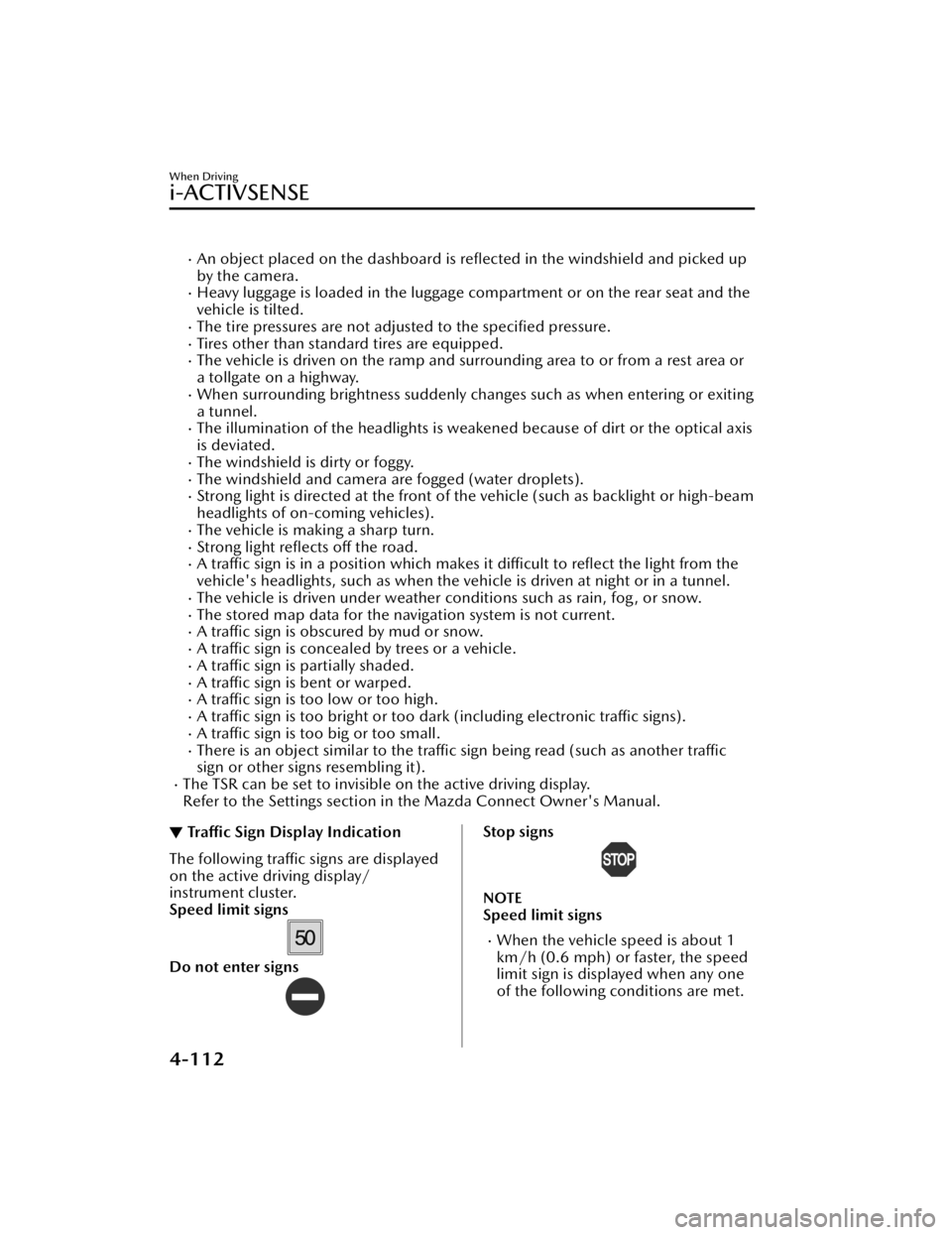
▼Traffic Sign Display Indication
The following traffic signs are displayed
on the active driving display/
instrument cluster.
Speed limit signs
Do not enter signs
Stop signs
NOTE
Speed limit signs
When the vehicle speed is about 1
km/h (0.6 mph) or faster, the speed
limit sign is displayed when any one
of the following conditions are met.
When Driving
i-ACTIVSENSE
4-112
CX-30_8KN2-EA-21L_Edition1_new
2021-9-15 19:39:56
Page 279 of 595

▼Setting the System
The MRCC with Stop & Go function syst
em operates when all of the following
conditions are met.
Vehicle speed is 0 km/h (0 mph) to 145 km/h (90 mph)The MRCC with Stop & Go function is turned on.The brake pedal is not depressed.The parking brake is released (Electric Parking Brake (EPB) indicator light is turned
off).
There is no problem with the DSC.All the doors are closed.The driver's seat belt is fastened.The selector lever is in the drive (D) position or manual (M) position (manual
mode).
NOTE
In the following cases, the MRCC with Stop & Go function system is canceled
when the vehicle is traveling at 30 km/h (20 mph) or less and “Mazda Radar
Cruise Control Disabled Under 30 km/h” is displayed in the multi-information
display.
The Forward Sensing Camera (FSC) cannot detect target objects (There is
problem with the Forward Sensing Came ra (FSC) or windshield is dirty).
There is a problem with the stop hold control function.There is a problem with the Electric Parking Brake (EPB).It may not be possible to set the MRCC wi th Stop & Go function system directly
after starting the engine, while the DSC operation is being checked.
Turning on the system
1. CANCEL switch
2. RES switch
3. MRCC switch
When the MRCC switch is pressed once, the MRCC with Stop & Go function system
turns on, and the MRCC with Stop & Go function standby indication (white) turns
When Driving
i-ACTIVSENSE
4-132
CX-30_8KN2-EA-21L_Edition1_new 2021-9-15 19:39:56
Page 287 of 595

If there is a structure on the road or
an object (such as a monorail) at a
low height off the ground in front of
the vehicle, the system may operate.
Therefore, do not use the TJA.
Do not use the TJA under conditions
in which close proximity warnings
are frequently activated.
If it is necessary to accelerate for a
lane change or the vehicle ahead
brakes suddenly causing you to close
in on the vehicle rapidly, accelerate
using the accelerator pedal or
decelerate using the brake pedal
depending on the conditions.
While the TJA is in use, any intended
engine braking does not occur even
if you shift the selector lever. If
deceleration is required, lower the
vehicle speed setting or depress the
brake pedal.
While braking by the TJA control is
operating, you might hear an
operation sound, however, this does
not indicate a problem.
The brake lights turn on while
braking by the TJA control is
operating, however, they may not
turn on while the vehicle is on a
down slope at the set vehicle speed
or traveling at a constant speed and
following a vehicle ahead.
Under the following conditions, the
TJA may not be able to detect white
(yellow) lines or vehicles ahead
correctly and the TJA may not
operate normally.
The forward sensing camera (FSC)
cannot recognize the area in front
of the vehicle due to soiling or fog.
The white (yellow) lane lines are
less visible because of dirt or paintflaking.
White (yellow) lane lines or
vehicles ahead are less visible
because of bad weather (rain, fog ,
or snow).
The vehicle is driven on a
temporary lane or section with a
closed lane resulting from
construction where there might be
multiple white (yellow) lane lines,
or they are interrupted.
The camera picks up an obscure
line, such as a temporary line being
used for construction, or because
of shade, unmelted snow, or
grooves filled with water.
The road surface is wet and shiny
after rain, or there are puddles on
the road.
Heavy luggage is loaded in the
luggage compartment or on the
rear seat causing the vehicle to tilt.
A vehicle in front of your vehicle is
running near a white (yellow) lane
line making it less visible.
The windshield is dirty or foggy.The vehicle is driven through an
intersection, a junction, or a fork in
the road.
While white (yellow) lane lines
cannot be detected due to road or
weather conditions.
The surrounding brightness
suddenly changes such as when
entering or exiting a tunnel.
The illumination of the headlights
is weakened because of dirt or the
optical axis is deviated at night.
Back-light is reflected off the road
surface or the road surface is wet
and shiny after rain.
The shade of a guardrail parallel to
a white (yellow) lane line is cast on
the road.
The width of a lane is excessively
narrow or wide.
The road is excessively uneven.
When Driving
i-ACTIVSENSE
4-140
CX-30_8KN2-EA-21L_Edition1_new 2021-9-15 19:39:56
Page 296 of 595

Steering assist function
If any of the following conditions occurs, the steering assist function is temporarily
canceled.
The headway control function is canceled.White (yellow) lane lines cannot be detected or a vehicle ahead cannot be
recognized.
Your vehicle speed is more than about 64 km/h (40 mph).The accelerator pedal is operated.The turn signal lever is operated.The vehicle is being driven on a sharp curve.The width of a lane is excessively narrow or wide.The vehicle crosses a lane line.The driver takes his/her hands off the steering wheel.The steering wheel is operated abruptly.There is a problem with the system.The temperature in the Forward Sensing Camera (FSC) is too high or too low.The windshield around the Forward Sensing Camera (FSC) is foggy.The windshield around the Forward Sensing Camera (FSC) is blocked by an
obstruction, causing poor forward visibility.
NOTE
If you take your hands off the steering wheel (not holding the steering wheel), the
warning sound is activated and an alert is indicated on the multi-information
display and the active driving display.
Multi-information display
Active driving display
When Driving
i-ACTIVSENSE
4-149
CX-30_8KN2-EA-21L_Edition1_new 2021-9-15 19:39:56