parking MAZDA CX5 2023 Service Manual
[x] Cancel search | Manufacturer: MAZDA, Model Year: 2023, Model line: CX5, Model: MAZDA CX5 2023Pages: 583, PDF Size: 32.58 MB
Page 287 of 583

If the steering wheel is held lightly, or depending on the road conditions, the
system determines that you have released the steering wheel even if you are
holding it, and an alert is indicated on the multi-information display and the active
driving display.
To resume operation
If the TJA is temporarily canceled, it will resume operation at the previously set speed
by pressing the RES switch after all of the operation conditions have been met.
NOTE
If the set speed is not indicated on the di splay, the system does not operate even if
the RES switch is pressed.
After the operation, the steering assist operation may not operate for a period of 5
seconds at the most until the lane lines are detected or a vehicle ahead is
recognized.
Tu r n i n g off
When the TJA switch is pressed while the TJA is operating, the TJA turns off.
▼Stop Hold Control
While in headway control using the
TJA, your vehicle will stop when a
vehicle ahead stops. When the vehicle
is stopped and the stop hold control
operates, the TJA indicator light turns
on.
NOTE
Even if the TJA is temporarily
canceled during stop hold control,
the vehicle is held in its stopped
position.
The parking brake is automatically
applied and the vehicle is held in its
stopped position when 10 minutes
or longer have passed since the stop
hold control operated. When this
occurs, the TJA is temporarily
canceled.
The brake lights turn on during stop
hold control.
To resume driving
After the vehicle ahead starts moving
while your vehicle is stopped under
stop hold control, press the RES switch
or depress the accelerator pedal to
cancel the stop hold control and start
driving.
When Driving
i-ACTIVSENSE
4-136
CX-50_8KB8-EA-22A_Edition2_new 2022-1-6 14:55:18
Page 300 of 583

NOTE
When any of the following
conditions is met, the forward
detection function may not operate.
If there is the possibility of hitting
only a part of a vehicle or
obstruction ahead.
You are driving your vehicle at the
same speed as the vehicle ahead.
When the driver deliberately
performs driving operations
(accelerator operation, steering
wheel operation).
The accelerator pedal is depressed
abruptly.
The brake pedal is depressed.The steering wheel is being
operated.
The selector lever is being shifted.The turn signal lever is being
operated.
Warnings and messages, such as a
dirty windshield, related to the
Forward Sensing Camera (FSC) or
front radar sensor are being
displayed on the multi-information
display.
When any of the following
conditions is met, the forward
detection function may operate.
There is an object in the road at
the entrance to a curve (including
guardrails and snow banks).
Passing an approaching vehicle
while rounding a curve.
When crossing a narrow bridge,
going under a low overhang, or
passing through a narrow gate, a
car washing machine, or tunnel.
When passing through a toll gate.When entering an underground
parking area.
There is a metal object, bump, or a
protruding object on the road.
If you suddenly come close to a
vehicle ahead.
An animal, wall, or standing tree is
detected.
While the system is operating, the
driver is notified by the
multi-information display and the
active driving display.
If a malfunction is detected or the
system temporarily stops the
function due to dirt on the sensors or
cameras, the i-ACTIVSENSE warning
light turns on and a message is
displayed on the multi-information
display.
If the system performs brake control
and the vehicle is stopped, the
system will continue to hold the
brakes for a brief time unless there is
an operation performed by the
driver.
Collision warning
If there is the possibility of your vehicle
colliding with a target object at the
front, the warning sound is activated
continuously and a warning is
displayed on the multi-information
display and the active driving display.
When Driving
i-ACTIVSENSE
4-149
CX-50_8KB8-EA-22A_Edition2_new 2022-1-6 14:55:18
Page 303 of 583

The vehicle speed is about 2 km/h
(2 mph) to 8 km/h (4 mph).
There is no problem with the DSC.The Electric Parking Brake (EPB) is
not operating.
NOTE
When any of the following
conditions is met, the rearward
detection function may not operate.
Directly after the engine starts.The height of the obstruction is
low such as low walls or trucks
with low loading platforms.
The height of the obstruction is
high such as trucks with high
loading platforms.
The obstruction is not as large as a
vehicle or wall.
The obstruction is thin such as a
signpost.
The surface of the obstruction is
not pointed vertically relative to
your vehicle.
The obstruction is soft such as a
hanging curtain or snow stuck to a
vehicle.
The obstruction is shaped
irregularly.
The obstruction is extremely close.When any of the following
conditions is met, the rearward
detection function may not operate
normally.
Snow, ice, or mud adheres to the
area around a rear ultrasonic
sensor.
The vehicle posture is unstable due
to sudden operation of the steering
wheel, accelerator pedal, or brake
pedal.
There is another obstruction near
one obstruction.
During inclement weather such as
rain, fog , and snow.
High or low humidity.High or low temperatures.Strong winds.The path of travel is not flat.Heavy luggage is loaded in the
luggage compartment or on the
rear seat and the vehicle is tilted.
Objects such as a wireless antenna,
fog light, or illuminated license
plate is installed near a rear
ultrasonic sensor.
The orientation of a rear ultrasonic
sensor has deviated for reasons
such as a collision.
The vehicle is affected by other
sound waves such as the horn,
engine noise, or rear ultrasonic
sensor of another vehicle.
When any of the following
conditions is met, the rearward
detection function may operate.
Reversing towards a steep
ascending slope.
There are grating, wheel blocks, a
road curb, or a bump.
There is a hanging curtain or
railroad crossing gate.
Reversing near objects such as
foliage, barriers, vehicles, walls, or
fences.
The vehicle is driven on rough
roads such as in areas where there
is grass and foliage or off-road.
When reversing through low gates,
narrow gates, car washing
machines, tunnels, or into a
mechanical parking garage.
A towing bar is installed or a trailer
is connected.
If the system performs brake control
and the vehicle is stopped, the
system will continue to hold the
brakes for a brief time unless there is
an operation performed by the
driver.
When Driving
i-ACTIVSENSE
4-152
CX-50_8KB8-EA-22A_Edition2_new2022-1-6 14:55:18
Page 307 of 583

360° View Monitor*
▼360° View Monitor
The 360°View Monitor consists of the
following functions
which assist the
driver in checking the area surrounding
the vehicle using various indications in
the center display and a warning sound
while the vehicle is being driven at low
speeds or while parking.
To p v i e w
The top view displays an image of
the vehicle from directly above on
the center display by combining the
images taken from the 4 cameras set
on all sides of the vehicle. The top
view displays on the right side of the
screen when the front view or rear
view screen is being displayed. The
top view assists the driver in
checking the area surrounding the
vehicle when the vehicle is moving
forward or in reverse.
Front view/front wide view
The image from the front of the
vehicle is displayed on the center
display.
The view from the front assists the
driver in checking the front of the
vehicle by displaying guide lines on
the displayed image taken from the
front of the vehicle.
Side view
The images taken from the front left
and right sides of the vehicle are
displayed on the center display.
The side view assists the driver in
checking the front sides of the
vehicle by displaying guide lines on
the displayed image taken from the
front left and right sides of the
vehicle.
Rear view/rear wide view
The image from the rear of the
vehicle is displayed on the center
display.
The image from the rear assists the
driver in checking the rear of the
vehicle by displaying guide lines on
the displayed image taken from the
rear of the vehicle.
Parking sensor
If there are any obstructions near the
vehicle while the top view/side view
is displayed, an obstruction
detection indication turns on around
the bumper in the center display.
The parking sensors use ultrasonic
sensors to detect obstructions
around the vehicle when the vehicle
is driven at low speeds, such as
during garage or parallel parking,
and notifies the driver of the
approximate distance from the
vehicle to the surrounding
obstruction using sound and an
obstruction detection indication.
Refer to Parking Sensor System on
page 4-215.
Rear Cross Traffic Alert (RCTA)
If there is the possibility of a collision
with an approaching vehicle while
the rear view/rear wide view is
displayed, a warning is displayed on
the center display.
The Rear Cross Traffic Alert (RCTA)
uses rear side radar sensor to detect
vehicles approaching from the rear
left and right sides of the vehicle,
and it assists the driver in checking
the rear of the vehicle while reversing
by flashing the Blind Spot Monitoring
(BSM) warning lights and activating
the warning sound.
Refer to Rear Cross Traffic Alert
(RCTA) on page 4-113.
When Driving
i-ACTIVSENSE
4-156*Some models.
CX-50_8KB8-EA-22A_Edition2_new 2022-1-6 14:55:18
Page 309 of 583

Do not modify the vehicle
suspensions or lower/raise the
vehicle body, or both.
Always use tires of the specified
type and size for the front and rear
wheels. Consult an Authorized
Mazda Dealer for tire replacement.
When the display is cold, images
may leave trails or the screen might
be darker than usual, making it
difficult to check the vehicle
surroundings. Always confirm the
safety at the front and around the
vehicle visually when driving.
The method for parking/stopping
the vehicle using the 360°View
Monitor differs depending on the
road circumstances/conditions and
the vehicle conditions. When and
how much you turn the steering
wheel will differ depending on the
situation, therefore always check the
vehicle surroundings directly with
your eyes while using the system.
Also, before using the system, always
make sure that the vehicle can be
parked/stopped in the parking/
stopping space.
NOTE
If there are water droplets, snow, or
mud on the camera lens, wipe it off
using a soft cloth. If the camera lens
is especially dirty, wash it off with
mild detergent.
If the camera lens is touched or there
is any dirt on it, it could affect the
screen image. Wipe the lens using a
soft cloth.
If the area where the camera is
installed, such as the front bumper,
liftgate or door mirrors, has been
damaged in a vehicle accident, the
camera (position, installation angle)
may have shifted. Always consult an
Authorized Mazda Dealer to have
the vehicle inspected.
If the camera is subjected to
excessive changes in temperature
such as by pouring hot water on the
camera during cold weather, the
360°View Monitor may not operate
normally.
If the vehicle is driven during cold
temperatures and the camera
temperature decreases, the top view
and the side view may become
u n c l ea r. H o we ve r, t h i s d o e s n o t
indicate a problem. If the vehicle is
stopped for a while and the camera
temperature increases, the top view
and the side view will return to the
normal condition.
If the battery voltage is low, the
screen might be temporarily difficult
to view, however, this does not
indicate a problem.
The 360°View Monitor has
limitations. Objects under the
bumper or near both ends of the
bumper cannot be displayed.
Obstructions above the upper image
range of the camera are not
displayed.
Under the following conditions, the
screen might be difficult to view,
however this does not indicate a
problem.
The temperature near the lens is
high/low.
Rainy conditions, water droplets
on the camera, or high humidity.
Mud or foreign matter near the
camera.
When Driving
i-ACTIVSENSE
4-158
CX-50_8KB8-EA-22A_Edition2_new 2022-1-6 14:55:18
Page 318 of 583
NOTE
The top view/rear view and top view/rear wide view automatically display
whether or not the 360°View Monitor switch is turned on or off when shifting the
selector lever to R position.
The top view/rear view and top view/rear wide view displays the previously
displayed screen.
The setting can be changed to display the top view/front view when shifting from
reverse to a forward gear without operating the 360°View Monitor switch to check
the front of the vehicle while parallel parking.
Refer to the Settings section in the Mazda Connect Owner's Manual.
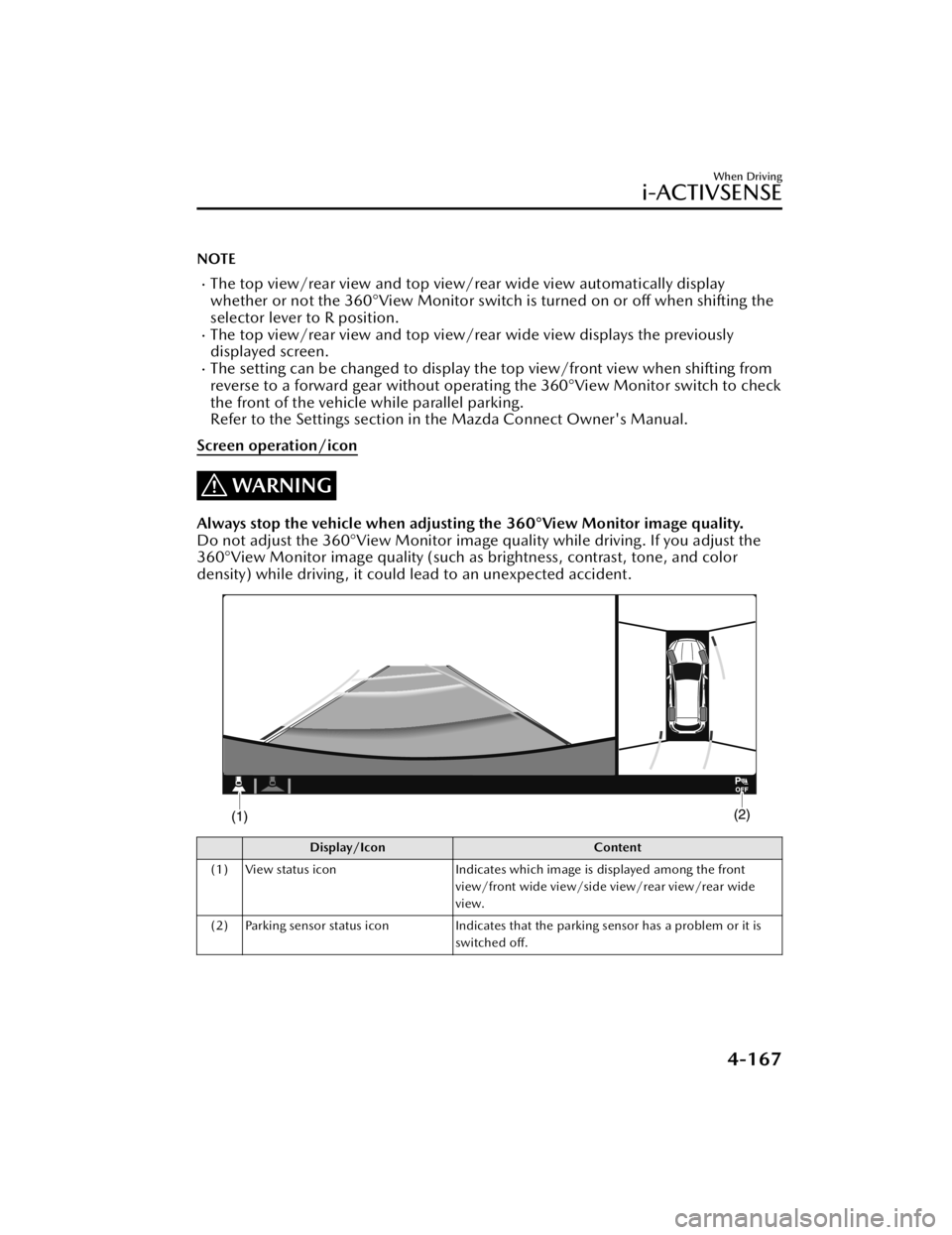
Screen operation/icon
WARNING
Always stop the vehicle when adjusting the 360°View Monitor image quality.
Do not adjust the 360°View Monitor image quality while driving. If you adjust the
360°View Monitor image quality (such as brightness, contrast, tone, and color
density) while driving, it could lead to an unexpected accident.
Display/Icon Content
(1) View status icon Indicates which image is displayed among the front
view/front wide view/side view/rear view/rear wide
view.
(2) Parking sensor status icon Indicates that the parking sensor has a problem or it is
switched off.
When Driving
i-ACTIVSENSE
4-167
CX-50_8KB8-EA-22A_Edition2_new 2022-1-6 14:55:18
Page 319 of 583
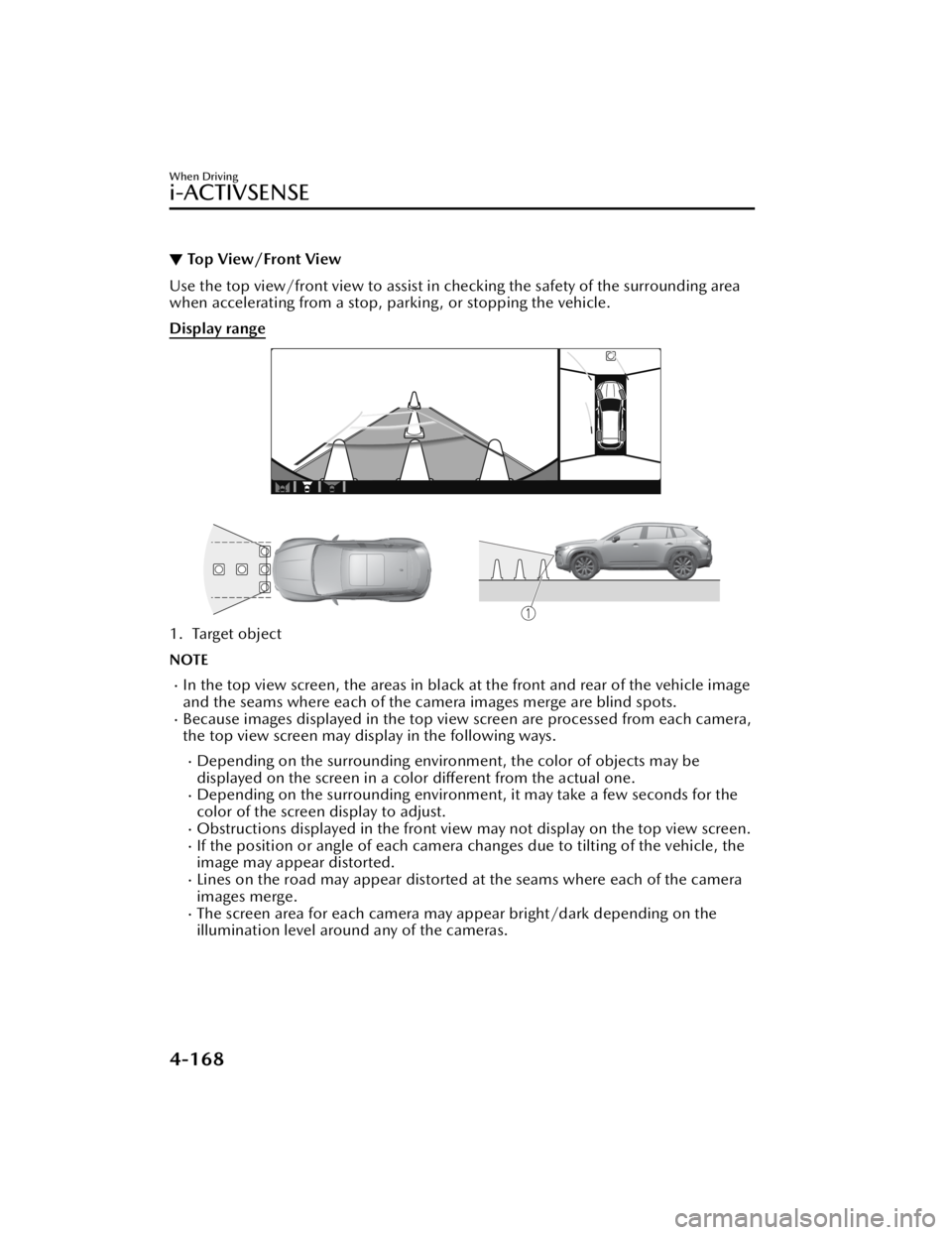
▼Top View/Front View
Use the top view/front view to assist in checking the safety of the surrounding area
when accelerating from a stop, parking, or stopping the vehicle.
Display range
1. Target object
NOTE
In the top view screen, the areas in black at the front and rear of the vehicle image
and the seams where each of the camera images merge are blind spots.
Because images displayed in the top view screen are processed from each camera,
the top view screen may display in the following ways.
Depending on the surrounding enviro
nment, the color of objects may be
displayed on the screen in a color different from the actual one.
Depending on the surrounding environment, it may take a few seconds for the
color of the screen display to adjust.
Obstructions displayed in the front view
may not display on the top view screen.If the position or angle of each camera changes due to tilting of the vehicle, the
image may appear distorted.
Lines on the road may appear distorted at the seams where each of the camera
images merge.
The screen area for each camera may appear bright/dark depending on the
illumination level around any of the cameras.
When Driving
i-ACTIVSENSE
4-168
CX-50_8KB8-EA-22A_Edition2_new 2022-1-6 14:55:18
Page 320 of 583

Viewing the screen
Display/IconContent
(1) Tire icon Indicates the tire direction. Moves in conjunction with
the steering wheel operation.
(2) Projected vehicle path lines (yellow & red) Indicates the approximate projected path of the vehicle.
Moves in conjunction with the steering wheel operation.
a) Indicates the path where the edge of the front bumper
is expected to travel.
b) Indicates the path where the inner side of the vehicle
is expected to travel.
(3) Extended vehicle width lines (blue) Indicates the approximate width of the vehicle.
(4) Projected vehicle path distance guide lines (yellow & red) Indicates the distance (from front end of bumper) in
front of the vehicle.
The red line indicates the point about 0.5 m (19 in)
from the front end of the bumper.
The yellow lines indicate the points about 1.0 m (39
in) and 2.0 m (78 in) from the front end of the bump-
er.
CAUTION
The parking sensor detection range has limitations. For example, obstructions
closing in from the side and objects shor
t in height may not be detected. Always
confirm the safety around the vehicle visually when driving.
For details, refer to the parking sensor ob struction detection indication and warning
sound.
Refer to Parking Sensor System on page 4-215.
When Driving
i-ACTIVSENSE
4-169
CX-50_8KB8-EA-22A_Edition2_new 2022-1-6 14:55:18
Page 324 of 583

▼Side View
Use the side view to assist in checking the safety of the surrounding area when
accelerating from a stop, parking , or stopping the vehicle.
Display range
1. Target object
When Driving
i-ACTIVSENSE
4-173
CX-50_8KB8-EA-22A_Edition2_new
2022-1-6 14:55:18
Page 326 of 583

How to use the projected vehicle path line function
1. (Screen display)
2. (Actual condition)
Make sure that there are no obstructions within the projected vehicle path lines.
Turn the steering wheel so that the projected vehicle path lines travel inside of the
obstruction (A), and drive the vehicle forward until it passes the obstruction.
If the projected vehicle path lines are on an obstruction (B) or outside of the
obstruction (C), the vehicle may contact the obstruction when turning the vehicle
sharply.
CAUTION
The parking sensor detection range has limitations. For example, obstructions
closing in from the side and objects short in height may not be detected. Always
confirm the safety around the vehicle visually when driving.
For details, refer to the parking sensor obstruction detection indication and
warning sound.
Refer to Parking Sensor System on page 4-215.
Do not turn the steering wheel any mo re until the vehicle has passed the
obstruction, even if the obstruction is no t visible on the side view image. If the
steering wheel is turned even more, the vehicle may contact the obstruction if it is
turned sharply.
When Driving
i-ACTIVSENSE
4-175
CX-50_8KB8-EA-22A_Edition2_new 2022-1-6 14:55:18