parking MAZDA CX5 2023 Workshop Manual
[x] Cancel search | Manufacturer: MAZDA, Model Year: 2023, Model line: CX5, Model: MAZDA CX5 2023Pages: 583, PDF Size: 32.58 MB
Page 327 of 583

NOTE
Because there might be a difference between the image displayed on the screen
and the actual conditions, always check the safety of the surrounding area using
the mirrors and directly with your eyes when driving.
Even though the object displayed on the screen, such as a road curb or a division
line of a parking space, and the vehicle parallel guide lines appear parallel, they
may not actually be parallel.
▼ Top View/Rear View
Use the top view/rear view to assist in checking the safety of the surrounding area
when accelerating from a stop, parking, or stopping the vehicle.
Range of displayed screen image
1. Target object
NOTE
In the top view screen, the areas in black at the front and rear of the vehicle image
and the seams where each of the camera images merge are blind spots.
Because images displayed in the top view screen are processed from each camera,
the top view screen may display in the following ways.
Depending on the surrounding enviro
nment, the color of objects may be
displayed on the screen in a color different from the actual one.
Depending on the surrounding environment, it may take a few seconds for the
color of the screen display to adjust.
Obstructions displayed in the rear view may not display on the top view screen.
When Driving
i-ACTIVSENSE
4-176
CX-50_8KB8-EA-22A_Edition2_new 2022-1-6 14:55:18
Page 329 of 583

How to use the projected vehicle path line function
CAUTION
The front of the vehicle swings out wide when turning the steering wheel while
reversing. Maintain sufficient distance between the vehicle and an obstruction.
The parking sensor detection range has limitations. For example, obstructions
closing in from the side and objects short in height may not be detected. Always
confirm the safety around the vehicle visually when driving.
For details, refer to the parking sens or obstruction detection indication and
warning sound.
Refer to Parking Sensor System on page 4-215.
NOTE
Because there might be a difference between the image displayed on the screen,
such as indicated in the following, and the actual conditions when parking, always
check the safety at the rear of the vehicle and the surrounding area directly with
your eyes.
Even though the back end of the park ing space (or garage) displayed on the
screen and distance guide lines appear parallel, they may not actually be
parallel.
When parking in a space with a division line on only one side of the parking
space, even though the division line and the vehicle width guide line appear
parallel, they may not actually be parallel.
The following shows an example of vehicle parking with the steering wheel turned
to the left while backing up the vehicle. When backing into a parking space from
the opposite direction, the st eering operation is reversed.
When Driving
i-ACTIVSENSE
4-178
CX-50_8KB8-EA-22A_Edition2_new 2022-1-6 14:55:18
Page 330 of 583

1. Back the vehicle into the parking space by turning the steering wheel so that thevehicle enters the center of the parking space.
1. (Screen display)
2. (Actual condition)
2. After the vehicle starts entering the parking space, stop and adjust the steering wheel so that the distance between the vehicle width lines and the sides of the
parking space on the left and right are roughly equal, and then continue backing
up slowly.
3. Once the vehicle width lines and the sides of the parking space on the left and right are parallel, straighten the wheels and back the vehicle slowly into the
parking space. Continue checking the vehicle's surroundings and then stop the
When Driving
i-ACTIVSENSE
4-179
CX-50_8KB8-EA-22A_Edition2_new 2022-1-6 14:55:18
Page 331 of 583

vehicle in the best possible position. (If the parking space has division lines,
check whether the vehicle width guide lines are parallel to them.)
1. (Screen display)
2. (Actual condition)
When Driving
i-ACTIVSENSE
4-180
CX-50_8KB8-EA-22A_Edition2_new 2022-1-6 14:55:18
Page 332 of 583

▼Top View/Rear Wide View
Use the top view/rear wide view to assist in checking the safety of the surrounding
area when accelerating from a stop, parking , or stopping the vehicle.
Range of displayed screen image
1. Target object
NOTE
In the top view screen, the areas in black
at the front and rear of the vehicle image
and the seams where each of the camera images merge are blind spots.
Because images displayed in the top view screen are processed from each camera,
the top view screen may display in the following ways.
Depending on the surrounding environment, the color of objects may be
displayed on the screen in a co lor different from the actual one.
Depending on the surrounding environment, it may take a few seconds for the
color of the screen display to adjust.
Obstructions displayed in the front view may not display on the top view screen.If the position or angle of each camera changes due to tilting of the vehicle, the
image may appear distorted.
Lines on the road may appear distorted at the seams where each of the camera
images merge.
The screen area for each camera may appear bright/dark depending on the
illumination level around any of the cameras.
When Driving
i-ACTIVSENSE
4-181
CX-50_8KB8-EA-22A_Edition2_new 2022-1-6 14:55:18
Page 342 of 583

The height of the vehicle ahead is
low.
You drive your vehicle at the same
speed as the vehicle ahead.
Headlights are not turned on
during the night or when going
through a tunnel.
In the following cases, the Forward
Sensing Camera (FSC) may not be
able to detect target objects
correctly.
Under bad weather condition,
such as rain, fog and snow.
The window washer is being used
or the windshield wipers are not
used when it's raining.
Ice, fog , snow, frost, rainfall, dirt,
or foreign matter such as a plastic
bag is stuck on the windshield.
Trucks with low loading platforms
and vehicles with an extremely low
or high profile.
When driving next to walls with no
patterning (including fences and
longitudinally striped walls).
The taillights of the vehicle ahead
are turned off.
A vehicle is outside the
illumination range of the
headlights.
The vehicle is making a sharp turn,
or ascending or descending a steep
slope.
Entering or exiting a tunnel.Heavy luggage is loaded causing
the vehicle to tilt.
Strong light is shone at the front of
the vehicle (back light or
high-beam light from on-coming
vehicles).
There are many light emitters on
the vehicle ahead.
When the vehicle ahead is not
equipped with taillights or the
taillights are turned off at
nighttime.
Elongated luggage or cargo is
loaded onto installed roof rails and
covers the Forward Sensing
Camera (FSC).
Exhaust gas from the vehicle in
front, sand, snow, and water vapor
rising from manholes and grating,
and water splashed into the air.
When towing a malfunctioning
vehicle.
The vehicle is driven with tires
having significantly different wear.
The vehicle is driven on down
slopes or bumpy roads.
There are water puddles on the
road.
The surroundings are dark such as
during the night, early evening , or
early morning , or in a tunnel or
indoor parking lot.
The illumination brightness of the
headlights is reduced or the
headlight illumination is weakened
due to dirt or a deviated optical
axis.
The target object enters the blind
spot of the Forward Sensing
Camera (FSC).
A person or object bursts onto the
road from the shoulder or cuts
right in front of you.
You change lanes and approach a
vehicle ahead.
When driving extremely close to
the target object.
Tire chains or a temporary spare
tire is installed.
The vehicle ahead has a special
shape. For example, a vehicle
towing a trailer house or a boat, or
a vehicle carrier carrying a vehicle
with its front pointed rearward.
When Driving
i-ACTIVSENSE
4-191
CX-50_8KB8-EA-22A_Edition2_new2022-1-6 14:55:18
Page 344 of 583
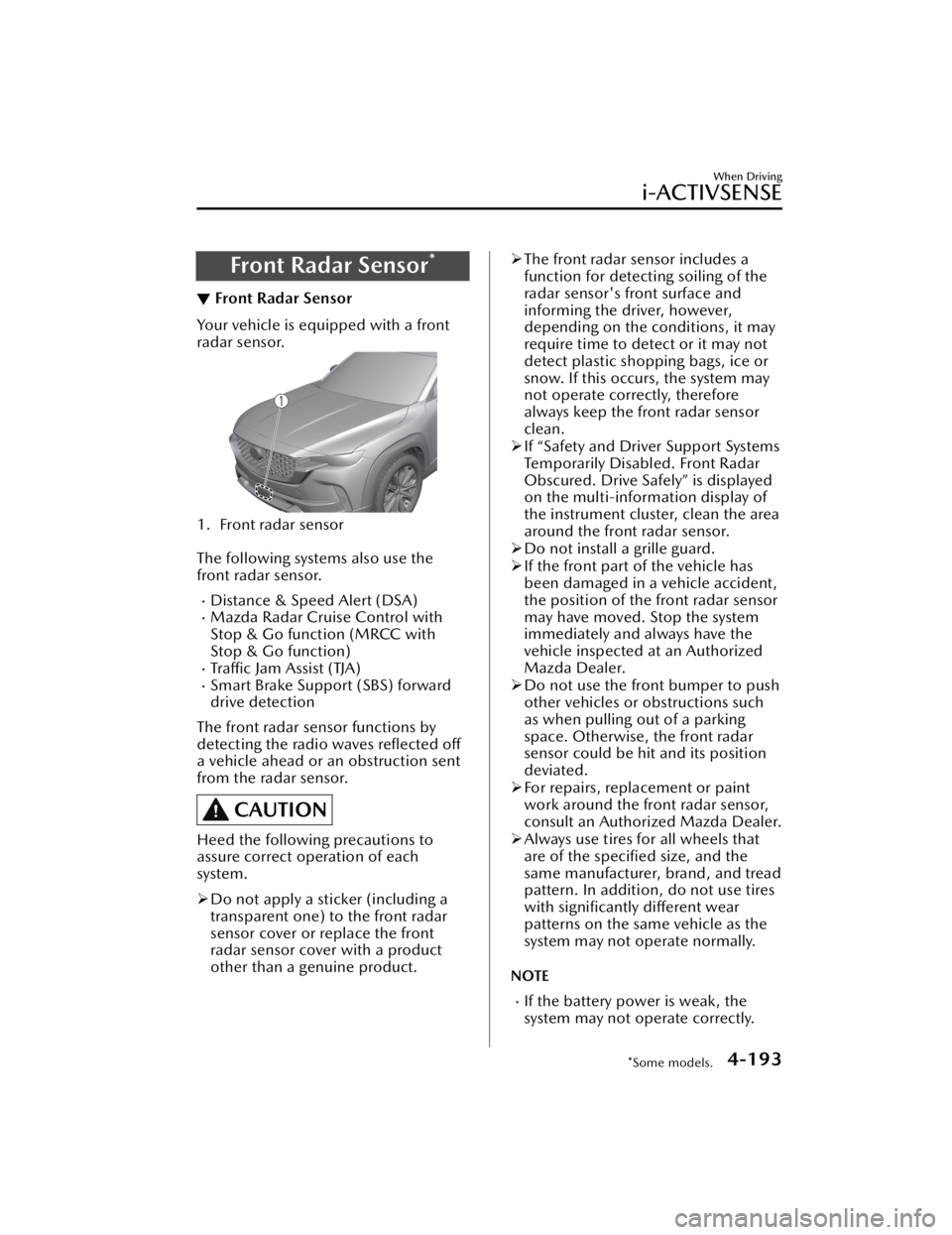
Front Radar Sensor*
▼Front Radar Sensor
Your vehicle is equipped with a front
radar sensor.
1. Front radar sensor
The following systems also use the
front radar sensor.
Distance & Speed Alert (DSA)Mazda Radar Cruise Control with
Stop & Go function (MRCC with
Stop & Go function)
Tra ffi c
Jam Assist (TJA)Smart Brake Support (SBS) forward
drive detection
The front radar sensor functions by
detecting the radio waves reflected off
a vehicle ahead or an obstruction sent
from the radar sensor.
CAUTION
Heed the following precautions to
assure correct operation of each
system.
Do not apply a sticker (including a
transparent one) to the front radar
sensor cover or replace the front
radar sensor cover with a product
other than a genuine product.
The front radar sensor includes a
function for detecting soiling of the
radar sensor's front surface and
informing the driver, however,
depending on the conditions, it may
require time to detect or it may not
detect plastic shopping bags, ice or
snow. If this occurs, the system may
not operate correctly, therefore
always keep the front radar sensor
clean.
If “Safety and Driver Support Systems
Temporarily Disabled. Front Radar
Obscured. Drive Safely” is displayed
on the multi-information display of
the instrument cluster, clean the area
around the front radar sensor.
Do not install a grille guard.
If the front part of the vehicle has
been damaged in a vehicle accident,
the position of the front radar sensor
may have moved. Stop the system
immediately and always have the
vehicle inspected at an Authorized
Mazda Dealer.
Do not use the front bumper to push
other vehicles or obstructions such
as when pulling out of a parking
space. Otherwise, the front radar
sensor could be hit and its position
deviated.
For repairs, replacement or paint
work around the front radar sensor,
consult an Authorized Mazda Dealer.
Always use tires for all wheels that
are of the specified size, and the
same manufacturer, brand, and tread
pattern. In addition, do not use tires
with significantly different wear
patterns on the same vehicle as the
system may not operate normally.
NOTE
If the battery power is weak, the
system may not operate correctly.
When Driving
i-ACTIVSENSE
*Some models.4-193
CX-50_8KB8-EA-22A_Edition2_new 2022-1-6 14:55:18
Page 350 of 583

Cruise Set Indication (Green)
The indication turns on (green) when a
cruising speed has been set.
▼Activation/Deactivation
WARNING
Always turn off the cruise control
system when it is not in use:
Leaving the cruise control system in an
activation-ready state while the cruise
control is not in use is dangerous as the
cruise control could unexpectedly
activate if the activation button is
accidentally pressed, and result in loss
of vehicle control and an accident.
If the headway control function is
disabled using a Mazda Connect
setting , the system switches to cruise
control.
Activation
To activate the system, press the cruise
switch. The cruise standby indication
(white) turns on.
Deactivation
To deactivate the system, press the
cruise switch again.
The cruise standby indication (white)
turns
off.
▼To Set Speed
1. Activate the cruise control system
by pressing the cruise switch. The
cruise standby indication (white)
turns on.
2. Accelerate to the desired speed,
which must be more than 25 km/h
(16 mph).
3. Adjust the system to the desired vehicle speed using the accelerator
pedal. Press the RES switch up (SET
+) or down (SET-) to start cruise
control. The cruise control
indication (green) in the instrument
cluster turns on at the same time.
Quickly release the switch when the
cruise control indication (green)
turns on.
NOTE
If the RES switch is operated up (SET
+) or down (SET-) while the vehicle
speed is between 25 and 30 km/h
(16 to 19 mph), the set speed is set
to 30 km/h (19 mph).
The cruise control speed setting
cannot be performed under the
following conditions:
Any of the doors is opened.The driver's seat belt is unfastened.The brake pedal is depressed.The parking brake is applied.The selector lever is in the P, N, or
R position.
On a steep grade, the vehicle may
momentarily slow down while
ascending or speed up while
descending.
The cruise control will cancel if the
vehicle speed decreases below 20
km/h (12 mph) when the cruise
control is activated, such as when
climbing a steep grade.
The vehicle speed preset using the
cruise control is displayed in the
instrument cluster and the active
driving display (vehicles with active
driving display).
When Driving
Cruise Control
4-199
CX-50_8KB8-EA-22A_Edition2_new 2022-1-6 14:55:18
Page 352 of 583

▼To Te m p o ra r i l y C a n c e l
To temporarily cancel the system, use
one of these methods:
Slightly depress the brake pedal.Press the CANCEL switch.
If the RES switch is pressed when the
vehicle speed is 30 km/h (19 mph) or
higher, the system reverts to the
previously set speed.
NOTE
If any of the fo llowing conditions
occur, the cruise control system is
temporarily canceled.
Even when the brake pedal is
slightly depressed.
The DSC is operating.There is a problem in the system.Any of the doors is opened.The driver's seat belt is unfastened.The parking brake is applied.The selector lever is in the P, N, or
R position.
When the cruise control system is
temporarily canceled by even one of
the applicable cancel conditions, the
speed cannot be re-set.
The cruise control cannot be
canceled while driving in manual
mode (selector lever shifted from D
to M position). Therefore, engine
braking will not be applied even if
the transmission is shifted down to a
lower gear. If deceleration is
required, lower the set speed or
depress the brake pedal.
▼ To D e a c t i va t e
Press the cruise switch again.
When Driving
Cruise Control
4-201
CX-50_8KB8-EA-22A_Edition2_new
2022-1-6 14:55:18
Page 357 of 583

Rear View Monitor*
▼Rear View Monitor
The rear view monitor provides visual
images of the rear of the vehicle when
reversing.
WARNING
Always drive carefully confirming the
safety of the rear and the surrounding
conditions by looking directly with
your eyes:
Reversing the vehicle by only looking at
the screen is dangerous as it may cause
an accident or a collision with an
object. The rear view monitor is only a
visual assist device when reversing the
vehicle. The images on the screen may
be
different from the actual conditions.
CAUTION
Do not use the rear view monitor
under the following conditions:
Using the rear view monitor under
the following conditions is
dangerous and could result in injury
or vehicle damage or both.
Icy or snow-covered roads.
Tire chains or a temporary spare
tire is installed.
The trunk lid is not fully closed.
The vehicle is on a road incline.
Bumpy roads.
When the display is cold, images
may course across the monitor or the
screen and may be dimmer than
usual, which could cause
difficulty in
confirming the surrounding
conditions of the vehicle. Always
drive carefully confirming the safety
of the rear and the surrounding
conditions by looking directly with
your eyes.
Do not apply excessive force to the
camera. The camera position and
angle may deviate.
Do not disassemble, modify, or
remove it as it may no longer be
waterproof.
The camera cover is made of plastic.
Do not apply degreasing agents,
organic solvents, wax, or glass
coating agents to the camera cover.
If any are spilled on the cover, wipe
off with a soft cloth immediately.
Do not rub the camera cover
forcefully with an abrasive or hard
brush. The camera cover or lens may
be scratched which might affect the
images.
If a camera lens is severely damaged
by flying gravel, have the camera
replaced. For camera replacement,
consult an Authorized Mazda Dealer.
NOTE
If water, snow, or mud is stuck on
the camera lens, wipe it off using a
soft cloth. If it cannot be wiped off,
use a mild detergent.
If the camera temperature changes
rapidly (Hot to cold, cold to hot), the
rear view monitor may not operate
correctly.
When replacing the tires, consult an
Authorized Mazda Dealer. Replacing
the tires could result in deviation of
the guide lines which appear on the
display.
If the vehicle's front, side, or rear has
been involved in a collision, the
alignment of the rear view parking
camera (location, installation angle)
may have deviated. Always consult
an Authorized Mazda Dealer to have
the vehicle inspected.
When Driving
Rear View Monitor
4-206*Some models.
CX-50_8KB8-EA-22A_Edition2_new 2022-1-6 14:55:18