coolant temperature MAZDA CX9 2023 User Guide
[x] Cancel search | Manufacturer: MAZDA, Model Year: 2023, Model line: CX9, Model: MAZDA CX9 2023Pages: 739, PDF Size: 11.69 MB
Page 206 of 739

SignalWarning Page
Seat Belt Warning Light (Front seat) 7-37
Seat Belt Warning Light (Rear seat) 7-37
*Low Washer Fluid Level Warning Indication7-37
Door-Ajar Warning Indication
7-37
Liftgate-Ajar Warning Indication7-37
*1 The light turns on when the ignition is switched on for an operation check, and turns off a few seconds later or
when the engine is started. If t he light does not turn on or remains turned on, have the vehicle inspected at an
Authorized Mazda Dealer.
*2 The light turns on continuously when the parking brake is appl ied.
▼Indication/Indicator Lights
These lights turn on or flash to
notify the user of the system operation status or a system
malfunction.
Signal Indicator Page
(Green)Seat Belt Indicator Light (Rear seat) 2-39
*Front Passenger Air Bag Deactivation Indicator Light*12-84
Security Indicator Light*13-44
Wrench Indication
4-44
(Blue)Low Engine Coolant Temperature Indicator Light 4-44
When Driving
Instrument Cluster and Display
*Some models.4-41
CX-9_8LJ2-EA-22H_Edition1_old
2022-6-9 13:33:08
Page 209 of 739

*1 The light turns on when the ignition is switched on for an operation check, and turns off
a few seconds later or when the e ngine is started. If the light does not turn on or remains
turned on, have the ve hicle inspected at an Authorized Mazda De aler.
▼Wrench Indicator Light
The wrench indication is displayed under
the following conditions.
When the preset maintenance period has
arrived.
Refer to the Information section in the
Mazda Connect Owner's Manual.
When the engine oil
replacement period
has arrived.
NOTE
The wrench indication may display
earlier than the preset period depending
on vehicle usage conditions.
Whenever the engine oil is replaced, a
reset of the vehicle engine control unit is
necessary.
Refer to the Informat ion section in the
Mazda Connect Owner's Manual.
▼ Low Engine Coolant Temperature
Indicator Light (Blue)
The light illuminates continuously when
the engine coolant temperature is low and
turns off after th
e engine is warm.
When Driving
Instrument Cluster and Display
4-44
CX-9_8LJ2-EA-22H_Edition1_old 2022-6-9 13:33:08
Page 211 of 739

▼Multi-information Display (Type C)
INFO switch
Multi-information Display (Type C)
The multi-information display in
dicates the following information.
Odometer
Trip meter
Engine coolant temperature gauge
Fuel gauge
Outside temperature
Trip Computer
Cruise Control Display
Compass Display
▼Odometer, Trip Meter and Trip
Meter Selector
The display mode can be changed from
odometer to trip meter A to trip meter B
and then back to odometer by pressing the
selector while one of them is displayed.
The selected mode will be displayed.
Dashboard illumination knob
Press the dashboard
illumination knob
Press the dashboard illumination knob
Press the dashboard illumination knob
Odometer
Trip meter A
Trip meter B
When Driving
Instrument Cluster and Display
4-46
CX-9_8LJ2-EA-22H_Edition1_old
2022-6-9 13:33:08
Page 212 of 739

Odometer
The odometer records the total distance
the vehicle has been driven.
Trip meter
The trip meter can record the total distance
of two trips. One is recorded in trip meter
A, and the other is recorded in trip meter
B.
For instance, trip m eter A can record the
distance from the point of origin, and trip
meter B can record the distance from
where the fuel tank is filled.
When trip meter A is selected, pressing the
selector again within 1 second will change
to trip meter B mode.
When trip meter A is selected, TRIP A
will be displayed. When trip meter B is
selected, TRIP B will be displayed.
The trip meter records the total distance
the vehicle is driven until the meter is
again reset. Return it to “0.0” by
depressing and holding the selector for 1
second or more. Use this meter to measure
trip distances and to compute fuel
consumption.
NOTE
If TRIP A is reset using the trip meter
when the function which synchronizes
(resets) the fuel economy monitor and
the trip meter (TRIP A) is on, the fuel
economy data resets in conjunction with
TRIP A.
Refer to the Information section in the
Mazda Connect Owner's Manual.
Only the trip meters record tenths of
kilometers (miles).
The trip record will be erased when:
The power supply is interrupted
(blown fuse or the battery is
disconnected).
The vehicle is driven over 9999.9 km
(mile).
▼ Engine Coolant Temperature Gauge
Displays the engine coolant temperature.
The white range of the gauge indicates
that the engine coolant temperature is low,
and the red range of the gauge indicates
that the engine coolant temperature is high
and overheating.
CAUTION
If the engine coolant temperature gauge
needle (white)
flashes, there is a possibility
of overheating. Drive slowly to reduce
engine load until you can find a safe place
to stop the vehicle and wait for the engine
to cool down.
Refer to Overheating on page 7-23.
NOTE
If the engine coolant temperature is high
or the engine is hot, the engine output
may be limited.
When Driving
Instrument Cluster and Display
4-47
CX-9_8LJ2-EA-22H_Edition1_old 2022-6-9 13:33:08
Page 213 of 739
The temperature unit (Centigrade/
Fahrenheit) of the engine coolant gauge
display changes in conjunction with the
temperature unit of the outside
temperature display.
Refer to the Settings section in the
Mazda Connect Owner's Manual.
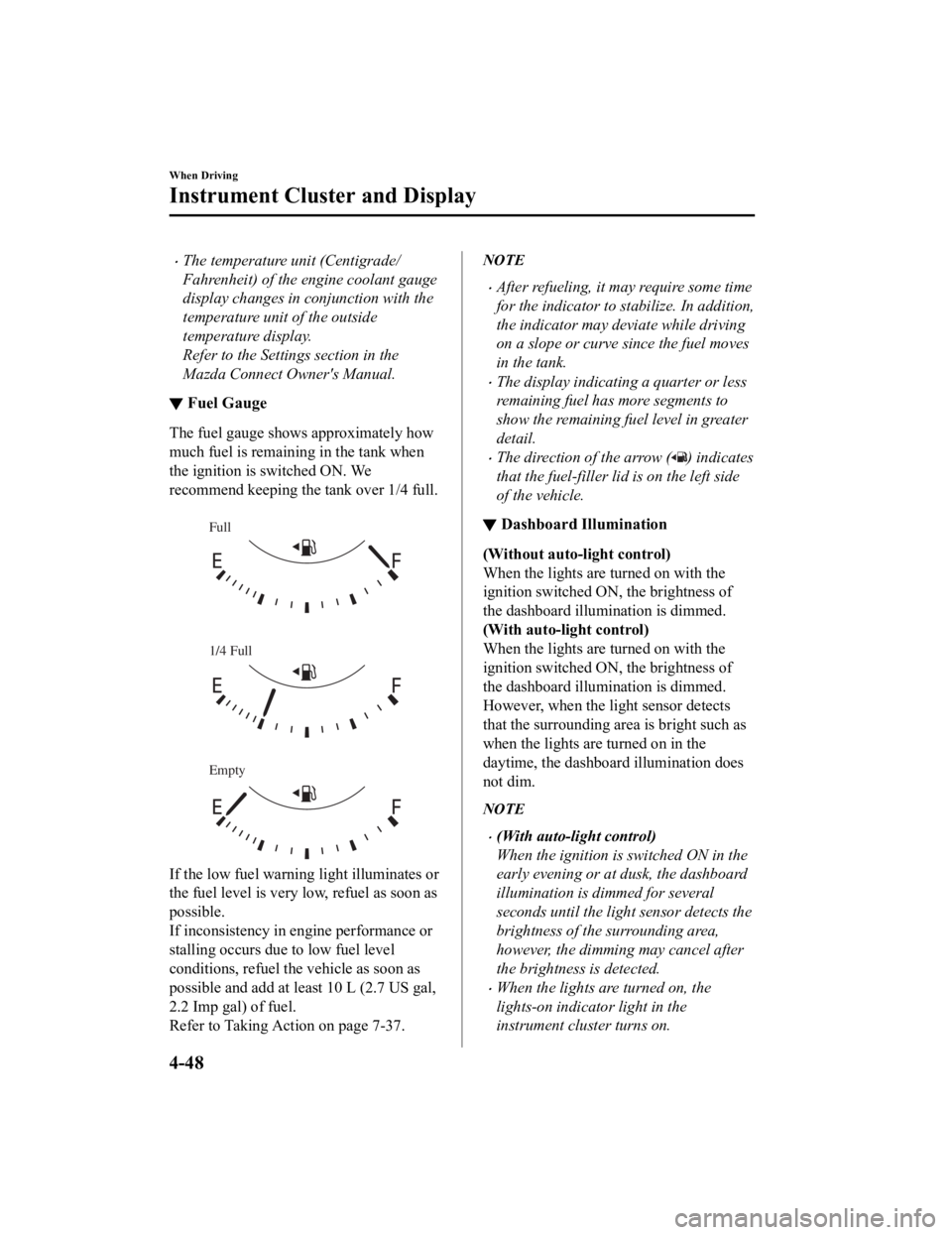
▼Fuel Gauge
The fuel gauge shows approximately how
much fuel is remaining in the tank when
the ignition is
switched ON. We
recommend keeping the tank over 1/4 full.
Full
1/4 Full
Empty
If the low fuel warnin g light illuminates or
the fuel level is very low, refuel as soon as
possible.
If inconsistency in engine performance or
stalling occurs due to low fuel level
conditions, refuel the vehicle as soon as
possible and add at least 10 L (2.7 US gal,
2.2 Imp gal) of fuel.
Refer to Taking Action on page 7-37.
NOTE
After refueling, it may require some time
for the indicator to st abilize. In addition,
the indicator may deviate while driving
on a slope or curve since the fuel moves
in the tank.
The display indicating a quarter or less
remaining fuel has more segments to
show the remaining fu el level in greater
detail.
The direction of the arrow () indicates
that the fuel-filler lid is on the left side
of the vehicle.
▼ Dashboard Illumination
(Without auto-light control)
When the lights are turned on with the
ignition switched ON
, the brightness of
the dashboard illumination is dimmed.
(With auto-light control)
When the lights are turned on with the
ignition switched ON , the brightness of
the dashboard illumination is dimmed.
However, when the li ght sensor detects
that the surrounding area is bright such as
when the lights are turned on in the
daytime, the dashboard illumination does
not dim.
NOTE
(With auto-light control)
When the ignition is switched ON in the
early evening or at dusk, the dashboard
illumination is dimmed for several
seconds until the light sensor detects the
brightness of the surrounding area,
however, the dimming may cancel after
the brightness is detected.
When the lights are turned on, the
lights-on indicator light in the
instrument cluster turns on.
When Driving
Instrument Cluster and Display
4-48
CX-9_8LJ2-EA-22H_Edition1_old 2022-6-9 13:33:08
Page 214 of 739
Refer to Headlights on page 4-71.
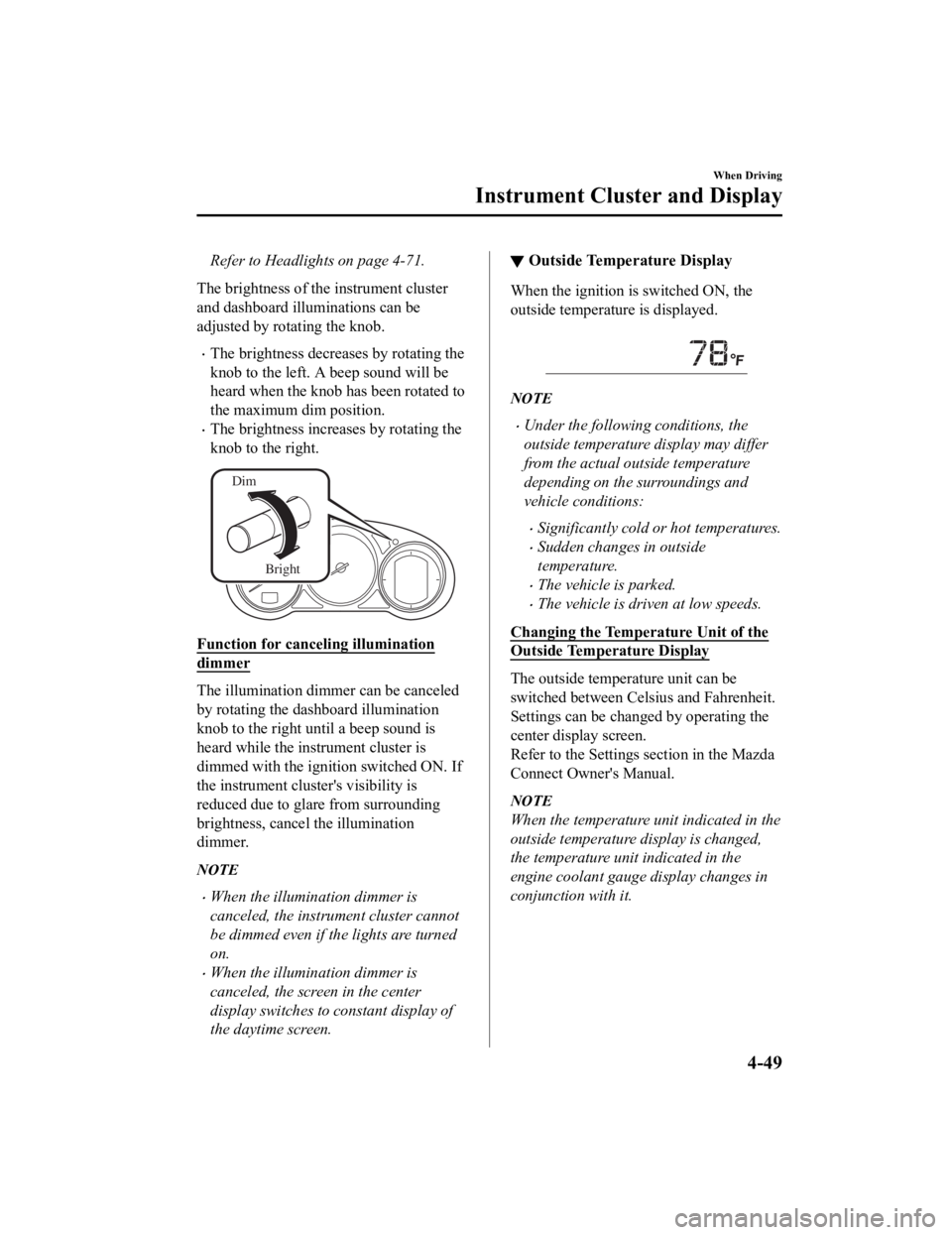
The brightness of the instrument cluster
and dashboard illuminations can be
adjusted by rotating the knob.
The brightness decreases by rotating the
knob to the left. A beep sound will be
heard when the knob has been rotated to
the maximum dim position.
The brightness increases by rotating the
knob to the right.
Dim
Bright
Function for canceling illumination
dimmer
The illumination dimmer can be canceled
by rotating the dashboard illumination
knob to the right until a beep sound is
heard while the instrument cluster is
dimmed with the ignition switched ON. If
the instrument cluster's visibility is
reduced due to glare from surrounding
brightness, cancel the illumination
dimmer.
NOTE
When the illumina tion dimmer is
canceled, the instrument cluster cannot
be dimmed even if the lights are turned
on.
When the illumina tion dimmer is
canceled, the screen in the center
display switches to constant display of
the daytime screen.
▼ Outside Tempera
ture Display
When the ignition is switched ON, the
outside temperature is displayed.
NOTE
Under the following conditions, the
outside temperature display may differ
from the actual outside temperature
depending on the surroundings and
vehicle conditions:
Significantly cold or hot temperatures.
Sudden changes in outside
temperature.
The vehicle is parked.
The vehicle is driven at low speeds.
Changing the Temperature Unit of the
Outside Temperature Display
The outside temperature unit can be
switched between Celsius and Fahrenheit.
Settings can be changed by operating the
center display screen.
Refer to the Settings section in the Mazda
Connect Owner's Manual.
NOTE
When the temperature unit indicated in the
outside temperature display is changed,
the temperature unit indicated in the
engine coolant gauge display changes in
conjunction with it.
When Driving
Instrument Cluster and Display
4-49
CX-9_8LJ2-EA-22H_Edition1_old 2022-6-9 13:33:08
Page 549 of 739

Scheduled Maintenance (Mexico)
Follow Schedule 1 if the vehicle is operated mainly where none of the following conditions
(severe driving conditions) apply.
Repeated short-distance driving
Driving in dusty conditions
Driving with extended use of brakes
Driving in areas where salt or other corrosive materials are us ed
Driving on rough or muddy roads
Extended periods of idling or low-speed operation
Driving for long periods in cold temperatures or extremely humi d climates
Driving in extremely hot conditions
Driving in mountainous conditions continually
If any do apply, follow Schedule 2.
NOTE
For maintenance guidelines beyond the kilome ters/months listed, follow the maintenance
intervals provided in the Scheduled Maintenance Tables.
▼ Schedule 1
Maintenance Interval Number of months or kilometers, whichever comes first
Months 6 1218243036424854606672
×1000 km 102030405060708090100110120
Drive belts II I
Engine oil & filter
*1RRRRRRRRRRRR
Cooling system I I I
Engine coolant
*2Replace at first 200,000 km or 10 years; after that, every 100,000 km or 5 years
Air filter RRRRRR
Fuel lines and hoses I
*3I*3I
Hoses and tubes for emission I
*3I*3I
Fuel filter Replace every 60,000 km
Spark plugs IIIIIIIIIIII
Replace every 64,000 km
Brake lines, hoses and connections IIIIII
Brake and clutch fluid level I I I I I I I I I
Brake fluid RRR
Disc brakes IIIIIIIIIIII
Tire (Rotation) Rotate every 10,000 km
Maintenance and Care
Scheduled Maintenance
6-10
CX-9_8LJ2-EA-22H_Edition1_old 2022-6-9 13:33:08
Page 561 of 739

Engine Coolant
▼Inspecting Coolant Level
WA R N I N G
Do not use a match or live flame in the
engine compartment. DO NOT ADD
COOLANT WHEN THE ENGINE IS HOT:
A hot engine is dangerous. If the engine has
been running, parts of the engine
compartment can become very hot. You
could be burned. Carefully inspect the
engine coolant in the coolant reservoir, but
do not open it.
Pull over to a safe location, then switch
the ignition off and make sure the fan is
not running before attempting to work
near the cooling fan:
Working near the cooling fan when it is
running is dangerous. The fan could
continue running indefinitely even if the
engine has stopped and the engine
compartment temperature is high. You
could be hit by the fan and seriously
injured.
Do not remove either cooling
system cap when the engine and radiator
are hot:
When the engine and radiator are hot,
scalding coolant and steam may shoot out
under pressure and cause serious injury.
NOTE
Changing the coolant should be done by
an Authorized Mazda Dealer.
Inspect the antifreeze protection and
coolant level in the coolant reservoir at
least once a year―at the beginning of the
winter season―and before traveling where
temperatures may drop below freezing.
Inspect the condition and connections of
all cooling system and heater hoses.
Replace any that are swollen or
deteriorated.
The coolant should be at full in the
radiator and between the F and L marks on
the coolant reservoir when the engine is
cool.
If it is at or near L, add enough coolant to
the coolant reservoir to provide freezing
and corrosion protec tion and to bring the
level to F.
Securely tighten the c oolant reservoir tank
cap after adding coolant.
Maintenance and Care
Owner Maintenance
6-22
CX-9_8LJ2-EA-22H_Edition1_old 2022-6-9 13:33:08
Page 599 of 739
WA R N I N G
Dry off brakes that have become wet by
driving slowly, releasing the accelerator
pedal and lightly applying the brakes
several times until the brake performance
returns to normal:
Driving with wet brakes is dangerous.
Increased stopping distance or the vehicle
pulling to one side when braking could
result in a serious accident. Light braking
will indicate whether the brakes have been
affected.
▼Aluminum Wheel Maintenance
A protective coating is provided over the
aluminum wheels. Special care is needed
to protect t
his coating.
CAUTION
Do not use any detergent other than mild
detergent. Before using any detergent,
verify the ingredients. Otherwise, the
product could discolor or stain the
aluminum wheels.
NOTE
Do not use a wire brush or any abrasive
cleaner, polishing compound, or solvent
on aluminum wheels. They may damage
the coating.
Always use a sponge or soft cloth to
clean the wheels.
Rinse the wheels thoroughly with
lukewarm or cold wate r. Also, be sure to
clean the wheels after driving on dusty
or salted roads to help prevent
corrosion.
Avoid washing your vehicle in an
automatic car wash that uses high-speed
or hard brushes.
▼ Plastic Part Maintenance
When cleaning the plastic lenses of the
lights, do not use gasoline, kerosene,
rectified spirit, paint, thinner, highly
acidic detergents, o
r strongly alkaline
detergents. Otherwise, these chemical
agents can discolor or damage the
surfaces resulting in a significant loss in
functionality. If plastic parts become
inadvertently exposed to any of these
chemical agents, flush with water
immediately.
If plastic parts such as the bumpers
become inadvertently exposed to
chemical agents or fluids such as
gasoline, oil, engine coolant, or battery
fluid, it could cause discoloration,
staining, or paint peeling. Wipe off any
such chemical agents or fluids using a
soft cloth immediately.
High water temperature and high water
pressure car washers are available
depending on the type of high pressure
car washer device. If the car washer
nozzle is put too close to the vehicle or
aimed at one area for an extended period
of time, it could deform plastic parts or
damage the paint.
Do not use wax containing compounds
(polish). Otherwise, it could result in
paint damage.
In addition, do not use an electrical or
air tool to apply wax. Otherwise, the
frictional heat generated could result in
deformation of plast ic parts or paint
damage.
Maintenance and Care
Appearance Care
6-60
CX-9_8LJ2-EA-22H_Edition1_old 2022-6-9 13:33:08
Page 626 of 739

Overheating
If the temperature gauge indicates
overheating or the high engine coolant
temperature warning light turns on, the
vehicle loses power, or you hear a loud
knocking or pinging noise, the engine is
probably too hot.
WA R N I N G
Pull over to a safe location, then switch
the ignition off and make sure the fan is
not running before attempting to work
near the cooling fan:
Working near the cooling fan when it is
running is dangerous. The fan could
continue running indefinitely even if the
engine has stopped and the engine
compartment temperature is high. You
could be hit by the fan and seriously
injured.
Do not remove either cooling
system cap when the engine and radiator
are hot:
When the engine and radiator are hot,
scalding coolant and steam may shoot out
under pressure and cause serious injury.
Open the hood ONLY after steam is no
longer escaping from the engine:
Steam from an overheated engine is
dangerous. The escaping steam could
seriously burn you.
If the temperature gauge indicates
overheating or the high engine coolant
temperature warning light turns on:
1. Drive safely to the side of the road and park off the right-of-way.
2. Shift into park (P).
3. Apply the parking brake.
4. Turn off the air conditioner.
5. Check whether coolant or steam is escaping from the engine
compartment.
If steam is coming from the engine
compartment:
Do not go near the front of the vehicle.
Stop the engine.
Wait until the steam dissipates, then
open the hood and start the engine.
If neither coolant nor steam is
escaping:
Open the hood and idle the engine
until it cools.
CAUTION
If the cooling fan does not operate
while the engine is running, the engine
temperature will increase. Stop the
engine and call an Authorized Mazda
Dealer.
6. Make sure the cooling fan is operating, then turn off the engine after the
temperature has decreased.
If Trouble Arises
Overheating
7-23
CX-9_8LJ2-EA-22H_Edition1_old 2022-6-9 13:33:08