rear bumper MAZDA CX90 2024 User Guide
[x] Cancel search | Manufacturer: MAZDA, Model Year: 2024, Model line: CX90, Model: MAZDA CX90 2024Pages: 687, PDF Size: 15.46 MB
Page 370 of 687
IndicationContent
7 Parking sensor status icon Indicates that the parking sensor has a problem or it is
switched off.
NOTE
The rear wide view displays the image at the rear of the vehicle at a wide angle and
corrects the image to help detect approaching obstructions from the side. Therefore,
it differs from the actual view.
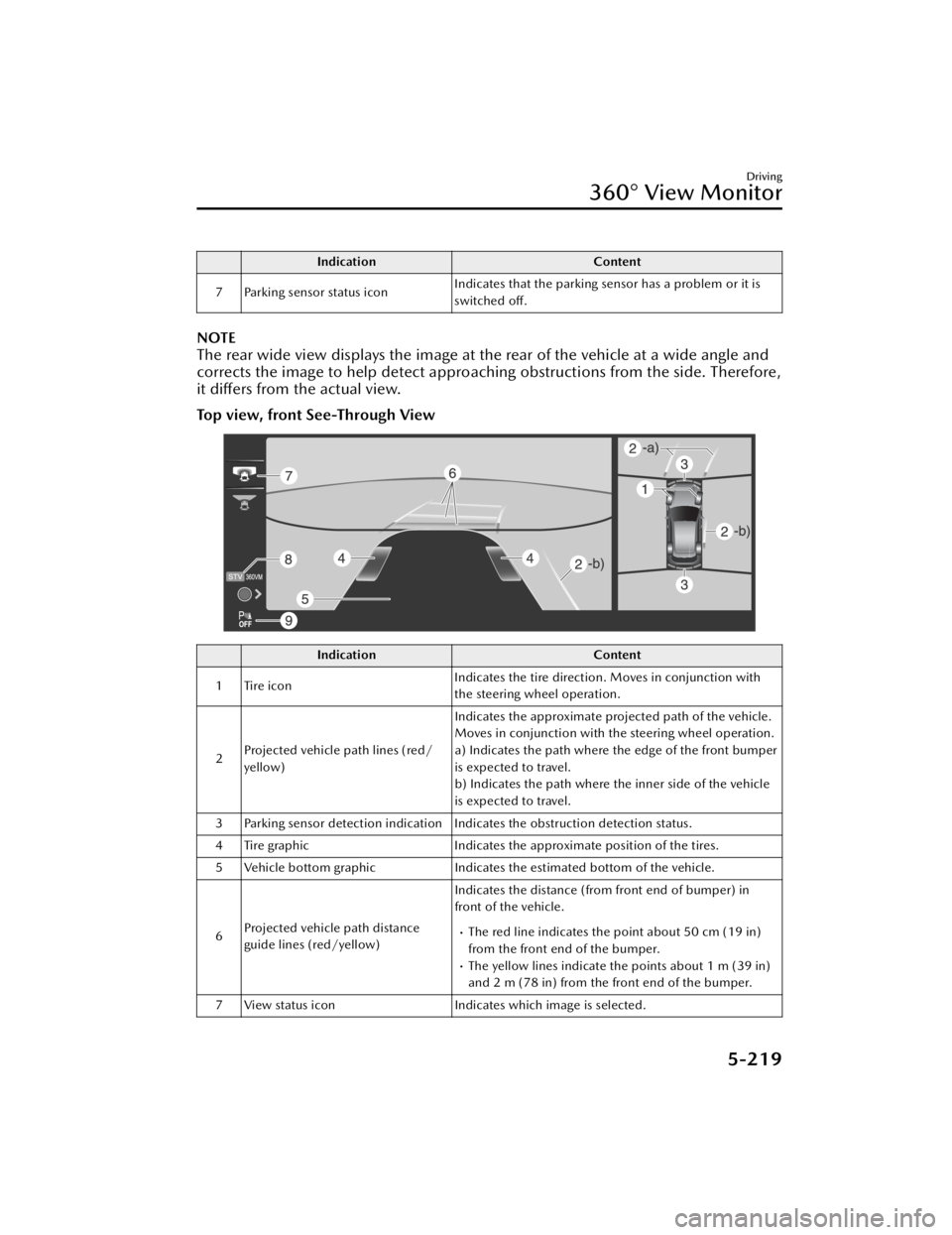
Top view, front See-Through View
Indication
Content
1 Tire icon Indicates the tire direction. Moves in conjunction with
the steering wheel operation.
2 Projected vehicle path lines (red/
yellow) Indicates the approximate projected path of the vehicle.
Moves in conjunction with the steering wheel operation.
a) Indicates the path where the edge of the front bumper
is expected to travel.
b) Indicates the path where the inner side of the vehicle
is expected to travel.
3 Parking sensor detection indication Indicates the obstruction detection status.
4 Tire graphic Indicates the approximate position of the tires.
5 Vehicle bottom graphic Indicates the estimated bottom of the vehicle.
6 Projected vehicle path distance
guide lines (red/yellow) Indicates the distance (from front end of bumper) in
front of the vehicle.
The red line indicates the point about 50 cm (19 in)
from the front end of the bumper.
The yellow lines indicate the points about 1 m (39 in)
and 2 m (78 in) from the front end of the bumper.
7 View status icon Indicates which image is selected.
Driving
360° View Monitor
5-219
CX-90_8KG7-EA-22L_Edition1_new 2022-11-17 16:05:04
Page 371 of 687

IndicationContent
8 Mode switching icon Indicates which mode is selected.
9 Parking sensor status icon Indicates that the parking sensor has a problem or it is
switched
off.
NOTE
The front See-Through View may be displayed as follows.
The ground and three-dimensional objects may appear curved.The representation of three-dimensional objects changes at the joints of images
and the same object may appear to be duplicated or not connected.
Top view, rear See-Through View
Indication Content
1 Tire icon Indicates the tire direction. Moves in conjunction with
the steering wheel operation.
2 Projected vehicle path lines (red/
yellow) Indicates the approximate projected path of the vehicle.
Moves in conjunction with the steering wheel operation.
a) Indicates the path where the rear end of the rear
bumper passes as a reference.
b) Indicates the path where the outer side of the vehicle
is expected to travel.
3 Parking sensor detection indication Indicates the obstruction detection status.
4 Tire graphic Indicates the approximate position of the tires.
5 Vehicle bottom graphic Indicates the estimated bottom of the vehicle.
Driving
360° View Monitor
5-220
CX-90_8KG7-EA-22L_Edition1_new 2022-11-17 16:05:04
Page 372 of 687

IndicationContent
6 Projected vehicle path distance
guide lines (red/yellow) These guide lines indicate the approximate distance to a
point measured from the rear of the vehicle (from the
end of the bumper).
The red line indicates the point about 50 cm (19 in)
from the rear end of the rear bumper.
The yellow lines indicate the points about 1 m (39 in)
and 2 m (78 in) from the rear end of the rear bumper.
7 View status icon Indicates which image is selected.
8 Mode switching icon Indicates which mode is selected.
9 Parking sensor status icon Indicates that the parking sensor has a problem or it is
switched
off.
NOTE
The rear See-Through View may be displayed as follows.
The ground and three-dimensional objects may appear curved.Expressions such as three-dimensional objects change at the seams of the image,
and the same objects may be displayed in duplicate or may be connected and not
visible.
System problem indication
In the following cases, there might be a problem with the system. Have the vehicle
inspected by an Authorized Mazda Dealer.
"No camera signal." is displayed on the center display.The display on the center display does not switch to the camera image even if the
selector lever is shifted to the R position.
The display on the center display does not switch to the camera image even if the
360° view monitor switch is pressed.
A portion of the display on the center display is black.
Driving
360° View Monitor
5-221
CX-90_8KG7-EA-22L_Edition1_new 2022-11-17 16:05:04
Page 383 of 687

IndicationContent
2 Vehicle width guide lines (blue) Indicates the approximate width of the vehicle.
Does not display when the steering wheel is operated in
a straight-ahead position.
3 Projected vehicle path distance
guide lines (red/yellow) These guide lines indicate the approximate distance to a
point measured from the rear of the vehicle (from the
end of the bumper).
The center point of the red line indicates the point
about 50 cm (19 in) from the rear end of the rear
bumper.
The center points of the yellow lines indicate the
points about 1 m (39 in) and 2 m (78 in) from the rear
end of the rear bumper.
4 Parking sensor status icon Indicates that the parking sensor has a problem or it is
switched off.
Ty p e B
When the parking sensor is ON
When the parking sensor is OFF
Driving
Rear View Monitor
5-232
CX-90_8KG7-EA-22L_Edition1_new
2022-11-17 16:05:04
Page 384 of 687

IndicationContent
1 Vehicle width guide lines (yellow) Indicates the approximate width of the vehicle.
2 Projected vehicle path distance
guide lines (red/yellow) These guide lines indicate the approximate distance to a
point measured from the rear of the vehicle (from the
end of the bumper).
The red line indicates the point about 50 cm (19 in)
from the rear end of the rear bumper.
The yellow lines indicate the points about 1 m (39 in)
and 2 m (78 in) from the rear end of the rear bumper.
3 Parking sensor status icon Indicates that the parking sensor has a problem or it is
switched off.
System problem indication
In the following cases, there might be a problem with the system. Have the vehicle
inspected by an Authorized Mazda Dealer.
"No camera signal." is displayed on the center display.The display on the center display does not switch to the camera image even if the
selector lever is shifted to the R position.
A portion of the display on the center display is black.
Driving
Rear View Monitor
5-233
CX-90_8KG7-EA-22L_Edition1_new
2022-11-17 16:05:04
Page 487 of 687

Warnings and Cautionsfor Using the Towing
WARNING
Always keep tow loads within
specified limits as indicated in the
Trailer Towing-Load Table:
Attempting to tow loads greater than
those specified is dangerous as it may
cause serious handling and
performance problems that could
result in personal injury or vehicle
damage, or both.
Load your trailer with the weight
about 60 % toward the front and
40 % toward the rear:
Loading the trailer with more weight in
the rear than in the front is dangerous.
Doing so could cause you to lose
control. The trailer tongue load must
be 10 % ―15 % of the total trailer load
(sum of the weights of the trailer and
cargo).
Always have the total trailer weight
and tongue load determined prior to
departure:
Attempting to tow loads without
determining the total trailer weight and
tongue load is dangerous. Trailer sway
from crosswinds, rough roads or other
causes could result in loss of control
and a serious accident.
Always make sure the trailer hitch is
securely attached before departure:
An unsecured trailer hitch is dangerous
as it causes greater trailer sway from
crosswinds, rough roads or other
causes, resulting in loss of control and
a serious accident.
Examine all trailer-hitch mounting
bolts regularly and tighten any that are
loose. If the hitch is removed, seal any
open mounting holes to prevent
exhaust, dust, water, dirt and other
foreign elements from filtering in,
possibly endangering personal safety
and damaging your vehicle.
Do not install a hitch that stiffens the
bumper as it will reduce the bumper's
performance.
Make sure there are no exhaust gas
leaks into the passenger compartment
if any mounting bolts are connected
to the body:
Modifying your vehicle exhaust system
is dangerous. Exhaust gas entering the
vehicle could cause loss of
consciousness or even death.
When mounting the trailer hitch, make
no modifications to the vehicle exhaust
system.
Never use the temporary spare tire
when towing:
Using the temporary spare tire on your
vehicle when towing a trailer is
dangerous as it could result in tire
failure, loss of control, and injury to
vehicle occupants.
Make sure the safety chain is securely
attached to both the trailer and the
vehicle prior to departure:
Towing a trailer without using a safety
chain securely attached to both the
trailer and the vehicle is dangerous. If
damage occurs to the coupling unit or
hitch ball, the trailer could wander into
another lane and cause a collision.
Other Equipment
Towing (U.S.A. and Canada)
7-60
CX-90_8KG7-EA-22L_Edition1_new 2022-11-17 16:05:04
Page 511 of 687

Using the Towing Hooks
CAUTION
Do not use the front and rear tiedown
eyelets for towing the vehicle.
They have been designed only for
securing the vehicle to a transport
vessel during shipping.
Using the eyelets for any other purpose
could result in the vehicle being
damaged.
1. Remove the tiedown eyelet, thejack lever and the lug wrench or
equivalent from the luggage
compartment.
1. Lug wrench
2. Tiedown eyelet
3. Jack lever
2. Wrap a flathead screwdriver or jack lever or a similar tool with a soft
cloth to prevent damage to a
painted bumper, and open the cap
located on the front or rear
bumper.
Front
Rear
CAUTION
Do not use excessive force as it may
damage the cap or scratch the
painted bumper surface.
NOTE
Remove the cap completely and
store it so as not to lose it.
3. Securely install the tiedown eyelet
using the lug wrench, the jack lever
or equivalent.
What to Do in Case of Emergency
When Towing is Required
8-6
CX-90_8KG7-EA-22L_Edition1_new 2022-11-17 16:05:04
Page 512 of 687

Front
1. Lug wrench
2. Tiedown eyelet
Rear
1. Jack lever
2. Tiedown eyelet
4. Hook the tying rope to the tiedown eyelet.
CAUTION
If the tiedown eyelet is not securely
tightened, it may loosen or
disengage from the bumper when
tying the vehicle. Make sure that
the tiedown eyelet is securely
tightened to the bumper.
What to Do in Case of Emergency
When Towing is Required
8-7
CX-90_8KG7-EA-22L_Edition1_new 2022-11-17 16:05:04
Page 598 of 687

CAUTION
Rotate unidirectional tires and radial
tires that have an asymmetrical tread
pattern or studs only from front to rear,
not from side to side. Tire performance
will be reduced if rotated from side to
side.
Replacing a Tire or aWheel
WARNING
Always use tires that are in good
condition.
Driving with worn tires is dangerous.
Reduced braking , steering , and
traction could result in an accident.
Replace all four tires at the same
time.
Replacing just one tire is dangerous. It
could cause poor handling and poor
braking resulting in loss of vehicle
control. Mazda strongly recommends
that you replace all four tires at the
same time.
Always use wheels of the correct size
on your vehicle.
Using a wrong-sized wheel is
dangerous. Braking and handling could
be affected, leading to loss of control
and an accident.
CAUTION
A wrong-sized wheel may adversely
affect:
Tire fit
Wheel and bearing life
Ground clearance
Snow-chain clearance
Speedometer calibration
Headlight aim
Bumper height
Tire Pressure Monitoring System
If a tire wears evenly, a wear indicator
will appear as a solid band across the
tread.
Inspection and Servicing/Cleaning
Vehicle Exterior Inspection
9-29
CX-90_8KG7-EA-22L_Edition1_new 2022-11-17 16:05:04