tires MAZDA CX90 2024 Owner's Manual
[x] Cancel search | Manufacturer: MAZDA, Model Year: 2024, Model line: CX90, Model: MAZDA CX90 2024Pages: 687, PDF Size: 15.46 MB
Page 351 of 687
Refer to Cameras on page 5-137.
Always check the surrounding area
visually.
The operation of the SBS has certain
limitations. Always confirm the safety
around the vehicle visually when
driving.
CAUTION
If any of the following conditions is
met, turn the SBS
off to prevent a
mis-operation.
A trailer is pulled or an accessory
such as a bicycle carrier is installed
to the rear of the vehicle.
The vehicle is driven on rough
roads such as in areas where there
is grass and foliage or off-road.
Always use tires of the specified size
and the same manufacturer, brand,
and tread pattern on all 4 wheels. In
addition, do not use tires with
significantly different wear patterns
on the same vehicle. If such
improper tires are used, the SBS may
not operate normally.
How to Use the Smart
Brake Support (SBS)
NOTE
During the SBS brake control, the
brake pedal may move rearward or
become stiff. The brakes are operating,
but continue to depress the brake
pedal.
When the forward detection function
operates*
The forward detection function
operates when all of the following
conditions are met.
(If an object is a vehicle ahead)
The vehicle speed is about 4 km/h
(3 mph) or faster.
(If an object is a bicycle/pedestrian)
The vehicle speed is about 10
km/h to 80 km/h (6.3 mph to 49
mph).
The DSC does not operate.The system determines that there is a
possibility of a collision with an
object ahead.
When the forward detection function
operates, the driver is notified of the
danger by the screen display and
warning sound. Furthermore, if the
possibility of a collision increases,
brake control is performed.
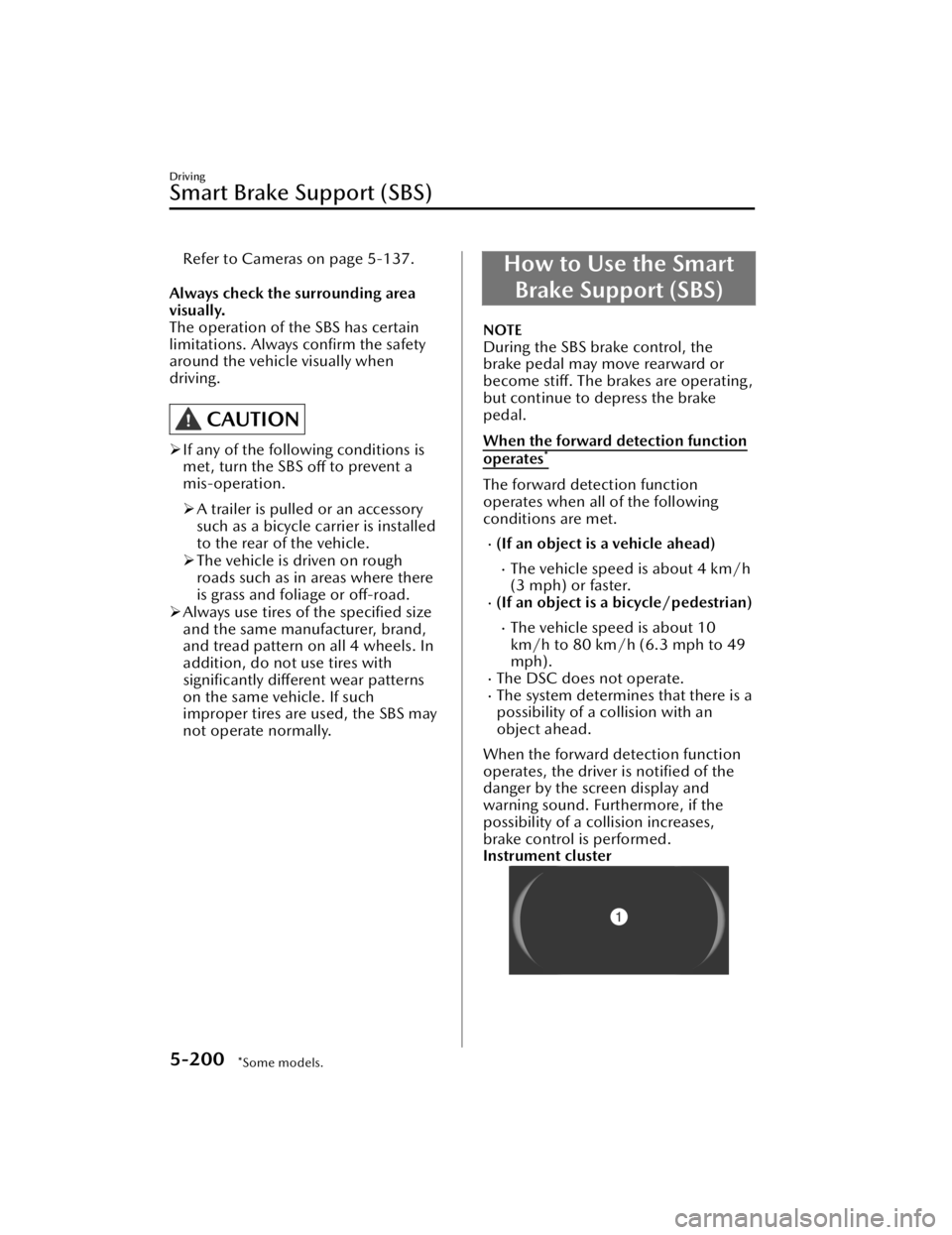
Instrument cluster
Driving
Smart Brake Support (SBS)
5-200*Some models.
CX-90_8KG7-EA-22L_Edition1_new 2022-11-17 16:05:04
Page 364 of 687
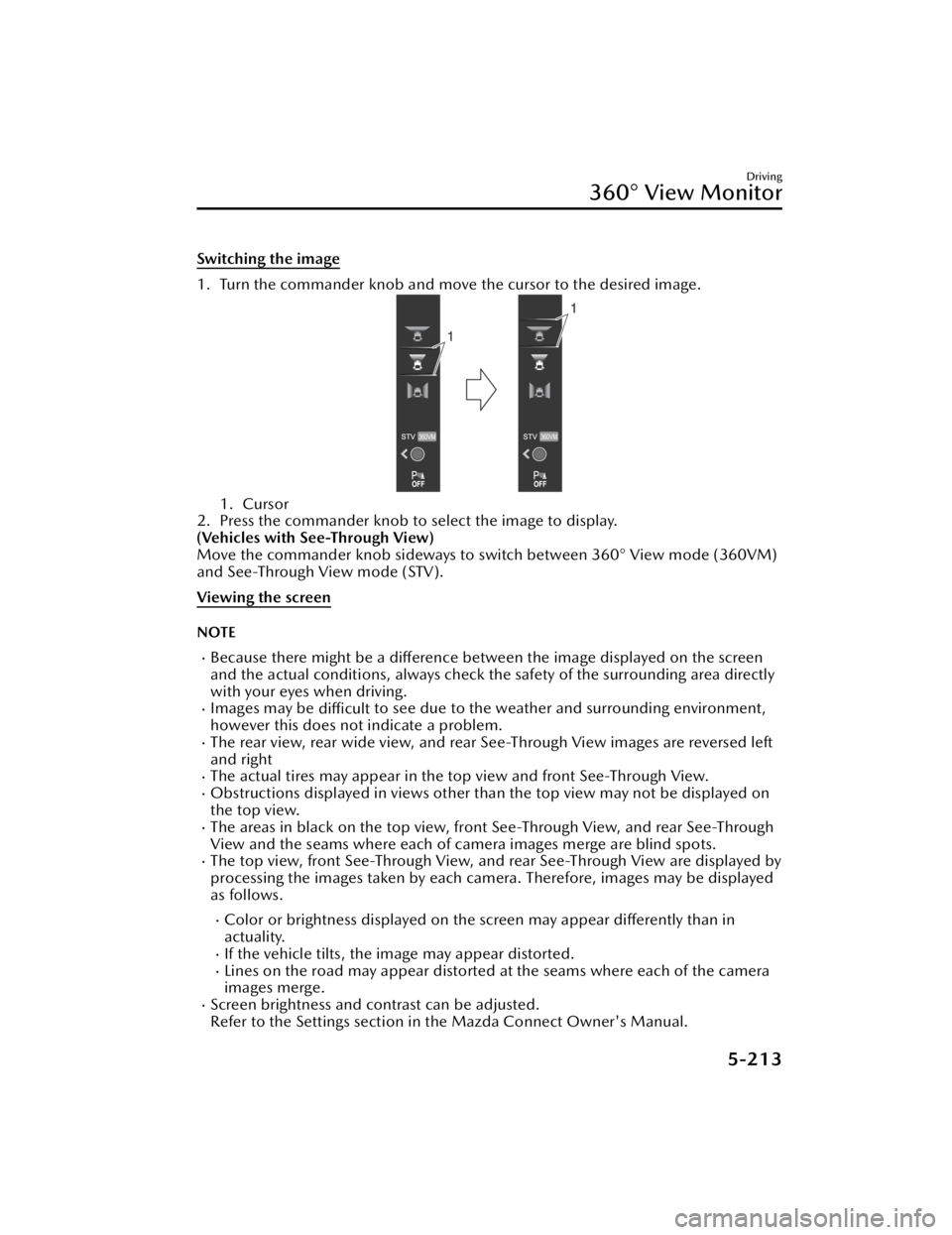
Switching the image
1. Turn the commander knob and move the cursor to the desired image.
1. Cursor
2. Press the commander knob to select the image to display.
(Vehicles with See-Through View)
Move the commander knob sideways to switch between 360° View mode (360VM)
and See-Through View mode (STV).
Viewing the screen
NOTE
Because there might be a difference between the image displayed on the screen
and the actual conditions, always check th e safety of the surrounding area directly
with your eyes when driving.
Images may be difficult to see due to the weather and surrounding environment,
however this does not indicate a problem.
The rear view, rear wide view, and rear See-Through View images are reversed left
and right
The actual tires may appear in the top view and front See-Through View.Obstructions displayed in views other than the top view may not be displayed on
the top view.
The areas in black on the top view, front See-Through View, and rear See-Through
View and the seams where each of camera images merge are blind spots.
The top view, front See-Through View, and rear See-Through View are displayed by
processing the images taken by each camera. Therefore, images may be displayed
as follows.
Color or brightness displayed on the screen may appear differently than in
actuality.
If the vehicle tilts, the image may appear distorted.Lines on the road may appear distorted at the seams where each of the camera
images merge.
Screen brightness and contrast can be adjusted.
Refer to the Settings section in the Mazda Connect Owner's Manual.
Driving
360° View Monitor
5-213
CX-90_8KG7-EA-22L_Edition1_new 2022-11-17 16:05:04
Page 370 of 687
IndicationContent
7 Parking sensor status icon Indicates that the parking sensor has a problem or it is
switched off.
NOTE
The rear wide view displays the image at the rear of the vehicle at a wide angle and
corrects the image to help detect approaching obstructions from the side. Therefore,
it differs from the actual view.
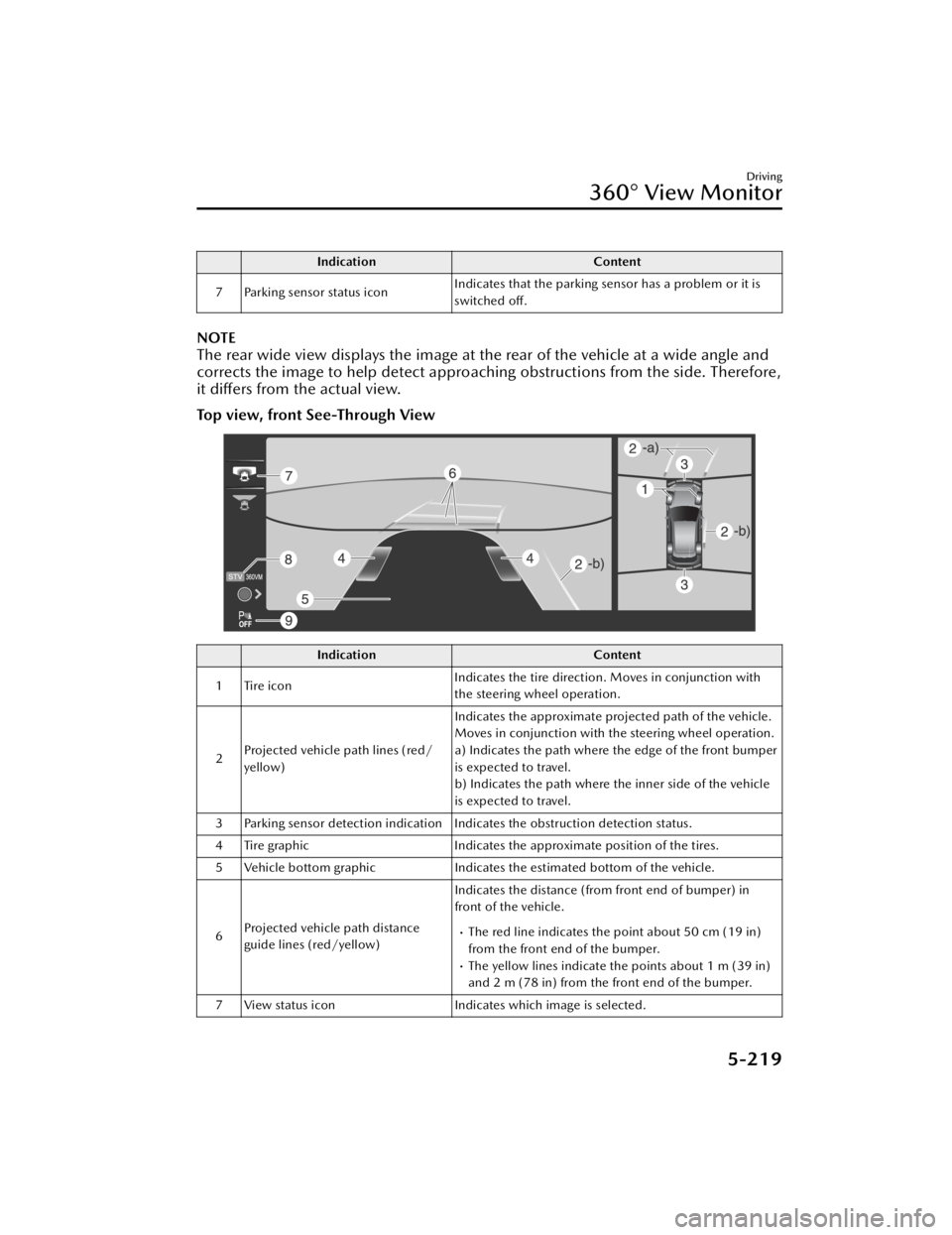
Top view, front See-Through View
Indication
Content
1 Tire icon Indicates the tire direction. Moves in conjunction with
the steering wheel operation.
2 Projected vehicle path lines (red/
yellow) Indicates the approximate projected path of the vehicle.
Moves in conjunction with the steering wheel operation.
a) Indicates the path where the edge of the front bumper
is expected to travel.
b) Indicates the path where the inner side of the vehicle
is expected to travel.
3 Parking sensor detection indication Indicates the obstruction detection status.
4 Tire graphic Indicates the approximate position of the tires.
5 Vehicle bottom graphic Indicates the estimated bottom of the vehicle.
6 Projected vehicle path distance
guide lines (red/yellow) Indicates the distance (from front end of bumper) in
front of the vehicle.
The red line indicates the point about 50 cm (19 in)
from the front end of the bumper.
The yellow lines indicate the points about 1 m (39 in)
and 2 m (78 in) from the front end of the bumper.
7 View status icon Indicates which image is selected.
Driving
360° View Monitor
5-219
CX-90_8KG7-EA-22L_Edition1_new 2022-11-17 16:05:04
Page 371 of 687

IndicationContent
8 Mode switching icon Indicates which mode is selected.
9 Parking sensor status icon Indicates that the parking sensor has a problem or it is
switched
off.
NOTE
The front See-Through View may be displayed as follows.
The ground and three-dimensional objects may appear curved.The representation of three-dimensional objects changes at the joints of images
and the same object may appear to be duplicated or not connected.
Top view, rear See-Through View
Indication Content
1 Tire icon Indicates the tire direction. Moves in conjunction with
the steering wheel operation.
2 Projected vehicle path lines (red/
yellow) Indicates the approximate projected path of the vehicle.
Moves in conjunction with the steering wheel operation.
a) Indicates the path where the rear end of the rear
bumper passes as a reference.
b) Indicates the path where the outer side of the vehicle
is expected to travel.
3 Parking sensor detection indication Indicates the obstruction detection status.
4 Tire graphic Indicates the approximate position of the tires.
5 Vehicle bottom graphic Indicates the estimated bottom of the vehicle.
Driving
360° View Monitor
5-220
CX-90_8KG7-EA-22L_Edition1_new 2022-11-17 16:05:04
Page 392 of 687

Snow Tires
WARNING
Use only the same size and type tires
(snow, radial, or non-radial) on all 4
wheels:
Using tires different in size or type is
dangerous. Your vehicle's handling
could be greatly affected and result in
an accident.
CAUTION
Check local regulations before using
studded tires.
Use snow tires on all 4 wheels
Do not go faster than 120 km/h (75
mph) while driving with snow tires.
When installing winter tires, use tires of
the specified size and adjust the air
pressure of all the tires to the specified
value. (page 10-71).
The vehicle is originally equipped with
all season radials designed to be used
all year around. In some extreme
climates you may find it necessary to
replace them with snow tires during
the winter months to further improve
traction on snow and ice covered
roads.
Tire Chains
Check local regulations before using
tire chains.
CAUTION
Chains may aff ect handling.
Do not go faster than 50 km/h (30
mph) or the chain manufacturer's
recommended limit, whichever is
lower.
Drive carefully and avoid bumps,
holes, and sharp turns.
Avoid locked-wheel braking.
Do not use chains on a temporary
spare tire; it may result in damage to
the vehicle and to the tire.
Do not use chains on roads that are
free of snow or ice. The tires and
chains could be damaged.
Chains may scratch or chip
aluminum wheels.
NOTE
The tire pressure monitoring system
may not function correctly when using
tire chains.
Install the chains on the rear tires only.
Do not use chains on the front tires.
Please consult an Authorized Mazda
Dealer.
Installing the chains
1. Secure the chains on the rear tires
as tightly as possible. Always follow
the chain manufacturer's
instructions.
2. Retighten the chains after driving 1/2 ―1 km (1/4 ―1/2 mile).
Driving
Winter Driving
5-241
CX-90_8KG7-EA-22L_Edition1_new 2022-11-17 16:05:04
Page 491 of 687

TTW and GCWR
The total trailer weight (TTW), gross combination weight rating (GCWR), gross axle
weight rating (GAWR), trailer load, and trailer tongue load must be within the
prescribed limits.
The total trailer weight (TTW) is the sum of the weights of the trailer load (trailer
weight plus cargo). Never allow the total trailer weight (TTW) to exceed specifications in the Trailer towing-load table.
The maximum GCWR is the combination weight of the trailer and load plus the
towing vehicle (including trailer hitch, vehicle passengers, and load). It must not
exceed the specifications in the load table.
GAWR and GVWR
Do not exceed front and rear GAWR (gross axle weight rating) and GVWR (gross
vehicle weight rating). If you do, vehicle handling , braking , and performance will be
affected. These values are also on the Motor Vehicle Safety Standard Label posted
on the driver's door frame.
Trailer frontal area table
Frontal area is the total area that a moving vehicle and trailer exposes to air
resistance. Exceeding this limit may reduce the performance of your towing vehicle.
(U.S.A. and Canada)
Limitation items Limit values
MAX. FRONTAL AREA
2.79 m2 (30 ft2)
Before driving
Have your cooling and braking system checked by an Authorized Mazda Dealer.Before starting out, inspect the operation of all vehicle and trailer lights and all
vehicle-to-trailer connections. Stop and re-inspect all lights and connections after
driving a short distance.
Trailer hitch
Use only a hitch ball recommended by the trailer manufacturer that conforms to the
gross trailer weight requirement.
When not towing a trailer, remove the trailer hitch (if detachable) to reduce the
possibility of damage as a result of the vehicle being rear-ended.
Tires
When towing a trailer, make sure that the tire pressures of the rear tires are at 20
kPa (0.2 bar, 2.9 psi) higher than the recommended tire pressures indicated on
the tire pressure chart on the driver's door frame.
Other Equipment
Towing (U.S.A. and Canada)
7-64
CX-90_8KG7-EA-22L_Edition1_new 2022-11-17 16:05:04
Page 493 of 687

If swaying occurs, firmly grip the steering wheel and reduce speed immediately, but
gradually.
Steer straight ahead. If no extreme correction of steering or braking is made, the
combination of less speed and firm steering will result in stability.
Backing up
Backing a vehicle with a trailer requires practice and patience. Back slowly, and have
a helper outside at the rear of the trailer to reduce the risk of an accident.
To turn the trailer, place your hand at th e bottom of the steering wheel and turn it in
the direction you want the trailer to go. Make only slight movements to prevent
sharp or prolonged turning.
Ascending a hill
Shift into a lower gear to reduce the poss ibility of overloading or overheating the
engine, or both.
Descending a hill
Shift into a lower gear and use engine compression as a braking effect.
Pa r k i n g
Always make sure the tires of the trailer and the tow vehicle are blocked while
parked.
Apply the parking brake firmly and put the transmission in P.
Avoid parking on an incline, but if you must, follow these instructions:
1. Depress and hold down the brake pedal.
2. Have a helper put wheel blocks against the downhill side of all vehicle and trailer tires.
3. Then release the brake pedal slowly until the blocks bear the load.
If the grade is downhill, turn the steering wheel so that the front of the front
tires face the curb.
If it is uphill, face the rear of the front tires against the curb.
4. Firmly apply the parking brake.
5. Shift the transmission into P, and stop the engine.
To restart after parking on an incline:
1. With the transmission in P, start the engine. (Be sure to depress and hold the brake pedal.)
2. Shift into gear.
3. Release the parking brake (also the foot brake) and pull away from the wheel blocks. Stop; apply the parking brake and shift into P.
4. Have a helper retrieve the wheel blocks.
Maintenance
If you tow a trailer frequently, have your vehicle serviced as shown in Scheduled
Maintenance (page 9-4).
Other Equipment
Towing (U.S.A. and Canada)
7-66
CX-90_8KG7-EA-22L_Edition1_new 2022-11-17 16:05:04
Page 504 of 687

Spare Tire
The temporary spare tire is lighter and
smaller than a conventional tire, and is
designed only for emergency use and
should be used only for VERY short
periods. Temporary spare tires should
NEVER be used for long drives or
extended periods.
WARNING
Do not install the temporary spare tire
on the rear wheels (driving wheels).
Driving with the temporary spare tire
on one of the rear driving wheels is
dangerous. Handling will be affected.
You could lose control of the vehicle,
especially on ice or snow bound roads,
and have an accident. Move a regular
tire to the rear wheel and install the
temporary spare tire to the front.
CAUTION
When using the temporary spare tire,
driving stability may decrease
compared to when using only the
conventional tire. Drive carefully.
To avoid damage to the temporary
spare tire or to the vehicle, observe
the following precautions:
Do not exceed 80 km/h (50 mph).
Avoid driving over obstacles. Also,
do not drive through an automatic
car wash. This tire's diameter is
smaller than a conventional tire, so
the ground clearance is reduced.
Do not use a tire chain on this tire
because it will not fit properly.
Do not use your temporary spare
tire on any other vehicle, it has
been designed only for your
Mazda.
Use only one temporary spare tire
on your vehicle at the same time.
To remove the spare tire
1. Remove the luggage board.
2. Remove the cargo sub compartment.
3. (Vehicles with sub-woofer)
Uncouple the sub-woofer
connector.
Other Equipment
Spare Tire and Tool Storage
7-77
CX-90_8KG7-EA-22L_Edition1_new 2022-11-17 16:05:04
Page 531 of 687

Mounting the Spare Tire
1. Remove dirt and grime from themounting surfaces of the wheel and
hub, including the hub bolts, with a
cloth.
WARNING
Make sure the mounting surfaces
of the wheel, hub and lug nuts are
clean before changing or replacing
tires.
When changing or replacing a tire,
not removing dirt and grime from
the mounting surfaces of the wheel,
hub and hub bolts is dangerous.
The lug nuts could loosen while
driving and cause the tire to come
off, resulting in an accident.
2. Mount the spare tire.
3. Install the lug nuts with the beveled edge inward; tighten them by hand.
WARNING
Do not apply oil or grease to lug
nuts and bolts and do not tighten
the lug nuts beyond the
recommended tightening torque.
Applying oil or grease to lug nuts
and bolts is dangerous. The lug nuts
could loosen while driving and
cause the tire to come off, resulting
in an accident. In addition, lug nuts
and bolts could be damaged if
tightened more than necessary.
4. Turn the lug wrench
counterclockwise and lower the
vehicle.
5. Use the lug wrench to tighten the nuts in the order shown.
If you are unsure of how tight the
nuts should be, have them
inspected at an Authorized Mazda
Dealer.
Nut tightening torque
N·m (kgf·m, ft·lbf) 108
―147 (12 ―14,
80 ―108)
What to Do in Case of Emergency
Tire is Punctured or Bursts
8-26
CX-90_8KG7-EA-22L_Edition1_new 2022-11-17 16:05:04
Page 534 of 687

5. Pass the flat tire beltsthrough the buckle.
6. While pressing the flat tireagainst the third-row seat,
pull the ends of the flat tire
belts and secure the flat tire.
CAUTION
When pulling the flat tire
belts, wrap the buckle with a
cloth. If the buckle directly
contacts the aluminum
wheel, the wheel may be
damaged.
7. Slowly close the liftgate while making sure that the liftgate trim
does not contact the flat tire.
NOTE
If the liftgate trim contacts the flat
tire, adjust the position of the flat
tire.
8. Make sure that the liftgate closes securely.
9. Check the tire inflation pressure.
Refer to the specification charts on
page 10-37.
10.Have the flat tire repaired or replaced as soon as possible.
WARNING
Do not drive with any tires that have
incorrect air pressure.
Driving on tires with incorrect air
pressure is dangerous. Tires with
incorrect pressure could affect
handling and result in an accident.
When you check the regular tires' air
pressure, check the spare tire, too.
NOTE
To prevent the jack and tool from
rattling , store them properly.
What to Do in Case of Emergency
Tire is Punctured or Bursts
8-29
CX-90_8KG7-EA-22L_Edition1_new 2022-11-17 16:05:04