battery MAZDA CX90 2024 Owner's Guide
[x] Cancel search | Manufacturer: MAZDA, Model Year: 2024, Model line: CX90, Model: MAZDA CX90 2024Pages: 687, PDF Size: 15.46 MB
Page 248 of 687

(SPORT Mode)
(NORMAL Mode)
(EV Mode)
(OFF-ROAD Mode)
NOTE
TOWING mode can be selected only
when electrically connected to the
trailer using a Mazda genuine trailer
hitch. In addition, it may take some
time until the connection is detected
and TOWING mode is displayed.
Consult an Authorized Mazda Dealer
for details.
Depending on driving conditions
when selecting TOWING mode/
SPORT mode/OFF-ROAD mode, the
vehicle may perform shift-down or
accelerate slightly.
When SPORT mode/OFF-ROAD
mode is selected, driving the vehicle
at higher engine speeds increases
and fuel economy may worsen.
Canceling SPORT mode/OFF-ROAD
mode during normal driving is
recommended.
When setting the Mazda Radar
Cruise Control (MRCC) while driving
in SPORT mode, the mode is
switched to NORMAL mode. In
addition, while the MRCC is being
used, the mode cannot be switched
to SPORT mode.
Switching to EV mode may not be
possible depending on the driving
operations, driving conditions, and
high voltage battery condition.
When the system determines that
the engine needs to be started while
the vehicle is being driven in EV
mode, the mode is switched to
NORMAL mode.
The remaining distance-to-full
discharge for EV mode may
decrease, even when the vehicle is
being driven in a mode other than
EV mode.
The maximum speed in EV mode is
140 km/h (86 mph).
The drive mode cannot be switched
in the following cases.
The Antilock Brake System (ABS) is
operating.
The Traction Control System (TCS)
is operating.
The Dynamic Stability Control
(DSC) is operating.
The steering wheel is being
operated abruptly.
The driving mode in which the
display in the instrument cluster is
grayed out cannot be selected.
When the vehicle power is switched
OFF, the mode returns to NORMAL
mode. However, TOWING mode
before switching the vehicle power
OFF is maintained only when the
trailer is connected in TOWING
mode.
Driving
Mazda intelligent Drive Select (Mi-Drive)
5-97
CX-90_8KG7-EA-22L_Edition1_new2022-11-17 16:05:04
Page 262 of 687
Warnings and CautionsFor Charging
WARNING
For occupants who use any medical
device such as an implanted-type
heart pacer or defibrillator, ask a
doctor or manufacturer of the device
about how the medical device may be
affected by the charging operation.
Otherwise, the operation of the
medical device could be affected
resulting in an accident.
For occupants who use any medical
device such as an implanted-type
heart pacer or defibrillator, do not
enter the cabin including the luggage
compartment while charging.
Otherwise, the operation of the
medical device could be affected
resulting in an accident.
Do not disassemble or modify the
charge port and the charge cable.
Otherwise, it could lead to an
electrical shock resulting in an
accident.
Always heed the following when
charging.
Otherwise, it could lead to an
electrical shock resulting in an
accident.
Never allow children to charge the
battery.
Do not charge the battery while the
vehicle is covered with a car cover.
Always heed the following when
charging in the rain or snow.
Otherwise, it could lead to an
electrical shock resulting in an
accident.
Do not charge the battery outside if
there is the possibility of heavy rain,
strong winds, or lightning.
Remove water with a clean cloth if
the charge connector or charge plug
is wet.
Do not touch the charge port or
charge cable with wet hands.
If the outlet is covered with snow
while charging, turn
off the power
such as turning off the breaker,
remove the snow, and then remove
the charge plug.
Refer to the instruction manual
accompanying the charge cable and
use the charge cable correctly.
If you handle the charge cable
mistakenly, it could result in an
unexpected accident.
Do not use the charge cable if it has
any of the following malfunctions.
Otherwise, it could lead to an
electrical shock resulting in an
accident.
The charge connector is rusted or
corroded.
The charge connector is damaged or
foreign matter penetrates the charge
connector.
Always heed the following when
using the charge cable.
Otherwise, the charge cable could be
damaged resulting in an accident.
Do not pull out or bend the charge
cable excessively.
Do not step on the charge cable or
drag it on the ground.
Driving
Charging
5-111
CX-90_8KG7-EA-22L_Edition1_new 2022-11-17 16:05:04
Page 263 of 687
When inserting/pulling out the
charge connector and the charge
plug, do not twist them excessively.
Do not apply excessive force to the
connected charge connector such as
by applying your weight.
Keep objects which generates
intense heat (such as a heater or
cigarette) away from the charge
cable.
Do not apply orga nic solvents, acid
or alkaline agents to the charge
cable.
CAUTION
Do not connect the booster cable to
the lead-acid battery or remove the
lead-acid battery while charging the
high voltage battery. Otherwise, the
vehicle or charging device could be
damaged.
If the charge connector is removed
after the charging is
finished, close
the charging port cap immediately. If
the charging port lid is closed with
the charging port cap open, water or
foreign matter may enter the
charging inlet causing a malfunction.
Always make sure that the charge
cable is not connected to the vehicle
before driving. If the charge
connector is connected correctly, the
vehicle cannot be driven. However, if
it is not connected completely, the
vehicle can be driven, which could
result in an accident.
If the charging port is frozen shut,
defrost the port using a hair dryer. If
the charge cable is inserted/pulled
out with the charging inlet frozen, it
could cause damage.
Driving
Charging
5-112
CX-90_8KG7-EA-22L_Edition1_new 2022-11-17 16:05:04
Page 267 of 687
How to Perform Charging
It can be charged with a maximum of
7.2 kW of power.
When charging is started after the high
voltage battery warning indication/
warning light turns on, the time until
fully charged is as follows.
(7.2 kW normal charging)
About 2.5 hours
For charging, the charging timer
function can be used to charge
automatically from start to finish. For
details on use, refer to [Charging
Settings].
NOTE
Installation of charging equipment is
required for 7.2 kW normal charging.
Consult an Authorized Mazda Dealer
for details.
If a power outage occurs while
charging, remove the charge plug
and the charge connector and start
charging from the beginning again.
Make sure that no water has
accumulated in the charge connector
and the charging port before
charging. If any foreign matter enters
the charge connector or the charging
port, do not start charging and
consult an Authorized Mazda Dealer.
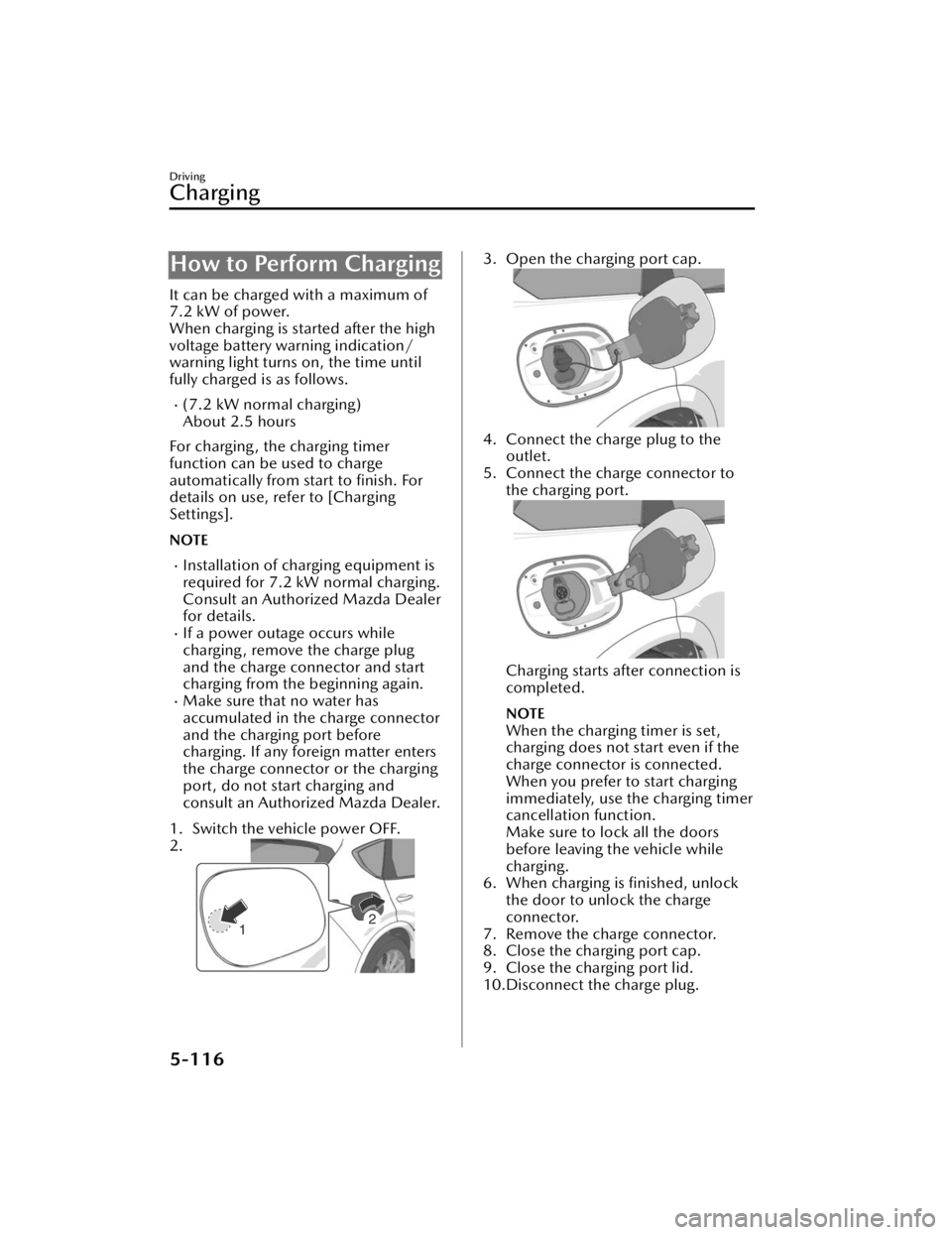
1. Switch the vehicle power OFF.
2.
3. Open the charging port cap.
4. Connect the charge plug to the outlet.
5. Connect the charge connector to the charging port.
Charging starts after connection is
completed.
NOTE
When the charging timer is set,
charging does not start even if the
charge connector is connected.
When you prefer to start charging
immediately, use the charging timer
cancellation function.
Make sure to lock all the doors
before leaving the vehicle while
charging.
6. When charging is finished, unlock the door to unlock the charge
connector.
7. Remove the charge connector.
8. Close the charging port cap.
9. Close the charging port lid.
10.Disconnect the charge plug.
Driving
Charging
5-116
CX-90_8KG7-EA-22L_Edition1_new 2022-11-17 16:05:04
Page 268 of 687

Charge indicator
The illumination/flash pattern of the
charge indicator can be checked using
the labels on the charge lid.
Charge indicator
illumination/flash pattern Content
— OFF Charging is possible.
(White) ON
Turns on when waiting for
starting to charge.
(White) Flashes
slowly The brightness changes
when the charging timer is
set.
(Green)
Flashes
slowly The brightness changes
during charging.
(Green)
ONTu r n s o n w h e n c h a rg i n g i s
completed.
Turns off after a certain pe-
riod of time has passed
since charging was com-
pleted.
(Amber)
FlashesFlashes when the charging
connector is connected and
the selector lever is in a po-
sition other than P.
Shift the selector lever to
the P position.
Charge indicator
illumination/
flash pattern Content
(Amber)
ONTurns on if there is a prob-
lem with the charging sys-
tem when the charging
connector is connected.
Wait a few minutes then re-
connect the charging con-
nector.
(Red)
ONTurns on if there is a prob-
lem with the charging sys-
tem and the charging port
lid is opened or the charg-
ing connector is connected.
Have your vehicle inspect-
ed by an Authorized Mazda
Dealer.
Charge status screen
When the driver's door is opened
while the charge connector is
connected, the charging status is
displayed in the instrument cluster.
1. Charge status icon
2. Message
3. Remaining power of the high
voltage battery (Displayed only
when vehicle power is switched
OFF)
4. Time to complete charging
5. EV maximum driving distance (Displayed only when vehicle
power is switched OFF)
Driving
Charging
5-117
CX-90_8KG7-EA-22L_Edition1_new 2022-11-17 16:05:04
Page 269 of 687

NOTE
When charging is started, the charging
status screen is displayed. The charging
status screen turns off after a certain
period of time passes or the doors or
liftgate is locked. The screen is
displayed again when the doors or
liftgate is unlocked.Convenient Ways to Useof Charging
Charging Schedule
Timer charging is a function which
charges the battery automatically ac-
cording to a preset time.
You can charge the battery using this
function during time periods when
electricity rates are low. In addition,
the maximum charge limit can be set
and changed.
1. Select Settings from the homescreen on Mazda Connect.
2. Select EV Settings from the setting
screen.
3. Select Charging Schedule from the selection screen.
Function Available setting changes
1 ----
Enable, Disa-ble
*1Edit, Delete*2
2 ----
3 ----
4 ----
5 ----
6 ----
7 ----
*1 If a list selected using the cursor has beenset, the item can be Enable or Disable.
*2 Settings can be Edit/Delete by sliding a listselected using the cursor to the right.
NOTE
The charging timer does not work
immediately after the lead-acid
battery is removed or installed, or
when no GPS signal has been
received. When charging without
receiving GPS, charging begins.
When GPS signals are received, the
charging timer becomes operational.
Driving
Charging
5-118
CX-90_8KG7-EA-22L_Edition1_new 2022-11-17 16:05:04
Page 270 of 687

Immediately after switching to
daylight savings, charging may occur
at the charging timer time set before
the switch to daylight savings until
the vehicle power is switched ON.
Edit
Function Available setting
changes
Start Time
Select the desired charging
start time. Time
(10-minute inter- vals)
End Time
Select the desired charging
end time. Time
(10-minute inter- vals)
Repeat
Select the day(s) of the
week to repeat. Monday
― Sun-
day
Charge Limit
Select the desired charge
limit method. According to Bat-
tery Charge Level, According to Esti- mated Range
Battery Charge Level
*1
Select the desired maxi-
mum charge level. 100%
― 20%
(9 levels)
Estimated Range
*2
Select the desired estimat-
ed range. In 10 km (10 mi)
increments
*1 Can be changed when According to Battery
Charge Level is selected for Charge Limit.
Use when you want to charge only the
amount of charging you need. This helps you
save power and prevent high voltage battery
deterioration.
*2 Can be changed when According toEstimated Range is selected for Charge
Limit.
Use when you want to charge according to
your planned driving distance.
The distance-to-full discharge changes
depending on the driving conditions and
surrounding environment. Check the actual
remaining distance-to-full discharge.
If you change the distance unit after setting
the Estimated Range, the Estimated Range
will be calculated in the unit after the
change. (If you change the units to miles
after setting the estimated range to 100 km,
the charge distance will be for 60 miles.)
NOTE
A charging day is set using Repeat
If 1 repeat day is set, charging is
repeated every week on the set day
of the week.
Depending on the set days of the
week, the Repeat indication is
displayed as Weekdays, Weekends,
and Daily. Otherwise, it is displayed
as Custom.
Setting example
Function Available setting
changes
Start Time 21 : 00
End Time 6 : 00
Repeat Friday
Charge Limit According to Bat-
tery Charge Level
Battery Charge Level 80%
In this case, charging is done every
week from Friday at 21 : 00 hours to
Saturday at 6:00 hours. However, if
the Battery Charge Level reaches
80%, the charging is stopped even if
it is before the End Time.
No day is set using Repeat
If no Repeat day is designated,
charging is done only 1 time at the
set hours.
Setting example (if settings below are
made at 13 : 00 hours)
Function Available setting
changes
Start Time 12 : 00
End Time 18 : 00
Driving
Charging
5-119
CX-90_8KG7-EA-22L_Edition1_new 2022-11-17 16:05:04
Page 271 of 687

FunctionAvailable setting
changes
Repeat Once
Charge Limit According to Esti-
mated Range
Estimated Range 50 km (30 mi)
In this case, when the charge
connector is connected, charging
starts immediately for charging to
18 : 00 hours on the same day.
However, if a charging amount
allowing a 50 km (30 miles) trip is
reached, the charging is stopped
even if it is before the end time.
Setting example (if settings below are
made at 13 : 00 hours)
Function Available setting
changes
Start Time 1 : 00
End Time 8 : 00
Repeat Once
Charge Limit According to Bat-
tery Charge Level
Battery Charge Level 100%
In this case, charging is done from
the next day at 1 : 00 hours to 8 : 00
hours. However, if the Battery
Charge Level reaches 100% is
reached, the charging is stopped
even if it is before the End Time.
Charge When Connected
Cancels charging schedule to allow im-
mediate charging.
1. Select Settings from the home screen on Mazda Connect.
2. Select EV Settings from the setting
screen.
3. Select Charge When Connected from the selection screen.
Available setting changes
Enable, Disable
NOTE
The charging timer can also be
canceled on the screen displayed on
the center display when the vehicle
power is switched OFF.
When the charging is completed
using the Charge When Connected
setting, the charging timer schedule
is restored.
Charge Limit for AC Charging
Sets the charge limit when using an AC
charger.
1. Select Settings from the home screen on Mazda Connect.
2. Select EV Settings from the setting
screen.
3. Select Charge Limit for AC Charging from the selection screen.
Available setting changes
100% ― 20% (9 levels)
NOTE
For normal charge, set the maximum
charge limit of the high voltage battery.
Set the Battery Charge Level of the
charging timer for each charging timer
setting.
Driving
Charging
5-120
CX-90_8KG7-EA-22L_Edition1_new 2022-11-17 16:05:04
Page 272 of 687
Climate control timer
The climate control timer is a function
which operates the cooling or heating
system automatically according to a
preset time. The power consumption
of the air conditioner after starting to
drive the vehicle is reduced by
operating the air conditioner and
providing a comfortable temperature
in the cabin before driving.
Refer to Convenient Ways to Use the
Fully Automatic Air-Conditioning on
page 6-12.
Charge Connector Lock
The charge connector lock is a function
which locks the charge connector con-
nected to the vehicle so that it cannot
be pulled out. You can also select the
lock conditions for the charge connec-
tor according to locations and situa-
tions.
1. Select Settings from the homescreen on Mazda Connect.
2. Select EV Settings from the setting screen.
3. Select Charge Connector Lock from the selection screen.
4. Set the lock condition from the se- lection screen.
Available setting changes
Locked When Charging
Unlocks connector when charging is complete
or vehicle is unlocked.
Locked When Connected
Unlocks connector only when vehicle is un-
locked.
Available setting changes
Off
Charge connector remains unlocked at all
times.
Functions using a Smartphone
You can check the remaining high
voltage battery power, operate the
charging, and operate the air
conditioner remotely by a Smartphone
remote control operation using the
Connected Service. For details, consult
an Authorized Mazda Dealer.
Driving
Charging
5-121
CX-90_8KG7-EA-22L_Edition1_new 2022-11-17 16:05:04
Page 283 of 687

Smart Brake Support (SBS) forward
drive detection
NOTE
When driving on roads with few
vehicles ahead, a message may
temporarily be displayed on the
screen indicating that the front radar
sensor is dirty.
When the vehicle is driven on roads
in which there is an elevated road on
one side, the front radar sensor
function may be restricted
temporarily.
If the lead-acid battery power is
weak, the front radar sensor
detection function may decrease and
each system may not operate
normally.
When any of the following
conditions is met, the front radar
sensor may not be able to detect
vehicles ahead or obstructions
correctly.
During inclement weather.Front visibility is reduced.The vehicle is driven near facilities
or objects emitting strong radio
waves.
The rear surface of a vehicle ahead
does not reflect radio waveseffectively.
A vehicle ahead has limited areas
that can reflect radio waves.
Your vehicle is tilted.Foreign matter is adhering to parts
near the front radar sensor.
When any of the following
conditions is met, the front radar
sensor may detect vehicles in the
adjacent lane or surrounding
obstructions, or it may not be able to
detect vehicles ahead or
obstructions.
The vehicle is entering or exiting a
curve.
The vehicle is driven on a
continuously curving road.
The vehicle is driven on roads with
repeated up and downslopes.
The vehicle is driven on roads with
narrow lanes.
The vehicle is driven on poor roads
or unpaved roads.
The vehicle ahead enters the front
radar sensor’s blind spot.
The distance to the vehicle ahead
is extremely close.
The vehicle ahead is being driven
in an unstable condition.
A vehicle suddenly comes close
such as by cutting into your lane.
Front side radar sensors
The following system utilizes front side
radar sensors.
Front Cross Traffic Alert (FCTA)Smart Brake Support (SBS) Front
Crossing
NOTE
When any of the following
conditions is met, the front side
radar sensors may not be able to
detect target objects.
During inclement weather.The vehicle is driven on a sharp
curve or on bumpy roads.
Radar sensor from an adjacent
vehicle causes radio wave
interference.
The detection range of a front side
radar sensor is obstructed by an
adjacent wall or vehicle, or the
radar is reflected.
A vehicle suddenly enters the
detection range from the front or
side of your vehicle.
Driving
Radar Sensors
5-132
CX-90_8KG7-EA-22L_Edition1_new 2022-11-17 16:05:04