steering wheel MAZDA CX90 2024 Repair Manual
[x] Cancel search | Manufacturer: MAZDA, Model Year: 2024, Model line: CX90, Model: MAZDA CX90 2024Pages: 687, PDF Size: 15.46 MB
Page 425 of 687

System Operation
When Entering the Vehicle
Sit in the driver' seat and close the
door.
Matching of the driver’s information
with the programmed information
begins.
The recognition result is displayed on
the screen.
If a confirmation message is displayed
on the Mazda Connect screen, follow
the message to complete the
operation.
The various driver’s settings that have
been programmed are automatically
restored.
NOTE
If the outer mirror angles are
adjusted close to the limits of their
range of motion, the outer mirror
angles may not be restored correctly.
When the adjustment to the stored
driving position has been completed,
a sound is not activated.
Under the following conditions, the
driving position adjustment is
canceled automatically.
The switch is operated due to the
position adjustment of the driver's
seat, the steering wheel, the outer
mirrors, or the active driving
display.
The key lock button or unlock
button is operated.
The vehicle moves.The selector lever is shifted to a
position other than P.
When Exiting the Vehicle
Unfasten the seat belt and switch the
vehicle power OFF.
The climate control setting status and
the personalization features are stored
at the time the vehicle power is
switched OFF.
(Vehicles with Entry/Exit Assist)
The seat and the steering wheel move
when all of the following conditions
are met.
The vehicle is in a programmed
driving position or in a position
where the vehicle was driven for a
certain period of time after adjusting
the driving position.
The vehicle power is switched OFF.The driver’s seat belt is unfastened.
NOTE
The climate control setting status and
the personalization features are also
stored when the drivers are switched
or when another programmed driver
is selected.
The climate control system operates
at the current setting without
restoring the stored values if any of
the following conditions occurs.
The windshield defrosting was
operating.
The ambient temperature is
significantly
different from the
previous time of entering the
vehicle.
A certain number of days have
passed since the previous time of
entering the vehicle.
If the driver's seat belt is unfastened
about 40 seconds after the vehicle
power is switched OFF, the Entry/
Exit Assist may not operate.
The Entry/Exit Assist may not operate
depending on the position of the
seat and the steering wheel.
Equipment to Make Cabin More Comfortable
Driver Personalization System
6-32
CX-90_8KG7-EA-22L_Edition1_new 2022-11-17 16:05:04
Page 426 of 687

The amount of seat movement and
the seat and the steering wheel
movement on/off can be changed.
Refer to Settings section in the
Mazda Connect Owner's Manual or
consult an Authorized Mazda Dealer.
In the following cases, the Entry/Exit
Assist is canceled.
A switch is operated due to the
position adjustment of the driver's
seat, steering wheel, or outer
mirrors.
The key lock button or unlock
button is operated.
Editing and Deleting the
Programming Content
Switch the vehicle power ON.
Select “Settings” from the Mazda
Connect home screen.
Select “Driver Personalization System”.
Operate according to the Mazda
Connect screen.
Setting the System to Inoperable
This can be set by operating Mazda
Connect.
Refer to Mazda Connect Owner's
Manual or consult an Authorized
Mazda Dealer.
Equipment to Make Cabin More Comfortable
Driver Personalization System
6-33
CX-90_8KG7-EA-22L_Edition1_new 2022-11-17 16:05:04
Page 432 of 687
Warnings and Cautions for Using the Mazda Connect
WARNING
Always adjust Mazda Connect while the vehicle is stopped:
Do not adjust Mazda Connect with th e Commander switch while driving the
vehicle. Adjusting Mazda Connect with the Commander switch while driving the
vehicle is dangerous as it could distract your attention from the vehicle operation
which could lead to a serious accident.
Even if the audio remote control switches are equipped on the steering wheel, learn
to use the switches without looking down at them so that you can keep your
maximum attention on the road while driving the vehicle.
Do not allow the connection plug cord to get tangled with the selector lever:
Allowing the plug cord to become tangled with the selector lever is dangerous as it
could interfere with driving , resulting in an accident.
Do not adjust a mobile device or a similar product while driving the vehicle:
Adjusting a mobile device or a similar product while driving the vehicle is dangerous
as it could distract your attention from the vehicle operation which could lead to a
serious accident. Always adjust a mobile device or a similar product while the
vehicle is stopped.
CAUTION
For the purposes of safe driving , adjust the audio volume to a level that allows you
to hear sounds outside of the vehicle incl uding car horns and particularly emergency
vehicle sirens.
Other Equipment
Mazda Connect
7-5
CX-90_8KG7-EA-22L_Edition1_new 2022-11-17 16:05:04
Page 440 of 687

How to Use the Audio Remote Control Switch
The audio remote control switch is on the left side of the steering wheel. You can
operate basic audio functions, pick up/hang up the phone, or activate voice
control using the switch.
The shape of the switches may differ depending on the specifications.
Volume adjustment button
/
Press the (+) or (-) button to adjust the volume.
If you adjust the volume during voice guidance, the volume of the voice guidance
will change.
If you adjust the volume during a hands-free call, the conversation volume will
change.
Seek Switch
(SEEK UP)/(SEEK DOWN)
Selecting a radio station
Radio stations saved to your Favorites can be selected by pressing the seek
switch while listening to FM/AM radio. The station will change to the previous or
next favorite station each time you press the seek switch. If you want to manually
tune to the next available station before or after the currently selected station, press
and hold the seek switch until it beeps and the tuner will select the next available
station.
Playback Control
Music and video files can be cued when listening to stored content via USB,
Bluetooth
®, and SiriusXM®*, audio, or video.
Other Equipment
Mazda Connect
*Some models.7-13
CX-90_8KG7-EA-22L_Edition1_new 2022-11-17 16:05:04
Page 493 of 687

If swaying occurs, firmly grip the steering wheel and reduce speed immediately, but
gradually.
Steer straight ahead. If no extreme correction of steering or braking is made, the
combination of less speed and firm steering will result in stability.
Backing up
Backing a vehicle with a trailer requires practice and patience. Back slowly, and have
a helper outside at the rear of the trailer to reduce the risk of an accident.
To turn the trailer, place your hand at th e bottom of the steering wheel and turn it in
the direction you want the trailer to go. Make only slight movements to prevent
sharp or prolonged turning.
Ascending a hill
Shift into a lower gear to reduce the poss ibility of overloading or overheating the
engine, or both.
Descending a hill
Shift into a lower gear and use engine compression as a braking effect.
Pa r k i n g
Always make sure the tires of the trailer and the tow vehicle are blocked while
parked.
Apply the parking brake firmly and put the transmission in P.
Avoid parking on an incline, but if you must, follow these instructions:
1. Depress and hold down the brake pedal.
2. Have a helper put wheel blocks against the downhill side of all vehicle and trailer tires.
3. Then release the brake pedal slowly until the blocks bear the load.
If the grade is downhill, turn the steering wheel so that the front of the front
tires face the curb.
If it is uphill, face the rear of the front tires against the curb.
4. Firmly apply the parking brake.
5. Shift the transmission into P, and stop the engine.
To restart after parking on an incline:
1. With the transmission in P, start the engine. (Be sure to depress and hold the brake pedal.)
2. Shift into gear.
3. Release the parking brake (also the foot brake) and pull away from the wheel blocks. Stop; apply the parking brake and shift into P.
4. Have a helper retrieve the wheel blocks.
Maintenance
If you tow a trailer frequently, have your vehicle serviced as shown in Scheduled
Maintenance (page 9-4).
Other Equipment
Towing (U.S.A. and Canada)
7-66
CX-90_8KG7-EA-22L_Edition1_new 2022-11-17 16:05:04
Page 527 of 687

Changing a Flat Tire (WithSpare Tire)
NOTE
If the following occurs while driving , it
could indicate a flat tire.
Steering becomes difficult.The vehicle begins to vibrate
excessively.
The vehicle pulls in one direction.
If you have a flat tire, drive slowly to a
level spot that is well off the road and
out of the way of traffic to change the
tire.
Stopping in traffic or on the shoulder
of a busy road is dangerous.
WARNING
Do not install the temporary spare tire
on the rear wheels (driving wheels).
Driving with the temporary spare tire
on one of the rear driving wheels is
dangerous. Handling will be affected.
You could lose control of the vehicle,
especially on ice or snow bound roads,
and have an accident. Move a regular
tire to the rear wheel and install the
temporary spare tire to the front.
Be sure to follow the directions for
changing a tire.
Changing a tire is dangerous if not
done properly. The vehicle can slip off
the jack and seriou sly injure someone.
No person should place any portion of
their body under a vehicle that is
supported by a jack.
Never allow anyone inside a vehicle
supported by a jack.
Allowing someone to remain in a
vehicle supported by a jack is
dangerous. The occupant could cause
the vehicle to fall resulting in serious
injury.
NOTE
Make sure the jack is well lubricated
before using it.
1. Park on a hard, level surface off the
right-of-way and firmly set the
parking brake.
2. Shift into Park (P) and turn off the
engine.
3. Turn on the hazard warning flasher.
4. Have passengers get out of the
vehicle and away from the vehicle
and traffic.
5. Remove any luggage, the jack (page
7-76), spare tire (page 7-77), and
tools.
1. Lug wrench
2. Jack lever
6. Block the wheel diagonally opposite the flat tire. When
blocking a wheel, place a tire block
both in front and behind the tire.
What to Do in Case of Emergency
Tire is Punctured or Bursts
8-22
CX-90_8KG7-EA-22L_Edition1_new 2022-11-17 16:05:04
Page 547 of 687

Electric Power SteeringWarning Light
The warning light turns on if the
electric power steering has a
malfunction.
If the warning light turns on, stop the
vehicle in a safe place and switch the
vehicle power OFF.
There is no problem if the warning light
turns off when the hybrid system is
restarted after some time has passed.
If the warning light turns on even after
the hybrid system is restarted, contact
an Authorized Mazda Dealer.
NOTE
If the warning light turns on, the
electric power steering will not
operate normally. In this case, the
steering wheel can still be operated,
however, the operation may feel
heavy compared to normal.
Repeatedly jerking the steering
wheel left and right while the vehicle
is stopped or moving extremely
slowly will cause the power steering
system to go into protective mode
which will make the steering feel
heavy, but this does not indicate a
problem. If this occurs, park the
vehicle safely and do not operate the
steering wheel. The system will
return to normal after a few minutes.
Shift System Warning Light
The light turns on if the shift system has
a problem.
Park the vehicle in a safe place
immediately and contact an
Authorized Mazda Dealer.
Always apply the parking brake when
parking or stopping the vehicle, as it
may not be possible to hold the
vehicle in a stopped position even with
the selector lever in the P position.
In addition, the hybrid system may not
start again if it is stopped.
What to Do in Case of Emergency
Warning/Indicator Light Turns On
8-42
CX-90_8KG7-EA-22L_Edition1_new 2022-11-17 16:05:04
Page 551 of 687

AWD Warning Light
The light turns on if the system has a
problem or if the tire sizes do not
match.
Check the contents of the message
displayed and take the necessary
action.
Tire Pressure MonitoringSystem (TPMS) Warning Light (Flashing)
The light flashes if there is a
malfunction in the system.
Contact an Authorized Mazda Dealer.
WARNING
Do not drive the vehicle at high
speeds if the TPMS warning light turns
on or flashes:
Driving the vehicle at high speeds
while the TPMS warning light is turned
on or flashing is dangerous because
the brake performance and the
steering wheel operability will be
reduced. If the vehicle is driven at high
speeds or the brakes are suddenly
applied, it could lead to an accident.
Gradually apply the brakes to lower the
vehicle's speed.
Do not ignore the TPMS warning light
when it is turned on or flashing:
Continuing to driv e the vehicle while
ignoring the illumi nation/flashing of
the TPMS warning light is dangerous
because a tire may burst which could
lead to an accident. Take appropriate
measures as soon as possible.
What to Do in Case of Emergency
Warning/Indicator Light Turns On
8-46
CX-90_8KG7-EA-22L_Edition1_new 2022-11-17 16:05:04
Page 574 of 687
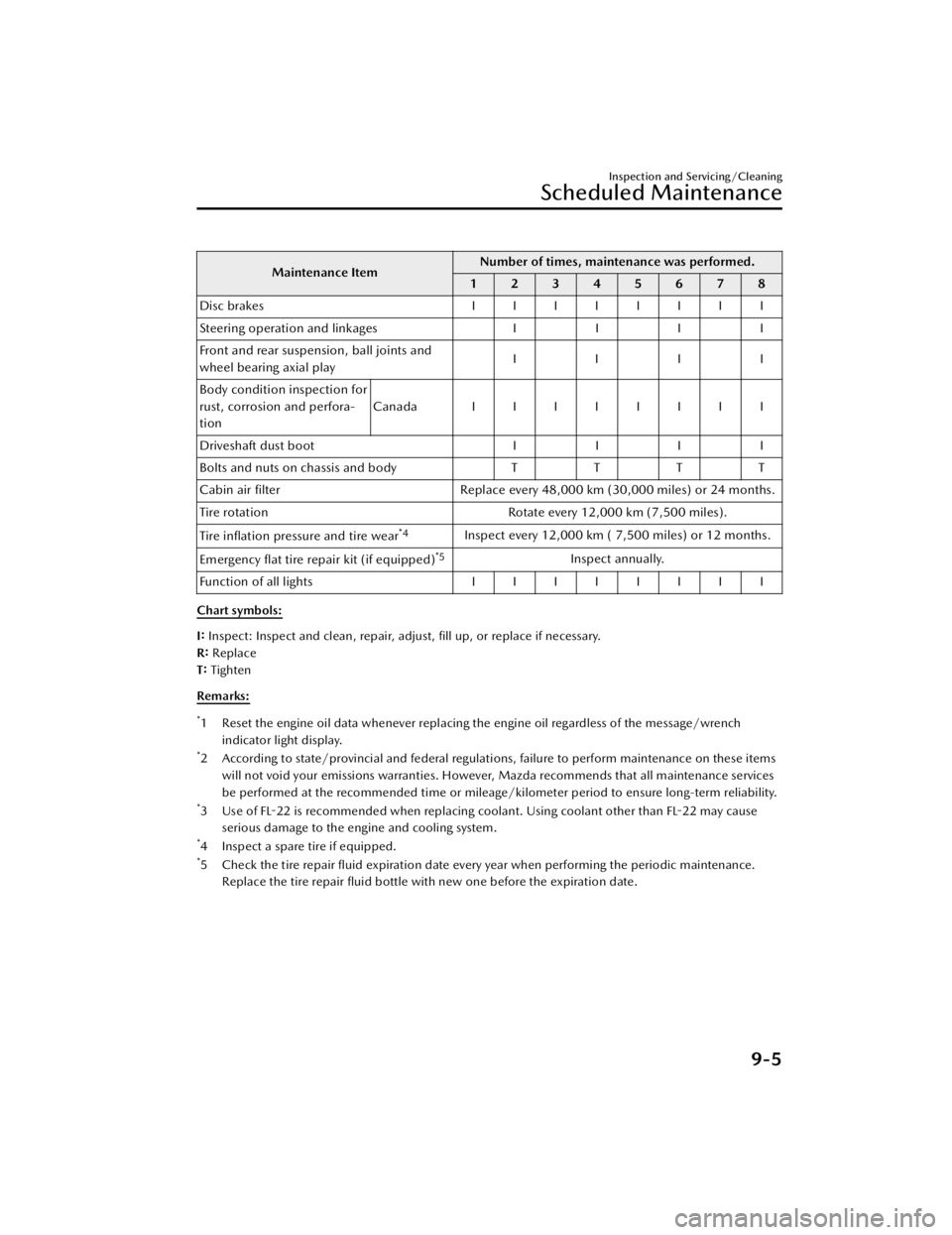
Maintenance ItemNumber of times, maintenance was performed.
12345678
Disc brakes IIIIIIII
Steering operation and linkages II II
Front and rear suspension, ball joints and
wheel bearing axial play IIII
Body condition inspection for
rust, corrosion and perfora-
tion Canada IIIIIIII
Driveshaft dust boot II II
Bolts and nuts on chassis and body TTT T
Cabin air filter Replace every 48,000 km (30,000 miles) or 24 months.
Tire rotation Rotate every 12,000 km (7,500 miles).
Tire inflation pressure and tire wear
*4Inspect every 12,000 km ( 7,500 miles) or 12 months.
Emergency flat tire repair kit (if equipped)
*5Inspect annually.
Function of all lights IIIIIIII
Chart symbols:
I: Inspect: Inspect and clean, repair, adjust, fill up, or replace if necessary.
R: Replace
T: Tighten
Remarks:
*1 Reset the engine oil data whenever replacing the engine oil regardless of the message/wrench indicator light display.
*2 According to state/provincial and federal regulations, failure to perform maintenance on these itemswill not void your emissions warranties. However, Mazda recommends that all maintenance services
be performed at the recommended time or mileage/kilometer period to ensure long-term reliability.
*3 Use of FL-22 is recommended when replacing coolant. Using coolant other than FL-22 may causeserious damage to the engine and cooling system.
*4 Inspect a spare tire if equipped.*5 Check the tire repair fluid expiration date every year when performing the periodic maintenance.Replace the tire repair fluid bottle with new one before the expiration date.
Inspection and Servicing/Cleaning
Scheduled Maintenance
9-5
CX-90_8KG7-EA-22L_Edition1_new
2022-11-17 16:05:04
Page 598 of 687

CAUTION
Rotate unidirectional tires and radial
tires that have an asymmetrical tread
pattern or studs only from front to rear,
not from side to side. Tire performance
will be reduced if rotated from side to
side.
Replacing a Tire or aWheel
WARNING
Always use tires that are in good
condition.
Driving with worn tires is dangerous.
Reduced braking , steering , and
traction could result in an accident.
Replace all four tires at the same
time.
Replacing just one tire is dangerous. It
could cause poor handling and poor
braking resulting in loss of vehicle
control. Mazda strongly recommends
that you replace all four tires at the
same time.
Always use wheels of the correct size
on your vehicle.
Using a wrong-sized wheel is
dangerous. Braking and handling could
be affected, leading to loss of control
and an accident.
CAUTION
A wrong-sized wheel may adversely
affect:
Tire fit
Wheel and bearing life
Ground clearance
Snow-chain clearance
Speedometer calibration
Headlight aim
Bumper height
Tire Pressure Monitoring System
If a tire wears evenly, a wear indicator
will appear as a solid band across the
tread.
Inspection and Servicing/Cleaning
Vehicle Exterior Inspection
9-29
CX-90_8KG7-EA-22L_Edition1_new 2022-11-17 16:05:04