steering wheel MAZDA CX90 2024 Service Manual
[x] Cancel search | Manufacturer: MAZDA, Model Year: 2024, Model line: CX90, Model: MAZDA CX90 2024Pages: 687, PDF Size: 15.46 MB
Page 354 of 687
The accelerator pedal or brake
pedal is being operated.
The steering wheel is being
operated.
The turn signal lever is being
operated.
If Front Crossing performs brake
control and the vehicle is stopped,
the vehicle is held stopped until the
estimated passing time of the target
vehicle has elapsed.
When the intersection accident
avoidance assist function operates*
The intersection accident avoidance
assist function operates when all of the
following conditions are met.
The vehicle speed is about 8 km/h
to 20 km/h (5 mph to 12 mph).
The DSC is not operating.The system determines that there is a
possibility of a collision with an
object ahead.
If the intersection accident avoidance
assist function operates, a screen
display and warning sound the driver
notify the driver of the danger.
Furthermore, if the possibility of a
collision increases, brake control is
performed.
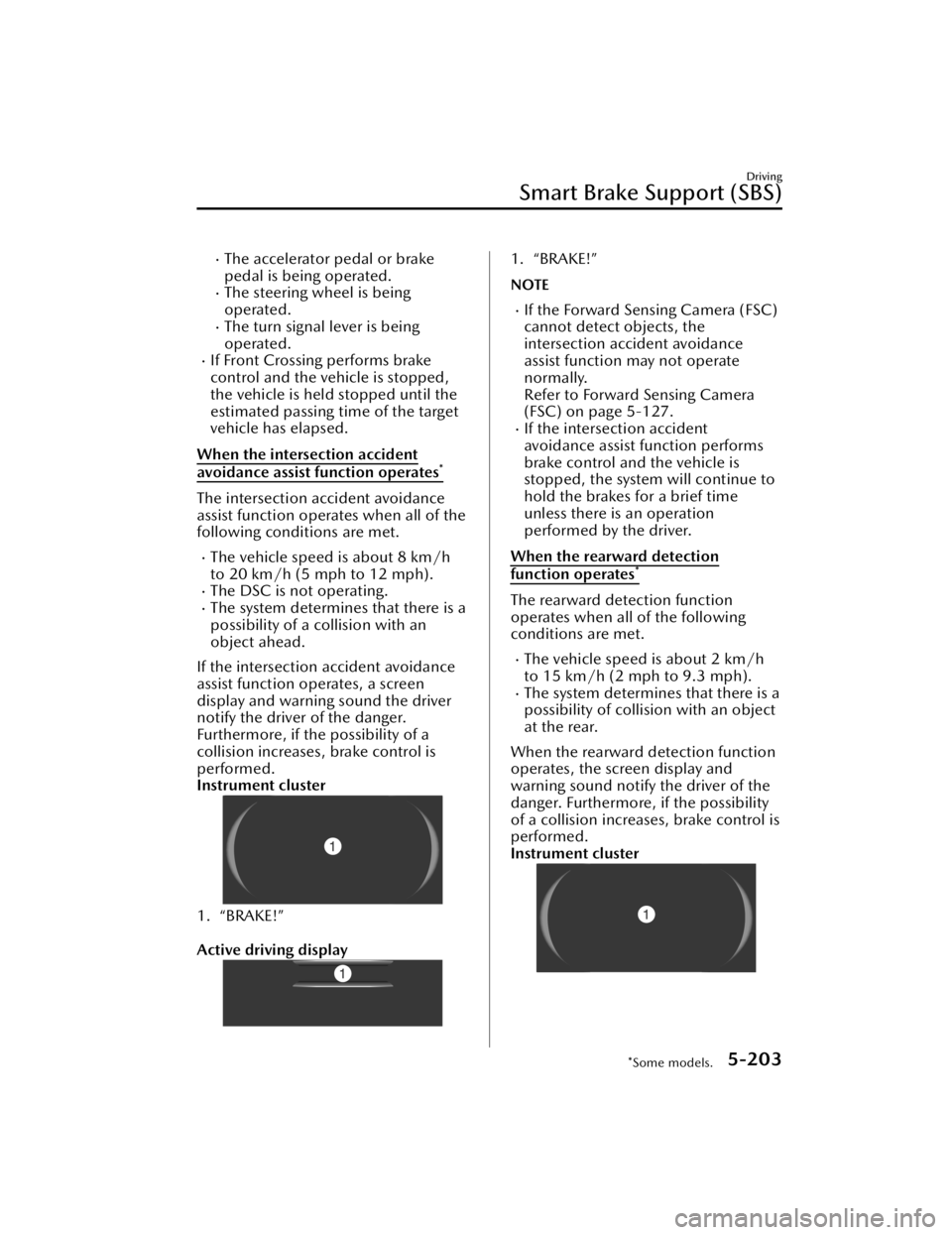
Instrument cluster
1. “BRAKE!”
Active driving display
1. “BRAKE!”
NOTE
If the Forward Sensing Camera (FSC)
cannot detect objects, the
intersection accident avoidance
assist function may not operate
normally.
Refer to Forward Sensing Camera
(FSC) on page 5-127.
If the intersection accident
avoidance assist function performs
brake control and the vehicle is
stopped, the system will continue to
hold the brakes for a brief time
unless there is an operation
performed by the driver.
When the rearward detection
function operates*
The rearward detection function
operates when all of the following
conditions are met.
The vehicle speed is about 2 km/h
to 15 km/h (2 mph to 9.3 mph).
The system determines that there is a
possibility of collision with an object
at the rear.
When the rearward detection function
operates, the screen display and
warning sound notify the driver of the
danger. Furthermore, if the possibility
of a collision increases, brake control is
performed.
Instrument cluster
Driving
Smart Brake Support (SBS)
*Some models.5-203
CX-90_8KG7-EA-22L_Edition1_new 2022-11-17 16:05:04
Page 362 of 687

CAUTION
Handle the cameras appropriately. If the cameras are handled incorrectly, images
may not be displayed normally.
Refer to Cameras on page 5-137.
Do not use the 360° view monitor in th e following locations or conditions.
Bumpy roads
The vehicle is on a road incline.
Icy or snow-covered roads
Tire chains or a temporary spare tire is installed.
The doors are not fully closed.
The outside mirrors are retracted.
If the doors are not completely closed, images and guide lines may not be
displayed correctly.
Heed the following cautions to assure that the 360° view monitor operates
normally.
Do not modify the suspensions.
Always use wheels of the specified size for the front and rear wheels. Consult an
Authorized Mazda Dealer for tire replacement.
When the center display is cold, images may leave trails or the display might be
darker than usual, making it difficult to check the vehicle surroundings. Always
confirm the safety around the vehicle visually when driving.
Recognizing images at night may be
difficult because there are no lights in the
shooting range of the side camera. Always confirm the safety around the vehicle
visually when driving.
The method for parking/stopping the vehicle using the 360° View Monitor
differs
depending on the road conditions and ve hicle conditions. In addition, when and
how much you turn the steering wheel will differ depending on the situation,
therefore always check the vehicle surroundings directly with your eyes while using
the system.
Driving
360° View Monitor
5-211
CX-90_8KG7-EA-22L_Edition1_new 2022-11-17 16:05:04
Page 365 of 687
The parking sensor detection range has limitations. For details, refer to the parking
sensor entry.
Refer to Parking Sensor on page 5-234.
The screen display may differ from the actual display.
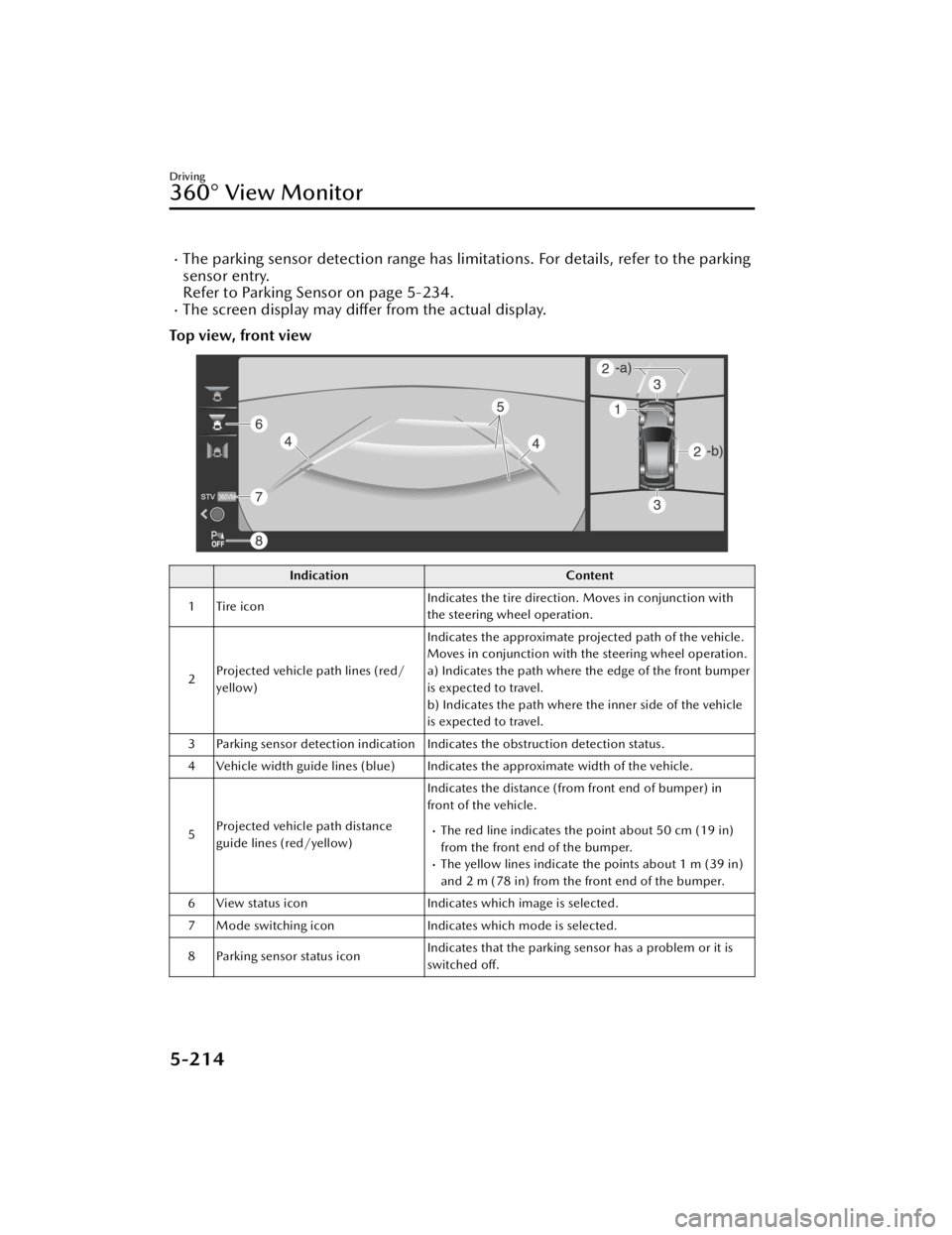
Top view, front view
Indication Content
1 Tire icon Indicates the tire direction. Moves in conjunction with
the steering wheel operation.
2 Projected vehicle path lines (red/
yellow) Indicates the approximate projected path of the vehicle.
Moves in conjunction with the steering wheel operation.
a) Indicates the path where the edge of the front bumper
is expected to travel.
b) Indicates the path where the inner side of the vehicle
is expected to travel.
3 Parking sensor detection indication Indicates the obstruction detection status.
4 Vehicle width guide lines (blue) Indicates the approximate width of the vehicle.
5 Projected vehicle path distance
guide lines (red/yellow) Indicates the distance (from front end of bumper) in
front of the vehicle.
The red line indicates the point about 50 cm (19 in)
from the front end of the bumper.
The yellow lines indicate the points about 1 m (39 in)
and 2 m (78 in) from the front end of the bumper.
6 View status icon Indicates which image is selected.
7 Mode switching icon Indicates which mode is selected.
8 Parking sensor status icon Indicates that the parking sensor has a problem or it is
switched off.
Driving
360° View Monitor
5-214
CX-90_8KG7-EA-22L_Edition1_new
2022-11-17 16:05:04
Page 366 of 687
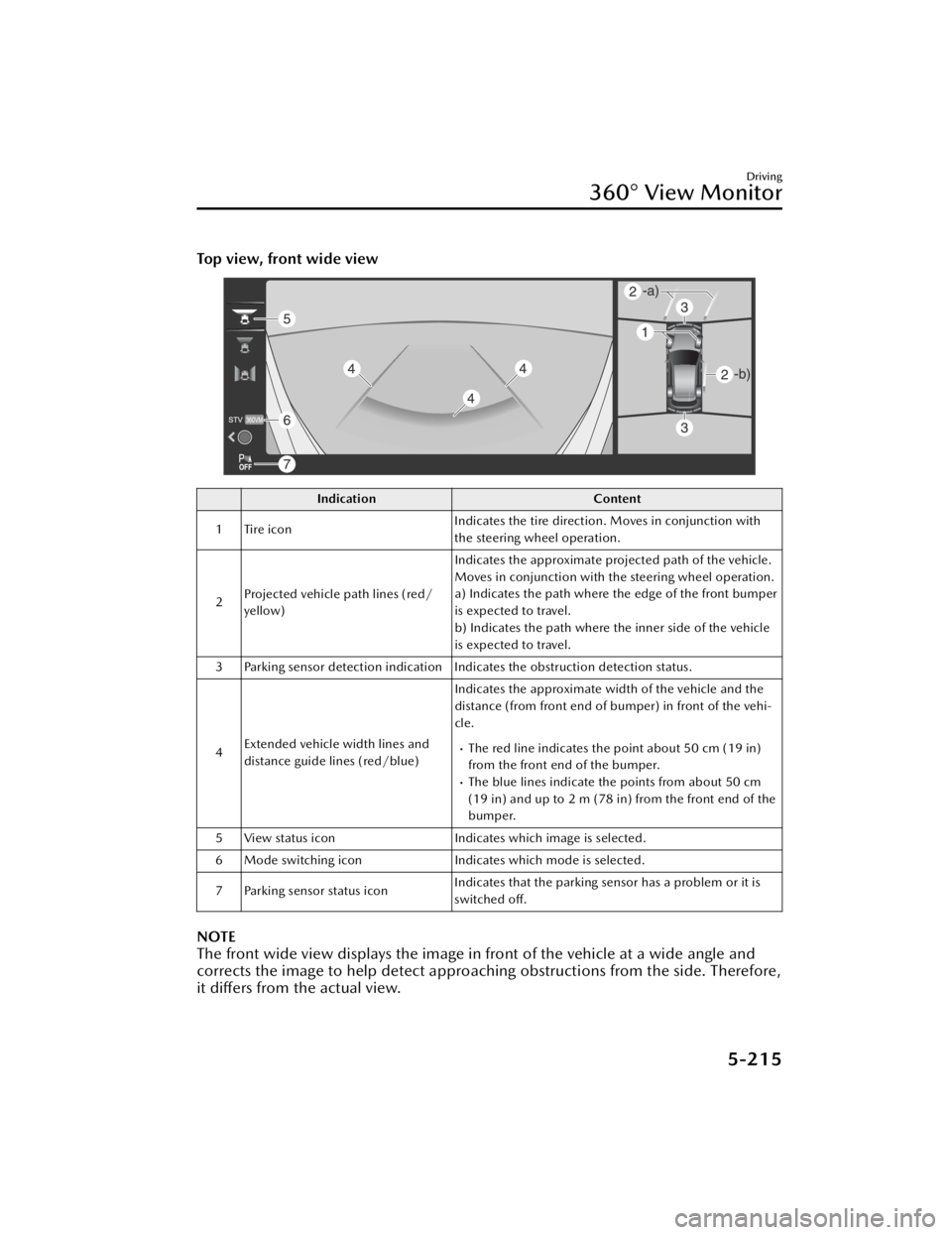
Top view, front wide view
IndicationContent
1 Tire icon Indicates the tire direction. Moves in conjunction with
the steering wheel operation.
2 Projected vehicle path lines (red/
yellow) Indicates the approximate projected path of the vehicle.
Moves in conjunction with the steering wheel operation.
a) Indicates the path where the edge of the front bumper
is expected to travel.
b) Indicates the path where the inner side of the vehicle
is expected to travel.
3 Parking sensor detection indication Indicates the obstruction detection status.
4 Extended vehicle width lines and
distance guide lines (red/blue) Indicates the approximate width of the vehicle and the
distance (from front end of bumper) in front of the vehi-
cle.
The red line indicates the point about 50 cm (19 in)
from the front end of the bumper.
The blue lines indicate the points from about 50 cm
(19 in) and up to 2 m (78 in) from the front end of the
bumper.
5 View status icon Indicates which image is selected.
6 Mode switching icon Indicates which mode is selected.
7 Parking sensor status icon Indicates that the parking sensor has a problem or it is
switched
off.
NOTE
The front wide view displays the image in front of the vehicle at a wide angle and
corrects the image to help detect approaching obstructions from the side. Therefore,
it differs from the actual view.
Driving
360° View Monitor
5-215
CX-90_8KG7-EA-22L_Edition1_new 2022-11-17 16:05:04
Page 367 of 687
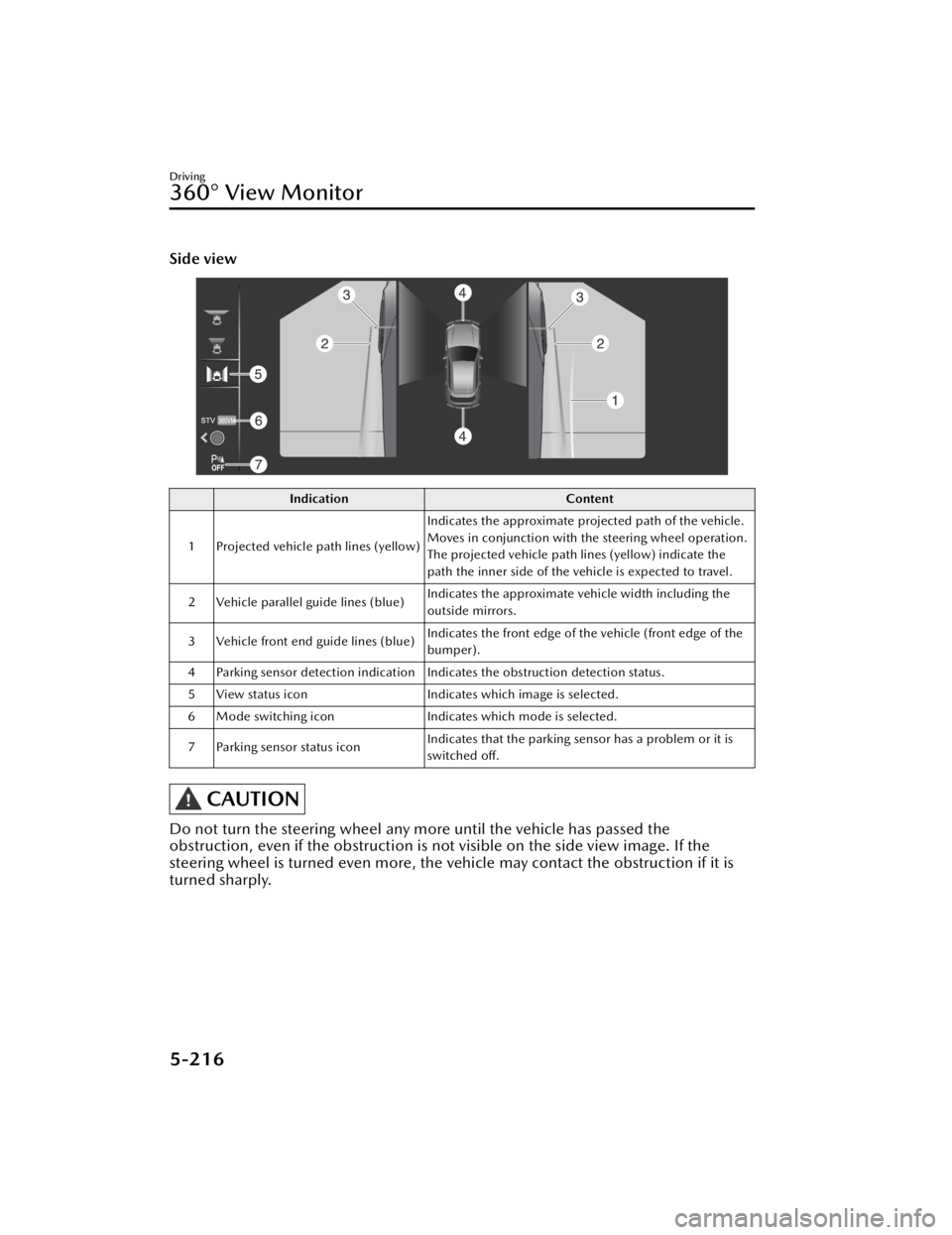
Side view
IndicationContent
1 Projected vehicle path lines (yellow) Indicates the approximate projected path of the vehicle.
Moves in conjunction with the steering wheel operation.
The projected vehicle path lines (yellow) indicate the
path the inner side of the vehicle is expected to travel.
2 Vehicle parallel guide lines (blue) Indicates the approximate vehicle width including the
outside mirrors.
3 Vehicle front end guide lines (blue) Indicates the front edge of the vehicle (front edge of the
bumper).
4 Parking sensor detection indication Indicates the obstruction detection status.
5 View status icon Indicates which image is selected.
6 Mode switching icon Indicates which mode is selected.
7 Parking sensor status icon Indicates that the parking sensor has a problem or it is
switched off.
CAUTION
Do not turn the steering wheel any more until the vehicle has passed the
obstruction, even if the obstruction is no
t visible on the side view image. If the
steering wheel is turned even more, the vehicle may contact the obstruction if it is
turned sharply.
Driving
360° View Monitor
5-216
CX-90_8KG7-EA-22L_Edition1_new 2022-11-17 16:05:04
Page 368 of 687
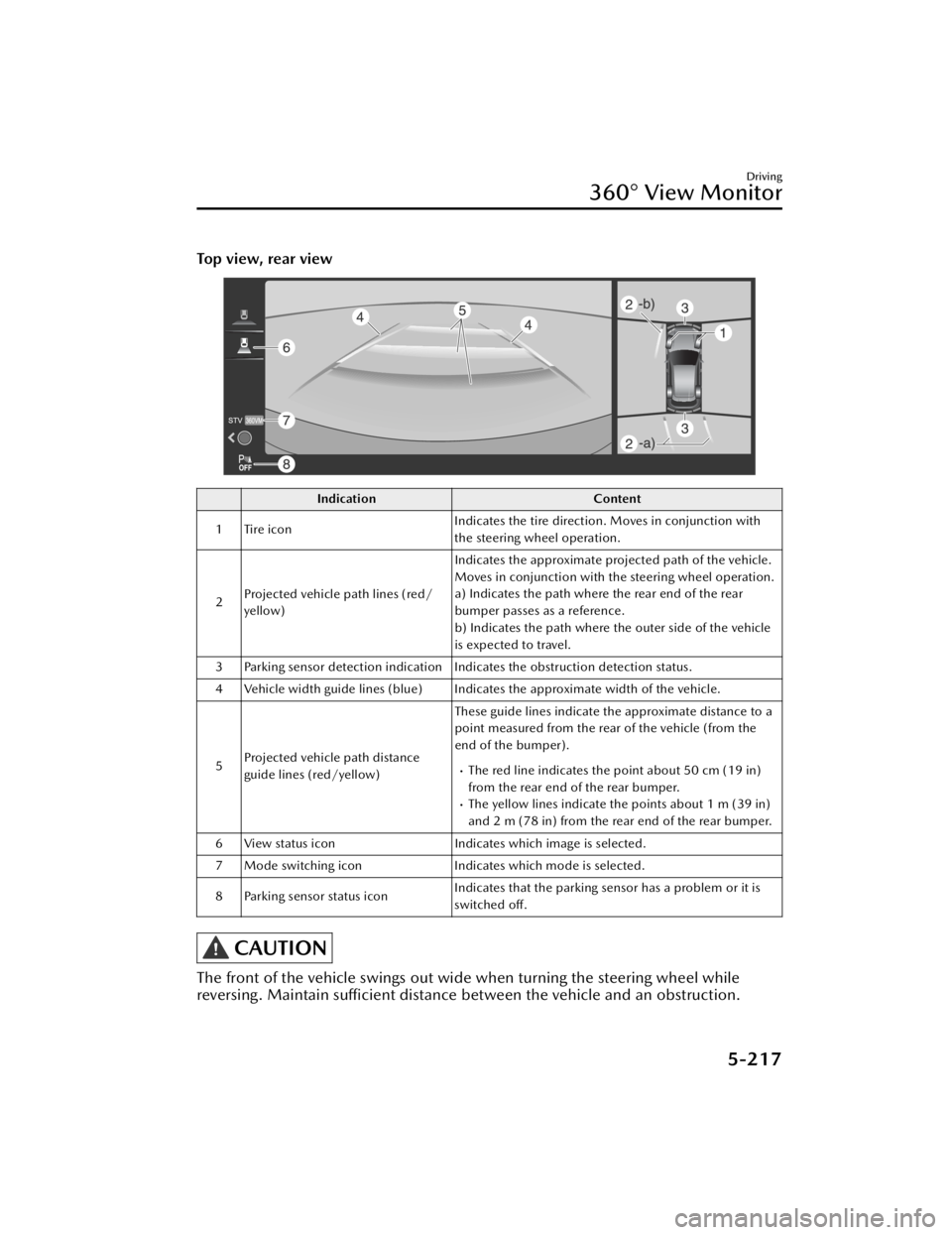
Top view, rear view
IndicationContent
1 Tire icon Indicates the tire direction. Moves in conjunction with
the steering wheel operation.
2 Projected vehicle path lines (red/
yellow) Indicates the approximate projected path of the vehicle.
Moves in conjunction with the steering wheel operation.
a) Indicates the path where the rear end of the rear
bumper passes as a reference.
b) Indicates the path where the outer side of the vehicle
is expected to travel.
3 Parking sensor detection indication Indicates the obstruction detection status.
4 Vehicle width guide lines (blue) Indicates the approximate width of the vehicle.
5 Projected vehicle path distance
guide lines (red/yellow) These guide lines indicate the approximate distance to a
point measured from the rear of the vehicle (from the
end of the bumper).
The red line indicates the point about 50 cm (19 in)
from the rear end of the rear bumper.
The yellow lines indicate the points about 1 m (39 in)
and 2 m (78 in) from the rear end of the rear bumper.
6 View status icon Indicates which image is selected.
7 Mode switching icon Indicates which mode is selected.
8 Parking sensor status icon Indicates that the parking sensor has a problem or it is
switched off.
CAUTION
The front of the vehicle swings out wide when turning the steering wheel while
reversing. Maintain sufficient distance between the vehicle and an obstruction.
Driving
360° View Monitor
5-217
CX-90_8KG7-EA-22L_Edition1_new
2022-11-17 16:05:04
Page 369 of 687
NOTE
Even though the back end of the parking space (or garage) displayed on the screen
and distance guide lines appear parallel, they may not actually be parallel.
When parking in a space with a division line on only one side of the parking space,
even though the division line and the vehicle width guide line appear parallel, they
may not actually be parallel.
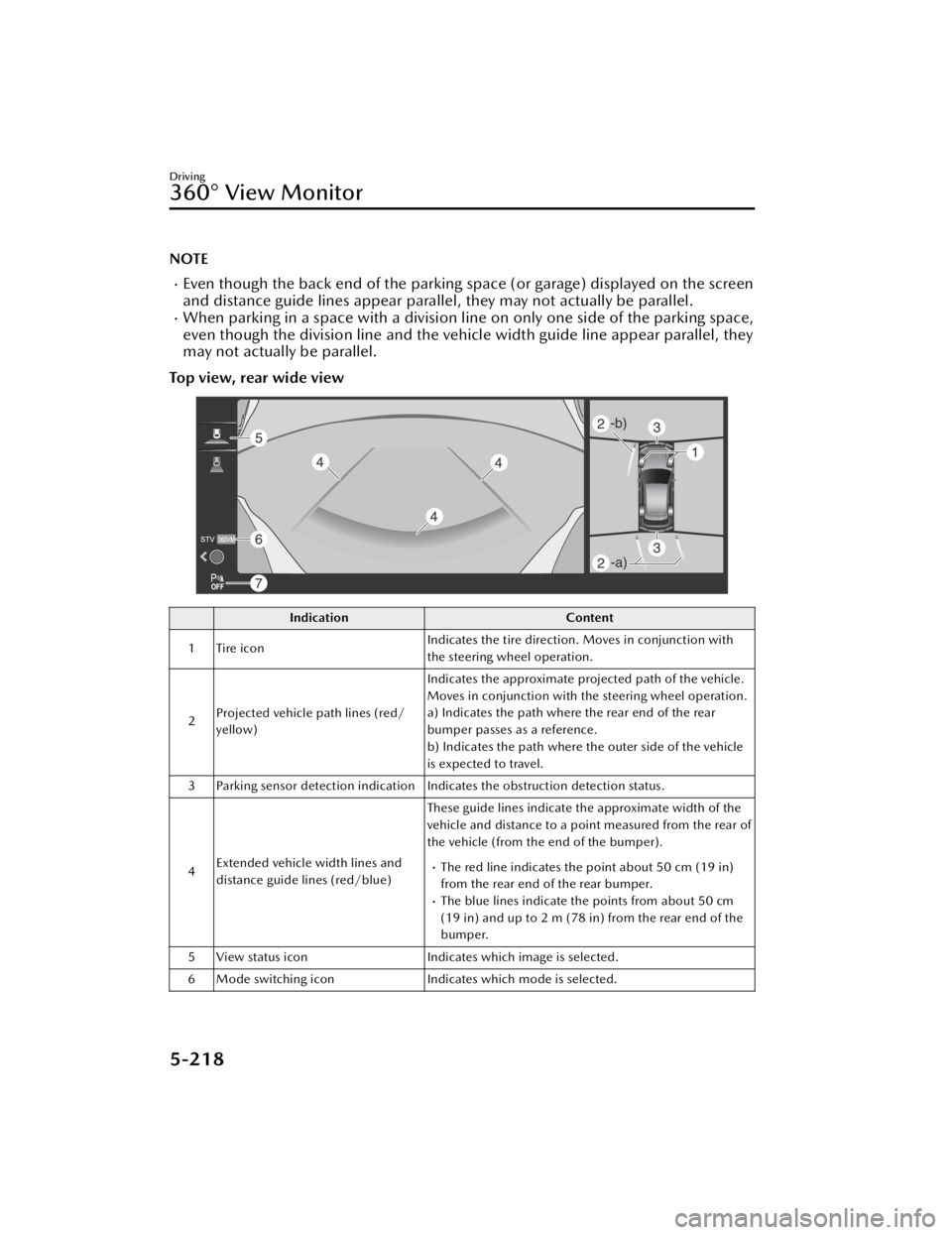
Top view, rear wide view
Indication Content
1 Tire icon Indicates the tire direction. Moves in conjunction with
the steering wheel operation.
2 Projected vehicle path lines (red/
yellow) Indicates the approximate projected path of the vehicle.
Moves in conjunction with the steering wheel operation.
a) Indicates the path where the rear end of the rear
bumper passes as a reference.
b) Indicates the path where the outer side of the vehicle
is expected to travel.
3 Parking sensor detection indication Indicates the obstruction detection status.
4 Extended vehicle width lines and
distance guide lines (red/blue) These guide lines indicate the approximate width of the
vehicle and distance to a point measured from the rear of
the vehicle (from the end of the bumper).
The red line indicates the point about 50 cm (19 in)
from the rear end of the rear bumper.
The blue lines indicate the points from about 50 cm
(19 in) and up to 2 m (78 in) from the rear end of the
bumper.
5 View status icon Indicates which image is selected.
6 Mode switching icon Indicates which mode is selected.
Driving
360° View Monitor
5-218
CX-90_8KG7-EA-22L_Edition1_new 2022-11-17 16:05:04
Page 370 of 687
IndicationContent
7 Parking sensor status icon Indicates that the parking sensor has a problem or it is
switched off.
NOTE
The rear wide view displays the image at the rear of the vehicle at a wide angle and
corrects the image to help detect approaching obstructions from the side. Therefore,
it differs from the actual view.
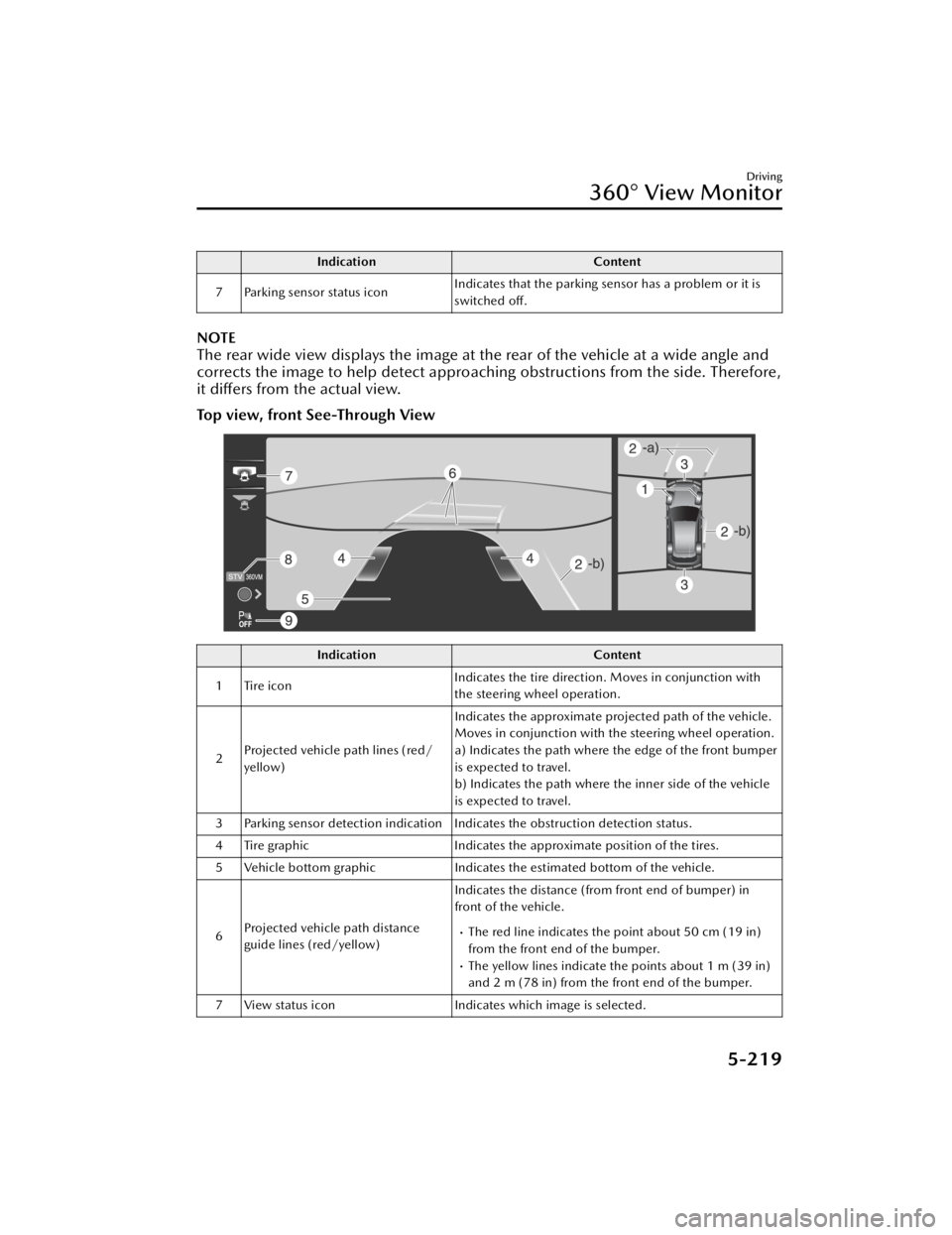
Top view, front See-Through View
Indication
Content
1 Tire icon Indicates the tire direction. Moves in conjunction with
the steering wheel operation.
2 Projected vehicle path lines (red/
yellow) Indicates the approximate projected path of the vehicle.
Moves in conjunction with the steering wheel operation.
a) Indicates the path where the edge of the front bumper
is expected to travel.
b) Indicates the path where the inner side of the vehicle
is expected to travel.
3 Parking sensor detection indication Indicates the obstruction detection status.
4 Tire graphic Indicates the approximate position of the tires.
5 Vehicle bottom graphic Indicates the estimated bottom of the vehicle.
6 Projected vehicle path distance
guide lines (red/yellow) Indicates the distance (from front end of bumper) in
front of the vehicle.
The red line indicates the point about 50 cm (19 in)
from the front end of the bumper.
The yellow lines indicate the points about 1 m (39 in)
and 2 m (78 in) from the front end of the bumper.
7 View status icon Indicates which image is selected.
Driving
360° View Monitor
5-219
CX-90_8KG7-EA-22L_Edition1_new 2022-11-17 16:05:04
Page 371 of 687

IndicationContent
8 Mode switching icon Indicates which mode is selected.
9 Parking sensor status icon Indicates that the parking sensor has a problem or it is
switched
off.
NOTE
The front See-Through View may be displayed as follows.
The ground and three-dimensional objects may appear curved.The representation of three-dimensional objects changes at the joints of images
and the same object may appear to be duplicated or not connected.
Top view, rear See-Through View
Indication Content
1 Tire icon Indicates the tire direction. Moves in conjunction with
the steering wheel operation.
2 Projected vehicle path lines (red/
yellow) Indicates the approximate projected path of the vehicle.
Moves in conjunction with the steering wheel operation.
a) Indicates the path where the rear end of the rear
bumper passes as a reference.
b) Indicates the path where the outer side of the vehicle
is expected to travel.
3 Parking sensor detection indication Indicates the obstruction detection status.
4 Tire graphic Indicates the approximate position of the tires.
5 Vehicle bottom graphic Indicates the estimated bottom of the vehicle.
Driving
360° View Monitor
5-220
CX-90_8KG7-EA-22L_Edition1_new 2022-11-17 16:05:04
Page 382 of 687
How to Use the Rear View Monitor
Displaying the rear view monitor
Shift the selector lever to the R position.
Images are displayed on the center display.
Viewing the screen
NOTE
The images displayed on the center display are reversed left and right.Screen brightness and contrast can be adjusted.
Refer to the Settings section in the Mazda Connect Owner's Manual.
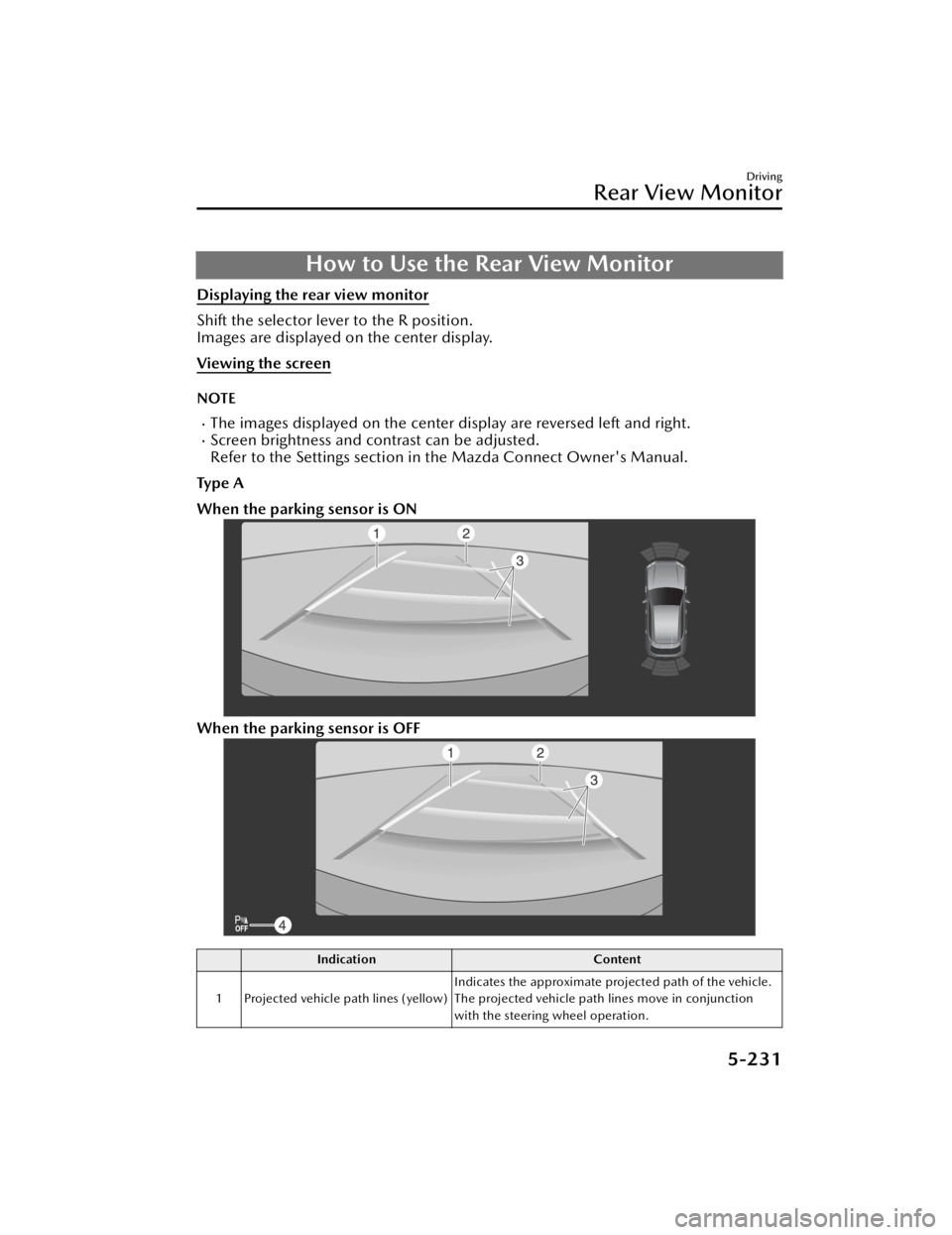
Ty p e A
When the parking sensor is ON
When the parking sensor is OFF
Indication Content
1 Projected vehicle path lines (yellow) Indicates the approximate projected path of the vehicle.
The projected vehicle path lines move in conjunction
with the steering wheel operation.
Driving
Rear View Monitor
5-231
CX-90_8KG7-EA-22L_Edition1_new
2022-11-17 16:05:04