wheel MAZDA CX90 2024 Manual PDF
[x] Cancel search | Manufacturer: MAZDA, Model Year: 2024, Model line: CX90, Model: MAZDA CX90 2024Pages: 687, PDF Size: 15.46 MB
Page 371 of 687

IndicationContent
8 Mode switching icon Indicates which mode is selected.
9 Parking sensor status icon Indicates that the parking sensor has a problem or it is
switched
off.
NOTE
The front See-Through View may be displayed as follows.
The ground and three-dimensional objects may appear curved.The representation of three-dimensional objects changes at the joints of images
and the same object may appear to be duplicated or not connected.
Top view, rear See-Through View
Indication Content
1 Tire icon Indicates the tire direction. Moves in conjunction with
the steering wheel operation.
2 Projected vehicle path lines (red/
yellow) Indicates the approximate projected path of the vehicle.
Moves in conjunction with the steering wheel operation.
a) Indicates the path where the rear end of the rear
bumper passes as a reference.
b) Indicates the path where the outer side of the vehicle
is expected to travel.
3 Parking sensor detection indication Indicates the obstruction detection status.
4 Tire graphic Indicates the approximate position of the tires.
5 Vehicle bottom graphic Indicates the estimated bottom of the vehicle.
Driving
360° View Monitor
5-220
CX-90_8KG7-EA-22L_Edition1_new 2022-11-17 16:05:04
Page 382 of 687
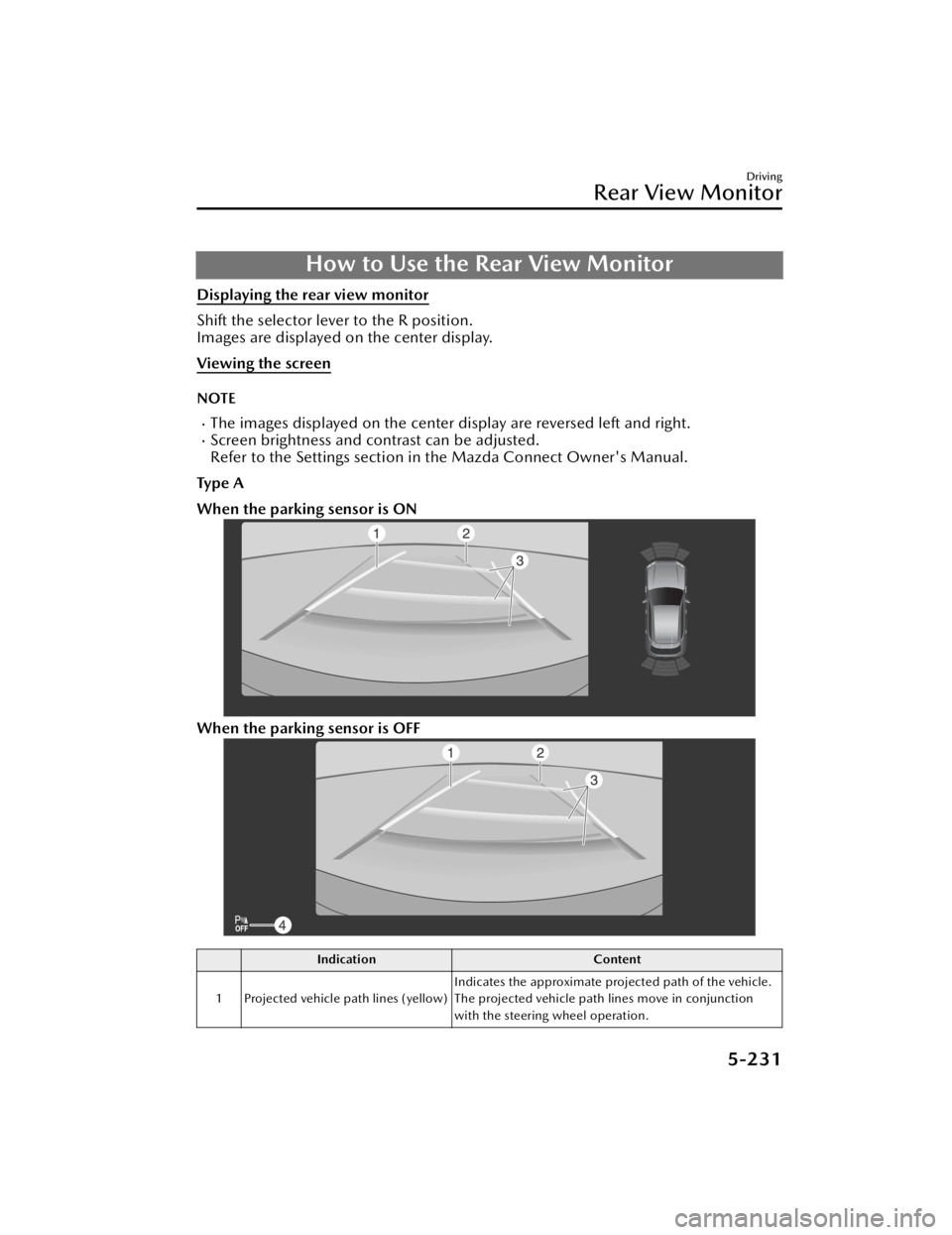
How to Use the Rear View Monitor
Displaying the rear view monitor
Shift the selector lever to the R position.
Images are displayed on the center display.
Viewing the screen
NOTE
The images displayed on the center display are reversed left and right.Screen brightness and contrast can be adjusted.
Refer to the Settings section in the Mazda Connect Owner's Manual.
Ty p e A
When the parking sensor is ON
When the parking sensor is OFF
Indication Content
1 Projected vehicle path lines (yellow) Indicates the approximate projected path of the vehicle.
The projected vehicle path lines move in conjunction
with the steering wheel operation.
Driving
Rear View Monitor
5-231
CX-90_8KG7-EA-22L_Edition1_new
2022-11-17 16:05:04
Page 383 of 687

IndicationContent
2 Vehicle width guide lines (blue) Indicates the approximate width of the vehicle.
Does not display when the steering wheel is operated in
a straight-ahead position.
3 Projected vehicle path distance
guide lines (red/yellow) These guide lines indicate the approximate distance to a
point measured from the rear of the vehicle (from the
end of the bumper).
The center point of the red line indicates the point
about 50 cm (19 in) from the rear end of the rear
bumper.
The center points of the yellow lines indicate the
points about 1 m (39 in) and 2 m (78 in) from the rear
end of the rear bumper.
4 Parking sensor status icon Indicates that the parking sensor has a problem or it is
switched off.
Ty p e B
When the parking sensor is ON
When the parking sensor is OFF
Driving
Rear View Monitor
5-232
CX-90_8KG7-EA-22L_Edition1_new
2022-11-17 16:05:04
Page 391 of 687

Winter Driving
Carry emergency gear, including tire
chains, window scraper, flares, a small
shovel, jumper cables, and a small bag
of sand or salt.
Ask an Authorized Mazda Dealer to
check the following:
Have the proper ratio of antifreeze in
the radiator.
Refer to Inspecting the Coolant on
page 9-14.
Inspect the battery and its cables.
Cold reduces battery capacity.
Use an engine oil appropriate for the
lowest ambient temperatures that
the vehicle will be driven in (page
9-18).
Inspect the ignition system for
damage and loose connections.
Use washer fluid made with
antifreeze―but do not use engine
coolant antifreeze for washer fluid
(page 9-17).
When driving on ice or in water, snow,
mud, sand, or similar hazards:
Be cautious and allow extra distance
for braking.
Avoid sudden braking and sudden
maneuvering.
Do not pump the brakes. Continue
to press down on the brake pedal.
Refer to Antilock Brake System (ABS)
on page 5-84.
If you get stuck, select a lower gear
and accelerate slowly. Do not spin
the rear wheels.
For more traction in starting on
slippery surfaces such as ice or
packed snow, use sand, rock salt,
chains, carpeting, or other nonslip
material under the rear wheels.
NOTE
Remove snow before driving. Snow
left on the windshield is dangerous
as it could obstruct vision.
Do not apply excessive force to a
window scraper when removing ice
or frozen snow on the mirror glass
and windshield.
Never use warm or hot water for
removing snow or ice from windows
and mirrors as it could result in the
glass cracking.
Drive slowly. Braking performance
can be adversely affected if snow or
ice adheres to the brake
components. If this situation occurs,
drive the vehicle slowly, releasing the
accelerator pedal and lightly applying
the brakes several times until the
brake performance returns to
normal.
Driving
Winter Driving
5-240
CX-90_8KG7-EA-22L_Edition1_new 2022-11-17 16:05:04
Page 392 of 687

Snow Tires
WARNING
Use only the same size and type tires
(snow, radial, or non-radial) on all 4
wheels:
Using tires different in size or type is
dangerous. Your vehicle's handling
could be greatly affected and result in
an accident.
CAUTION
Check local regulations before using
studded tires.
Use snow tires on all 4 wheels
Do not go faster than 120 km/h (75
mph) while driving with snow tires.
When installing winter tires, use tires of
the specified size and adjust the air
pressure of all the tires to the specified
value. (page 10-71).
The vehicle is originally equipped with
all season radials designed to be used
all year around. In some extreme
climates you may find it necessary to
replace them with snow tires during
the winter months to further improve
traction on snow and ice covered
roads.
Tire Chains
Check local regulations before using
tire chains.
CAUTION
Chains may aff ect handling.
Do not go faster than 50 km/h (30
mph) or the chain manufacturer's
recommended limit, whichever is
lower.
Drive carefully and avoid bumps,
holes, and sharp turns.
Avoid locked-wheel braking.
Do not use chains on a temporary
spare tire; it may result in damage to
the vehicle and to the tire.
Do not use chains on roads that are
free of snow or ice. The tires and
chains could be damaged.
Chains may scratch or chip
aluminum wheels.
NOTE
The tire pressure monitoring system
may not function correctly when using
tire chains.
Install the chains on the rear tires only.
Do not use chains on the front tires.
Please consult an Authorized Mazda
Dealer.
Installing the chains
1. Secure the chains on the rear tires
as tightly as possible. Always follow
the chain manufacturer's
instructions.
2. Retighten the chains after driving 1/2 ―1 km (1/4 ―1/2 mile).
Driving
Winter Driving
5-241
CX-90_8KG7-EA-22L_Edition1_new 2022-11-17 16:05:04
Page 394 of 687

6
Equipment to Make Cabin More
Comfortable
Fully Automatic Climate Control
(Front)..................................... 6-2Air Vents............................... 6-2
How to Use the Air Vents....... 6-2
Fully Automatic Climate
Control................................. 6-4
Fully Automatic Climate Control
Overview.............................. 6-6
How to Use the Fully Automatic
Climate Control..................... 6-7
Operating Each Switch........... 6-8
Convenient Ways to Use the Fully
Automatic Climate Control ..........
.......................................... 6-12
Fully Automatic Climate Control
(Rear).................................... 6-15 Air Vents............................. 6-15
How to Use the Air Vents..... 6-15
Fully Automatic Climate Control
System................................ 6-16
Fully Automatic Climate Control
System Overview................. 6-17
How to Use the Fully Automatic
Climate Control System........ 6-19
Operating Each Switch......... 6-20
Seat Warmer.......................... 6-22 Seat Warmer
*...................... 6-22
Warnings and Cautions For Using
the Seat Warmer.................. 6-22
How to Use the Seat
Warmer...............................6-23
Convenient Ways to Use the Seat
Warmer...............................6-24
Heated Steering Wheel............ 6-25 Heated Steering Wheel
*........6-25
Warnings and cautions For Using
the Heated Steering Wheel ..........
.......................................... 6-25
How to Use Heated Steering
Wheel................................. 6-26
Convenient Ways to Use Heated
Steering Wheel.................... 6-26
Seat Ventilation...................... 6-27 Seat Ventilation
*.................. 6-27
Warnings and cautions For Using
the Seat Ventilation..............6-27
How to Use the Seat
Ventilation.......................... 6-28
Convenient Ways to Use the Seat
Ventilation.......................... 6-29
Driver Personalization System ..........
............................................ 6-30 Driver Personalization System
*.....
.......................................... 6-30
Warnings and Cautions For Using
the Driver Personalization
System................................ 6-30
How to Use the Driver
Personalization System......... 6-31
*Some models.6-1
CX-90_8KG7-EA-22L_Edition1_new 2022-11-17 16:05:04
Page 397 of 687

Defroster and Floor Vents
Defroster Vents
Fully Automatic ClimateControl
The following functions are
automatically controlled according to
the set temperature.
Airflow temperature controlAirflow amount controlAirflow mode switchingRecirculate/fresh air mode switchingAir conditioning (cooling/
dehumidifying functions) on/off
Seat warmer level selection*
Heated steering wheel operation*
Seat ventilation level selection*
NOTE
To prevent cold airflow immediately
after heating starts when the hybrid
system is cold, the airflow amount is
decreased.
Fully automatic air-conditioning uses
the sunlight and interior temperature
sensors to control the temperature in
the cabin by measuring interior and
exterior temperatures, humidity, and
sunlight. Do not cover the sunlight/
interior temperature sensor.
Sunlight sensor
Equipment to Make Cabin More Comfortable
Fully Automatic Climate Control (Front)
6-4*Some models.
CX-90_8KG7-EA-22L_Edition1_new 2022-11-17 16:05:04
Page 399 of 687

Fully Automatic Climate Control Overview
1. AUTO switch
2. Driver’s side temperature setting switch
3. Driver’s side temperature setting display
4. Linked auto-comfort display
*1
Refer to Convenient Ways to Use the Seat Warmer on page 6-24.
Refer to Convenient Ways to Use Heated Steering Wheel on page 6-26.
Refer to Convenient Ways to Use the Seat Ventilation on page 6-29.
5. Airflow display
6. Mode selector display
7. Air intake selector display
8. Front passenger’s side te mperature setting display
9. Front passenger’s side temperature setting switch
10.SYNC (synchronized temperature) switch
11.A/C switch
12.Air intake selector switch
13.Mode selector switch
14.Fan control switch
15.Climate control system power switch
16.Rear window defogger switch
17.Windshield defroster switch
*1 The display differs depending on the clim ate control systems, or whether or not
the seat warmer, seat ventilation, and steering warmer are equipped.
Equipment to Make Cabin More Comfortable
Fully Automatic Climate Control (Front)
6-6
CX-90_8KG7-EA-22L_Edition1_new 2022-11-17 16:05:04
Page 417 of 687

NOTE
If the hybrid system is stopped while
the seat warmer is operating in manual
mode, the seat warmer does not turn
on automatically the next time the
hybrid system is started. To turn the
seat warmer on, press the switch
again.
In addition, the second-row seat
warmer operation stops automatically
after the seat warmers have operated
for a certain period of time.Convenient Ways to Usethe Seat Warmer
The seat temperature for front seat can
be automatically controlled (auto
mode) at 4 levels (High, Mid, Low,
OFF) according to the conditions in the
cabin.
The seat warmer can be operated in
conjunction with auto mode for the
climate control system.
1. Turn on the “Occupant Comfort”Refer to Mazda Connect Owner's
Manual or consult an Authorized
Mazda Dealer.
2. Press the AUTO switch for the climate control system.
NOTE
If the front passenger’s seat belt is
unfastened, the front passenger’s
seat warmer turns off.
If any of the following switch
operations is performed during auto
mode or the auto operation of the
climate control system is canceled,
the seat warmer switches from auto
mode to manual mode.
Seat warmer switch is pressedSeat ventilation switch is pressed
When the seat warmer switch/seat
ventilation switch is pressed, only the
seat on the side where the switch
was pressed switches to manual
mode.
To return to auto operation, press
the AUTO switch for the climate
control system.
While operating in auto mode, the
(with heated steering wheel)/
(without heated steering wheel)
is displayed.
Equipment to Make Cabin More Comfortable
Seat Warmer
6-24
CX-90_8KG7-EA-22L_Edition1_new 2022-11-17 16:05:04
Page 418 of 687

Heated Steering Wheel*
The grips on the left and right of the
steering wheel can be warmed up.
Warnings and cautionsFor Using the Heated Steering Wheel
WARNING
The following types of persons should
be careful not to touch the steering
wheel. Otherwise, it could cause a
low-temperature burn.
Infants, small children, elderly
people, and physically challenged
people
People with delicate skin
People who are excessively fatigued
People who are intoxicated
Pe o pl e w h o have ta ke n
sleep-inducing medicine such as
sleeping pills or cold medicine
Equipment to Make Cabin More Comfortable
Heated Steering Wheel
*Some models.6-25
CX-90_8KG7-EA-22L_Edition1_new 2022-11-17 16:05:04