Page 1 MAZDA MAZDA 2021 Owners Manual
[x] Cancel search | Manufacturer: MAZDA, Model Year: 2021, Model line: MAZDA, Model: MAZDA MAZDA 2021Pages: 612, PDF Size: 11.91 MB
Page 331 of 612

How to use the projected vehicle path line function
1. (Screen display)
2. (Actual condition)
Make sure that there are no obstructions within the projected vehicle path lines.
Turn the steering wheel so that the projected vehicle path lines travel inside of the
obstruction (A), and drive the vehicle forward until it passes the obstruction.
If the projected vehicle path lines are on an obstruction (B) or outside of the
obstruction (C), the vehicle may contact the obstruction when turning the vehicle
sharply.
CAUTION
The parking sensor detection range has limitations. For example, obstructions
closing in from the side and objects short in height may not be detected. Always
confirm the safety around the vehicle visually when driving.
For details, refer to the parking sensor obstruction detection indication and
warning sound.
Refer to Parking Sensor System on page 4-238.
Do not turn the steering wheel any mo re until the vehicle has passed the
obstruction, even if the obstruction is no t visible on the side view image. If the
steering wheel is turned even more, the vehicle may contact the obstruction if it is
turned sharply.
When Driving
i-ACTIVSENSE
4-189
Mazda3_8JM2-EA-20H_Edition2_new 2020-8-19 13:13:07
Page 334 of 612

How to use the projected vehicle path line function
CAUTION
The front of the vehicle swings out wide when turning the steering wheel while
reversing. Maintain sufficient distance between the vehicle and an obstruction.
The parking sensor detection range has limitations. For example, obstructions
closing in from the side and objects short in height may not be detected. Always
confirm the safety around the vehicle visually when driving.
For details, refer to the parking sens or obstruction detection indication and
warning sound.
Refer to Parking Sensor System on page 4-238.
NOTE
Because there might be a difference between the image displayed on the screen,
such as indicated in the following, and the actual conditions when parking, always
check the safety at the rear of the vehicle and the surrounding area directly with
your eyes.
Even though the back end of the park ing space (or garage) displayed on the
screen and distance guide lines appear parallel, they may not actually be
parallel.
When parking in a space with a division line on only one side of the parking
space, even though the division line and the vehicle width guide line appear
parallel, they may not actually be parallel.
The following shows an example of vehicle parking with the steering wheel turned
to the left while backing up the vehicle. When backing into a parking space from
the opposite direction, the st eering operation is reversed.
When Driving
i-ACTIVSENSE
4-192
Mazda3_8JM2-EA-20H_Edition2_new 2020-8-19 13:13:07
Page 351 of 612

Roads with repeated up and down
slopes
Driving on poor roads or unpaved
roads.
The distance between your vehicle
and the vehicle ahead is extremely
short.
A vehicle suddenly comes close,
such as by cutting into your lane.
To prevent incorrect operation of the
system, use tires of the same
specified size, manufacturer, brand,
and tread pattern on all four wheels.
In addition, do not use tires with
significantly different wear patterns
or tire pressures on the same vehicle
(Including the temporary spare tire).
If the battery power is weak, the
system may not operate correctly.
When driving on roads with little
traffic and few vehicles ahead or
obstructions for the front radar
sensor to detect, “Safety and Driver
Support Systems Temporarily
Disabled. Front Radar Obscured.
Drive Safely” may be temporarily
displayed, however, this does not
indicate a problem.
The radar sensors are regulated by
the relevant radio wave laws of the
country in which the vehicle is
driven. If the vehicle is driven
abroad, authorization from the
country in which the vehicle is driven
may be required.
Front Side Radar Sensor*
▼Front Side Radar Sensor
Your vehicle is equipped with front
side radar sensor. The following
systems also use the front side radar
sensor.
Front Cross Traffic Alert (FCTA)
The front side radar sensor function by
detecting the radio waves reflected off
a vehicle approaching from the front or
an obstruction sent from the radar
sensor.
1. Front side radar sensor
The front side radar sensors are
installed inside the front bumper, one
on each side.
Always keep the surface of the front
bumper near the front side radar
sensors clean so that they operate
normally. Also, do not apply items such
as stickers.
Refer to Exterior Care on page 6-48.
CAUTION
If the front bumper receives a severe
impact, the system may no longer
operate normally. Stop the system
immediately and have the vehicle
inspected at an Authorized Mazda
Dealer.
When Driving
i-ACTIVSENSE
*Some models.4-209
Mazda3_8JM2-EA-20H_Edition2_new 2020-8-19 13:13:07
Page 353 of 612

Rear Side Radar Sensor*
▼Rear Side Radar Sensor
Your vehicle is equipped with rear side
radar sensor. The following systems
also use the rear side radar sensor.
Blind Spot Monitoring (BSM)Rear Cross Traffic Alert (RCTA)Smart Brake Support [Rear Crossing]
(SBS-RC)
The rear side radar sensors emit radio
waves and detect the radio waves
reflected off a vehicle approaching
from the rear or an obstruction.
4–Door
1. Rear side radar sensor
5–Door
1. Rear side radar sensor
The rear side radar sensors are installed
inside the rear bumper, one on each
side.
Always keep the surface of the rear
bumper near the rear side radar
sensors clean so that they operate
normally. Also, do not apply items such
as stickers.
Refer to Exterior Care on page 6-48.
CAUTION
If the rear bumper receives a severe
impact, the system may no longer
operate normally. Stop the system
immediately and have the vehicle
inspected at an Authorized Mazda
Dealer.
NOTE
The detection ability of the rear side
radar sensor has limitations. In the
following cases, the detection ability
may lower and the system may not
operate normally.
The rear bumper near the rear side
radar sensor has become
deformed.
Snow, ice or mud adheres to the
rear side radar sensor on the rear
bumper.
Under bad weather conditions
such as rain, snow and fog.
Under the following conditions, the
rear side radar sensor cannot detect
target objects or it may be difficult to
detect them.
Small motorcycles, bicycles,
pedestrians, animals, shopping
carts, and stationary objects on a
road or a road side.
Vehicle shapes which do not reflect radar waves well such as
empty trailers with a low vehicle
height and sports cars.
When Driving
i-ACTIVSENSE
*Some models.4-211
Mazda3_8JM2-EA-20H_Edition2_new 2020-8-19 13:13:07
Page 355 of 612
Front Camera/Side
Cameras/Rear Camera
*
▼ Front Camera/Side Cameras/Rear
Camera
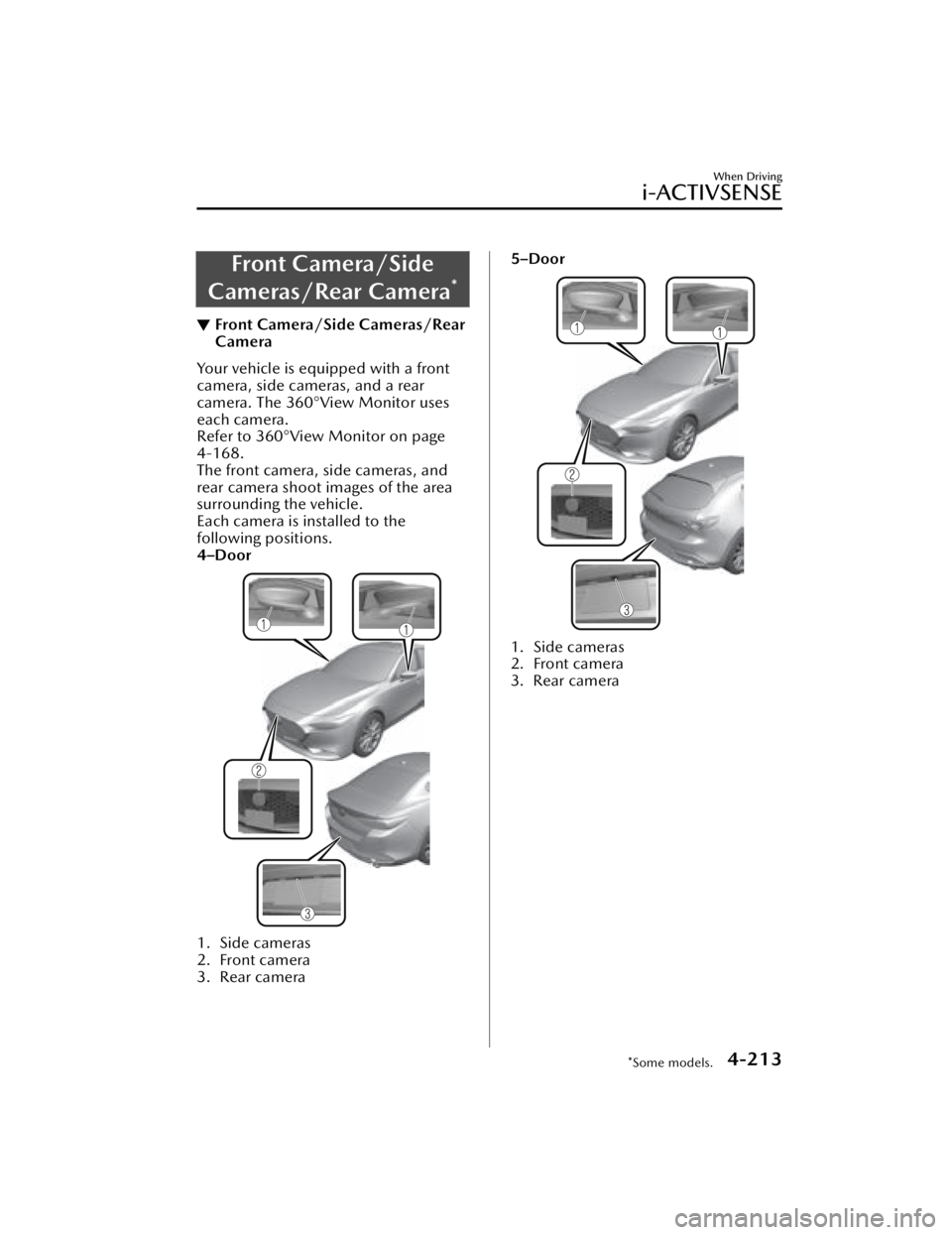
Your vehicle is equipped with a front
camera, side cameras, and a rear
camera. The 360°View Monitor uses
each camera.
Refer to 360°View
Monitor on page
4-168.
The front camera, side cameras, and
rear camera shoot images of the area
surrounding the vehicle.
Each camera is installed to the
following positions.
4–Door
1. Side cameras
2. Front camera
3. Rear camera
5–Door
1. Side cameras
2. Front camera
3. Rear camera
When Driving
i-ACTIVSENSE
*Some models.4-213
Mazda3_8JM2-EA-20H_Edition2_new 2020-8-19 13:13:07
Page 357 of 612
Cruise Control*
▼Cruise Control
With cruise control, you can set and
automatically maintain any speed of
more than about 30 km/h (19 mph).
WARNING
Do not use the cruise control under
the following conditions:
Using the cruise control under the
following conditions is dangerous and
could result in loss of vehicle control.
Hilly terrain
Steep inclines
Heavy or unsteady traffic
Slippery or winding roads
Similar restrictions that require
inconsistent speed
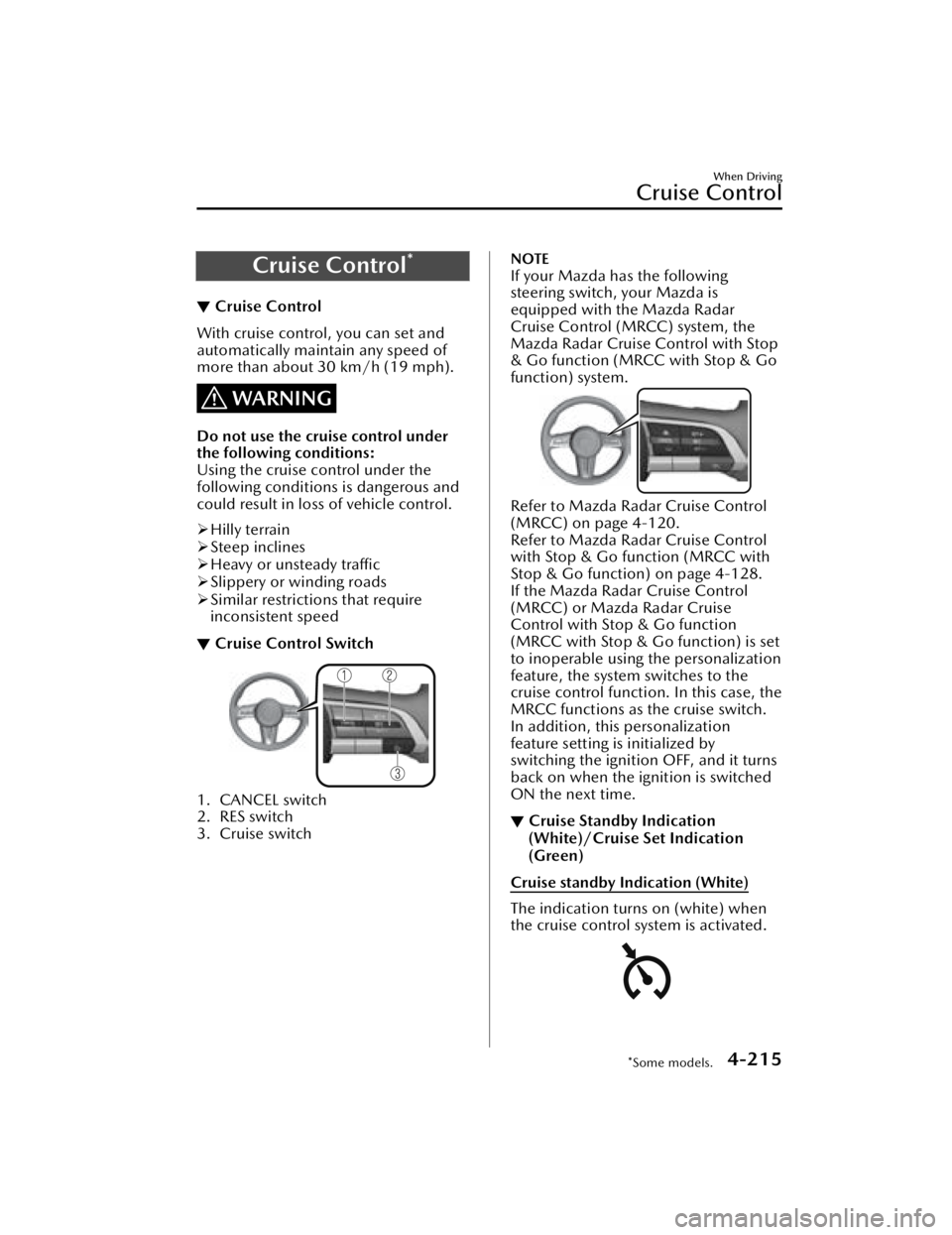
▼ Cruise Control Switch
1. CANCEL switch
2. RES switch
3. Cruise switch
NOTE
If your Mazda has the following
steering switch, your Mazda is
equipped with the Mazda Radar
Cruise Control (MRCC) system, the
Mazda Radar Cruise Control with Stop
& Go function (MRCC with Stop & Go
function) system.
Refer to Mazda Radar Cruise Control
(MRCC) on page 4-120.
Refer to Mazda Radar Cruise Control
with Stop & Go function (MRCC with
Stop & Go function) on page 4-128.
If the Mazda Radar Cruise Control
(MRCC) or Mazda Radar Cruise
Control with Stop & Go function
(MRCC with Stop & Go function) is set
to inoperable using the personalization
feature, the system switches to the
cruise control function. In this case, the
MRCC functions as the cruise switch.
In addition, this personalization
feature setting is initialized by
switching the ignition OFF, and it turns
back on when the ignition is switched
ON the next time.
▼Cruise Standby Indication
(White)/Cruise Set Indication
(Green)
Cruise standby Indication (White)
The indication turns on (white) when
the cruise control system is activated.
When Driving
Cruise Control
*Some models.4-215
Mazda3_8JM2-EA-20H_Edition2_new
2020-8-19 13:13:07
Page 362 of 612

Please note that the TPMS is not a
substitute for proper tire
maintenance, and it is the driver's
responsibility to maintain correct tire
pressure, even if under-inflation has
not reached the level to trigger
illumination of the TPMS low tire
pressure telltale.
Your vehicle has also been equipped
with a TPMS malfunction indicator to
indicate when the system is not
operating properly.
The TPMS malfunction indicator is
combined with the low tire pressure
telltale. When the system detects a
malfunction, the telltale will flash for
approximately one minute and then
remain continuously illuminated.
This sequence will continue upon
subsequent vehicle start-ups as long
as the malfunction exists. When the
malfunction indicator is illuminated,
the system may not be able to detect
or signal low tire pressure as
intended. TPMS malfunctions may
occur for a variety of reasons,
including the installation of
replacement or alternate tires or
wheels on the vehicle that prevent
the TPMS from functioning properly.
Always check the TPMS malfunction
telltale after replacing one or more
tires or wheels on your vehicle to
ensure that the replacement or
alternate tires and wheels allow the
TPMS to continue to function
properly.
To avoid false readings, the system
samples for a little while before
indicating a problem. As a result it
will not instantaneously register a
rapid tire deflation or blow out.▼ If there is a problem with the Tire
Pressure Monitoring System
(TPMS)
If the TPMS warning light flashes, there
may be a problem with the system.
Consult an Authorized Mazda Dealer
to have the system inspected.
Refer to Tire Pressure Monitoring
System (TPMS) Warning Indication/
Warning Light (Flashing) on page
7-33.
In the following cases, the system
cannot recognize the tire pressures
correctly and the TPMS warning light
may
flash.
There is equipment or a device
nearby emitting radio signals the
same as a tire pressure sensor.
A metallic object such as a
non-genuine electronic device is
installed near the center of the
dashboard (obstructs the radio
signals from the tire pressure sensors
to the receiver).
A device such as one of the following
is used in the cabin.
Electronic devices such as a
computer.
Converter devices such as a
DC-AC converter.
There is a large accumulation of
snow or ice around the vehicle tires.
The battery in a tire pressure sensor
is dead.
A wheel not equipped with a tire
pressure sensor is used.
Tires employing steel in the sidewall
of the tire are installed.
Tire chains are used.
When Driving
Tire Pressure Monitoring System (TPMS)
4-220
Mazda3_8JM2-EA-20H_Edition2_new 2020-8-19 13:13:07
Page 363 of 612

▼When a tire pressure decreases
If the TPMS warning light turns on, a
tire pressure may be low. Inspect the
tire pressures and adjust them to the
correct inflation pressure.
Refer to Tire Pressure Monitoring
System (TPMS) Warning Indication/
Warning Light (Turns on) on page
7-37.
▼Tires and Wheels
CAUTION
When inspecting/adjusting the tire
pressures, do not apply excessive force
to the air valve of the tire pressure
sensor. Otherwise, the tire pressure
sensor could be damaged.
When changing tires and wheels
When changing the tires or wheels
(such as installing winter tires), it will
be necessary to regi
ster the ID signal
code of the tire pressure sensor to the
TPMS.
Have an Authorized Mazda Dealer do
the registration or register the ID signal
codes of the tire pressure sensors using
the following procedure.
NOTE
The tire pressure sensors on each
wheel have a unique ID signal code.
For the TPMS to operate correctly, the
ID signal codes of the tire pressure
sensors need to be registered to the
system.
1. Wait more than 19 minutes after changing a tire or wheel.
2. After more than 19 minutes havepassed, drive the vehicle at a speed
of about 25 km/h (16 mph) or
faster for 3 minutes or longer. While
driving, the ID signal codes of the
tire pressure sensors are
automatically registered.
NOTE
If you drive the vehicle within 19
minutes of changing a tire or wheel,
the TPMS warning light will flash
because the ID signal codes for the tire
pressure sensors were not registered.
In this case, stop the vehicle and
register the ID signal codes of the tire
pressure sensors following the
procedure.
When replacing tires and wheels
CAUTION
When replacing the tires and wheels,
consult an Authorized Mazda Dealer
Otherwise, the tire pressure sensors
could be damaged when replacing
them.
Do not install non-genuine wheels. If
wheels other than genuine ones are
installed, it may not be possible to
install the tire pressure sensors.
When replacing a tire or wheel, always
install the tire pressure sensor. The
following combinations of tires,
wheels, or tires and wheels are
possible.
The tire pressure sensor from the old
wheel is removed and it is installed
to the new wheel.
Only a tire is replaced without
replacing the tire pressure sensor and
wheel.
A new tire pressure sensor is installed
to a new wheel.
When Driving
Tire Pressure Monitoring System (TPMS)
4-221
Mazda3_8JM2-EA-20H_Edition2_new 2020-8-19 13:13:07
Page 386 of 612
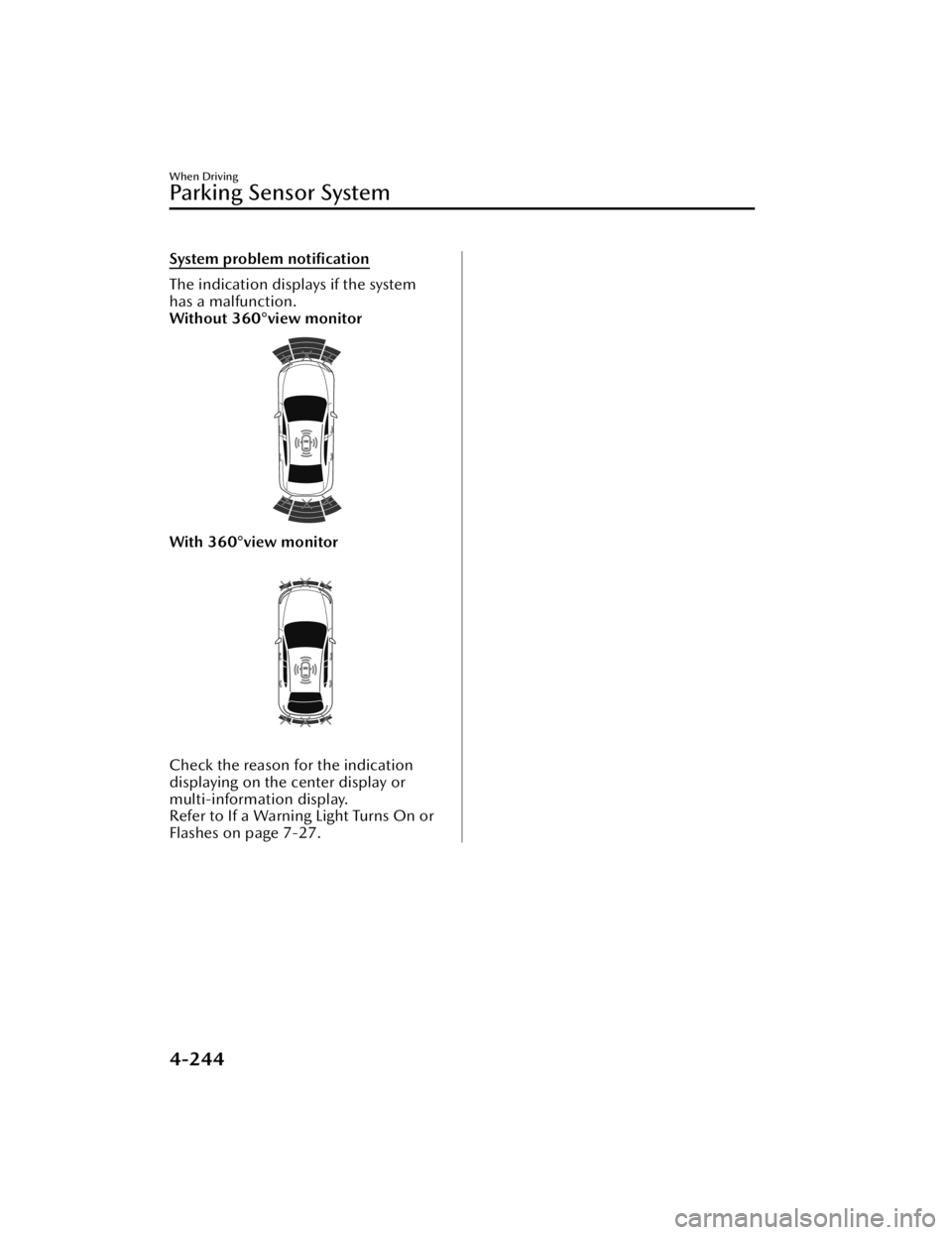
System problem notification
The indication displays if the system
has a malfunction.
Without 360°view monitor
With 360°view monitor
Check the reason for the indication
displaying on the center display or
multi-information display.
Refer to If a Warning Light Turns On or
Flashes on page 7-27.
When Driving
Pa r k i n g S e n s o r Sys te m
4-244
Mazda3_8JM2-EA-20H_Edition2_new2020-8-19 13:13:07
Page 396 of 612
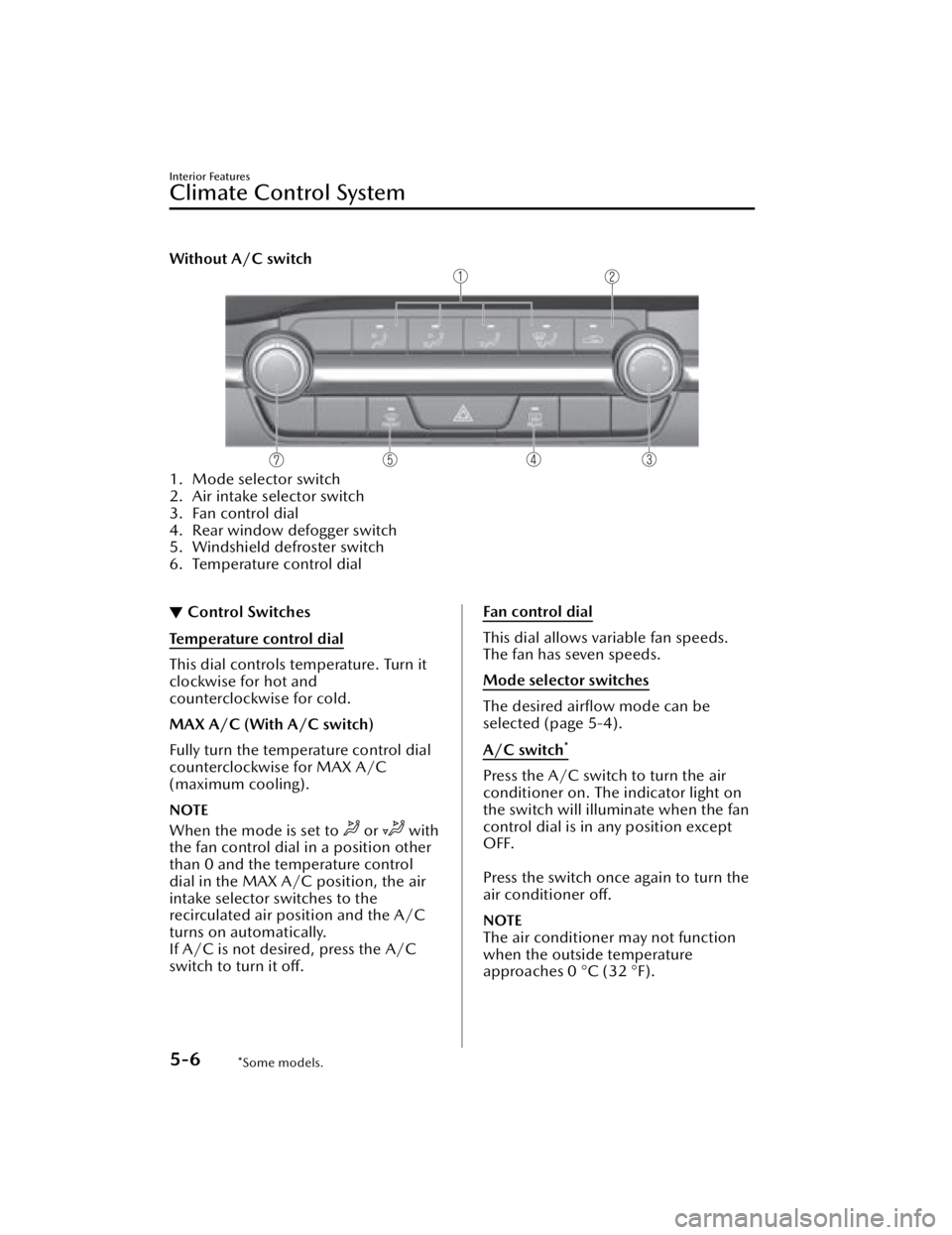
Without A/C switch
1. Mode selector switch
2. Air intake selector switch
3. Fan control dial
4. Rear window defogger switch
5. Windshield defroster switch
6. Temperature control dial
▼Control Switches
Temperature control dial
This dial controls temperature. Turn it
clockwise for hot and
counterclockwise for cold.
MAX A/C (With A/C switch)
Fully turn the temperature control dial
counterclockwise for MAX A/C
(maximum cooling).
NOTE
When the mode is set to or with
the fan control dial in a position other
than 0 and the temperature control
dial in the MAX A/C position, the air
intake selector switches to the
recirculated air position and the A/C
turns on automatically.
If A/C is not desired, press the A/C
switch to turn it off.
Fan control dial
This dial allows variable fan speeds.
The fan has seven speeds.
Mode selector switches
The desired airflow mode can be
selected (page 5-4).
A/C switch
*
Press the A/C switch to turn the air
conditioner on. The indicator light on
the switch will illuminate when the fan
control dial is in any position except
OFF.
Press the switch once again to turn the
air conditioner off.
NOTE
The air conditioner may not function
when the outside temperature
approaches 0 °C (32 °F).
Interior Features
Climate Control System
5-6*Some models.
Mazda3_8JM2-EA-20H_Edition2_new 2020-8-19 13:13:07