Page 1 MAZDA MAZDA 2021 Owners Manual
[x] Cancel search | Manufacturer: MAZDA, Model Year: 2021, Model line: MAZDA, Model: MAZDA MAZDA 2021Pages: 612, PDF Size: 11.91 MB
Page 533 of 612
Message Indicated on Multi-information Display
▼Message Indicated on Multi-information Display
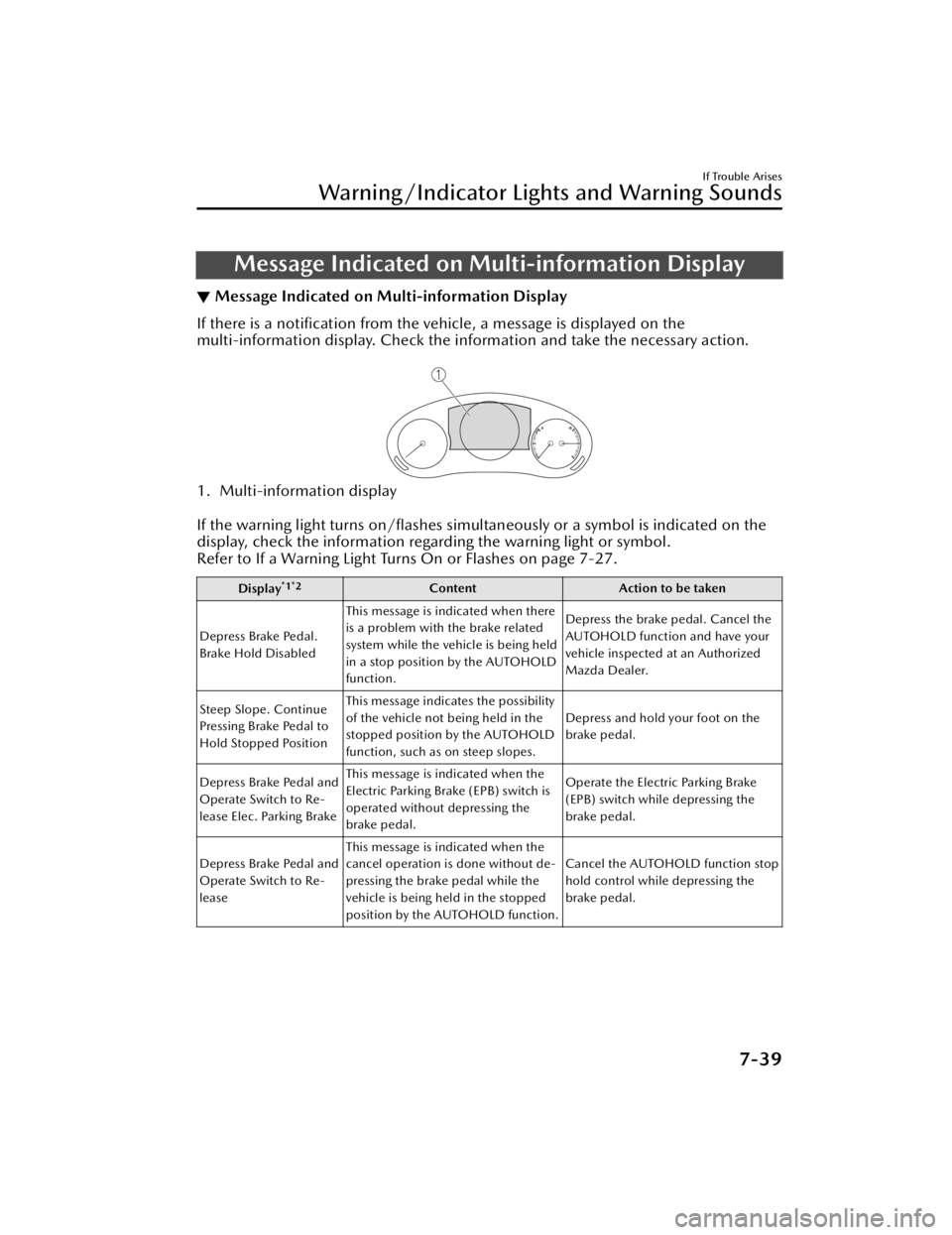
If there is a notification from the vehicle, a message is displayed on the
multi-information display. Check the information and take the necessary action.
1. Multi-information display
If the warning light turns on/flashes simultan
eously or a symbol is indicated on the
display, check the information regarding the warning light or symbol.
Refer to If a Warning Light Turn s On or Flashes on page 7-27.
Display*1*2Content Action to be taken
Depress Brake Pedal.
Brake Hold Disabled This message is indicated when there
is a problem with the brake related
system while the vehicle is being held
in a stop position by the AUTOHOLD
function. Depress the brake pedal. Cancel the
AUTOHOLD function and have your
vehicle inspected at an Authorized
Mazda Dealer.
Steep Slope. Continue
Pressing Brake Pedal to
Hold Stopped Position This message indicates the possibility
of the vehicle not being held in the
stopped position by the AUTOHOLD
function, such as on steep slopes.
Depress and hold your foot on the
brake pedal.
Depress Brake Pedal and
Operate Switch to Re-
lease Elec. Parking Brake This message is indicated when the
Electric Parking Brake (EPB) switch is
operated without depressing the
brake pedal.
Operate the Electric Parking Brake
(EPB) switch while depressing the
brake pedal.
Depress Brake Pedal and
Operate Switch to Re-
lease This message is indicated when the
cancel operation is done without de-
pressing the brake pedal while the
vehicle is being held in the stopped
position by the AUTOHOLD function. Cancel the AUTOHOLD function stop
hold control while depressing the
brake pedal.
If Trouble Arises
Warning/Indicator Lights and Warning Sounds
7-39
Mazda3_8JM2-EA-20H_Edition2_new
2020-8-19 13:13:07
Page 534 of 612

Display*1*2ContentAction to be taken
Mazda Radar Cruise
Control Canceled. Drive
Safely This message is indicated when the
Mazda Radar Cruise Control
(MRCC), Mazda Radar Cruise Con-
trol with Stop & Go function (MRCC
with Stop & Go function), and the
Traffic Jam Assist (TJA) have been can-
celed other than by the driver.
Have your vehicle inspected by an
Authorized Mazda Dealer.
Distance & Speed Alert
Operation Canceled
Drive Safely This message is indicated when the
Distance & Speed Alert (DSA) have
been canceled other than by the driv-
er.
Have your vehicle inspected by an
Authorized Mazda Dealer.
Cruise Control Opera-
tion Canceled. Drive
Safely This message is indicated when the
Cruise Control have been canceled
other than by the driver.
Have your vehicle inspected by an
Authorized Mazda Dealer.
Emergency Braking Acti-
vated. Depress Brake
Pedal to Hold Stop This message is indicated after the
Smart Brake Support (SBS) brakes op-
erate and when the Smart Brake Sup-
port (SBS) is canceled.
Depress the brake pedal.
Touch Key Fob to Push
Button Start Switch This message is indicated when the
key battery is weak (battery dead or
damaged key). Touch the key against push button
start to start the engine.
Refer to Engine Start Function When
Key Battery is Dead on page 4-8.
Depress Brake Pedal to
Start Vehicle This message is indicated when the
push button start is pressed without
depressing the brake pedal. When starting the engine, press the
push button start with the brake ped-
al depressed.
Depress Clutch Pedal to
Start Vehicle This message is indicated when the
push button start is pressed without
depressing the clutch pedal. When starting the engine, press the
push button start with the clutch
pedal depressed.
Check Gear Selector
Lever Position This message is indicated when the
selector lever is shifted to the P or R
position while driving.
Check the selector lever position.
Close Door and Fasten
Seat Belt This message is indicated when AU-
TOHOLD is about to operate and a
door is opened or a seat belt is unfas-
tened. When the AUTOHOLD is turned on,
close the doors and fasten seat belts.
Wiper Blades Must Be
on Windshield Before
Operating This message is indicated when the
ignition is switched ON with the wip-
er arms at the service positions.
Return the wiper arms to the initial
positions.
If Trouble Arises
Warning/Indicator Lights and Warning Sounds
7-40
Mazda3_8JM2-EA-20H_Edition2_new
2020-8-19 13:13:07
Page 536 of 612

Warning Sound isActivated
▼Lights-On Reminder
The lights-on reminder is operable
when the time setting*1 of the auto
headlight off function is off.
If the ignition is switched OFF with the
exterior lights turned on and the
driver’s door is opened, a sound is
activated.
Operate the headlight switch to turn
off the exterior lights.
*1 If the light switch is left on, the
auto headlight off function
automatically turns off the lights
about 30 seconds after switching
the ignition off. The time setting
can be changed.
Refer to the Settings section in the
Mazda Connect Owner's Manual.
NOTE
When the ignition is switched to
ACC, the “Ignition Not Switched OFF
(STOP) Warning Beep” (page 7-43)
overrides the lights-on reminder.
A personalized function is available
to change the sound volume for the
lights-on reminder.
Refer to the Settings section in the
Mazda Connect Owner's Manual.
▼ Seat Belt Warning Beep
Front seat
Except Mexico
If the driver's seat belt is not fastened
when the ignition is switched ON, a
beep sound will be heard for about 6
seconds. If the driver or the front
passenger's seat belt is not fastened
and if the vehicle is driven at about 20
km/h (12 mph) or faster, or about 10
km/h (6 mph) or faster for a
continuous 30 seconds, with the seat
belt unfastened, a sound is activated
continuously for a certain period.
Until a seat belt is fastened or a given
period of time has elapsed, the beep
sound will not stop even if the vehicle
speed falls below 20 km/h (12 mph).
NOTE
To allow the front passenger
occupant
classification sensor to
function properly, do not place and
sit on an additional seat cushion on
the front passenger's seat. The
sensor may not function properly
because the additional seat cushion
could cause sensor interference.
If a small child is seated on the front
passenger's seat, the warning beep
may not operate.
If Trouble Arises
Warning/Indicator Lights and Warning Sounds
7-42
Mazda3_8JM2-EA-20H_Edition2_new 2020-8-19 13:13:07
Page 538 of 612

▼Touch Sensor Inoperable Warning
Beep (With the advanced keyless
function)
A warning beep is activated to notify
the driver that the doors are not locked
when all of the following conditions
are met:
The ignition is switched OFF.All the doors and liftgate are not fully
closed.
The lock is operated 3 times within 5
seconds.
Check the ignition and whether the
doors and liftgate are open or closed,
and then operate the lock again.
▼ Liftgate Door-lock Switch
Inoperable Warning Beep*
When the door-lock switch on the
liftgate is pressed under any of the
following conditions, a warning sound
is activated.
The ignition is switched to a position
other than OFF.
Any door is open.
Make sure that none of the above
conditions are present, and then press
the door-lock switch again.
▼ Key Left-in-luggage
Compartment/Trunk Warning
Beep (With the advanced keyless
function)
If the key is left in the luggage
compartment/trunk with all the doors
locked and the liftgate/trunk lid
closed, a beep will be heard outside
for about 10 seconds to notify the
driver that the key is in the luggage
compartment/trunk. In this case, take
out the key by pressing the electric
liftgate/trunk lid opener and opening
the liftgate/trunk lid. The key taken out
of the luggage compartment/trunk
may not operate because its functions
have been temporarily stopped. To
restore the key's functions, perform
the applicable procedure (page 3-8).
▼Key Left-in-vehicle Warning Beep
(With the advanced keyless
function)
If all the doors and luggage
compartment/trunk are locked using
another key while the key is left in the
cabin, the beep wh
ich sounds outside
of the vehicle will be heard for about
10 seconds to notify the driver that the
key is in the cabin. In this case, take
out the key by opening the door. A key
taken out of the vehicle using this
method may not operate because its
functions have been temporarily
stopped. To restore the key's functions,
perform the applicable procedure
(page 3-8).
If Trouble Arises
Warning/Indicator Lights and Warning Sounds
7-44*Some models.
Mazda3_8JM2-EA-20H_Edition2_new 2020-8-19 13:13:07
Page 542 of 612
When Liftgate/Trunk LidCannot be Opened
▼ When Liftgate/Trunk Lid Cannot
be Opened
If the battery is dead, the liftgate/trunk
lid cannot be unlocked and opened.
In this case, the liftgate/trunk lid can
be unlocked by taking care of the dead
battery situation.
Refer to Jump-Starting on page 7-17.
If the liftgate/trunk lid cannot be
unlocked even if the dead battery
situation has been resolved, the
electrical system may have a
malfunction.
In this case, the liftgate/trunk lid can
be opened using the following
procedure as an emergency measure.
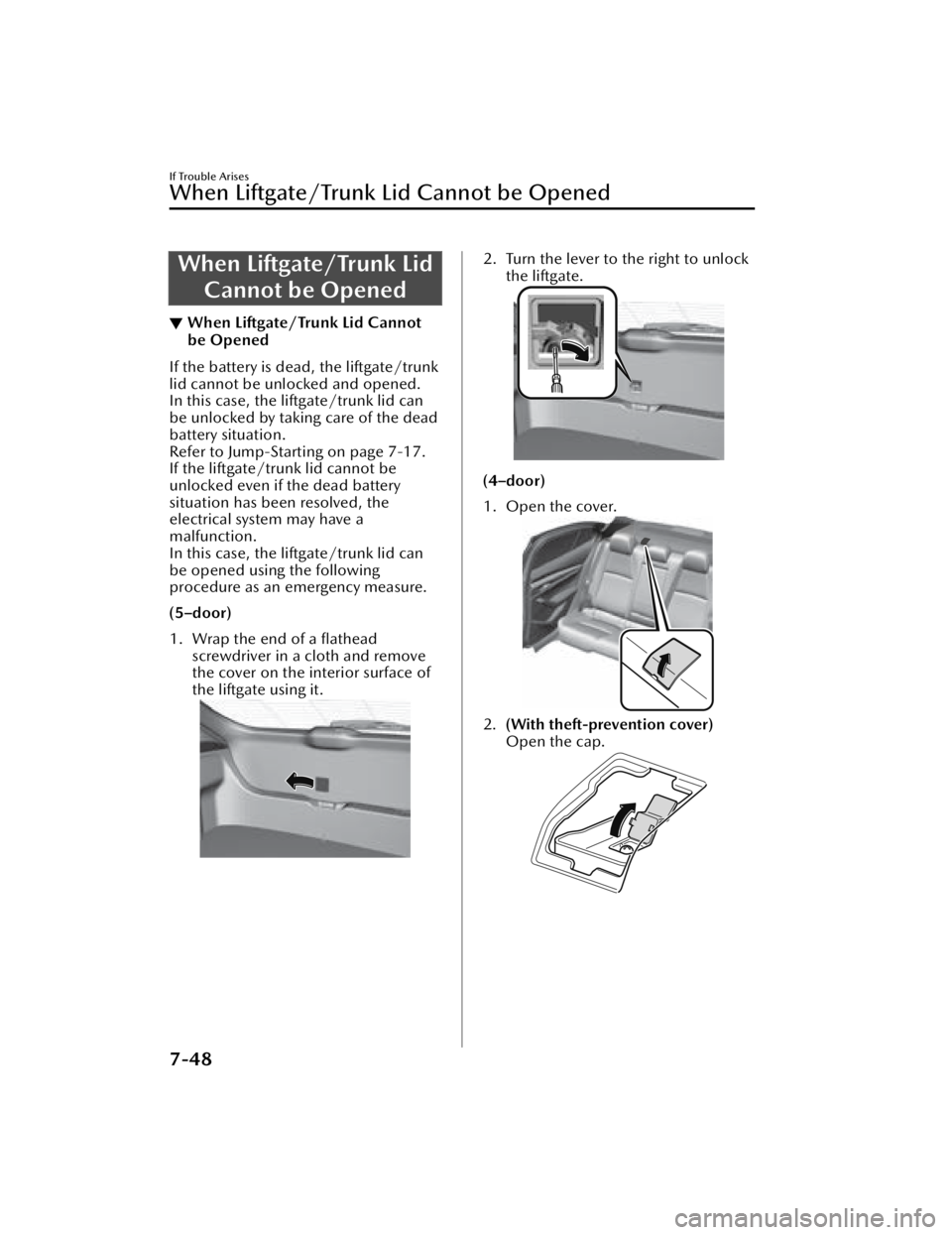
(5–door)
1. Wrap the end of a flathead
screwdriver in a cloth and remove
the cover on the interior surface of
the liftgate using it.
2. Turn the lever to the right to unlockthe liftgate.
(4–door)
1. Open the cover.
2.(With theft-prevention cover)
Open the cap.
If Trouble Arises
When Liftgate/Trunk Lid Cannot be Opened
7-48
Mazda3_8JM2-EA-20H_Edition2_new 2020-8-19 13:13:07
Page 548 of 612
Customer Assistance(U.S.A.)
▼Customer Assistance
Your complete and permanent
satisfaction is our business. We are
here to serve you. All Authorized
Mazda Dealers have the knowledge
and the tools to keep your Mazda
vehicle in top condition.
If you have any questions or
recommendations for improvement
regarding the service of your Mazda
vehicle or servicing by Mazda Dealer
personnel, we recommend that you
take the following steps:
NOTE
If it becomes necessary to have the
components or wiring system for the
supplementary restraint system
modified to accommodate a person
with certain medical conditions in
accordance with a certified physician,
contact an Authorized Mazda Dealer.
For more informatio
n, go to NHTSA
website www.safercar.gov (VEHICLE
SHOPPERS > Air Bags > Air Bag FAQs >
Air Bag Deactivation).
▼ STEP 1: Contact Your Mazda
Dealer
Discuss the matter with an Authorized
Mazda Dealer. This is the quickest and
best way to address the issue.
If your concern has not been
resolved by the CUSTOMER
RELATIONS, SALES, SERVICE, or
PA RT S M A N A G E R , t h e n p l ea s e
contact the GENERAL MANAGER of
the dealership or the OWNER.
If it becomes necessary to have the
components or wiring system for the
supplementary restraint system
modified to accommodate a person
with certain medical conditions in
accordance with a certified
physician, go to STEP 2.
▼ STEP 2: Contact Mazda North
American Operations
If for any reason you feel the need for
further assistance after contacting your
dealership management or it becomes
necessary to have the components or
wiring system for the supplementary
restraint system modified to
accommodate a person with certain
medical conditions in accordance with
a certified physician, you can reach
Mazda North American Operations by
one of the following ways.
Log on: at www.MazdaUSA.com
Answers to many questions, including
how to locate or contact a local Mazda
dealership in the U.S., can be found
here.
E-mail: click on “Contact Us” located
on the bottom of the page at
www.mazdausa.com under “Help”
By phone at: 1 (800) 222-5500
By letter at:
ATTN: Customer Experience Center
Mazda North American Operations
200 Spectrum Center Drive Suite 100
Irvine, California 92618
P.O. Box 19734
Irvine, CA 92623-9734
Customer Information and Reporting Safety Defects
Customer Assistance
8-2
Mazda3_8JM2-EA-20H_Edition2_new
2020-8-19 13:13:07
Page 552 of 612
11.If you accept the arbitrator'sdecision, Mazda will be bound by
the decision, and will comply with
the decision within a reasonable
time not to exceed 30 days after we
receive notice of your acceptance
of the decision.
12.Please call BBB AUTO LINE at 1-800-955-5100 for further details
about the program.Customer Assistance
(Canada)
▼Satisfaction Review Process
Your complete and permanent
satisfaction is of primary concern to
Mazda. All Authorized Mazda Dealers
have both the knowledge and tools to
keep your Mazda in top condition. In
our experience, any questions,
problems, or complaints regarding the
operation of your Mazda or any other
general service transactions are most
effectively
resolved by your dealer. If
the cause of your dissatisfaction
cannot adequately be addressed by
normal dealership procedures, we
recommend that you take the
following steps:
▼ STEP 1: Contact the Mazda Dealer
Discuss the matter with a member of
dealership manageme
nt. If the Service
Manager has alread y reviewed your
concerns, contact the owner of the
dealership or its General Manager.
▼ STEP 2: Contact the Mazda
Regional Office
If you feel that you still require
assistance, ask the dealer Service
Manager to arrange for you to meet
the local Mazda Service
Representative. If more expedient,
contact Mazda Canada Inc. Regional
Office nearest you for such
arrangements. Regional Office address
and phone numbers are shown (page
8-8).
Customer Information and Reporting Safety Defects
Customer Assistance
8-6
Mazda3_8JM2-EA-20H_Edition2_new
2020-8-19 13:13:07
Page 553 of 612

▼STEP 3: Contact the Mazda
Customer Relations Department
If still not substantially satisfied,
contact the Customer Relations
Department, Mazda Canada Inc., 55
Vo g e l l Ro a d , R i c h m o
nd Hill, Ontario,
L4B 3K5 Canada TEL: 1 (800)
263-4680.
Provide the Department with the
following information:
1. Your name, address and telephone number
2. Year and model of vehicle
3. Vehicle Identification Number (VIN). Refer to the Vehicle
Identification Nu mber on page
9-2 for the location of the VIN.
4. Purchase date
5. Present odometer reading
6. Your dealer's name and location
7. The nature of your problem and/or cause of dissatisfaction
The Department, in cooperation with
the local Mazda Service
Representative, will review the case to
determine if everything possible has
been done to ensure your satisfaction.
Please recognize that the resolution of
service problems in most cases
requires the use of your Mazda
dealer's service facilities, personnel
and equipment. We urge you to follow
the above three steps in sequence for
most effective results.
▼ Mediation/Arbitration Program
Occasionally a customer concern
cannot be resolved through Mazda's
Customer Satisfaction Program. If after
exhausting the procedures in this
manual your concern is still not
resolved, you have another option.
Mazda Canada Inc. participates in an
arbitration program administered by
the Canadian Motor Vehicle
Arbitration Plan (CAMVAP). CAMVAP
will advise you about how your
concern may be reviewed and resolved
by an independent third party through
binding arbitration.
Your complete satisfaction is the goal
of Mazda Canada Inc. and our dealers.
Mazda's participation in CAMVAP
makes a valuable contribution to our
achieving that goal. There is no charge
for using CAMVAP. CAMVAP results
are fast, fair and final as the award is
binding on both you and Mazda
Canada Inc.
▼Canadian Motor Vehicle
Arbitration Plan (CAMVAP)
If a specific item of concern arises,
where a solution cannot be reached
between an owner, Mazda, and/or
one of its dealers (that all parties
cannot agree upon), the owner may
wish to use the services offered by the
Canadian Motor Vehicle Arbitration
Plan (CAMVAP).
Customer Information and Reporting Safety Defects
Customer Assistance
8-7
Mazda3_8JM2-EA-20H_Edition2_new
2020-8-19 13:13:07
Page 555 of 612
Customer Assistance(Puerto Rico)
▼Customer Assistance
Your complete and permanent
satisfaction is our business. That is why
all Authorized Mazda Dealers have the
knowledge and the tools to keep your
Mazda vehicle in top condition.
If you have any questions or
recommendations for improvement
regarding the service of your Mazda
vehicle or servicing by Mazda Dealer
personnel, we recommend that you
take the following steps:
▼STEP 1
Discuss the matter with an Authorized
Mazda Dealer. This is the quickest and
best way to address the issue. If your
concern has not been resolved by the
CUSTOMER RELATIONS, SALES,
SERVICE, or PARTS MANAGER, then
please contact the GENERAL
MANAGER of the dealership or the
OWNER.
▼STEP 2
If, after following STEP 1, you feel the
need for further assistance, please
contact your area's Mazda
representative.
Refer to PUERTO RICO/U.S. Virgin
Island on page 8-11.
Please help us by providing the
following information:
1. Your name, address, and telephone
number
2. Year and model of vehicle
3. Vehicle Identification Number (17 digits, noted on your registration or
title or located on the upper
driver's side corner of the dash)
4. Purchase date and current mileage
5. Your dealer's name and location
6. Your question(s)
Customer Information and Reporting Safety Defects
Customer Assistance
8-9
Mazda3_8JM2-EA-20H_Edition2_new 2020-8-19 13:13:07
Page 556 of 612
Customer Assistance(Mexico)
▼Customer Assistance
Your complete and permanent
satisfaction is our business. We are
here to serve you. All Authorized
Mazda Dealers have the knowledge
and the tools to keep your Mazda
vehicle in top condition.
If you have any questions or
recommendations for improvement
regarding the service of your Mazda
vehicle or servicing by Mazda Dealer
personnel, we recommend that you
take the following steps:
▼Contact Your Mazda Dealer
Discuss the matter with an Authorized
Mazda Dealer. This is the quickest and
best way to address the issue.
If your concern has not been
resolved by the CUSTOMER
RELATIONS, SALES, SERVICE, or
PA RT S M A N A G E R , t h e n p l ea s e
contact the GENERAL MANAGER of
the dealership or the OWNER.
If it becomes necessary to have the
components or wiring system for the
supplementary restraint system
modified to accommodate a person
with certain medical condition in
accordance with a certified physician
you must contact your dealership in
order to avoid the potential loss of
the warranty of your vehicle which
may occur if some third party is hired
by the customer to make any modifications to this system.
Log on: at
www.mazdamexico.com.mx
Answers to many questions, including
how to locate or contact a local Mazda
dealership in Mexico, can be found
here.
E-mail: click on “Contactanos” at the
top of the page at
www.mazdamexico.com.mx
By phone at: 01 800 01 MAZDA
(62932)
By letter at:
Attn: Customer Assistance
Mazda Motor de Mexico
Mario Pani 400 PB, Col. Santa Fe
Cuajimalpa, Delegación Cuajimalpa
de Morelos, Ciudad de México, CP
05348
Tel: Customer Assistance
01 800 01 MAZDA(62932).
In order to serve you efficiently and
effectively, please help us by providing
the following information:
1. Your name, address, and telephone number
2. Year and model of vehicle
3. Vehicle Identification Number (17 digits, noted on your registration or
title or located on the upper
driver's side corner of the dash)
4. Purchase date and current mileage
5. Your dealer's name and location
6. Your question(s)
Customer Information and Reporting Safety Defects
Customer Assistance
8-10
Mazda3_8JM2-EA-20H_Edition2_new 2020-8-19 13:13:07