Direct Mode MAZDA MAZDA 2023 Owner's Manual
[x] Cancel search | Manufacturer: MAZDA, Model Year: 2023, Model line: MAZDA, Model: MAZDA MAZDA 2023Pages: 623, PDF Size: 15.08 MB
Page 392 of 623
Pa r k i n g S e n s o r Sys te m*
▼Parking Sensor System
The parking sensors use ultrasonic sensors which detect obstructions around the
vehicle when the vehicle is driven at low speeds, such as during garage or parallel
parking , and a buzzer sound and detection indicator notify the driver of the
approximate distance from the vehicle to the surrounding obstruction.
WARNING
Do not rely completely on the park
ing sensor system and be sure to
confirm the
safety around your vehicle visually when driving:
This system can assist the driver in operating the vehicle in the forward and
backward directions while parking. The detection ranges of the sensors are limited,
therefore, driving the vehicle while relying only on the system may cause an
accident. Always confirm the safety around your vehicle visually when driving.
CAUTION
Do not install any accessories within the detection ranges of the sensors. It may
affect the system operation.
Depending on the type of obstruction and the surrounding conditions, the
detection range of a sensor may narrow, or the sensors may not be able to detect
obstructions.
When washing the vehicle, do not spra y highly pressurized water against the
sensor area, or rub it strongly. Otherwise, it may not be able to detect obstructions
correctly and the system may not operate normally.
NOTE
When the ignition is switched OFF, th e system status before it was turned
off is
maintained. For example, if the ignition is switched OFF while the parking sensor
is activated, the system will be activate d when the ignition is switched ON the
next time.
The system may not operate normally under the following conditions:
Mud, ice, or snow is adhering to the sensor area (Returns to normal operation
when removed).
The sensor area is frozen (Returns to normal operation when the ice is thawed).The sensor is covered by a hand.The sensor is excessively shocked.The vehicle is excessively tilted.Under extremely hot or cold weather conditions.The vehicle is driven on bumps, inclines, gravel, grating, or grass covered roads.
When Driving
Pa r k i n g S e n s o r Sys te m
*Some models.4-247
Mazda3_8LC2-EA-22G_Edition1_new 2022-5-20 11:26:10
Page 401 of 623
Operating Tips
▼Operating Tips
Operate the climate control system
with the engine running.
To prevent the battery from being
discharged, do not leave the fan
control switch on for a long period of
time with the ignition switched ON
when the engine is not running.
(With i-stop)
The airflow amount may decrease
slightly while the i-stop function is
operating.
Clear all obstructions such as leaves,
snow and ice from the hood and the
air inlet in the cowl grille to improve
the system
efficiency.
Use the climate control system to
defog the windows and dehumidify
the air.
The recirculate mode should be used
when driving through tunnels or
while in a traffic jam, or when you
would like to shut off outside air for
quick cooling of the interior.
Use the outside air position for
ventilation or windshield defrosting.
If the vehicle has been parked in
direct sunlight during hot weather,
open the windows to let warm air
escape, then run the climate control
system.
Run the air conditioner about 10
minutes at least once a month to
keep internal parts lubricated.
Have the air conditioner checked
before the weather gets hot. Lack of
refrigerant may make the air
conditioner less efficient.
The refrigerant specifications are
indicated on a label attached to the
inside of the engine compartment. If
the wrong type of refrigerant is used,
it could result in a serious
malfunction of the air conditioner.
Consult a professional, government certified repairer for the inspection
or repair because a special device is
required for the air conditioner
maintenance.
For details, consult an Authorized
Mazda Dealer.
1. Label
Interior Features
Climate Control System
5-2
Mazda3_8LC2-EA-22G_Edition1_new 2022-5-20 11:26:10
Page 410 of 623
Mode selector switchFan control switchWindshield defroster switch
The functions for switches other
than those operated continue to
operate in auto control.
Powe r s wi tc h ( Sys te m On/Off)
The climate control system turns on or
off by pressing the power switch.
Temperature control dial
This dial controls temperature. Turn it
clockwise for hot and
counterclockwise for cold.
Turn the temperature control dial to
adjust the temperature between 15 °C
(60 °F) and 29 °C (84 °F).
When the SYNC switch is on:
Turn the driver temperature control
dial to control the temperature
throughout the entire cabin.
When the SYNC switch is off:
Turn the driver or front passenger
temperature control dial to
independently control the
temperature on each side of the
cabin.
NOTE
The climate control system changes
to the individual operation mode
(SYNC switch indicator light turns
off) by turning the front passenger
temperature control dial even when
the SYNC switch is on, which allows
individual control of the set
temperature for the driver and front
passenger.
When you set the temperature to the
lower or upper limit, “Lo” or “Hi” is
displayed.
The temperature units for the
temperature setting display can be
changed in conjunction with the
temperature units for the outside
temperature display.
Refer to Outside Temperature
Display on page 4-25.
Fan control switch
The fan has 7 speeds. The selected
speed will be displayed.
Mode selector switch
The desired airflow mode can be
selected (page 5-4).
NOTE
With the airflow mode set to the
position and the temperature control
dial set at a medium temperature,
heated air is directed to the feet and
air at a comparably lower
temperature will flow through the
central, left and right vents.
To set the air vent to , press the
windshield defroster switch.
In the position, the outside air
position is automatically selected.
Interior Features
Climate Control System
5-11
Mazda3_8LC2-EA-22G_Edition1_new 2022-5-20 11:26:10
Page 413 of 623
▼Windshield Defrosting and
Defogging
Press the windshield defroster switch.
In this position, the outside air position
is automatically selected, and the air
conditioner automatically turns on.
The air conditioner will directly
dehumidify the air to the front
windshield and side windows on page
5-4.
Airflow amount will be increased.
WARNING
Set the temperature control to the hot
or warm position when defogging
(
position):
Using the
position with the
temperature control set to the cold
position is dangerous as it will cause
the outside of the windshield to fog
up. Your vision will be hampered,
which could lead to a serious accident.
NOTE
Fogging on the windows clears up
more easily while the air conditioner
is on, but they will fog up more easily
if the air conditioner is turned off.
Be careful that the windows do not
fog up when doing any of the
following:
Switching to recirculate modeTu r n i n g off the air conditionerUse the temperature control dial to
increase the air
flow temperature
and defog the windshield more
quickly.
▼ Sunlight/Temperature Sensor
The climate control system measures
inside and outside temperatures,
humidity and sunlight using the
sunlight/temperature sensor. It sets
temperatures inside the cabin
accordingly.
CAUTION
Do not obstruct both sensors,
otherwise the climate control system
will not operate properly.
Sunlight sensor
1. Sunlight sensor
Interior temperature sensor
1. Interior temperature sensor
Interior Features
Climate Control System
5-14
Mazda3_8LC2-EA-22G_Edition1_new
2022-5-20 11:26:10
Page 415 of 623
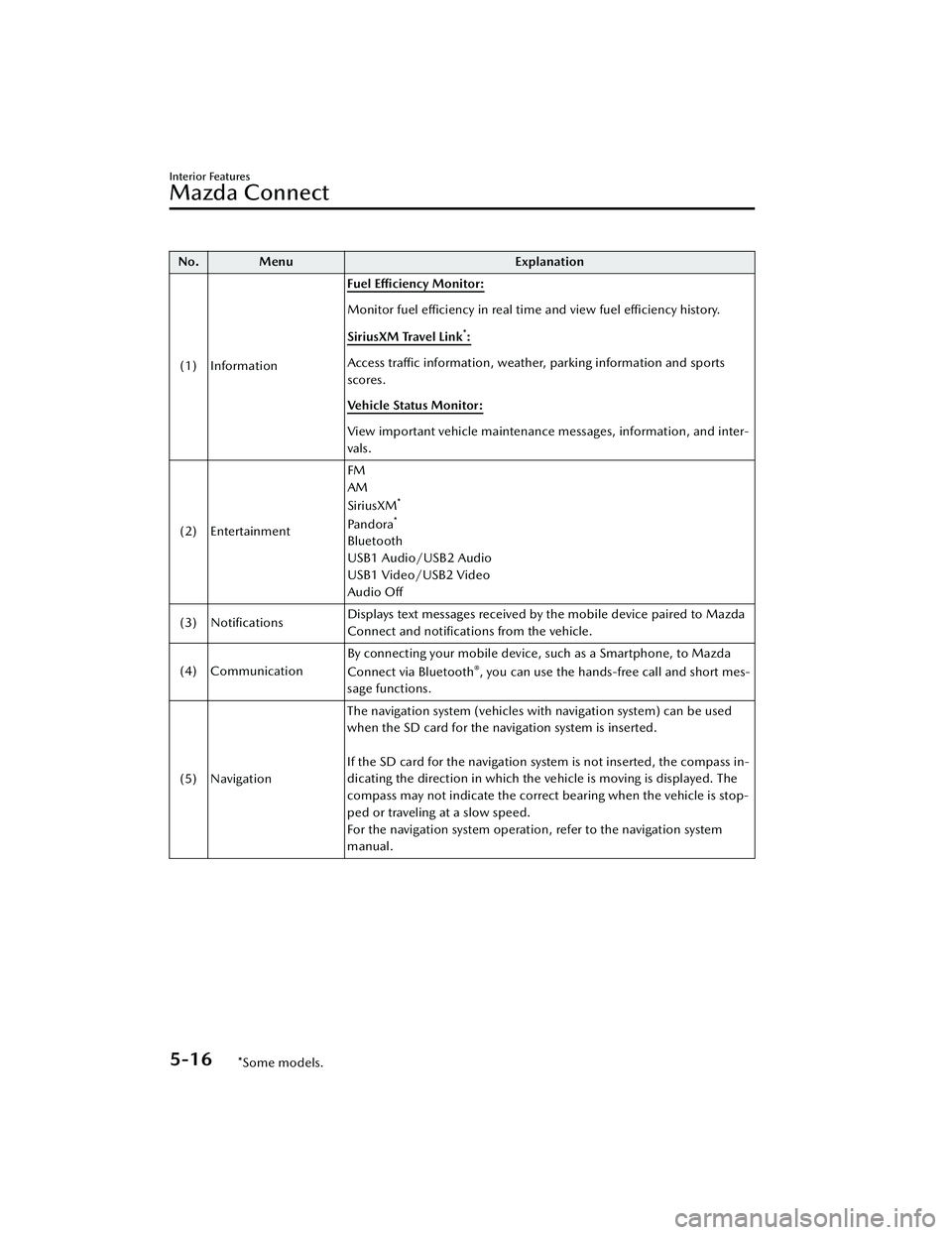
No. MenuExplanation
(1) Information Fuel Efficiency Monitor:
Monitor fuel
efficiency in real time and view fuel
efficiency history.
SiriusXM Travel Link
*:
Access traffic information, weather, parking information and sports
scores.
Vehicle Status Monitor:
View important vehicle maintenance messages, information, and inter-
vals.
(2) Entertainment FM
AM
SiriusXM
*
Pandora*
Bluetooth
USB1 Audio/USB2 Audio
USB1 Video/USB2 Video
Audio
Off
(3) Notifications Displays text messages received by the mobile device paired to Mazda
Connect and notifications from the vehicle.
(4) Communication By connecting your mobile device,
such as a Smartphone, to Mazda
Connect via Bluetooth
®, you can use the hands-free call and short mes-
sage functions.
(5) Navigation The navigation system (vehicles with navigation system) can be used
when the SD card for the navigation system is inserted.
If the SD card for the navigation system is not inserted, the compass in-
dicating the direction in which the ve
hicle is moving is displayed. The
compass may not indicate the correct bearing when the vehicle is stop-
ped or traveling at a slow speed.
For the navigation system operation, refer to the navigation system
manual.
Interior Features
Mazda Connect
5-16*Some models.
Mazda3_8LC2-EA-22G_Edition1_new 2022-5-20 11:26:10
Page 421 of 623
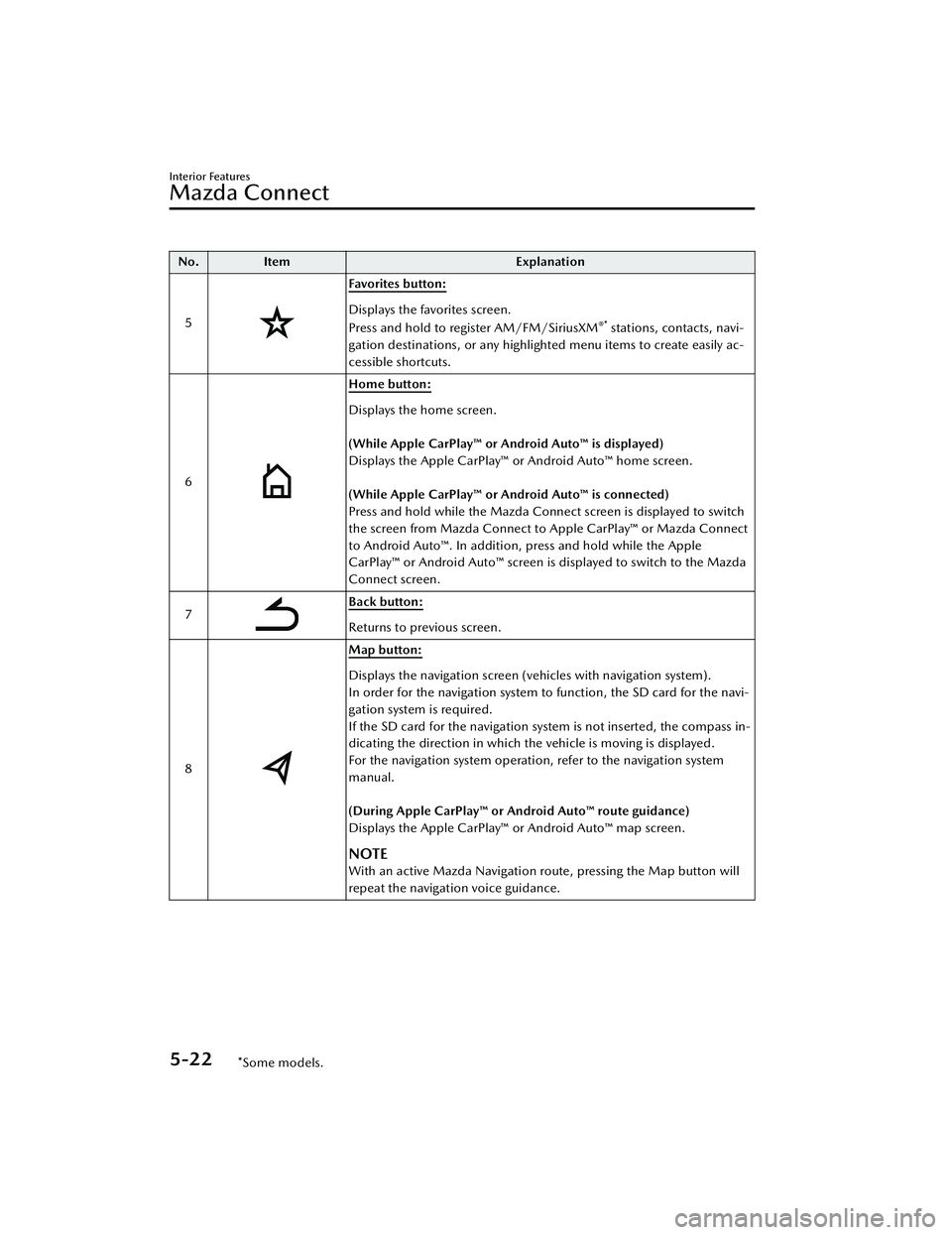
No.Item Explanation
5
Favorites button:
Displays the favorites screen.
Press and hold to register AM/FM/SiriusXM®* stations, contacts, navi-
gation destinations, or any highlighted menu items to create easily ac-
cessible shortcuts.
6
Home button:
Displays the home screen.
(While Apple CarPlay™ or Android Auto™ is displayed)
Displays the Apple CarPlay™ or Android Auto™ home screen.
(While Apple CarPlay™ or Android Auto™ is connected)
Press and hold while the Mazda Connect screen is displayed to switch
the screen from Mazda Connect to Apple CarPlay™ or Mazda Connect
to Android Auto™. In addition, press and hold while the Apple
CarPlay™ or Android Auto™ screen is displayed to switch to the Mazda
Connect screen.
7
Back button:
Returns to previous screen.
8
Map button:
Displays the navigation screen (vehicles with navigation system).
In order for the navigation system to function, the SD card for the navi-
gation system is required.
If the SD card for the navigation system is not inserted, the compass in-
dicating the direction in which the vehicle is moving is displayed.
For the navigation system operation, refer to the navigation system
manual.
(During Apple CarPlay™ or Android Auto™ route guidance)
Displays the Apple CarPlay™ or Android Auto™ map screen.
NOTE
With an active Mazda Navigation route, pressing the Map button will
repeat the navigation voice guidance.
Interior Features
Mazda Connect
5-22*Some models.
Mazda3_8LC2-EA-22G_Edition1_new 2022-5-20 11:26:10
Page 501 of 623
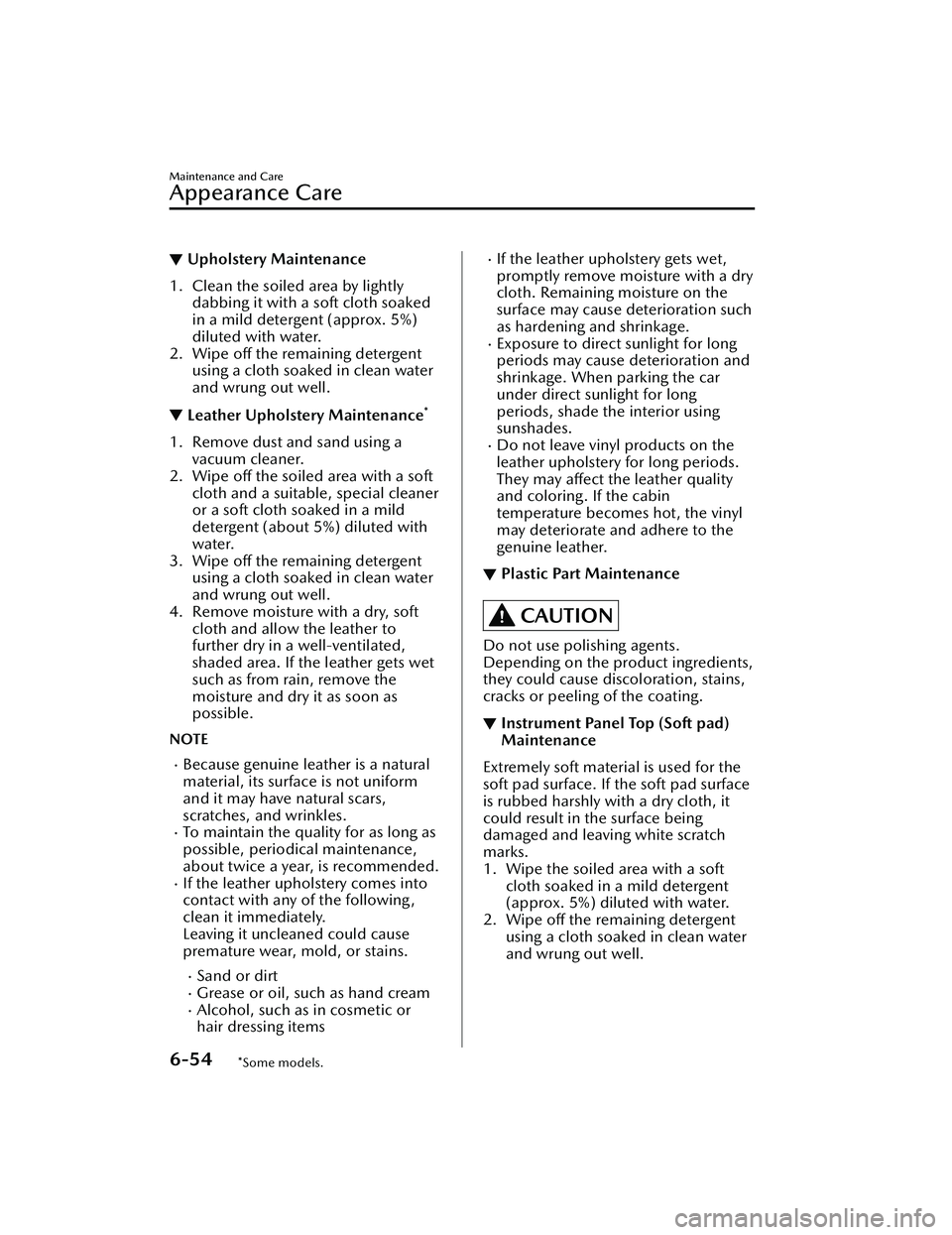
▼Upholstery Maintenance
1. Clean the soiled area by lightly
dabbing it with a soft cloth soaked
in a mild detergent (approx. 5%)
diluted with water.
2. Wipe off the remaining detergent using a cloth soaked in clean water
and wrung out well.
▼Leather Upholstery Maintenance*
1. Remove dust and sand using a
vacuum cleaner.
2. Wipe off the soiled area with a soft cloth and a suitable, special cleaner
or a soft cloth soaked in a mild
detergent (about 5%) diluted with
water.
3. Wipe off the remaining detergent using a cloth soaked in clean water
and wrung out well.
4. Remove moisture with a dry, soft cloth and allow the leather to
further dry in a well-ventilated,
shaded area. If the leather gets wet
such as from rain, remove the
moisture and dry it as soon as
possible.
NOTE
Because genuine leather is a natural
material, its surface is not uniform
and it may have natural scars,
scratches, and wrinkles.
To maintain the quality for as long as
possible, periodical maintenance,
about twice a year, is recommended.
If the leather upholstery comes into
contact with any of the following,
clean it immediately.
Leaving it uncleaned could cause
premature wear, mold, or stains.
Sand or dirtGrease or oil, such as hand creamAlcohol, such as in cosmetic or
hair dressing items
If the leather upholstery gets wet,
promptly remove moisture with a dry
cloth. Remaining moisture on the
surface may cause deterioration such
as hardening and shrinkage.
Exposure to direct sunlight for long
periods may cause deterioration and
shrinkage. When parking the car
under direct sunlight for long
periods, shade the interior using
sunshades.
Do not leave vinyl products on the
leather upholstery for long periods.
They may affect the leather quality
and coloring. If the cabin
temperature becomes hot, the vinyl
may deteriorate and adhere to the
genuine leather.
▼Plastic Part Maintenance
CAUTION
Do not use polishing agents.
Depending on the product ingredients,
they could cause discoloration, stains,
cracks or peeling of the coating.
▼Instrument Panel Top (Soft pad)
Maintenance
Extremely soft material is used for the
soft pad surface. If the soft pad surface
is rubbed harshly with a dry cloth, it
could result in the surface being
damaged and leaving white scratch
marks.
1. Wipe the soiled area with a soft
cloth soaked in a mild detergent
(approx. 5%) diluted with water.
2. Wipe off the remaining detergent using a cloth soaked in clean water
and wrung out well.
Maintenance and Care
Appearance Care
6-54*Some models.
Mazda3_8LC2-EA-22G_Edition1_new 2022-5-20 11:26:10
Page 502 of 623
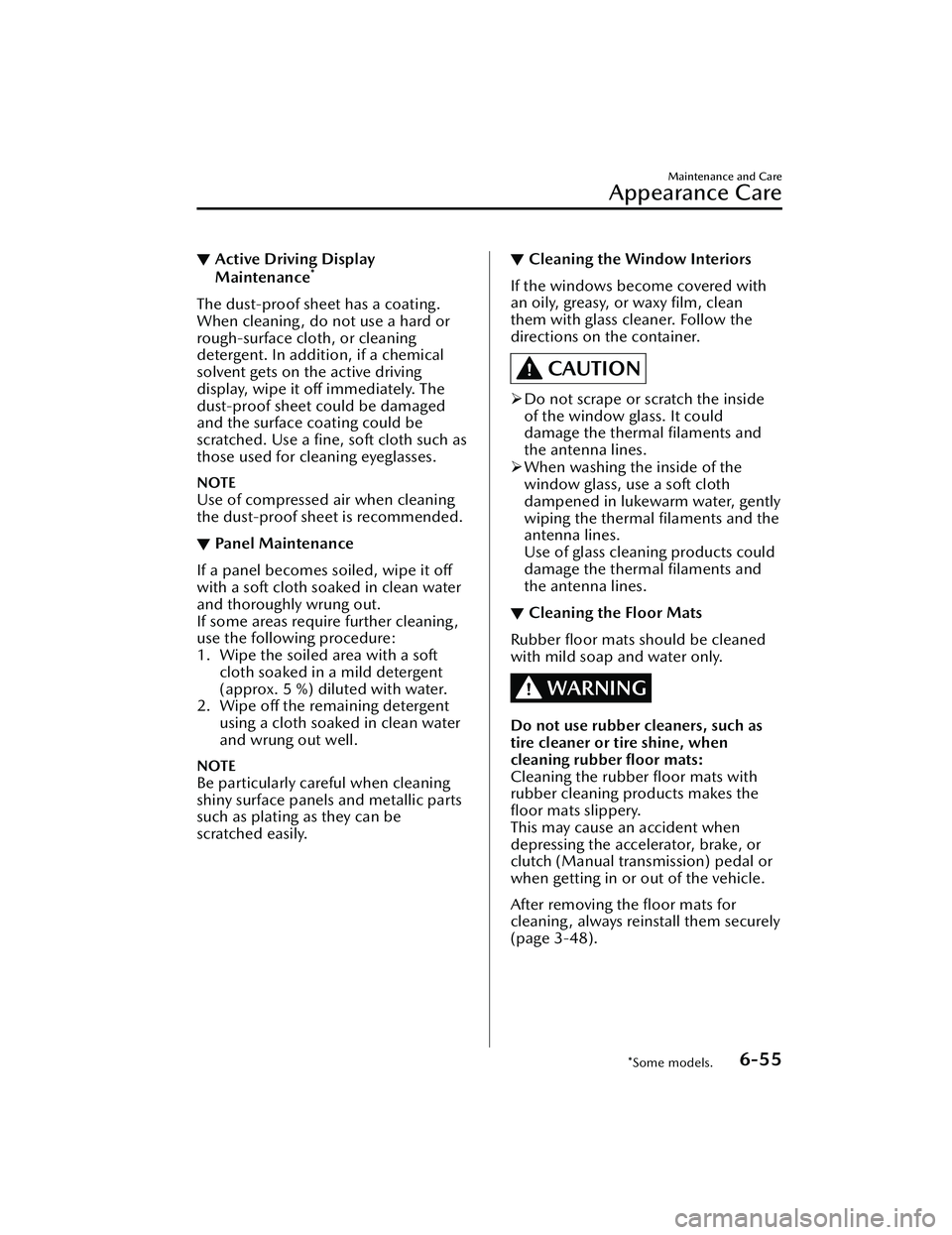
▼Active Driving Display
Maintenance*
The dust-proof sheet has a coating.
When cleaning , do not use a hard or
rough-surface cloth, or cleaning
detergent. In addition, if a chemical
solvent gets on the active driving
display, wipe it off immediately. The
dust-proof sheet could be damaged
and the surface coating could be
scratched. Use a fine, soft cloth such as
those used for cleaning eyeglasses.
NOTE
Use of compressed air when cleaning
the dust-proof sheet is recommended.
▼Panel Maintenance
If a panel becomes soiled, wipe it off
with a soft cloth soaked in clean water
and thoroughly wrung out.
If some areas require further cleaning,
use the following procedure:
1. Wipe the soiled area with a soft
cloth soaked in a mild detergent
(approx. 5 %) diluted with water.
2. Wipe off the remaining detergent using a cloth soaked in clean water
and wrung out well.
NOTE
Be particularly careful when cleaning
shiny surface panels and metallic parts
such as plating as they can be
scratched easily.
▼Cleaning the Window Interiors
If the windows become covered with
an oily, greasy, or waxy film, clean
them with glass cleaner. Follow the
directions on the container.
CAUTION
Do not scrape or scratch the inside
of the window glass. It could
damage the thermal filaments and
the antenna lines.
When washing the inside of the
window glass, use a soft cloth
dampened in lukewarm water, gently
wiping the thermal filaments and the
antenna lines.
Use of glass cleaning products could
damage the thermal filaments and
the antenna lines.
▼ Cleaning the Floor Mats
Rubber floor mats should be cleaned
with mild soap and water only.
WARNING
Do not use rubber cleaners, such as
tire cleaner or tire shine, when
cleaning rubber floor mats:
Cleaning the rubber floor mats with
rubber cleaning products makes the
floor mats slippery.
This may cause an accident when
depressing the accelerator, brake, or
clutch (Manual transmission) pedal or
when getting in or out of the vehicle.
After removing the floor mats for
cleaning, always reinstall them securely
(page 3-48).
Maintenance and Care
Appearance Care
*Some models.6-55
Mazda3_8LC2-EA-22G_Edition1_new
2022-5-20 11:26:10
Page 558 of 623
In order to serve you efficiently and
effectively, please help us by providing
the following information:
1. Your name, address, and telephonenumber
2. Year and model of vehicle
3. Vehicle Identification Number (17 digits, noted on your registration or
title or located on the upper
driver's side corner of the dash)
4. Purchase date and current mileage
5. Your dealer's name and location
6. Your question(s)
If you live outside the U.S.A., please
contact your nearest Mazda
Distributor.
▼ STEP 3: Contact Better Business
Bureau (BBB)
Mazda North American Operations
realizes that mutual agreement on
some issues may not be possible. As a
final step to ensure that your concerns
are being fairly considered, Mazda
North American Operations has
agreed to participate in a dispute
settlement program administered by
the Better Business Bureau (BBB)
system, at no cost to you the
consumer.
BBB AUTO LINE works with consumers
and the manufacturer in an attempt to
reach a mutually acceptable resolution
of any warranty related concerns. If the
BBB is not able to facilitate a
settlement they will provide an
informal hearing before an arbitrator.
You are required to resort to BBB
AUTO LINE before exercising rights or
seeking remedies under the Federal
Magnuson-Moss Warranty Act, 15
U.S.C. § 2301 et seq. To the extent
permitted by the applicable state
“Lemon Law”, you are also required to
resort to BBB AUTO LINE before
exercising any rights or seeking
remedies under the “Lemon Law”. If
you choose to seek remedies that are
not created by the Magnuson-Moss
Warranty Act or the applicable state
“Lemon Law”, you are not required to
first use BBB AUTO LINE.
The whole process normally takes 40
days or less. The arbitration decision is
not binding on you or Mazda unless
you accept the decision. For more
information about BBB AUTO LINE,
including current eligibility standards,
please call 1-800-955-5100 or visit
the BBB website at www.bbb.org/
autoline.
Being truly committed to customer
satisfaction is more than a phrase with
Mazda. We hope to satisfy every
customer directly, but if there is ever a
question about our decision, Mazda
believes in providing a fast, fair and
free method such as the BBB AUTO
LINE to ensure Mazda delivers on our
commitment to do the right thing for
our customers!
Customer Information and Reporting Safety Defects
Customer Assistance
8-3
Mazda3_8LC2-EA-22G_Edition1_new
2022-5-20 11:26:10
Page 615 of 623
Index
A
Accessory Socket....................... 5-42
Active Driving Display................4-36
Adaptive Front Lighting System
(AFS)...................................... 4-101
Add-On Non-Genuine Parts and
Accessories............................... 8-17
Advanced KeyAdvanced keyless entry
system................................... 3-9
Operational range................ 3-10
Advanced Keyless Entry System..... 3-9
Antilock Brake System (ABS).......4-88
Assist Grips............................... 5-45
AUTOHOLD.............................. 4-82
AUTOHOLD Warning Beep........ 7-46
Automatic Transmission Active Adaptive Shift (AAS)... 4-44
Automatic transmission
controls................................4-41
Direct mode.........................4-51
Driving tips.......................... 4-52
Manual shift mode............... 4-45
Shift-lock system...................4-42
Transmission ranges.............. 4-43
B
Battery...................................... 6-28Maintenance........................ 6-30
Replacement........................ 6-30
Specifications......................... 9-4
Battery Runs Out....................... 7-17
Jump-starting....................... 7-17
Blind Spot Monitoring (BSM)....4-107 Canceling operation of Blind Spot
Monitoring (BSM)...............4-111
Blind Spot Monitoring (BSM) Warning
Beep.........................................7-47
Body Lubrication....................... 6-22
Bottle Holder............................ 5-45
Brakes Brake assist.......................... 4-81
Brake override system........... 4-81
Electric Parking Brake (EPB)....4-77
Foot brake............................4-76
Pad wear indicator................4-80
Parking brake....................... 4-77
Warning light........................4-80
Brake Override System............... 4-81
Brake Override Warning Beep.....7-46
Brake System Warning Beep....... 7-46
Break-In Period......................... 3-46
C
Capacities...................................9-5
Cell Phones.............................. 8-18
Center Console......................... 5-47
Child Restraint Categories of child-restraint
systems................................ 2-36
Child-restraint precautions.... 2-31
Child-restraint system
installation........................... 2-36
Child-restraint system suitability
for various seat positions
table.................................... 2-38
Installing child-restraint
systems................................ 2-41
ISOFIX child-restraint systems
(Mexico).............................. 2-49
LATCH child-restraint systems
(Except Mexico)................... 2-49
Climate Control System Fully automatic type..............5-10
Manual type...........................5-5
Operating tips........................ 5-2
Vent operation....................... 5-3
Collision warning...................... 7-48
Coming Home Light.................. 4-61
10-2
Mazda3_8LC2-EA-22G_Edition1_new 2022-5-20 11:26:10