automatic transmission MAZDA MAZDA 2023 Owner's Manual
[x] Cancel search | Manufacturer: MAZDA, Model Year: 2023, Model line: MAZDA, Model: MAZDA MAZDA 2023Pages: 623, PDF Size: 15.08 MB
Page 191 of 623
▼Manually Shifting Up
You can shift gears up by operating the
selector lever or the steering shift
switches
*.
M1 → M2 → M3 → M4 → M5 → M6
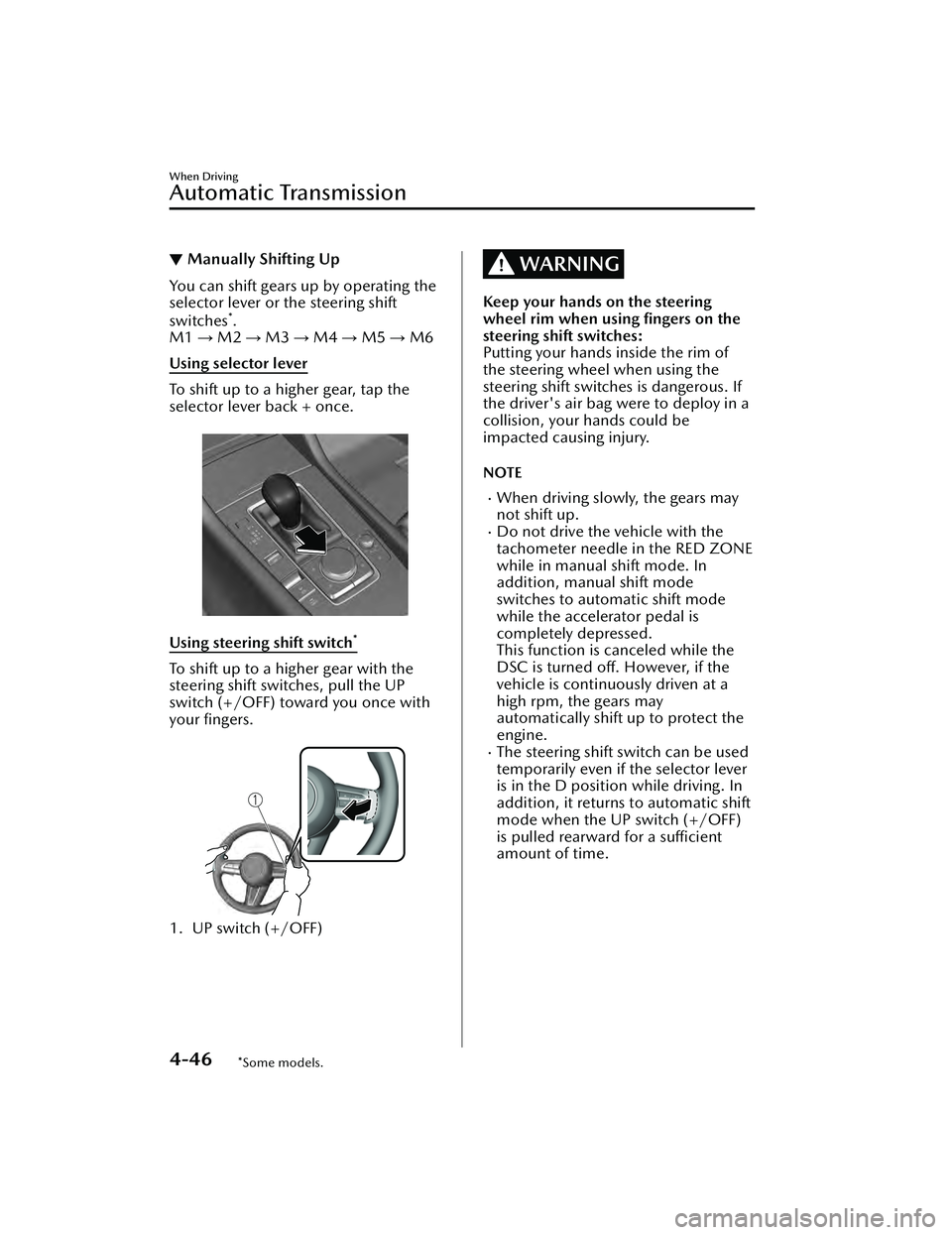
Using selector lever
To shift up to a higher gear, tap the
selector lever back + once.
Using steering shift switch*
To shift up to a higher gear with the
steering shift switches, pull the UP
switch (+/OFF) toward you once with
your fingers.
1. UP switch (+/OFF)
WARNING
Keep your hands on the steering
wheel rim when using fingers on the
steering shift switches:
Putting your hands inside the rim of
the steering wheel when using the
steering shift switches is dangerous. If
the driver's air bag were to deploy in a
collision, your hands could be
impacted causing injury.
NOTE
When driving slowly, the gears may
not shift up.
Do not drive the vehicle with the
tachometer needle in the RED ZONE
while in manual shift mode. In
addition, manual shift mode
switches to automatic shift mode
while the accelerator pedal is
completely depressed.
This function is canceled while the
DSC is turned off. However, if the
vehicle is continuously driven at a
high rpm, the gears may
automatically shift up to protect the
engine.
The steering shift switch can be used
temporarily even if the selector lever
is in the D position while driving. In
addition, it returns to automatic shift
mode when the UP switch (+/OFF)
is pulled rearward for a sufficient
amount of time.
When Driving
Automatic Transmission
4-46*Some models.
Mazda3_8LC2-EA-22G_Edition1_new 2022-5-20 11:26:10
Page 192 of 623
▼Manually Shifting Down
You can shift gears down by operating
the selector lever or the steering shift
switches
*.
M6 → M5 → M4 → M3 → M2 → M1
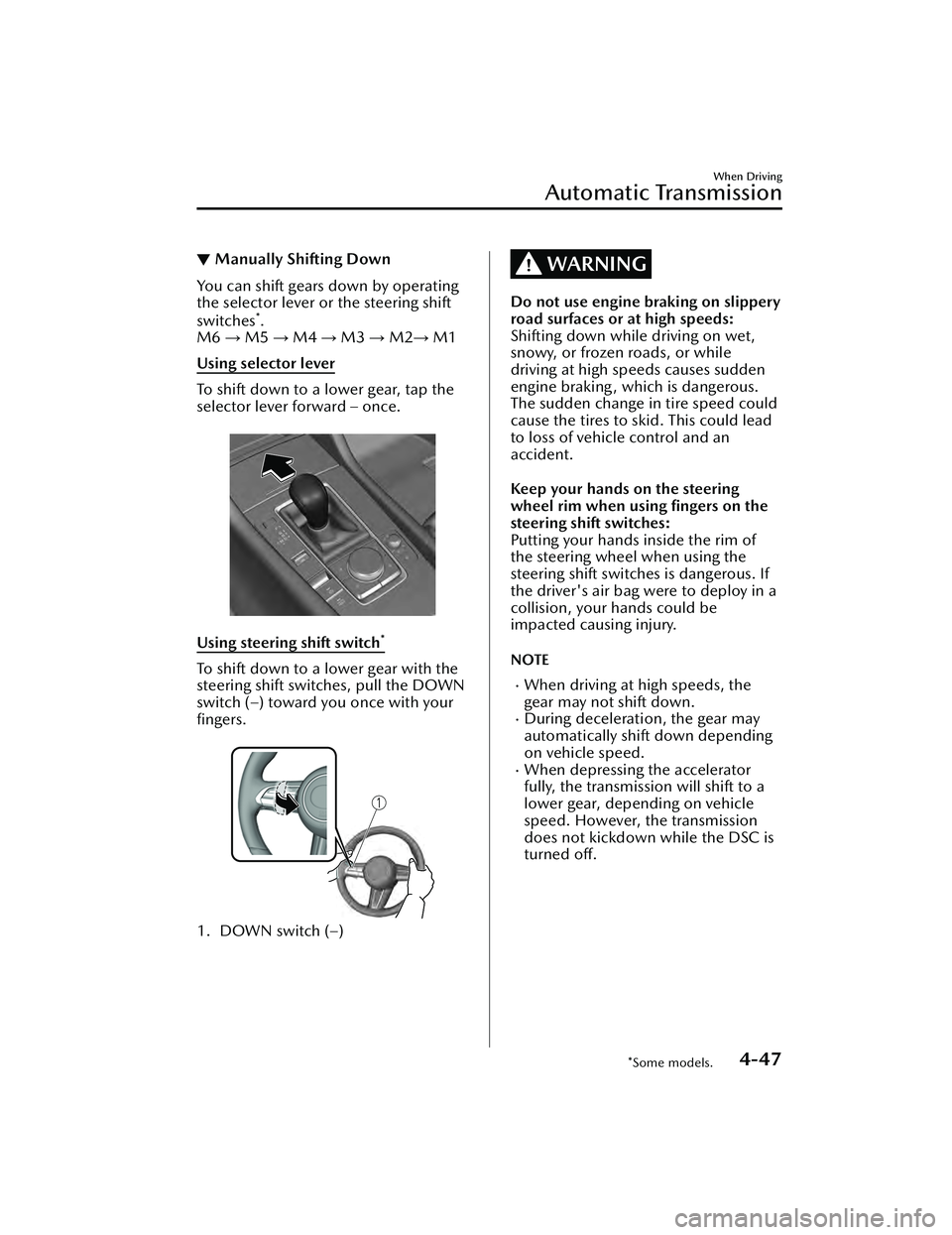
Using selector lever
To shift down to a lower gear, tap the
selector lever forward – once.
Using steering shift switch*
To shift down to a lower gear with the
steering shift switches, pull the DOWN
switch (–) toward you once with your
fingers.
1. DOWN switch (–)
WARNING
Do not use engine braking on slippery
road surfaces or at high speeds:
Shifting down while driving on wet,
snowy, or frozen roads, or while
driving at high speeds causes sudden
engine braking , which is dangerous.
The sudden change in tire speed could
cause the tires to skid. This could lead
to loss of vehicle control and an
accident.
Keep your hands on the steering
wheel rim when using fingers on the
steering shift switches:
Putting your hands inside the rim of
the steering wheel when using the
steering shift switches is dangerous. If
the driver's air bag were to deploy in a
collision, your hands could be
impacted causing injury.
NOTE
When driving at high speeds, the
gear may not shift down.
During deceleration, the gear may
automatically shift down depending
on vehicle speed.
When depressing the accelerator
fully, the transmissi on will shift to a
lower gear, depending on vehicle
speed. However, the transmission
does not kickdown while the DSC is
turned off.
When Driving
Automatic Transmission
*Some models.4-47
Mazda3_8LC2-EA-22G_Edition1_new 2022-5-20 11:26:10
Page 193 of 623
▼Second Gear Fixed Mode
When the selector lever is moved back
+ while the vehicle speed is about 10
km/h (6.2 mph) or less, the
transmission is set in the second gear
fixed mode. The gear is fixed in second
while in this mode for easier
acceleration from a stop and driving on
slippery roads such as snow-covered
roads.
If the selector lever is moved back + or
forward – while in the second gear
fixed mode, the mode will be
canceled.
When Driving
Automatic Transmission
4-48
Mazda3_8LC2-EA-22G_Edition1_new
2022-5-20 11:26:10
Page 194 of 623
▼Shift Gear (Shifting) Speed Limit
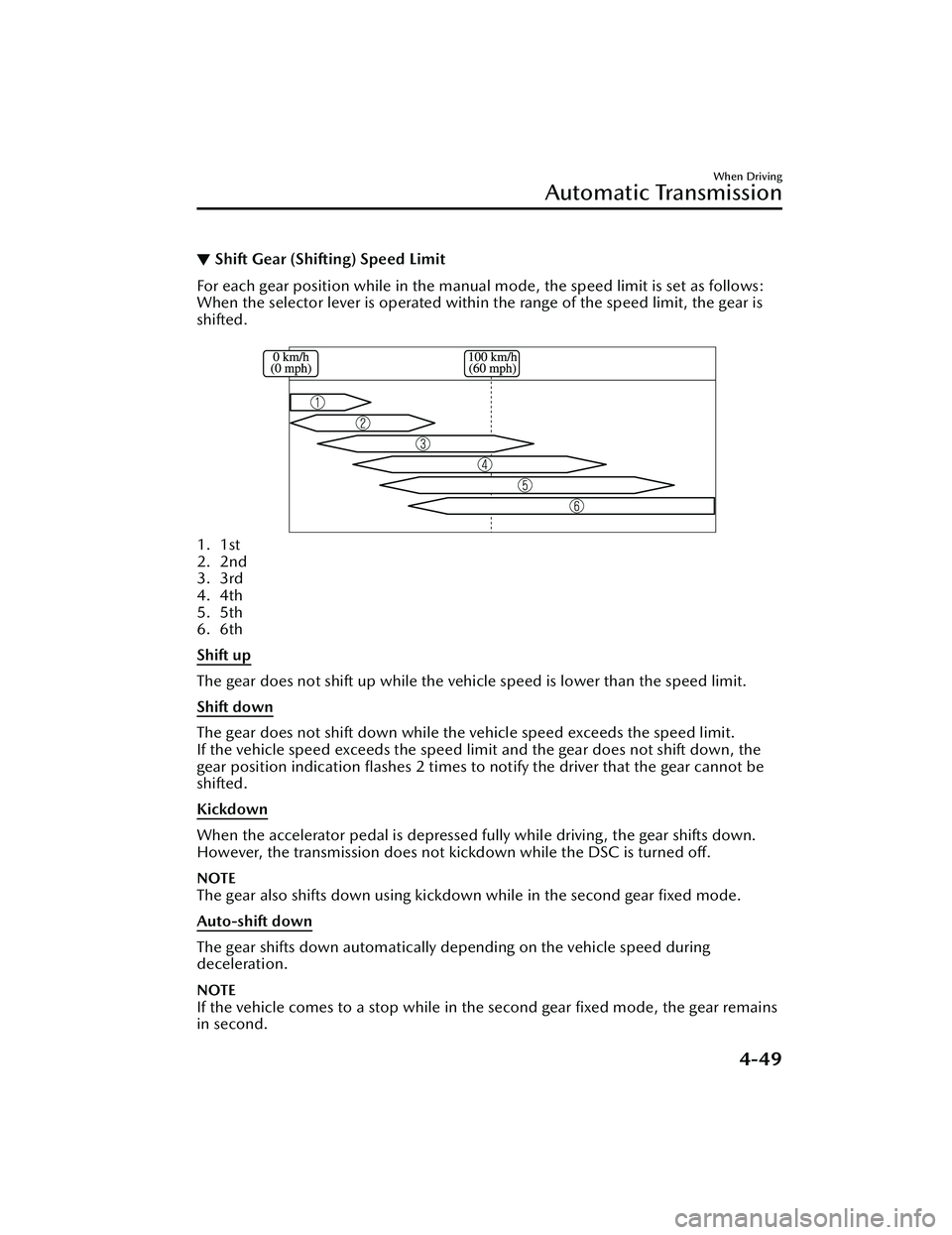
For each gear position while in the manual
mode, the speed limit is set as follows:
When the selector lever is operated within the range of the speed limit, the gear is
shifted.
1. 1st
2. 2nd
3. 3rd
4. 4th
5. 5th
6. 6th
Shift up
The gear does not shift up while the vehicle speed is lower than the speed limit.
Shift down
The gear does not shift down while the vehicle speed exceeds the speed limit.
If the vehicle speed exceeds the speed limi t and the gear does not shift down, the
gear position indication flashes 2 times to notify the driver that the gear cannot be
shifted.
Kickdown
When the accelerator pedal is depressed fully while driving, the gear shifts down.
However, the transmission does not kickdown while the DSC is turned off.
NOTE
The gear also shifts down using kickdown while in the second gear fixed mode.
Auto-shift down
The gear shifts down automatically depending on the vehicle speed during
deceleration.
NOTE
If the vehicle comes to a stop while in the second gear fixed mode, the gear remains
in second.
When Driving
Automatic Transmission
4-49
Mazda3_8LC2-EA-22G_Edition1_new 2022-5-20 11:26:10
Page 195 of 623
▼Recommendations for Shifting
Upshifting
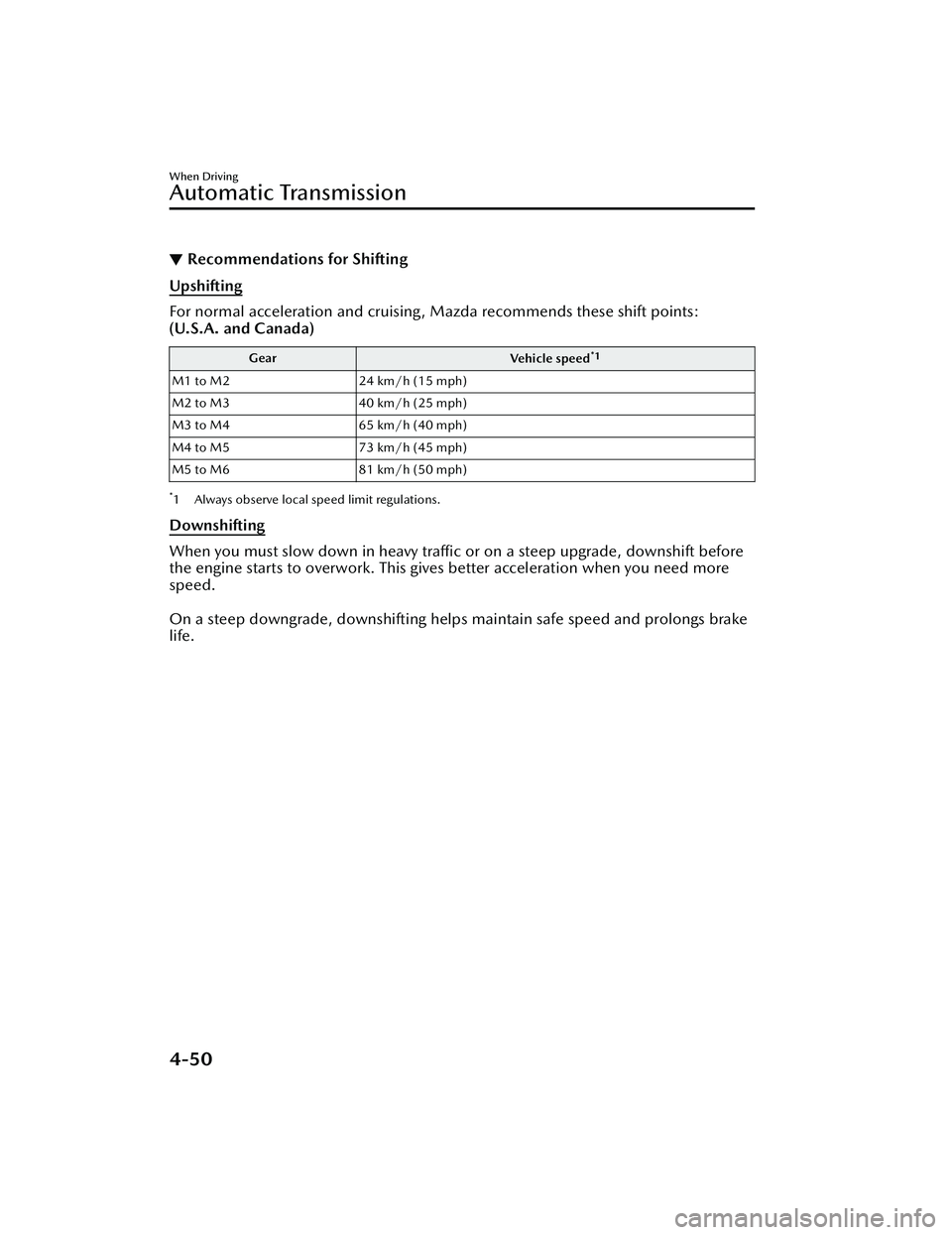
For normal acceleration and cruising, Mazda recommends these shift points:
(U.S.A. and Canada)
Gear
Vehicle speed*1
M1 to M224 km/h (15 mph)
M2 to M3 40 km/h (25 mph)
M3 to M4 65 km/h (40 mph)
M4 to M5 73 km/h (45 mph)
M5 to M6 81 km/h (50 mph)
*1 Always observe local speed limit regulations.
Downshifting
When you must slow down in heavy traffic or on a steep upgrade, downshift before
the engine starts to overwork. This give s better acceleration when you need more
speed.
On a steep downgrade, downshifting helps maintain safe speed and prolongs brake
life.
When Driving
Automatic Transmission
4-50
Mazda3_8LC2-EA-22G_Edition1_new 2022-5-20 11:26:10
Page 196 of 623
Direct Mode*
▼Direct Mode
Direct mode can be used for
temporarily switching gears by
operating the steering shift switch
while the vehicle is being driven with
the selector lever in the D position.
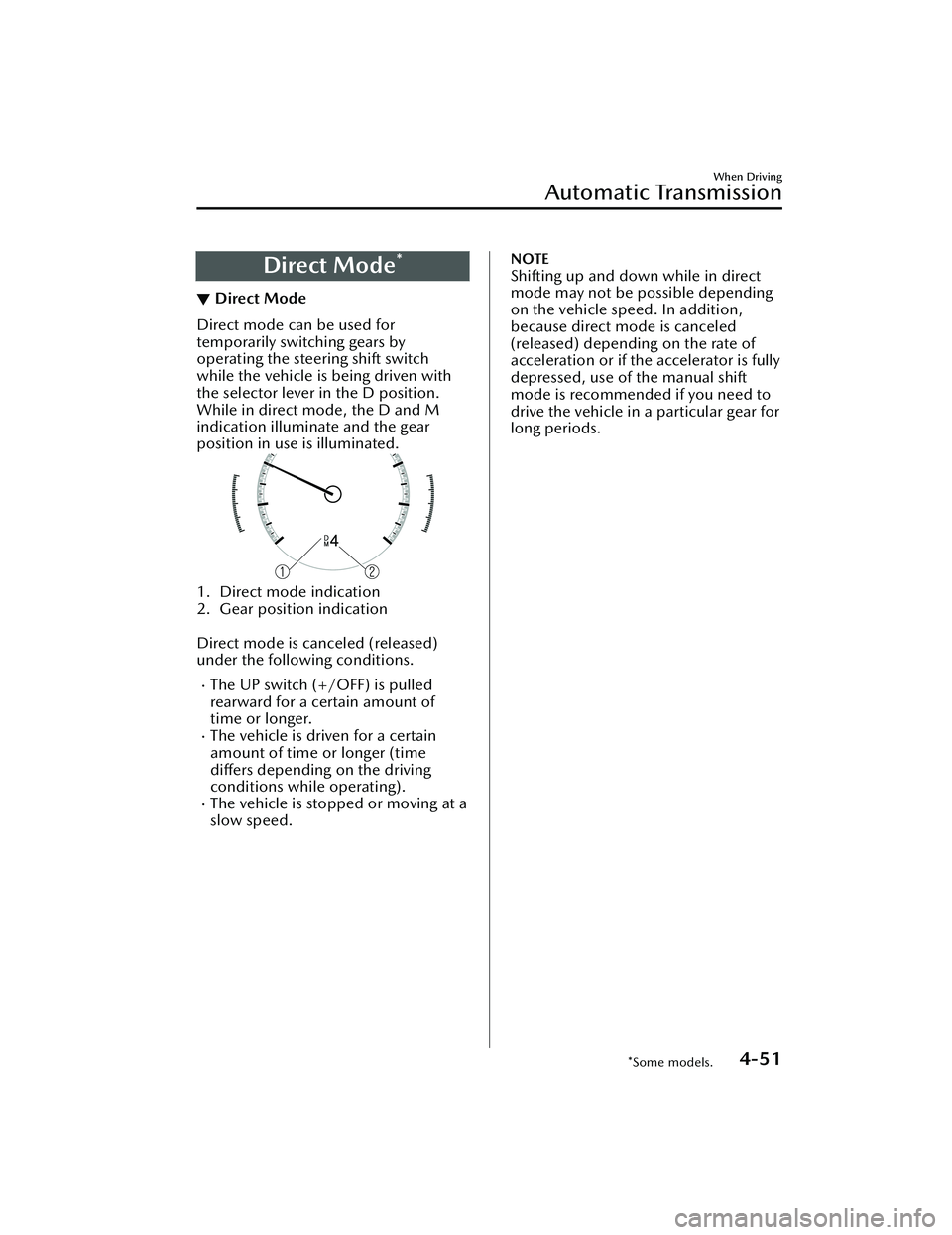
While in direct mode, the D and M
indication illuminate and the gear
position in use is illuminated.
1. Direct mode indication
2. Gear position indication
Direct mode is canceled (released)
under the following conditions.
The UP switch (+/OFF) is pulled
rearward for a certain amount of
time or longer.
The vehicle is driven for a certain
amount of time or longer (time
differs
depending on the driving
conditions while operating).
The vehicle is stopped or moving at a
slow speed.
NOTE
Shifting up and down while in direct
mode may not be possible depending
on the vehicle speed. In addition,
because direct mode is canceled
(released) depending on the rate of
acceleration or if the accelerator is fully
depressed, use of the manual shift
mode is recommended if you need to
drive the vehicle in a particular gear for
long periods.
When Driving
Automatic Transmission
*Some models.4-51
Mazda3_8LC2-EA-22G_Edition1_new 2022-5-20 11:26:10
Page 197 of 623
Driving Tips
▼Driving Tips
WARNING
Do not let the vehicle move in a
direction opposite to the direction
selected by the selector lever:
Do not let the vehicle move backward
with the selector lever in a forward
position, or do not let the vehicle
move forward with the selector lever in
the reverse position. Otherwise, the
engine may stop, causing the loss of
the power brake and power steering
functions, and make it difficult to
control the vehicle which could result
in an accident.
Pa s s i n g
For extra power when passing another
vehicle or climbing steep grades,
depress the accelerator fully. The
transmission will shift to a lower gear,
depending on vehicle speed.
NOTE
The accelerator pedal may initially
feel heavy as it is being depressed,
then feel lighter as it is depressed
further. This change in pedal force
aids the engine control system in
determining how much the
accelerator pedal has been
depressed for performing kickdown,
and functions to control whether or
not kickdown should be performed.
The manual shift mode does not
switch to automatic shift mode while
the DSC is turned off when the
selector lever is in the M position.
Shift the selector lever.
Climbing steep grades from a stop
To climb a steep grade from a stopped
position:
1. Depress the brake pedal.
2. Shift to D or M1, depending on the
load weight and grade steepness.
3. Release the brake pedal while
gradually accelerating.
Descending steep grades
When descending a steep grade, shift
to lower gears, depending on load
weight and grade steepness. Descend
slowly, using the brakes only
occasionally to prevent them from
overheating.
When Driving
Automatic Transmission
4-52
Mazda3_8LC2-EA-22G_Edition1_new 2022-5-20 11:26:10
Page 223 of 623
Manual operation
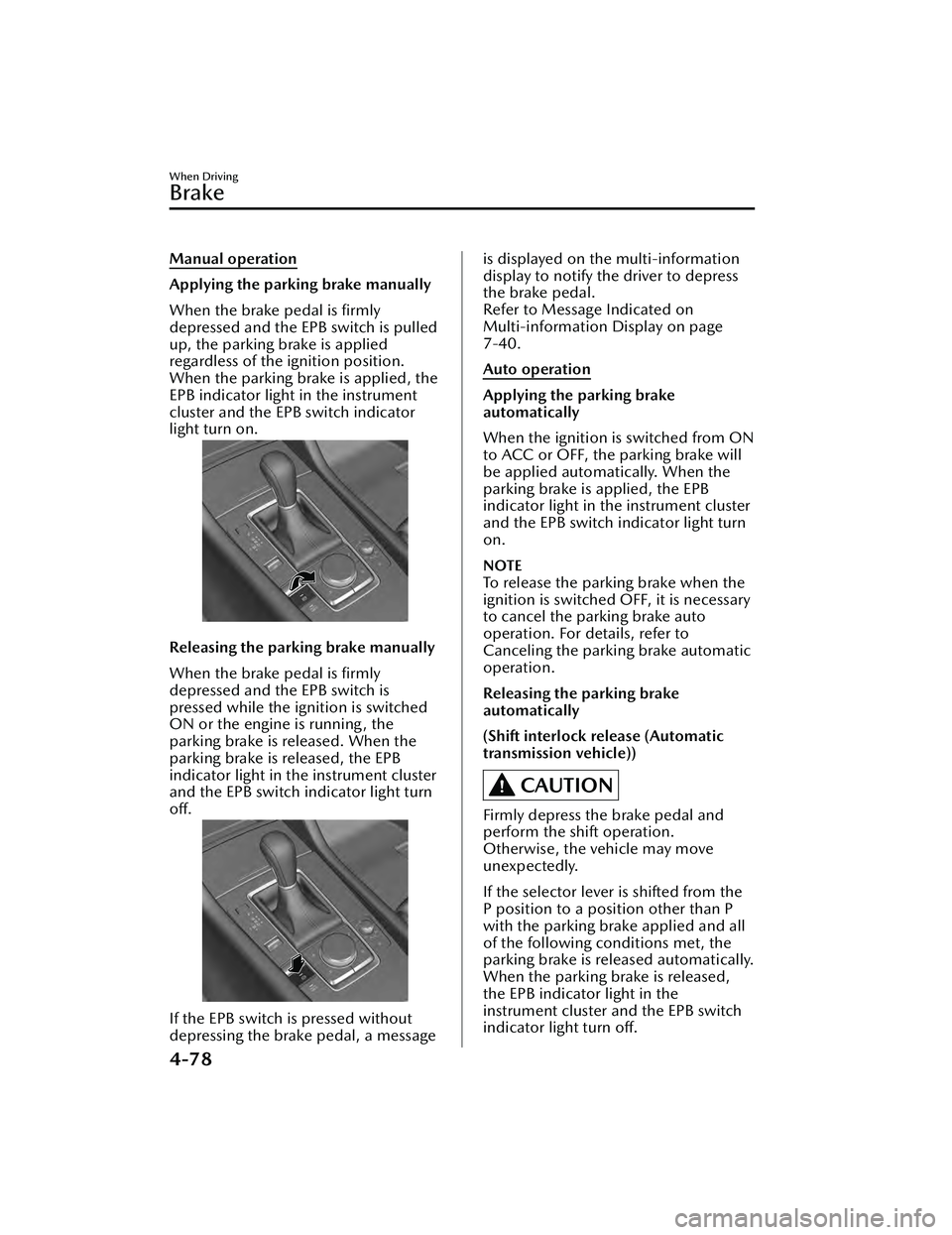
Applying the parking brake manually
When the brake pedal is firmly
depressed and the EPB switch is pulled
up, the parking brake is applied
regardless of the ignition position.
When the parking brake is applied, the
EPB indicator light in the instrument
cluster and the EPB switch indicator
light turn on.
Releasing the parking brake manually
When the brake pedal is firmly
depressed and the EPB switch is
pressed while the ignition is switched
ON or the engine is running, the
parking brake is released. When the
parking brake is released, the EPB
indicator light in the instrument cluster
and the EPB switch indicator light turn
off.
If the EPB switch is pressed without
depressing the brake pedal, a message
is displayed on the multi-information
display to notify the driver to depress
the brake pedal.
Refer to Message Indicated on
Multi-information Display on page
7-40.
Auto operation
Applying the parking brake
automatically
When the ignition is switched from ON
to ACC or OFF, the parking brake will
be applied automatically. When the
parking brake is applied, the EPB
indicator light in the instrument cluster
and the EPB switch indicator light turn
on.
NOTE
To release the parking brake when the
ignition is switched OFF, it is necessary
to cancel the parking brake auto
operation. For details, refer to
Canceling the parking brake automatic
operation.
Releasing the parking brake
automatically
(Shift interlock release (Automatic
transmission vehicle))
CAUTION
Firmly depress the brake pedal and
perform the shift operation.
Otherwise, the vehicle may move
unexpectedly.
If the selector lever is shifted from the
P position to a position other than P
with the parking brake applied and all
of the following conditions met, the
parking brake is released automatically.
When the parking brake is released,
the EPB indicator light in the
instrument cluster and the EPB switch
indicator light turn off.
When Driving
Brake
4-78
Mazda3_8LC2-EA-22G_Edition1_new2022-5-20 11:26:10
Page 224 of 623
The engine is running.The driver's door is closed.Shift interlock release is enabled.The brake pedal is being depressed.
When performing the following
operations, shift interlock release can
be enabled/disabled.
1. Switch the ignition ON.
2. Pull the EPB switch continuously for 4 seconds or longer.
3. Release the EPB switch once and then pull it again continuously for 4
seconds or longer within 3 seconds.
(Switching from disable to enable
shift interlock release)
When shift interlock release is
enabled, a sound is activated 2
times and the EPB switch indicator
changes to fast flashing , and flashes
for 3 seconds.
(Switching from enable to disable
shift interlock release)
When shift interlock release is
disabled, a sound is activated 2
times and the EPB switch indicator
light changes to slow flashing, and
flashes for 4 seconds.
NOTE
When the ignition is switched OFF,
the system setting before it was
turned off is maintained.
(Accelerator interlock release)
If the accelerator pedal is depressed
with the parking brake applied and all
of the following conditions met, the
parking brake is released automatically.
When the parking brake is released,
the EPB indicator light in the
instrument cluster and the EPB switch
indicator light turn off.
The engine is running.The driver's door is closed.The driver's seat belt is fastened.(Manual transmission vehicle)
The shift lever is in a position other
than neutral.
The clutch pedal is depressed
halfway.
(Automatic transmission vehicle)
The selector lever is in the D, M, or R
position.
CAUTION
If something such as the driver’s foot
contacts the accelerator pedal with the
engine running and the parking brake
applied, the parking brake may be
released automatically and the vehicle
may move unexpectedly. If you do not
intend to start driving the vehicle
immediately, shift the shift lever to the
neutral position for a manual
transmission, or shif t the selector lever
to the P or N position for an automatic
transmission.
Canceling the parking brake
automatic operation
The parking brake automatic operation
can be canceled by doing any of the
following after switching the ignition
from ON to OFF.
Auto operation cancel method 1
1. Switch the ignition ON.
2. Release the parking brake manually.
3. Turn off the AUTOHOLD.
4. Press the EPB switch continuously for 2 seconds or longer (until a
sound is activated).
5. Release the EPB switch and switch
the ignition OFF within 5 seconds
after the sound was activated.
After the auto operation is
canceled, a sound is activated one
time, and the EPB switch indicator
light switches from illumination to
flashing , and then turns off after 3
seconds.
When Driving
Brake
4-79
Mazda3_8LC2-EA-22G_Edition1_new 2022-5-20 11:26:10
Page 225 of 623
Auto operation cancel method 2
1. Switch the ignition ON.
2. Release the parking brake manually.
3. Turn off the AUTOHOLD.
4. Switch the ignition OFF with theEPB switch pressed while the brake
pedal is not depressed.
When the auto operation is
canceled, a sound is activated one
time, and the EPB switch indicator
light goes from normal flashing to
faster flashing, and then turns
off
after 3 seconds.
NOTE
When canceling the parking brake
auto operation and parking the
vehicle, shift the shift lever to the 1st
gear or the R position for a manual
transmission, or shift the selector
lever to the P position for an
automatic transmission, and then
use wheel blocks.
The auto operation may not cancel if
the vehicle is parked on a steep
slope.
When the ignition is switched ON, the
parking brake auto operation is
restored.
How to use Emergency Brake
If there is a problem with the brake
system (foot brake) while driving the
vehicle or in an emergency situation
where the driver cannot step on the
brake pedal, continually pulling up the
EPB switch will apply the brakes and
decelerate or stop the vehicle. The
parking brake on-reminder sound is
activated while the brake is applied. In
addition, when releasing the switch,
the brake is released and the sound
stops.
WARNING
Use Emergency Brake only in an
emergency situation:
Excessive use may cause the brake
parts to wear quickly or the brakes to
heat up and become less effective.
▼Warning Light
The warning light turns on when the
system has a malfunction.
Refer to Brake System Warning
Indication/Warning Light on page
7-27.
▼
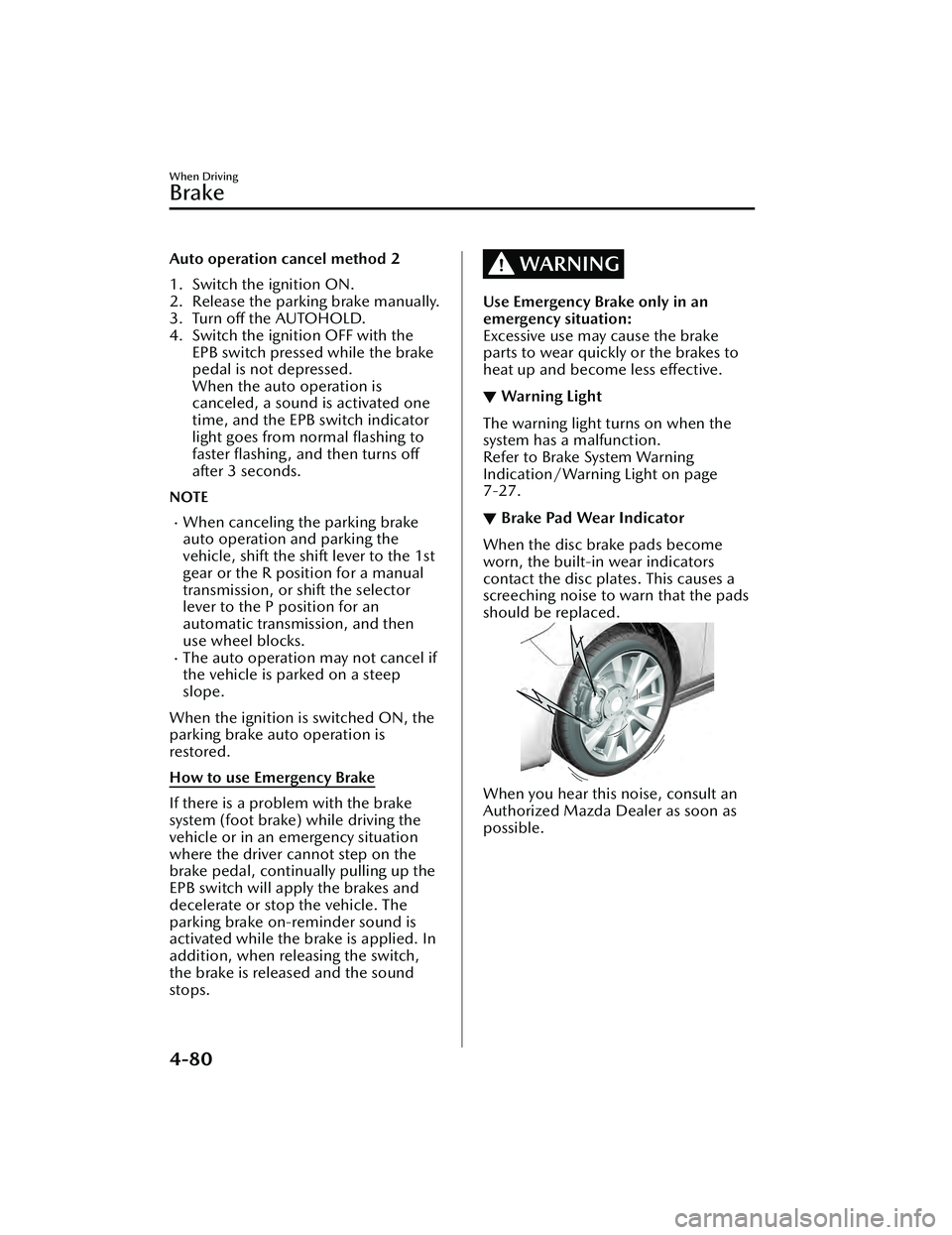
Brake Pad Wear Indicator
When the disc brake pads become
worn, the built-in wear indicators
contact the disc plates. This causes a
screeching noise to warn that the pads
should be replaced.
When you hear this noise, consult an
Authorized Mazda Dealer as soon as
possible.
When Driving
Brake
4-80
Mazda3_8LC2-EA-22G_Edition1_new
2022-5-20 11:26:10