transmission MAZDA MAZDA 2023 Repair Manual
[x] Cancel search | Manufacturer: MAZDA, Model Year: 2023, Model line: MAZDA, Model: MAZDA MAZDA 2023Pages: 623, PDF Size: 15.08 MB
Page 320 of 623
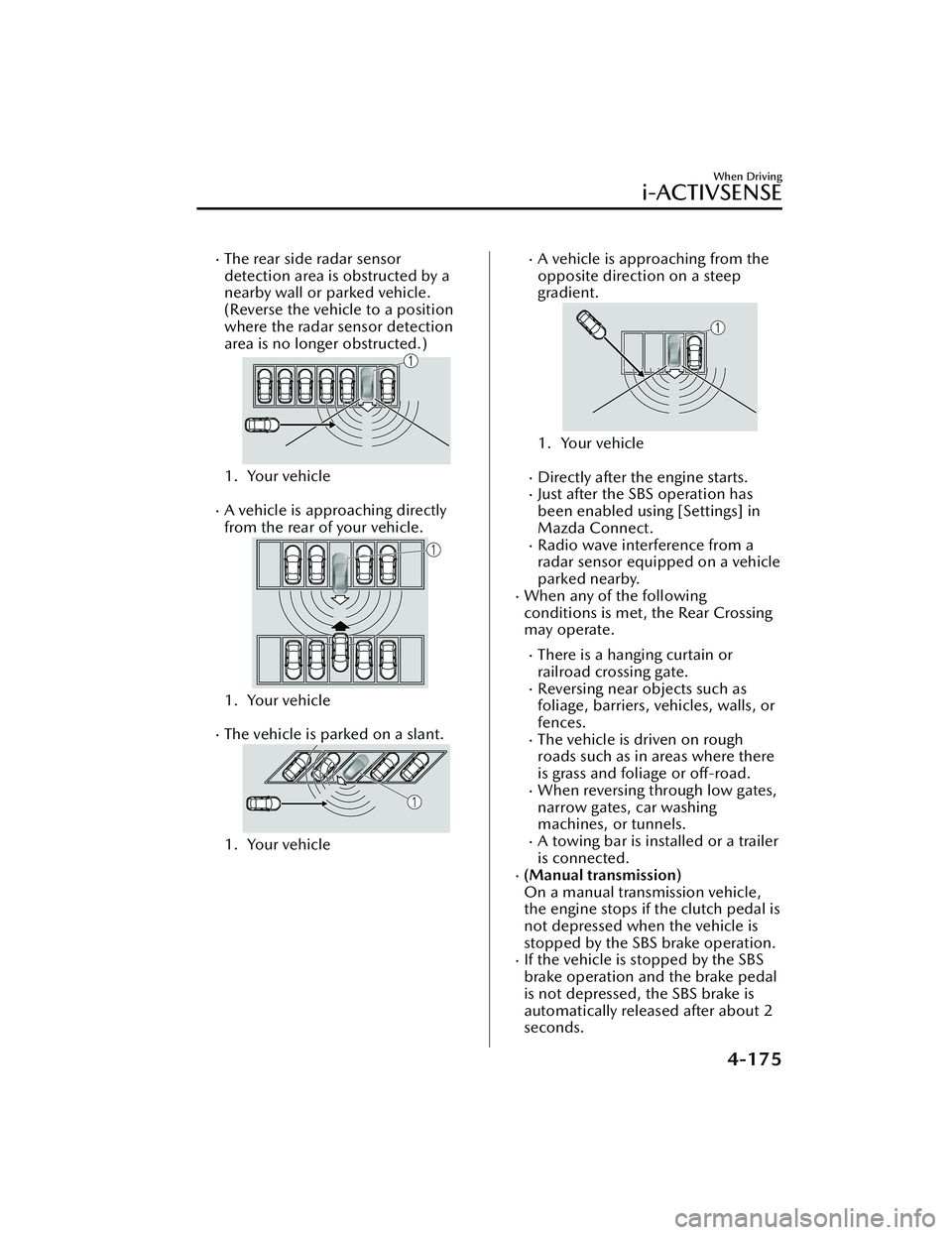
The rear side radar sensor
detection area is obstructed by a
nearby wall or parked vehicle.
(Reverse the vehicle to a position
where the radar sensor detection
area is no longer obstructed.)
1. Your vehicle
A vehicle is approaching directly
from the rear of your vehicle.
1. Your vehicle
The vehicle is parked on a slant.
1. Your vehicle
A vehicle is approaching from the
opposite direction on a steep
gradient.
1. Your vehicle
Directly after the engine starts.Just after the SBS operation has
been enabled using [Settings] in
Mazda Connect.
Radio wave interference from a
radar sensor equipped on a vehicle
parked nearby.
When any of the following
conditions is met, the Rear Crossing
may operate.
There is a hanging curtain or
railroad crossing gate.
Reversing near objects such as
foliage, barriers, vehicles, walls, or
fences.
The vehicle is driven on rough
roads such as in areas where there
is grass and foliage or off-road.
When reversing through low gates,
narrow gates, car washing
machines, or tunnels.
A towing bar is installed or a trailer
is connected.
(Manual transmission)
On a manual transmission vehicle,
the engine stops if the clutch pedal is
not depressed when the vehicle is
stopped by the SBS brake operation.
If the vehicle is stopped by the SBS
brake operation and the brake pedal
is not depressed, the SBS brake is
automatically released after about 2
seconds.
When Driving
i-ACTIVSENSE
4-175
Mazda3_8LC2-EA-22G_Edition1_new 2022-5-20 11:26:10
Page 332 of 623
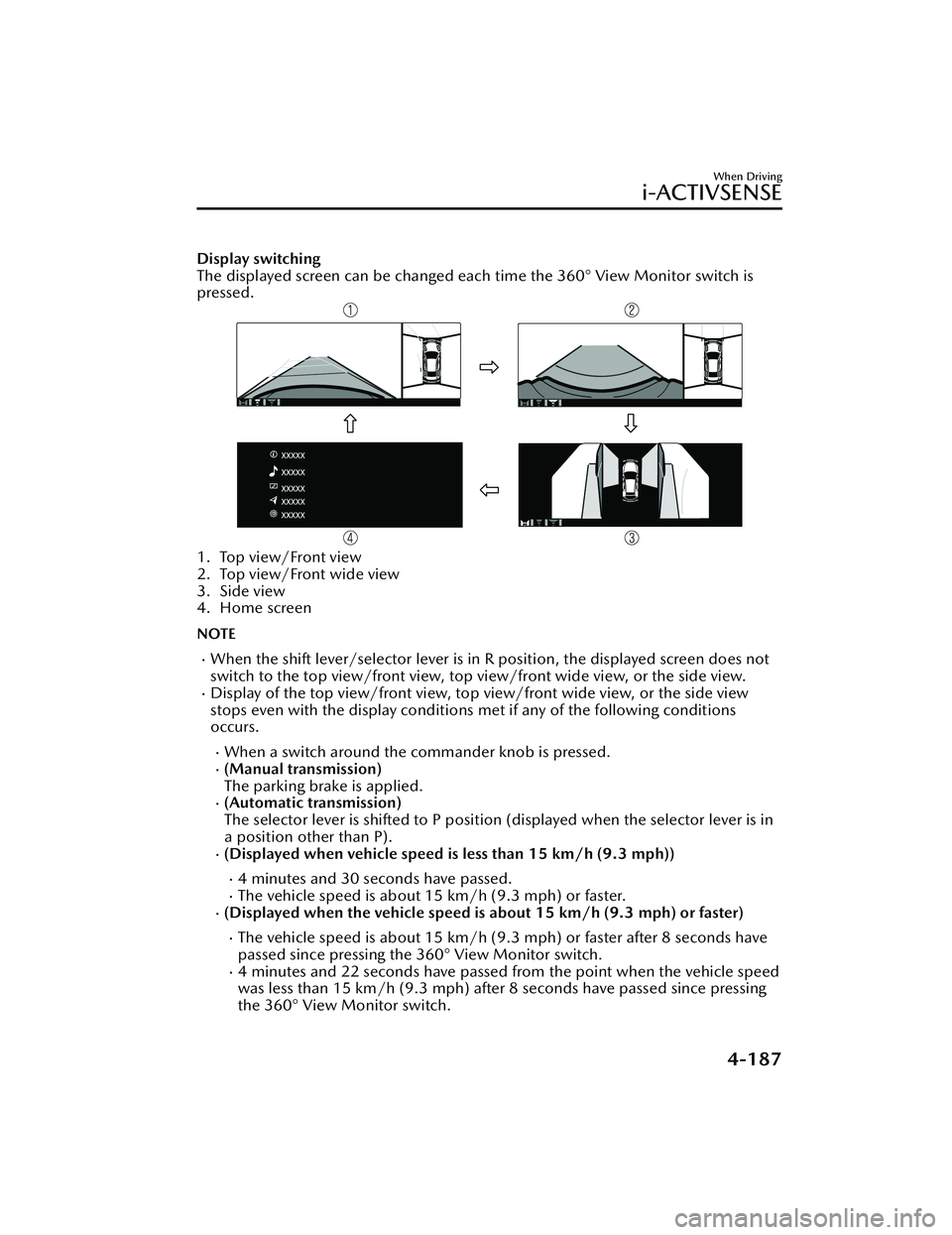
Display switching
The displayed screen can be changed each time the 360° View Monitor switch is
pressed.
1. Top view/Front view
2. Top view/Front wide view
3. Side view
4. Home screen
NOTE
When the shift lever/selector lever is in R position, the displayed screen does not
switch to the top view/front view, top view/front wide view, or the side view.
Display of the top view/front view, top view/front wide view, or the side view
stops even with the display conditions met if any of the following conditions
occurs.
When a switch around the commander knob is pressed.(Manual transmission)
The parking brake is applied.
(Automatic transmission)
The selector lever is shifted to P position (displayed when the selector lever is in
a position other than P).
(Displayed when vehicle speed is less than 15 km/h (9.3 mph))
4 minutes and 30 seconds have passed.The vehicle speed is about 15 km/h (9.3 mph) or faster.(Displayed when the vehicle speed is about 15 km/h (9.3 mph) or faster)
The vehicle speed is about 15 km/h (9.3 mph) or faster after 8 seconds have
passed since pressing the 360° View Monitor switch.
4 minutes and 22 seconds have passed from the point when the vehicle speed
was less than 15 km/h (9.3 mph) after 8 seconds have passed since pressing
the 360° View Monitor switch.
When Driving
i-ACTIVSENSE
4-187
Mazda3_8LC2-EA-22G_Edition1_new 2022-5-20 11:26:10
Page 370 of 623
Cruise Set Indication (Green)
The indication turns on (green) when a
cruising speed has been set.
▼Activation/Deactivation
WARNING
Always turn off the cruise control
system when it is not in use:
Leaving the cruise control system in an
activation-ready state while the cruise
control is not in use is dangerous as the
cruise control could unexpectedly
activate if the activation button is
accidentally pressed, and result in loss
of vehicle control and an accident.
If the headway control function is
disabled using a Mazda Connect
setting , the system switches to cruise
control.
Activation
To activate the system, press the cruise
switch. The cruise standby indication
(white) turns on.
Deactivation
To deactivate the system, press the
cruise switch again.
The cruise standby indication (white)
turns off.
▼To Set Speed
1. Activate the cruise control system
by pressing the cruise switch. The
cruise standby indication (white)
turns on.
2. Accelerate to the desired speed, which must be more than 25 km/h
(16 mph).
3. Adjust the system to the desired vehicle speed using the accelerator
pedal. Press the RES switch up (SET
+) or down (SET-) to start cruise
control. The cruise control
indication (green) in the instrument
cluster turns on at the same time.
Quickly release the switch when the
cruise control indication (green)
turns on.
NOTE
If the RES switch is operated up (SET
+) or down (SET-) while the vehicle
speed is between 25 and 30 km/h
(16 to 19 mph), the set speed is set
to 30 km/h (19 mph).
The cruise control speed setting
cannot be performed under the
following conditions:
Any of the doors is opened.The driver's seat belt is unfastened.The brake pedal is depressed.The parking brake is applied.(Automatic transmission)
The selector lever is in the P, N, or
R position.
(Manual transmission)
The shift lever is in the neutral
position.
On a steep grade, the vehicle may
momentarily slow down while
ascending or speed up while
descending.
When Driving
Cruise Control
4-225
Mazda3_8LC2-EA-22G_Edition1_new 2022-5-20 11:26:10
Page 372 of 623
▼To Resume Cruising Speed at More
Than 30 km/h (19 mph)
If the cruise control system is
temporarily canceled (such as by
applying the brake pedal) and the
system is still activated, the most
recent set speed will automatically
resume when the RES switch is
pressed.
If vehicle speed is below 30 km/h (19
mph), increase the vehicle speed up to
30 km/h (19 mph) or more and press
the RES switch.
▼To Te m p o ra r i l y C a n c e l
To temporarily cancel the system, use
one of these methods:
Slightly depress the brake pedal.Press the CANCEL switch.(Manual transmission)
Depress the clutch pedal.
If the RES switch is pressed when the
vehicle speed is 30 km/h (19 mph) or
higher, the system reverts to the
previously set speed.
NOTE
If any of the following conditions
occur, the cruise control system is
temporarily canceled.
Even when the brake pedal is
slightly depressed.
The DSC is operating.There is a problem in the system.Any of the doors is opened.The driver's seat belt is unfastened.The parking brake is applied.(Automatic transmission)
The selector lever is in the P, N, or
R position.
(Manual transmission)
The shift lever is in the neutral
position.
When the cruise control system is
temporarily canceled by even one of
the applicable cancel conditions, the
speed cannot be re-set.
(Automatic transmission)
The cruise control cannot be
canceled while driving in manual
mode (selector lever shifted from D
to M position). Therefore, engine
braking will not be applied even if
the transmission is shifted down to a
lower gear. If deceleration is
required, lower the set speed or
depress the brake pedal.
▼ To D e a c t i va t e
Press the cruise switch again.
When Driving
Cruise Control
4-227
Mazda3_8LC2-EA-22G_Edition1_new
2022-5-20 11:26:10
Page 379 of 623
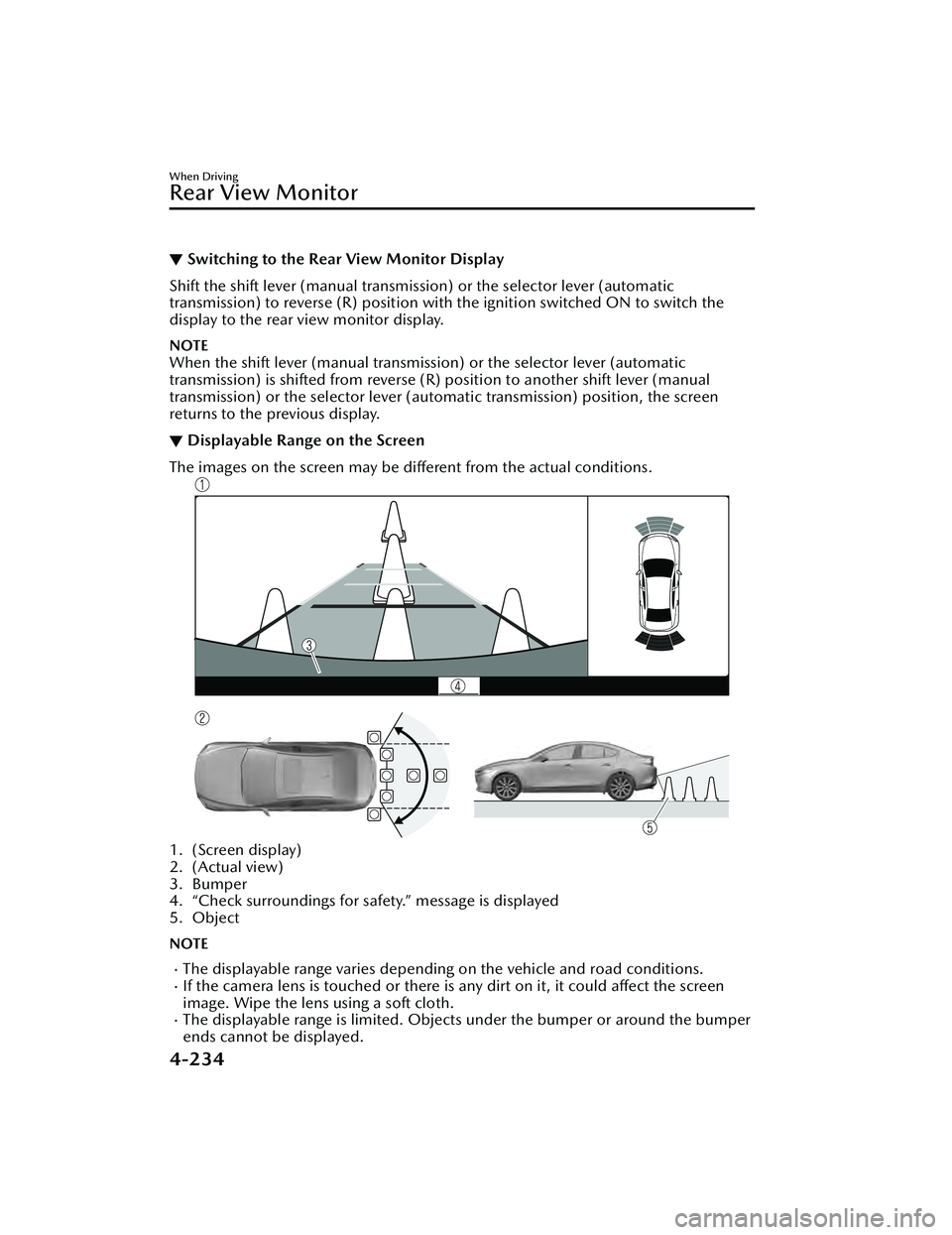
▼Switching to the Rear View Monitor Display
Shift the shift lever (manual transmission) or the selector lever (automatic
transmission) to reverse (R)
position with the ignition switched ON to switch the
display to the rear view monitor display.
NOTE
When the shift lever (manual transmission) or the selector lever (automatic
transmission) is shifted from reverse (R ) position to another shift lever (manual
transmission) or the select or lever (automatic transm ission) position, the screen
returns to the previous display.
▼ Displayable Range on the Screen
The images on the screen may be different from the actual conditions.
1. (Screen display)
2. (Actual view)
3. Bumper
4. “Check surroundings for safety.” message is displayed
5. Object
NOTE
The displayable range varies depending on the vehicle and road conditions.If the camera lens is touched or there is any dirt on it, it could affect the screen
image. Wipe the lens using a soft cloth.
The displayable range is limited. Objects under the bumper or around the bumper
ends cannot be displayed.
When Driving
Rear View Monitor
4-234
Mazda3_8LC2-EA-22G_Edition1_new
2022-5-20 11:26:10
Page 382 of 623
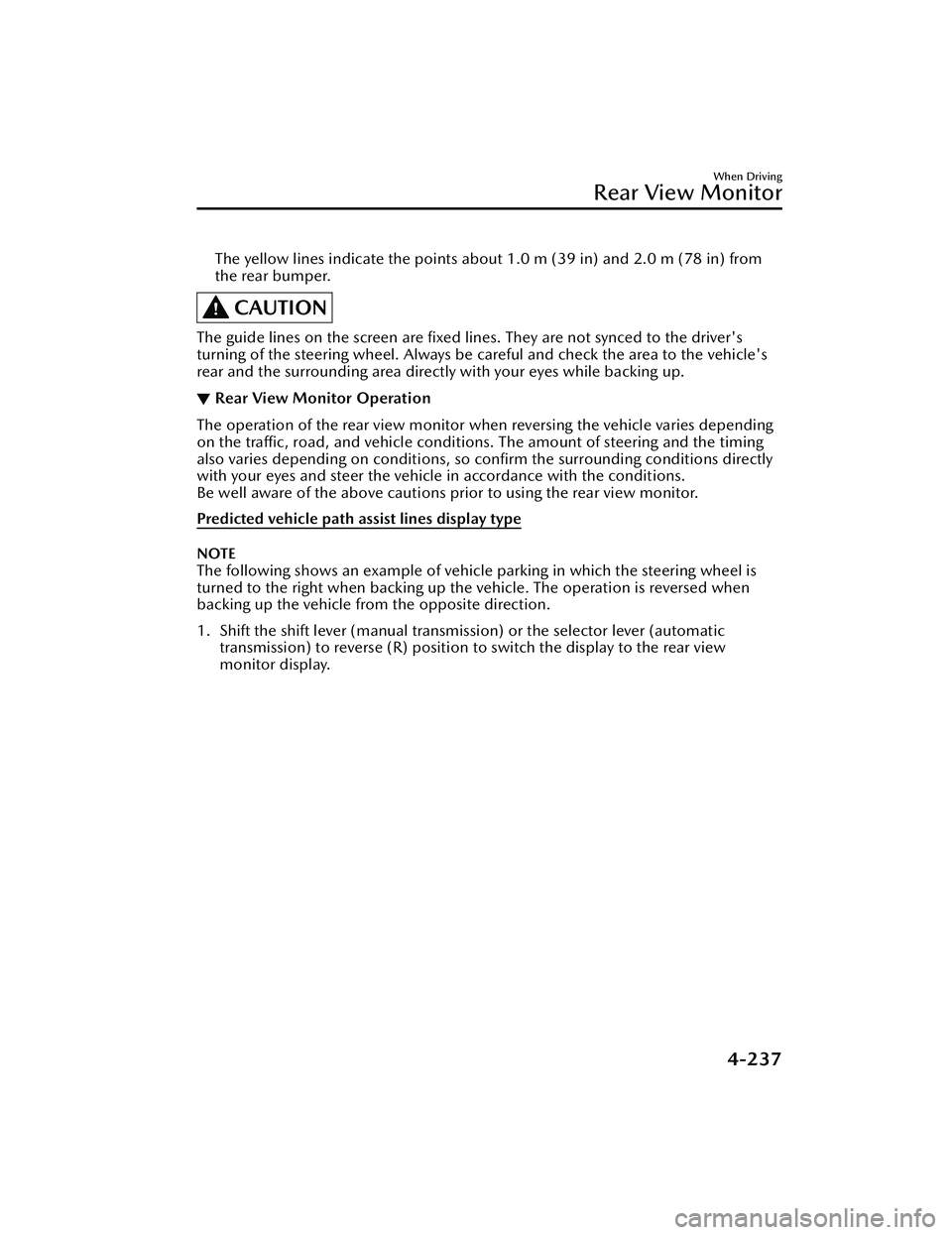
The yellow lines indicate the points about 1.0 m (39 in) and 2.0 m (78 in) from
the rear bumper.
CAUTION
The guide lines on the screen are fixed li nes. They are not synced to the driver's
turning of the steering wheel. Always be careful and check the area to the vehicle's
rear and the surrounding area directly with your eyes while backing up.
▼ Rear View Monitor Operation
The operation of the rear view monitor when reversing the vehicle varies depending
on the traffic, road, and vehicle conditions. The amount of steering and the timing
also varies depending on conditions, so confirm the surrounding conditions directly
with your eyes and steer the vehicle in accordance with the conditions.
Be well aware of the above cautions prior to using the rear view monitor.
Predicted vehicle path assist lines display type
NOTE
The following shows an example of vehicle parking in which the steering wheel is
turned to the right when backing up the vehicle. The operation is reversed when
backing up the vehicle from the opposite direction.
1. Shift the shift lever (manual transmission) or the selector lever (automatic
transmission) to reverse (R) position to switch the display to the rear view
monitor display.
When Driving
Rear View Monitor
4-237
Mazda3_8LC2-EA-22G_Edition1_new 2022-5-20 11:26:10
Page 385 of 623
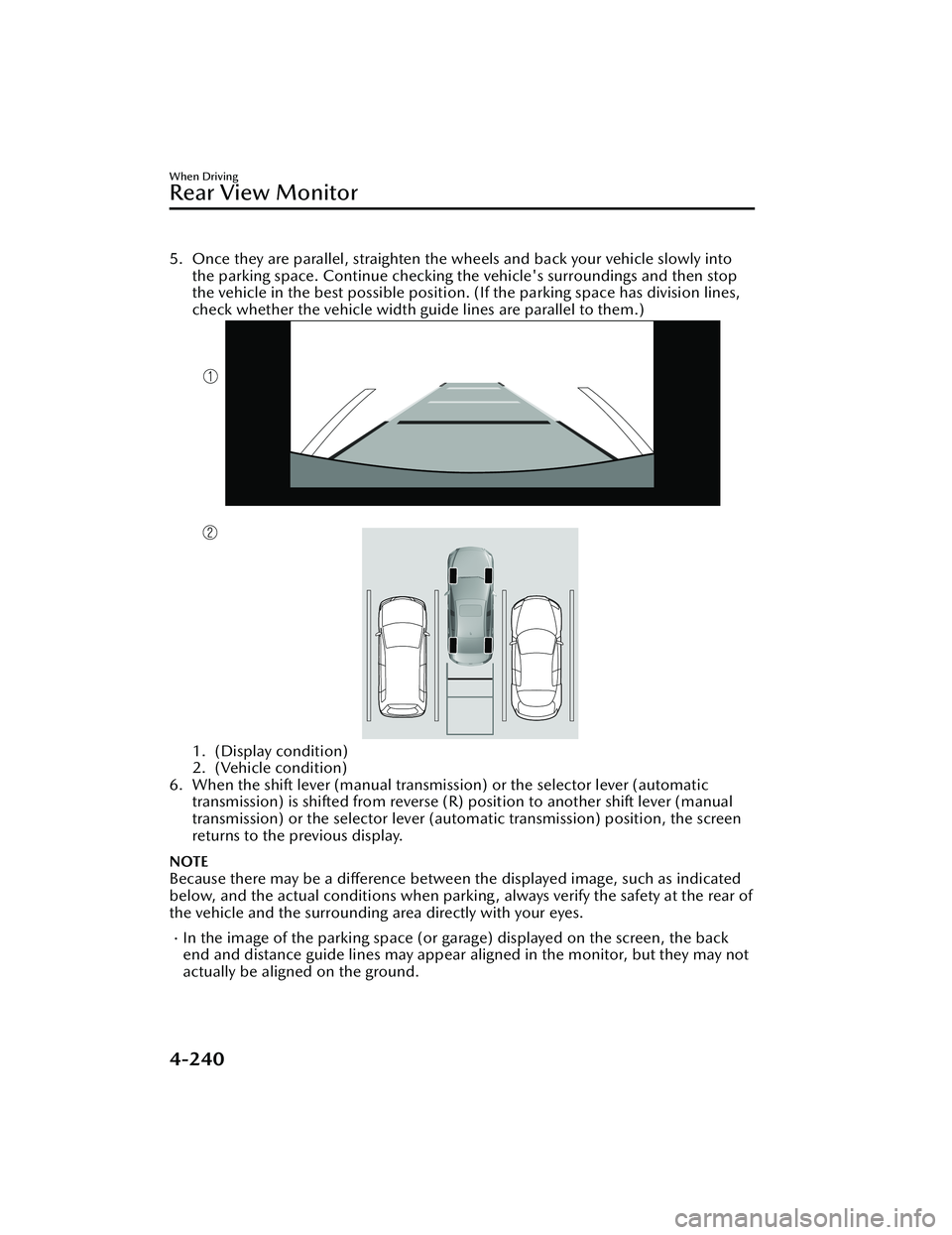
5. Once they are parallel, straighten the wheels and back your vehicle slowly intothe parking space. Continue checking the vehicle's surroundings and then stop
the vehicle in the best possible position. (If the parking space has division lines,
check whether the vehicle width guide lines are parallel to them.)
1. (Display condition)
2. (Vehicle condition)
6. When the shift lever (manual transmission) or the selector lever (automatic transmission) is shifted from reverse (R) position to another shift lever (manual
transmission) or the select or lever (automatic transmission) position, the screen
returns to the previous display.
NOTE
Because there may be a difference between the displayed image, such as indicated
below, and the actual conditions when parkin g , always verify the safety at the rear of
the vehicle and the surrounding area directly with your eyes.
In the image of the parking space (or garage) displayed on the screen, the back
end and distance guide lines may appear aligned in the monitor, but they may not
actually be aligned on the ground.
When Driving
Rear View Monitor
4-240
Mazda3_8LC2-EA-22G_Edition1_new 2022-5-20 11:26:10
Page 386 of 623
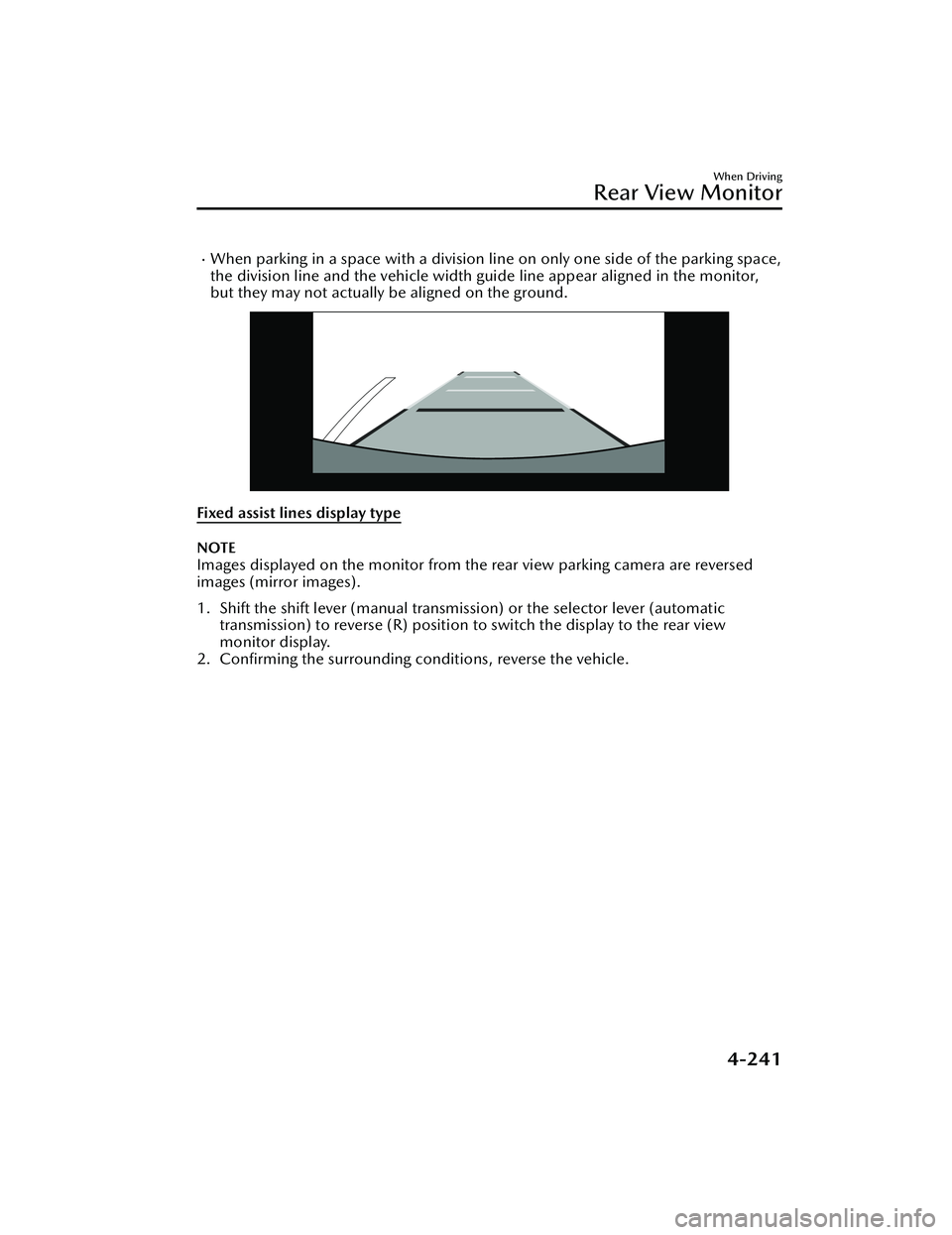
When parking in a space with a division line on only one side of the parking space,
the division line and the vehicle width guide line appear aligned in the monitor,
but they may not actually be aligned on the ground.
Fixed assist lines display type
NOTE
Images displayed on the monitor from the rear view parking camera are reversed
images (mirror images).
1. Shift the shift lever (manual transmission) or the selector lever (automatic
transmission) to reverse (R) position to switch the display to the rear view
monitor display.
2. Confirming the surrounding conditions, reverse the vehicle.
When Driving
Rear View Monitor
4-241
Mazda3_8LC2-EA-22G_Edition1_new 2022-5-20 11:26:10
Page 388 of 623
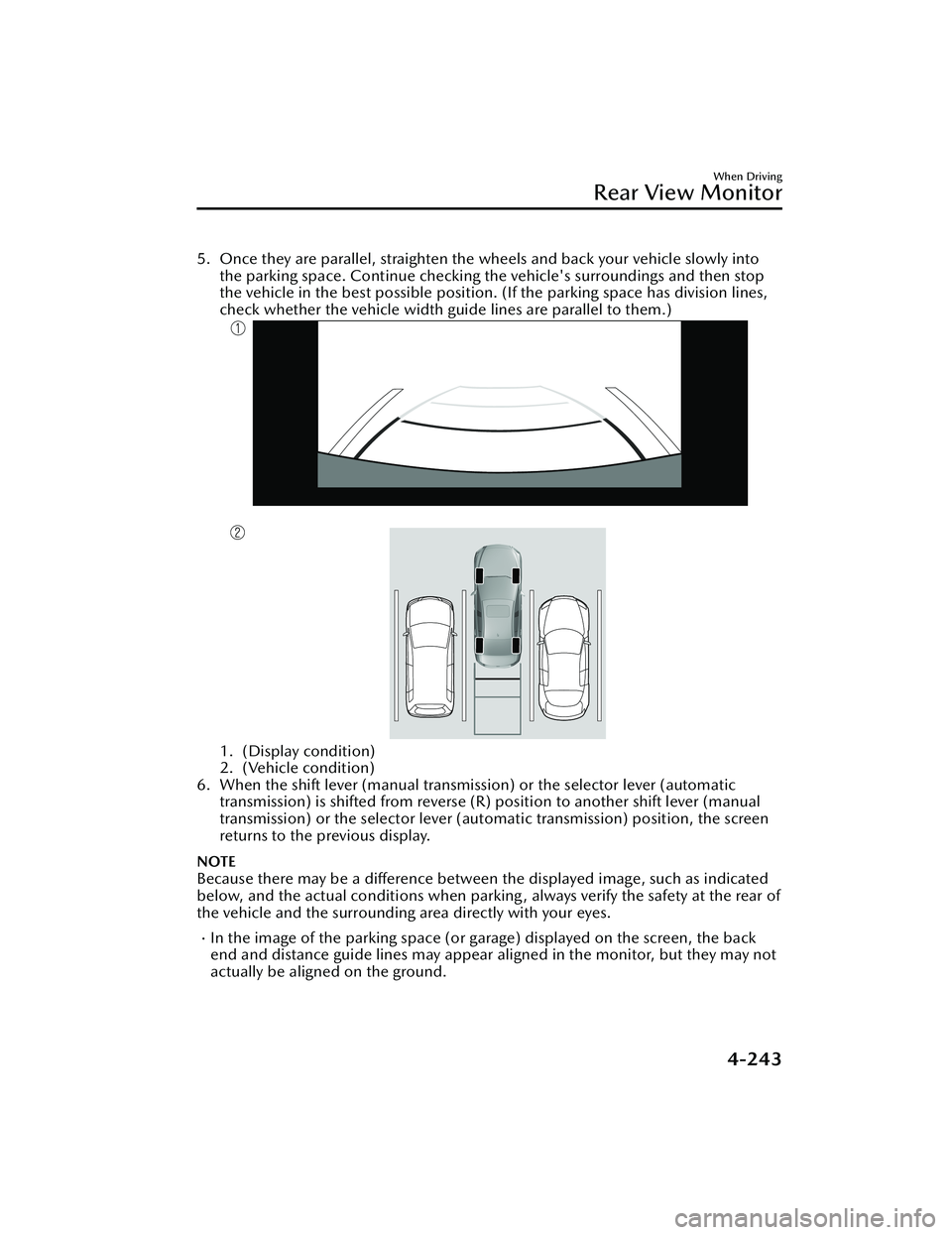
5. Once they are parallel, straighten the wheels and back your vehicle slowly intothe parking space. Continue checking the vehicle's surroundings and then stop
the vehicle in the best possible position. (If the parking space has division lines,
check whether the vehicle width guide lines are parallel to them.)
1. (Display condition)
2. (Vehicle condition)
6. When the shift lever (manual transmission) or the selector lever (automatic transmission) is shifted from reverse (R) position to another shift lever (manual
transmission) or the selector lever (aut omatic transmission) position, the screen
returns to the previous display.
NOTE
Because there may be a difference between the displayed image, such as indicated
below, and the actual conditions when parkin g , always verify the safety at the rear of
the vehicle and the surrounding area directly with your eyes.
In the image of the parking space (or garage) displayed on the screen, the back
end and distance guide lines may appear aligned in the monitor, but they may not
actually be aligned on the ground.
When Driving
Rear View Monitor
4-243
Mazda3_8LC2-EA-22G_Edition1_new 2022-5-20 11:26:10
Page 416 of 623
No. MenuExplanation
(6) Settings You can change the settings for the Mazda Connect screen, sound set-
tings, and the vehicle functions.
In-Vehicle Displays:
Configures settings and content for all in-vehicle displays.
Sound Settings:
Configures
the in-vehicle listening experience.
Safety Settings:
Configures safety and driver assistance features.
Ve h i c l e S e t t i n g s :
Configures vehicle convenience features.
Connectivity Settings:
Configures Bluetooth and other device connectivity settings.
System Settings:
Configures language, time, and other general settings.
(7) Apple CarPlay You can use Apple CarPlay™ by connecting an iPhone
® compatible with
Apple CarPlay™ to the USB slot.
(8) Android Auto You can use Android Auto™ by connecting an Android™ Smartphone
compatible with Android Auto™ to the USB port.
WARNING
Always adjust Mazda Connect while the vehicle is stopped:
Do not adjust Mazda Connect with th
e Commander switch while driving the
vehicle. Adjusting Mazda Connect with the Commander switch while driving the
vehicle is dangerous as it could distract your attention from the vehicle operation
which could lead to a serious accident.
Even if the audio remote control switches are equipped on the steering wheel, learn
to use the switches without looking down at them so that you can keep your
maximum attention on the road while driving the vehicle.
Do not allow the connection plug cord to get tangled with the shift lever (manual
transmission)/selector leve r (automatic transmission):
Allowing the plug cord to become tangled with the shift lever (manual
transmission)/selector lever (automatic transmission) is dangerous as it could
interfere with driving, resulting in an accident.
Interior Features
Mazda Connect
5-17
Mazda3_8LC2-EA-22G_Edition1_new 2022-5-20 11:26:10