transmission MAZDA MAZDA 2023 Manual PDF
[x] Cancel search | Manufacturer: MAZDA, Model Year: 2023, Model line: MAZDA, Model: MAZDA MAZDA 2023Pages: 623, PDF Size: 15.08 MB
Page 490 of 623
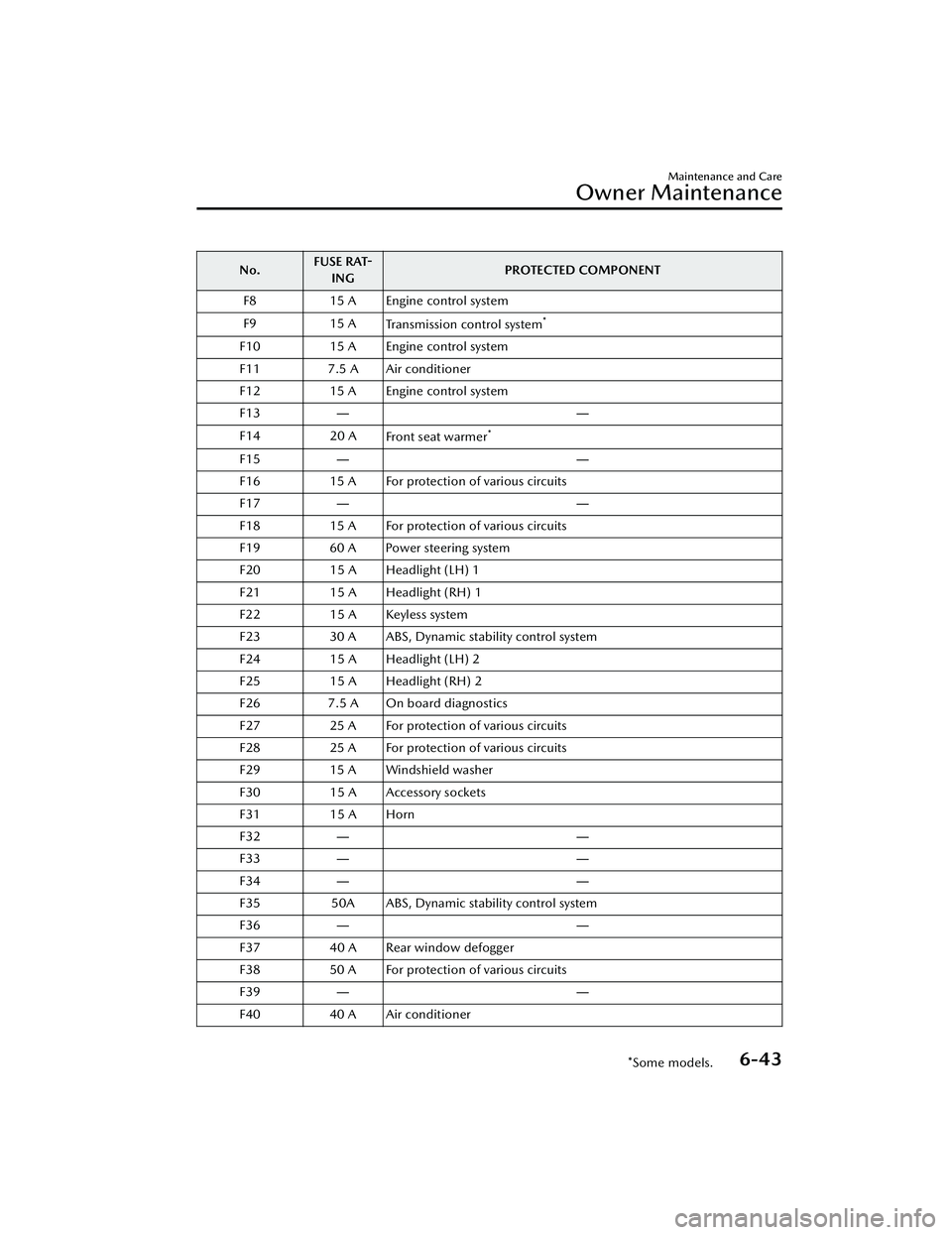
No.FUSE RAT-
ING PROTECTED COMPONENT
F8 15 A Engine control system
F9 15 A
Transmission control system
*
F10 15 A Engine control system
F11 7.5 A Air conditioner
F12 15 A Engine control system
F13 ――
F14 20 A
Front seat warmer
*
F15 ――
F16 15 A For protection of various circuits
F17 ――
F18 15 A For protection of various circuits
F19 60 A Power steering system
F20 15 A Headlight (LH) 1
F21 15 A Headlight (RH) 1
F22 15 A Keyless system
F23 30 A ABS, Dynamic stability control system
F24 15 A Headlight (LH) 2
F25 15 A Headlight (RH) 2
F26 7.5 A On board diagnostics
F27 25 A For protection of various circuits
F28 25 A For protection of various circuits
F29 15 A Windshield washer
F30 15 A Accessory sockets
F31 15 A Horn
F32 ――
F33 ――
F34 ――
F35 50A ABS, Dynamic stability control system
F36 ――
F37 40 A Rear window defogger
F38 50 A For protection of various circuits
F39 ――
F40 40 A Air conditioner
Maintenance and Care
Owner Maintenance
*Some models.6-43
Mazda3_8LC2-EA-22G_Edition1_new 2022-5-20 11:26:10
Page 502 of 623
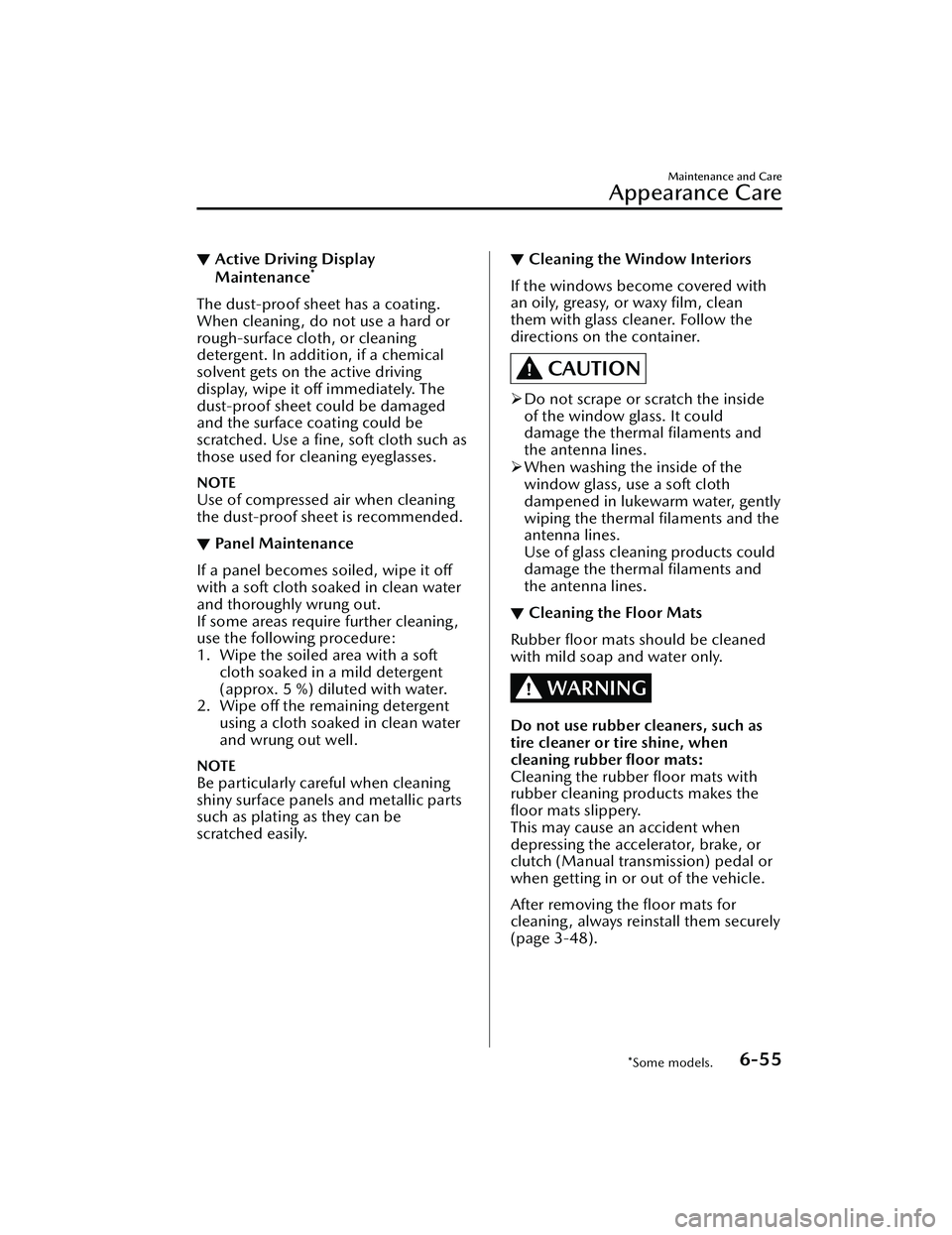
▼Active Driving Display
Maintenance*
The dust-proof sheet has a coating.
When cleaning , do not use a hard or
rough-surface cloth, or cleaning
detergent. In addition, if a chemical
solvent gets on the active driving
display, wipe it off immediately. The
dust-proof sheet could be damaged
and the surface coating could be
scratched. Use a fine, soft cloth such as
those used for cleaning eyeglasses.
NOTE
Use of compressed air when cleaning
the dust-proof sheet is recommended.
▼Panel Maintenance
If a panel becomes soiled, wipe it off
with a soft cloth soaked in clean water
and thoroughly wrung out.
If some areas require further cleaning,
use the following procedure:
1. Wipe the soiled area with a soft
cloth soaked in a mild detergent
(approx. 5 %) diluted with water.
2. Wipe off the remaining detergent using a cloth soaked in clean water
and wrung out well.
NOTE
Be particularly careful when cleaning
shiny surface panels and metallic parts
such as plating as they can be
scratched easily.
▼Cleaning the Window Interiors
If the windows become covered with
an oily, greasy, or waxy film, clean
them with glass cleaner. Follow the
directions on the container.
CAUTION
Do not scrape or scratch the inside
of the window glass. It could
damage the thermal filaments and
the antenna lines.
When washing the inside of the
window glass, use a soft cloth
dampened in lukewarm water, gently
wiping the thermal filaments and the
antenna lines.
Use of glass cleaning products could
damage the thermal filaments and
the antenna lines.
▼ Cleaning the Floor Mats
Rubber floor mats should be cleaned
with mild soap and water only.
WARNING
Do not use rubber cleaners, such as
tire cleaner or tire shine, when
cleaning rubber floor mats:
Cleaning the rubber floor mats with
rubber cleaning products makes the
floor mats slippery.
This may cause an accident when
depressing the accelerator, brake, or
clutch (Manual transmission) pedal or
when getting in or out of the vehicle.
After removing the floor mats for
cleaning, always reinstall them securely
(page 3-48).
Maintenance and Care
Appearance Care
*Some models.6-55
Mazda3_8LC2-EA-22G_Edition1_new
2022-5-20 11:26:10
Page 511 of 623
1. Park on a hard, level surface off theright-of-way and firmly set the
parking brake.
2. Put a vehicle with an automatic transmission in Park (P), a manual
transmission in Reverse (R) or 1,
and turn off the engine.
3. Turn on the hazard warning flasher.
4. Have passengers get out of the vehicle and away from the vehicle
and traffic.
5. Remove any luggage, the jack, tools, and spare tire (page 7-3).
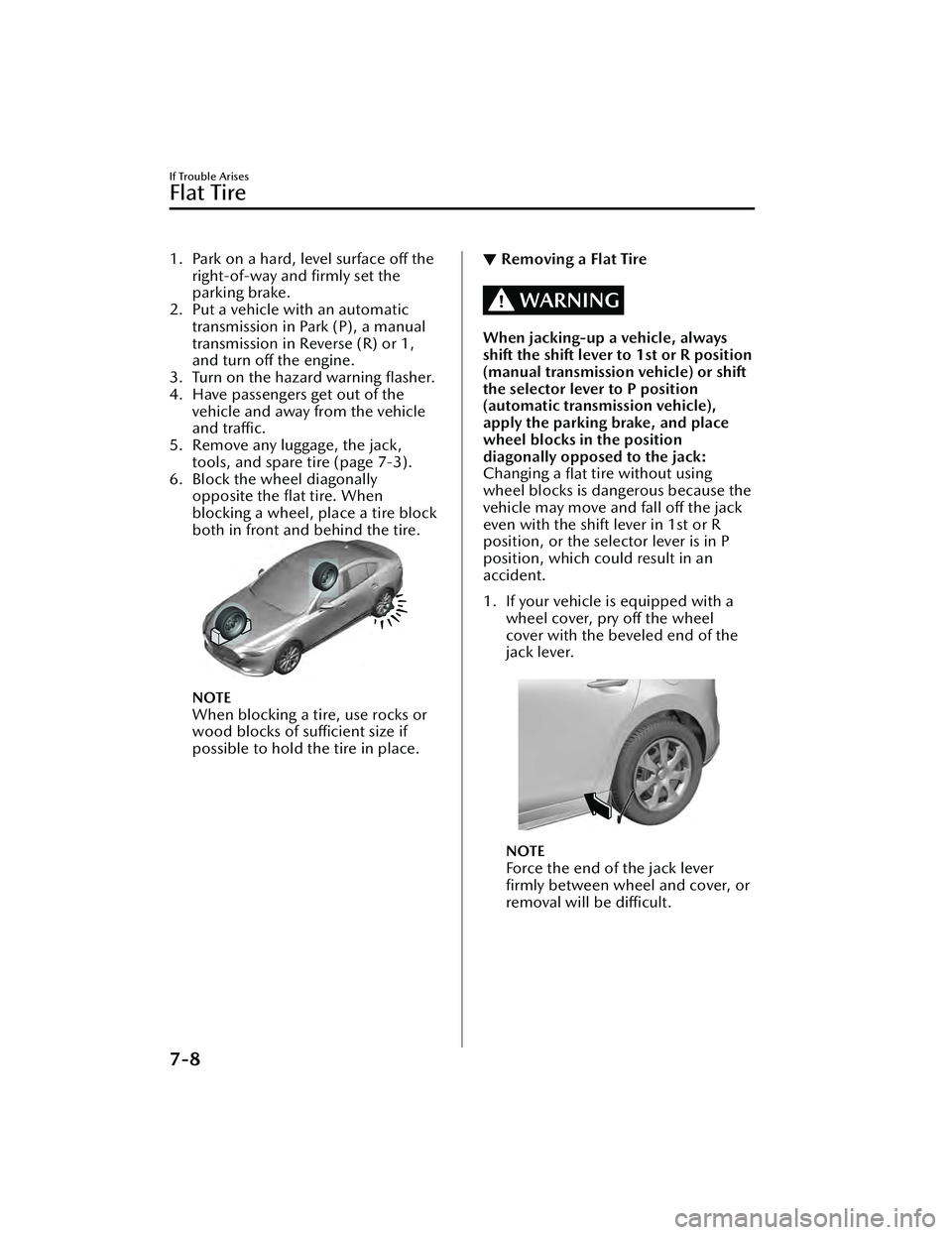
6. Block the wheel diagonally opposite the flat tire. When
blocking a wheel, place a tire block
both in front and behind the tire.
NOTE
When blocking a tire, use rocks or
wood blocks of sufficient size if
possible to hold the tire in place.
▼Removing a Flat Tire
WARNING
When jacking-up a vehicle, always
shift the shift lever to 1st or R position
(manual transmission vehicle) or shift
the selector lever to P position
(automatic transmission vehicle),
apply the parking brake, and place
wheel blocks in the position
diagonally opposed to the jack:
Changing a
flat tire without using
wheel blocks is dangerous because the
vehicle may move and fall off the jack
even with the shift lever in 1st or R
position, or the selector lever is in P
position, which could result in an
accident.
1. If your vehicle is equipped with a wheel cover, pry off the wheel
cover with the beveled end of the
jack lever.
NOTE
Force the end of the jack lever
firmly between wheel and cover, or
removal will be difficult.
If Trouble Arises
Flat Tire
7-8
Mazda3_8LC2-EA-22G_Edition1_new 2022-5-20 11:26:10
Page 523 of 623
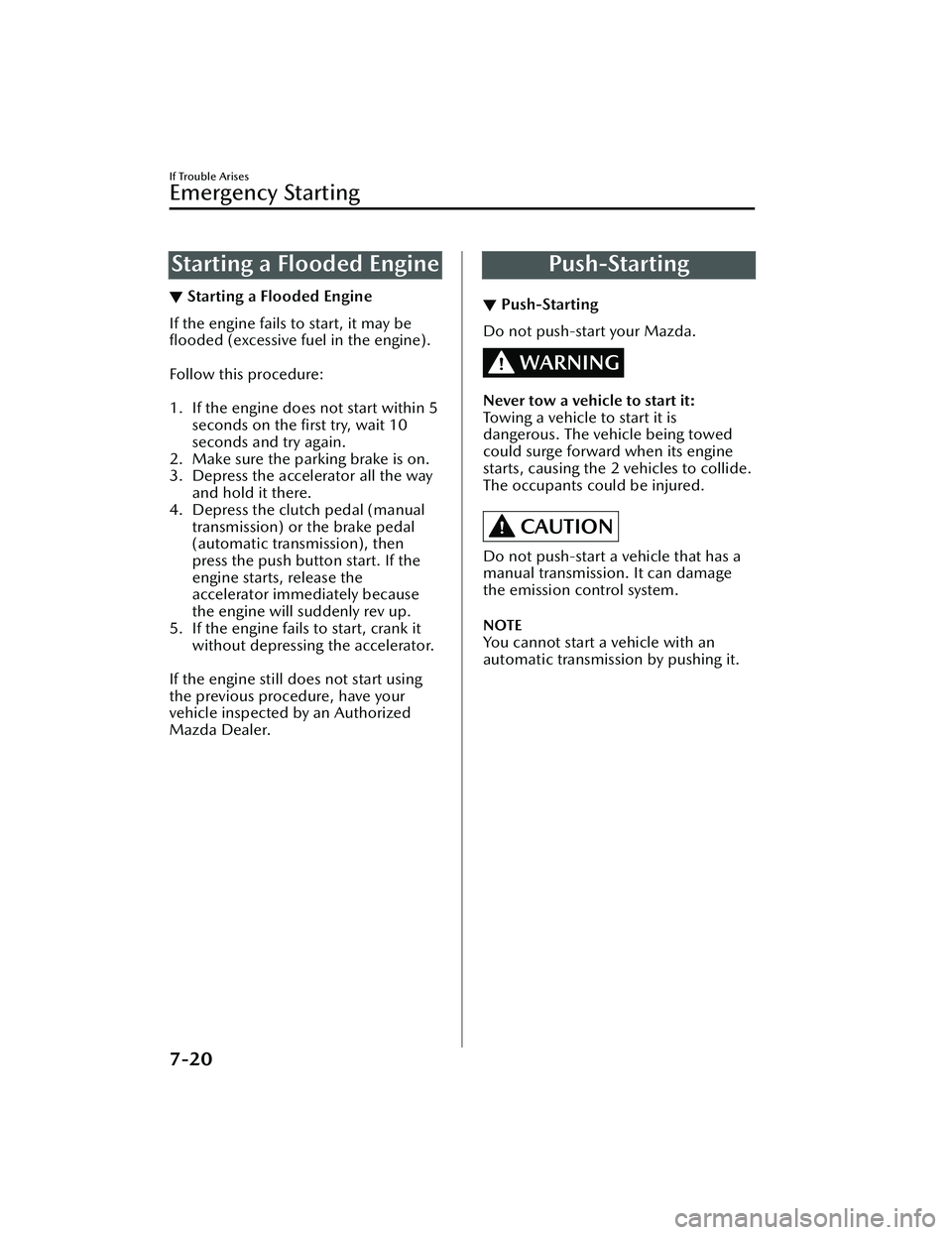
Starting a Flooded Engine
▼Starting a Flooded Engine
If the engine fails to start, it may be
flooded
(excessive fuel in the engine).
Follow this procedure:
1. If the engine does not start within 5 seconds on the first try, wait 10
seconds and try again.
2. Make sure the parking brake is on.
3. Depress the accelerator all the way
and hold it there.
4. Depress the clutch pedal (manual
transmission) or the brake pedal
(automatic transmission), then
press the push button start. If the
engine starts, release the
accelerator immediately because
the engine will suddenly rev up.
5. If the engine fails to start, crank it
without depressing the accelerator.
If the engine still does not start using
the previous procedure, have your
vehicle inspected by an Authorized
Mazda Dealer.
Push-Starting
▼ Push-Starting
Do not push-start your Mazda.
WARNING
Never tow a vehicle to start it:
Towing a vehicle to start it is
dangerous. The vehicle being towed
could surge forward when its engine
starts, causing the 2 vehicles to collide.
The occupants could be injured.
CAUTION
Do not push-start a vehicle that has a
manual transmission. It can damage
the emission control system.
NOTE
You cannot start a vehicle with an
automatic transmissi
on by pushing it.
If Trouble Arises
Emergency Starting
7-20
Mazda3_8LC2-EA-22G_Edition1_new 2022-5-20 11:26:10
Page 524 of 623
Overheating
▼Overheating
If the engine coolant temperature
gauge indicates overheating and the
high engine coolant temperature
warning indication is displayed, the
vehicle loses power or you hear a loud
knocking or pinging noise, the engine
is probably too hot.
WARNING
Pull over to a safe location, then
switch the ignition off and make sure
the fan is not running before
attempting to work near the cooling
fan:
Working near the cooling fan when it is
running is dangerous. The fan could
continue running indefinitely even if
the engine has stopped and the engine
compartment temperature is high. You
could be hit by the fan and seriously
injured.
Do not remove either
cooling system cap when the engine
and radiator are hot:
When the engine and radiator are hot,
scalding coolant and steam may shoot
out under pressure and cause serious
injury.
Open the hood ONLY after steam is
no longer escaping from the engine:
Steam from an overheated engine is
dangerous. The escaping steam could
seriously burn you.
If the engine coolant temperature
gauge indicates overheating and the
high engine coolant temperature
warning indication is displayed:
1. Drive safely to the side of the road and park off the right-of-way.
2. Put a vehicle with an automatic transmission in park (P), a manual
transmission in neutral.
3. Apply the parking brake.
4. Turn off the air conditioner.
5. Check whether coolant or steam is escaping from the engine
compartment.
If steam is coming from the engine
compartment:
Do not go near the front of the
vehicle. Stop the engine.
Wait until the steam dissipates,
then open the hood and start the
engine.
If neither coolant nor steam is
escaping:
Open the hood and idle the engine
until it cools.
CAUTION
If the cooling fan does not operate
while the engine is running, the
engine temperature will increase.
Stop the engine and call an
Authorized Mazda Dealer.
If Trouble Arises
Overheating
7-21
Mazda3_8LC2-EA-22G_Edition1_new 2022-5-20 11:26:10
Page 526 of 623
To w i n g D e s c r i p t i o n
▼Towing Description
We recommend that towing be done
only by an Authorized Mazda Dealer
or a commercial tow-truck service.
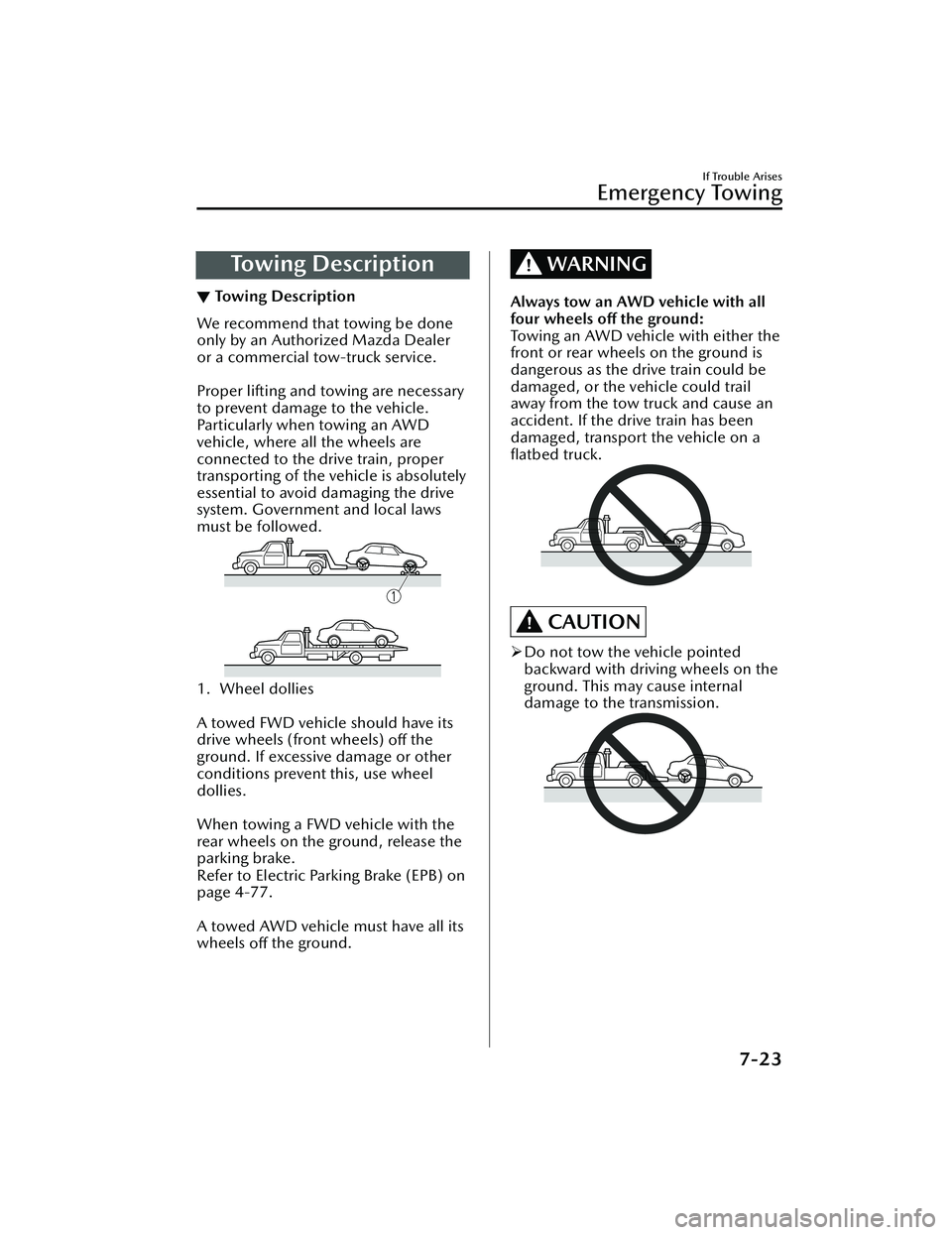
Proper lifting and towing are necessary
to prevent damage to the vehicle.
Particularly when towing an AWD
vehicle, where all the wheels are
connected to the drive train, proper
transporting of the vehicle is absolutely
essential to avoid damaging the drive
system. Government and local laws
must be followed.
1. Wheel dollies
A towed FWD vehicle should have its
drive wheels (front wheels)
off the
ground. If excessive damage or other
conditions prevent this, use wheel
dollies.
When towing a FWD vehicle with the
rear wheels on the ground, release the
parking brake.
Refer to Electric Parking Brake (EPB) on
page 4-77.
A towed AWD vehicle must have all its
wheels off the ground.
WARNING
Always tow an AWD vehicle with all
four wheels
off the ground:
Towing an AWD vehicle with either the
front or rear wheels on the ground is
dangerous as the drive train could be
damaged, or the vehicle could trail
away from the tow truck and cause an
accident. If the drive train has been
damaged, transport the vehicle on a
flatbed truck.
CAUTION
Do not tow the vehicle pointed
backward with driving wheels on the
ground. This may cause internal
damage to the transmission.
If Trouble Arises
Emergency Towing
7-23
Mazda3_8LC2-EA-22G_Edition1_new 2022-5-20 11:26:10
Page 534 of 623
▼Brake Override Warning Indication
This message is displayed when the
accelerator pedal and brake pedal are
depressed at the same time while
driving.
Release the accelerator pedal and
depress the brake pedal.
▼Check Engine Indication/Light
If this light illuminates while driving ,
the vehicle may have a problem. It is
important to note the driving
conditions when the light illuminated
and consult an Authorized Mazda
Dealer.
The check engine light may illuminate
in the following cases:
The engine's electrical system has a
problem.
The emission control system has a
problem.
The fuel-filler cap is missing or not
tightened securely.
The fuel tank level being very low or
approaching empty.
If the check engine light remains on, or
it flashes continuously , do not drive at
high speeds and consult an Authorized
Mazda Dealer as soon as possible.
WARNING
If the check engine light turns on, do
not disconnect the battery cables.
If the battery cables are disconnected
and then reconnected, the engine
could be damaged and catch on fire.
▼i-stop Warning Indication/
Warning Light (Amber)*
The light turns
on/flashes
continuously if the system has a
problem.
Have the vehicle inspected by an
Authorized Mazda Dealer.
▼ Automatic Transmission Warning
Indication/Warning Light*
The indication/light illuminates when
the transmission has a problem.
If Trouble Arises
Warning/Indicator Lights and Warning Sounds
*Some models.7-31
Mazda3_8LC2-EA-22G_Edition1_new
2022-5-20 11:26:10
Page 535 of 623
CAUTION
If the automatic transmission warning
indication/light illuminates, the
transmission has an electrical problem.
Continuing to drive your Mazda in this
condition could cause damage to your
transmission. Consult an Authorized
Mazda Dealer as soon as possible.
▼ AWD Warning Indication/
Warning Light*
“AWD Malfunction. Front Wheel
Drive Only. Have the Vehicle
Inspected” is displayed/When the
light is turned on
The indication is displayed/the light
turns on under the following
conditions. The system may have a
malfunction. Have the vehicle checked
at an Authorized Mazda Dealer.
When there is a malfunction in the
AWD system.
“Excessive AWD System Load. Drive
Slowly Until Warning Light Turns Off.
Vehicle Now in Front Wheel Drive” is
displayed/When the light is flashing
The indication is displayed/the light
flashes under the following conditions.
Park the vehicle in a safe place and
check that the warning indication light
turns off/ the warning light stops
flashing, and then drive the vehicle.
Contact an Authorized Mazda Dealer
if the indication is continuously
displayed.
When the differential oil temperature
is excessively high.
When there is a large difference
between the front and rear wheel
rotation, such as when trying to
remove the vehicle from mud.
“Mismatched Tire Diameters. Vehicle
Now in Front Wheel Drive” is
displayed/When the light is turned on
The indication is displayed/the light
turns on under the following
conditions. Inspect the tire sizes or tire
pressures on all 4 wheels. Contact an
Authorized Mazda Dealer if the
indication remains on or the warning
light remains illuminated.
When any of the tire diameter is different.
When any of the tire pressure is
incorrect.
If Trouble Arises
Warning/Indicator Lights and Warning Sounds
7-32*Some models.
Mazda3_8LC2-EA-22G_Edition1_new 2022-5-20 11:26:10
Page 537 of 623
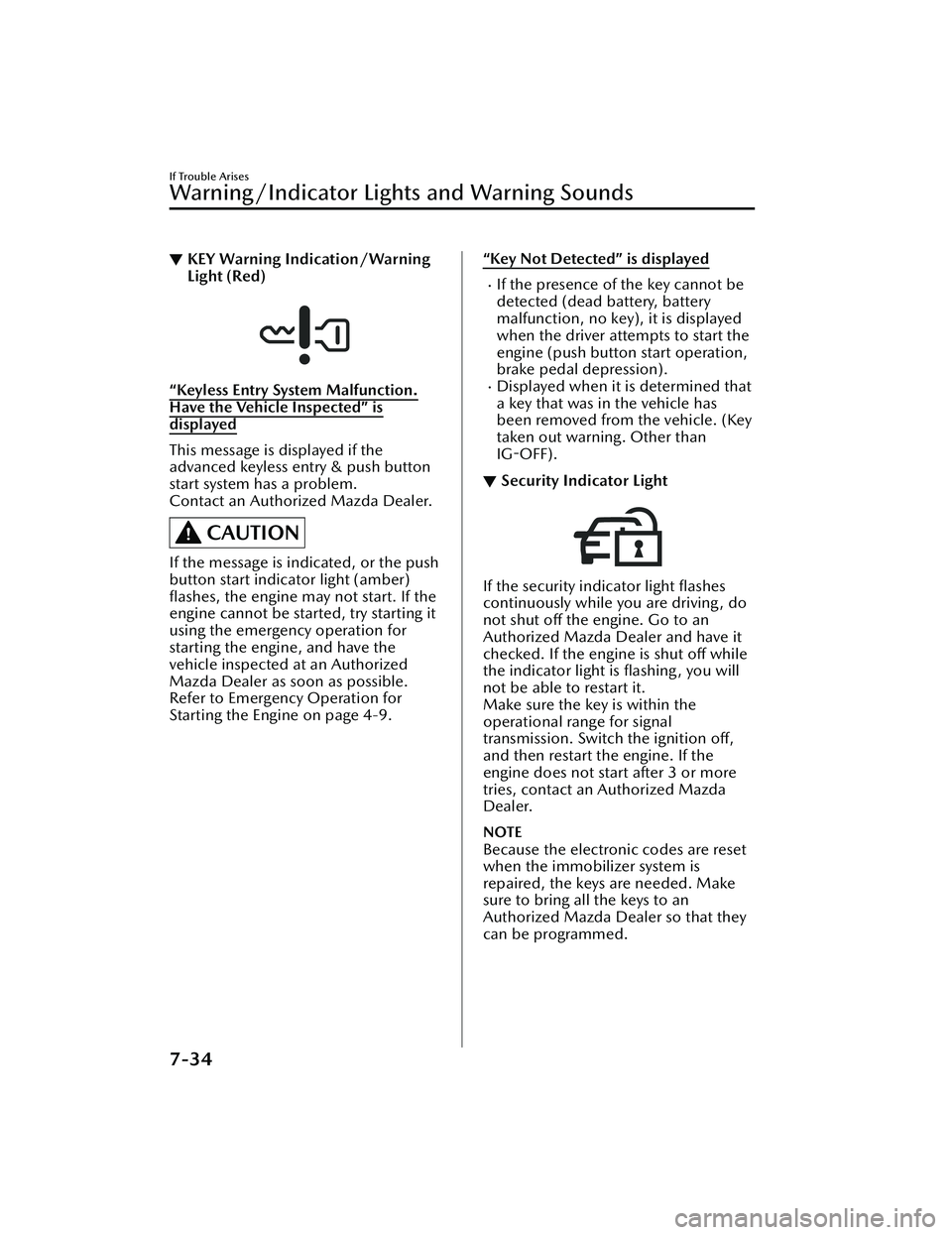
▼KEY Warning Indication/Warning
Light (Red)
“Keyless Entry System Malfunction.
Have the Vehicle Inspected” is
displayed
This message is displayed if the
advanced keyless entry & push button
start system has a problem.
Contact an Authorized Mazda Dealer.
CAUTION
If the message is indicated, or the push
button start indicator light (amber)
flashes, the engine may not start. If the
engine cannot be started, try starting it
using the emergency operation for
starting the engine, and have the
vehicle inspected at an Authorized
Mazda Dealer as soon as possible.
Refer to Emergency Operation for
Starting the Engine on page 4-9.
“Key Not Detected” is displayed
If the presence of the key cannot be
detected (dead battery, battery
malfunction, no key), it is displayed
when the driver attempts to start the
engine (push button start operation,
brake pedal depression).
Displayed when it is determined that
a key that was in the vehicle has
been removed from the vehicle. (Key
taken out warning. Other than
IG-OFF).
▼ Security Indicator Light
If the security indicator light flashes
continuously while you are driving, do
not shut off the engine. Go to an
Authorized Mazda Dealer and have it
checked. If the engine is shut off while
the indicator light is flashing, you will
not be able to restart it.
Make sure the key is within the
operational range for signal
transmission. Switch the ignition off,
and then restart the engine. If the
engine does not start after 3 or more
tries, contact an Authorized Mazda
Dealer.
NOTE
Because the electronic codes are reset
when the immobilizer system is
repaired, the keys are needed. Make
sure to bring all the keys to an
Authorized Mazda Dealer so that they
can be programmed.
If Trouble Arises
Warning/Indicator Lights and Warning Sounds
7-34
Mazda3_8LC2-EA-22G_Edition1_new
2022-5-20 11:26:10
Page 545 of 623
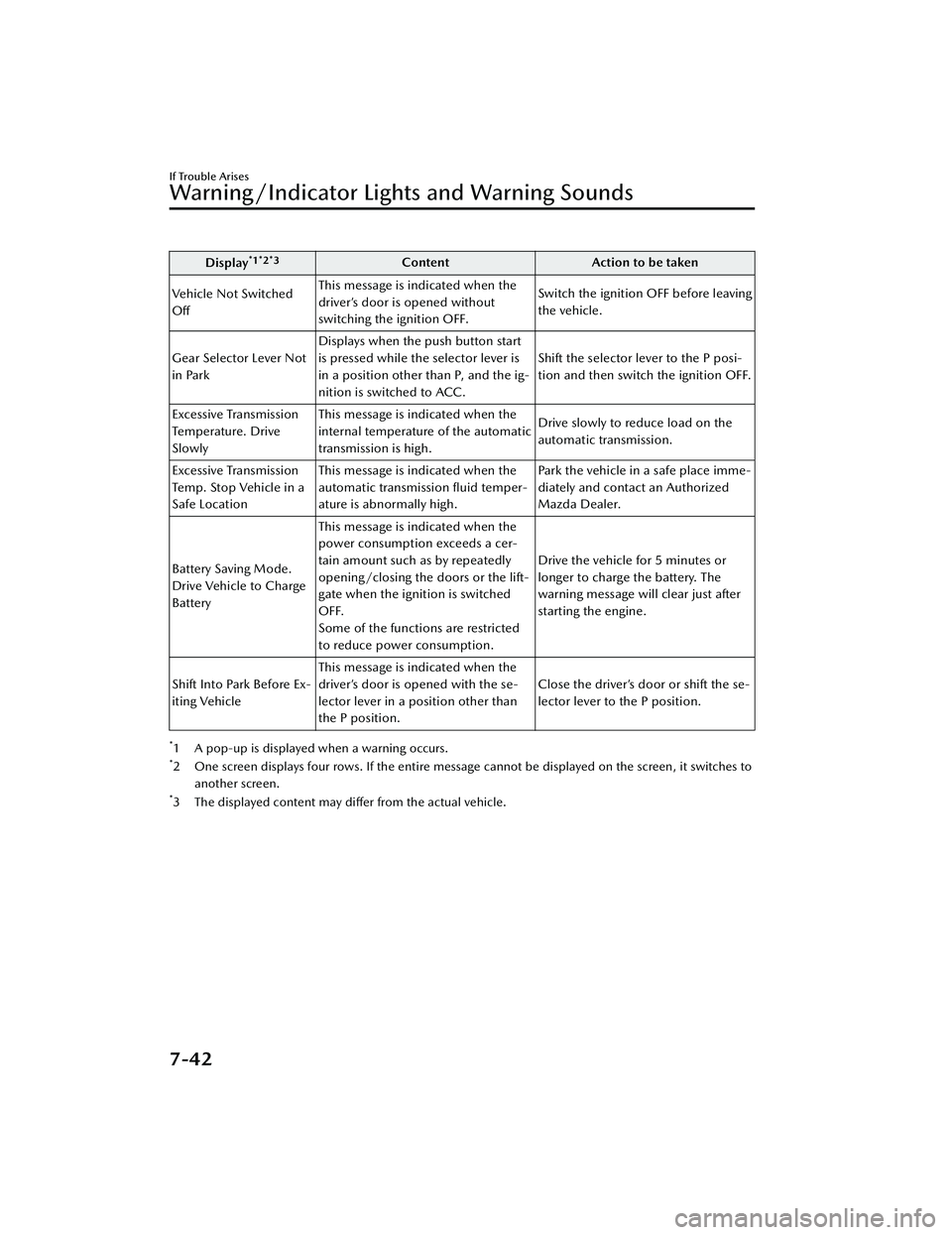
Display*1*2*3ContentAction to be taken
Vehicle Not Switched
Off This message is indicated when the
driver’s door is opened without
switching the ignition OFF. Switch the ignition OFF before leaving
the vehicle.
Gear Selector Lever Not
in Park Displays when the push button start
is pressed while the selector lever is
in a position other than P, and the ig-
nition is switched to ACC. Shift the selector lever to the P posi-
tion and then switch the ignition OFF.
Excessive Transmission
Te m p e ra t u r e . D r i v e
Slowly This message is indicated when the
internal temperature of the automatic
transmission is high.
Drive slowly to reduce load on the
automatic transmission.
Excessive Transmission
Temp. Stop Vehicle in a
Safe Location This message is indicated when the
automatic transmission fluid temper-
ature is abnormally high. Park the vehicle in a safe place imme-
diately and contact an Authorized
Mazda Dealer.
Battery Saving Mode.
Drive Vehicle to Charge
Battery This message is indicated when the
power consumption exceeds a cer-
tain amount such as by repeatedly
opening/closing the doors or the lift-
gate when the ignition is switched
OFF.
Some of the functions are restricted
to reduce power consumption. Drive the vehicle for 5 minutes or
longer to charge the battery. The
warning message will clear just after
starting the engine.
Shift Into Park Before Ex-
iting Vehicle This message is indicated when the
driver’s door is opened with the se-
lector lever in a position other than
the P position. Close the driver’s door or shift the se-
lector lever to the P position.
*1 A pop-up is displayed when a warning occurs.*2 One screen displays four rows. If the entire message cannot be displayed on the screen, it switches to
another screen.
*3 The displayed content may differ from the actual vehicle.
If Trouble Arises
Warning/Indicator Lights and Warning Sounds
7-42
Mazda3_8LC2-EA-22G_Edition1_new 2022-5-20 11:26:10