lock MAZDA MAZDA 2023 Manual PDF
[x] Cancel search | Manufacturer: MAZDA, Model Year: 2023, Model line: MAZDA, Model: MAZDA MAZDA 2023Pages: 623, PDF Size: 15.08 MB
Page 224 of 623
The engine is running.The driver's door is closed.Shift interlock release is enabled.The brake pedal is being depressed.
When performing the following
operations, shift interlock release can
be enabled/disabled.
1. Switch the ignition ON.
2. Pull the EPB switch continuously for 4 seconds or longer.
3. Release the EPB switch once and then pull it again continuously for 4
seconds or longer within 3 seconds.
(Switching from disable to enable
shift interlock release)
When shift interlock release is
enabled, a sound is activated 2
times and the EPB switch indicator
changes to fast flashing , and flashes
for 3 seconds.
(Switching from enable to disable
shift interlock release)
When shift interlock release is
disabled, a sound is activated 2
times and the EPB switch indicator
light changes to slow flashing, and
flashes for 4 seconds.
NOTE
When the ignition is switched OFF,
the system setting before it was
turned off is maintained.
(Accelerator interlock release)
If the accelerator pedal is depressed
with the parking brake applied and all
of the following conditions met, the
parking brake is released automatically.
When the parking brake is released,
the EPB indicator light in the
instrument cluster and the EPB switch
indicator light turn off.
The engine is running.The driver's door is closed.The driver's seat belt is fastened.(Manual transmission vehicle)
The shift lever is in a position other
than neutral.
The clutch pedal is depressed
halfway.
(Automatic transmission vehicle)
The selector lever is in the D, M, or R
position.
CAUTION
If something such as the driver’s foot
contacts the accelerator pedal with the
engine running and the parking brake
applied, the parking brake may be
released automatically and the vehicle
may move unexpectedly. If you do not
intend to start driving the vehicle
immediately, shift the shift lever to the
neutral position for a manual
transmission, or shif t the selector lever
to the P or N position for an automatic
transmission.
Canceling the parking brake
automatic operation
The parking brake automatic operation
can be canceled by doing any of the
following after switching the ignition
from ON to OFF.
Auto operation cancel method 1
1. Switch the ignition ON.
2. Release the parking brake manually.
3. Turn off the AUTOHOLD.
4. Press the EPB switch continuously for 2 seconds or longer (until a
sound is activated).
5. Release the EPB switch and switch
the ignition OFF within 5 seconds
after the sound was activated.
After the auto operation is
canceled, a sound is activated one
time, and the EPB switch indicator
light switches from illumination to
flashing , and then turns off after 3
seconds.
When Driving
Brake
4-79
Mazda3_8LC2-EA-22G_Edition1_new 2022-5-20 11:26:10
Page 225 of 623
Auto operation cancel method 2
1. Switch the ignition ON.
2. Release the parking brake manually.
3. Turn off the AUTOHOLD.
4. Switch the ignition OFF with theEPB switch pressed while the brake
pedal is not depressed.
When the auto operation is
canceled, a sound is activated one
time, and the EPB switch indicator
light goes from normal flashing to
faster flashing, and then turns
off
after 3 seconds.
NOTE
When canceling the parking brake
auto operation and parking the
vehicle, shift the shift lever to the 1st
gear or the R position for a manual
transmission, or shift the selector
lever to the P position for an
automatic transmission, and then
use wheel blocks.
The auto operation may not cancel if
the vehicle is parked on a steep
slope.
When the ignition is switched ON, the
parking brake auto operation is
restored.
How to use Emergency Brake
If there is a problem with the brake
system (foot brake) while driving the
vehicle or in an emergency situation
where the driver cannot step on the
brake pedal, continually pulling up the
EPB switch will apply the brakes and
decelerate or stop the vehicle. The
parking brake on-reminder sound is
activated while the brake is applied. In
addition, when releasing the switch,
the brake is released and the sound
stops.
WARNING
Use Emergency Brake only in an
emergency situation:
Excessive use may cause the brake
parts to wear quickly or the brakes to
heat up and become less effective.
▼Warning Light
The warning light turns on when the
system has a malfunction.
Refer to Brake System Warning
Indication/Warning Light on page
7-27.
▼
Brake Pad Wear Indicator
When the disc brake pads become
worn, the built-in wear indicators
contact the disc plates. This causes a
screeching noise to warn that the pads
should be replaced.
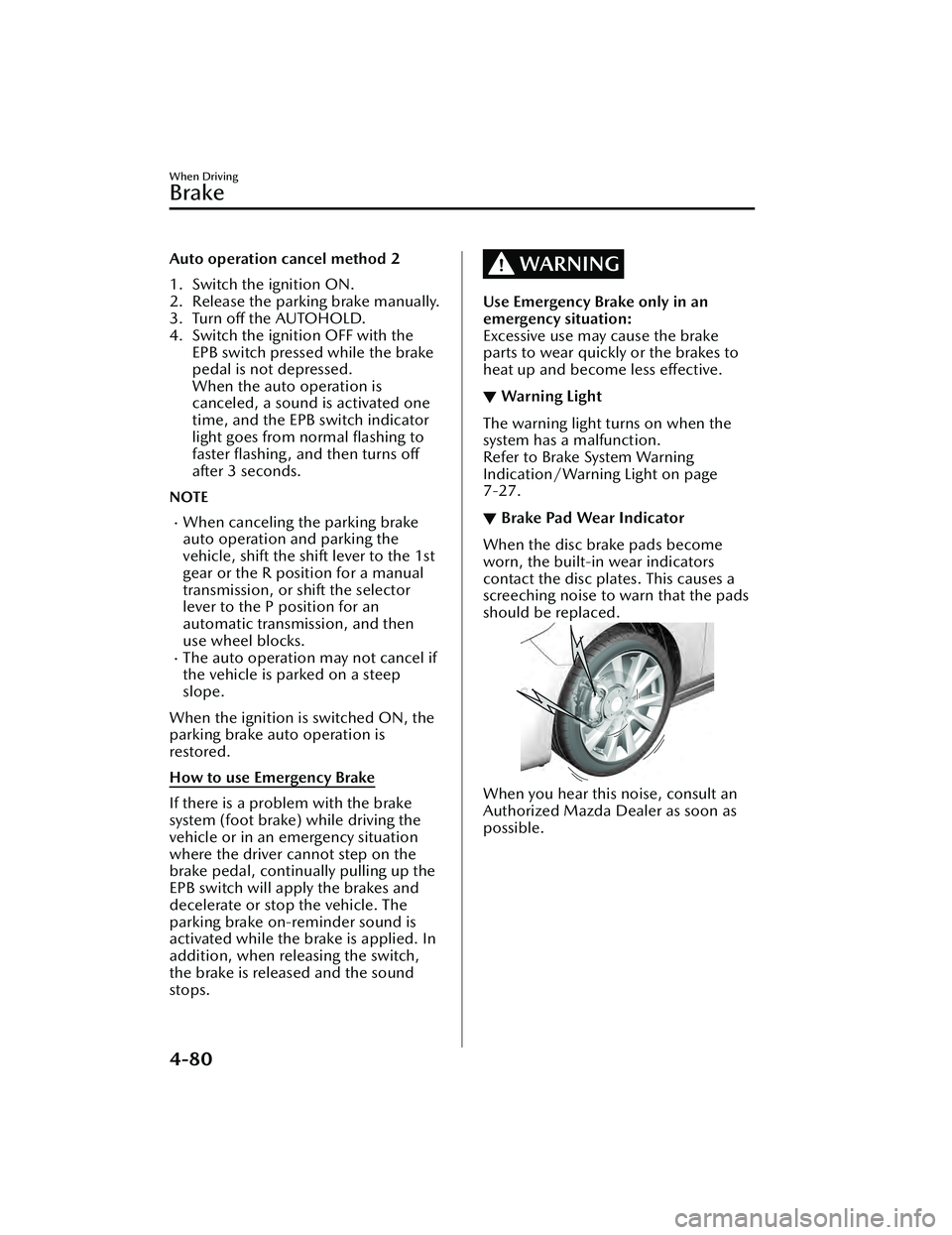
When you hear this noise, consult an
Authorized Mazda Dealer as soon as
possible.
When Driving
Brake
4-80
Mazda3_8LC2-EA-22G_Edition1_new
2022-5-20 11:26:10
Page 233 of 623
Antilock Brake System(ABS)
▼Antilock Brake System (ABS)
The ABS control unit continuously
monitors the speed of each wheel. If
one wheel is about to lock up, the ABS
responds by automatically releasing
and reapplying that wheel's brake.
The driver will feel a slight vibration in
the brake pedal and may hear a
chattering noise from the brake system.
This is normal ABS system operation.
Continue to depress the brake pedal
without pumping the brakes.
The warning light turns on when the
system has a malfunction.
Refer to ABS Warning Indication/
Warning Light on page 7-30.
WARNING
Do not rely on ABS as a substitute for
safe driving:
The ABS cannot compensate for unsafe
and reckless driving, excessive speed,
tailgating (following another vehicle
too closely), driving on ice and snow,
and hydroplaning (reduced tire friction
and road contact because of water on
the road surface). You can still have an
accident.
NOTE
Braking distances may be longer on
loose surfaces (snow or gravel, for
example) which usually have a hard
foundation. A vehicle with a normal
braking system may require less
distance to stop under these
conditions because the tires will
build up a wedge of surface layer
when the wheels skid.
The sound of the ABS operating may
be heard when starting the engine or
immediately after starting the
vehicle, however, it does not indicate
a malfunction.
When Driving
ABS/TCS/DSC
4-88
Mazda3_8LC2-EA-22G_Edition1_new
2022-5-20 11:26:10
Page 250 of 623
▼When the System Operates
When the ignition is switched ON, the
i-ACTIVSENSE status symbol (warning/
risk avoidance support system) (white)
turns on and the system goes on
standby.
NOTE
If the i-ACTIVSENSE status symbol
(warning/risk avoidance support
system) (white) does not turn on, the
system is canceled using the
i-ACTIVSENSE OFF switch or the
personalization feature.
Operation conditions
When all of the following conditions
are met, the i-ACTIVSENSE status
symbol (warning/risk avoidance
support system) on the
multi-information display changes
from white to green and the system
becomes operational.
The ignition is switched ON.The vehicle speed is about 64 km/h
(40 mph) or faster.
The system detects white (yellow)
lane lines.
NOTE
When the system does not detect a
white (yellow) lane line on one side
only, the system does not operate on
the side that is not being detected.
When temporarily canceling the
system
The LDWS goes on standby in the
following cases: The LDWS operation
is automatically restored when the
system's operation conditions are met.
The system cannot detect white
(yellow) lane lines.
The vehicle speed is less than about
56 km/h (35 mph).
The turn signal lever is operated.The accelerator pedal is depressed.The steering wheel is operated.The brake pedal is operated.
The function is temporarily stopped.
The LDWS stops functioning in the
following cases:
The temperature in the forward
sensing camera (FSC) is too high or
too low.
The windshield around the forward
sensing camera (FSC) is foggy.
The windshield around the forward
sensing camera (FSC) is blocked by
an obstruction, causing poor forward
visibility.
Strong light (such as sunlight, or
headlights (high-beam) of
on-coming vehicles) is directed at
the forward sensing camera (FSC).
When Driving
i-ACTIVSENSE
4-105
Mazda3_8LC2-EA-22G_Edition1_new 2022-5-20 11:26:10
Page 254 of 623
When there is a difference in the
height between your driving lane
and the adjacent lane.
Directly after the BSM system
becomes operable by changing the
setting.
If the road width is extremely
narrow, vehicles two lanes over may
be detected. The detection area of
the rear side radar sensor is set
according to the road width of
expressways.
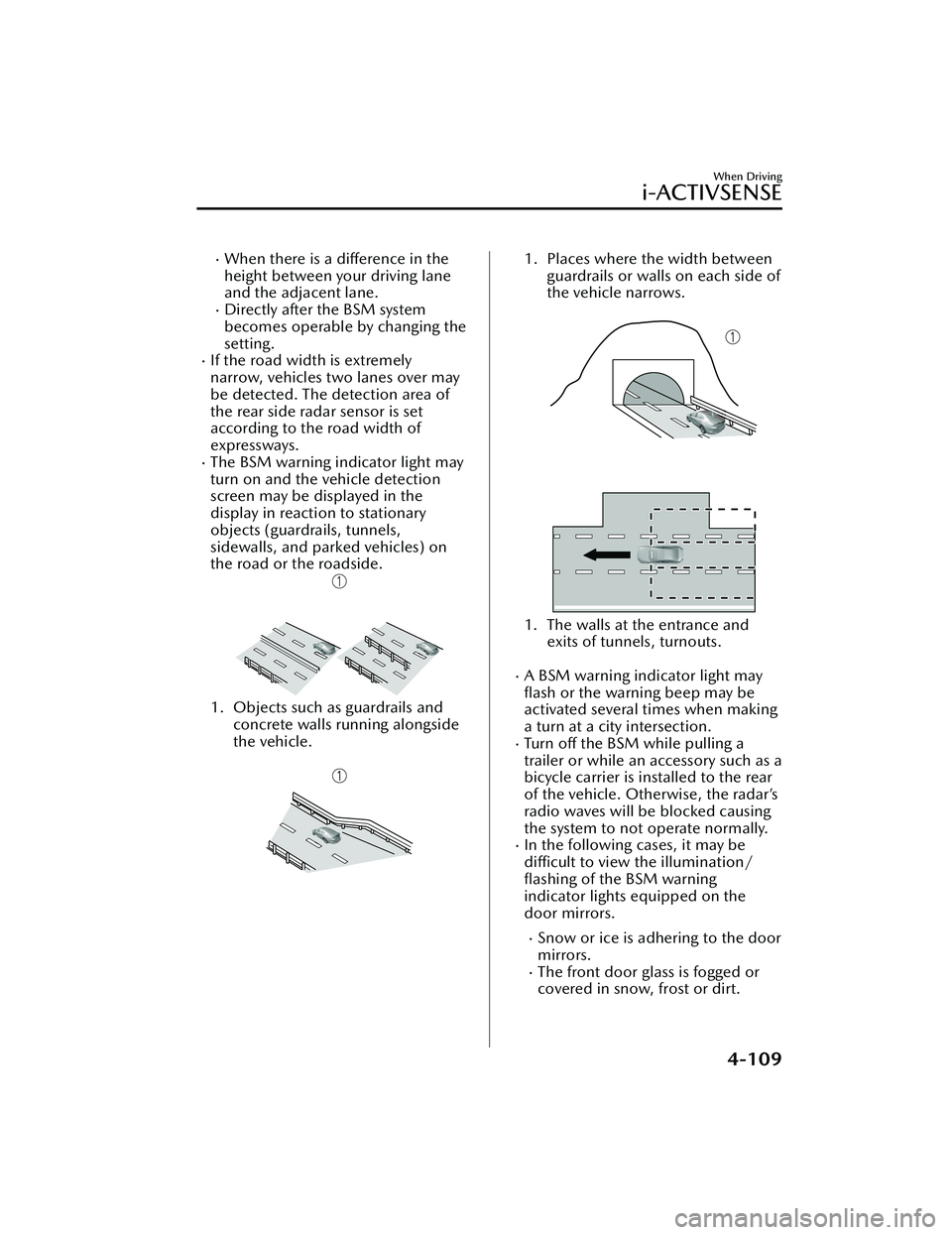
The BSM warning indicator light may
turn on and the vehicle detection
screen may be displayed in the
display in reaction to stationary
objects (guardrails, tunnels,
sidewalls, and parked vehicles) on
the road or the roadside.
1. Objects such as guardrails andconcrete walls running alongside
the vehicle.
1. Places where the width between guardrails or walls on each side of
the vehicle narrows.
1. The walls at the entrance and exits of tunnels, turnouts.
A BSM warning indicator light may
flash or the warning beep may be
activated several times when making
a turn at a city intersection.
Tu r n off the BSM while pulling a
trailer or while an accessory such as a
bicycle carrier is installed to the rear
of the vehicle. Otherwise, the radar’s
radio waves will be blocked causing
the system to not operate normally.
In the following cases, it may be
difficult to view the
illumination/
flashing of the BSM warning
indicator lights equipped on the
door mirrors.
Snow or ice is adhering to the door
mirrors.
The front door glass is fogged or
covered in snow, frost or dirt.
When Driving
i-ACTIVSENSE
4-109
Mazda3_8LC2-EA-22G_Edition1_new 2022-5-20 11:26:10
Page 274 of 623
In the following cases, it may be
difficult to view the illumination/
flashing of the Blind Spot Monitoring
(BSM) warning indicator lights
equipped on the door mirrors.
Snow or ice adheres to the door
mirrors.
The front door glass is fogged or
covered in snow, frost or dirt.
Turn off the RCTA system while
pulling a trailer or while an accessory
such as a bicycle carrier is installed to
the rear of the vehicle. Otherwise,
the radio waves emitted by the radar
will be blocked causing the system to
not operate normally.
The rear side radar sensor of the
RCTA may be regulated under the
radio wave related laws of the
country where the vehicle is driven. If
this system is used abroad, it may be
necessary to turn off the system.
Refer to Rear Side Radar Sensor on
page 4-219.
▼ Canceling Operation of Rear Cross
Traffic Alert (RCTA)
The RCTA can be set to inoperable.
(If only the RCTA is turned
off)
Refer to the Settings section in the
Mazda Connect Owner's Manual.
(If the RCTA is turned off by
operating the i-ACTIVSENSE OFF
switch)
Refer to i-ACTIVSENSE OFF Switch
on page 4-100.
NOTE
If the ignition is switched OFF while
you have canceled the system using the
i-ACTIVSENSE OFF switch, the system
is automatically enabled the next time
the ignition is switched ON. However,
if the system is canceled using the
personalization features, the system is
not automatically enabled.
When Driving
i-ACTIVSENSE
4-129
Mazda3_8LC2-EA-22G_Edition1_new 2022-5-20 11:26:10
Page 306 of 623
In the following cases, the TJA cancel indication is displayed and a sound is activated
one time.
The DSC has operated.The Smart Brake Support (SBS) has operated.The vehicle is driven on a downslope for a long time.There is a problem with the system.The front radar sensor cannot detect target objects (during rain, fog , snow or other
inclement weather conditions, or when the radiator grille is dirty).
The parking brake is applied.Any of the doors is opened.The driver's seat belt is unfastened.The operation frequency of the braking by the TJA control is high.(Automatic transmission vehicle)
The parking brake is automatically applied during stop hold control.
(Manual transmission vehicle)
The vehicle speed decreases below 25 km/h (15 mph).The shift lever is in the neutral posi tion for a certain period of time.The clutch pedal is depressed for a certain period of time.The engine has stalled.
Steering assist function
If any of the following conditions occurs, the steering assist function is temporarily
canceled.
The headway control function is canceled.White (yellow) lane lines cannot be detected or a vehicle ahead cannot be
recognized.
Your vehicle speed is more than about 64 km/h (40 mph).The accelerator pedal is operated.The Lane-keep Assist System (LAS) has operated.The turn signal lever is operated.The vehicle is being driven on a sharp curve.The width of a lane is excessively narrow or wide.The vehicle crosses a lane line.The driver takes his/her hands off the steering wheel.The steering wheel is operated abruptly.There is a problem with the system.The temperature in the Forward Sensing Camera (FSC) is too high or too low.The windshield around the Forward Sensing Camera (FSC) is foggy.The windshield around the Forward Sensing Camera (FSC) is blocked by an
obstruction, causing poor forward visibility.
When Driving
i-ACTIVSENSE
4-161
Mazda3_8LC2-EA-22G_Edition1_new 2022-5-20 11:26:10
Page 311 of 623
▼System Operation
When the ignition is switched ON, the
i-ACTIVSENSE status symbol (warning/
risk avoidance support system) (white)
turns on and the system goes on
standby.
NOTE
If the i-ACTIVSENSE status symbol
(warning/risk avoidance support
system) (white) does not turn on, the
system is canceled using the
i-ACTIVSENSE OFF switch or the
personalization feature.
Operation conditions
When all of the following conditions
are met, the i-ACTIVSENSE status
symbol (warning
/risk avoidance
support system) on the
multi-information display changes
from white to green and the system
becomes operational.
The vehicle speed is about 64 km/h
(40 mph) or faster.
The system detects white (yellow)
lane lines.
NOTE
When the system does not detect a
white (yellow) lane line on one side
only, the system does not operate on
the side that is not being detected.
When temporarily canceling the
system
The LAS goes on standby in the
following cases: The LAS operation is
automatically restored when the
system's operation conditions are met.
The system cannot detect white
(yellow) lane lines.
The vehicle speed is less than about
56 km/h (35 mph).
The turn signal lever is operated.The accelerator pedal is depressed
abruptly.
The TCS/DSC is operating.The TCS/DSC is turned off.The steering wheel is operated.The brake pedal is operated.
The function is temporarily stopped.
The LAS stops functioning in the
following cases:
The temperature in the forward
sensing camera (FSC) is too high or
too low.
The windshield around the forward
sensing camera (FSC) is foggy.
The windshield around the forward
sensing camera (FSC) is blocked by
an obstruction, causing poor forward
visibility.
Strong light (such as sunlight, or
headlights (high-beam) of
on-coming vehicles) is directed at
the forward sensing camera (FSC).
When Driving
i-ACTIVSENSE
4-166
Mazda3_8LC2-EA-22G_Edition1_new 2022-5-20 11:26:10
Page 318 of 623
During inclement weather such as
rain, fog , and snow.
High or low humidity.High or low temperatures.Strong winds.The path of travel is not flat.Heavy luggage is loaded in the
luggage compartment or on the
rear seat and the vehicle is tilted.
Objects such as a wireless antenna,
fog light, or illuminated license
plate is installed near a rear
ultrasonic sensor.
The orientation of a rear ultrasonic
sensor has deviated for reasons
such as a collision.
The vehicle is affected by other
sound waves such as the horn,
engine noise, or rear ultrasonic
sensor of another vehicle.
When any of the following
conditions is met, the rearward
detection function may operate.
Reversing towards a steep
ascending slope.
There are grating, wheel blocks, a
road curb, or a bump.
There is a hanging curtain or
railroad crossing gate.
Reversing near objects such as
foliage, barriers, vehicles, walls, or
fences.
The vehicle is driven on rough
roads such as in areas where there
is grass and foliage or off-road.
When reversing through low gates,
narrow gates, car washing
machines, tunnels, or into a
mechanical parking garage.
A towing bar is installed or a trailer
is connected.
(Manual transmission)
On a manual transmission vehicle,
the engine stops if the clutch pedal is
not depressed when the vehicle is
stopped by the SBS brake operation.
If the vehicle is stopped by the SBS
brake operation and the brake pedal
is not depressed, the SBS brake is
automatically released after about 2
seconds.
Collision warning
If there is the possibility of your vehicle
colliding with a vehicle approaching
from the rear on the left or right, or
from the rear while you are driving in
reverse, a warning sound is activated
continuously and a warning is
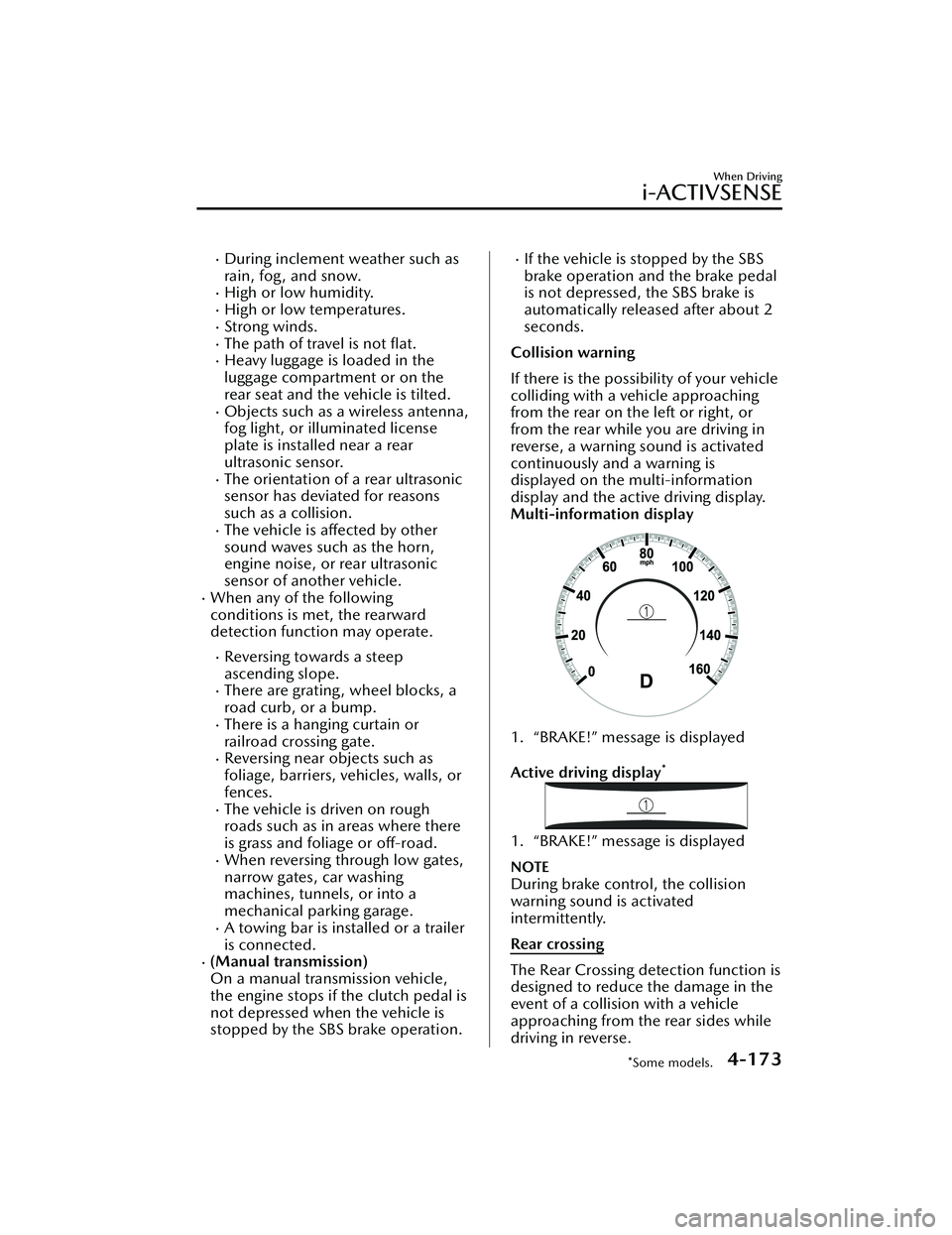
displayed on the multi-information
display and the active driving display.
Multi-information display
1. “BRAKE!” message is displayed
Active driving display
*
1. “BRAKE!” message is displayed
NOTE
During brake control, the collision
warning sound is activated
intermittently.
Rear crossing
The Rear Crossing detection function is
designed to reduce the damage in the
event of a collision with a vehicle
approaching from the rear sides while
driving in reverse.
When Driving
i-ACTIVSENSE
*Some models.4-173
Mazda3_8LC2-EA-22G_Edition1_new 2022-5-20 11:26:10
Page 367 of 623
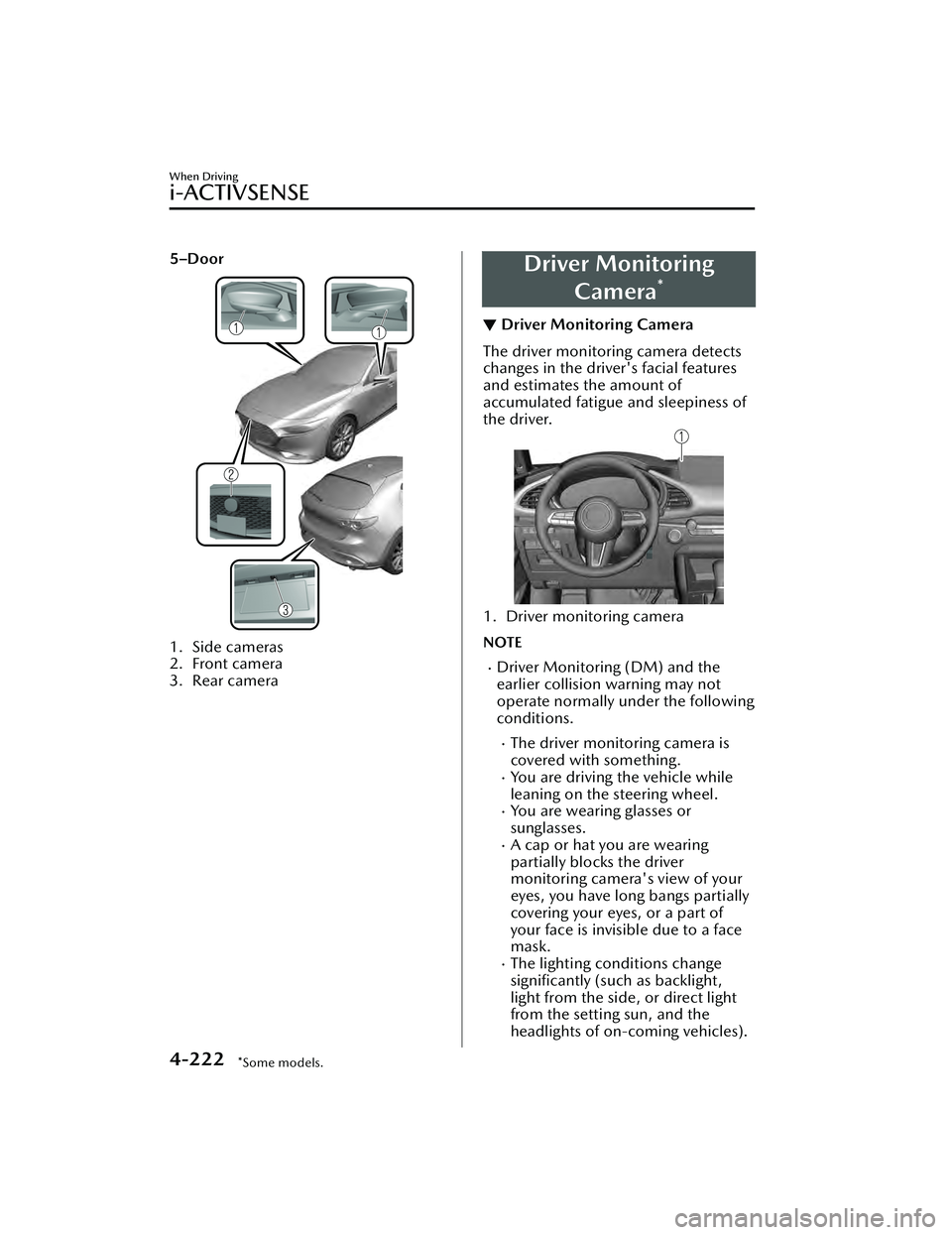
5–Door
1. Side cameras
2. Front camera
3. Rear camera
Driver MonitoringCamera
*
▼Driver Monitoring Camera
The driver monitoring camera detects
changes in the driver's facial features
and estimates the amount of
accumulated fatigue and sleepiness of
the driver.
1. Driver monitoring camera
NOTE
Driver Monitoring (DM) and the
earlier collision warning may not
operate normally under the following
conditions.
The driver monitoring camera is
covered with something.
You are driving the vehicle while
leaning on the steering wheel.
You are wearing glasses or
sunglasses.
A cap or hat you are wearing
partially blocks the driver
monitoring camera's view of your
eyes, you have long bangs partially
covering your eyes, or a part of
your face is invisible due to a face
mask.
The lighting conditions change
significantly (such as backlight,
light from the side, or direct light
from the setting sun, and the
headlights of on-coming vehicles).
When Driving
i-ACTIVSENSE
4-222*Some models.
Mazda3_8LC2-EA-22G_Edition1_new
2022-5-20 11:26:10