lock MAZDA MAZDA 2023 Manual Online
[x] Cancel search | Manufacturer: MAZDA, Model Year: 2023, Model line: MAZDA, Model: MAZDA MAZDA 2023Pages: 623, PDF Size: 15.08 MB
Page 404 of 623
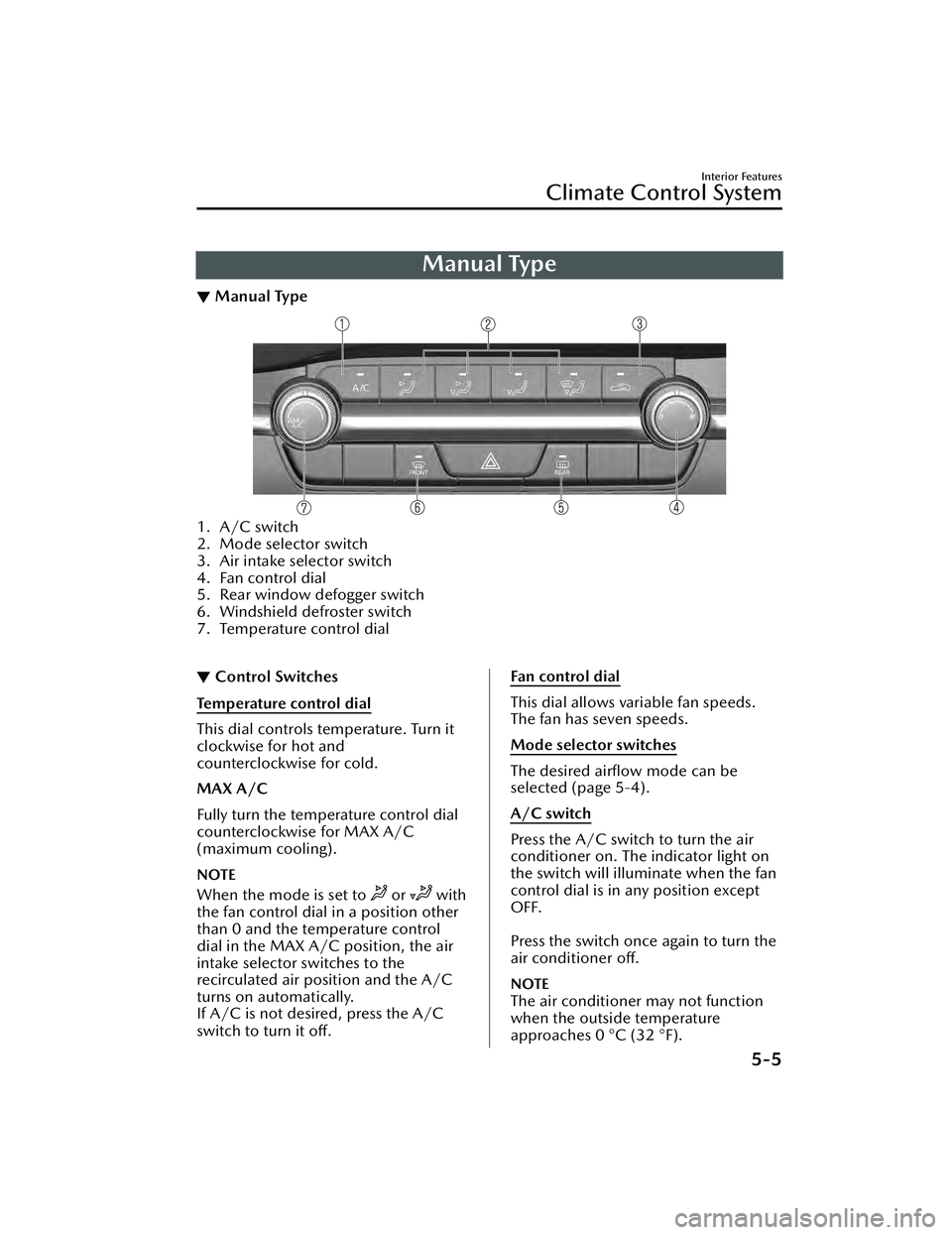
Manual Type
▼Manual Type
1. A/C switch
2. Mode selector switch
3. Air intake selector switch
4. Fan control dial
5. Rear window defogger switch
6. Windshield defroster switch
7. Temperature control dial
▼Control Switches
Temperature control dial
This dial controls temperature. Turn it
clockwise for hot and
counterclockwise for cold.
MAX A/C
Fully turn the temperature control dial
counterclockwise for MAX A/C
(maximum cooling).
NOTE
When the mode is set to or with
the fan control dial in a position other
than 0 and the temperature control
dial in the MAX A/C position, the air
intake selector switches to the
recirculated air position and the A/C
turns on automatically.
If A/C is not desired, press the A/C
switch to turn it off.
Fan control dial
This dial allows variable fan speeds.
The fan has seven speeds.
Mode selector switches
The desired airflow mode can be
selected (page 5-4).
A/C switch
Press the A/C switch to turn the air
conditioner on. The indicator light on
the switch will illuminate when the fan
control dial is in any position except
OFF.
Press the switch once again to turn the
air conditioner off.
NOTE
The air conditioner may not function
when the outside temperature
approaches 0 °C (32 °F).
Interior Features
Climate Control System
5-5
Mazda3_8LC2-EA-22G_Edition1_new 2022-5-20 11:26:10
Page 406 of 623
Rear window defogger switch
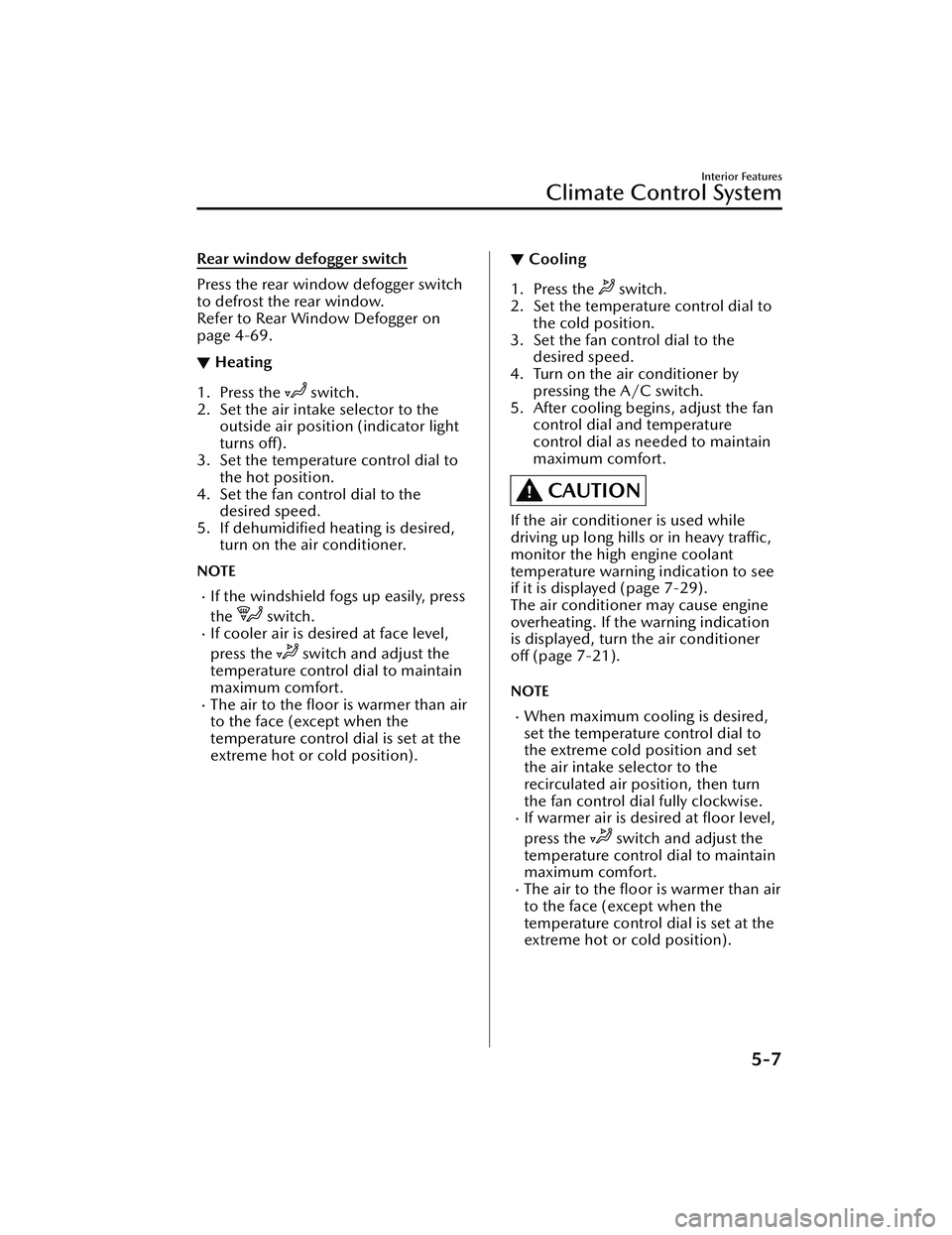
Press the rear window defogger switch
to defrost the rear window.
Refer to Rear Window Defogger on
page 4-69.
▼Heating
1. Press the switch.
2. Set the air intake selector to the outside air position (indicator light
turns off).
3. Set the temperature control dial to
the hot position.
4. Set the fan control dial to the desired speed.
5. If dehumidified heating is desired, turn on the air conditioner.
NOTE
If the windshield fogs up easily, press
the
switch.If cooler air is desired at face level,
press the
switch and adjust the
temperature control dial to maintain
maximum comfort.
The air to the floor is warmer than air
to the face (except when the
temperature control dial is set at the
extreme hot or cold position).
▼ Cooling
1. Press the switch.
2. Set the temperature control dial to the cold position.
3. Set the fan control dial to the desired speed.
4. Turn on the air conditioner by pressing the A/C switch.
5. After cooling begins, adjust the fan control dial and temperature
control dial as needed to maintain
maximum comfort.
CAUTION
If the air conditioner is used while
driving up long hills or in heavy traffic,
monitor the high engine coolant
temperature warning indication to see
if it is displayed (page 7-29).
The air conditioner may cause engine
overheating. If the warning indication
is displayed, turn the air conditioner
off (page 7-21).
NOTE
When maximum cooling is desired,
set the temperature control dial to
the extreme cold position and set
the air intake selector to the
recirculated air position, then turn
the fan control dial fully clockwise.
If warmer air is desired at floor level,
press the
switch and adjust the
temperature control dial to maintain
maximum comfort.
The air to the floor is warmer than air
to the face (except when the
temperature control dial is set at the
extreme hot or cold position).
Interior Features
Climate Control System
5-7
Mazda3_8LC2-EA-22G_Edition1_new 2022-5-20 11:26:10
Page 407 of 623
▼Ve n t i l a t i o n
1. Press the switch.
2. Set the air intake selector to the outside air position (indicator light
turns off).
3. Set the temperature control dial to the desired position.
4. Set the fan control dial to the desired speed.
▼Windshield Defrosting and
Defogging
1. Press the switch.
2. Set the temperature control dial to the desired position.
3. Set the fan control dial to the desired speed.
4. If dehumidified heating is desired, turn on the air conditioner.
WARNING
Do not defog the windshield using the
switch with the temperature
control set to the cold position:
Using the
switch with the
temperature control set to the cold
position is dangerous as it will cause
the outside of the windshield to fog
up. Your vision will be hampered,
which could lead to a serious accident.
Set the temperature control to the hot
or warm position when using the
switch.
NOTE
Fogging on the windows clears up
more easily while the air conditioner
is on, but they will fog up more easily
if the air conditioner is turned off.
Be careful that the windows do not
fog up when doing any of the
following:
Switching to recirculate modeTurning off the air conditionerFor maximum defrosting, turn on the
air conditioner, set the temperature
control dial to the extreme hot
position, and turn the fan control
dial fully clockwise.
If warm air is desired at the floor,
press the
switch.
With the or *1 switch, the air
conditioner is automatically turned
on and the outside air position is
automatically selected to defrost the
windshield. In the
switch, the
outside air position cannot be
changed to the recirculated air
position.
*1 Depending on the market.
▼ Dehumidifying
Operate the air conditioner in cool or
cold weather to help defog the
windshield and side windows.
1. Press the desired mode switch you
want to set.
2. Set the air intake selector to the outside air position (indicator light
turns off).
3. Set the temperature control dial to the desired position.
4. Set the fan control dial to the desired speed.
5. Turn on the air conditioner by pressing the A/C switch.
Interior Features
Climate Control System
5-8
Mazda3_8LC2-EA-22G_Edition1_new 2022-5-20 11:26:10
Page 410 of 623
Mode selector switchFan control switchWindshield defroster switch
The functions for switches other
than those operated continue to
operate in auto control.
Powe r s wi tc h ( Sys te m On/Off)
The climate control system turns on or
off by pressing the power switch.
Temperature control dial
This dial controls temperature. Turn it
clockwise for hot and
counterclockwise for cold.
Turn the temperature control dial to
adjust the temperature between 15 °C
(60 °F) and 29 °C (84 °F).
When the SYNC switch is on:
Turn the driver temperature control
dial to control the temperature
throughout the entire cabin.
When the SYNC switch is off:
Turn the driver or front passenger
temperature control dial to
independently control the
temperature on each side of the
cabin.
NOTE
The climate control system changes
to the individual operation mode
(SYNC switch indicator light turns
off) by turning the front passenger
temperature control dial even when
the SYNC switch is on, which allows
individual control of the set
temperature for the driver and front
passenger.
When you set the temperature to the
lower or upper limit, “Lo” or “Hi” is
displayed.
The temperature units for the
temperature setting display can be
changed in conjunction with the
temperature units for the outside
temperature display.
Refer to Outside Temperature
Display on page 4-25.
Fan control switch
The fan has 7 speeds. The selected
speed will be displayed.
Mode selector switch
The desired airflow mode can be
selected (page 5-4).
NOTE
With the airflow mode set to the
position and the temperature control
dial set at a medium temperature,
heated air is directed to the feet and
air at a comparably lower
temperature will flow through the
central, left and right vents.
To set the air vent to , press the
windshield defroster switch.
In the position, the outside air
position is automatically selected.
Interior Features
Climate Control System
5-11
Mazda3_8LC2-EA-22G_Edition1_new 2022-5-20 11:26:10
Page 438 of 623
Sunvisors
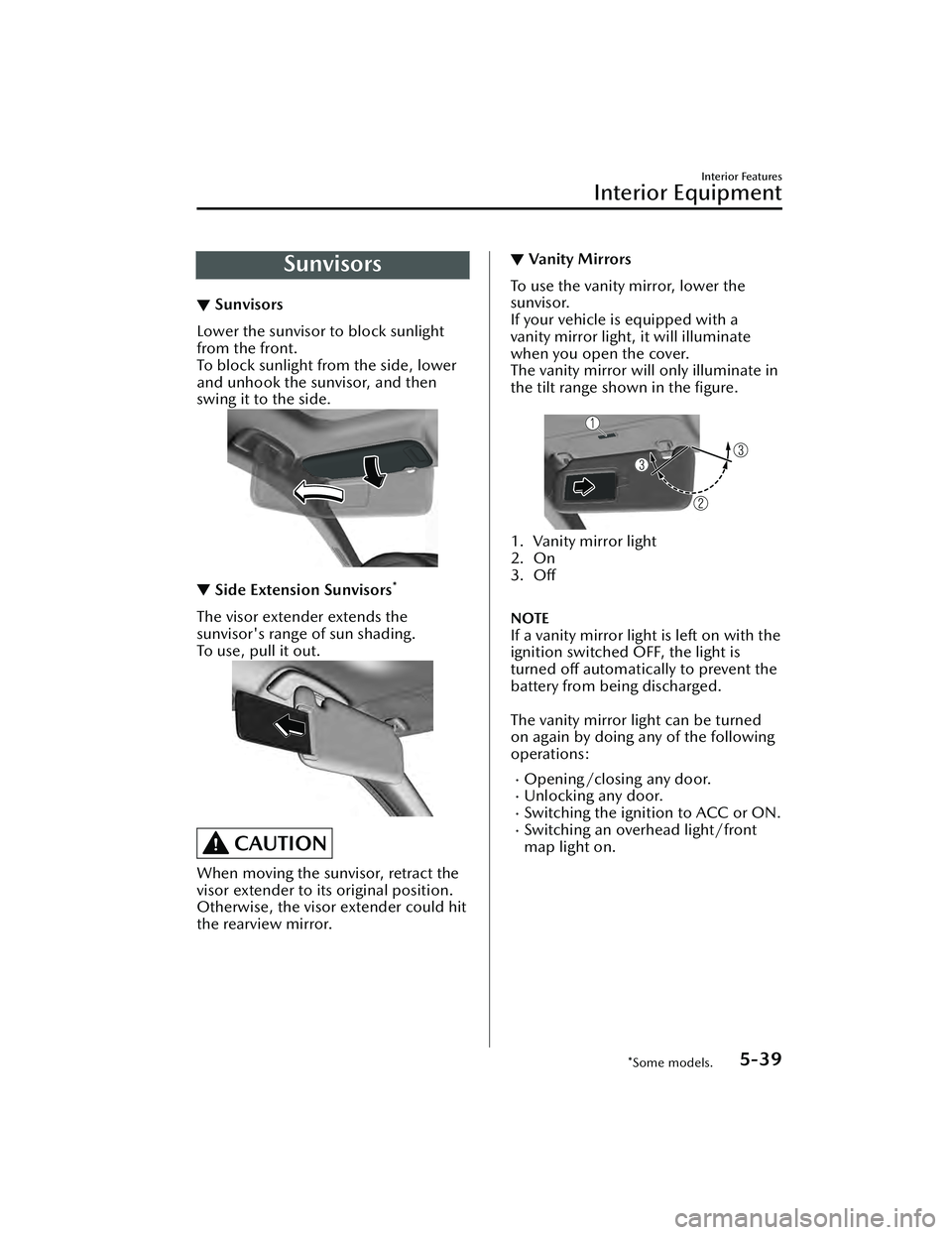
▼Sunvisors
Lower the sunvisor to block sunlight
from the front.
To block sunlight from the side, lower
and unhook the sunvisor, and then
swing it to the side.
▼
Side Extension Sunvisors*
The visor extender extends the
sunvisor's range of sun shading.
To u s e , p u l l i t o u t .
CAUTION
When moving the sunvisor, retract the
visor extender to it
s original position.
Otherwise, the visor extender could hit
the rearview mirror.
▼ Va n i t y M i r ro rs
To use the vanity mirror, lower the
sunvisor.
If your vehicle is equipped with a
vanity mirror light, it will illuminate
when you open the cover.
The vanity mirror will only illuminate in
the tilt range shown in the figure.
1. Vanity mirror light
2. On
3. Off
NOTE
If a vanity mirror light is left on with the
ignition switched OFF, the light is
turned off automatically to prevent the
battery from being discharged.
The vanity mirror light can be turned
on again by doing any of the following
operations:
Opening/closing any door.Unlocking any door.Switching the ignition to ACC or ON.Switching an overhead light/front
map light on.
Interior Features
Interior Equipment
*Some models.5-39
Mazda3_8LC2-EA-22G_Edition1_new
2022-5-20 11:26:10
Page 439 of 623
Interior Lights
▼Interior Lights
NOTE
Do not leave the lights on for long
periods while the engine is turned off.
Otherwise the battery power could be
depleted.
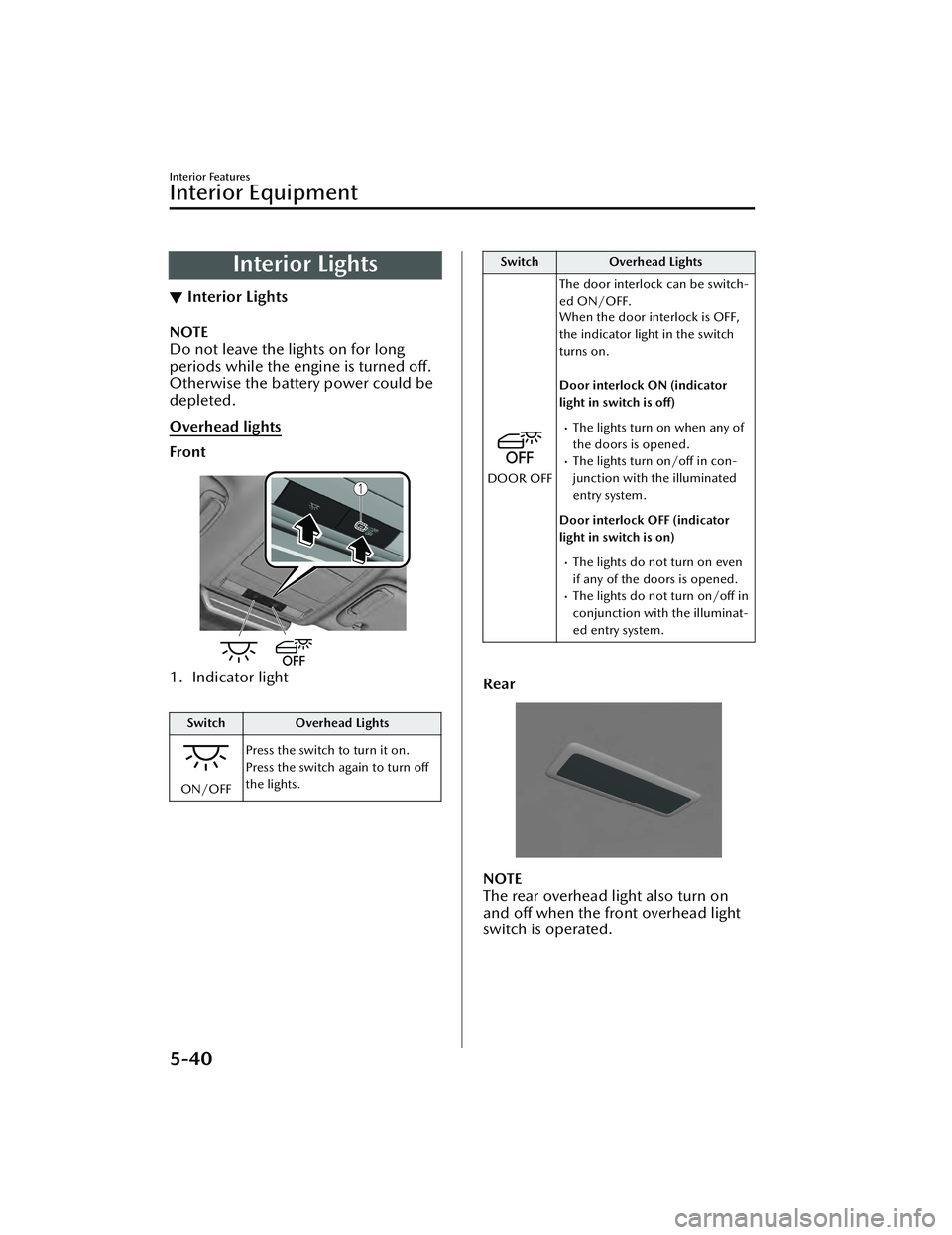
Overhead lights
Front
1. Indicator light
Switch
Overhead Lights
ON/OFFPress the switch to turn it on.
Press the switch again to turn off
the lights.
Switch
Overhead Lights
DOOR OFFThe door interlock can be switch-
ed ON/OFF.
When the door interlock is OFF,
the indicator light in the switch
turns on.
Door interlock ON (indicator
light in switch is off)
The lights turn on when any of
the doors is opened.
The lights turn on/off in con-
junction with the illuminated
entry system.
Door interlock OFF (indicator
light in switch is on)
The lights do not turn on even
if any of the doors is opened.
The lights do not turn on/off in
conjunction with the illuminat-
ed entry system.
Rear
NOTE
The rear overhead light also turn on
and off when the front overhead light
switch is operated.
Interior Features
Interior Equipment
5-40
Mazda3_8LC2-EA-22G_Edition1_new 2022-5-20 11:26:10
Page 441 of 623
▼Illuminated Entry System
The overhead lights turn on when any
of the following operations is done
with the overhead light switch in the
DOOR position.
The driver's door is unlocked with
the ignition is switched OFF.
The ignition is switched OFF with all
doors closed.
NOTE
The illumination time differs
depending on the operation.
The vehicle is equipped with a
battery saver. If an interior light is left
on with the ignition switched OFF,
the light turns off automatically after
a certain period of time has passed
to prevent battery depletion.
The operation of the illuminated
entry system can be changed.
Refer to the Settings section in the
Mazda Connect Owner's Manual.
The illuminated entry system does
not operate in conjunction with the
overhead lights when the overhead
lights are turned on using the
overhead light ON/OFF switch.
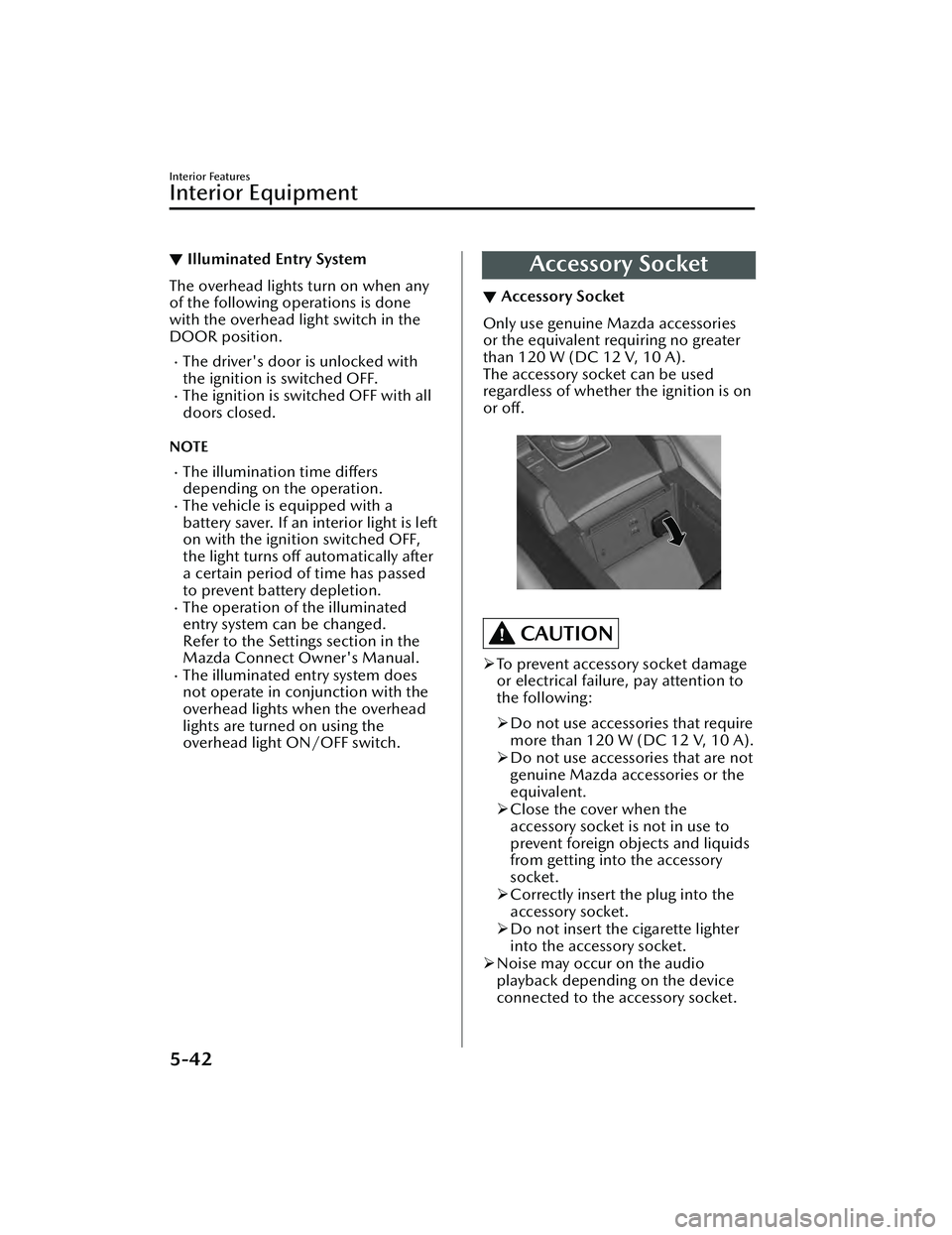
Accessory Socket
▼ Accessory Socket
Only use genuine Mazda accessories
or the equivalent requiring no greater
than 120 W (DC 12 V, 10 A).
The accessory socket can be used
regardless of whether the ignition is on
or off.
CAUTION
To prevent accessory socket damage
or electrical failure, pay attention to
the following:
Do not use accessories that require
more than 120 W (DC 12 V, 10 A).
Do not use accessories that are not
genuine Mazda accessories or the
equivalent.
Close the cover when the
accessory socket is not in use to
prevent foreign objects and liquids
from getting into the accessory
socket.
Correctly insert the plug into the
accessory socket.
Do not insert the cigarette lighter
into the accessory socket.
Noise may occur on the audio
playback depending on the device
connected to the accessory socket.
Interior Features
Interior Equipment
5-42
Mazda3_8LC2-EA-22G_Edition1_new 2022-5-20 11:26:10
Page 459 of 623
If you must run the engine while
working under the hood, make
certain that you remove all jewelry
(especially rings, bracelets, watches,
and necklaces) and all neckties,
scarves, and similar loose clothing
before getting near the engine or
cooling fan which may turn on
unexpectedly:
Working under the hood with the
engine running is dangerous. It
becomes even more dangerous when
you wear jewelry, loose clothing or
have long hair or a long beard.
Either can become entangled in
moving parts and result in injury.
Pull over to a safe location, then
switch the ignition off and make sure
the fan is not running before
attempting to work near the cooling
fan:
Working near the cooling fan when it is
running is dangerous. The fan could
continue running indefinitely even if
the engine has stopped and the engine
compartment temperature is high. You
could be hit by the fan and seriously
injured.
Do not leave items in the engine
compartment:
After you have finished checking or
doing servicing in the engine
compartment, do not forget and leave
items such as tools or rags in the
engine compartment.
Tools or other items left in the engine
compartment could cause engine
damage or a fire leading to an
unexpected accident.
Hood
▼ Hood
WARNING
Always check that the hood is closed
and securely locked:
A hood that is not closed and securely
locked is dangerous as it could fly open
while the vehicle is moving and block
the driver's vision which could result in
a serious accident.
▼
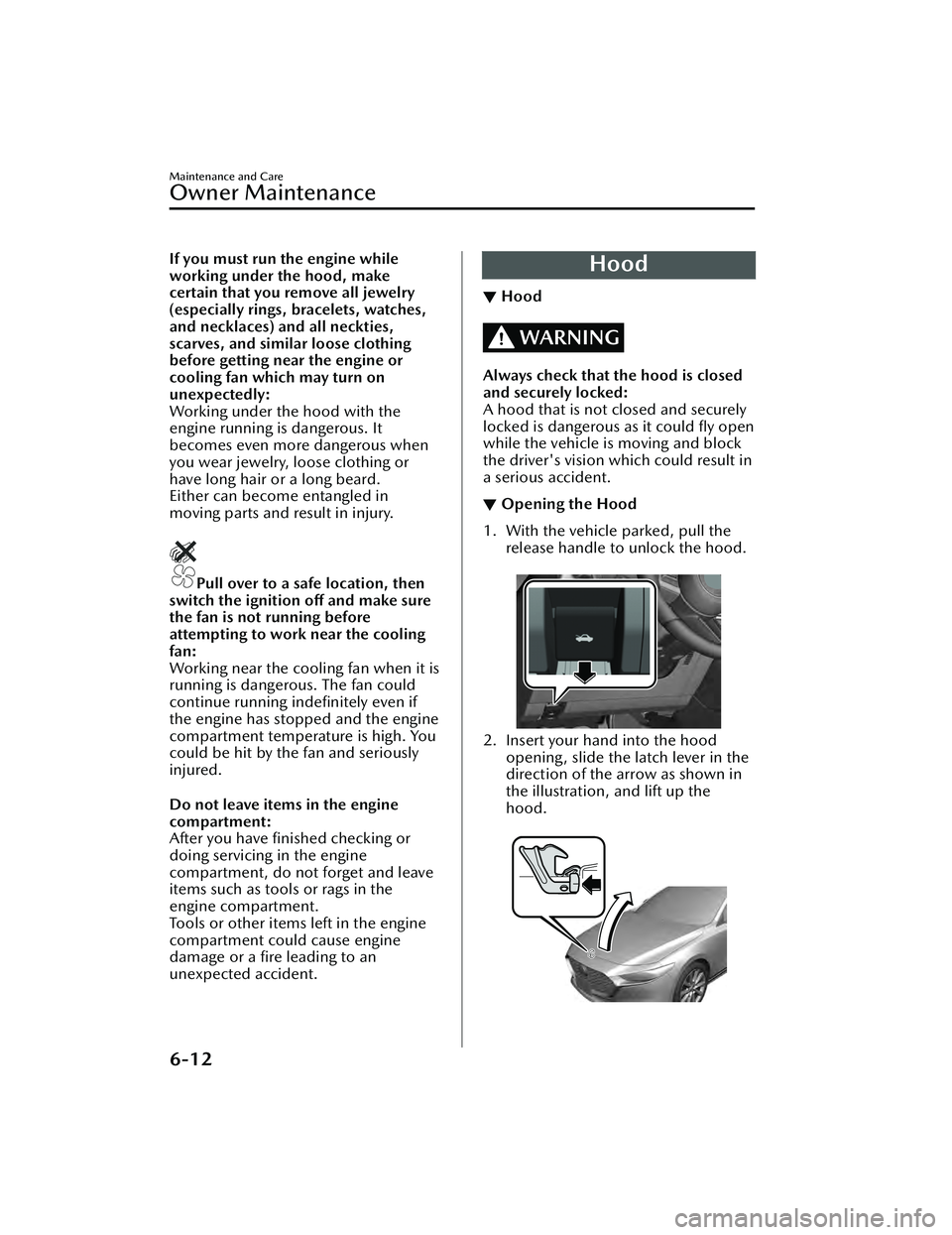
Opening the Hood
1. With the vehicle parked, pull the
release handle to unlock the hood.
2. Insert your hand into the hoodopening, slide the latch lever in the
direction of the arrow as shown in
the illustration, and lift up the
hood.
Maintenance and Care
Owner Maintenance
6-12
Mazda3_8LC2-EA-22G_Edition1_new 2022-5-20 11:26:10
Page 461 of 623
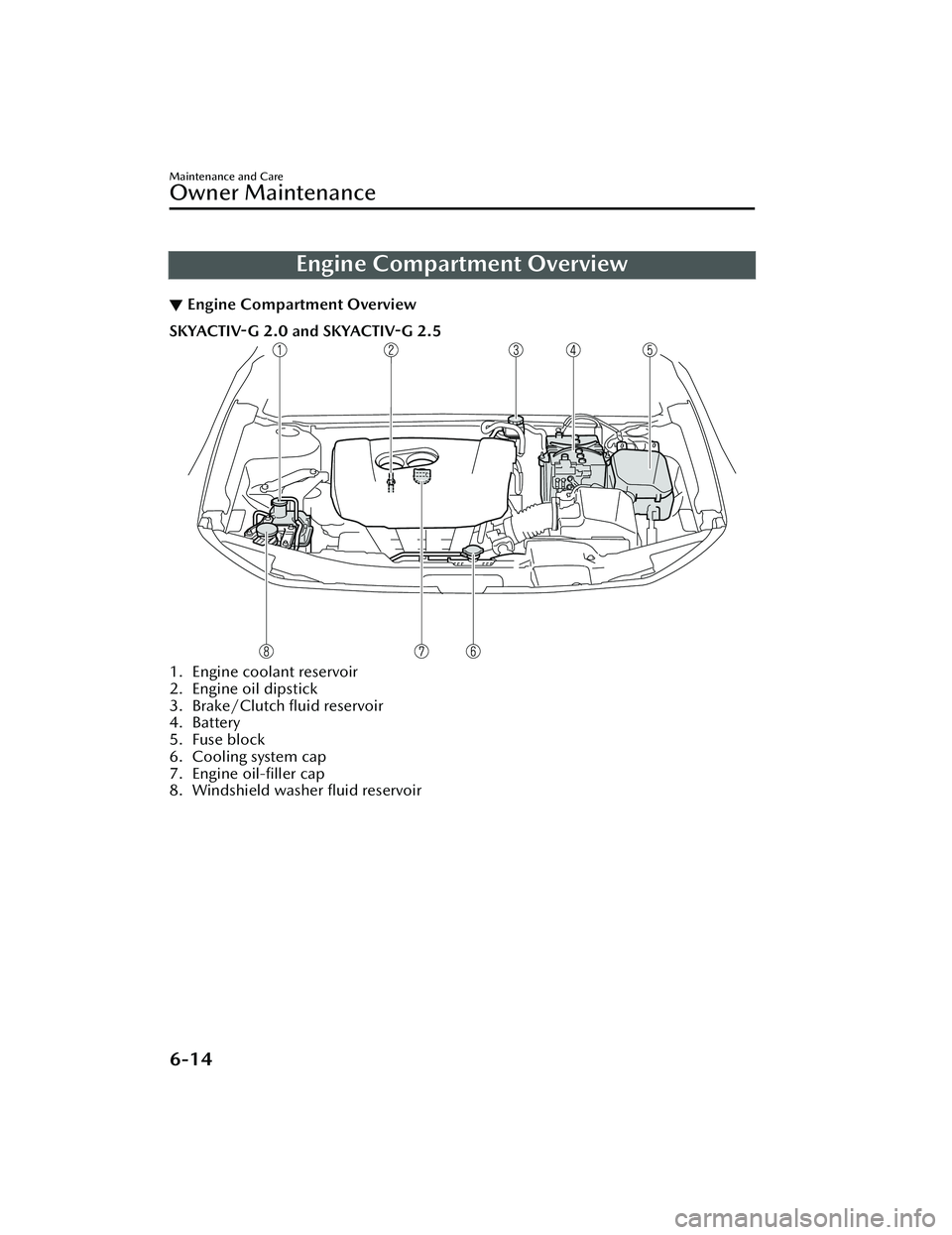
Engine Compartment Overview
▼Engine Compartment Overview
SKYACTIV-G 2.0 and SKYACTIV-G 2.5
1. Engine coolant reservoir
2. Engine oil dipstick
3. Brake/Clutch fluid reservoir
4. Battery
5. Fuse block
6. Cooling system cap
7. Engine oil-filler cap
8. Windshield washer fluid reservoir
Maintenance and Care
Owner Maintenance
6-14
Mazda3_8LC2-EA-22G_Edition1_new
2022-5-20 11:26:10
Page 462 of 623
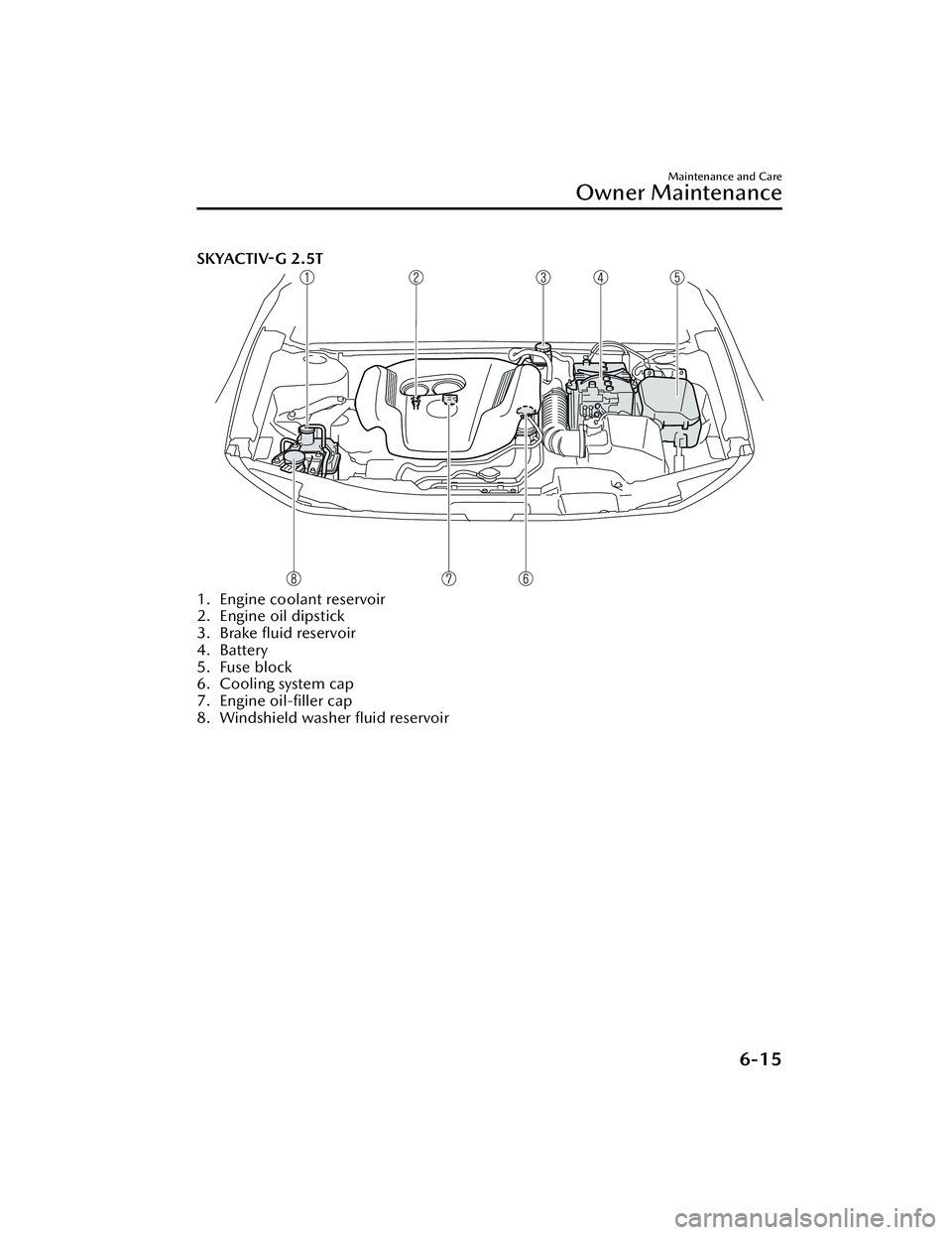
SKYACTIV-G 2.5T
1. Engine coolant reservoir
2. Engine oil dipstick
3. Brake fluid reservoir
4. Battery
5. Fuse block
6. Cooling system cap
7. Engine oil-filler cap
8. Windshield washer fluid reservoir
Maintenance and Care
Owner Maintenance
6-15
Mazda3_8LC2-EA-22G_Edition1_new2022-5-20 11:26:10