battery MAZDA MODEL 2 2012 Owner's Manual
[x] Cancel search | Manufacturer: MAZDA, Model Year: 2012, Model line: MODEL 2, Model: MAZDA MODEL 2 2012Pages: 346, PDF Size: 3.93 MB
Page 204 of 346
Black plate (204,1)
NOTElBefore using the auxiliary jack, read the
manufacturer's instructions for the product
being connected.
lUse a commercially-available, non-
impedance (3.5
) stereo mini plug for
connecting the portable audio unit to the
auxiliary jack. Before using the auxiliary
jack, read the manufacturer's instructions
for connecting a portable audio unit to the
auxiliary jack.
lTo prevent discharging of the battery, do
not use the auxiliary input for long periods
with the engine off or idling.
lNoise may occur depending on the product
connected to the auxiliary jack.
lWith regard to connecting a portable audio
or similar device to a power source, use the
battery for the device, not the accessory
socket.
lInsert the plug to the auxiliary jack
securely.
lInsert or remove the plug with the plug
perpendicular to the auxiliary jack hole.
lInsert or remove the plug by holding its
base.
To listen to a portable audio unit
1. Switch the ignition to ACC or ON.
2. Insert the connection plug into the auxiliary jack.
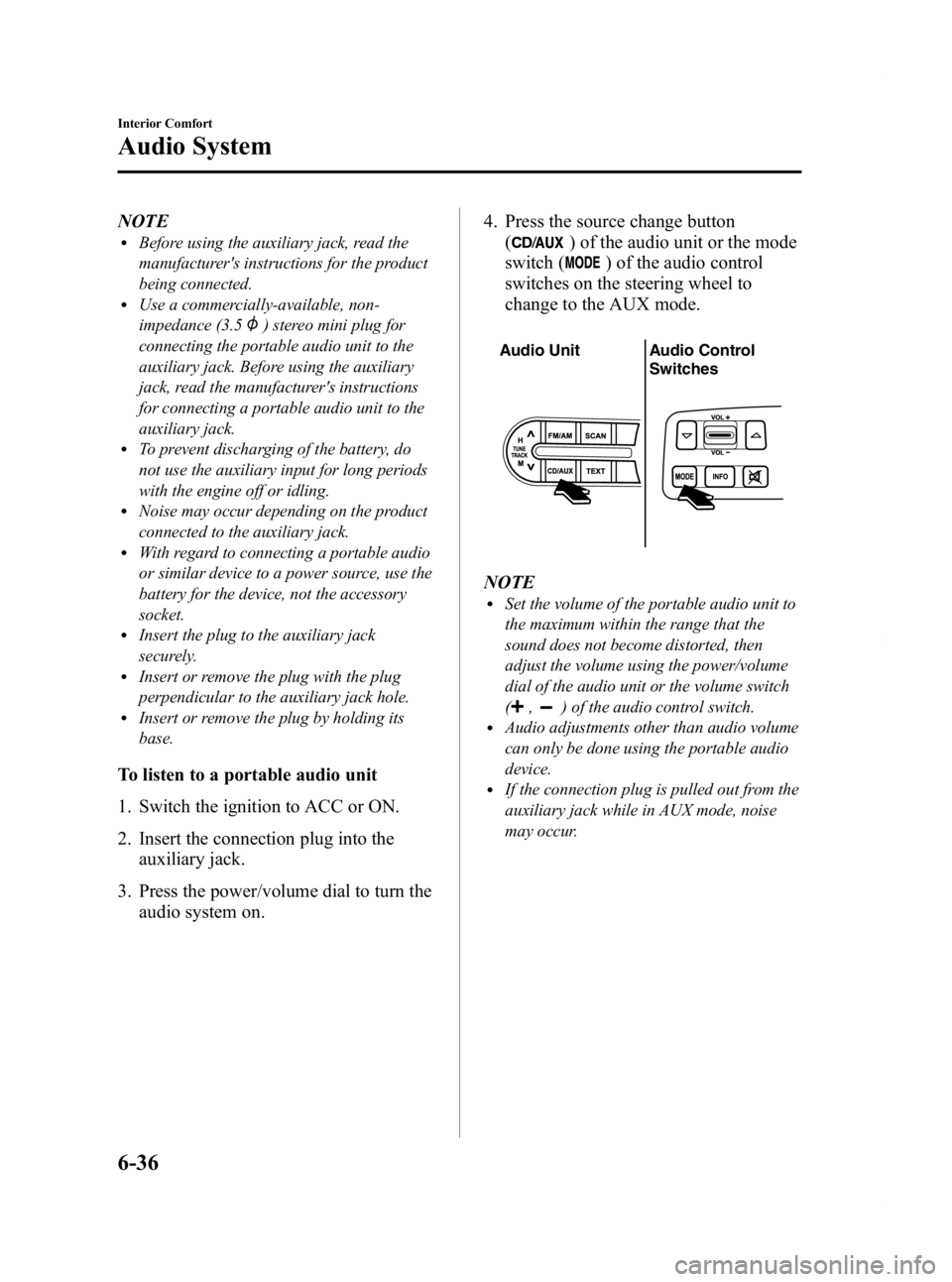
3. Press the power/volume dial to turn the audio system on. 4. Press the source change button
(
) of the audio unit or the mode
switch (
) of the audio control
switches on the steering wheel to
change to the AUX mode.
Audio Unit Audio Control
Switches
NOTElSet the volume of the portable audio unit to
the maximum within the range that the
sound does not become distorted, then
adjust the volume using the power/volume
dial of the audio unit or the volume switch
(
,) of the audio control switch.lAudio adjustments other than audio volume
can only be done using the portable audio
device.
lIf the connection plug is pulled out from the
auxiliary jack while in AUX mode, noise
may occur.
6-36
Interior Comfort
Audio System
Mazda2_8CC7-EA-11H_Edition2 Page204
Monday, September 26 2011 1:55 PM
Form No.8CC7-EA-11H
Page 206 of 346

Black plate (206,1)
Sunvisors
When you need a sunvisor, lower it for
use in front or swing it to the side.
Sunvisor
qVanity Mirrors
To use the vanity mirror, lower the
sunvisor.
Interior Lights
qIlluminated Entry System
When the illuminated entry system
operates, the overhead light (switch is in
the DOOR position) turns on for:
lAbout 30 seconds after the driver's
door is unlocked and the ignition is
switched off (with the ignition key
removed).
lAbout 15 seconds after all doors are
closed.
lAbout 15 seconds after the ignition is
switched off (with the ignition key
removed) with all doors closed.
The light also turns off when:
lThe ignition is switched ON and all
doors are closed.
lThe driver's door is locked.
NOTE
Battery saver
If any door is left opened, the light turns off
after about 30 minutes to save the battery.
The light turns on again when the ignition is
switched ON, or when any door is opened after
all doors have been closed.
q Overhead Light
6-38
Interior Comfort
Interior Equipment
Mazda2_8CC7-EA-11H_Edition2 Page206
Monday, September 26 2011 1:55 PM
Form No.8CC7-EA-11H
Page 210 of 346

Black plate (210,1)
Accessory Socket
Switch the ignition to ACC or ON.
Only use genuine Mazda accessories or
the equivalent requiring no greater than
120 W (DC 12 V, 10 A).
CAUTION
ØTo prevent accessory socket
damage or electrical failure, pay
attention to the following:
ØDo not use accessories that
require more than 120 W (DC 12
V, 10 A).
ØDo not use accessories that are
not genuine Mazda accessories
or the equivalent.
ØClose the cover when the
accessory socket is not in use to
prevent foreign objects and
liquids from getting into the
accessory socket.
ØCorrectly insert the plug into
the accessory socket.
ØDo not insert the cigarette
lighter into the accessory
socket.
Ø Noise may occur on the audio
playback depending on the device
connected to the accessory socket.
Ø Depending on the device
connected to the accessory socket,
the vehicle's electrical system may
be affected, which could cause the
warning light to illuminate.
Disconnect the connected device
and make sure that the problem is
resolved. If the problem is
resolved, disconnect the device
from the socket and switch the
ignition off. If the problem is not
resolved, consult an Authorized
Mazda Dealer.
NOTE
To prevent discharging of the battery, do not
use the socket for long periods with the engine
off or idling.
6-42
Interior Comfort
Interior Equipment
Mazda2_8CC7-EA-11H_Edition2 Page210
Monday, September 26 2011 1:55 PM
Form No.8CC7-EA-11H
Page 228 of 346

Black plate (228,1)
Jump-Starting
Jump-starting is dangerous if done incorrectly. So follow the procedure carefully. If you
feel unsure about jump-starting, we strongly recommend that you have a competent service
technician do the work.
WARNING
Follow These Precautions Carefully:
To ensure safe and correct handling of the battery, read the following precautions
carefully before using the battery or inspecting it.
Always wear eye protection when working near the battery:
Working without eye protection is dangerous. Battery fluid contains SULFURIC ACID
which could cause blindness if splashed into your eyes. Also, hydrogen gas produced
during normal battery operation, could ignite and cause the battery to explode.
Wear eye protection and protective gloves to prevent contact with battery
fluid: Spilled battery fluid is dangerous.
Battery fluid contains SULFURIC ACID which could cause serious injuries if it gets in
eyes, skin or clothing. If this happens, immediately flush your eyes with water for 15
minutes or wash your skin thoroughly and get medical attention.
Always keep batteries out of the reach of children:
Allowing children to play near batteries is dangerous. Battery fluid could cause
serious injuries if it gets in the eyes or on the skin.
Do not allow the positive () terminal to contact any other metal object that
could cause sparks: Flames and sparks near open battery cells are dangerous. Hydrogen gas, produced
during normal battery operation, could ignite and cause the battery to explode. An
exploding battery can cause serious burns and injuries. When working near a
battery, do not allow metal tools to contact the positive (
) or negative ()
terminal of the battery.
7-18
In Case of an Emergency
Emergency Starting
Mazda2_8CC7-EA-11H_Edition2 Page228
Monday, September 26 2011 1:55 PM
Form No.8CC7-EA-11H
Page 229 of 346

Black plate (229,1)
Keep all flames, including cigarettes, and sparks away from open battery cells:
Flames and sparks near open battery cells are dangerous. Hydrogen gas, produced
during normal battery operation, could ignite and cause the battery to explode. An
exploding battery can cause serious burns and injuries.
Do not jump-start a frozen battery or one with a low fluid level: Jump-starting a frozen battery or one with a low fluid level is dangerous. It may
rupture or explode, causing serious injury.
Connect the negative cable to a good ground point away from the battery: Connecting the end of the second jumper cable to the negative (
) terminal of the
discharged battery is dangerous.
A spark could cause the gas around the battery to explode and injure someone.
Route the jumper cables away from parts that will be moving: Connecting a jumper cable near or to moving parts (cooling fans, belts) is dangerous.
The cable could get caught when the engine starts and cause serious injury.
CAUTION
Use only a 12 V booster system. You can damage a 12 V starter, ignition system, and
other electrical parts beyond repair with a 24 V power supply (two 12 V batteries in
series or a 24 V motor generator set).
Discharged battery
Jumper cables
Connect cables in numerical order and disconnect in reverse order.
Booster battery
In Case of an Emergency
Emergency Starting
7-19
Mazda2_8CC7-EA-11H_Edition2 Page229
Monday, September 26 2011 1:55 PM
Form No.8CC7-EA-11H
Page 230 of 346

Black plate (230,1)
1. Remove the battery cover from its rearside.
2. Make sure the booster battery is 12 V
and that its negative terminal is
grounded.
3. If the booster battery is in another vehicle, don't allow both vehicles to
touch. Turn off the engine of the
vehicle with the booster battery and all
unnecessary electrical loads in both
vehicles.
4. Connect the jumper cables in the exact sequence as in the illustration.
lConnect one end of a cable to the
positive terminal on the discharged
battery (1).
lAttach the other end to the positive
terminal on the booster battery (2).
lConnect one end of the other cable
to the negative terminal of the
booster battery (3).
lConnect the other end to the ground
point indicated in the illustration
away from the discharged battery
(4).
5. Start the engine of the booster vehicle and run it a few minutes. Then start the
engine of the other vehicle. 6. When finished, carefully disconnect the
cables in the reverse order described in
the illustration.
7. If the battery cover has been removed, install it in the reverse order of
removal.
NOTE
Verify that the covers are securely installed.
7-20
In Case of an Emergency
Emergency Starting
Mazda2_8CC7-EA-11H_Edition2 Page230
Monday, September 26 2011 1:55 PM
Form No.8CC7-EA-11H
Page 235 of 346
Black plate (235,1)
8Maintenance and Care
How to keep your Mazda in top condition.
Introduction .................................................................................. 8-2Introduction ............................................................................... 8-2
Scheduled Maintenance ................................................................ 8-3 Scheduled Maintenance (USA, Canada, and Puerto Rico) ....... 8-3
Owner Maintenance ..................................................................... 8-8 Owner Maintenance Schedule .................................................. 8-8
Owner Maintenance Precautions ............................................... 8-9
Engine Compartment Overview .............................................. 8-11
Engine Oil ............................................................................... 8-12
Engine Coolant ....................................................................... 8-13
Brake/Clutch Fluid .................................................................. 8-15
Automatic transaxle Fluid (ATF)
í......................................... 8-16
Washer Fluid ........................................................................... 8-18
Body Lubrication .................................................................... 8-19
Wiper Blades ........................................................................... 8-19
Battery ..................................................................................... 8-23
Tires ........................................................................................ 8-26
Light Bulbs ............................................................................. 8-32
Fuses ....................................................................................... 8-39
Appearance Care ........................................................................ 8-45 How to Minimize Environmental Paint Damage .................... 8-45
Exterior Care ........................................................................... 8-47
Interior Care ............................................................................ 8-51
8-1íSome models.
Mazda2_8CC7-EA-11H_Edition2 Page235
Monday, September 26 2011 1:55 PM
Form No.8CC7-EA-11H
Page 245 of 346

Black plate (245,1)
Engine Compartment Overview
Battery Fuse block
Engine oil dipstick
Engine oil-filler cap Engine coolant reservoir
Windshield washer fluid reservoir
Automatic transaxle
fluid-level dipstick (only
for automatic transaxle)
Brake/Clutch fluid
reservoir
Cooling system cap
Maintenance and Care
Owner Maintenance
8-11
Mazda2_8CC7-EA-11H_Edition2 Page245
Monday, September 26 2011 1:55 PM
Form No.8CC7-EA-11H
Page 257 of 346

Black plate (257,1)
Battery
WARNING
Wash hands after handling the battery and related accessories:Battery posts, terminals and related accessories contain lead and lead compounds,
chemicals known to the State of California to cause cancer and reproductive harm.
Read the following precautions carefully before using the battery or inspecting
to ensure safe and correct handling:
Always wear eye protection when working near the battery:
Working without eye protection is dangerous. Battery fluid contains SULFURIC ACID
which could cause blindness if splashed into your eyes. Also, hydrogen gas produced
during normal battery operation, could ignite and cause the battery to explode.
Wear eye protection and protective gloves to prevent contact with battery
fluid: Spilled battery fluid is dangerous.
Battery fluid contains SULFURIC ACID which could cause serious injuries if it gets in
eyes, or on the skin or clothing. If this happens, immediately flush your eyes with
water for 15 minutes or wash your skin thoroughly and get medical attention.
Always keep batteries out of the reach of children:
Allowing children to play near batteries is dangerous. Battery fluid could cause
serious injuries if it gets in the eyes or on the skin.
Keep flames and sparks away from open battery cells and do not allow metal
tools to contact the positive (
) or negative () terminal of the battery when
working near a battery. Do not allow the positive (
) terminal to contact the vehicle
body:
Flames and sparks near open battery cells are dangerous. Hydrogen gas, produced
during normal battery operation, could ignite and cause the battery to explode. An
exploding battery can cause serious burns and injuries. Keep all flames including
cigarettes and sparks away from open battery cells.
Maintenance and Care
Owner Maintenance
8-23
Mazda2_8CC7-EA-11H_Edition2 Page257
Monday, September 26 2011 1:55 PM
Form No.8CC7-EA-11H
Page 258 of 346

Black plate (258,1)
Keep all flames, including cigarettes, and sparks away from open battery cells:
Flames and sparks near open battery cells are dangerous. Hydrogen gas, produced
during normal battery operation, could ignite and cause the battery to explode. An
exploding battery can cause serious burns and injuries.
8-24
Maintenance and Care
Owner Maintenance
Mazda2_8CC7-EA-11H_Edition2 Page258
Monday, September 26 2011 1:55 PM
Form No.8CC7-EA-11H