radio MAZDA MODEL 3 4-DOOR 2013 Service Manual
[x] Cancel search | Manufacturer: MAZDA, Model Year: 2013, Model line: MODEL 3 4-DOOR, Model: MAZDA MODEL 3 4-DOOR 2013Pages: 610, PDF Size: 7.05 MB
Page 327 of 610
Black plate (327,1)
(SIRIUS digital satellite radio)
Press and hold the seek switch in the up or
down position to seek all usable stations
at a higher or lower channel whether
programmed or not.
NOTE
During radio reception
Radio stations which have been previously
stored in the auto memory tuning can be called
up by pressing the seek switch up or down
while any radio station stored in the auto
memory tuning is being received. Radio
stations can be called up in the order they
were stored with each press of the switch up or
down.
When playing a CD, USB, iPod or BT
audio
Press the seek switch up to skip to the
next track.
Press the seek switch down to repeat the
current track.
Press and hold the seek switch in the up or
down position to continuously switch the
tracks up or down.
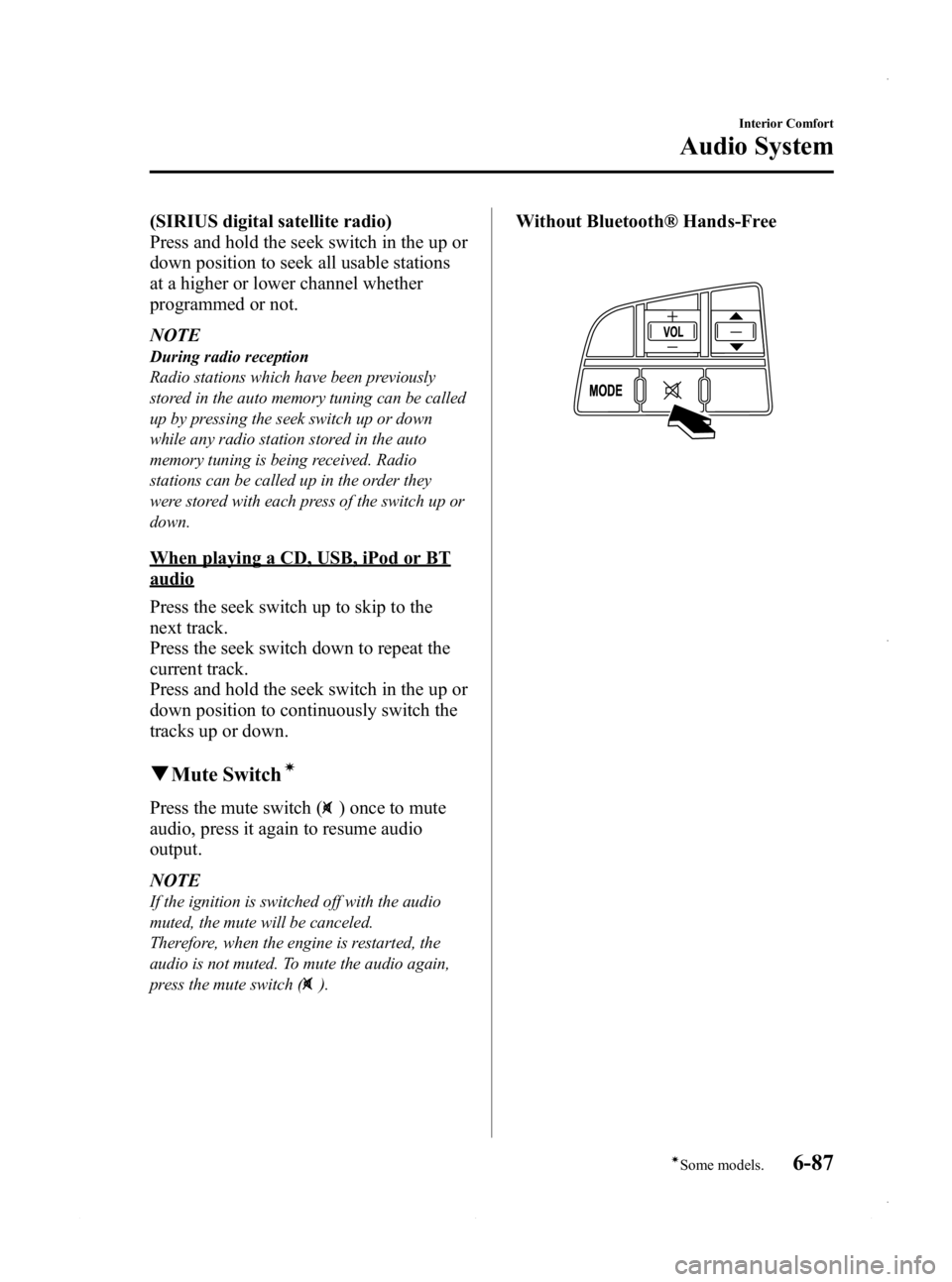
qMute Switchí
Press the mute switch () once to mute
audio, press it again to resume audio
output.
NOTE
If the ignition is switched off with the audio
muted, the mute will be canceled.
Therefore, when the engine is restarted, the
audio is not muted. To mute the audio again,
press the mute switch (
).
Without Bluetooth® Hands-Free
Interior Comfort
Audio System
6-87íSome models.
Mazda3_8CV6-EA-12H_Edition3 Page327
Thursday, February 28 2013 11:29 AM
Form No.8CV6-EA-12H
Page 347 of 610
Black plate (347,1)
Safety Certification
This CD player is made and tested to meet exacting safety standards. It meets FCC
requirements and complies with safety performance standards of the U.S. Department of
Health and Human Services.
CAUTION
ØThis CD player should not be adjusted or repaired by anyone except qualified
service personnel.
If servicing is required, contact an Authorized Mazda Dealer.
Ø Use of controls or adjustments or performance of procedures other than those
specified herein may result in hazardous laser exposure. Never operate the CD
player with the top case of the unit removed.
Ø Changes or modifications not expressly approved by the party responsible for
compliance could void the user's authority to operate this equipment.
NOTE
For CD player section:
This device complies with part 15 of the FCC Rules. Operation is subject to the following two
conditions: (1) This device may not cause harmful interference, and (2) this device must accept any
interference received, including interference that may cause undesired operation.
NOTE
This equipment has been tested and found to comply with the limits for a Class B digital device,
pursuant to part 15 of the FCC Rules. These limits are designed to provide reasonable protection
against harmful interference in a residential installation. This equipment generates, uses, and can
radiate radio frequency energy and, if not installed and used in accordance with the instructions,
may cause harmful interference to radio communications. However, there is no guarantee that
interference will not occur in a particular installation.
Interior Comfort
Audio System
6-107
Mazda3_8CV6-EA-12H_Edition3 Page347
Thursday, February 28 2013 11:29 AM
Form No.8CV6-EA-12H
Page 356 of 610
Black plate (356,1)
NOTE
Some Bluetooth®audio devices need a certain
amount of time before the “
”symbol is
displayed.
3. Press the AUX button () to switch
to the Bluetooth®audio mode and start
playback.
If the current device version is lower
than AVRCP Ver. 1.3:
“ BT Audio ”is displayed.
If the current device is AVRCP Ver.
1.3:
The playback time is displayed.
NOTE
lIf the Bluetooth®audio device does not
begin playback, press the Play/Pause
button (
).lIf the mode is switched from Bluetooth®
audio mode to another mode (radio mode),
audio playback from the Bluetooth®audio
device stops.
lIf a call is received on a hands-free mobile
phone during playback from the Bluetooth®
audio device, the playback is stopped.
Playback from the Bluetooth®audio device
resumes after the call ends.
Playback
1. To listen to a Bluetooth
®audio device
over the vehicle's speaker system,
switch the mode to Bluetooth
®audio
mode. (Refer to “Switching to
Bluetooth
®audio mode ”)
2. To stop playback, press the Play/Pause button (
).
3. Press the button again to resume playback.
Selecting a file (track)
Short-press the track down button (
)or
turn the file dial counterclockwise: Selects
the beginning of the current file (track).
Short-press the track up button (
)or
turn the file dial clockwise: Selects the
next file (track).
Fast-forward/Reverse (only AVRCP
Ver. 1.3)
Fast-forward
Press and hold the track up button (
).
Reverse
Press and hold the track down button
(
).
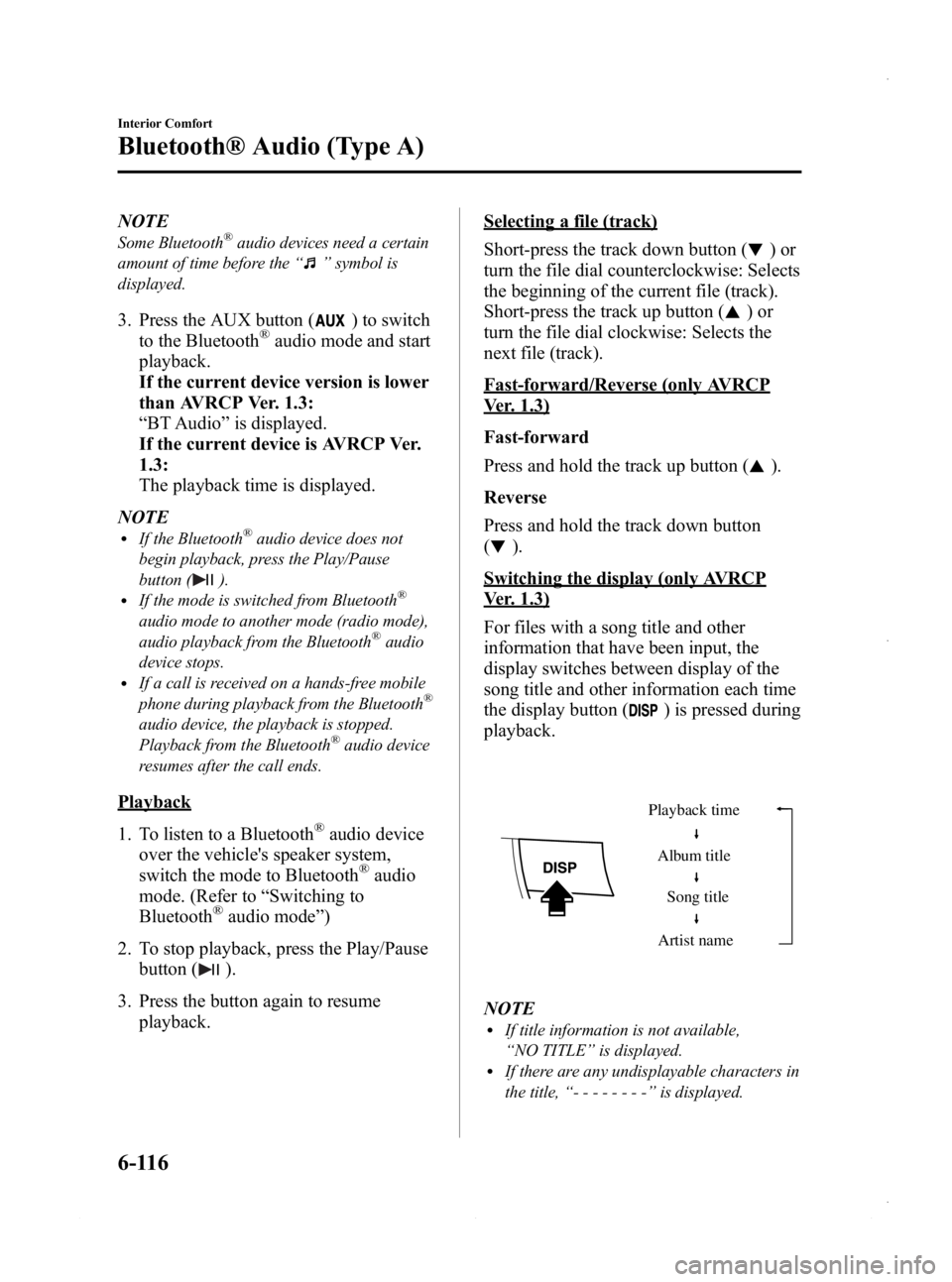
Switching the display (only AVRCP
Ver. 1.3)
For files with a song title and other
information that have been input, the
display switches between display of the
song title and other information each time
the display button (
) is pressed during
playback.
Album title
Song title
Artist name
Playback time
NOTElIf title information is not available,
“
NO TITLE ”is displayed.
lIf there are any undisplayable characters in
the title, “-------- ”is displayed.
6-116
Interior Comfort
Bluetooth® Audio (Type A)
Mazda3_8CV6-EA-12H_Edition3 Page356
Thursday, February 28 2013 11:29 AM
Form No.8CV6-EA-12H
Page 358 of 610
Black plate (358,1)
Bluetooth® Hands-Freeí
qWhat is Bluetooth® Hands-Free?
Bluetooth®Hands-Free Outline
By connecting a Bluetooth
®equipped
device (Mobile phone) to the hands-free
unit equipped on the vehicle, making and
receiving calls is possible using the talk
button, pick-up button and hang-up button
located on the steering wheel, and saying
the voice commands.
WARNING
Perform phonebook registration related
operations while the vehicle is parked: Performing phonebook registration
while driving the vehicle could be a
distraction to your driving and result
in an accident. In addition, a mistake
in performing the phonebook
operation could result in the loss of
important data.
Bluetooth®equipped device (Mobile
phone)
A Bluetooth
®equipped device (Mobile
phone) communicates with the hands-free
unit equipped on the vehicle using radio
transmission (Bluetooth
®).
For example, if the device (Mobile phone)
is placed in a coat pocket, the phone calls
can be made through your mobile service
without taking out and handling the
device (Mobile phone).
CAUTION
The types of devices (Mobile phone)
which can be connected to the
hands-free unit are limited.
Therefore, before purchasing or
changing your device (Mobile phone)
model, consult Mazda Bluetooth
®
Hands-Free Customer Service or visit
www.MazdaUSA.com/bluetooth for a
complete list of compatible phones.
Devices (Mobile phone) which can be
connected to the hands-free system
need to be compliant with
Bluetooth
®specifications and the
appropriate profile. However, even
among these Bluetooth
®devices
(Mobile phone) are some which will
not connect with your Mazda or will
have limited function. Therefore,
consult Mazda Bluetooth
®Hands-
Free Customer Service for
information regarding device (Mobile
phone) compatibility:
Ø U.S.A.
Phone: 800-430-0153
Web: www.MazdaUSA.com/
bluetooth
Ø Canada
Phone: 800-430-0153
Web: www.mazdahandsfree.ca
Ø Mexico
Center of Attention to Client (CAC)
Phone: 01-800-01-MAZDA
Web: www.mazdamexico.com.mx
Applicable Bluetooth
®specification
Ver. 2.0 or higher
Response profile
lHFP (Hands Free Profile) Ver. 1.5lDUN (Dial-up Networking Profile)
Ver. 1.1
lPBAP (Phone Book Access Profile)
Ver. 1.0
6-118
Interior Comfort
íSome models.
Bluetooth® Hands-Free (Type A)
Mazda3_8CV6-EA-12H_Edition3 Page358
Thursday, February 28 2013 11:29 AM
Form No.8CV6-EA-12H
Page 359 of 610
Black plate (359,1)
lA2DP (Advanced Audio Distribution
Profile) Ver. 1.0
lOPP (Object Push Profile) Ver. 1.1
NOTE
lThe Bluetooth®Hands-Free system is
operable several seconds after the ignition
is switched to ACC or ON (requires less
than 15 seconds).
lIf the ignition is switched off during a
hands-free call, the line is transferred to the
device (Mobile phone) automatically.
lIf the device (Mobile phone) is in a location
where radio reception is difficult such as a
metal container or in the trunk, the call may
not be connected using Bluetooth
®.If
communication is not possible, change the
location of the device (Mobile phone).
q Component Parts
Bluetooth®Hands-Free consists of the
following items:
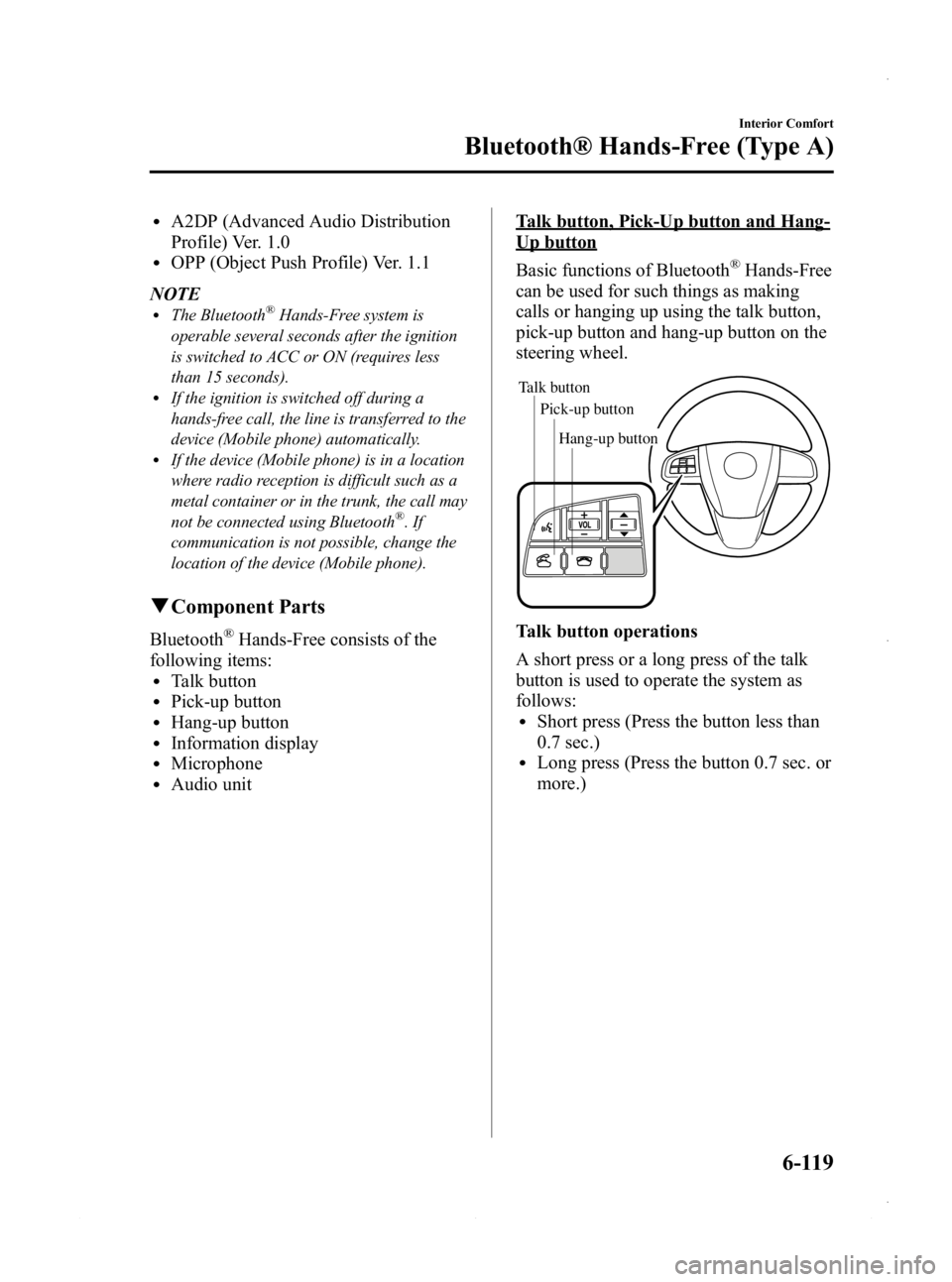
lTalk buttonlPick-up buttonlHang-up buttonlInformation displaylMicrophonelAudio unit
Talk button, Pick-Up button and Hang-
Up button
Basic functions of Bluetooth
®Hands-Free
can be used for such things as making
calls or hanging up using the talk button,
pick-up button and hang-up button on the
steering wheel.
Talk button
Pick-up buttonTalk button
Hang-up button
Pick-up button
Talk button operations
A short press or a long press of the talk
button is used to operate the system as
follows:
lShort press (Press the button less than
0.7 sec.)
lLong press (Press the button 0.7 sec. or
more.)
Interior Comfort
Bluetooth® Hands-Free (Type A)
6-119
Mazda3_8CV6-EA-12H_Edition3 Page359
Thursday, February 28 2013 11:29 AM
Form No.8CV6-EA-12H
Page 379 of 610
Black plate (379,1)
NOTElThe applicable phrase appears in the
display.
lAfter user voice registration is completed,
voice guidance“Speaker enrollment is
complete, returning to main menu ”is
announced.
Voice recognition learning on/off
1. Press the pick-up button or talk button with a short press.
2. Say: [Beep] “Voice training ”
3. Prompt: “Enrollment is enabled/
disabled. Would you like to disable/
enable or retrain? ”
4. Say: [Beep] “Disable ”or “Enable ”
5. When “Disable ”is spoken, the voice
recognition learning is turned off.
When “Enable ”is spoken, the voice
recognition learning is turned on.
6. Prompt: “Speaker Enrollment is
disabled/enabled, returning to main
menu. ”
When Bluetooth® Hands-
Free Cannot be Used
Bluetooth®Hands-Free cannot be used
under the following conditions:
lThe device is outside of the
communication area.
lThe device has a malfunction.lThe device is not connected to the
hands-free unit equipped on the
vehicle.
lThe device's battery is weak.lThe device is turned off.lThe device is placed where radio
reception is difficult.
lThe ignition is switched off.
Interior Comfort
Bluetooth® Hands-Free (Type A)
6-139
Mazda3_8CV6-EA-12H_Edition3 Page379
Thursday, February 28 2013 11:29 AM
Form No.8CV6-EA-12H
Page 380 of 610

Black plate (380,1)
Safety Certification
FCC ID: CB2MBLUEC09 IC:279B-
MBLUEC09
This device complies with Part 15 of the
FCC Rules and with RSS-210 of Industry
Canada. Operation is subject to the
following two conditions:
(1) This device may not cause harmfulinterference, and
(2) This device must accept any interference received, including
interference that may cause undesired
operation.
WARNING
Changes or modifications not
expressively approved by the party
responsible for compliance could void
the user's authority to operate the
equipment.
The term “IC: ”before the radio
certification number only signifies that
Industry Canada technical specifications
were met.
The antenna used for this transmitter must
not be co-located or operating in
conjunction with any other antenna or
transmitter. End-users and installers must
be provided with installation instructions
and transmitter operating conditions for
satisfying RF exposure compliance.
Mazda Bluetooth® Hands-
Free Customer Service
lU.S.A.
Phone: 800-430-0153 (Toll-free)
www.MazdaUSA.com/bluetooth
lCanada
Phone: 800-430-0153 (Toll-free)
www.mazdahandsfree.ca
lMexico
Center of Attention to Client (CAC)
Phone: 01-800-01-MAZDA (Toll-free)
Web: www.mazdamexico.com.mx
6-140
Interior Comfort
Bluetooth® Hands-Free (Type A)
Mazda3_8CV6-EA-12H_Edition3 Page380
Thursday, February 28 2013 11:29 AM
Form No.8CV6-EA-12H
Page 381 of 610
Black plate (381,1)
Bluetooth®í
Bluetooth®Hands-Free outline
When a Bluetooth
®device (mobile phone) is connected to the vehicle's Hands-Free unit
via radio wave transmission, a call can be made or received by pressing the talk button,
pick-up button, hang-up button, or voice command on the steering wheel, or by operating
the panel. For example, even if a device (mobile phone) is in your coat pocket, a call can
be made without taking the device (mobile phone) out and operating it directly.
Bluetooth®audio outline
When a portable audio unit equipped with the Bluetooth
®communication function is
programmed to the Bluetooth®unit, you can listen to music recorded on the programmed
portable audio device from the vehicle's speakers. It is not necessary to connect the
portable audio device to the vehicle's external input terminal. After programming, operate
the vehicle audio control panel to play/stop the audio.
Applicable Bluetooth
®specification
Ver. 2.0 or higher
Response profile
lHFP (Hands-Free Profile) Ver. 1.5lDUN (Dial-up Networking Profile) Ver. 1.1lPBAP (Phone Book Access Profile) Ver. 1.0lOPP (Object Push Profile) Ver. 1.1lMAP (Message Access Profile) Ver. 1.0
Interior Comfort
Bluetooth® (Type B)
6-141íSome models.
Mazda3_8CV6-EA-12H_Edition3 Page381
Thursday, February 28 2013 11:29 AM
Form No.8CV6-EA-12H
Page 394 of 610
Black plate (394,1)
3. To set, touch theon-screen button
or the
on-screen button.
4. Touch the
on screen button.
NOTE
The following operations are possible even
when the Don't Disturb Me function is on.
lDownloading messageslDownloading phone bookslDownloading the incoming/outgoing call
record
lSending messages
q Audio Operation Using Voice
Recognition
Audio on/off, audio mode switching, and
audio operations can be done using voice
recognition.
NOTE
(When playing a USB or iPod)
When a track is selected using voice
recognition, the track list is set to VR Playlist.
Starting the audio
The audio can be started using voice
recognition.
1. Press the talk button.
2. Prompt: “Ready ”
3. Say: [Beep] “Turn on audio ”
4. Power to the audio is turned on.
Turning off the audio
1. Press the talk button.
2. Prompt: “Ready ”
3. Say: [Beep] “Change mode ” 4.
Prompt: “Available audio modes are:
AM, FM, FM1, FM2, Sirius, Sirius1,
Sirius2, Sirius3, USB, iPod,
Bluetooth
®audio, Pandora®, CD,
AUX, Turn off audio ”
5. Say: [Beep] “Turn off audio ”
6. Power to the audio is turned off.
Switching modes
1. Press the talk button.
2. Prompt: “Ready ”
3. Say: [Beep] “Change mode ”
4. Prompt: “Available audio modes are:
AM, FM, FM1, FM2, Sirius, Sirius1,
Sirius2, Sirius3, USB, iPod,
Bluetooth
®audio, Pandora®, CD,
AUX, Turn off audio ”
5. Say: [Beep] “XXX (Ex. “AM ”) (audio
source) ”
6. The audio source is switched.
NOTE
CD, SIRIUS digital satellite radio, USB, iPod,
BT audio, and Pandora®modes cannot be
selected in the following cases:
lSIRIUS digital satellite radio unit, USB
device, iPod, BT audio, or Pandora®unit is
not equipped on the audio system.
lCD has not been inserted.
The AUX mode is locked out unless you
connect a commercially available portable
audio unit (such as an MP3 player) to the
auxiliary jack. Connect a portable audio unit
or similar product on the market to the
auxiliary jack to listen to music or audio over
the vehicle's speakers.
6-154
Interior Comfort
Bluetooth® (Type B)
Mazda3_8CV6-EA-12H_Edition3 Page394
Thursday, February 28 2013 11:30 AM
Form No.8CV6-EA-12H
Page 397 of 610
Black plate (397,1)
8. The name spoken will be searched forin the USB device or iPod.
If a contact is matched, go to Step 10.
If multiple contacts are matched, go to
Step 9.
9. Prompt:
“Would you like to play XXXXX...
(Choice 1)? ”
(Genre you would like to play)
Say: [Beep] “Yes. ”Then go to Step 10.
(Genre you do not want to play)
Say: [Beep] “No. ”Then go to Step 9.
(Maximum 3 times)
10. Tracks from the selected genre are played.
Scan
(When playing a Radio, Sirius satellite
radio, CD, or BT audio (AVRCP1.4))
The scan function for the radio, Sirius
satellite radio, CD and BT audio
(AVRCP1.4) can be launched using voice
recognition.
Refer to Operating the Radio on page
6-68.
Refer to Operating the Satellite Radio on
page 6-72.
Refer to Operating the Compact Disc
(CD) Player on page 6-80.
Refer to How to Use the Bluetooth®
Audio System on page 6-166.
1. Press the talk button.
2.Prompt: “Ready ”
3. Say: [Beep] “Scan (or Scan Off)”
4. Scan is performed or stopped.
Mute
Muting of the audio can be done using
voice recognition.
1. Press the talk button. 2.
Prompt: “Ready ”
3. Say: [Beep] “Mute (or Mute Off) ”
4. Mute is performed or stopped.
Track search
(When playing a CD, USB, iPod, BT
audio (AVRCP1.0/1.3/1.4))
The track up/down function can be run
using voice recognition.
Refer to Operating the Compact Disc
(CD) Player on page 6-80.
Refer to How to use USB mode (Type B)
on page 6-96.
Refer to How to use iPod mode (Type B)
on page 6-104.
Refer to How to Use the Bluetooth®
Audio System on page 6-166.
Track up
1. Press the talk button.
2. Prompt: “Ready ”
3. Say: [Beep] “Next track ”
4. The next track is played.
Track down
1. Press the talk button.
2. Prompt: “Ready ”
3. Say: [Beep] “Previous track ”
4. The previous track is played.
Folder search
(When playing BT audio (AVRCP1.4))
The folder up/down function can be run
using voice recognition.
Refer to How to Use the Bluetooth®
Audio System on page 6-166.
Folder up
1. Press the talk button.
Interior Comfort
Bluetooth® (Type B)
6-157
Mazda3_8CV6-EA-12H_Edition3 Page397
Thursday, February 28 2013 11:30 AM
Form No.8CV6-EA-12H