radio MAZDA MODEL 3 4-DOOR 2013 Workshop Manual
[x] Cancel search | Manufacturer: MAZDA, Model Year: 2013, Model line: MODEL 3 4-DOOR, Model: MAZDA MODEL 3 4-DOOR 2013Pages: 610, PDF Size: 7.05 MB
Page 399 of 610
![MAZDA MODEL 3 4-DOOR 2013 Workshop Manual Black plate (399,1)
Refer to How to Use the Bluetooth®
Audio System on page 6-166.
(When playing a CD)
1. Press the talk button.
2.Prompt: “Ready ”
3. Say: [Beep] “Shuffle (or Shuffle Off)”
4](/img/28/41005/w960_41005-398.png "MAZDA MODEL 3 4-DOOR 2013 Workshop Manual Black plate (399,1)
Refer to How to Use the Bluetooth®
Audio System on page 6-166.
(When playing a CD)
1. Press the talk button.
2.Prompt: “Ready ”
3. Say: [Beep] “Shuffle (or Shuffle Off)”
4")
Black plate (399,1)
Refer to How to Use the Bluetooth®
Audio System on page 6-166.
(When playing a CD)
1. Press the talk button.
2.Prompt: “Ready ”
3. Say: [Beep] “Shuffle (or Shuffle Off)”
4. Shuffle is performed or stopped.
(When playing BT audio)
1. Press the talk button.
2. Prompt: “Ready ”
3. Say: [Beep] “Shuffle ”
4. Prompt:
“Available shuffle options are Folder ,
All, and Off ”
5. Say: [Beep]
“ XXXXX (Folder, All or Off) ”
6. If “Folder ”is spoken, folder shuffle is
performed.
If “All ”is spoken, device shuffle is
performed.
If “Off ”is spoken, shuffle is stopped.
Switching between display/non-display
of radio text information
(When playing FM Radio)
Switching between display/non-display of
radio text information is possible using
voice recognition.
Refer to Operating the Radio on page
6-68.
1. Press the talk button.
2. Prompt: “Ready ”
3. Say: [Beep]
“ Radio text (or Radio text OFF) ”4. Radio text information is displayed/not
displayed.
Selection by specifying frequency
(When playing the Radio)
Selection by specifying the frequency is
possible using voice recognition.
Refer to Operating the Radio on page
6-68.
1. Press the talk button.
2.Prompt: “Ready ”
3. Say: [Beep] “Frequency ”
4. Prompt:
“What frequency would you like? ”
5. Say: [Beep]
“ XXX (Ex. 610) (Frequency) ”
6. The specified frequency is selected.
Seek tuning function
(When playing the Radio)
Seek tuning can be run using voice
recognition.
Refer to Operating the Radio on page
6-68.
Seek up
1. Press the talk button.
2. Prompt: “Ready ”
3. Say: [Beep] “Seek up ”
4. Seek up is performed.
Seek down
1. Press the talk button.
2. Prompt: “Ready ”
3. Say: [Beep] “Seek down”
4. Seek down is performed.
Interior Comfort
Bluetooth® (Type B)
6-159
Mazda3_8CV6-EA-12H_Edition3 Page399
Thursday, February 28 2013 11:30 AM
Form No.8CV6-EA-12H
Page 400 of 610
Black plate (400,1)
Auto memory seek function
(When playing the Radio)
The auto memory seek function can be
run using voice recognition.
Refer to Operating the Radio on page
6-68.
1. Press the talk button.
2.Prompt: “Ready ”
3. Say: [Beep] “Auto memory seek ”
4. Auto memory seek is performed.
Auto memory preset function
(When playing the Radio)
Auto memory preset can be selected using
voice recognition.
Refer to Operating the Radio on page
6-68.
1. Press the talk button.
2. Prompt: “Ready ”
3. Say: [Beep] “Auto memory preset ”
4. Prompt: “Number, please ”
5. Say: [Beep]
“ X (Ex. 3) (Preset number) ”
6. The specified preset is selected.
Preset switching
(When playing the Radio, Sirius
satellite radio)
Radio stations programmed to the preset
can be selected using voice recognition.
Refer to Operating the Radio on page
6-68.
Refer to Operating the Satellite Radio on
page 6-72.
Specify the preset number and select
1. Press the talk button.
2. Prompt: “Ready ” 3.
Say: [Beep] “Preset ”
4. Prompt:
“Say a preset number between 1 and 6 ”
5. Say: [Beep]
“ X (Ex. 3) (Preset number) ”
6. The specified preset is selected.
Next preset selection
(When playing the Radio)
1. Press the talk button.
2. Prompt: “Ready ”
3. Say: [Beep] “Next preset ”
4. The next preset is selected.
Previous preset selection
(When playing the radio)
1. Press the talk button.
2. Prompt: “Ready ”
3. Say: [Beep] “Previous preset ”
4. The previous preset is selected.
Switching channels
(When playing a Sirius satellite radio)
Selection of the channel to be received is
possible using voice recognition.
Refer to Operating the Satellite Radio on
page 6-72.
Select by specifying the channel
number
1. Press the talk button.
2. Prompt: “Ready ”
3. Say: [Beep] “Channel”
4. Prompt:
“What channel number would you
like? ”
6-160
Interior Comfort
Bluetooth® (Type B)
Mazda3_8CV6-EA-12H_Edition3 Page400
Thursday, February 28 2013 11:30 AM
Form No.8CV6-EA-12H
Page 401 of 610
![MAZDA MODEL 3 4-DOOR 2013 Workshop Manual Black plate (401,1)
5.Say: [Beep]
“ XXX (Ex. 610) (Channel number) ”
6. The specified channel is selected.
Selecting the next channel
1. Press the talk button.
2. Prompt: “Ready ”
3. Say: [Bee](/img/28/41005/w960_41005-400.png "MAZDA MODEL 3 4-DOOR 2013 Workshop Manual Black plate (401,1)
5.Say: [Beep]
“ XXX (Ex. 610) (Channel number) ”
6. The specified channel is selected.
Selecting the next channel
1. Press the talk button.
2. Prompt: “Ready ”
3. Say: [Bee")
Black plate (401,1)
5.Say: [Beep]
“ XXX (Ex. 610) (Channel number) ”
6. The specified channel is selected.
Selecting the next channel
1. Press the talk button.
2. Prompt: “Ready ”
3. Say: [Beep] “Next channel ”
4. The next channel is selected.
Selecting the previous channel
1. Press the talk button.
2. Prompt: “Ready ”
3. Say: [Beep] “Previous channel ”
4. The previous channel is selected.
Skip track function
(When playing Pandora
®)
The skip track function can be run using
voice recognition.
Refer to How to Use Pandora® on page
6-168.
1. Press the talk button.
2. Prompt: “Ready ”
3. Say: [Beep] “Skip Track ”
4. The next track is skipped.
Thumbs up function
(When playing Pandora
®)
The thumbs up function can be run using
voice recognition.
Refer to How to Use Pandora® on page
6-168.
1. Press the talk button.
2. Prompt: “Ready ”
3. Say: [Beep] “Thumbs Up ” 4. This tells Pandora
®that you like this
track and helps to bring in more tracks
like it to your station.
Thumbs down function
(When playing Pandora
®)
The thumbs down function can be run
using voice recognition.
Refer to How to Use Pandora® on page
6-168.
1. Press the talk button.
2. Prompt: “Ready ”
3. Say: [Beep] “Thumbs Down ”
4. This tells Pandora
®not to play this
track.
Pandora®radio station selection
(When playing Pandora
®)
A Pandora®radio station can be selected
using voice recognition.
Refer to How to Use Pandora® on page
6-168.
1. Press the talk button.
2. Prompt: “Ready ”
3. Say: [Beep] “Station ”
4. Prompt: “Which Pandora
®station you
would like? ”
5. Say: [Beep]
“ XXXXX... (Ex. “90 ’s classic ”)
(Station name) ”
6. The system searches for the announced radio station.
If a contact is matched, go to Step 8.
If multiple contacts are matched, go to
Step 7.
Interior Comfort
Bluetooth® (Type B)
6-161
Mazda3_8CV6-EA-12H_Edition3 Page401
Thursday, February 28 2013 11:30 AM
Form No.8CV6-EA-12H
Page 402 of 610
![MAZDA MODEL 3 4-DOOR 2013 Workshop Manual Black plate (402,1)
7.Prompt:
“Would you like to play XXXXX...
(Choice 1)? ”
(Station you would like to play)
Say: [Beep] “Yes. ”Then go to Step 8.
(Station you do not want to play)
Say: [Beep](/img/28/41005/w960_41005-401.png "MAZDA MODEL 3 4-DOOR 2013 Workshop Manual Black plate (402,1)
7.Prompt:
“Would you like to play XXXXX...
(Choice 1)? ”
(Station you would like to play)
Say: [Beep] “Yes. ”Then go to Step 8.
(Station you do not want to play)
Say: [Beep")
Black plate (402,1)
7.Prompt:
“Would you like to play XXXXX...
(Choice 1)? ”
(Station you would like to play)
Say: [Beep] “Yes. ”Then go to Step 8.
(Station you do not want to play)
Say: [Beep] “No. ”Then go to Step 7.
(Maximum 3 times)
8. The specified radio station is selected.
Bookmark function
(When playing Pandora
®)
The bookmark function can be run using
voice recognition.
Refer to How to Use Pandora® on page
6-168.
1. Press the talk button.
2. Prompt: “Ready ”
3. Say: [Beep] “Bookmark ”
4. Prompt:
“Would you like to bookmark Track, or
artist? ”
5. Say: [Beep] “Track (or Artist) ”
6. Track or artist is bookmarked.
6-162
Interior Comfort
Bluetooth® (Type B)
Mazda3_8CV6-EA-12H_Edition3 Page402
Thursday, February 28 2013 11:30 AM
Form No.8CV6-EA-12H
Page 407 of 610
Black plate (407,1)
3. Press the audio button () and
then touch the
on-screen tab to
switch to the Bluetooth®audio mode
and start playback.
NOTE
lIf the Bluetooth®audio device does not
begin playback, press the
on-screen
button.
lIf the mode is switched from Bluetooth®
audio mode to another mode (radio mode),
audio playback from the Bluetooth®audio
device stops.
Playback
1. To listen to a Bluetooth
®audio device
over the vehicle's speaker system,
switch the mode to Bluetooth
®audio
mode. (Refer to “Switching to
Bluetooth
®audio mode ”)
2. To stop playback, press the
on-
screen button.
3. Press the button again to resume playback.
Selecting a file (track)
Selects the next file (track)
Short-press the track up button (
)or
touch the
on-screen button.
Selects the beginning of the current file
(track)
Short-press the track down button (
)or
touch the
on-screen button.
Fast-forward/Reverse (AVRCP Ver. 1.3
or higher)
Fast-forward
Press and hold the fast-forward button
(
) or touch and hold theon-
screen button. Reverse
Press and hold the reverse down button
(
) or touch and hold theon-
screen button.
Folder search (only AVRCP Ver. 1.4)
To change to the previous folder, touch
the
on-screen button, or touch the
on-screen button to advance to the
next folder.
Music scan (only AVRCP Ver. 1.4)
This function scans the titles in a folder
currently being played and plays 10
seconds of each song to aid you in finding
a song you want to listen to.
1. Touch the
on-screen button
during playback to play 10 seconds of
each subsequent track starting from the
next song.
2. Touch the
on-screen button again
during playback of the song which you
want to listen to continue the playback
from that point.
Repeat playback (only AVRCP Ver. 1.4)
Track repeat
Touch the
on-screen button to play
the song during playback repeatedly. “
”
is displayed during playback.
Touch the
on-screen button two
times while “
”is displayed to cancel.
Folder repeat
Touch the
on-screen button two
times to play the songs in the folder
repeatedly. “
”is displayed during
playback.
Touch the
on-screen button while
“
” is displayed to cancel.
Interior Comfort
Bluetooth® (Type B)
6-167
Mazda3_8CV6-EA-12H_Edition3 Page407
Thursday, February 28 2013 11:30 AM
Form No.8CV6-EA-12H
Page 408 of 610
Black plate (408,1)
Shuffle playback (only AVRCP Ver. 1.4)
Folder shuffle
Touch the
on-screen button during
playback to play the songs in the folder
shuffle. “
”is displayed during
playback.
Touch the
on-screen button two
times while “
”is displayed to cancel.
Device shuffle
Touch the
on-screen button two
times during playback to play the songs in
the device shuffle. “
”is displayed
during playback.
Touch the
on-screen button while
“
” is displayed to cancel.
Display scroll
If a whole title cannot be displayed at one
time, touch the
on-screen button on
the right side of the title. When the last
character is displayed, touch the
on-
screen button to display the first character
of the title.
q Bluetooth® audio device
information display
If a Bluetooth®audio device is connected,
the following information is displayed in
the display.
AVRCP
Ver. lower than 1.3 AVRCP
Ver. 1.3 AVRCP
Ver. 1.4 or higher
Device name X X X
Remaining
battery charge
of device ―
XX
Title ―XX
Artist name ―XX
Album name ―XX
File number ―XX
Playback time ―XX
Folder number ―― X
NOTE
Some information may not display depending
on the device, and if the information cannot be
displayed,“No Song Name ”is indicated.
q How to Use Pandora®
What is Pandora®?
Pandora
®is free personalized internet
radio. Simply enter a favorite artist, track,
genre, and Pandora
®will create a
personalized station that plays their music
and more like it. Rate songs by giving
thumbs-up and thumbs-down feedback to
further refine your station, discover new
music and help Pandora
®play only music
you love.
* Pandora
®, the Pandora®logo, and the
Pandora®trade dress are trademarks or
registered trademarks of Pandora
Media, Inc., used with permission.
NOTE
To operate Pandora®from your Bluetooth®
device, perform the following in advance:lCreate Pandora®account on the web.lCreate Pandora®station using Pandora®
application.lInstall Pandora®application on your
device.
Playback
1. To listen to Pandora
®, touch the
on-screen tab.
2. To stop playback, press the
on-
screen button.
3. Press the button again to resume playback.
Skip song
Press the
on-screen button.
6-168
Interior Comfort
Bluetooth® (Type B)
Mazda3_8CV6-EA-12H_Edition3 Page408
Thursday, February 28 2013 11:30 AM
Form No.8CV6-EA-12H
Page 409 of 610
Black plate (409,1)
NOTElThe skip function may not be available
depending on the device.
lThe number of skips is limited by
Pandora®.
Selection from station list
Selection can be made from a
programmed radio station list.
1. Press the
on-screen button.
2. Select the desired radio station.
NOTE
Whenis selected, songs randomly
selected from the radio station list are played.
Thumbs up function
Press the
on-screen button to tell
Pandora®“ you like this track ”and it helps
to bring in more tracks like it to your
station.
Thumbs down function
Press the
on-screen button to tell
Pandora®not to play this track.
NOTE
If theon-screen button is touched when the
skip song function is running, the next song is
skipped.
Bookmarking
You can bookmark song or artist to check
out later on the Web.
Bookmark the song name
Press the
on-screen button on the right
side of the song name.
Bookmark the artist name
Press the
on-screen button on the right
side of the artist name.
Display scroll
If a whole title cannot be displayed at one
time, touch the
on-screen button on
the right side of the title.
When the last character is displayed,
touch the
on-screen button to display
the first character of the title.
Interior Comfort
Bluetooth® (Type B)
6-169
Mazda3_8CV6-EA-12H_Edition3 Page409
Thursday, February 28 2013 11:30 AM
Form No.8CV6-EA-12H
Page 410 of 610
Black plate (410,1)
Troubleshooting
Bluetooth®does not operate under the following conditions. Check whether the following
conditions apply to your Bluetooth®device:lThe device is not being operated correctly.lThe device is not connected to the Bluetooth®unit equipped on the vehicle.lThe device's battery is weak.lA device which interferes with radio wave reception has been placed in the vehicle.lThe ignition switch has been turned off.
If none of the above conditions apply, refer to the following to see if any of the problem
symptoms correspond to your device.
If the problem cannot be resolved, consult an Authorized Mazda Dealer or Mazda
Bluetooth
®Hands-Free Customer Service.
Mazda Bluetooth®Hands-Free Customer Service
If you have any problems with Bluetooth
®, contact with our toll-free customer service
center.
lU.S.A.
Phone: 800-430-0153 (Toll-free)
Web: www.MazdaUSA.com/bluetooth
lCanada
Phone: 800-430-0153 (Toll-free)
Web: www.mazdahandsfree.ca
6-170
Interior Comfort
Bluetooth® (Type B)
Mazda3_8CV6-EA-12H_Edition3 Page410
Thursday, February 28 2013 11:30 AM
Form No.8CV6-EA-12H
Page 411 of 610
Black plate (411,1)
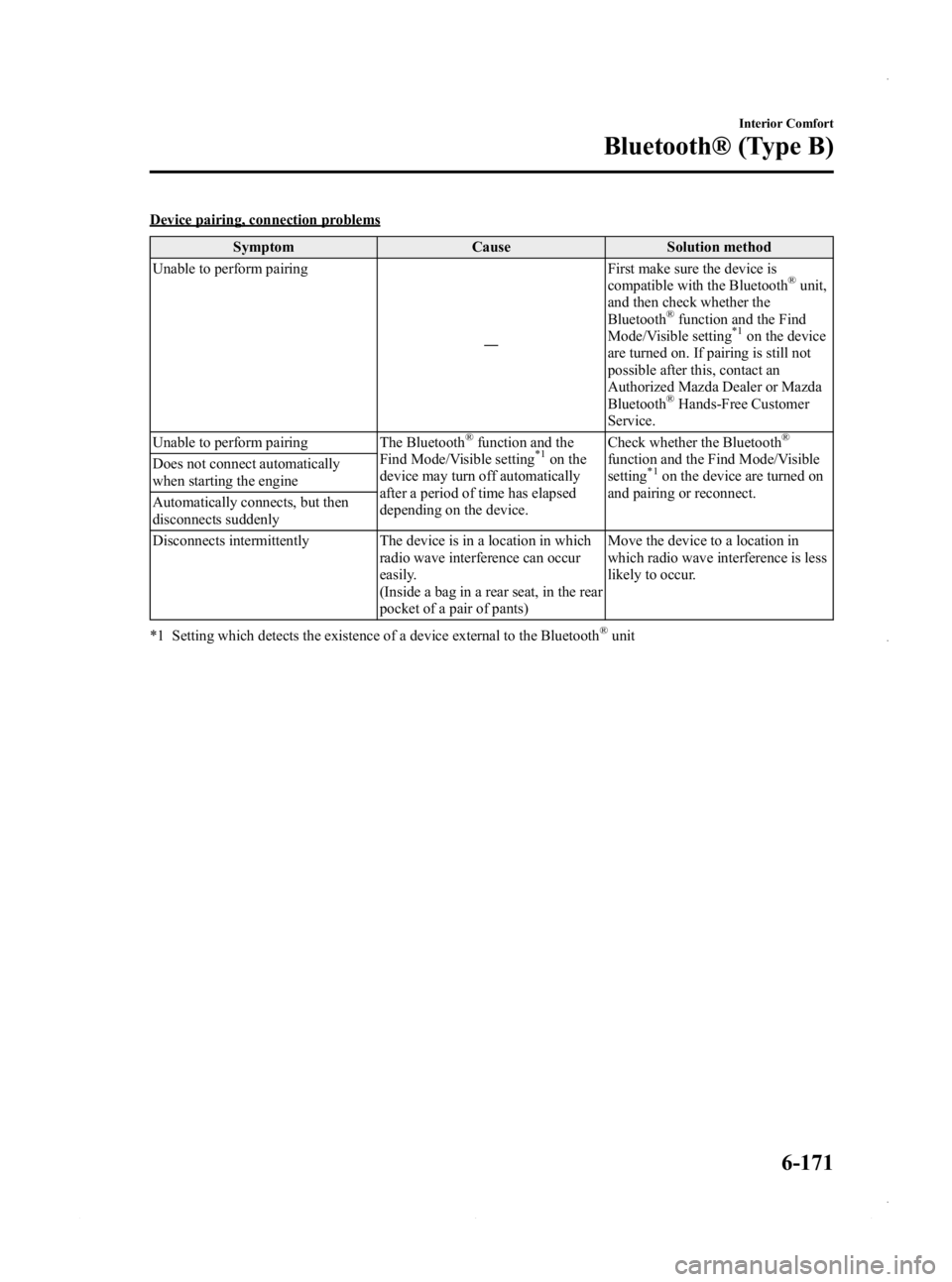
Device pairing, connection problemsSymptom Cause Solution method
Unable to perform pairing
―First make sure the device is
compatible with the Bluetooth
®unit,
and then check whether the
Bluetooth
®function and the Find
Mode/Visible setting*1on the device
are turned on. If pairing is still not
possible after this, contact an
Authorized Mazda Dealer or Mazda
Bluetooth
®Hands-Free Customer
Service.
Unable to perform pairing The Bluetooth
®function and the
Find Mode/Visible setting*1on the
device may turn off automatically
after a period of time has elapsed
depending on the device. Check whether the Bluetooth
®
function and the Find Mode/Visible
setting*1on the device are turned on
and pairing or reconnect.
Does not connect automatically
when starting the engine
Automatically connects, but then
disconnects suddenly
Disconnects intermittently The device is in a location in which
radio wave interference can occur
easily.
(Inside a bag in a rear seat, in the rear
pocket of a pair of pants) Move the device to a location in
which radio wave interference is less
likely to occur.
*1 Setting which detects the existence of a device external to the Bluetooth
®unit
Interior Comfort
Bluetooth® (Type B)
6-171
Mazda3_8CV6-EA-12H_Edition3 Page411
Thursday, February 28 2013 11:30 AM
Form No.8CV6-EA-12H
Page 414 of 610
Black plate (414,1)
Safety Certification
FCC
FCC: CB2MAZGEN6HFT
NOTE
This device complies with Part 15 of the FCC Rules. Operation is subject to the following two
conditions:
(1) This device may not cause harmful interference, and
(2) This device must accept any interference received, including interference that may causeundesired operation.
WARNING
Changes or modifications made to this equipment not expressly approved by the
manufacturer may void the FCC authorization to operate this equipment.
NOTE
This equipment has been tested and found to comply with the limits for a Class B digital device,
pursuant to Part 15 of the FCC Rules. These limits are designed to provide reasonable protection
against harmful interference in a residential installation. This equipment generates, uses and can
radiate radio frequency energy and, if not installed and used in accordance with the instructions,
may cause harmful interference to radio communications. However, there is no guarantee that
interference will not occur in a particular installation. If this equipment does cause harmful
interference to radio or television reception, which can be determined by turning the equipment off
and on, the user is encouraged to try to correct the interference by one or more of the following
measures:
lReorient or relocate the receiving antenna.lIncrease the separation between the equipment and receiver.lConnect the equipment into an outlet on a circuit different from that to which the receiver is
connected.
lConsult the dealer or an experienced radio/TV technician for help.
IC
IC:279B-MAZGEN6HFT
Licence exempt
This device complies with Industry Canada licence-exempt RSS standard(s). Operation is
subject to the following two conditions:
(1) This device may not cause interference, and
(2) This device must accept any interference, including interference that may cause undesired operation of the device.
6-174
Interior Comfort
Bluetooth® (Type B)
Mazda3_8CV6-EA-12H_Edition3 Page414
Thursday, February 28 2013 11:30 AM
Form No.8CV6-EA-12H