ignition MAZDA MODEL 3 4-DOOR 2017 Owners Manual
[x] Cancel search | Manufacturer: MAZDA, Model Year: 2017, Model line: MODEL 3 4-DOOR, Model: MAZDA MODEL 3 4-DOOR 2017Pages: 612
Page 370 of 612
5–78
Interior Features
Bluetooth®
NOTE
When Call history and messages are
downloaded automatically, each automatic
download setting must be on.
Refer to Communication Settings on page
5-91.
After a device is registered, the system
automatically identifies the device. By
activating Bluetooth
® Hands-Free again, or
by activating Bluetooth® Hands-Free first
after switching the ignition from OFF to
ACC, the device connection condition is
indicated in the center display.
IMPORTANT note about pairing and
automatic reconnection:
If pairing is redone on the same
mobile phone device, first clear
“Mazda” displayed on the Bluetooth
®
setting screen of the mobile device.
When the OS of the device is updated,
the pairing information may be deleted.
If this happens, reprogram the pairing
information to the Bluetooth
® unit. Before you pair your device, make sure
that Bluetooth® is “ON”, both on your
phone and on the vehicle.
Device selection
If several devices have been paired, the
Bluetooth
® unit links the device last
paired. If you would like to link a different
paired device, it is necessary to change the
link. The order of device priority after the
link has been changed is maintained even
when the ignition is switched off. Connecting other devices
1. Select the icon on the home screen
to display the Settings screen.
2. Select the tab.
3. Select .
4. Turn the Bluetooth® setting on.
5. Select the name of the device you
would like to connect.
6. selection
Connects both devices as hands-free
and Bluetooth® audio.
selection
Connects as a hands-free device.
selection
Connects as Bluetooth® audio.
NOTE
The following functions can be used for
the Hands-free or audio.
Hands-free: Phone calls and E-mail/
SMS Audio: Bluetooth® audio, Pandora®,
Aha™, Stitcher™ radio
Disconnecting a device
1. Select the icon on the home screen
to display the Settings screen.
2. Select the tab.
3. Select .
4. Turn the Bluetooth® setting on.
5. Select the device name which is
currently connected.
6. Select .
Mazda3_8FL6-EA-16F_Edition2.indb 782016/08/10 17:38:00
Page 379 of 612
5–87
Interior Features
Bluetooth®
NOTE
If the ignition is switched off during a
hands-free call, the line is transferred
to the device (Mobile phone)
automatically.
If the DTMF code has two or more
digits or symbols, each one must be
transmitted individually.
Call Interrupt
A call can be interrupted to receive an
incoming call from a third party.
When
is selected or the pick-
up button on the steering wheel is pressed,
the current call is held and the system
switches to the new incoming call.
When
is selected, the current
call is ended and the system switches to
the new incoming call (GSM network
only).
When
is selected or the hang-up
button on the steering wheel is pressed, an
incoming call is refused.
NOTE
The function may not be available
depending on the contractual content of
the mobile device.
The function may not be operable
depending on the type of the telephone
network and the mobile device.
Receiving and Replying to
Messages (available only with
E-mail/SMS compatible phones)
SMS (Short Message Service) messages,
and E-mail received by connected devices
can be downloaded, displayed, and played
(read by the system).
Additionally, replies can also be made
to calls and messages in the received
messages.
Downloading messages
Up to 20 new messages can be
downloaded and displayed from a
connected device.
NOTE
For E-mail, 20 messages for each account
can be downloaded.
(Automatic downloading)
The “Auto Download Email” (E-mail)
or “Auto Download Text Message”
(SMS) setting must be on. A message
is downloaded automatically when the
Bluetooth
® unit is connected to the device.
Refer to Communication Settings on page
5-91.
(Manually downloading)
When the “Auto Download Email”
(E-mail) or “Auto Download Text
Message” (SMS) setting is off, the
message is downloaded using the
following procedure.
1. Select the icon on the home screen
to display the Communication screen.
2. Select or to display
the Inbox.
3. Select .
4. Download will be started from the
mobile phone.
Mazda3_8FL6-EA-16F_Edition2.indb 872016/08/10 17:38:09
Page 385 of 612
5–93
Interior Features
Bluetooth®
How to Use the Bluetooth® Audio System
Switching to Bluetooth® audio mode
To listen to music or voice audio recorded to a Bluetooth
® audio device, switch to the
Bluetooth® audio mode to operate the audio device using the audio system control p\
anel.
Any Bluetooth® audio device must be paired to the vehicle's Bluetooth® unit before it can be
used.
Refer to Bluetooth
® Preparation on page 5-77.
1. Turn on the Bluetooth® audio device's power.
2. Switch the ignition to ACC or ON.
3. Select the icon on the home screen to display the Entertainment screen.
4. When is selected, switches to the Bluetooth® audio mode to begin playback.
NOTE
If Bluetooth® audio is used after using Pandora®, Aha™ or Stitcher™ radio, the
application on the mobile device has to be closed first.
If the Bluetooth® audio device does not begin playback, select the icon. If the mode is switched fr om Bluetooth® audio mode to another mode (radio mode), audio
playback from the Bluetooth® audio device stops.
Mazda3_8FL6-EA-16F_Edition2.indb 932016/08/10 17:38:13
Page 404 of 612
5–112
Interior Features
Interior Equipment
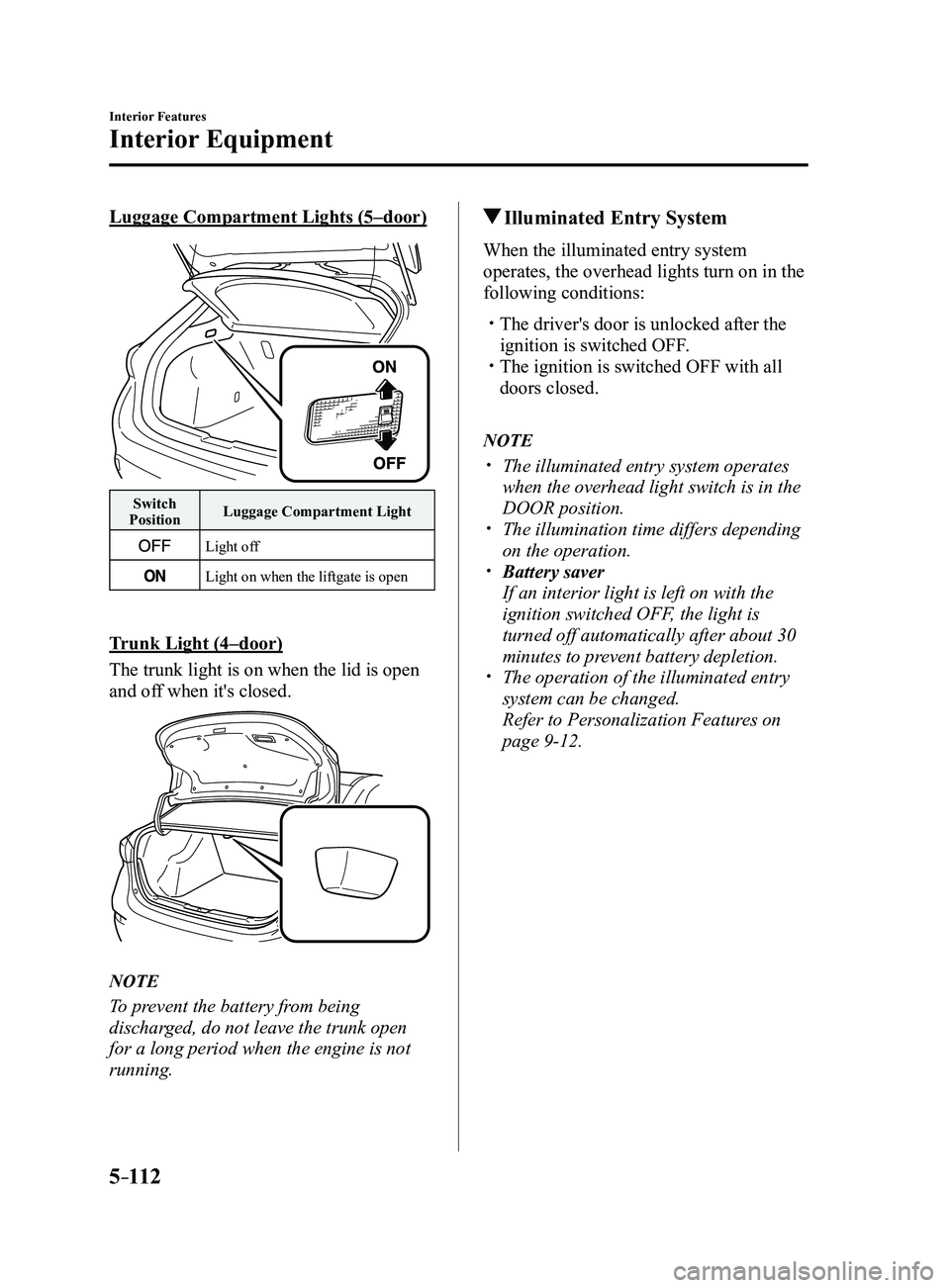
Luggage Compartment Lights (5–door)
Switch
Position Luggage Compartment Light
Light off
Light on when the liftgate is open
Trunk Light (4–door)
The trunk light is on when the lid is open
and off when it's closed.
NOTE
To prevent the battery from being
discharged, do not leave the trunk open
for a long period when the engine is not
running.
Illuminated Entry System
When the illuminated entry system
operates, the overhead lights turn on in the
following conditions:
The driver's door is unlocked after the
ignition is switched OFF. The ignition is switched OFF with all
doors closed.
NOTE
The illuminated entry system operates
when the overhead light switch is in the
DOOR position.
The illumination time differs depending
on the operation. Battery saver
If an interior light is left on with the
ignition switched OFF, the light is
turned off automatically after about 30
minutes to prevent battery depletion.
The operation of the illuminated entry
system can be changed.
Refer to Personalization Featur
es on
page 9-12.
Mazda3_8FL6-EA-16F_Edition2.indb 1122016/08/10 17:38:23
Page 405 of 612
5–113
Interior Features
Interior Equipment
*Some models.
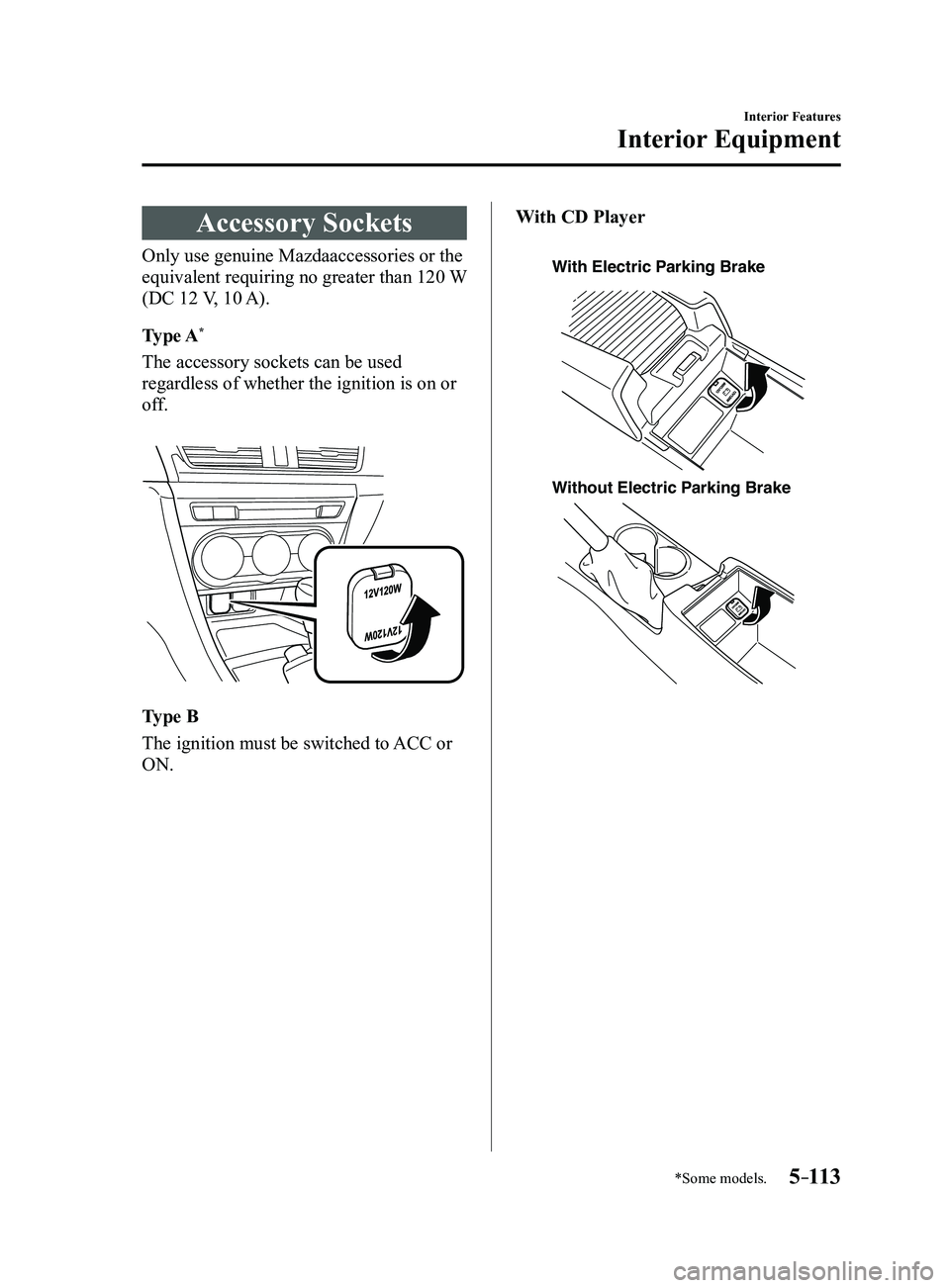
Accessory Sockets
Only use genuine Mazdaaccessories or the
equivalent requiring no greater than 120 W
(DC 12 V, 10 A).
Type A
*
The accessory sockets can be used
regardless of whether the ignition is on or
off.
Type B
The ignition must be switched to ACC or
ON.With CD Player
With Electric Parking Brake
Without Electric P
arking Brake
Mazda3_8FL6-EA-16F_Edition2.indb 1132016/08/10 17:38:24
Page 406 of 612
5–114
Interior Features
Interior Equipment
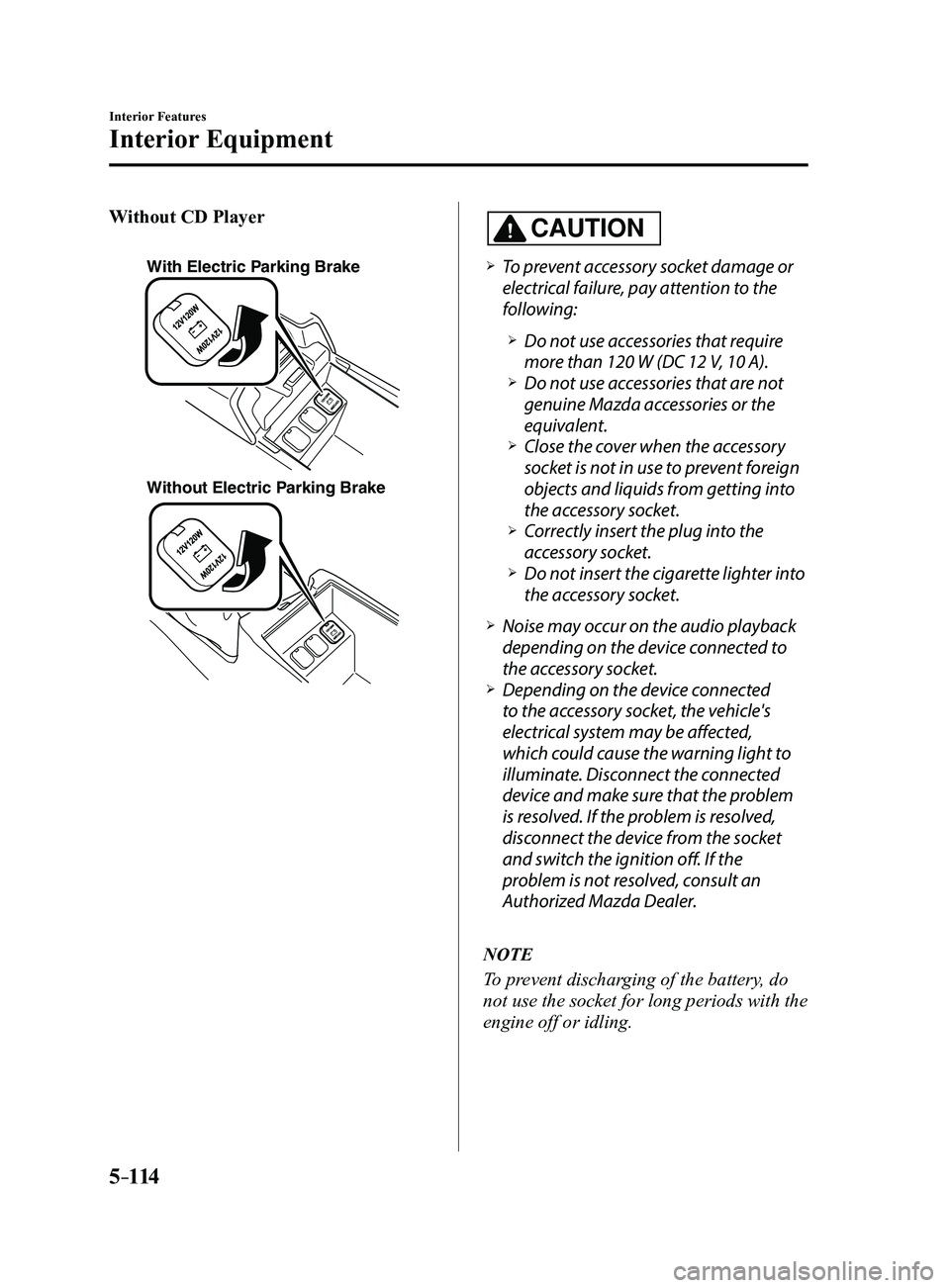
Without CD Player
With Electric Parking Brake
Without Electric Parking Brake
CAUTION
To prevent accessory socket damage or
electrical failure, pay attention to the
following:
Do not use accessories that require
more than 120 W (DC 12 V, 10 A). Do not use accessories that are not
genuine Mazda accessories or the
equivalent.
Close the cover when the accessory
socket is not in use to prevent foreign
objects and liquids from getting into
the accessory socket.
Correctly insert the plug into the
accessory socket. Do not insert the cigarette lighter into
the accessory socket.
Noise may occur on the audio playback
depending on the device connected to
the accessory socket.
Depending on the device connected
to the accessory socket, the vehicle's
electrical system may be affected,
which could cause the warning light to
illuminate. Disconnect the connected
device and make sure that the problem
is resolved. If the problem is resolved,
disconnect the device from the socket
and switch the ignition off. If the
problem is not resolved, consult an
Authorized Mazda Dealer.
NOTE
To prevent discharging of the battery, do
not use the socket for long periods with the
engine off or idling.
Mazda3_8FL6-EA-16F_Edition2.indb 1142016/08/10 17:38:24
Page 417 of 612
6–5
Maintenance and Care
Scheduled Maintenance
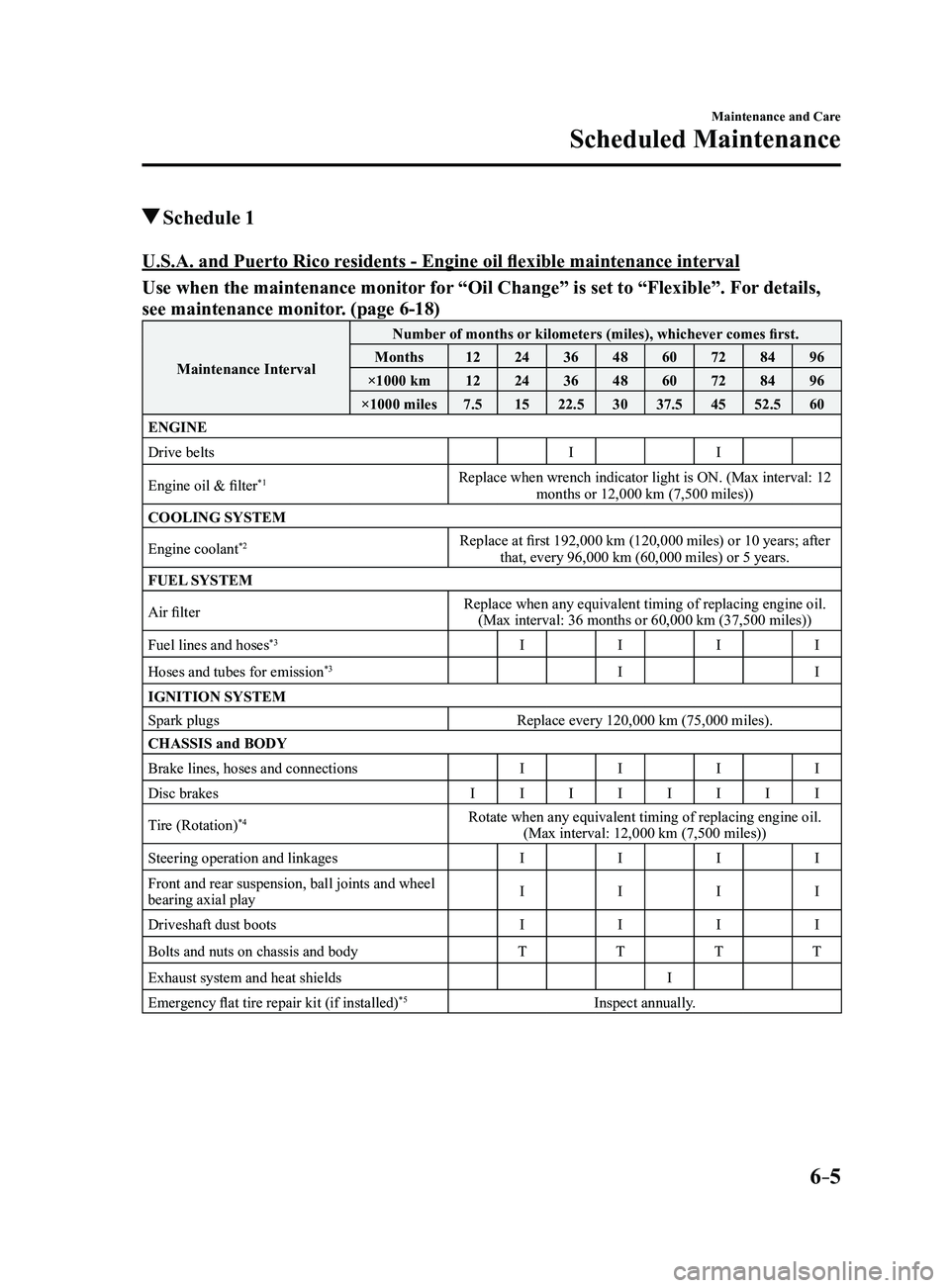
Schedule 1
U.S.A. and Puerto Rico residents - Engine oil flexible maintenance interval
Use when the maintenance monitor for “Oil Change” is set to “Flexible”. For details,
see maintenance monitor. (page
6-18)
Maintenance IntervalNumber of months or kilometers (miles), whichever comes first.
Months 1224364860728496
×1000 km 1224364860728496
×1000 miles 7.51522.5 3037.5 4552.5 60
ENGINE
Drive belts II
Engine oil & filter
*1Replace when wrench indicator light is ON. (Max interval: 12 months or 12,000 km (7,500 miles))
COOLING SYSTEM
Engine coolant
*2Replace at first 192,000 km (120,000 miles) or 10 years; after that, every 96,000 km (60,000 miles) or 5 years.
FUEL SYSTEM
Air filter Replace when any equivalent timing of replacing engine oil.
(Max interval: 36 months or 60,000 km (37,500 miles))
Fuel lines and hoses
*3I III
Hoses and tubes for emission
*3I I
IGNITION SYSTEM
Spark plugs Replace every 120,000 km (75,000 miles).
CHASSIS and BODY
Brake lines, hoses and connections IIII
Disc brakes IIIIIIII
Tire (Rotation)
*4Rotate when any equivalent timing of replacing engine oil. (Max interval: 12,000 km (7,500 miles))
Steering operation and linkages IIII
Front and rear suspension, ball joints and wheel
bearing axial play I
III
Driveshaft dust boots IIII
Bolts and nuts on chassis and body TTTT
Exhaust system and heat shields I
Emergency flat tire repair kit (if installed)
*5Inspect annually.
Mazda3_8FL6-EA-16F_Edition2.indb 52016/08/10 17:38:30
Page 419 of 612
6–7
Maintenance and Care
Scheduled Maintenance
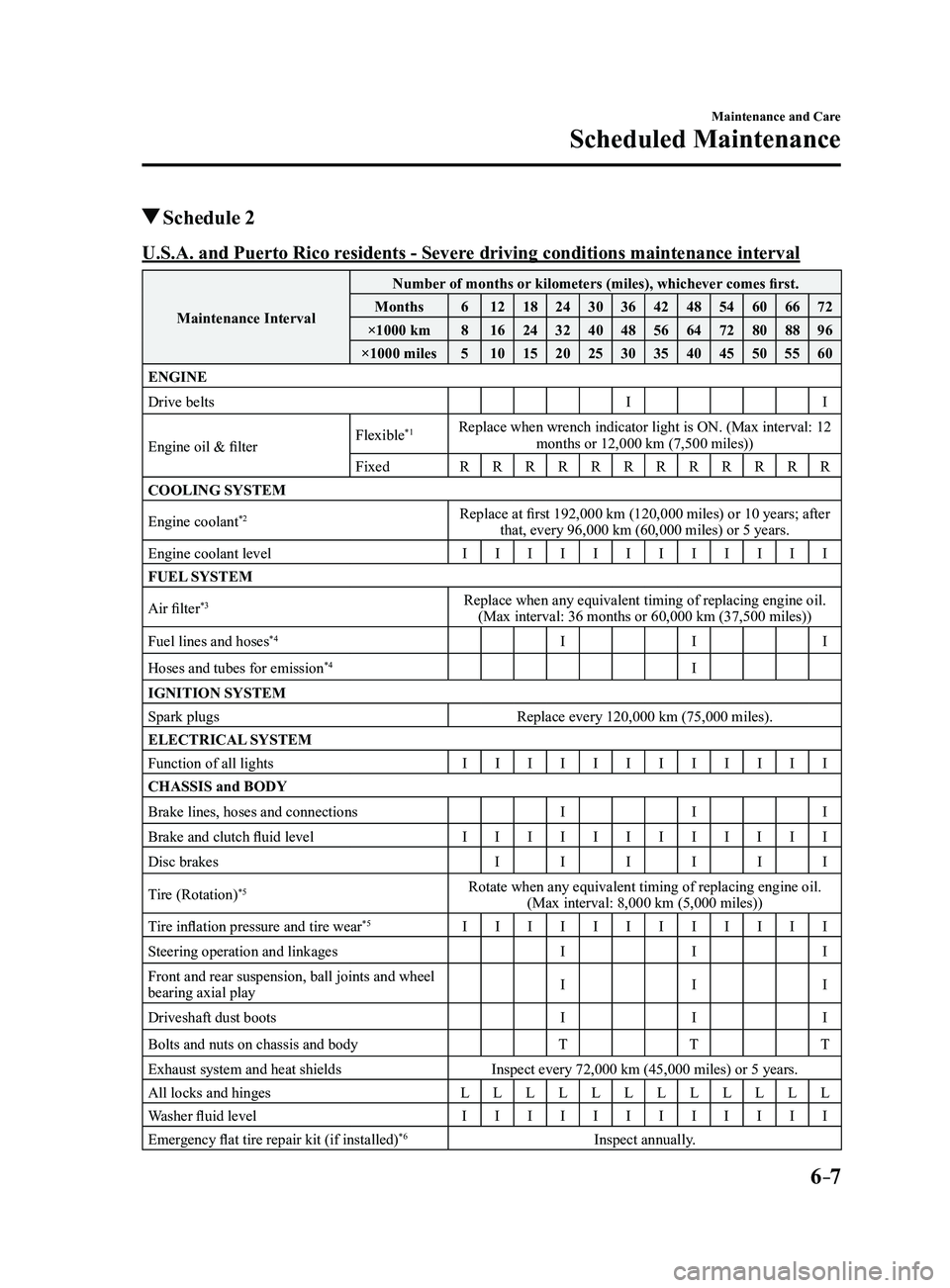
Schedule 2
U.S.A. and Puerto Rico residents - Severe driving conditions maintenance interval
Maintenance IntervalNumber of months or kilometers (miles), whichever comes first.
Months 612 18243036424854606672
×1000 km 816 24324048566472808896
×1000 miles 510 15202530354045505560
ENGINE
Drive belts II
Engine oil & filter Flexible
*1Replace when wrench indicator light is ON. (Max interval: 12
months or 12,000 km (7,500 miles))
Fixed RRRRRRRRRRRR
COOLING SYSTEM
Engine coolant
*2Replace at first 192,000 km (120,000 miles) or 10 years; after that, every 96,000 km (60,000 miles) or 5 years.
Engine coolant level IIIIIIIIIIII
FUEL SYSTEM
Air filter
*3Replace when any equivalent timing of replacing engine oil. (Max interval: 36 months or 60,000 km (37,500 miles))
Fuel lines and hoses
*4I II
Hoses and tubes for emission
*4I
IGNITION SYSTEM
Spark plugs Replace every 120,000 km (75,000 miles).
ELECTRICAL SYSTEM
Function of all lights IIIIIIIIIIII
CHASSIS and BODY
Brake lines, hoses and connections III
Brake and clutch fluid level IIIIIIIIIIII
Disc brakes IIII
II
Tire (Rotation)
*5Rotate when any equivalent timing of replacing engine oil. (Max interval: 8,000 km (5,000 miles))
Tire inflation pressure and tire wear
*5I IIIIIIIIIII
Steering operation and linkages III
Front and rear suspension, ball joints and wheel
bearing axial play I
II
Driveshaft dust boots III
Bolts and nuts on chassis and body TTT
Exhaust system and heat shields Inspect every 72,000 km (45,000 miles) or 5 years.
All locks and hinges LLLLLLLLLLLL
Washer fluid level IIIIIIIIIIII
Emergency flat tire repair kit (if installed)
*6Inspect annually.
Mazda3_8FL6-EA-16F_Edition2.indb 72016/08/10 17:38:30
Page 421 of 612
6–9
Maintenance and Care
Scheduled Maintenance
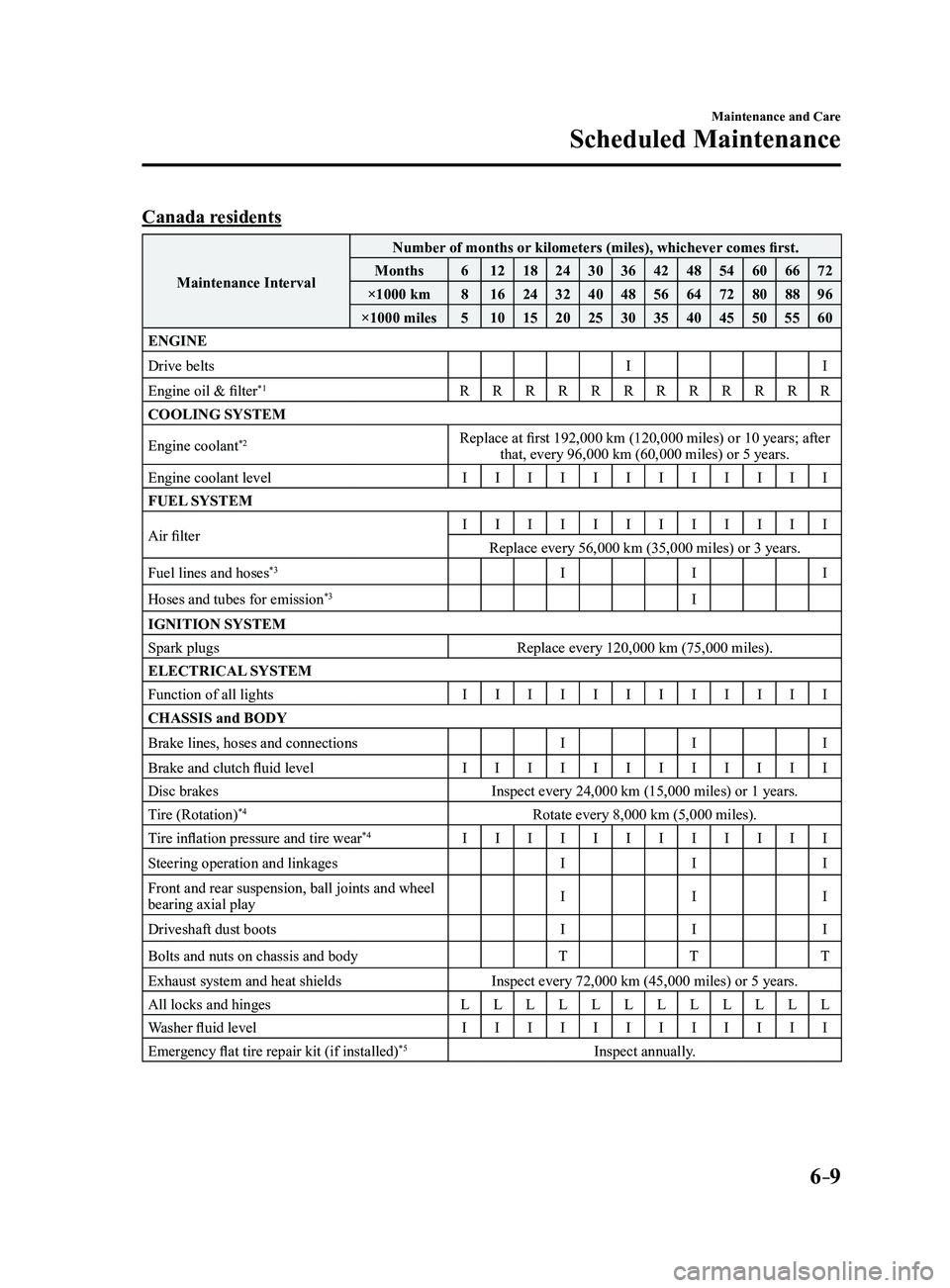
Canada residents
Maintenance IntervalNumber of months or kilometers (miles), whichever comes first.
Months 612 18243036424854606672
×1000 km 816 24324048566472808896
×1000 miles 510 15202530354045505560
ENGINE
Drive belts II
Engine oil & filter
*1R RRRRRRRRRRR
COOLING SYSTEM
Engine coolant
*2Replace at first 192,000 km (120,000 miles) or 10 years; after that, every 96,000 km (60,000 miles) or 5 years.
Engine coolant level IIIIIIIIIIII
FUEL SYSTEM
Air filter I
IIIIIIIIIII
Replace every 56,000 km (35,000 miles) or 3 years.
Fuel lines and hoses
*3I II
Hoses and tubes for emission
*3I
IGNITION SYSTEM
Spark plugs Replace every 120,000 km (75,000 miles).
ELECTRICAL SYSTEM
Function of all lights IIIIIIIIIIII
CHASSIS and BODY
Brake lines, hoses and connections III
Brake and clutch fluid level IIIIIIIIIII
I
Disc brakes Inspect every 24,000 km (15,000 miles) or 1 years.
Tire (Rotation)
*4Rotate every 8,000 km (5,000 miles).
Tire inflation pressure and tire wear*4I IIIIIIIIIII
Steering operation and linkages III
Front and rear suspension, ball joints and wheel
bearing axial play I
II
Driveshaft dust boots III
Bolts and nuts on chassis and body TTT
Exhaust system and heat shields Inspect every 72,000 km (45,000 miles) or 5 years.
All locks and hinges LLLLLLLLLLLL
Washer fluid level IIIIIIIIIIII
Emergency flat tire repair kit (if installed)
*5Inspect annually.
Mazda3_8FL6-EA-16F_Edition2.indb 92016/08/10 17:38:31
Page 424 of 612
6–12
Maintenance and Care
Scheduled Maintenance
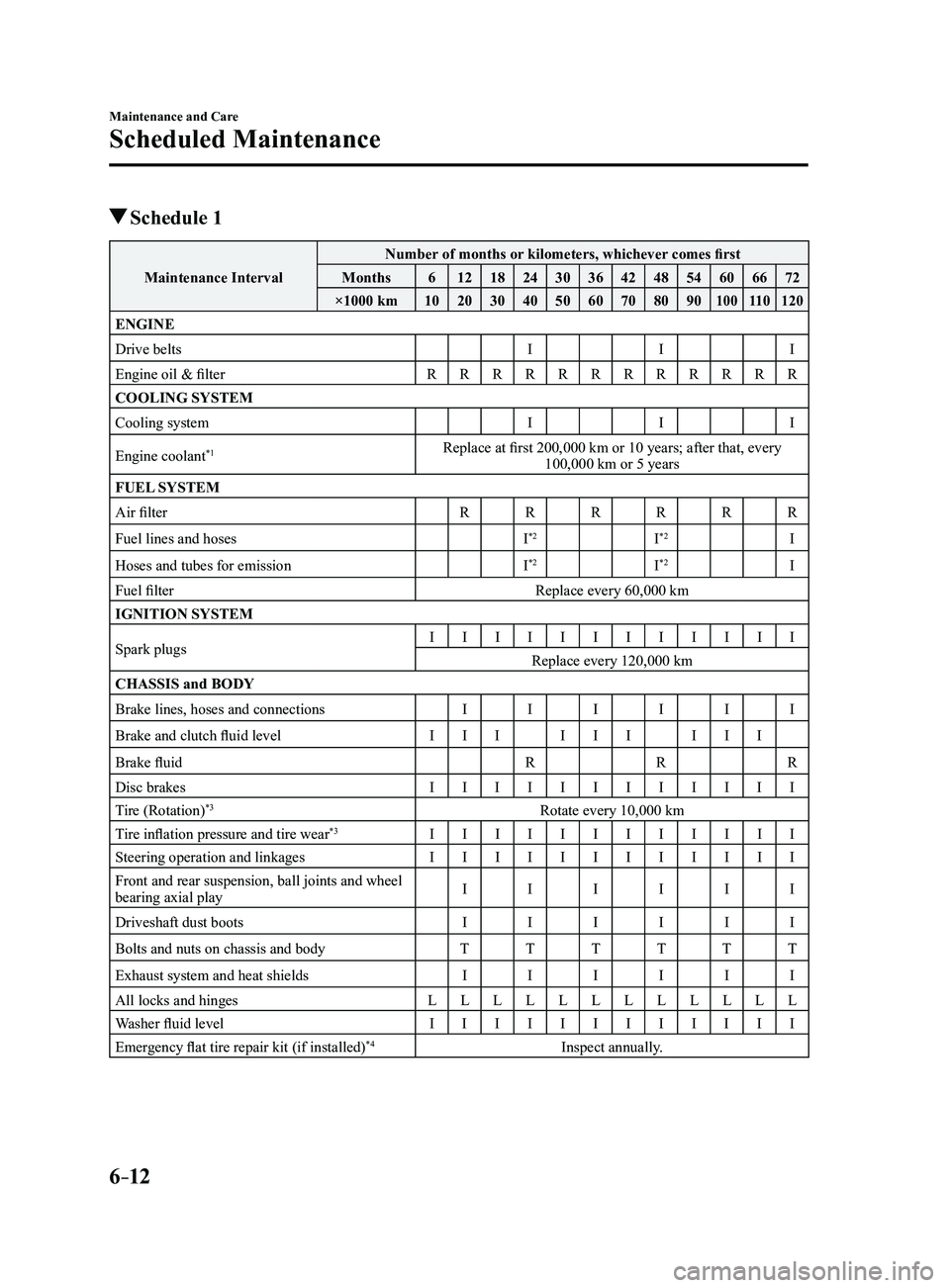
Schedule 1
Maintenance IntervalNumber of months or kilometers, whichever comes first
Months 612 18243036424854606672
×1000 km 102030405060708090
10011 0120
ENGINE
Drive belts III
Engine oil & filter RRRRRRRRRRRR
COOLING SYSTEM
Cooling system III
Engine coolant
*1Replace at first 200,000 km or 10 years; after that, every 100,000 km or 5 years
FUEL SYSTEM
Air filter RRRRRR
Fuel lines and hoses I
*2I*2I
Hoses and tubes for emission I
*2I*2I
Fuel filter Replace every 60,000 km
IGNITION SYSTEM
Spark plugs I
IIIIIIIIIII
Replace every 120,000 km
CHASSIS and BODY
Brake lines, hoses and connections IIIIII
Brake and clutch fluid level III III III
Brake fluid RRR
Disc brakes IIIIIIIIIIII
Tire (Rotation)
*3Rotate every 10,000 km
Tire inflation pressure and tire wear*3I IIIIIIIIIII
Steering operation and linkages IIIIIIIIIIII
Front and rear suspension, ball joints and wheel
bearing axial play I
IIIII
Driveshaft dust boots IIIIII
Bolts and nuts on chassis and body TTTTTT
Exhaust system and heat shields IIIIII
All locks and hinges LLLLLLLLLLLL
Washer fluid level IIIIIIIIIIII
Emergency flat tire repair kit (if installed)
*4Inspect annually.
Mazda3_8FL6-EA-16F_Edition2.indb 122016/08/10 17:38:32