MAZDA MODEL 3 4-DOOR 2017 Owners Manual
Manufacturer: MAZDA, Model Year: 2017, Model line: MODEL 3 4-DOOR, Model: MAZDA MODEL 3 4-DOOR 2017Pages: 612
Page 151 of 612
4–21
When Driving
Instrument Cluster and Display
*Some models.
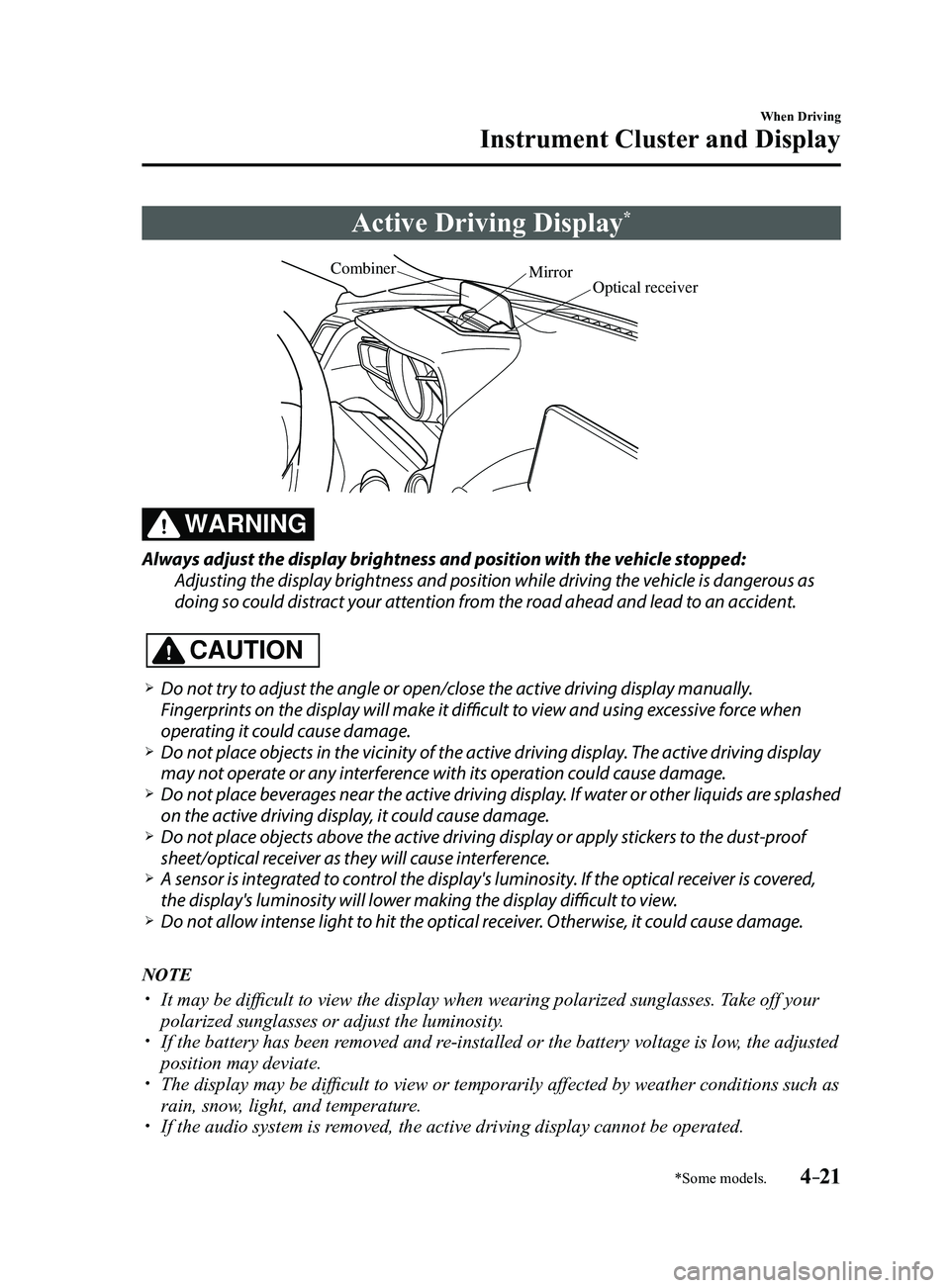
Active Driving Display*
Optical receiver
Mirror
Combiner
WARNING
Always adjust the display brightness and position with the vehicle stopped:
Adjusting the display brightness and position while driving the vehicle is dangerous as
doing so could distract your attention from the road ahead and lead to an accident.
CAUTION
Do not try to adjust the angle or open/close the active driving display manually.
Fingerprints on the display will make it difficult to view and using excessive force when
operating it could cause damage.
Do not place objects in the vicinity of the active driving display. The active driving display
may not operate or any interference with its operation could cause damage. Do not place beverages near the active driving display. If water or other liquids are splashed
on the active driving display, it could cause damage. Do not place objects above the active driving display or apply stickers to the dust-proof
sheet/optical receiver as they will cause interference. A sensor is int
egrated to control the display's luminosity. If the optical receiver is covered,
the display's luminosity will lower making the display difficult to view. Do not allow intense light to hit the optical receiver. Otherwise, it could cause damage.
NOTE
It may be difficult to view the display when wearing polarized s unglasses. Take off your
polarized sunglasses or adjust the luminosity. If the battery has been removed and re-installed or the battery voltage is low, the adjusted
position may deviate. The display may be difficult to view or temporarily affected by weather conditions such as
rain, snow, light, and temperature. If the audio system is removed, the active driving display cannot be operated.
Mazda3_8FL6-EA-16F_Edition2.indb 212016/08/10 17:35:51
Page 152 of 612
4–22
When Driving
Instrument Cluster and Display
The active driving display indicates the following information:
Blind Spot Monitoring (BSM) Operation Conditions and Warnings
Refer to Blind Spot Monitoring (BSM) on page 4-88.
Distance Recognition Support System (DRSS) Warnings
Refer to Distance Recognition Support System (DRSS) on page 4-101.
Traffic Sign Recognition System (TSR) traffic signs and Warnings
Refer to Traffic Sign Recognition System (TSR) on page 4-94.
Mazda Radar Cruise Control (MRCC) Operation Conditions and Warnings
Refer to Mazda Radar Cruise Control (MRCC) on page 4-107.
Lane-keep Assist System (LAS) & Lane Departure Warning System (LDWS) Operation
Conditions and Warnings
Refer to Lane-keep Assist System (LAS) & Lane Departure Warning System (LDWS) on
page 4-117.
Smart City Brake Support (SCBS) Warnings
Refer to Smart City Brake Support (SCBS) on page 4-128.
Smart Brake Support (SBS) Warnings
Refer to Smart Brake Support (SBS) on page 4-133.
Cruise Control Operation Conditions
Refer to Cruise Control on page 4-146.
Navigation Guidance (vehicles with navigation system)
Speed limit indicator (vehicles with navigation system)
Vehicle Speed
Each setting/adjustment for the active driving display can be performed on the center display.
1. Select the icon on the home screen and display the Settings screen.
2. Select the AD-Disp tab.
3. Select the desired item and perform the setting/adjustment.
Method for adjusting screen brightness (automatically/manually) Screen brightness initial settings (automatic adjustment is selected) Screen brightness adjustment (manual adjustment is selected) Display position of active driving display (display height) Active driving display angle adjustment (display angle correction) The combination of street name display , lane guidance, and turn by turn (TBT) can be
changed. (navigation guidance) Active driving display ON/OFF (indication) Reset settings (reset)
Mazda3_8FL6-EA-16F_Edition2.indb 222016/08/10 17:35:52
Page 153 of 612
4–23
When Driving
Instrument Cluster and Display
Warning/Indicator Lights
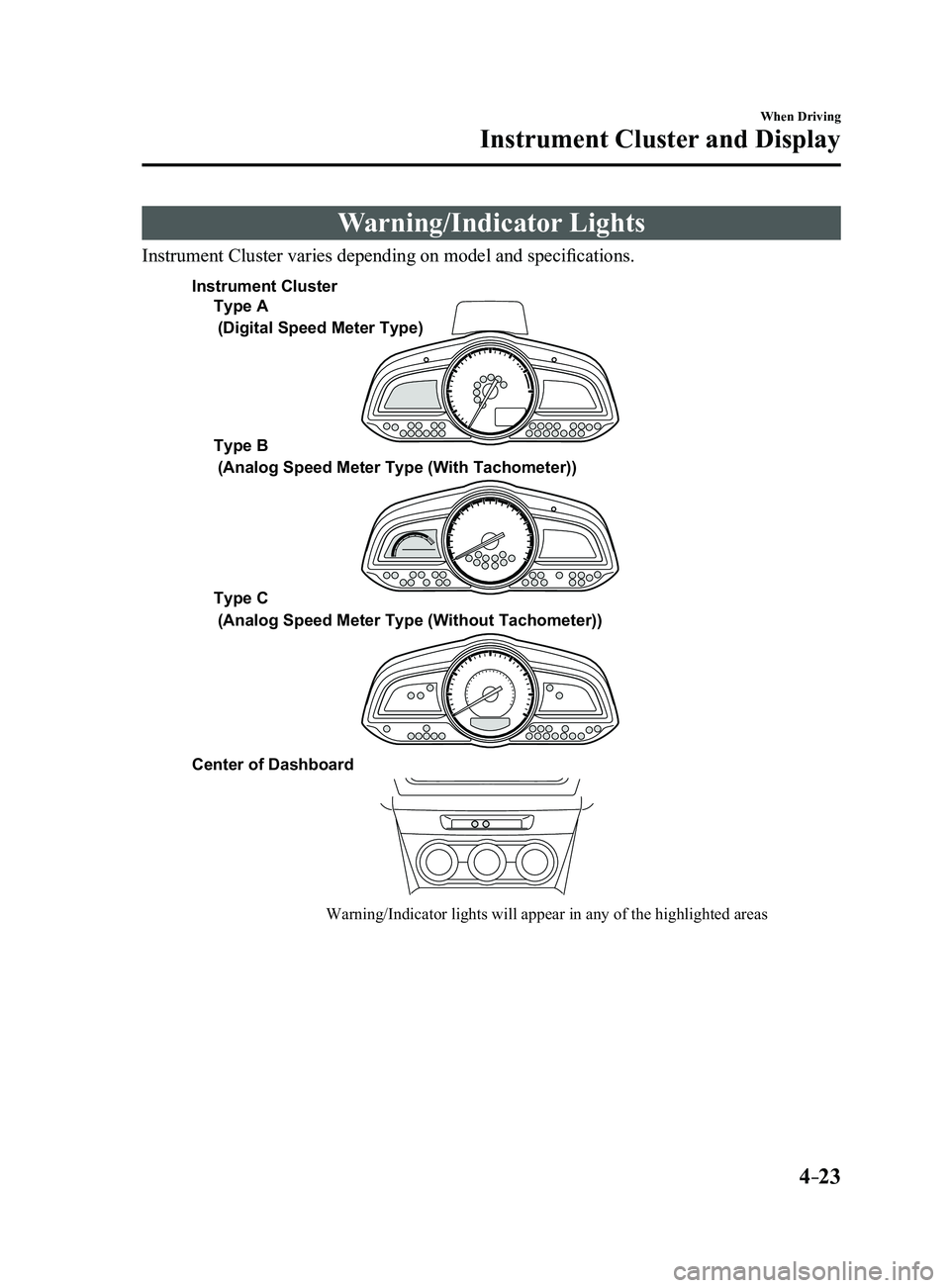
Instrument Cluster varies depending on model and specifications.
Warning/Indicator lights will appear in any of the highlighted areas
Type A
Type B
Type C
Center of Dashboard
(Digital Speed Meter Type)
(Analog Speed Meter Type (With Tachometer))
(Analog Speed Meter Type (Without Tachometer))
Instrument Cluster
Mazda3_8FL6-EA-16F_Edition2.indb 232016/08/10 17:35:52
Page 154 of 612
4–24
When Driving
Instrument Cluster and Display
*Some models.
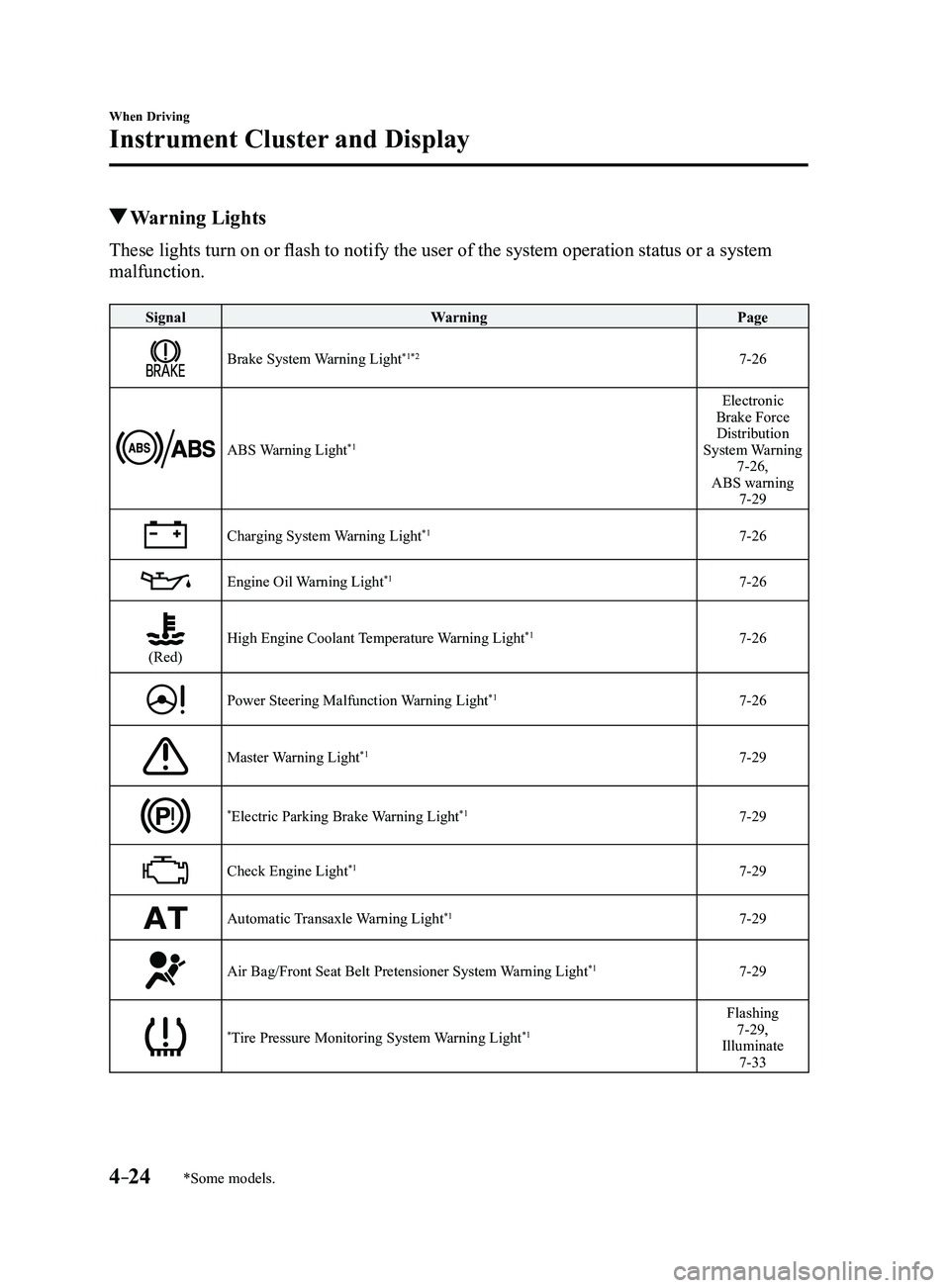
Warning Lights
These lights turn on or flash to notify the user of the system operation status or a system
malfunction.
SignalWarning Page
Brake System Warning Light*1*27-26
ABS Warning Light*1
Electronic
Brake Force Distribution
System Warning
7-26,
ABS warning
7-29
Charging System Warning Light*17-26
Engine Oil Warning Light*17-26
(Red)High Engine Coolant Temperature Warning Light*17-26
Power Steering Malfunction Warning Light*17-26
Master Warning Light*17-29
*Electric Parking Brake Warning Light*17-29
Check Engine Light*17-29
Automatic Transaxle Warning Light*17-29
Air Bag/Front Seat Belt Pretensioner System Warning Light*17-29
*Tire Pressure Monitoring System Warning Light*1
Flashing 7-29,
Illuminate
7-33
Mazda3_8FL6-EA-16F_Edition2.indb 242016/08/10 17:35:55
Page 155 of 612
4–25
When Driving
Instrument Cluster and Display
*Some models.
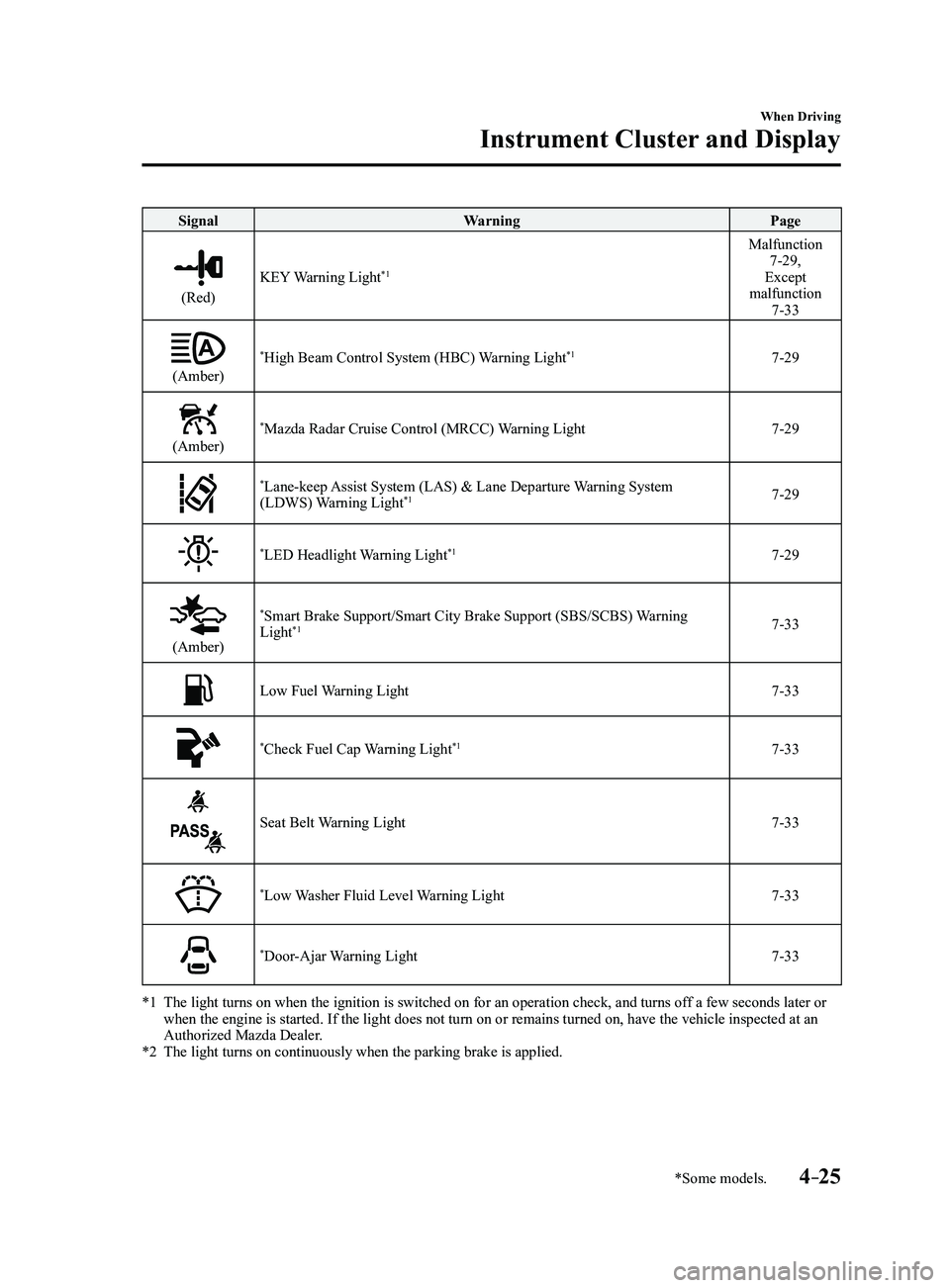
SignalWarning Page
(Red)
KEY Warning Light*1
Malfunction 7-29,
Except
malfunction
7-33
(Amber)
*High Beam Control System (HBC) Warning Light*17-29
(Amber)
*Mazda Radar Cruise Control (MRCC) Warning Light7-29
*Lane-keep Assist System (LAS) & Lane Departure Warning System
(LDWS) Warning Light*17-29
*LED Headlight Warning Light*17-29
(Amber)
*Smart Brake Support/Smart City Brake Support (SBS/SCBS) Warning
Light*17-33
Low Fuel Warning Light7-33
*Check Fuel Cap Warning Light*17-33
Seat Belt Warning Light7-33
*Low Washer Fluid Level Warning Light7-33
*Door-Ajar Warning Light7-33
*1 The light turns on when the ignition is switched on for an operation che\
ck, and turns of f a few seconds later or when the engine is started. If the light does not turn on or remains tur\
ned on, have the vehicle inspected at an
Authorized Mazda Dealer.
*2 The light turns on continuously when the parking brake is applied.
Mazda3_8FL6-EA-16F_Edition2.indb 252016/08/10 17:35:58
Page 156 of 612
4–26
When Driving
Instrument Cluster and Display
*Some models.
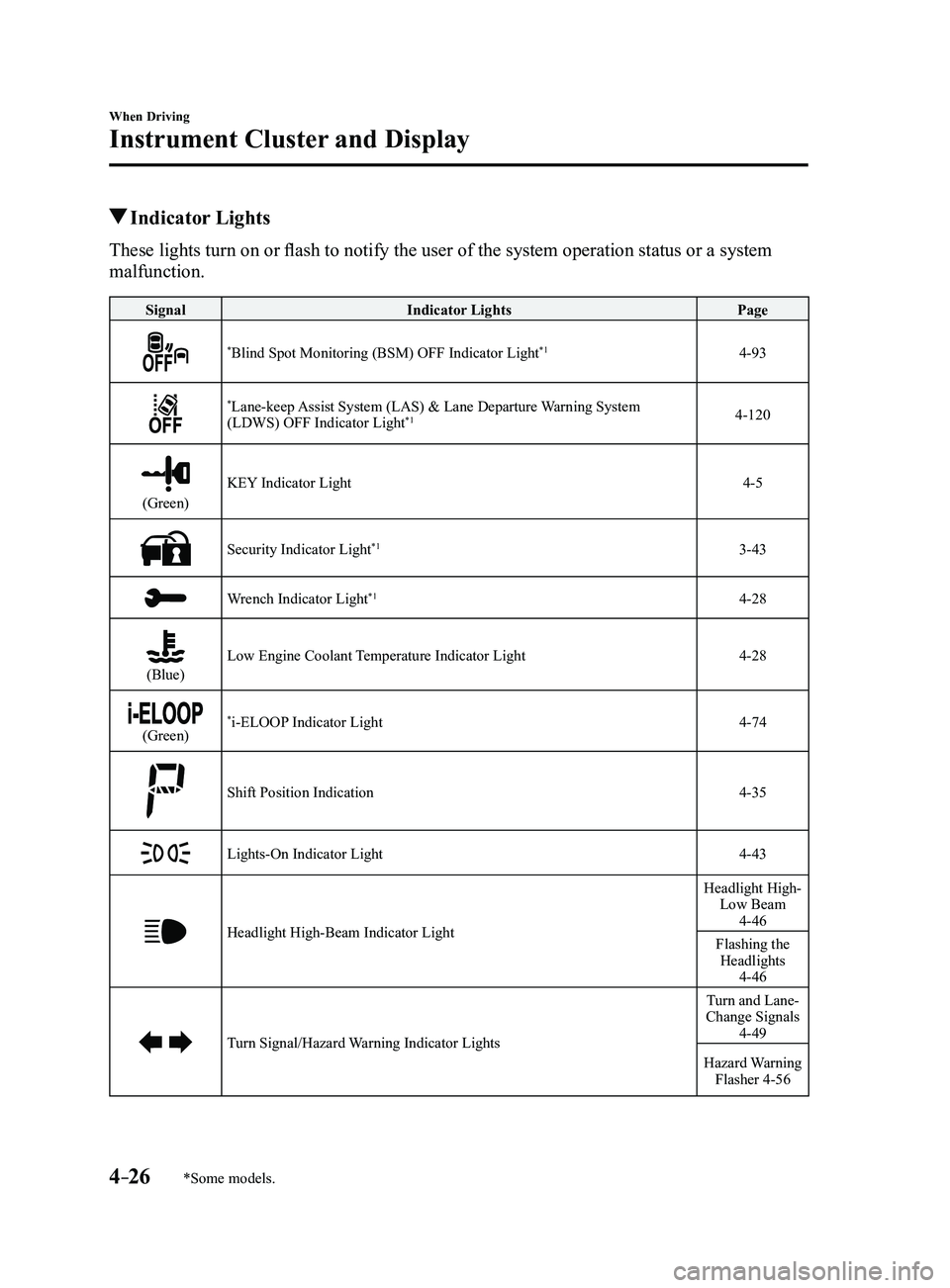
Indicator Lights
These lights turn on or flash to notify the user of the system operation status or a system
malfunction.
SignalIndicator Lights Page
*Blind Spot Monitoring (BSM) OFF Indicator Light*14-93
*Lane-keep Assist System (LAS) & Lane Departure Warning System
(LDWS) OFF Indicator Light*14-120
(Green)
KEY Indicator Light4-5
Security Indicator Light*13-43
Wrench Indicator Light*14-28
(Blue)Low Engine Coolant Temperature Indicator Light4-28
(Green)*i-ELOOP Indicator Light4-74
Shift Position Indication4-35
Lights-On Indicator Light4-43
Headlight High-Beam Indicator Light
Headlight High- Low Beam
4-46
Flashing the Headlights
4-46
Turn Signal/Hazard Warning Indicator Lights
Turn and Lane-
Change Signals
4-49
Hazard Warning Flasher 4-56
Mazda3_8FL6-EA-16F_Edition2.indb 262016/08/10 17:36:01
Page 157 of 612
4–27
When Driving
Instrument Cluster and Display
*Some models.
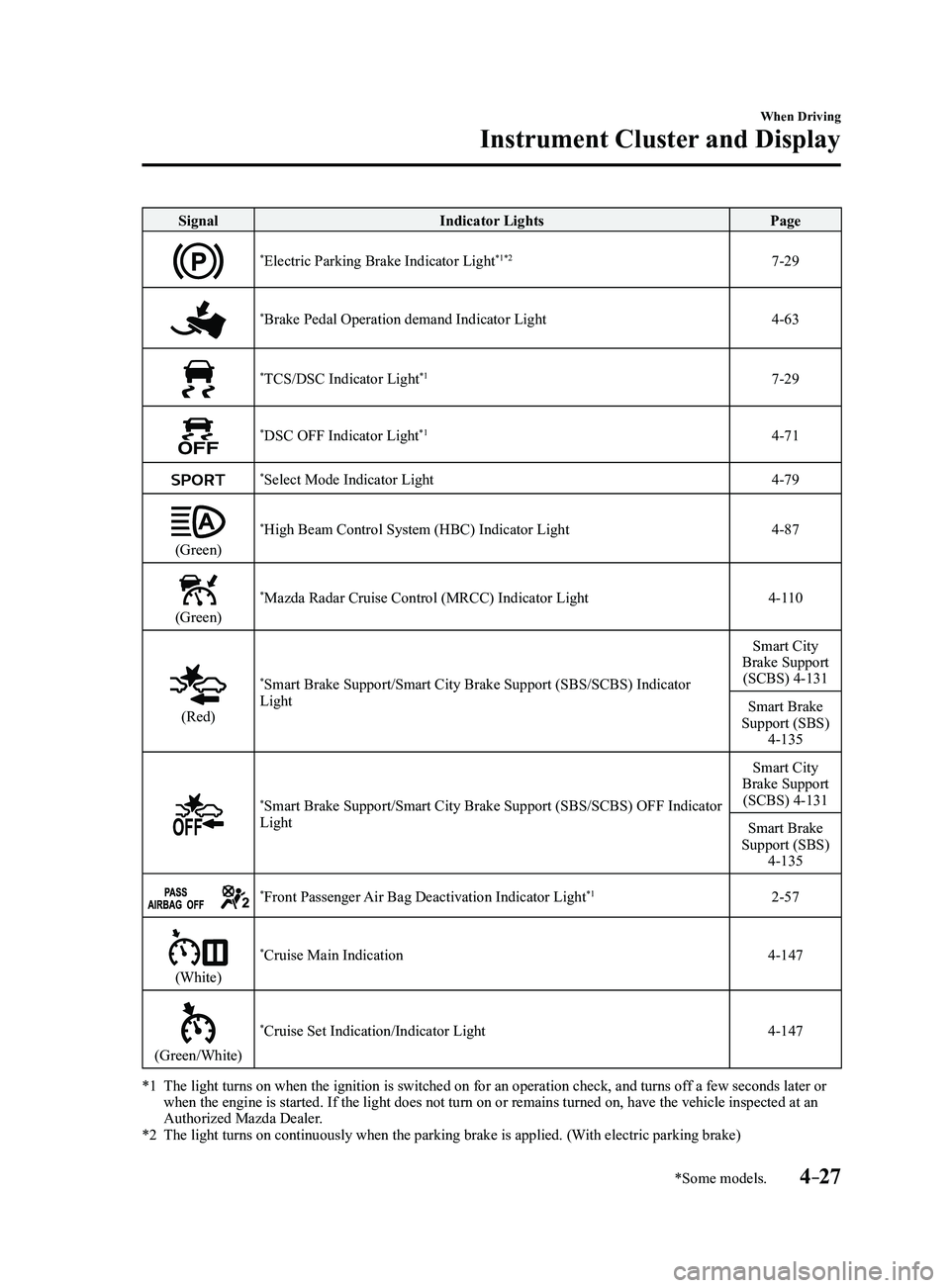
SignalIndicator Lights Page
*Electric Parking Brake Indicator Light*1*27-29
*Brake Pedal Operation demand Indicator Light4-63
*TCS/DSC Indicator Light*17-29
*DSC OFF Indicator Light*14-71
*Select Mode Indicator Light4-79
(Green)
*High Beam Control System (HBC) Indicator Light4-87
(Green)
*Mazda Radar Cruise Control (MRCC) Indicator Light4-110
(Red)
*Smart Brake Support/Smart City Brake Support (SBS/SCBS) Indicator
Light Smart City
Brake Support (SCBS) 4-131
Smart Brake
Support (SBS)
4-135
*Smart Brake Support/Smart City Brake Support (SBS/SCBS) OFF Indicator
Light Smart City
Brake Support (SCBS) 4-131
Smart Brake
Support (SBS)
4-135
*Front Passenger Air Bag Deactivation Indicator Light*12-57
(White)
*Cruise Main Indication4-147
(Green/White)
*Cruise Set Indication/Indicator Light4-147
*1 The light turns on when the ignition is switched on for an operation che\
ck, and turns of f a few seconds later or when the engine is started. If the light does not turn on or remains tur\
ned on, have the vehicle inspected at an
Authorized Mazda Dealer.
*2 The light turns on continuously when the parking brake is applied. (With electric parking brake)
Mazda3_8FL6-EA-16F_Edition2.indb 272016/08/10 17:36:04
Page 158 of 612
4–28
When Driving
Instrument Cluster and Display
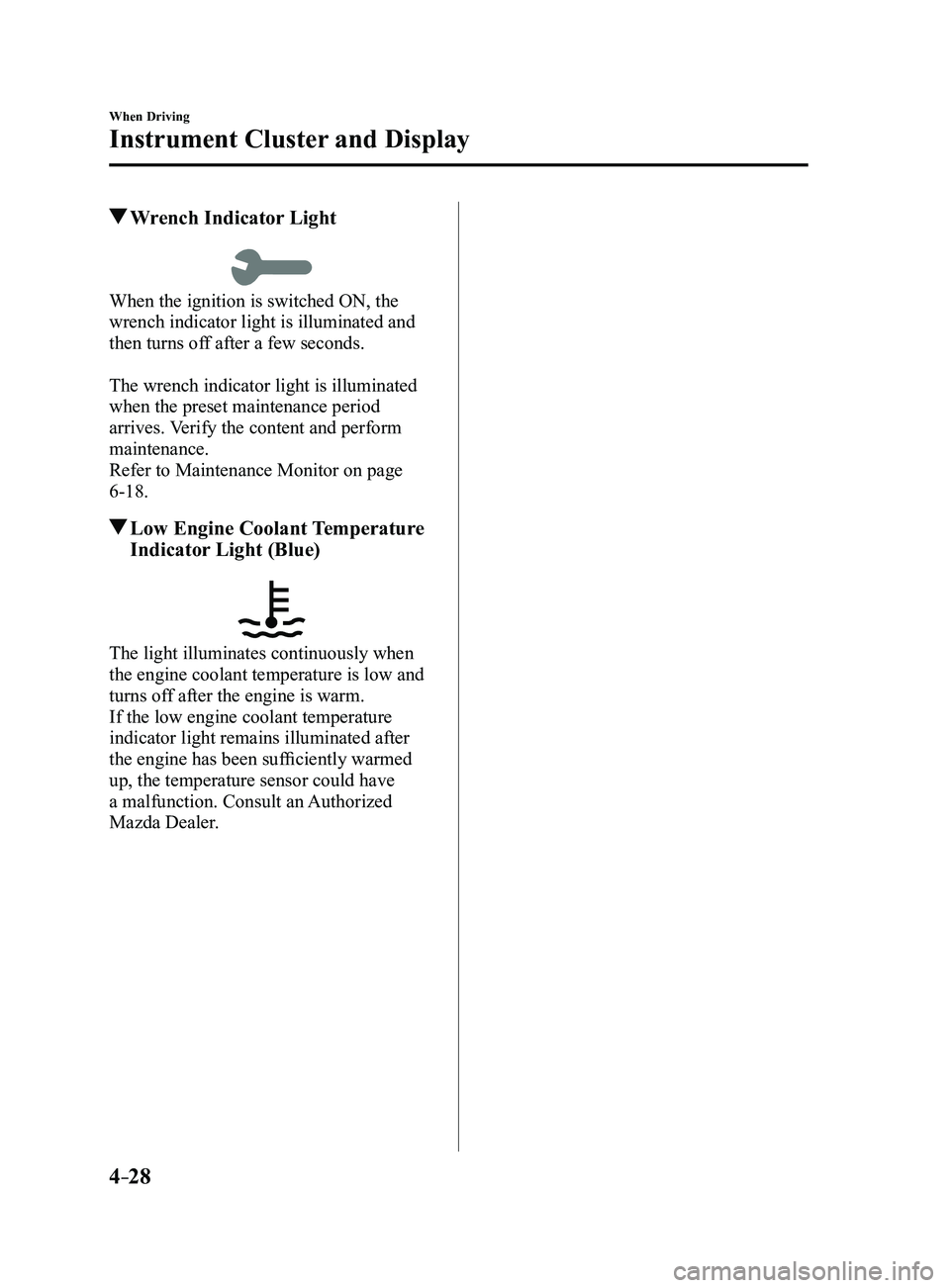
Wrench Indicator Light
When the ignition is switched ON, the
wrench indicator light is illuminated and
then turns off after a few seconds.
The wrench indicator light is illuminated
when the preset maintenance period
arrives. Verify the content and perform
maintenance.
Refer to Maintenance Monitor on page
6-18.
Low Engine Coolant Temperature
Indicator Light (Blue)
The light illuminates continuously when
the engine coolant temperature is low and
turns off after the engine is warm.
If the low engine coolant temperature
indicator light remains illuminated after
the engine has been sufficiently warmed
up, the temperature sensor could have
a malfunction. Consult an Authorized
Mazda Dealer.
Mazda3_8FL6-EA-16F_Edition2.indb 282016/08/10 17:36:05
Page 159 of 612
4–29
When Driving
Manual Transaxle Operation
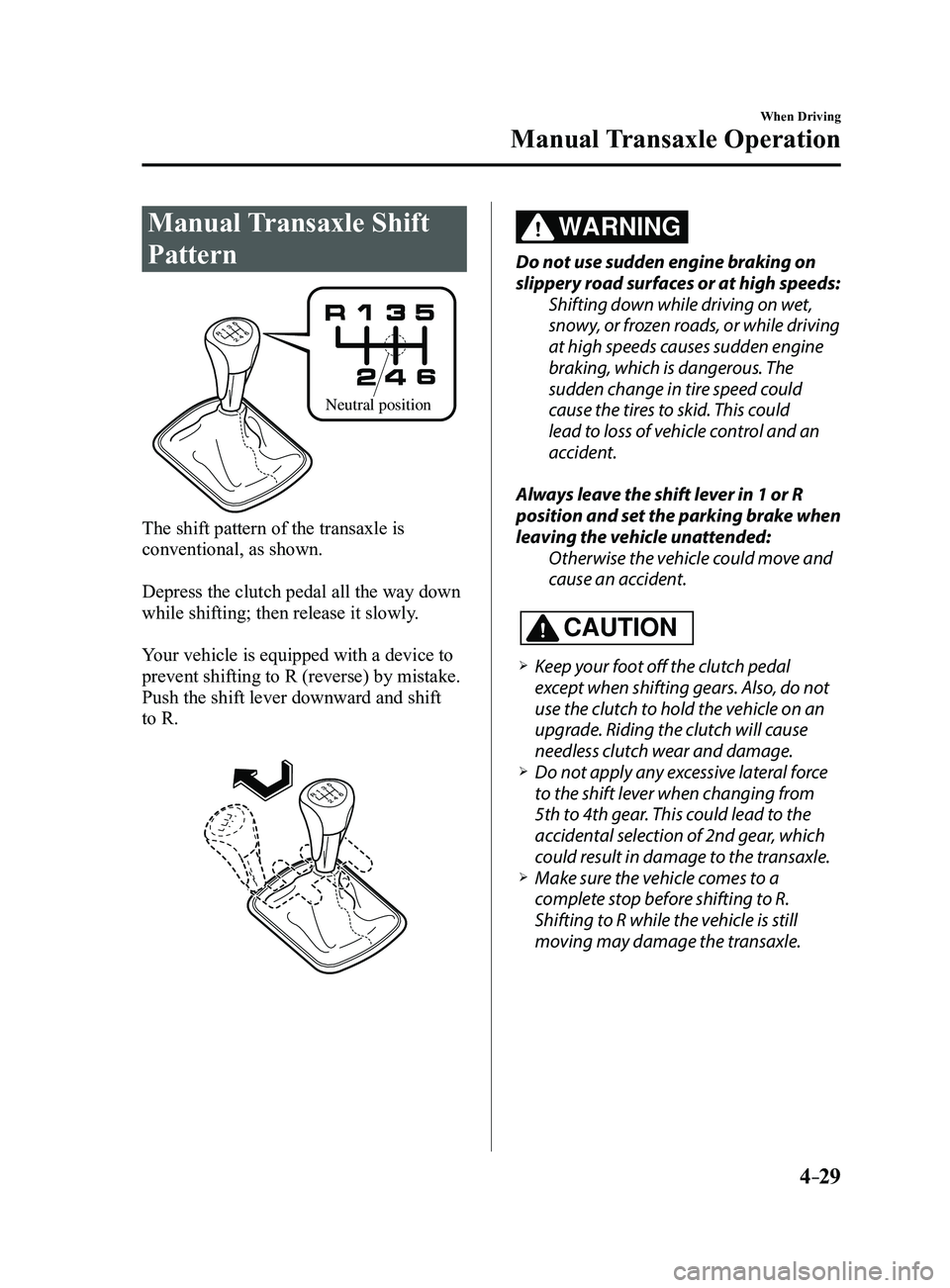
Manual Transaxle Shift
Pattern
Neutral position
The shift pattern of the transaxle is
conventional, as shown.
Depress the clutch pedal all the way down
while shifting; then release it slowly.
Your vehicle is equipped with a device to
prevent shifting to R (reverse) by mistake.
Push the shift lever downward and shift
to R.
WARNING
Do not use sudden engine braking on
slippery road surfaces or at high speeds:Shifting down while driving on wet,
snowy, or frozen roads, or while driving
at high speeds causes sudden engine
braking, which is dangerous. The
sudden change in tire speed could
cause the tires to skid. This could
lead to loss of vehicle control and an
accident.
Always leave the shift lever in 1 or R
position and set the parking brake when
leaving the vehicle unattended: Otherwise the vehicle could move and
cause an accident.
CAUTION
Keep your foot off the clutch pedal
except when shifting gears. Also, do not
use the clutch to hold the vehicle on an
upgrade. Riding the clutch will cause
needless clutch wear and damage.
Do not apply any excessive lateral force
to the shift lever when changing from
5th to 4th gear. This could lead to the
accidental selection of 2nd gear, which
could result in damage to the transaxle.
Make sure the vehicle comes to a
complete stop before shifting to R.
Shifting to R while the vehicle is still
moving may damage the transaxle.
Mazda3_8FL6-EA-16F_Edition2.indb 292016/08/10 17:36:06
Page 160 of 612
4–30
When Driving
Manual Transaxle Operation
*Some models.
NOTE
(For vehicles with type C instrument
cluster*1)
If the engine speed is about to exceed
the permissible engine speed, the buzzer
sounds.
Refer to Over Rev. Buzzer on page
7-43.
*1 To determine which instrument
cluster is equipped on your Mazda,
Refer to Meters and Gauges on page
4-12.
If shifting to R is difficult, shift back into
neutral, release the clutch pedal, and try
again.
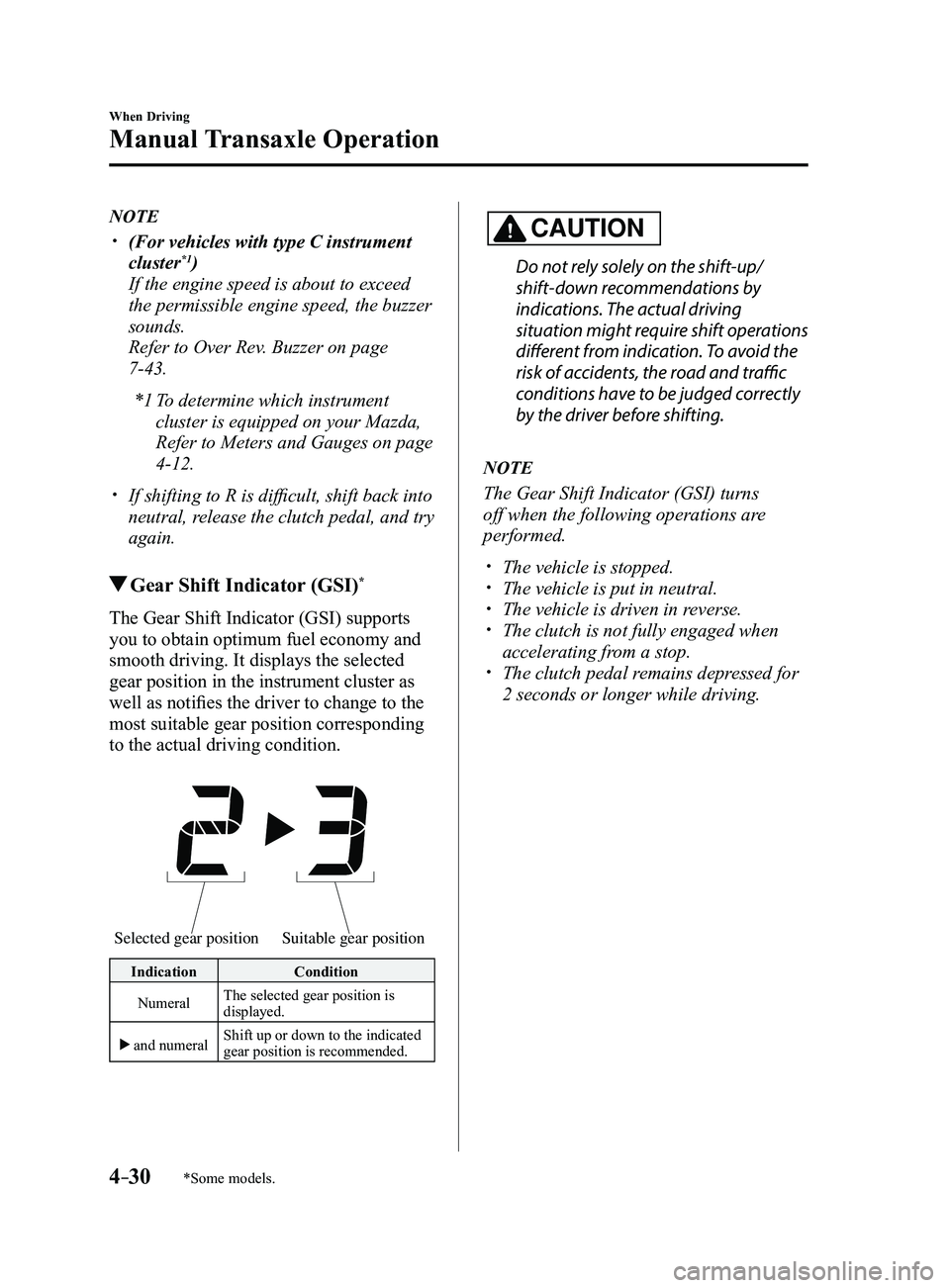
Gear Shift Indicator (GSI)*
The Gear Shift Indicator (GSI) supports
you to obtain optimum fuel economy and
smooth driving. It displays the selected
gear position in the instrument cluster as
well as notifies the driver to change to the
most suitable gear position corresponding
to the actual driving condition.
Selected gear positionSuitable gear position
Indication Condition
Numeral The selected gear position is
displayed.
and numeral Shift up or down to the indicated
gear position is recommended.
CAUTION
Do not rely solely on the shift-up/
shift-down recommendations by
indications. The actual driving
situation might require shift operations
different from indication. To avoid the
risk of accidents, the road and traffic
conditions have to be judged correctly
by the driver before shifting.
NOTE
The Gear Shift Indicator (GSI) turns
off when the following operations are
performed.
The vehicle is stopped. The vehicle is put in neutral. The vehicle is driven in r
everse. The clutch is not fully engaged when
accelerating from a stop. The clutch pedal remains depressed for
2 seconds or longer while driving.
Mazda3_8FL6-EA-16F_Edition2.indb 302016/08/10 17:36:07