display MAZDA MODEL 3 4-DOOR 2017 Owners Manual
[x] Cancel search | Manufacturer: MAZDA, Model Year: 2017, Model line: MODEL 3 4-DOOR, Model: MAZDA MODEL 3 4-DOOR 2017Pages: 612
Page 517 of 612
7–29
If Trouble Arises
Warning/Indicator Lights and Warning Sounds
*Some models.
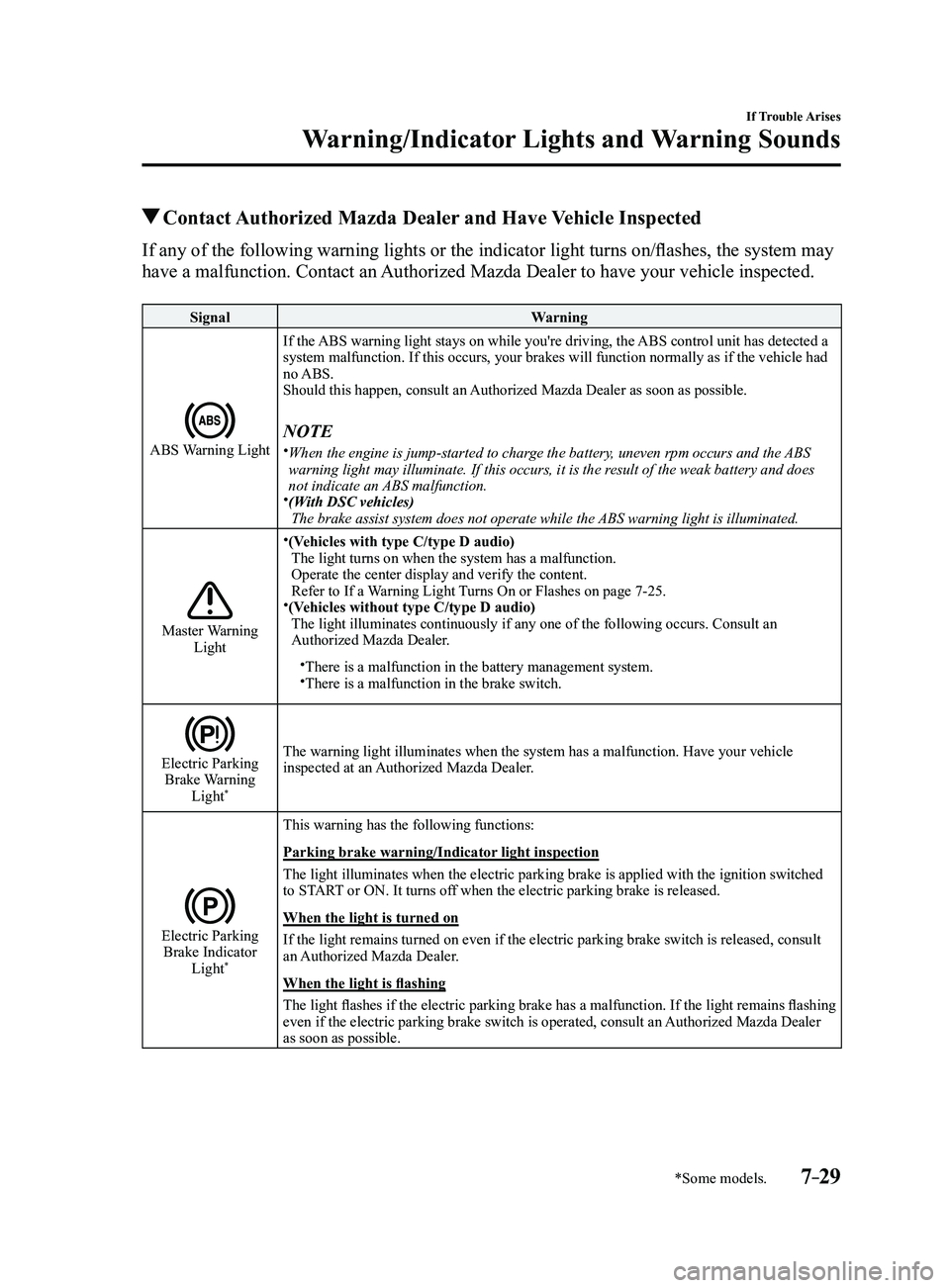
Contact Authorized Mazda Dealer and Have Vehicle Inspected
If any of the following warning lights or the indicator light turns on/flashes, the system may
have a malfunction. Contact an Authorized Mazda Dealer to have your vehicle inspected.
SignalWarning
ABS Warning Light
If the ABS warning light stays on while you're driving, the ABS control unit has detected a
system malfunction. If this occurs, your brakes will function normally a\
s if the vehicle had
no ABS.
Should this happen, consult an Authorized Mazda Dealer as soon as possible.
NOTE When the engine is jump-started to charge the battery, uneven rpm occurs and the ABS
warning light may illuminate. If this occurs, it is the result of the weak battery and does
not indicate an ABS malfunction.
(With DSC vehicles)
The brake assist system does not operate while the ABS warning light is illuminated.
Master Warning Light
(Vehicles with type C/type D audio)The light turns on when the system has a malfunction.
Operate the center display and verify the content.
Refer to If a Warning Light Turns On or Flashes on page
7-25.(Vehicles without type C/type D audio)The light illuminates continuously if any one of the following occurs. C\
onsult an
Authorized Mazda Dealer.
There is a malfunction in the battery management system.There is a malfunction in the brake switch.
Electric Parking Brake Warning Light*
The warning light illuminates when the system has a malfunction. Have yo\
ur vehicle
inspected at an Authorized Mazda Dealer.
Electric Parking Brake Indicator Light*
This warning has the following functions:
Parking brake warning/Indicator light inspection
The light illuminates when the electric parking brake is applied with th\
e ignition switched
to START or ON. It turns off when the electric parking brake is released.
When the light is turned on
If the light remains turned on even if the electric parking brake switch\
is released, consult
an Authorized Mazda Dealer.
When the light is flashing
The light flashes if the electric parking brake has a malfunction. If the light remains flashing
even if the electric parking brake switch is operated, consult an Authorized Mazda Dealer
as soon as possible.
Mazda3_8FL6-EA-16F_Edition2.indb 292016/08/10 17:39:25
Page 520 of 612
7–32
If Trouble Arises
Warning/Indicator Lights and Warning Sounds
*Some models.
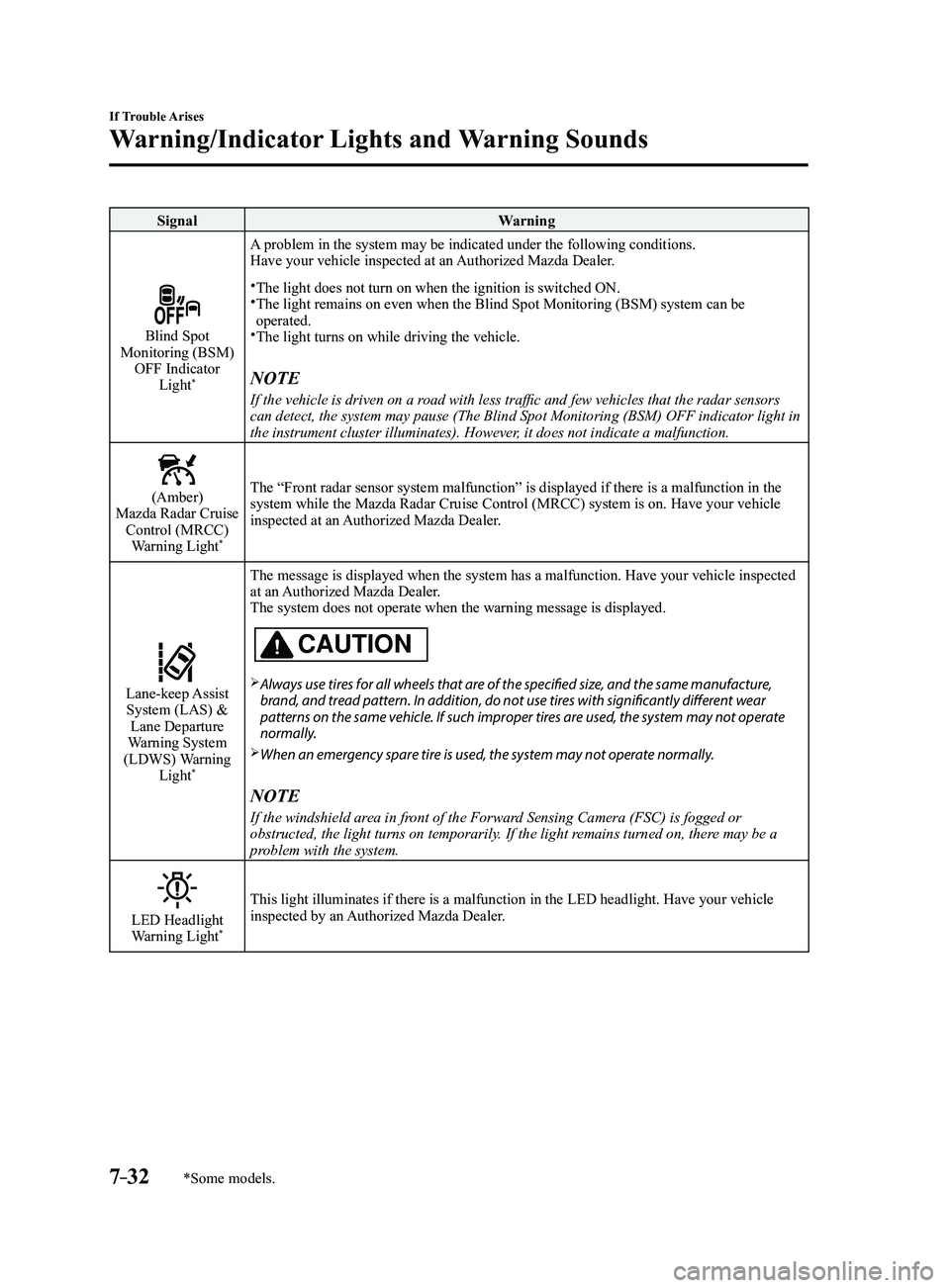
SignalWarning
Blind Spot Monitoring (BSM)
OFF Indicator Light
*
A problem in the system may be indicated under the following conditions.
Have your vehicle inspected at an Authorized Mazda Dealer.
The light does not turn on when the ignition is switched ON. The light remains on even when the Blind Spot Monitoring (BSM) system can be operated.The light turns on while driving the vehicle.
NOTE
If the vehicle is driven on a road with less traffic and few vehicles that the radar sensors
can detect, the system may pause (The Blind Spot Monitoring (BSM) OFF\
indicator light in
the instrument cluster illuminates). However, it does not indicate a malfunction.
(Amber)Mazda Radar Cruise Control (MRCC) Warning Light
*
The “Front radar sensor system malfunction” is displayed if there is a malfunction in the
system while the Mazda Radar Cruise Control (MRCC) system is on. Have your vehicle
inspected at an Authorized Mazda Dealer.
Lane-keep Assist System (LAS) & Lane Departure
Warning System
(LDWS) Warning Light
*
The message is displayed when the system has a malfunction. Have your ve\
hicle inspected
at an Authorized Mazda Dealer.
The system does not operate when the warning message is displayed.
CAUTION
Always use tires for all wheels that are of the specified size, and the same manufacture,
brand, and tread pattern. In addition, do not use tires with significantly different wear
patterns on the same vehicle. If such improper tires are used, the system may not operate
normally.
When an emergency spare tire is used, the system may not operate normally.
NOTE
If the windshield area in front of the Forward Sensing Camera (FSC) is fogged or
obstructed, the light turns on temporarily. If the light remains turned on, there may be a
problem with the system.
LED Headlight Warning Light*
This light illuminates if there is a malfunction in the LED headlight. Have your vehicle
inspected by an Authorized Mazda Dealer.
Mazda3_8FL6-EA-16F_Edition2.indb 322016/08/10 17:39:29
Page 522 of 612
7–34
If Trouble Arises
Warning/Indicator Lights and Warning Sounds
*Some models.
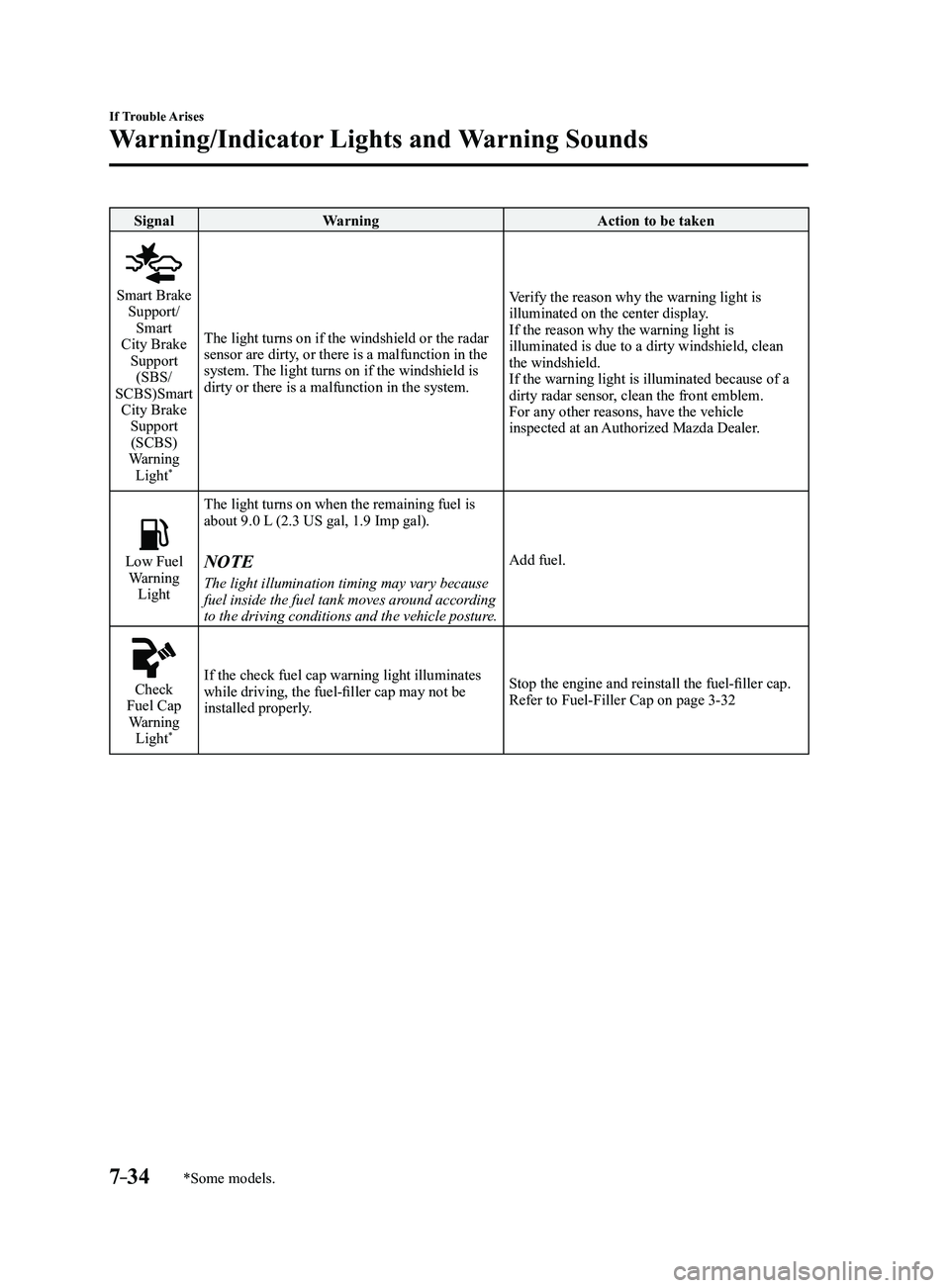
SignalWarning Action to be taken
Smart Brake Support/
Smart
City Brake Support (SBS/
SCBS)Smart City Brake Support (SCBS)
Warning Light
*
The light turns on if the windshield or the radar
sensor are dirty, or there is a malfunction in the
system. The light turns on if the windshield is
dirty or there is a malfunction in the system. Verify the reason why the warning light is
illuminated on the center display.
If the reason why the warning light is
illuminated is due to a dirty windshield, clean
the windshield.
If the warning light is illuminated because of a
dirty radar sensor, clean the front emblem.
For any other reasons, have the vehicle
inspected at an Authorized Mazda Dealer.
Low Fuel Warning
Light The light turns on when the remaining fuel is
about 9.0 L (2.3 US gal, 1.9 Imp gal).NOTE
The light illumination timing may vary because
fuel inside the fuel tank moves around according
to the driving conditions and the vehicle posture.
Add fuel.
Check Fuel Cap
Warning Light
*
If the check fuel cap warning light illuminates
while driving, the fuel-filler cap may not be
installed properly. Stop the engine and reinstall the fuel-filler cap.
Refer to Fuel-Filler Cap on page
3-32
Mazda3_8FL6-EA-16F_Edition2.indb 342016/08/10 17:39:30
Page 525 of 612
7–37
If Trouble Arises
Warning/Indicator Lights and Warning Sounds
*Some models.
Message Indicated on Display*
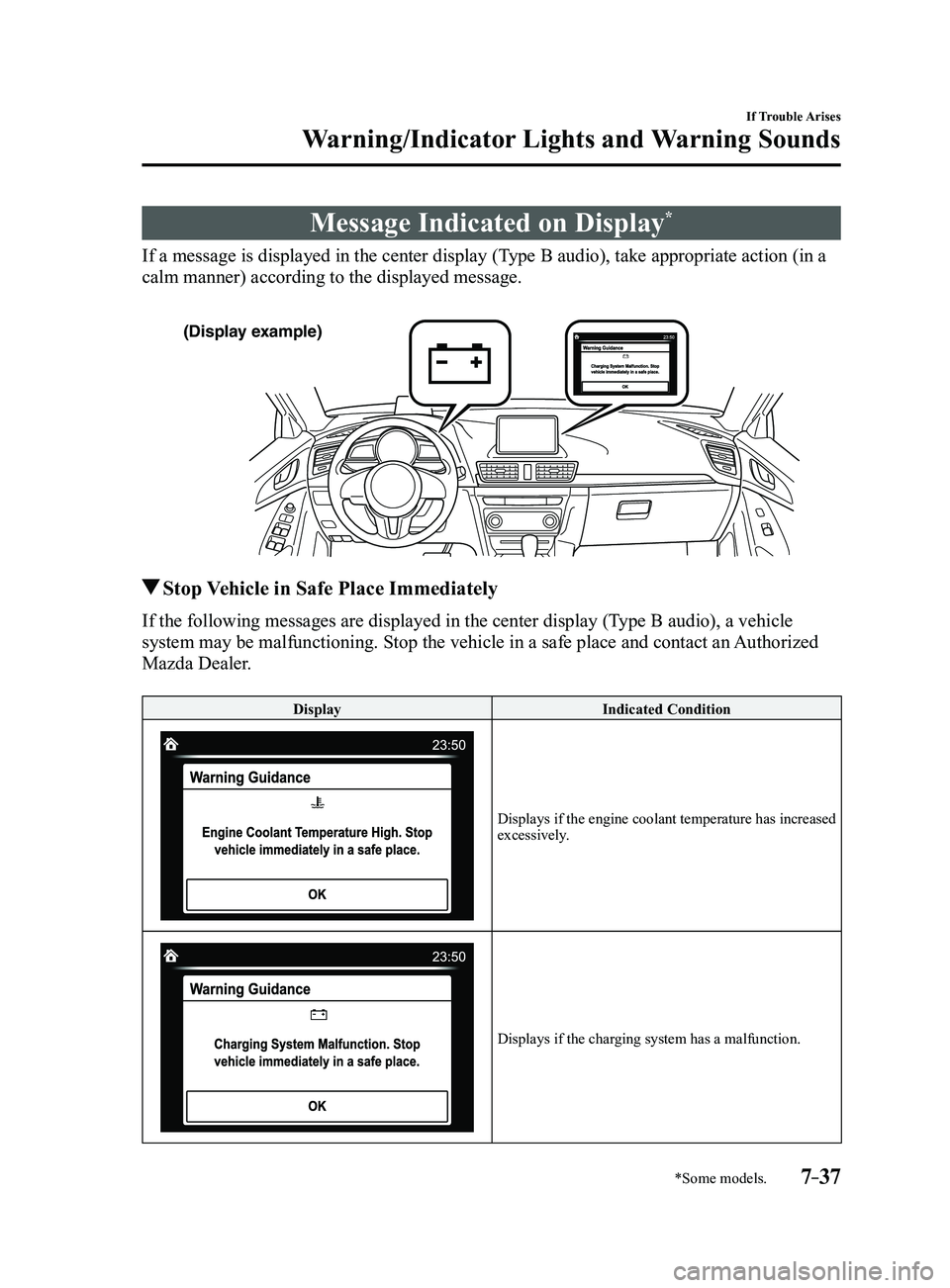
If a message is displayed in the center display (Type B audio), take appropriate action (in a
calm manner) according to the displayed message.
(Display example)
Stop Vehicle in Safe Place Immediately
If the following messages are displayed in the center display (Type B audio), a vehicle
system may be malfunctioning. Stop the vehicle in a safe place and conta\
ct an Authorized
Mazda Dealer.
DisplayIndicated Condition
Displays if the engine coolant temperature has increased excessively.
Displays if the charging system has a malfunction.
Mazda3_8FL6-EA-16F_Edition2.indb 372016/08/10 17:39:32
Page 526 of 612
7–38
If Trouble Arises
Warning/Indicator Lights and Warning Sounds
Make Sure the Message is No Longer Displayed
Displays in the following cases:
DisplayIndicated Condition/Action to be taken
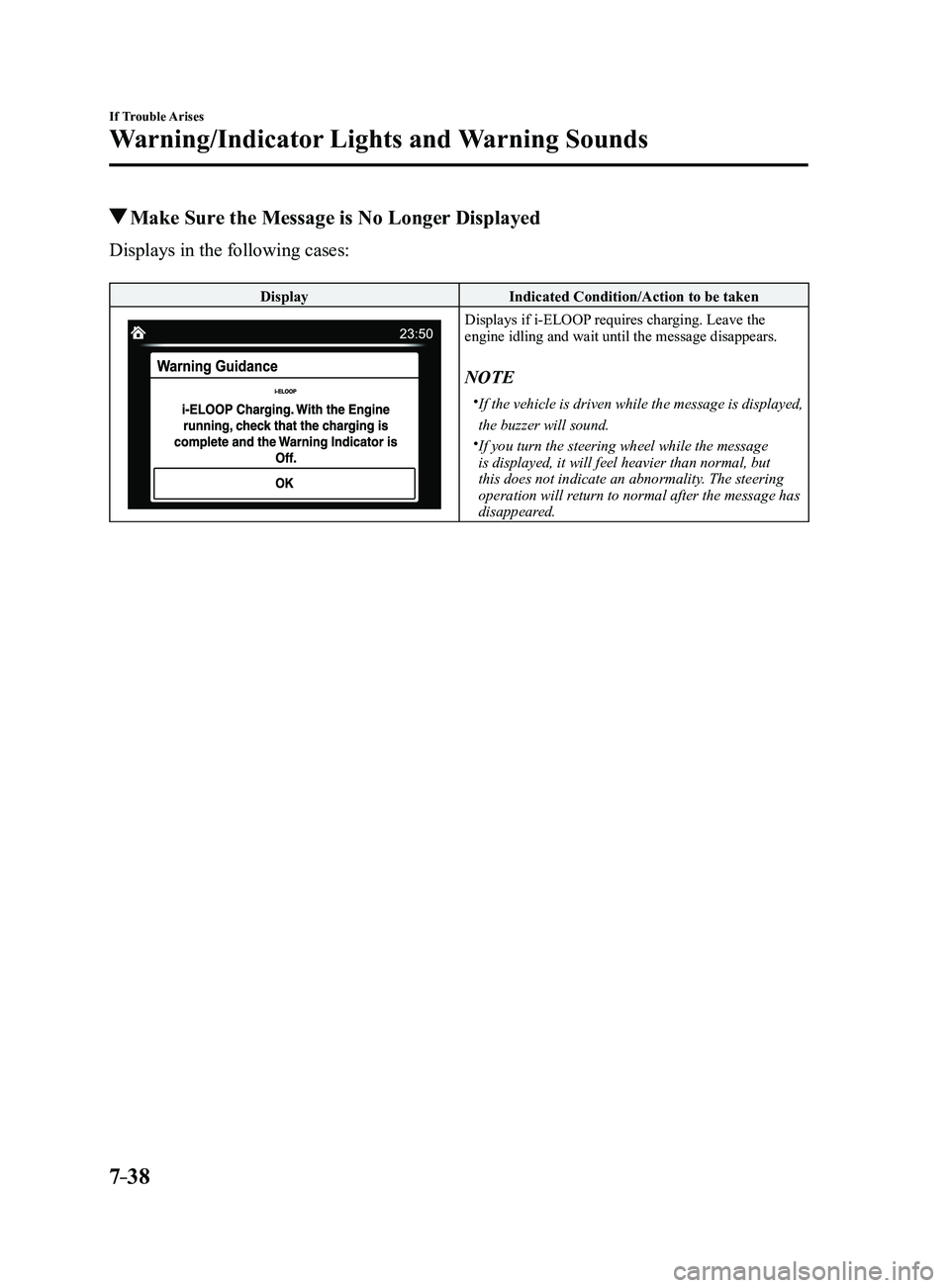
Displays if i-ELOOP requires charging. Leave the engine idling and wait until the message disappears.
NOTE
If the vehicle is driven while the message is displayed,
the buzzer will sound.
If you turn the steering wheel while the message
is displayed, it will feel heavier than normal, but
this does not indicate an abnormality. The steering
operation will return to normal after the message has
disappeared.
Mazda3_8FL6-EA-16F_Edition2.indb 382016/08/10 17:39:32
Page 529 of 612
7–41
If Trouble Arises
Warning/Indicator Lights and Warning Sounds
*Some models.
Key Left-in-luggage Compartment
Warning Beep (With the advanced
keyless function)
If the key is left in the luggage
compartment/trunk with all the doors
locked and the liftgate/trunk lid closed,
a beep will be heard outside for about 10
seconds to notify the driver that the key
is in the luggage compartment/trunk. In
this case, take out the key by pressing
the electric liftgate/trunk lid opener and
opening the liftgate/trunk lid. The key
taken out of the luggage compartment/
trunk may not operate because its
functions have been temporarily stopped.
To restore the key's functions, perform the
applicable procedure (page
3-9).
Key Left-in-vehicle Warning Beep
(With the advanced keyless
function)
If all the doors and luggage compartment/
trunk are locked using another key while
the key is left in the cabin, the beep
which sounds outside of the vehicle will
be heard for about 10 seconds to notify
the driver that the key is in the cabin. In
this case, take out the key by opening the
door. A key taken out of the vehicle using
this method may not operate because its
functions have been temporarily stopped.
To restore the key's functions, perform the
applicable procedure (page
3-9).
i-ELOOP Warning Beep*
The beep will activate if you attempt to
drive the vehicle under the following
conditions.
The i-ELOOP indicator light is flashing
green. “i-ELOOP Charging” is indicated in the
center display (Type B audio).
The beep will stop when the vehicle is
stopped. Make sure the indicator light is
no longer illuminated and the message
is no longer displayed before driving the
vehicle.
Tire Inflation Pressure Warning
Beep*
The warning beep sound will be heard
for about 3 seconds when there is any
abnormality in tire inflation pressures
(page
4-151).
Lane Departur e Warning Sound
While the system is operating, if the
system determines that the vehicle may
depart from the lane, it sounds a warning
sound.
NOTE
The volume of the Lane-keep Assist
System (LAS) & Lane Departure
Warning System (LDWS) warning sound
can be changed.
Refer to Personalization Featur es on
page 9-12. The type of the Lane-keep Assist System
(LAS) & Lane Departure Warning
System (LDWS) warning sound can be
changed.
Refer to Personalization Featur es on
page 9-12.
Mazda3_8FL6-EA-16F_Edition2.indb 412016/08/10 17:39:34
Page 530 of 612
7–42
If Trouble Arises
Warning/Indicator Lights and Warning Sounds
*Some models.
Blind Spot Monitoring (BSM)
Warning Beep*
Driving forward
The warning beep operates when the turn
signal lever is operated to the side where
the Blind Spot Monitoring (BSM) warning
light is illuminated.
NOTE
A personalized function is available to
change the Blind Spot Monitoring (BSM)
warning beep sound volume.
Refer to Personalization Features on page
9-12.
Reversing
If a moving object such as a vehicle or
two-wheeled vehicle approaches on the
left or right from behind your vehicle, the
Blind Spot Monitoring (BSM) warning
sound is activated.
Excessive Speed Warning
If the vehicle speed exceeds the speed
limit sign displayed on the active driving
display, the warning sound is activated
and the area around the speed limit sign
displayed on the active driving display
flashes 3 times in amber, and if the vehicle
speed continues to exceed the displayed
speed limit sign, the indication stops
flashing and remains on.
Mazda Radar Cruise Control
(MRCC) System Warnings*
The Mazda Radar Cruise Control (MRCC)
system warnings notify the driver of
system malfunctions and cautions on use
when required.
Check based on the beep sound.
Cautions What to check
The beep sounds 1 time
while the Mazda Radar
Cruise Control (MRCC)
is operating The vehicle speed is
slower than 25 km/h (16
mph) and the Mazda
Radar Cruise Control
(MRCC) system has
been canceled.
The beep sounds
continuously while
driving The distance between
your vehicle and the
vehicle ahead is too
close. Verify the safety
of the surrounding area
and reduce vehicle
speed.
When the Mazda Radar
Cruise Control (MRCC)
is operating, the beep
sounds and the Mazda
Radar Cruise Control
(MRCC) warning
light (amber) in the
instrument cluster turns
on. A malfunction in
the system may be
indicated. Have your
vehicle inspected at
an Authorized Mazda
Dealer.
Collision warning*
If there is a possibility of a collision with
a vehicle ahead or an obstruction at the
rear of the vehicle, the warning light in the
instrument cluster flashes at the same time
as the warning indication is displayed in
the active driving display, and a warning
sound is activated intermittently.
Mazda3_8FL6-EA-16F_Edition2.indb 422016/08/10 17:39:34
Page 534 of 612
7–46
If Trouble Arises
Active Driving Display Does Not Operate*
*Some models.
If the Active Driving Display Does Not Operate
If the active driving display does not operate, switch the ignition off and then restart the
engine. If the active driving display does not operate even with the eng\
ine restarted, have
the vehicle inspected at an Authorized Mazda Dealer.
Mazda3_8FL6-EA-16F_Edition2.indb 462016/08/10 17:39:36
Page 596 of 612

9–12
Specifications
Personalization Features
Personalization Features
The following personalization features can be set or changed by the cust\
omer or an
Authorized Mazda Dealer. Consult an Authorized Mazda Dealer for details.
Additionally, some of the personalization features can be changed by the customer
depending on the feature.
Personalization features and settings which can be changed differ depending on the market
and specification.
Settings Change Method
Settings can be changed by operating the center display screen.
A: Refer to Settings on page 5-53.
B: Refer to Fuel Economy Monitor on page
4-75.
C: Refer to Active Driving Display on page
4-21.
Settings can be changed by operating the vehicle switches.
D: Refer to Auto Lock/Unlock Function on page 3-18.
E: Refer to Transmitter on page
3-5.
F: Refer to Locking, Unlocking with Request Switch (W ith the advanced keyless function)
on page 3-14.
Settings can be changed by an Authorized Mazda Dealer.
ItemFeatureFactory
Setting Available
Settings Settings
Change
Method
Safety
Smart City
Brake Support
(SCBS) (page
4-128)
Smart Brake
Support (SBS)
(page
4-133) The system can be changed so that Smart City
Brake Support (SCBS)/Smart Brake Support
(SBS) does not operate.
*1On
On/Off A—
The distance at which the collision warning activates can be changed. Med.
Far/Med./Near A—
The volume of the collision warning can be changed. High
High/Low/Off A—
Mazda3_8FL6-EA-16F_Edition2.indb 122016/08/10 17:39:55
Page 598 of 612
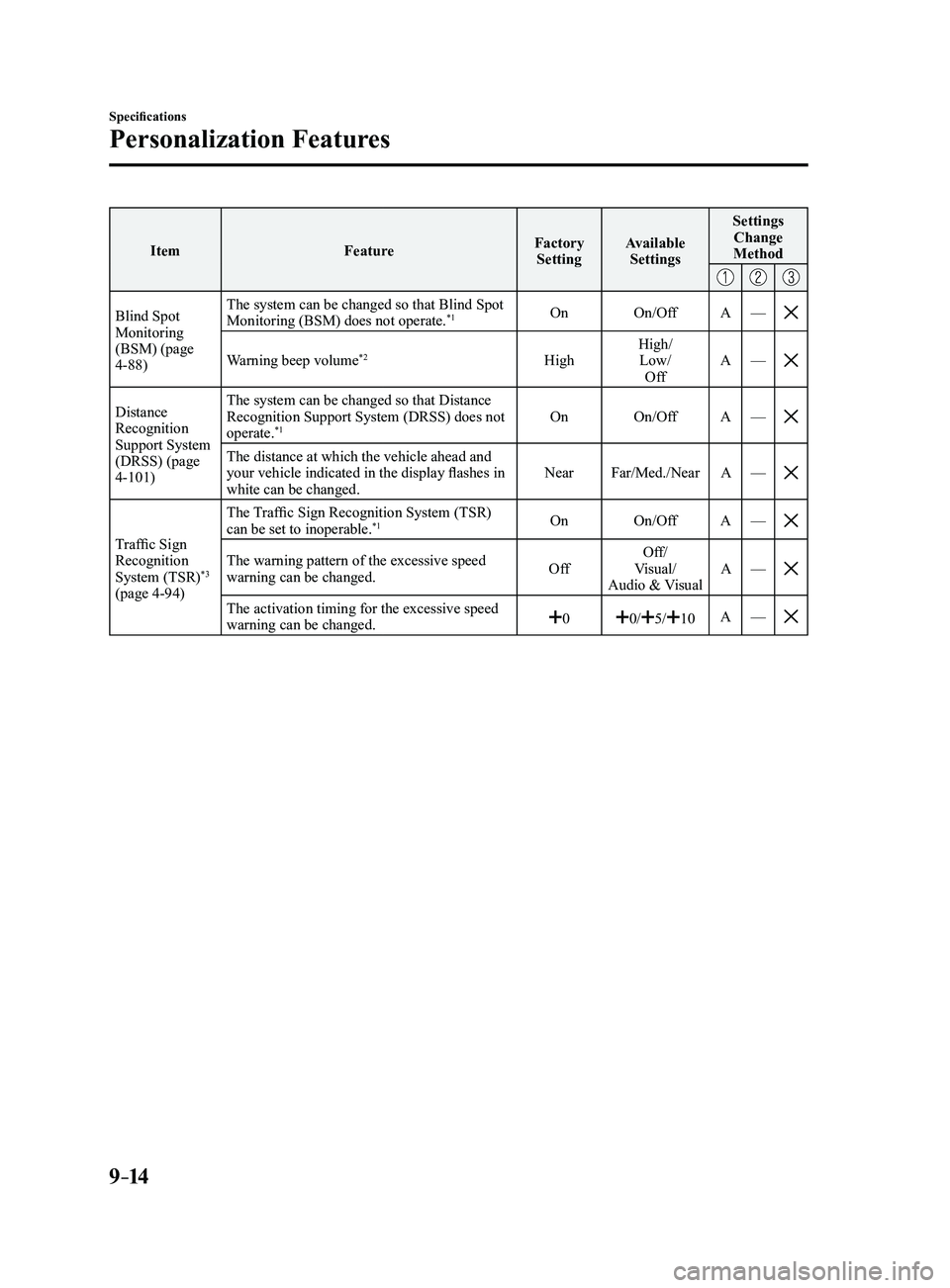
9–14
Specifications
Personalization Features
ItemFeatureFactory
Setting Available
Settings Settings
Change
Method
Blind Spot Monitoring
(BSM) (page
4-88) The system can be changed so that Blind Spot
Monitoring (BSM) does not operate.
*1On
On/Off A—
Warning beep volume*2High High/
Low/ Off A
—
Distance Recognition
Support System
(DRSS) (page
4-101) The system can be changed so that Distance
Recognition Support System (DRSS) does not
operate.
*1On
On/Off A—
The distance at which the vehicle ahead and your vehicle indicated in the display flashes in
white can be changed. Near
Far/Med./Near A—
Traffic Sign Recognition
System (TSR)*3
(page 4-94) The Traffic Sign Recognition System (TSR)
can be set to inoperable.
*1On
On/Off A—
The warning pattern of the excessive speed warning can be changed. OffOff/
Visual/
Audio & Visual A
—
The activation timing for the excessive speed warning can be changed.00/5/10A—
Mazda3_8FL6-EA-16F_Edition2.indb 142016/08/10 17:39:56